2017 MITSUBISHI LANCER fold
[x] Cancel search: foldPage 29 of 385

Seats 4-2 Seat and restraint systems
4
N00408400479
To adjust the seat forward or backward
P.4-3 To adjust the seatback
P.4-4
To adjust the seat height (Driver’s side only, if so equipped)
P.4-4
Heated seats (if so equipped)
P.4-4
Folding the seatbacks forward (if so equipped)
P.4-5
Arm rest (if so equipped)
P.4-6
N00401601248
Your vehicle has seat belts and other features that help protect you and your passengers in an accident. Seat belts are the most important safetydevice. When worn properly, seat belts can reduce the chance of serious injury or death in various types of crashes. For added protec-tion during a severe frontal collision, your vehicle has a Supplemental Restraint System (SRS) with airbags for the driver and passen-
gers. The seats, head restraints, and door locks also are safety equipment, which must be used correctly. Always check the following before you drive: That everyone in your vehicle is properly wearing their seat belt. That infants and small children are prop- erly secured in appropriate child restraintsystems in the rear seat. That all doors are full
y closed and locked.
That seatbacks are upright, with head restraints properly adjusted.
Seats 1 - Front seats 2 - Rear seats
Seats and restraint systems
BK0237700US.bo
ok 2 ページ 2016年4月15日 金曜日 午前11時28分
Page 32 of 385

Rear seats
Seat and restraint systems 4-5
4
The indicator light (A) will illuminate while the heater is on.
N00402501260 N00402900195
The rear seatbacks can be folded forward to provide additional luggage compartment space.Push the left and/or right release buttons (A), and fold the rear seatbacks forward. Confirm that the seatback locks securely when it isreturned.
3(LO)- Heater low (to keep the seat warm)
WA R N I N G Persons who are unable to feel tempera- ture change or skin pain due to age, ill- ness, injury, medication, alcohol use,fatigue or other physical conditions or who have sensitive skin may suffer burns when using the heated seat even at lowtemperatures. To reduce the risk of burns, people with such conditions must use care when using the heated seat.CAUTION Switch off the seat heaters when not in use. Operate the heaters at high for quick heating. After the seat has become warm, set theheater to low to keep it warm. Slight varia- tions in the seat temperature may be felt while using the heated seats. This is causedby the operation of the heater’s internal ther- mostat and does not indicate a malfunction. Do not place heavy objects on the seat or stick pins, needles, or other pointed objectsinto the seat. Do not place a blanket,
cushion, or other
insulating material on the seat while using the heater; doing so can cause the heater ele- ment to overheat.
When cleaning the seat, do not use benzine, kerosene, gasoline, alcohol, or other organic solvents; doing so can cause damage not only to the surface of the seat, but also to the heater. If water or any other
liquid is spilled on the
seat, allow it to dry thoroughly beforeattempting to use the heater. Turn the heater off immediately if it appears to be malfunc- tioning during use.
Rear seats Folding the seatbacks forward
(if so equipped)
CAUTION
WA R N I N G Do not allow anyone to
ride in the luggage
compartment while the vehicle is in motion. People who are not properlyseated and restrained can be seriously injured or killed in an accident. After returning the rear seatbacks to their upright positions, make sure that the seat- backs lock in place and are firmly secured.Also check to be sure that the rear seat belts are in front of the seatbacks, and not caught behind the seatbacks.CAUTION In the cargo area, do not load the luggage higher than the top of the seats and make sure that the luggage is firmly secured.Restricted rear vision or flying objects enter- ing the passenger compartment during sud- den braking can result in a serious accidentand injury.
BK0237700US.bo
ok 5 ページ 2016年4月15日 金曜日 午前11時28分
Page 117 of 385

Ignition switch 5-52 Features and controls
5
The outside rearview mirrors can be adjusted when the ignition switch is in the “ON” or “ACC” position.Move the lever (A) to the same side as the mirror you wish to adjust. Press the switch (B) to adjust the mirror posi- tion.
The outside mirror can be folded in toward the side window to prevent damage whenparking in tight locations.
N00549300175
When the rear window defogger switch ispressed with the engine running, the outside rearview mirrors are defogged or defrosted. Current will flow through the heater elementinside the mirrors, thus clearing away frost or condensation.
The indicator light (A) will illuminate while the defogger is on. The heater will be turned off automatically in about 20 minutes.
N00512401713
[For vehicles equipped with the F.A.S.T.-key] For information on operations for vehicles equipped with the F.A.S.T.-key, refer to“F.A.S.T.-key: Ignition switch” on page 5-16. [Except for vehicles equipped with the F. A . S . T. - k e y ]
To adjust the mirror position L- Left outside mirror adjustmentR- Right outside mirror adjustment 1- Up 2- Down 3- Right4- Left
NOTE
After adjusting, return the lever to the “•”(off) position (C).
To fold the mirror Heated mirror
(if so equipped)
Ignition switch
BK0237700US.bo
ok 52 ページ 2016年4月15日 金曜日 午前11時28分
Page 227 of 385

USB input terminal 5-162 Features and controls
5
N00583300029
For details about the types of connectable devices and supported file specifications, refer to the following section.
N00583400020
Devices of the following types can be con-nected. For these connectable device types, “iPod*,” “iPod classic*,” “iPod nano*,” “iPod touch*” and “iPhone*,” refer to the following web- site:[For vehicles sold in U.S.A.] You can access the Mitsubishi Motors North America website.[For vehicles sold in Canada and Mexico] You can access the Mitsubishi Motors web- site. Please read and agree to the “Warningabout Links to the Web Sites of Other Com-
panies”. The websites mentioned above may connect you to websites other than the Mitsubishi Motors website. http://www.mitsubishi-motors.com/en/prod-ucts/index.html
N00583500021
You can play music files of the following specifications that are saved in a USB mem- ory device or other device supporting massstorage class. When you connect your iPod, playable file specifications depend on the connected iPod.
For vehicles equipped with the Bluetooth
® 2.0 interface
Device types Model name
Condition
USB memory device
Storage capacity of 256 Mbytes or more
Models other than USB memory devices and iPods
Digital audio player supporting mass storage class
* : “iPod,” “iPod classic,” “iPod nano,” “iPod touch,” and “iPhone” are regis- tered trademarks of Apple Inc. in the United States and other countries.NOTE
Depending on the type of the USB memory device or other device connected, the con- nected device may not function properly or the available functions may be limited. It is recommended to use an iPod with firm- ware updated to the latest version. You can charge your iPod by connecting it to the USB input terminal when the ignitionswitch is in the “ACC” or “ON” position. Do not keep your USB memory device or iPod in your vehicle. It is recommended that you back up the files in case of data damage. Do not connect to the USB input terminal any device (hard disk, card reader, memory reader, etc.) other than the connectabledevices specified in the previous section. The device and/or data may be damaged. If any of these devices
was connected by mis-
take, remove it after turning the ignition switch to the “LOCK” position.
File specifications Item
Condition
File format
MP3, WMA, AAC, WAV
Maximum number of levels(including the root)
Level 8
Number of folders 700 Number of files 65,535
BK0237700US.book
162 ページ 2016年4月15日 金曜日 午前11時28分
Page 228 of 385
Sun visors
Features and controls 5-163
5
N00524600308
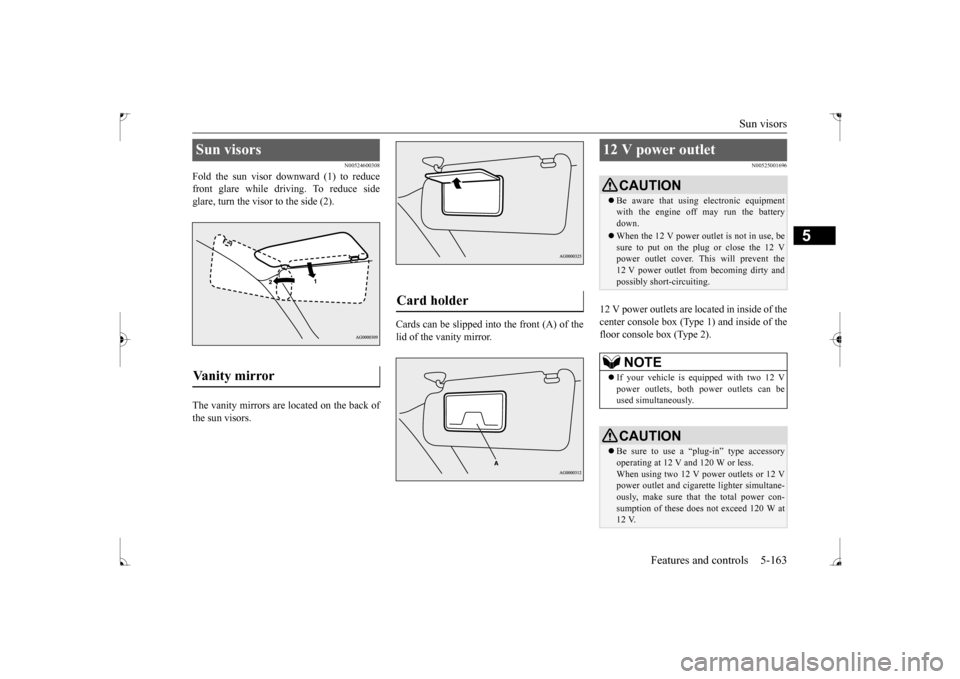
Fold the sun visor downward (1) to reduce front glare while driving. To reduce sideglare, turn the visor to the side (2). The vanity mirrors are located on the back of the sun visors.
Cards can be slipped into the front (A) of the lid of the vanity mirror.
N00525001696
12 V power outlets are lo
cated in inside of the
center console box (Type 1) and inside of the floor console box (Type 2).
Sun visors Vanity mirror
Card holder
12 V power outlet
CAUTION Be aware that using electronic equipment with the engine off may run the battery down. When the 12 V power outlet is not in use, be sure to put on the plug or close the 12 V power outlet cover. This will prevent the12 V power outlet from becoming dirty and possibly short-circuiting.NOTE
If your vehicle is equipped with two 12 V power outlets, both power outlets can beused simultaneously.CAUTION Be sure to use a “plug-in” type accessory operating at 12 V and 120 W or less. When using two 12 V power outlets or 12 V power outlet and cigarette lighter simultane-ously, make sure that the total power con- sumption of these does not exceed 120 W at 12 V.
BK0237700US.book
163 ページ 2016年4月15日 金曜日 午前11時28分
Page 268 of 385
Audio Files (MP3/WMA/AAC)
Comfort controls 7-21
7
N00715700028
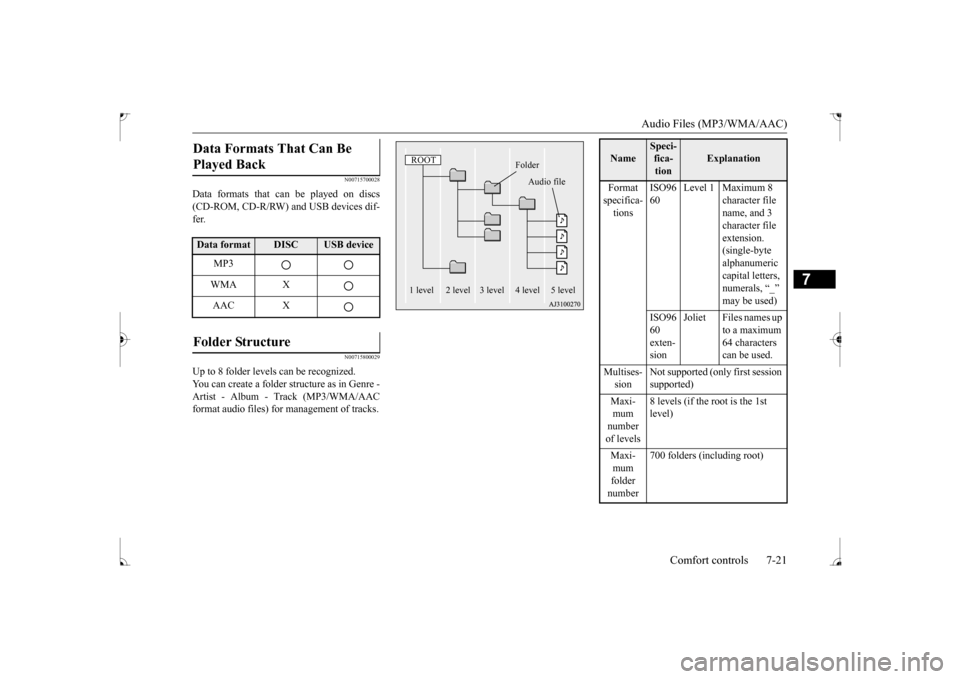
Data formats that can be played on discs (CD-ROM, CD-R/RW) and USB devices dif- fer.
N00715800029
Up to 8 folder levels can be recognized.You can create a folder structure as in Genre - Artist - Album - Track (MP3/WMA/AACformat audio files) for management of tracks.Data Formats That Can Be Played Back Data format
DISC
USB device
MP3 WMA XAAC X
Folder Structure
ROOT
Folder
Audio file
1 level 2 level 3 level 4 level 5 level
Name
Speci- fica- tion
Explanation
Format specifica- tions
ISO96 60
Level 1 Maximum 8
character file name, and 3 character file extension. (single-byte alphanumeric capital letters, numerals, “_” may be used)
ISO96 60 exten- sion
Joliet Files names up
to a maximum 64 characters can be used.
Multises- sion
Not supported (only first session supported)
Maxi- mum number of levels
8 levels (if the root is the 1st level)
Maxi- mum folder number
700 folders (including root)
BK0237700US.bo
ok 21 ページ 2016年4月15日 金曜日 午前11時28分
Page 269 of 385
Audio Files (MP3/WMA/AAC) 7-22 Comfort controls
7
N00715900020
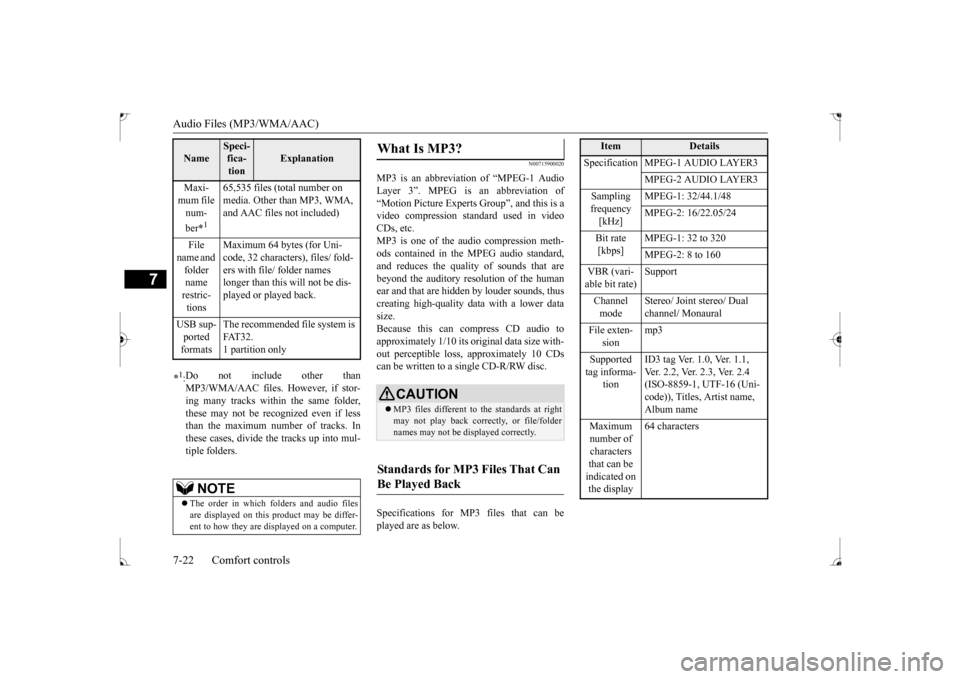
MP3 is an abbreviation of “MPEG-1 Audio Layer 3”. MPEG is an abbreviation of“Motion Picture Experts Group”, and this is a video compression standard used in video CDs, etc.MP3 is one of the audio compression meth- ods contained in the MPEG audio standard, and reduces the quality of sounds that arebeyond the auditory resolution of the humanear and that are hidden by louder sounds, thus creating high-quality data with a lower data size.Because this can compress CD audio to approximately 1/10 its original data size with- out perceptible loss, approximately 10 CDscan be written to a single CD-R/RW disc. Specifications for MP3 files that can be played are as below.
Maxi- mum file num- ber
*1
65,535 files (total number on media. Other than MP3, WMA, and AAC files not included)
File
name and folder name restric- tions
Maximum 64 bytes (for Uni- code, 32 characters), files/ fold- ers with file/ folder names longer than this will not be dis-played or played back.
USB sup- ported formats
The recommended file system is FAT32.1 partition only
*1: Do not include other than MP3/WMA/AAC files. However, if stor- ing many tracks within the same folder, these may not be recognized even if lessthan the maximum number of tracks. In these cases, divide the tracks up into mul- tiple folders.
NOTE
The order in which folders and audio files are displayed on this product may be differ-ent to how they are displayed on a computer.Name
Speci- fica- tion
Explanation
What Is MP3?
CAUTION MP3 files different to the standards at right may not play back correctly, or file/folder names may not be displayed correctly.
Standards for MP3 Files That Can Be Played Back
Item
Details
Specification MPEG-1 AUDIO LAYER3
MPEG-2 AUDIO LAYER3
Sampling frequency [kHz]
MPEG-1: 32/44.1/48 MPEG-2: 16/22.05/24
Bit rate [kbps]
MPEG-1: 32 to 320 MPEG-2: 8 to 160
VBR (vari- able bit rate)
Support
Channel mode
Stereo/ Joint stereo/ Dual channel/ Monaural
File exten-
sion
mp3
Supported tag informa-
tion
ID3 tag Ver. 1.0, Ver. 1.1, Ver. 2.2, Ver. 2.3, Ver. 2.4 (ISO-8859-1, UTF-16 (Uni- code)), Titles, Artist name, Album name
Maximum number of characters that can be indicated on the display
64 characters
BK0237700US.bo
ok 22 ページ 2016年4月15日 金曜日 午前11時28分
Page 270 of 385
Audio Files (MP3/WMA/AAC)
Comfort controls 7-23
7
N00716000028
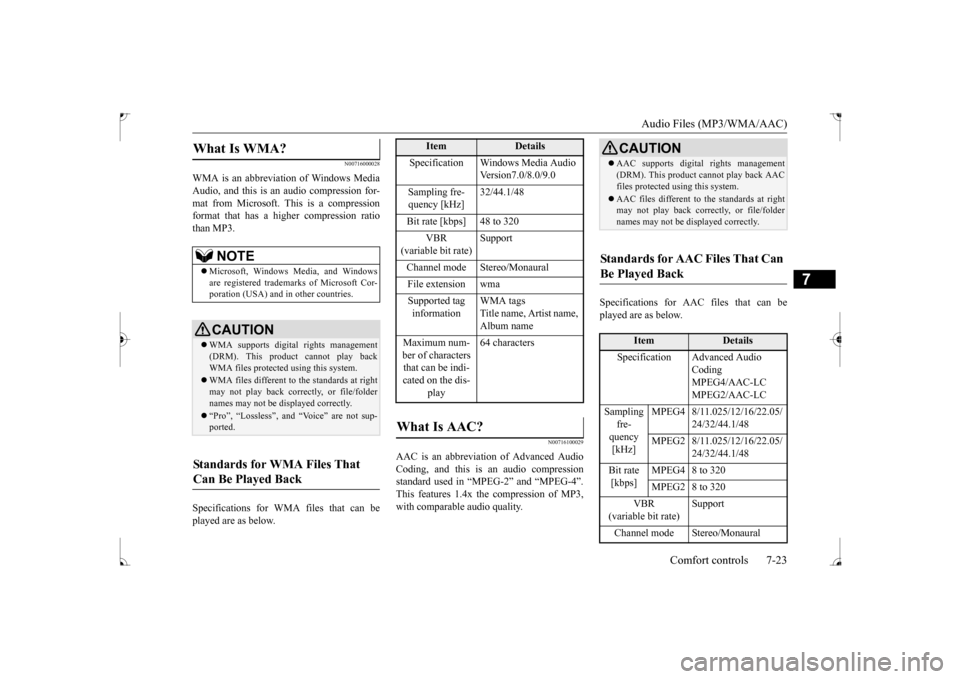
WMA is an abbreviation of Windows Media Audio, and this is an audio compression for-mat from Microsoft. This is a compression format that has a higher compression ratio than MP3. Specifications for WMA files that can be played are as below.
N00716100029
AAC is an abbreviation of Advanced AudioCoding, and this is an audio compression standard used in “MPEG-2” and “MPEG-4”. This features 1.4x the compression of MP3,with comparable audio quality.
Specifications for AAC files that can be played are as below.
What Is WMA?
NOTE
Microsoft, Windows Media, and Windows are registered trademarks of Microsoft Cor-poration (USA) and in other countries.CAUTION WMA supports digital rights management (DRM). This product cannot play backWMA files protected using this system. WMA files different to the standards at right may not play back correctly, or file/folder names may not be displayed correctly. “Pro”, “Lossless”, and “Voice” are not sup- ported.
Standards for WMA Files That Can Be Played Back
Item
Details
Specification Windows Media Audio
Version7.0/8.0/9.0
Sampling fre- quency [kHz]
32/44.1/48
Bit rate [kbps] 48 to 320
VBR
(variable bit rate)
Support
Channel mode Stereo/Monaural File extension wmaSupported tag information
WMA tags Title name, Artist name, Album name
Maximum num- ber of characters that can be indi- cated on the dis-
play
64 characters
What Is AAC?
CAUTION AAC supports digital rights management (DRM). This product cannot play back AAC files protected using this system. AAC files different to the standards at right may not play back correctly, or file/folder names may not be displayed correctly.
Standards for AAC Files That Can Be Played Back
Item
Details
Specification Advanced Audio
Coding MPEG4/AAC-LC MPEG2/AAC-LC
Sampling
fre- quency [kHz]
MPEG4 8/11.025/12/16/22.05/
24/32/44.1/48
MPEG2 8/11.025/12/16/22.05/
24/32/44.1/48
Bit rate [kbps]
MPEG4 8 to 320 MPEG2 8 to 320
VBR
(variable bit rate)
Support
Channel mode Stereo/Monaural
BK0237700US.bo
ok 23 ページ 2016年4月15日 金曜日 午前11時28分