2017 MITSUBISHI LANCER ECU
[x] Cancel search: ECUPage 233 of 385
Cup holder 5-168 Features and controls
5
N00527301475
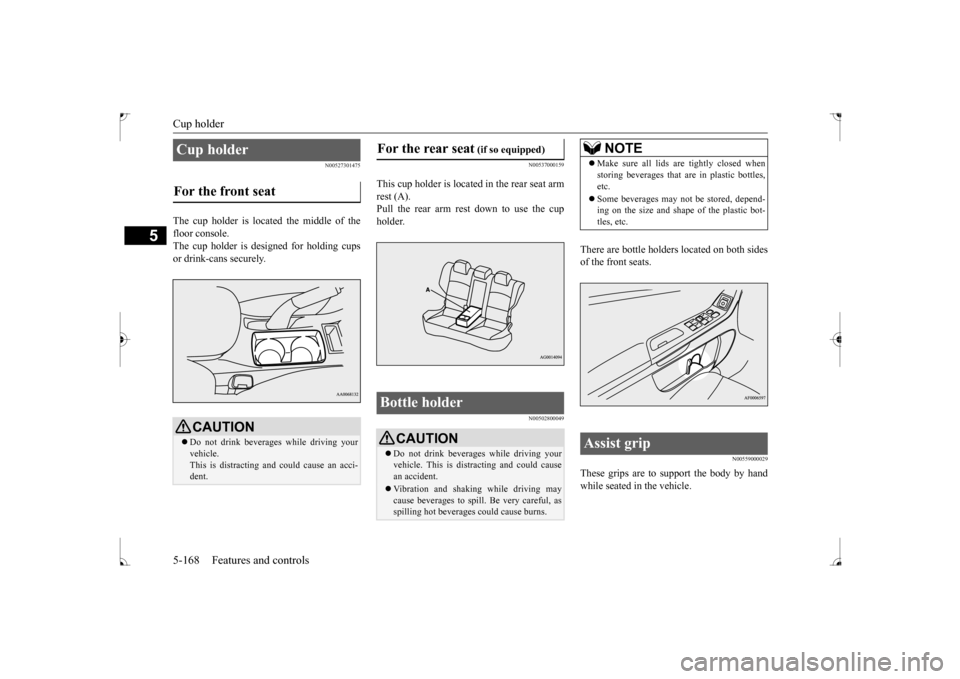
The cup holder is located the middle of the floor console.The cup holder is designed for holding cups or drink-cans securely.
N00537000159
This cup holder is located
in the rear seat arm
rest (A). Pull the rear arm rest down to use the cup holder.
N00502800049
There are bottle holders located on both sides of the front seats.
N00559000029
These grips are to support the body by handwhile seated in the vehicle.
Cup holder For the front seat
CAUTION Do not drink beverages while driving your vehicle.This is distracting and could cause an acci- dent.
For the rear seat
(if so equipped)
Bottle holder
CAUTION Do not drink beverages while driving your vehicle. This is distracting and could cause an accident. Vibration and shaking while driving may cause beverages to spill. Be very careful, as spilling hot beverages could cause burns.
NOTE
Make sure all lids are tightly closed when storing beverages that are in plastic bottles, etc. Some beverages may not be stored, depend- ing on the size and shape of the plastic bot- tles, etc.
Assist grip
BK0237700US.book
168 ページ 2016年4月15日 金曜日 午前11時28分
Page 237 of 385

Fuel economy 6-2 Driving safety
6
N00628800165
Fuel economy is dependent on many factors. Your personal driving habits can have a sig-nificant effect on your fuel use. Several rec- ommendations for achieving the greatest fuel economy are listed below. Whenever accelerating from a stop, always accelerate slowly and smoothly. When parked for even a short period, do not idle the engine. Shut it off. Plan your trips to avoid unnecessary stops. Keep your tires inflated to the recom- mended pressures. When you drive on highways or dry improved roads, set the drive mode-selec- tor “2WD” or “4WD AUTO” position (ifso equipped). For freeway driving, maintain a speed of approximately 50 mph (80 km/h) whentraffic, roadway and weather conditions safely permit. Keep your air filter clean and your vehicle lubricated according to the recommenda- tions in this manual. Always keep your vehicle well main- tained. A poorly maintained engine wastes fuel and costs money. Do not overload your vehicle.
N00628900052
Drunk driving is one of the most frequent causes of accidents.Your driving ability can be seriously impaired even with blood alcohol levels far below the legal minimum. If you have been drinking,don’t drive. Ride with a designated non- drinking driver, call a cab or a friend, or use public transportation. Drinking coffee or tak-ing a cold shower will not make you sober.Similarly, prescription and nonprescription drugs affect your alertness, perception and reaction time. Consult with your doctor orpharmacist before driving while under the influence of any of these medications.
N00628600017
The original equipment floor mat providedwith your vehicle was specifically designed for your vehicle. Always properly positionthe floor mat and assure it does not interfere with operation of the pedals. Always use the
retaining clip on the driver’s floorboard to secure the floor mat. When used, this clip will help prevent the floor mat from moving for- ward and possibly interfering with the opera-tion of the pedals. To prevent the floor mat from moving forward and possibly interfering with the operation of the pedals, Mitsubishigenuine floor mats are recommended.
N00628700050
1. Place the floor mat to fit the shape of thefloorboard.2. Align the floor mat with the installation holes over the retaining clips. 3. Secure the floor mat with retaining clips.
Fuel economy
Driving, alcohol and drugs
WA R N I N G NEVER DRINK AND DRIVE. Your perceptions are less accurate, yourreflexes are slower and your judgment is impaired.
Floor mat
To install the floor mat
NOTE
The shape of the mat and the number of retaining clips may vary depending on the vehicle model.
BK0237700US.bo
ok 2 ページ 2016年4月15日 金曜日 午前11時28分
Page 238 of 385

Vehicle preparation before driving
Driving safety 6-3
6
N00629001796
For a safer and more enjoyable trip, always observe the following: Before starting the vehicle, make certain that you and all passengers are seated and wearing their seat belts properly (with children in the rear seat, in appropriaterestraints), and that all the doors are locked.
Move the driver’s seat as far backward as possible, while still keeping good visibil- ity, and good control of the steering wheel, brakes, accelerator, and controls.Check the instrument panel indicators and multi-information display for any possible problem. Move the front passenger seat as far back as possible. Make sure that infants and small children are properly restrained in accordance withall laws and regulations.
Check these by selecting the defroster mode, and set the blower switch on high. You should be able to feel the air blowing against the windshield. (Refer to “Defrosting or defogging the wind- shield and door windows” on page 7-8, 7-13.) Check all the tires for heavy tread wear or uneven wear patterns. Look for stones, nails, glass, or other objects stuck in the tread. Lookfor any tread cuts or sidewall cracks. Check the wheel nuts for tightness, and the tires (including spare tire) for proper pressures.
WA R N I N G If a floor mat is the wrong size or is not properly installed, it can interfere with the operation of the pedals. Interference with the pedals can cause unintended accelera- tion and/or increased stopping distancesresulting in a crash and injury. Always make sure the floor mat does not interfere with the accelerator or brake pedal. Always use the retaining clip on the driver’s floorboard to secure the floormat. Always install the mat with the correct side facing down. Never install a second mat over or under an existing floor mat. Do not use a floor mat designed for another model vehicle ev
en if it is a Mit-
subishi genuine floor mat. Before driving, be sure to check the fol- lowing:• Periodically check that the floor mat isproperly secured with the retaining clips. If you remove the floor mat while clean-ing the inside of your vehicle or for any other reason, always check the condition of the floor mat after it has been rein-stalled.• While the vehicle is stopped with the engine off, check that the floor mat is not interfering with the pedals by depressingthe pedals fully.
Vehicle preparation before driving Seat belts and seats
Defrosters Tires
BK0237700US.bo
ok 3 ページ 2016年4月15日 金曜日 午前11時28分
Page 246 of 385

Trailer towing
Driving safety 6-11
6
N00630600102
When installing the roof carrier, use the brackets (A). The brackets (A) are located under each cover (B).
Slide each cover (B) toward the front of the vehicle to remove it.
1. With each cover, put the tabs (C) on the cover in the holes (D) in the roof. 2. Slide the cover (B) toward the rear of thevehicle to install it.
N00629801332
Before driving and after traveling a short dis- tance, always check the load to make sure it is securely fastened to the roof carrier. Stop the vehicle periodically and check that the load remains secure. If the load is notsecure, it could fall from the vehicle and damage your vehicle, another vehicle or cre- ate a road hazard.NOTE
To prevent wind noise or reduction in gas mileage, remove the roof carrier when not in use. Before using an automatic car wash, check with the attendant to determine if the roof carrier should be removed. Be sure that adequate clearance is main- tained for raising the sunroof when installinga roof carrier. (For vehicle with sunroof only)
Roof carrier mounting brackets
(if so equipped)
CAUTION
Attaching the roof carrier
Refitting the covers
Trailer towing
BK0237700US.bo
ok 11 ページ 2016年4月15日 金曜日 午前11時28分
Page 267 of 385
Audio Files (MP3/WMA/AAC) 7-20 Comfort controls
7
Discs that have not been finalized cannot be played back. Even if recorded using the correct format on a recorder or computer, applicationsoftware settings and environments; disc peculiarities, damage, or marking; or dirt or condensation on the lens inside theproduct may render the disc unplayable. Depending on the disc, some functions may not be used, or the disc may not playback. Do not use discs with cracks or warps. If the disc has stickers affixed, remains from removed stickers, or affixed adhe-sive, then do not use the disc. Discs that have decorative labels or stick- ers may not be used.
This product will play back audio CDs, how- ever please be aware of
the following points
regarding CD standards. Ensure that you use discs with on the label surface. Playback of other than standard CDs is not guaranteed. Even if the audio can be played back, the audio quality cannot be guaranteed. When playing back other than standard CDs, the following may occur.
• There may be noise during playback. • There may be jumping in the audio. • The disc may not be recognized. • The first track may not be played back.• It may take longer than usual until start of playback of tracks. • Playback may start from within thetrack. • Some parts may not be played back. • Tracks may freeze during playback.• Tracks may be displayed erroneously.
N00715600027
This product can play back MP3/WMA/AACformat audio files recorded on CD-ROM,CD-R/RW, and USB devices. There are limitations on the files and media that can be used, therefore read the following prior to recording MP3/WMA/AAC formataudio files on discs or USB devices. Additionally, ensure you read the user manu- als for your CD-R/RW drive and the writingsoftware, and ensure these are used correctly. If the MP3/WMA/AAC format audio files includes title information or other data, thenthis can be displayed.
Nonstandard CDs
Audio Files (MP3/WMA/AAC)
CAUTION CD-ROM and CD-R/RW media can only play back MP3 format audio files. Actions such as copying audio CDs or files and either distributing these to others for freeor for charge, or uploading files via the Inter- net or other means to servers is an infringe- ment of the law. Do not append the file extensions “.mp3”, “.wma”, or “.m4a”, to other thanMP3/WMA/AAC format files. Playing back discs with these types of files recorded upon them may cause the files to be incorrectlyidentified for playback, which may lead to loud noise, resulting in speaker damage or accident.NOTE
Depending on the condition of the disc recorder or recording software used, correct playback may not be possible. In these cases,refer to the user manual for your product or software. Depending on your computer’s operating system, version, software, or settings, files may not have a file extension appended. In these cases, append the file extensions “.mp3”, “.wma”, or “.m4a” when copyingthe files. Files larger than 2GB in size cannot be played back.
BK0237700US.bo
ok 20 ページ 2016年4月15日 金曜日 午前11時28分
Page 298 of 385

Antenna
Comfort controls 7-51
7
N00734200426
Turn the pole (A) counterclockwise. Screw the pole (A) clockwise into the base (B) until it is securely retained.
For securing the best satellite reception, the angle of the antenna is fixed.
The disc cannot be inserted.
A disc is already in the product. Eject the disc.
“Insert/Eject Discs” (P.7-25)
There is no disc in the product, but the prod- uct says it is loading.
Press the eject button once. “Insert/Eject Discs” (P.7-25)
The disc cannot be played. The disc is inserted upside down. Insert with the label side up.
The disc has condensation on it. Wait a while before inserting.The disc is dirty. Clean the read surface of the disc.
The sound skips in the same place.
The disc is damaged or dirty. Check the disc.
There is no sound, even if the disc is inserted.
Damage to or dirt on the disc means that its data cannot be read.
Check the disc. Additionally, if using CD-R/RW discs, their charac- teristics may render them unable to be played.
Symptoms
Cause
Response
Antenna Roof antenna (except for vehi- cles with SIRIUS satellite radio) To remove To install
NOTE
Be sure to remove the roof antenna in the following cases: • When using an automatic car wash
• When covering your vehicle with a car cover • When driving into a structure that has a low ceiling
Roof antenna (for vehicles with SIRIUS satellite radio)
NOTE
BK0237700US.bo
ok 51 ページ 2016年4月15日 金曜日 午前11時28分
Page 299 of 385

Clock (if so equipped) 7-52 Comfort controls
7
Turn the pole (A) counterclockwise. Screw the pole (A) clockwise into the base (B) until it is securely retained.
N00755001219
The time is displayed when the ignitionswitch is in ON or ACC.
1. Press and hold the PAGE key until the clock display flashes.2. Press the various keys to adjust. 3. Press the PAGE key to finish adjusting the time. When the adjustment is complete, the clock display stops flashing.
To remove To i n s t a l l
NOTE
Be sure to remove the roof antenna in the following cases: • When entering a place with low clearance • When using an automatic car wash • When covering your vehicle with a car cover
Clock
(if so equipped)
NOTE
Reset the time after the battery terminals are disconnected and reconnected.
Time Setting
H - “Hour” setting
Press this key to fast-forward the“hours”.
M - “Minutes” setting
Press this key to fast-forward the “minutes”.
NOTE
If the PAGE key is pressed and held when the time adjustment is finished, the seconds will be reset to “00”.
PA G E /SEL
M
H
BK0237700US.bo
ok 52 ページ 2016年4月15日 金曜日 午前11時28分
Page 315 of 385

Towing 8-12 For emergencies
8
1. Align the tire air valve (C) and the wheel cover notch (D).
2. Push the bottom (F) of the wheel cover into the wheel. 3. Gently push in both sides (G) of the wheel cover and hold them in place with bothknees. 4. Gently tap the top (H) of the wheel cover. Ensure the wheel cover is securelyinstalled around its entire outer circumfer- ence.
N00837001915
If towing is necessary, we recommend you to have it done by a commercial tow truck ser-vice.
NOTE
The wheel cover is made of plastic. Be care- ful when prying it off. CAUTION Trying to remove the wheel cover with only your bare hands can seriously injure your fingers.
To i n s t a l l
CAUTION Before installing the wheel cover to the wheel, make sure that the tabs (A) on the back of the wheel cover correctly engage the ring (B) to prevent the wheel cover fromcoming off. Do not install a wheel cover that has broken tabs.
NOTE
Full wheel covers have a symbol mark (E) provided on the reverse side to show the air valve location.Before installing the wheel cover to the wheel, make sure that the opening with the symbol mark is correctly aligned with the airvalve.
To w i n g If your vehicle needs to be towed
BK0237700US.bo
ok 12 ページ 2016年4月15日 金曜日 午前11時28分