2017 MITSUBISHI LANCER manual transmission
[x] Cancel search: manual transmissionPage 130 of 385

Continuously variable transmission (CVT) (if so equipped)
Features and controls 5-65
5
While driving with the selector lever in the “D” (DRIVE), sports mode can be selected by pulling one of the sportronic steeringwheel shifters toward you. In sports mode, rapid
shifting is possible sim-
ply by operating the sportronic steering wheelpaddle shifter.Unlike the manual transaxle, sports mode allows shifting with the accelerator pedal depressed.
NOTE
The upward shift may be made automatically in sports mode when the engine revolutions rises and approaches the tachometer’s red zone (the red-colored part of the tachometer dial). Shift ranges can only be selected in a for- ward direction from 1st to 6th. To reverse orpark the vehicle, move the selector lever to the “R” or “P” position. To maintain good running performance, the transmission may refuse to perform an upshift when the selector lever or sportronicsteering wheel paddle shifter is moved to the “+(SHIFT UP)” positi
on at certain vehicle
speeds. Also, to prevent over-revving of theengine, the transmission may refuse to per- form a downshift when the shift lever or sportronic steering wheel paddle shifter ismoved to the “- (SHIFT DOWN)” position at certain vehicle speeds. When this happens, a buzzer sounds to indicate that a downshift isnot going to take place. Move the selector lever gently between the manual and main gates and between posi- tions in the manual gate. And do not operate sportronic steering wheel paddle shifter vio-lently. Excessive force could damage the selector lever or sportronic steering wheel paddle shifter.
Except for vehicles with manual gate
NOTE
To return to “D” (DRIVE) operation, pull the sportronic steering wheel paddle shifter on the +(UP) side for longer than 2 seconds, orpark the vehicle to change the selector lever position indicator to “D” (DRIVE) and return to “D” (DRIVE) operation. When the sportronic steering wheel paddle shifter is operated with the selector lever inthe “L” (LOW) position, gear is not shifted because the selectable shift range is limited.
+ (SHIFT UP) Transmission shifts up once by each opera- tion. - (SHIFT DOWN) Transmission shifts down once by each operation.
CAUTION In sports mode, the driver must execute upward shifts in accordance with prevailing road conditions, taking care to keep theengine speed below the red zone. Repeated continuous operation of the spor- tronic steering wheel paddle shifter will con- tinuously switch shift position. Shift ranges may not change when the lateral paddle shifters are operated at the same time.
SHIFT DOWN
SHIFT UP
BK0237700US.bo
ok 65 ページ 2016年4月15日 金曜日 午前11時28分
Page 148 of 385
Cruise control (if so equipped) Features and controls 5-83
5
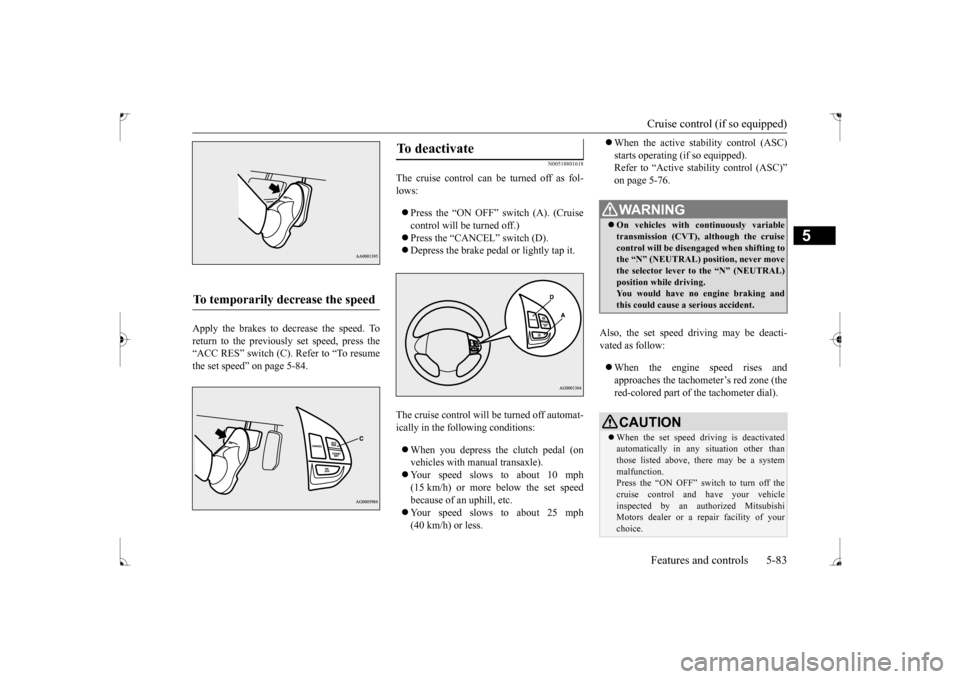
Apply the brakes to decrease the speed. To return to the previously set speed, press the“ACC RES” switch (C). Refer to “To resume the set speed” on page 5-84.
N00518801618
The cruise control can be turned off as fol- lows: Press the “ON OFF” switch (A). (Cruise control will be turned off.) Press the “CANCEL” switch (D). Depress the brake pedal or lightly tap it.
The cruise control will be turned off automat- ically in the following conditions: When you depress the clutch pedal (on vehicles with manual transaxle). Your speed slows to about 10 mph (15 km/h) or more below the set speed because of an uphill, etc. Your speed slows to about 25 mph (40 km/h) or less.
When the active stability control (ASC) starts operating (if so equipped). Refer to “Active stability control (ASC)” on page 5-76.
Also, the set speed driving may be deacti- vated as follow: When the engine speed rises and approaches the tachometer’s red zone (the red-colored part of the tachometer dial).
To temporarily decrease the speed
To deactivate
WA R N I N G On vehicles with continuously variable transmission (CVT), although the cruisecontrol will be disengaged when shifting to the “N” (NEUTRAL) position, never move the selector lever to the “N” (NEUTRAL)position while driving. You would have no engine braking and this could cause a serious accident.CAUTION When the set speed driving is deactivated automatically in any situation other than those listed above, there may be a system malfunction.Press the “ON OFF” switch to turn off the cruise control and have your vehicle inspected by an authorized MitsubishiMotors dealer or a repair facility of your choice.
BK0237700US.bo
ok 83 ページ 2016年4月15日 金曜日 午前11時28分
Page 155 of 385

Instrument cluster 5-90 Features and controls
5
N00519001431
N00519100190
The speedometer shows the vehicle speed in miles per hour (mph) or kilometers per hour(km/h).
N00519201329
The tachometer shows engine revolutions perminute. This allows the driver to determinethe most efficient shift position (manual transaxle), selector position {continuously variable transmission (CVT)} and enginespeed combinations. This gauge also assists in evaluating engine performance.
• When water drops or condensation are on the lens. • When sun light or headlights shine directly into the lens.
Instrument cluster 1- Tachometer
P.5-90
2- Multi-information display
P.5-91
Information screen display list P.5-113
3- Speedometer
P.5-90
4- Rheostat meter illumination button
P.5-91NOTE
Speedometer Type 1Type 2
Tachometer
CAUTIONThe red zone indicates an engine speed beyond the range of safe operation. Select the correct shift position (manual transaxle) or selector position (CVT) to con- trol the engine speed so that the tachometerindicator does not enter the red zone.
BK0237700US.bo
ok 90 ページ 2016年4月15日 金曜日 午前11時28分
Page 210 of 385

Bluetooth® 2.0 interface (if so equipped)
Features and controls 5-145
5
1. Stop your vehicle in a safe area, put the shift lever (manual transaxle) in the “N” (Neutral) position, or the selector lever {continuously variable transmission(CVT)} in the “P”(PARK) position, and then pull the parking brake lever. 2. Press the SPEECH button. 3. Say “Voice training.” 4. The voice guide will say “This operation must be performed in a quiet environmentwhile the vehicle is stopped. See the owner’s manual for the list of required training phrases. Press and release theSPEECH button when you are ready to begin. Press the HANG-UP button to can- cel at any time.”Press the SPEECH button to start the speaker enrollment process.
5. The voice guide will prompt for phrase 1. Repeat the corresponding phrase listed in table “Enrollment commands” on page5-160. The system will register your voice and then move on to the registration of thenext command. Continue the process until all phrases have been registered. 6. When all enrollment commands have been read out, the voice guide will say “Speaker enrollment is complete.” The system will then end the speaker enroll-ment process and return to the main menu.
N0056490
1111
You can turn a voice model registered with the speaker enrollment function on and offwhenever you want. You can also retrain the system. Use the following procedure to perform theseactions. 1. Press the SPEECH button. 2. Say “Voice training.” 3. If you have completed a speaker enroll-ment process once already, the voice guide will say either “Enrollment is enabled. Would you like to disable orretrain?” or “Enrollment is disabled. Would you like to enable or retrain?” 4. When enrollment is “enabled,” the voicemodel is on; when enrollment is “dis- abled,” the voice model is off. Say the command that fits your needs.
NOTE
Speaker enrollment is not possible unless the vehicle is parked. Make sure you park the vehicle in a safe area before attemptingspeaker enrollment.
NOTE
If you do not start the speaker enrollment process within 3 minutes after pressing the SPEECH button, the speaker enrollment function will time out. The voice guide will say “Speaker enroll-ment has timed out.” The system will then beep and the voice recognition mode will be deactivated. NOTE
To repeat the most recent voice training com- mand, press and release the SPEECH button. If you press the HANG-UP button anytime during the process, the system will beep and stop the speaker enrollment process.
NOTE
Completing the speaker enrollment process will turn on the voice model automatically. The commands “Help” and “Cancel” will not work in this mode.
Enabling and disabling the voice model and retraining
BK0237700US.book
145 ページ 2016年4月15日 金曜日 午前11時28分
Page 211 of 385

Bluetooth® 2.0 interface (if so equipped) 5-146 Features and controls
5
Say “Retrain” to start the speaker enroll- ment process and recreate a new voice model. (Refer to “Speaker enrollment” on page 5-144.)
N00565001379
Before you can make or receive hands-free calls or play music using the Bluetooth
® 2.0
interface function, you must pair the Blue- tooth
® device and Bluetooth
® 2.0 interface.
Up to 7 Bluetooth
® devices can be paired
with the Bluetooth
® 2.0 interface.
If multiple paired Bluetooth
® devices are
available in the vehicle, the cellular phone or music player most recently connected is auto- matically connected to the Bluetooth
® 2.0
interface.
You can also change a Bluetooth
® device to
be connected. To pair a Bluetooth
® device with the Blue-
tooth
® 2.0 interface, follow the steps below.
1. Stop your vehicle in a safe area, put the shift lever (manual transaxle) in the “N” (Neutral) position, or the selector lever{continuously variable transmission(CVT)} in the “P” (PARK) position and pull the parking brake lever. 2. Press the SPEECH button. 3. Say “Pair Device.”
4. The voice guide will say “Start pairing procedure on the device. See the device manual for instructions.” and then willsay “The pairing code is
Connecting the Bluetooth
® 2.0
interface and Bluetooth
® device
NOTE
Pairing is required only when the device is used for the first time. Once the device has been paired with the Bluetooth
® 2.0 inter-
face, all you need is
to bring the device into
the vehicle next time and the device will connect to the Bluetooth
® 2.0 interface auto-
matically (if supported by the device).
To p a i r
NOTE
You cannot pair any Bluetooth
® device with
the Bluetooth
® 2.0 interface unless the vehi-
cle is parked. Before pairing a Bluetooth
®
device with the Bluetooth
® 2.0 interface,
confirm that the vehicle is parked in a safelocation.
NOTE
The following procedure ( to ) can also be used instead of saying “Pair Device.” Replace this step 3 with the following proce- dure if you prefer. Say “Setup.” Say “Pairing Options.” The voice guide will say “Select one of the following: pair, edit, delete, list or set code.”Say “Pair.” voice guide will say “Maximum devices paired” and then the system will end the pairing process. To register a new device, delete one device and then repeat the pairing process.(Refer to “Selecting a device: Deleting a device” on page 5-148.)NOTE
Some Bluetooth
® devices require a specific
pairing code. Please refer to the device man- ual for pairing code requirements and read the next section “If your device requires aspecific pairing code” on page 5-147 to set the pairing code.
BK0237700US.book
146 ページ 2016年4月15日 金曜日 午前11時28分
Page 240 of 385

Braking
Driving safety 6-5
6
Please read this section in conjunction with the “Engine coolant” on page 9-7.
N00629500446
All the parts of the brake system are criticalto safety. Have the vehicle serviced by anauthorized Mitsubishi Motors dealer or a repair facility of your choice at regular inter- vals according to the “WARRANTY ANDMAINTENANCE MANUAL”. Check the brake system while driving at a low speed immediately after starting, espe- cially when the brakes are wet, to confirm they work normally.A film of water can be formed on the brake discs or brake drums and prevent normal braking after driving in heavy rain or throughlarge puddles, or after the vehicle is washed. If this occurs, dry the brakes out by driving slowly while lightly depressing the brakepedal.
On snowy roads, ice can form on the braking system, making the brakes less effective.While driving in such conditions, pay close attention to preceding and following vehicles and to the condition of
the road surface. From
time to time, lightly depress the brake pedal and check how effective the brakes are. It is important to take advantage of the engine braking by shifting to a lower gear while driving on steep downhill roads in order to prevent the brakes from overheating.
N00629601356
When parking on a hill, set the parking brake,and turn the front wheels toward the curb on adownhill, or away from the curb on an uphill. If necessary, apply chocks to wheels.
Place the gearshift lever into the “R” (Reverse) position when parking on a down- hill slope, into the 1s
t position when parking
on an uphill slope. Be sure that the parking brake is firmly set when parked and that the selector lever is in the “P” (PARK) position.When parking on a hill, it is important to set the parking brake before moving the selector lever to the “P” (PARK) position. This pre-vents loading the parking brake against the transaxle gear. When this happens, it is diffi- cult to move the selector lever out of the “P”(PARK) position. Never leave the engine running while you take a short sleep/rest. Also, never leave the engine running in a closed or poorly venti-lated place.
WA R N I N G Never open the radiator cap when the radiator is hot. You could be seriouslyburned.
Braking When brakes are wet
When driving in cold weather When driving downhill Parking Parking on a hill
For vehicles with manual trans- axle For vehicles with continuously variable transmission (CVT) Parking with the engine run- ning
BK0237700US.bo
ok 5 ページ 2016年4月15日 金曜日 午前11時28分
Page 305 of 385

If the vehicle breaks down 8-2 For emergencies
8
N00836300161
If your vehicle breaks down on the road, move to the shoulder and turn on the hazardwarning flashers. If there is no shoulder, or the shoulder is not safe, drive in the right lane slowly, with the hazard lights flashing, untilyou come to a safe stopping place. Keep the flashers flashing. If the engine stops, there will be no power assist to the steering and brakes, making these difficult to use. The brake booster will not work, so the brakes will not grip well. The brake pedalwill be harder to press than usual. Since there is no power steering assist, the steering wheel will be hard to turn.
Get help from your passengers, bystanders, etc. to push the vehicl
e and move it to a safe
zone.
N00836401808
If the engine cannot be started because the battery is weak or dead, you can start it withthe battery from another vehicle using jumper cables. 1. Take off any metal jewelry such as watch bands or bracelets that might make an accidental electrical contact. 2. Position the vehicles close enough together so that the jumper cables can reach, but be sure the vehicles aren’ttouching each other.
3. You could be injured if the vehicles move. Set the parking brake firmly on each vehi-cle. Put an automatic transaxle, CVT in “P” (PARK) or a manual transaxle in “N” (Neutral). Turn the ignition key to the“LOCK” position. 4. Make sure your battery electrolyte is at the proper level. (Refer to “Checking bat- tery electrolyte level” on page 9-12.)
If the vehicle breaks down If the engine stops/fails When the engine fails at the intersection
Jump-starting the engine
WA R N I N G When using jumper cables to start a vehi- cle, follow the procedures and be very cau- tious. CAUTION Do not try to start your vehicle by pushing or towing. Vehicles with continuously variable transmission (CVT) cannot be started this way. Pushing or towing a vehicle that has amanual transaxle may overheat and damage the catalytic converter. Also, there is more risk of an accident when a vehicle is beingpushed or towed.
CAUTION Check the other vehicle. It must have a 12- volt battery. If the other system isn’t 12-volt, both systems can be damaged.WA R N I N G Turn the ignition key to the “LOCK” posi- tion on both vehicles. Make sure that thecables or your clothes cannot be caught by the fan or drive belt. Personal injury could result. NOTE
Turn off all lights, heater, and other electrical loads. This will avoid sparks and help save both batteries.
BK0237700US.bo
ok 2 ページ 2016年4月15日 金曜日 午前11時28分
Page 309 of 385

How to change a tire 8-6 For emergencies
8
Turn the shaft end (1) so that the jack con- tracts, then remove it from the storage bracket (C). Turn the shaft end (2) by hand to expand the jack until it is held firmly in position.
N00836901858
Before changing a tire, first stop your vehicle in a safe, flat location. 1. Park the vehicle on level and stable ground.2. Set the parking brake firmly. 3. On vehicles with manual transaxle, turn the ignition switch to the “LOCK” posi-tion, and move the gearshift lever to the “R” (Reverse) position.
On vehicles with continuously variable transmission (CVT), move the selector lever to the “P” (PARK) position, and turn the ignition switch to the “LOCK” posi-tion. 4. Turn on the hazard flashers and set up a warning triangle, flashing signal light,etc., at an adequate distance from the vehicle, and have all your passengers leave the vehicle.5. To prevent the vehicle from rolling whenit is raised on the jack, place chocks or blocks (A) at the tire that is diagonally opposite from the tire (B) you are chang-ing.
To remove To s t o r e
How to change a tire
WA R N I N G The jack should not be used for any pur- pose other than to change a tire. Never get under the vehicle or put any portion of your body under the vehiclewhile it is supported by the jack.
WA R N I N G Be sure to apply chocks or blocks to the correct tire when jacking up the vehicle. If the vehicle moves while jacked up, the jack could slip out of position, leading toan accident.
BK0237700US.bo
ok 6 ページ 2016年4月15日 金曜日 午前11時28分