2017 MERCEDES-BENZ SPRINTER lock
[x] Cancel search: lockPage 227 of 286

XSwitch off all electrical consumers.
XTo remove:remove screws =and take off
trim ;.
XRemove floor covering :.
XTo install:insert floor covering :and align
with the driver's seat base and the doorway.
XPut trim ;in place and screw screws =
back in.
Disconnecting/connecting the
starter battery
Important safety notes
GWARNING
During the charging process, a battery produ-
ces hydrogen gas. If a short circuit occurs or
sparks are created, the hydrogen gas can
ignite. There is a risk of an explosion.
RMake sure that the positive terminal of a
connected battery does not come into con- tact with vehicle parts.
RNever place metal objects or tools on a bat-
tery.
RIt is important that you observe the descri-
bed order of the battery terminals when
connecting and disconnecting a battery.
RWhen jump-starting, make sure that the
battery poles with identical polarity are
connected.
RIt is particularly important to observe the
described order when connecting and dis-
connecting the jumper cables.
RNever connect or disconnect the battery
terminals while the engine is running.
Disconnecting the starter battery
!Switch off the engine and remove the key
from the ignition lock. Firstly remove the bat-
tery terminals. Otherwise, you could destroy
electronic components such as the alterna-
tor.
Always disconnect the starter battery in the
battery case in the left-hand side footwell
first.
!Always disconnect the battery in the order
described below. Never swap the terminal
clamps. You may otherwise damage the vehi- cle electronics.
If the vehicle is expected to be out of use for over
3 weeks, disconnect the batteries. This will pre-
vent battery discharge caused by off-load cur-
rent consumption.
Battery cover in the left footwell
XSwitch off all electrical consumers.
XSwitch off the engine and remove the key
from the ignition lock.
XRemove the floor covering (Ypage 224).
XLoosen screws ;and slide battery cover :
in the direction of the arrow.
The screws must protrude beyond the larger
recesses.
XRemove battery cover :upwards.
Battery225
Maintenance and care
Z
Page 229 of 286
Installing the starter battery
XInsertth ebattery int oth ebattery case.
XFold down th ebar of th ebattery.
XSlide th ebattery int oits anchorage in th e
opposit edirection to th edirection of travel .
XInsertretainer =.
XTightenth ebolt son retainer =whic hhold s
th ebattery in place.
XAttac hbreather hos ewit hconnecto r
bracke t; to connection :of th eventilation
cover .
XConnect th ebattery (Ypage 225).
Disconnecting and connecting the
additional battery (engine compart-
ment)
Important safety notes
GWARNIN G
During th echarging process, abattery produ-
ce shydrogen gas. If ashort circuit occur sor
sparks are created, th ehydrogen gas can
ignite. Ther eis aris kof an explosion .
RMakesur ethat th epositive termina lof a
connecte dbattery does no tcome int ocon-
tac twit hvehicl eparts.
RNever plac emetal objects or tools on abat -
tery.
RIt is important that you observ eth edescri-
bed order of th ebattery terminals when
connecting and disconnecting abattery.
RWhen jump-starting ,mak esur ethat th e
battery pole swit hidentical polarit yare
connected.
RIt is particularly important to observ eth e
describe dorder when connecting and dis-
connecting th ejumper cables.
RNever connec tor disconnect th ebattery
terminals while th eengin eis running.
Disconnecting the additional battery
!Switc hoff th eengin eand remove th eke y
from th eignition lock. Firstly remove th ebat -
tery terminals. Otherwise, you could destroy electronic component
ssuc has th ealterna-
tor.
Always disconnect th estarter battery in th e
battery cas ein th eleft-han dside footwell
first .
!Always disconnect th ebattery in th eorder
describe dbelow. Never swap th etermina l
clamps. You may otherwise damag eth evehi-
cle electronics .
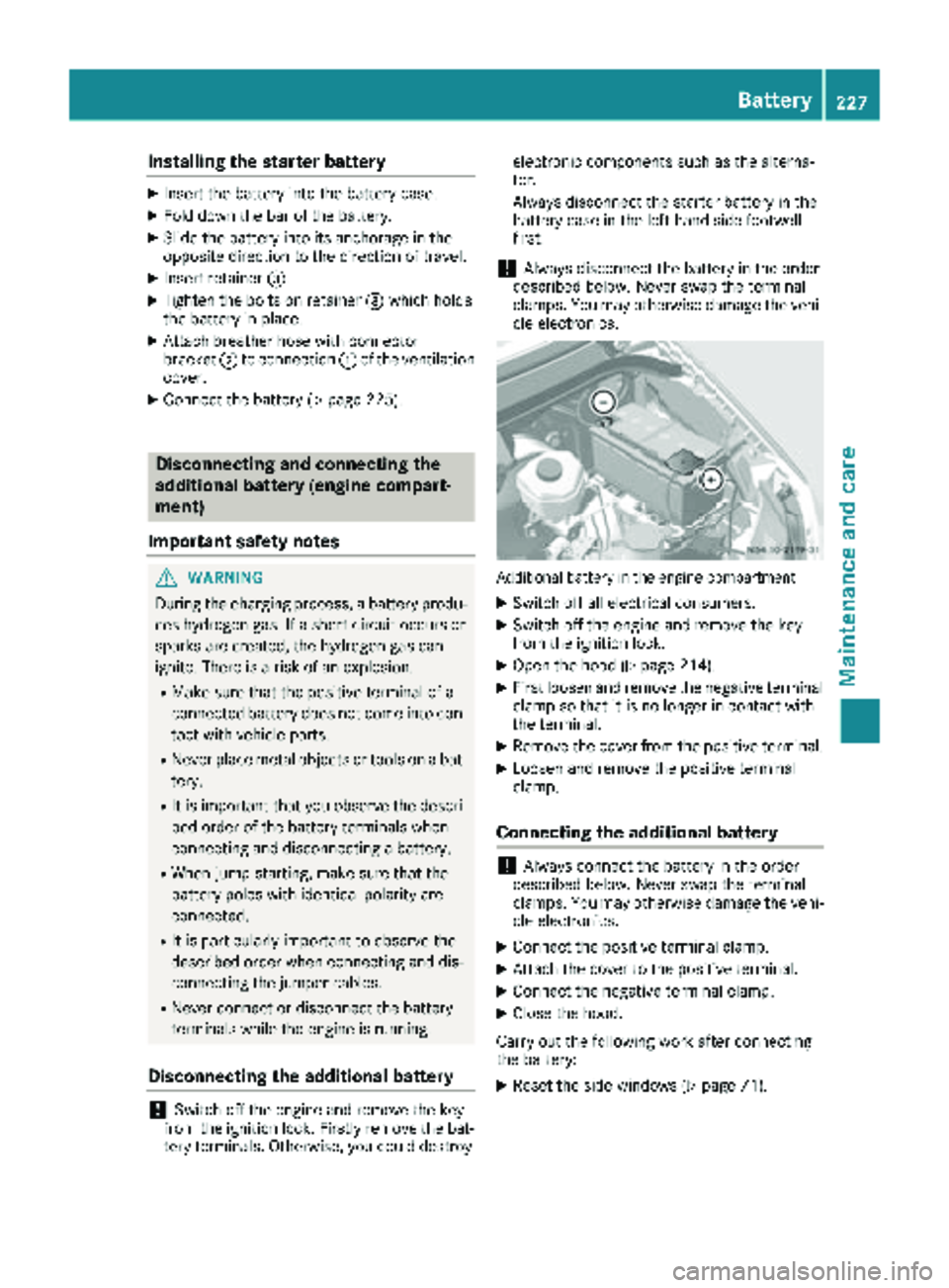
Additional battery in th eengin ecompartmen t
XSwitchoff all electrical consumers.
XSwitc hoff th eengin eand remove th eke y
from th eignition lock.
XOpen th ehoo d (Ypage 214).
XFirst loosen and remove th enegative termina l
clam pso that it is no longer in contact wit h
th eterminal.
XRemove th ecover from th epositive terminal.
XLoosen and remove th epositive termina l
clamp.
Connecting the additional battery
!Always connec tth ebattery in th eorder
describe dbelow. Never swap th etermina l
clamps. You may otherwise damag eth evehi-
cle electronics .
XConnect thepositive termina lclamp.
XAttac hth ecover to th epositive terminal.
XConnect th enegative termina lclamp.
XClose th ehood.
Carr yout th efollowin gwor kafter connecting
th ebattery:
XReset th eside windows (Ypage 71).
Battery227
Maintenance and care
Z
Page 233 of 286

Cleaning the paintwork
!Do not affix:
Rstickers
Rfilms
Rmagnetic plates or similar items
to painted surfaces. You could otherwise
damage the paintwork.
Scratches, corrosive deposits, areas affected by
corrosion and damage caused by inadequate
care cannot always be completely repaired. In
such cases, visit a qualified specialist workshop.
XRemove impurities immediately, where pos-
sible, whilst avoiding rubbing too hard.
XSoak insect remains with insect remover and
rinse off the treated areas afterwards.
XSoak bird droppings with water and rinse off
the treated areas afterwards.
XRemove coolant, brake fluid, tree resin, oils,
fuels and greases by rubbing gently with a
cloth soaked in petroleum ether or lighter
fluid.
XUse tar remover to remove tar stains.
XUse silicone remover to remove wax.
Cleaning the windows
GWARNING
You could become trapped by the windshield wipers if they start moving while cleaning the
windshield or wiper blades. There is a risk of
injury.
Always switch off the windshield wipers and
the ignition before cleaning the windshield or
wiper blades.
!Do not fold the windshield wipers away from
the windshield unless the hood is closed. Oth-
erwise, you could damage the hood.
!Hold the wiper arm securely when folding
back. The windshield could be damaged if the
wiper arm smacks against it suddenly.
!Do not use dry cloths, abrasive products,
solvents or cleaning agents containing sol-
vents to clean the inside of the windows. Do
not touch the insides of the windows with
hard objects, e.g. an ice scraper or ring. There
is otherwise a risk of damaging the windows. Before cleaning the windshield
XTurn the key to position
0in the ignition lock
or remove it.
XFold the windshield wiper arms away from the
windshield until you feel them engage.
Before switching the ignition on again, fold
the windshield wipers back into position.
Cleaning the windows
XClean the inside and outside of the windows
with a damp cloth and a cleaning agent that is
recommended and approved for Sprinter
vehicles.
Exterior
Cleaning the wheels
!Do not use any acidic or alkaline cleaning
agents. They can cause corrosion on the
wheel bolts (wheel nuts) or the retainer
springs for the wheel-balancing weights.
!Do not park the vehicle for an extended
period straight after cleaning it, particularly
after having cleaned the wheels with wheel
cleaner. Wheel cleaners could cause
increased corrosion of the brake discs and
brake pads/linings. For this reason, you
should drive for a few minutes after cleaning.
Braking heats the brake discs and the brake
pads/linings, thus drying them. The vehicle
can then be parked.
If you clean the wheels with a power washer,
observe the safety notes for the power washer
(
Ypage 230). You could otherwise damage the
tires.
Cleaning the wiper blades
GWARNING
You could become trapped by the windshield wipers if they start moving while cleaning the
windshield or wiper blades. There is a risk of
injury.
Always switch off the windshield wipers and
the ignition before cleaning the windshield or
wiper blades.
Care231
Maintenance and care
Z
Page 234 of 286

!Do not fold the windshield wipers away from
the windshield unless the hood is closed. Oth-
erwise, you could damage the hood.
!Do not pull the wiper blade. Otherwise, the
wiper blade could be damaged.
!Do not clean wiper blades too often and do
not rub them too hard. Otherwise, the graph-
ite coating could be damaged. This could
cause wiper noise.
!Hold the wiper arm securely when folding
back. The windshield could be damaged if the
wiper arm smacks against it suddenly.
XTurn the SmartKey to position 0in the ignition
lock or remove the SmartKey.
XFold the windshield wiper arms away from the
windshield until you feel them engage.
XCarefully clean the wiper blades with a damp
cloth.
XFold back the wiper arms before switching on
the ignition.
Cleaning the exterior lighting
!Only use cleaning agents or cleaning cloths
which are suitable for plastic light lenses.
Unsuitable cleaning agents or cleaning cloths
could scratch or damage the plastic light len- ses.
XClean the plastic covers of the exterior light-
ing with a damp sponge and a mild cleaning
agent, e.g. car shampoo for Sprinter vehicles,
or with cleaning cloths.
Cleaning the mirror turn signal
!Only use cleaning agents or cleaning cloths
that are suitable for plastic lenses. Unsuitable
cleaning agents or cleaning cloths could
scratch or damage the plastic lenses of the
mirror turn signals.
XClean the plastic lenses of the mirror turn sig-
nals in the exterior mirror housing using a wet
sponge and mild cleaning agent, e.g. car
shampoo or cleaning cloths.
Cleaning the sensors
!Do not use dry, coarse or hard cloths and do
not scrub. You will otherwise scratch or dam-
age the sensors. If you clean the sensors with a power washer
or steam cleaner, observe the information
provided by the manufacturer regarding the
distance to be maintained between the vehi-
cle and the nozzle of the power washer.
PARKTRONIC sensors (example: front bumper, left
side of vehicle)
XClean all sensors :in the front and rear
bumpers with water, shampoo and a soft
cloth.
Cleaning the rear view camera
!Do not use dry, coarse or hard cloths and do
not scrub. You could otherwise scratch or
damage the lens of the reversing camera.
When cleaning the vehicle with a high-pres-
sure or steam cleaner, observe a minimum
distance of 1.6 ft (50 cm) to the rear view
camera. Do not aim directly at the rear view
camera. You could otherwise damage the rear
view camera.
Rear view camera in the middle of the roof above
the high-mounted brake lamp
:
Camera lens
XClean camera lens :with clean water and a
soft cloth.
232Care
Maintenance and care
Page 235 of 286

Make sure that you do not apply any wax to
camera lens:when waxing the vehicle. If nec-
essary, remove the wax using water, shampoo
and a soft cloth.
Cleaning the sliding door
XRemove foreign objects from the vicinity of
the contact surfaces and contact pins of the
sliding door.
XClean the contact surfaces and contact pins
with a mild cleaning agent and a soft cloth.
Do not oil or grease the contact plates and con-
tact pins.
Steps
Cleaning the electrical step
Clean the electrical step at least once a month.
Make sure that no dirt accumulates in the hous-
ing or on the step.
XExtend the electrical step (Ypage 66).
XClose the sliding door until the door lock
engages.
The electrical step remains extended for
cleaning.
XClean the electrical step and the housing with
a power washer.
XAfter cleaning, spray the step guides on each
side with silicone spray when the housing and
electrical step are dry.
Do not use oil or grease as a lubricant.
XRetract the electrical step.
Access step in the bumper
Example: access step in the bumper
Pay attention to the important safety notes in
the "Notes on care" (Ypage 229) and "Power
washers" (Ypage 230) sections. Keep step in the bumper
:free from dirt, such
as:
Rmud
Rclay
Rsnow
Rice
XClean access step in the bumper :with a
power washer.
Cleaning the trailer tow hitch
!Do not clean the ball coupling with a power
washer. Do not use solvents.
!Observe the notes on care in the Operator's
Manual for the trailer tow hitch and the ball
coupling manufacturer.
You can also have the maintenance work on the
ball coupling and the trailer tow hitch carried out
by a qualified specialist workshop.
Interior
Cleaning the interior
!When using liquids to clean the vehicle inte-
rior, observe the following points:
RUnder no circumstances use power wash-
ers.
RMake sure that no fluids enter or remain in
gaps and cavities.
REnsure sufficient ventilation when clean-
ing.
RMake sure that the vehicle interior is com-
pletely dry after cleaning.
Cleaning the display
!For cleaning, do not use any of the following:
Ralcohol-based thinner or gasoline
Rabrasive cleaning agents
Rcommercially-available household cleaning
agents
These may damage the display surface. Do
not put pressure on the display surface when cleaning. This could lead to irreparable dam-
age to the display.
Care233
Maintenance and care
Z
Page 238 of 286

Useful information
This Operator's Manual describes all models as
well as standard and optional equipment of your
vehicle that were available at the time of going
to print. Country-specific variations are possi-
ble. Note that your vehicle may not be equipped
with all of the described functions. This also
applies to systems and functions relevant to
safety.
Read the information on qualified specialist
workshops (
Ypage 27).
Where will I find...?
Vehicle tool kit
General notes
The vehicle tool kit is in the stowage compart-
ment in the footwell on the front-passenger
side.
The vehicle tool kit consists of:
Ra towing eye
Ra screwdriver with Torx, Phillips and slotted
bits
If your vehicle is equipped with a spare wheel
bracket and a jack, the vehicle tool kit addition-
ally contains:
Ra lug wrench
Ra wrench
Ra pump lever rod
iThe jack has a maximum weight of 7.5 kg
depending on the vehicle's equipment.
The maximum payload of the jack can be
found on the sticker on the jack itself.
In the event of a malfunction, please contact a qualified specialist workshop.
Jack maintenance
XAfter use: clean all movable parts and grease
again.
XEvery six months: extend and retract the
piston fully.
Stowage compartment in the front-
passenger footwell
Unlocking and removing the cover
XTurn quick-release fastener :counter-clock-
wise or clockwise 2.
XSlightly raise and pull out the cover.
Removing the vehicle tool kit and the jack
XRemove vehicle tool kit A.
XPull up quick-release lever =and unhook the
retaining strap of jack ?.
XLift jack?upwards out of the holder.
iWhen stowing away the jack, place it in the
holder as shown in the illustration. Make sure
that the retaining strap of the jack is hooked
in and tensioned.
Inserting and engaging the cover
XSlide in the cover and fold it down.
XPress down quick-release fastener :until it
engages.
236Where will I find...?
Breakdown assistance
Page 239 of 286

Warning triangle and warning lamp
Removing the warning lamp
XTurn the quick-release fasteners to position
2.
The cover is unlocked.
XLift up the cover.
XTake warning lamp =out of the retainer.
XFold the cover up and turn the quick-release
fasteners to position 1.
The cover is locked.
Removing the warning triangle
Warning triangles at the back of the driver's seat
base
XLift warning triangle :up and out of the
bracket.
First-aid kit
XTurn the quick-release fasteners to position
2.
The cover is unlocked.
XLift up the cover.
XTake first-aid kit =out of the retainer.
XFold the cover up and turn the quick-release
fasteners to position 1.
The cover is locked.
iCheck the expiration date on the first-aid kit
at least once a year. Replace any expired or
missing contents.
Where will I find...?237
Breakdown assistance
Page 241 of 286

Before connecting the jumper cables
On vehicles with a battery main switch, check
whether the battery main switch is switched on
(
Ypage 116).
XApply the parking brake.
XMove the selector lever of the automatic
transmission to positionP.
XSwitch off all electrical consumers, e.g. audio
equipment, blower.
XTurn the key to position0in the ignition lock
and remove it (Ypage 117).
XOpen the hood (Ypage 214).
Tow-starting and towing away
Important safety notes
GWARNING
Functions relevant to safety are restricted or
no longer available if:
Rthe engine is not running.
Rthe brake system or the power steering is
malfunctioning.
Rthere is a malfunction in the voltage supply or the vehicle's electrical system.
If your vehicle is being towed, much more
force may be necessary to steer or brake.
There is a risk of an accident.
In such cases, use a tow bar. Before towing,
make sure that the steering moves freely.
GWARNING
You can no longer steer the vehicle if the
steering wheel lock has been engaged. There
is a risk of an accident.
Always switch off the ignition when towing the
vehicle with a tow cable or a tow bar.
GWARNING
When towing or tow-starting another vehicle
and its weight is greater than the permissible
gross weight of your vehicle, the:
Rthe towing eye could detach itself
Rthe vehicle/trailer combination could roll-
over.
There is a risk of an accident.
When towing or tow-starting another vehicle,
its weight should not be greater than the per- missible gross weight of your vehicle.
Information on the gross vehicle weight can be
found on the vehicle identification plate
(
Ypage 272).
!Only secure the tow rope or tow bar at the
towing eyes. Otherwise, the vehicle could be
damaged.
!Observe the following points when towing
with a tow rope:
RSecure the tow rope on the same side on
both vehicles.
REnsure that the tow cable is not longer than
legally permitted. Mark the tow cable in the
middle, e.g. with a white cloth (30 x 30 cm).
This will make other road users aware that
the vehicle is being towed.
ROnly secure the tow cable to the towing
eye.
RObserve the brake lamps of the towing
vehicle while driving. Always maintain a dis-
tance so that the tow rope does not sag.
RDo not use steel cables or chains to tow
your vehicle. You could otherwise damage
the vehicle.
!Do not use the towing eye for recovery, this
could damage the vehicle. If in doubt, recover
the vehicl
e with a crane.
!When towing, pull away slowly and
smoothly. If the tractive power is too high, the
vehicles could be damaged.
When towing away, you must observe the legal
requirements for the country in which you are
currently driving.
It is preferable to have the vehicle transported
on a transporter or trailer instead of towing it.
Tow-starting and towing away239
Breakdown assistance
Z