2017 MERCEDES-BENZ S CLASS door lock
[x] Cancel search: door lockPage 89 of 382

Always switch off the engine before opening
the trunk lid. Never drive with the trunk lid
open.
! The trunk lid swings upwards when opened.
Therefore, make sure that there is sufficient
clearance above the trunk lid.
The opening dimensions of the trunk lid can be
found in the "Vehicle data" section
( Y
page 376).
Opening automatically You can open the trunk lid automatically using
the SmartKey or the handle in the trunk lid. X
Press and hold the T button on the Smart-
Key until the trunk lid opens.
or X
If the trunk lid is unlocked, pull the trunk lid
handle and let it go again immediately.
Closing automatically You can close the trunk lid automatically using
the SmartKey or the closing button in the trunk
lid.
X
Press closing button C on the trunk lid.
or X
If the SmartKey is located in the immediate
vicinity of the vehicle: press the T button
on the SmartKey.
You can release the button as soon as the
trunk lid starts to close. X
To stop the closing process: R
Press the T button on the SmartKey.R
Pull the handle in the trunk lid. R
Press closing button C or locking but-
ton D on the trunk lid. R
Press the remote operating switch on the
driver's door. R
In vehicles with HANDS-FREE ACCESS:
kick into the sensor detection range under
the bumper with your foot.
i If the T button on the SmartKey is
pressed or HANDS-FREE ACCESS is initiated
after the closing process is stopped, the trunk
lid opens.
Vehicles with trunk lid remote closing fea-
ture and KEYLESS-GO: when all the doors are
closed, you can simultaneously close the trunk
lid and lock the vehicle. The SmartKey must be
located to the rear of the vehicle. X
Press and release locking button D on the
trunk lid.
If a KEYLESS-GO key is detected outside the
vehicle, the trunk lid closes and the vehicle
locks.
If KEYLESS-GO detects a second SmartKey out-
side the vehicle, the trunk lid remains closed.
If KEYLESS-GO detects a SmartKey in the trunk,
the trunk lid opens again after it is closed.
HANDS-FREE ACCESS
Important safety notes
G WARNING
The vehicle's exhaust system may be very hot.
You could burn yourself by touching the
exhaust system if you use HANDS-FREE
ACCESS. There is a risk of injury. Always
ensure that you only make the kicking move-
ment within the detection range of sensors.
! If the SmartKey is within the rear detection
range of KEYLESS-GO, the following situa-
tions, for example, could lead to the uninten-
tional opening of the trunk: R
using a car wash R
using a power washer
Make sure that the SmartKey is at least 10 ft
(3 m) away from the vehicle.
General notes
With KEYLESS-GO and HANDS-FREE ACCESS,
you can open or close the trunk lid or stop the
procedure without using your hands. This is use- Trunk 87
Opening and closing Z
Page 92 of 382
X
To deactivate: open the glove box.X
Push the switch to position C .
If the vehicle is unlocked centrally, the trunk
will also be unlocked.
Unlocking the trunk using the
mechanical key
General notes Use the mechanical key if the trunk lid can no
longer be unlocked: R
using the SmartKey R
using HANDS-FREE ACCESS R
using the remote operating switch in the door
control panel
! The trunk lid swings upwards when opened.
Therefore, make sure that there is sufficient
clearance above the trunk lid.
The opening dimensions of the trunk lid can be
found in the "Vehicle data" section
( Y
page 376).
Unlocking X
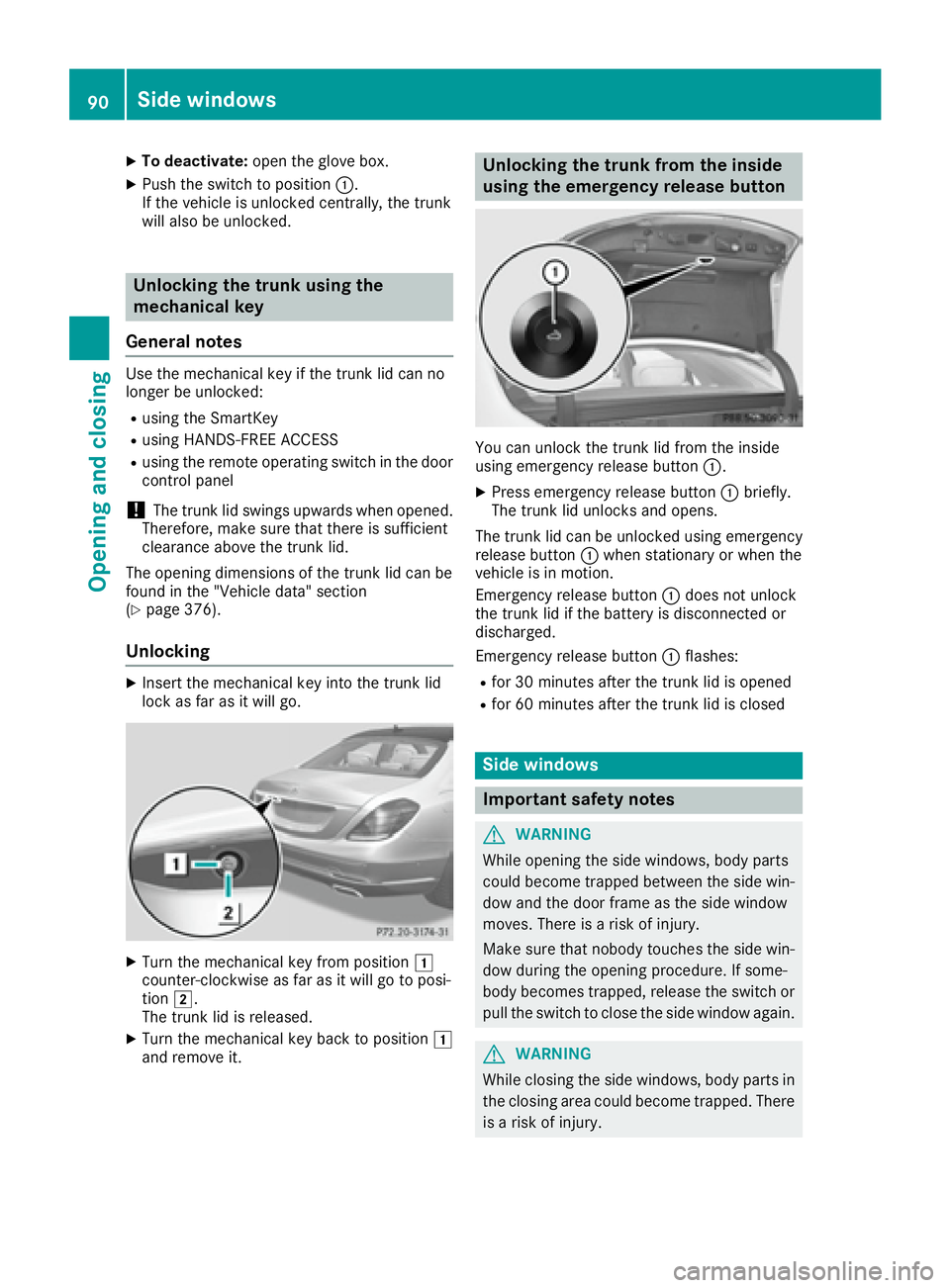
Insert the mechanical key into the trunk lid
lock as far as it will go.
X
Turn the mechanical key from position G
counter-clockwise as far as it will go to posi-
tion H .
The trunk lid is released. X
Turn the mechanical key back to position G
and remove it. Unlocking the trunk from the inside
using the emergency release button
You can unlock the trunk lid from the inside
using emergency release button C .X
Press emergency release button C briefly.
The trunk lid unlocks and opens.
The trunk lid can be unlocked using emergency
release button C when stationary or when the
vehicle is in motion.
Emergency release button C does not unlock
the trunk lid if the battery is disconnected or
discharged.
Emergency release button C flashes:R
for 30 minutes after the trunk lid is opened R
for 60 minutes after the trunk lid is closed
Side windows
Important safety notes
G WARNING
While opening the side windows, body parts
could become trapped between the side win-
dow and the door frame as the side window
moves. There is a risk of injury.
Make sure that nobody touches the side win-
dow during the opening procedure. If some-
body becomes trapped, release the switch or
pull the switch to close the side window again.
G WARNING
While closing the side windows, body parts in
the closing area could become trapped. There
is a risk of injury.90
Side windows
Opening and closing
Page 93 of 382
When closing make sure that no parts of the
body are in the closing area. If somebody
becomes trapped, release the switch or press
the switch to open the side window again.
G WARNING
If children operate the side windows they
could become trapped, particularly if they are
left unsupervised. There is a risk of injury.
Activate the override feature for the rear side
windows. When leaving the vehicle, always
take the SmartKey with you and lock the vehi-
cle. Never leave children unsupervised in the
vehicle.
Side window reversing feature The side windows are equipped with an auto-
matic reversing feature. If a solid object blocks
or restricts a side window from traveling
upwards during the automatic closing process,
the side window opens again automatically. Dur-
ing the manual closing process, the side window
only opens again automatically after the corre-
sponding switch is released.
The automatic reversing feature is only an aid
and does not relieve you of the responsibility of
paying attention when closing a side window.
G WARNING
The reversing feature does not react: R
to soft, light and thin objects, e.g. small fin-
gers R
while resetting
This means that the reversing feature cannot
prevent someone being trapped in these sit-
uations. There is a risk of injury.
Make sure that no body parts are in close
proximity during the closing procedure. If
someone becomes trapped, press the switch
to open the side window again. Opening and closing the side win-
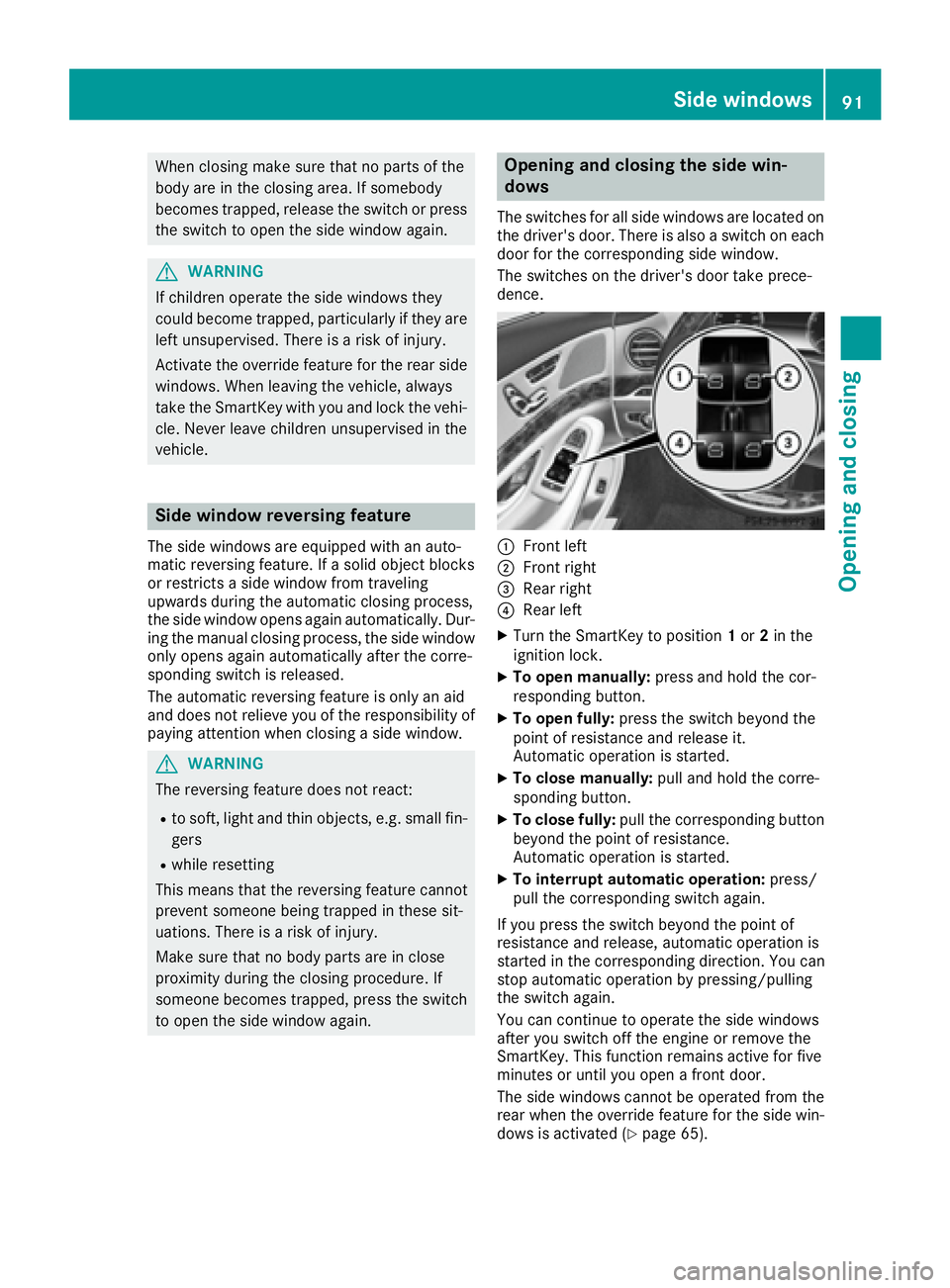
dows The switches for all side windows are located on
the driver's door. There is also a switch on each
door for the corresponding side window.
The switches on the driver's door take prece-
dence.
C
Front left D
Front right
Page 94 of 382
Before opening or closing the side windows, a
check is carried out to see whether a valid
SmartKey is in the vehicle. The check is carried
out if you use the start/stop button instead of a
SmartKey in the ignition and you press or pull a
button while the engine is switched off. This is
carried out by means of a brief radio connection
between the vehicle and the SmartKey.
Information on opening and closing the roller
sunblinds on the rear side windows
( Y
page 293).
Convenience opening
General notes If the SmartKey is in close proximity to the vehi-
cle, the convenience opening function is availa-
ble.
You can ventilate the vehicle before you start
driving.
To do this, the SmartKey is used to carry out the
following functions simultaneously: R
unlock the vehicle R
open the side windows R
open the panorama roof with power tilt/slid-
ing panel and the roller sunblinds R
switch on the seat ventilation for the driver's
seat
The "convenience opening" feature is also avail-
able when the vehicle is unlocked.
Convenience opening X
Press and hold the 6 button until the side
windows and the panorama sunroof are in the
desired position.
If the roller sunblinds of the panorama roof
with power tilt/sliding panel are closed, the
roller sunblinds are opened first. X
Keep the 6 button pressed until the pan-
orama roof with power tilt/sliding panel is in
the desired position. X
To interrupt convenience opening: release
the 6 button. Convenience closing feature
Important safety notes
G WARNING
When the convenience closing feature is oper-
ating, parts of the body could become trapped
in the closing area of the side window and the
sliding sunroof. There is a risk of injury.
Observe the complete closing procedure
when the convenience closing feature is oper-
ating. Make sure that no body parts are in
close proximity during the closing procedure.
When you lock the vehicle, you can simultane-
ously: R
close the side windows R
close the panorama roof with power tilt/slid-
ing panel
On vehicles with a panorama roof with power
tilt/sliding panel, you can then close the roller
sunblinds.
i Notes on the automatic reversing feature
for: R
the side window ( Y
page 91)R
the panorama roof with power tilt/sliding
panel ( Y
page 95) R
the roller sunblinds ( Y
page 96)
Using the SmartKey X
Press and hold the 7 button until the side
windows and the panorama roof with power
tilt/sliding panel are fully closed. X
Make sure that all the side windows and the
panorama roof with power tilt/sliding panel
are closed. X
On vehicles with a panorama roof with
power tilt/sliding panel: press and hold the
7 button again until the roller sunblinds of
the panorama roof with power tilt/sliding
panel close. X
To interrupt convenience closing: release
the 7 button.
Using KEYLESS-GO
The SmartKey must be outside the vehicle. All
the doors must be closed.92
Side windows
Opening and closing
Page 95 of 382
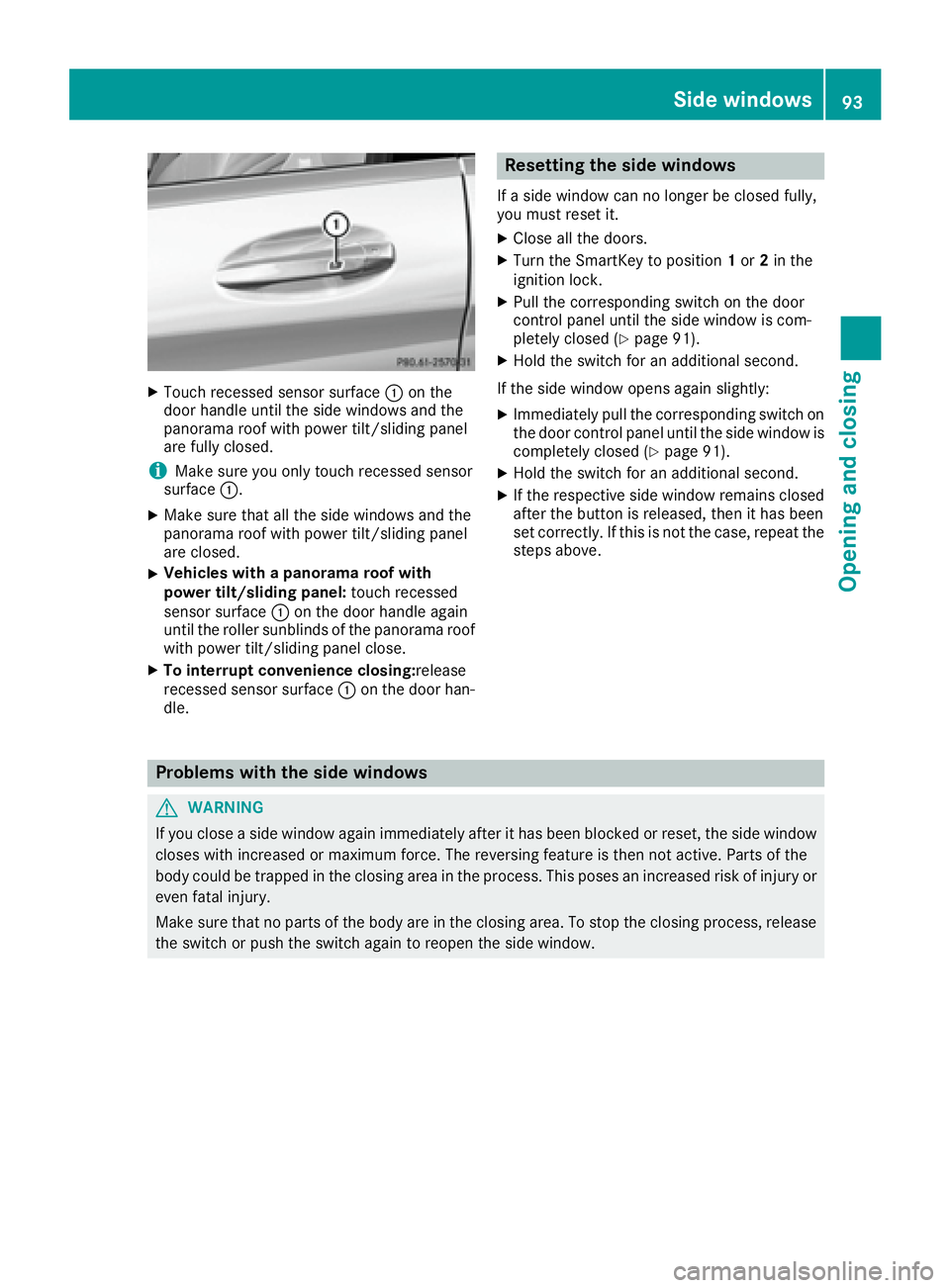
X
Touch recessed sensor surface C on the
door handle until the side windows and the
panorama roof with power tilt/sliding panel
are fully closed.
i Make sure you only touch recessed sensor
surface C .X
Make sure that all the side windows and the
panorama roof with power tilt/sliding panel
are closed. X
Vehicles with a panorama roof with
power tilt/sliding panel: touch recessed
sensor surface C on the door handle again
until the roller sunblinds of the panorama roof
with power tilt/sliding panel close. X
To interrupt convenience closing: release
recessed sensor surface C on the door han-
dle. Resetting the side windows If a side window can no longer be closed fully,
you must reset it. X
Close all the doors. X
Turn the SmartKey to position 1 or 2 in the
ignition lock. X
Pull the corresponding switch on the door
control panel until the side window is com-
pletely closed ( Y
page 91). X
Hold the switch for an additional second.
If the side window opens again slightly: X
Immediately pull the corresponding switch on
the door control panel until the side window is
completely closed ( Y
page 91).X
Hold the switch for an additional second. X
If the respective side window remains closed
after the button is released, then it has been
set correctly. If this is not the case, repeat the
steps above.
Problems with the side windows
G WARNING
If you close a side window again immediately after it has been blocked or reset, the side window
closes with increased or maximum force. The reversing feature is then not active. Parts of the
body could be trapped in the closing area in the process. This poses an increased risk of injury or
even fatal injury.
Make sure that no parts of the body are in the closing area. To stop the closing process, release
the switch or push the switch again to reopen the side window. Side windows 93
Opening and closing Z
Page 118 of 382

Problems with the steering wheel heating Problem
Possible causes/consequences and P Solutions
The steering wheel heat-
ing has switched off pre-
maturely or cannot be
switched on. The on-board voltage is too low because too many electrical consum-
ers are switched on. X
Switch off electrical consumers that you do not need, such as the
rear window defroster or interior lighting.
EASY-ENTRY/EXIT feature
Important safety notes
G WARNING
When the EASY-ENTRY/EXIT feature adjusts
the steering wheel and the driver's seat, you
and other vehicle occupants – particularly
children – could become trapped. There is a
risk of injury.
While the EASY-ENTRY/EXIT feature is mak-
ing adjustments, make sure that no one has
any body parts in the sweep of the seat and
the steering wheel.
If there is a risk of becoming trapped by R
the steering wheel: move the steering
wheel adjustment lever. R
the seat: press the switch for seat adjust-
ment.
The adjustment process is stopped.
You can stop the adjustment process by press-
ing one of the memory function's position but-
tons. This function is only available on vehicles
with memory function.
G WARNING
If children activate the EASY-ENTRY/EXIT fea-
ture, they can become trapped, particularly
when unattended. There is a risk of injury.
When leaving the vehicle, always take the
SmartKey with you and lock the vehicle. Never
leave children unsupervised in the vehicle.
G WARNING
If you drive off while the EASY-ENTRY/EXIT
feature is making adjustments, you could lose control of the vehicle. There is a risk of an
accident.
Always wait until the adjustment process is
complete before driving off.
The EASY-ENTRY/EXIT feature makes getting in
and out of your vehicle easier.
You can activate and deactivate the EASY-
ENTRY/EXIT feature using the multimedia sys-
tem (see the Digital Operator's Manual).
Position of the steering wheel and the
driver's seat when the EASY-ENTRY/
EXIT feature is active The steering wheel tilts upwards and the driver's
seat moves backwards if you: R
remove the SmartKey from the ignition lock R
with the start/stop button: open the driv-
er's door; the ignition must be switched off R
with the SmartKey: open the driver's door;
the SmartKey must be in position 0 or 1 in the
ignition lock ( Y
page 145)
i The steering wheel only tilts upwards and
the driver's seat only moves backwards if the
driving position is stored after the seat or
steering column has been adjusted.
The last position of the steering wheel or seat is
stored if: R
the ignition is switched off R
the setting is stored with the memory function
( Y
page 120).
i The steering wheel only moves upwards if it
has not already reached the upper stop. The
driver's seat only moves backwards if it is not
already in the rearmost position.116
Steering wheel
Seats, steering wheel and mirrors
Page 119 of 382
Position of the steering wheel and the
driver's seat for driving The steering wheel and the driver's seat are
moved to the previously set position if: R
the driver's door is closed and you insert the
SmartKey into the ignition lock R
you close the driver's door when the ignition
is switched on R
you press the Start/Stop button once
i The steering wheel and the driver's seat only
return to the last set position if the driving
position is stored after the seat or steering
column has been adjusted.
The last position of the steering wheel or seat is
stored if: R
the ignition is switched off R
the setting is stored with the memory function
( Y
page 120).
Crash-responsive EASY-EXIT feature If the crash-responsive EASY-EXIT feature is trig-
gered in an accident, the steering column will
move upwards when the driver's door is opened
or the SmartKey is removed from the ignition
lock. This makes it easier to exit the vehicle and
rescue the occupants.
The crash-responsive EASY-EXIT feature is only
operational if the EASY-EXIT/ENTRY feature is
activated in the multimedia system (see the sep-
arate Operator's Manual).
Mirrors
Rear-view mirror
X
Anti-glare mode: flick anti-glare lever C for-
wards or back. Exterior mirrors
Important safety notes
G WARNING
You could lose control of your vehicle if you do
the following while driving: R
adjust the driver's seat, head restraint,
steering wheel or mirrors R
fasten the seat belt
There is a risk of an accident.
Adjust the driver's seat, head restraint, steer-
ing wheel and mirror and fasten your seat belt
before starting the engine.
G WARNING
The exterior mirror on the front-passenger
side reduces the size of the image. Visible
objects are actually closer than they appear.
This means that you could misjudge the dis-
tance from road users traveling behind, e.g.
when changing lane. There is a risk of an acci-
dent.
For this reason, always make sure of the
actual distance from the road users traveling
behind by glancing over your shoulder.
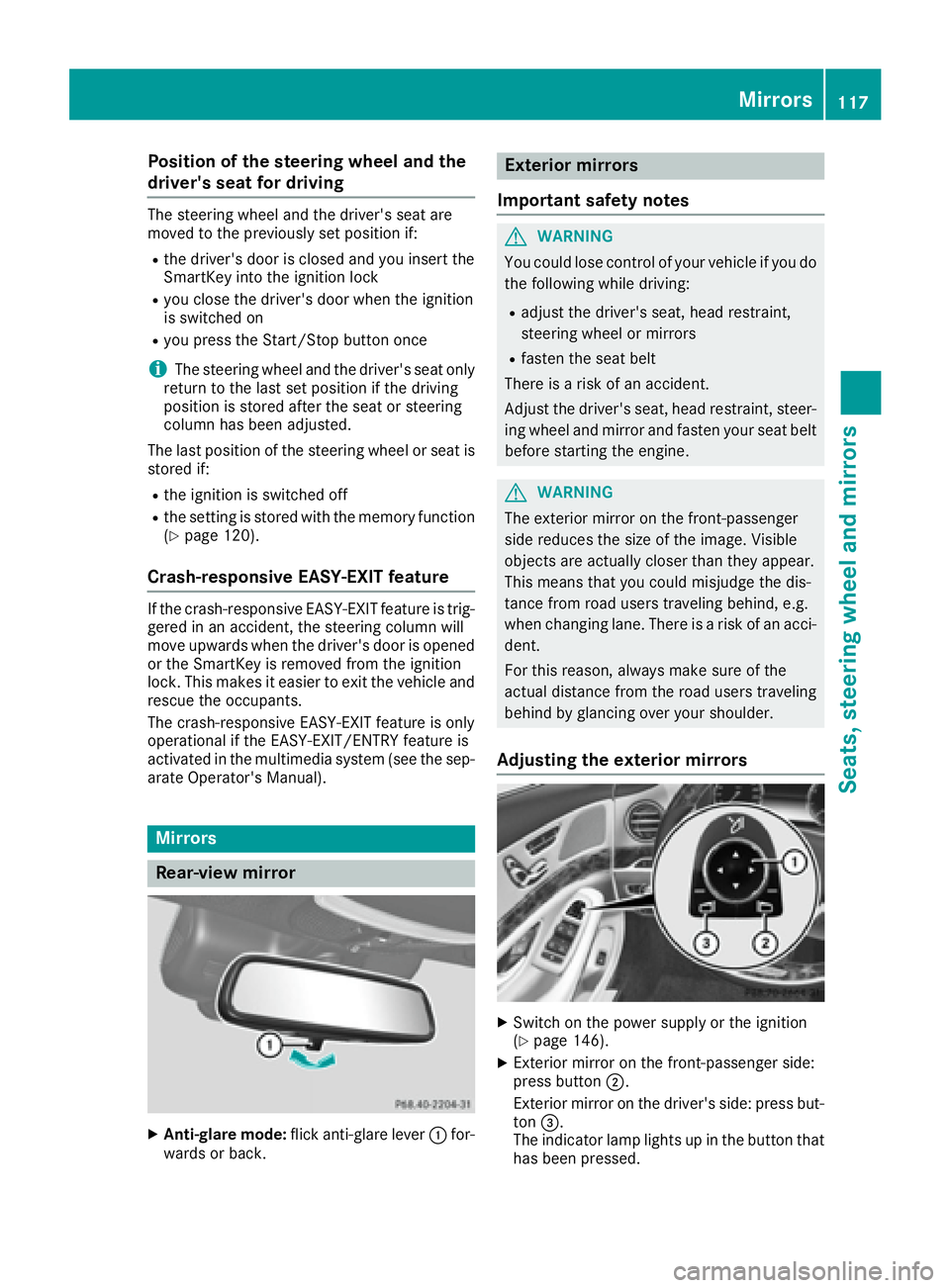
Adjusting the exterior mirrors
X
Switch on the power supply or the ignition
( Y
page 146). X
Exterior mirror on the front-passenger side:
press button D .
Exterior mirror on the driver's side: press but-
ton
Page 126 of 382

Exterior lighting
General notes USA only: if you wish to drive during the daytime
without lights, switch off the Daytime Run‐
ning Lights function via the on-board com-
puter ( Y
page 225).
Setting the exterior lighting
Setting options Exterior lighting can be set using: R
the light switch ( Y
page 124)R
the combination switch ( Y
page 125)R
the on-board computer ( Y
page 225)
Light switch Operation
G c
Left-hand standing lampsH d
Right-hand standing lampsI `
Parking lamps, license plate and
instrument cluster lightingJ X
Automatic headlamp mode, controlled
by the light sensor
K X
Low-beam/high-beam headlamps
If you hear a warning tone when you leave the
vehicle, the lights may still be switched on. X
Turn the light switch to the X position.
The exterior lighting (except the parking/stand-
ing lamps) switches off automatically if you: R
remove the SmartKey from the ignition lock R
open the driver's door with the SmartKey in
position 0 in the ignition lock Automatic headlamp mode
G WARNING
When the light switch is set to X , the low-
beam headlamps may not be switched on
automatically if there is fog, snow or other
causes of poor visibility due to the weather
conditions such as spray. There is a risk of an
accident.
In such situations, turn the light switch to
X .
The automatic headlamp feature is only an aid.
The driver is responsible for the vehicle's light-
ing at all times.
X is the favored light switch setting.
The light setting is automatically selected
according to the brightness of the ambient light,
but not in the event of poor visibility due to
weather conditions such as fog, snow or spray. R
With the SmartKey in position 1 in the ignition
lock, the parking lamps are switched on or off
automatically depending on the brightness of
the ambient light. R
USA only: if you have switched on the Day‐
time Running Lights function via the on-
board computer, and the engine is running,
the daytime running lamps or the parking
lamps and low-beam headlamps are switched
on or off automatically depending on the
ambient light. R
Canada only: depending on the ambient light,
the daytime running lamps or the parking and
low-beam headlamps are switched on/off
automatically when the engine is running. X
To switch on the automatic headlamps:
turn the light switch to the X position.
USA only: The daytime running lamps improve
the visibility of your vehicle during the day. Here,
the Daytime Running Lights function must
be switched on via the on-board computer
( Y
page 225).
If the engine is running and you turn the light
switch to the ` or X position, the manual
settings take precedence over the daytime run-
ning lamps.
Canada only: The daytime running lamps
improve the visibility of your vehicle during the
day. The daytime running lamps function is
required by law in Canada. It cannot therefore
be deactivated.124
Exterior lighting
Lights and windshield wipers