2017 MERCEDES-BENZ S-Class MAYBACH audio
[x] Cancel search: audioPage 211 of 230

Your multimediasystem equipment
These operating instructions describe all the
standard and optional equipment of your multi-
media system, as available at the time of going
to press. Country-specifi cdifferences are pos-
sible. Bear in mind that your vehicle may not
feature all functions described here. This also
applies to safety-relevant systems andfunc-
tions.
Read the information on qualified specialist
workshop s in the vehicle Operator's Manual.
Rear Seat Entertainment System
overview
Important safety notes
GWARNING
The CD/DVD drive is a class1 laser product.
If you ope nth e housing of the CD/DVD drive,
there is a risk of exposure to invisible laser
radiation. This laser radiation could damage
your retina. There is a risk of injury.
Never open the housing. Always have main-
tenanc e and repair work carried out at a quali-
fied specialist workshop.
GWARNING
If objects such as headphones/headsets or
external audio/video sources are not secured
in the passenger compartment, they can be
flung around and hit vehicle occupants. There
is a risk of injury, fo r example in the event of
sudden braking or a sudden change in direc-
tion .
Always stow these items or similar objects
carefully so that they cannot be flung around,
fo r example in a lockable vehicle stowage
compartment.
Components
The Rear Seat Entertainment System includes:
Rtwoscreens fo rth e rear behind the front-seat
head restraints
Rtw oremot econtrols fo rth e rear compart -
ment
Ra CD/DVD drive in th e rearcompartmen t
RAUXjack s
RtwoUS B ports
Rtwo sets of cordless headphones
General notes
RYou can only adjust the volume forth e head-
phone s supplied, directly on the headphones.
RIf media from differentsources are used,they
can be used separately from each of theoper-
ating positions. Example: a film from theDV D
drive is played on the rear right-hand operat-
ing position. This means that another film
from th e same DVDcanno t be played sepa-
rately on the rear left-hand operating position. However, all other media sources (e.g. radio,
Media Interface ) or the online and Internet
function s can be used.
RIf you use th e same medium on both sides,
you can both carry out the respective set-
tings. The "last one wins" principle applies
here, i.e. the last setting activated is favored.
RThe Internet can be used separately at all
operating positions.
RThe Internet can only be used if it is set up and
connecte d via a telephone(Ypage 142).
Rear-compartment screens
:Display
;Brightness sensor
Rear Seat Entertainment System overview209
Rear Seat Entertainment System
Z
Page 215 of 230

CD/DVD drive
:CD/DVD slot
;CD/DVD eject button
Depending on the vehicle model and equipment
level, the CD/DVD drive is found:
Rat the rear of the center console under the
automatic climate control panel or
Rbetween the parcel shelf and skibag
AUX jacks
:AUX, right-hand (R) jack for audio signal
(red)
;AUX, left-hand (L) jack for audio signal
(white)
=AUX, video (V) jack (yellow) Depending on the vehicle model and equipment
level, the AUX jacks are found:
Rin the stowage box between the rear seats or
Rin the rear-compartment armrest
USB ports
:USB port 1
;USB port 2
Depending on the vehicle model and equipment
level, the USB ports are found:
Rin the stowage box between the rear seats or
Rin the rear-compartment armrest
Rear Seat Entertainment System overview213
Rear Seat Entertainment System
Z
Page 216 of 230

Cordless headphones
Overview
XTo adjust the headphones: open both sides of the headphones.
XAdjust the headphones by pulling the headphone band in the direction of the arrow.
XTo switch the headphones on/off: press on/off switch;.
XTo adjust the volume: turn volume control=until the desired volume is set.
or
XIf you have connected corded headphones to a rear-compartment screen, you can adjust the
volume using the remote control (Ypage 210).
XTo check the battery condition of charge: check the state of the batteries using indicator
lamp :.
The headphones automatically switch off if they have not received an audio signal for approximately
three minutes. This preserves the batteries.
Indicator lamp on the cordless head-
phones
The color of the indicator lamp shows:
Rwhether the device is switched on or off
Rthe condition of the inserted batteries
LED dis-
playStatus
GreenThe batteries are fine.
RedThe batteries are almost dis-
charged.
Lit continu-
ouslyThe headphones are switched
on and connected to a screen.
LED dis-
playStatus
FlashingThe headphones are searching
for the connection to a screen.
No display
(dark)The headphones are switched
off or the batteries are dis-
charged.
iThe function of the headphones may be
impaired by other radio-based electronic
devices such as mobile phones or laptops.
214Rear Seat Entertainment System overview
Rear Seat Entertainment System
Page 219 of 230

Switching the display design
XSelectVehicleusing the
9:=; buttons on the remote
control and press the 9button to confirm.
XSelect System Settingsusing
the :=; buttons on the remote
control and press the 9button to confirm.
You see the System Settings
menu on the
selected rear screen.
XSelect Displayusing the 9: buttons
on the remote control and press the 9button
to confirm.
XSelect Day Mode,Night Modeor Automaticusing the 9: buttons and press the 9
button to confirm.
The dot indicates the current setting.
DesignExplanation
Day ModeThe display is set perma-
nently to day design.
Night ModeThe display is set perma-
nently to night design.
AutomaticThe display design
changes depending on
the vehicle instrument
cluster illumination.
Setting the brightness
XSelect Vehicleusing the
9:=; buttons on the remote
control and press the 9button to confirm.
XSelect System Settingsusing
the :=; buttons on the remote
control and press the 9button to confirm.
You see the System Settings
menu on the
selected rear screen.
XSelect Displayusing the :9 buttons
on the remote control and press the 9button
to confirm.
XSelect Brightnessusing the 9: but-
tons and press the 9button.
A scale appears.
XAdjust the brightness using the 9:
buttons and press the 9button to confirm.
The brightness bar moves up or down. The
picture becomes lighter or darker in accord-
ance with the scale.
Showing/hiding the picture
XSelect Vehicleusing the
9:=; buttons on the remote
control and press the 9button to confirm.
XPress button :on the remote control.
A menu appears.
XSelect Display Offusing the
9:=; buttons and press the
9 button to confirm.
XTo display the picture: press the9button.
Adjusting sound settings
You can select the sound settings in the radio,
audio CD/audio DVD/MP3, video DVD and AUX
modes.
XSelect a medium (e.g. CD mode)
(Ypage 221).
XTo show the menu: press the :button on
the remote control.
XSelect Soundusing the :=; but-
tons on the remote control and press the 9
button to confirm.
XSelect sound settings using
the :=; buttons on the remote
control and press the 9button.
XSelect the desired setting using the selector
wheel on the remote control.
XTo exit the menu: press the %button on
the remote control.
Picture settings
Overview
You can select the picture settings in video DVD and AUX mode.
System settings217
Rear Seat Entertainment System
Z
Page 223 of 230
XPress theÕbutton on the remote control.
XTo show the menu: press the :button on
the remote control.
XTo select Devices: press the :=;
buttons on the remote control.
The discs/devices available are shown. The #
dot indicates the current setting.
XSelect the device/disc using the :9
buttons and press the 9button to confirm.
If the device/disc contains music or video
files, these will be played.
Music search
XSelect the preferred media source.
XPress the :button on the remote control.
The menu is shown.
XSelect Searchusing the =; buttons
on the remote control and press the 9but-
ton.
Further information on the music search
(
Ypage 173).
Audio/video mode
Important safety notes
GWARNING
The CD/DVD drive is a class 1 laser product.
If you open the housing of the CD/DVD drive,
there is a risk of exposure to invisible laser
radiation. This laser radiation could damage
your retina. There is a risk of injury.
Never open the housing. Always have main-
tenance and repair work carried out at a quali- fied specialist workshop.
General notes
You will find information on the following topics
in the Audio section:
RNotes on CD/DVD discs (Ypage 167)
RNotes on MP3 mode (Ypage 166)
RNotes on copyright (Ypage 167)
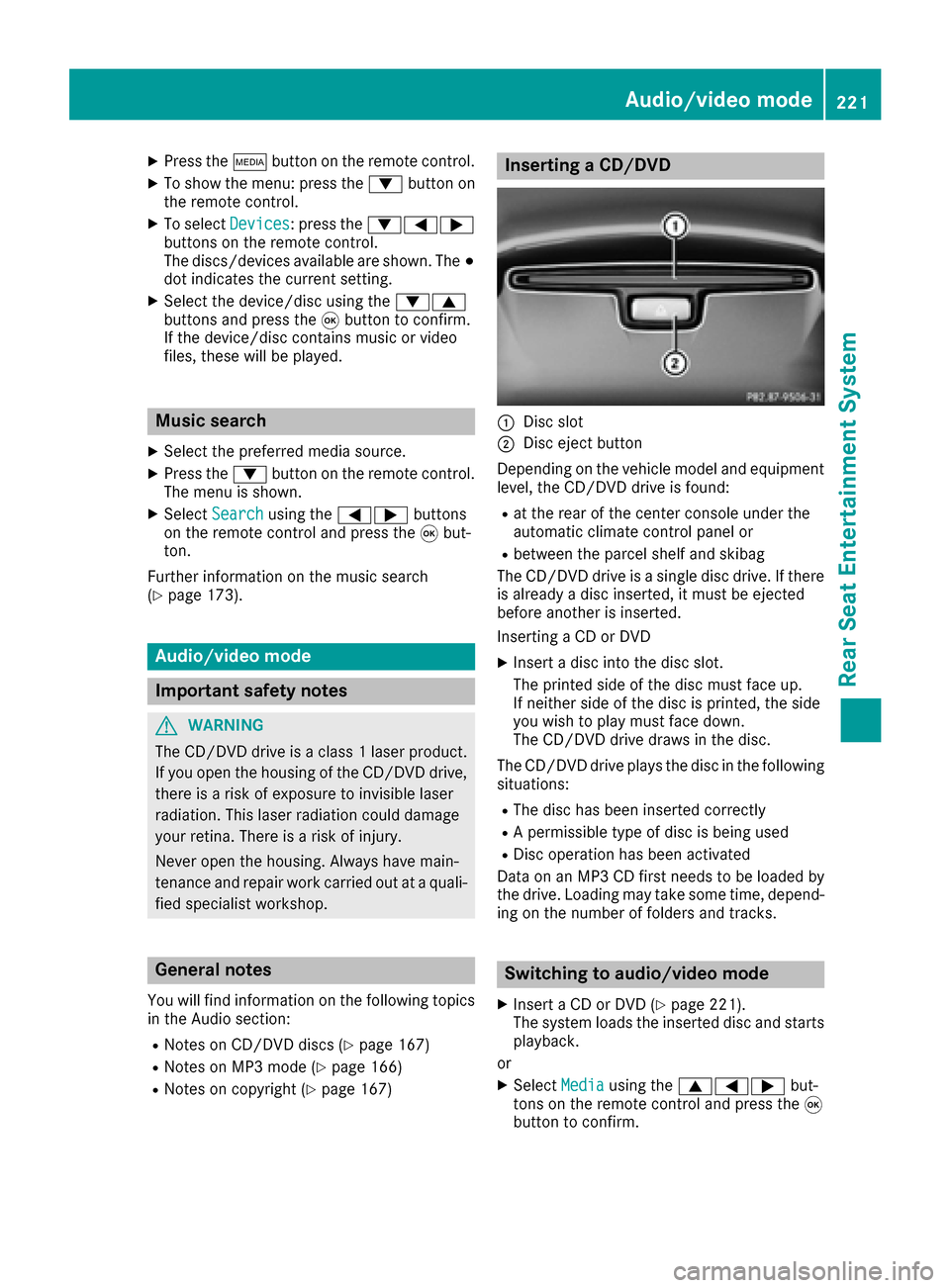
Inserting a CD/DVD
:Disc slot
;Disc eject button
Depending on the vehicle model and equipment
level, the CD/DVD drive is found:
Rat the rear of the center console under the
automatic climate control panel or
Rbetween the parcel shelf and skibag
The CD/DVD drive is a single disc drive. If there
is already a disc inserted, it must be ejected
before another is inserted.
Inserting a CD or DVD
XInsert a disc into the disc slot.
The printed side of the disc must face up.
If neither side of the disc is printed, the side
you wish to play must face down.
The CD/DVD drive draws in the disc.
The CD/DVD drive plays the disc in the following situations:
RThe disc has been inserted correctly
RA permissible type of disc is being used
RDisc operation has been activated
Data on an MP3 CD first needs to be loaded by
the drive. Loading may take some time, depend- ing on the number of folders and tracks.
Switching to audio/video mode
XInsert a CD or DVD (Ypage 221).
The system loads the inserted disc and starts
playback.
or
XSelect Mediausing the 9=; but-
tons on the remote control and press the 9
button to confirm.
Audio/video mode221
Rear Seat Entertainment System
Z
Page 224 of 230

XSelectDiscusing the =; buttons and
press the 9button.
The system plays the disc.
XTo switch on other media: connect the
device with the corresponding port.
The system searches for files on the device
that can be played back, and then plays them.
Selecting a track
Selecting a track by skipping to a track
XTo skip forward or back to a track: press the
= or; button on the remote control.
or
XPress the EorF button.
The skip forward function skips to the next
track.
If the elapsed track time has passed eight
seconds, the function skips back to the begin- ning of the track. If the elapsed time is
shorter, it will skip to the start of the previous
track.
If playback option Random Track List
or
Random Mediumhas been selected, the
tracks will be played in a random order.
Selecting a track via the track list
In CD mode, the track list contains all tracks on
the disc currently playing.
In MP3 mode, the track list shows all tracks in
the currently active folder as well as the folder
structure, allowing you to select any track on the
MP3 CD.
XSelect Searchusing the :=; but-
tons on the remote control and press the 9
button to confirm.
XSelect Current Tracklistusing the
9: buttons and press the 9button.
The track list appears. The #dot indicates
the current track.
XSelect the track using the 9:buttons
and press the 9button to confirm.
Selecting a track via the track number
This function is only available in Media mode.
XPress the hbutton on the remote control.
The track entry display appears.
XExample: track 2 Press number button
2.
XExample: track 12
Press the corresponding number keys in rapid
succession.
XWait for approximately three seconds after
making the entry.
You will hear the track which has been
entered. The corresponding basic menu then
reappears.
iIt is not possible to enter numbers that
exceed the number of tracks on the CD or in
the currently active folder.
Fast forwarding/rewinding
XWith the display/selection window active,
press the =or; button on the remote
control repeatedly until you reach the desired
position.
or
XPress and hold the EorF button until
the desired position is reached.
Selecting a folder
This function is only available in MP3 mode.
XSelect Searchusing the :=; but-
tons on the remote control and press the 9
button to confirm.
XSelect Folderusing the :=;
buttons and press the 9button.
The folder content appears.
XTo switch to the next folder up: press the
= button on the remote control.
The display shows the next folder up.
XSelect the folder with the 9:buttons
and press the 9button to confirm.
You will see the tracks in the folder.
XSelect the track using the 9:buttons
and press the 9button to confirm.
The track is played and the corresponding
folder is now the active folder.
222Audio/video mode
Rear Seat Entertainment System
Page 228 of 230

XSelectSelectusing the 9:=;
buttons on the remote control and press the
9 button to confirm.
The system executes the function or shows a
submenu.
XIf available, additional options can now be
selected.
The system then switches back to the DVD
menu.
iMenu items which cannot be selected are
shown in gray.
Stopping a film or skipping to the begin-
ning or end of a scene
XSelect any menu item from the DVD menu.
The menu appears.
XTo stop the film: select the¿menu item
and press the 9button on the remote control
to confirm.
XTo skip to the end of a scene: select the
F menu item and press 9to confirm.
XTo skip to the start of a scene: select the
E menu item and press 9to confirm.
Moving up one level in the DVD menu
XShow the DVD menu.
XPress the %back button on the remote
control or select the corresponding menu
item in the DVD menu.
Back to the movie
XPress the %back button repeatedly until
you see the movie.
Setting the audio format
This function is not available on all DVDs. If it is
available, you can set the audio language or the
audio format. The number of settings is deter-
mined by the DVD content. It may also be pos-
sible to access the settings from the DVD menu.
XPress the 9button on the remote control
and show the menu.
XSelect Video DVD using the
9:=; buttons on the remote
control and press the 9button to confirm.
XSelect DVDFunctionsand press the 9but-
ton.
XSelect Audio Languageand press the 9
button.
A menu appears after a short while. The #dot
in front of an entry indicates the currently
selected language.
XSelect the language using the 9:but-
tons and press the 9button to confirm.
XTo exit the menu: press the=or;
button.
Subtitles and camera angle
These functions are not available on all DVDs.
The number of subtitle languages and camera
angles available depends on the content of the
DVD. It may also be possible to access the set-
tings from the DVD menu.
XPress the 9button on the remote control
and show the menu.
XSelect Video DVD using the
9:=; buttons on the remote
control and press the 9button to confirm.
XSelect DVDFunctionsand press the 9but-
ton.
XSelect, for example Subtitles, and press the
9 button.
A menu appears. The #dot in front of an entry
indicates the current setting.
XSelect the setting using the 9:but-
tons and press the 9button to confirm.
XTo exit the menu: press the=or;
button.
Interactive content
DVDs can also contain interactive content (e.g.
a video game). In a video game, you may be able
to influence events by selecting and triggering
actions. The type and number of actions depend
on the DVD.
XSelect an action using the
9;:= buttons on the remote
control and press the 9button to execute it.
A menu appears and the first entry, Select
is
highlighted.
XPress the 9button.
226Video DVD mode
Rear Seat Entertainment System
Page 229 of 230

AUX mode
General notes
You can connect an external video source in the
rear compartment.
Depending on the vehicle model and equipment
level, the AUX jacks are found:
Rin the stowage box between the rear seats or
Rin the rear-compartment armrest
(Ypage 213).
Please see the manufacturer's operating
instructions for how to operate the external
video source.
Please consult an authorized Mercedes-Benz
Center for further information.
Connecting AUX equipment
XInser tth e audio plugs for the left and right
signals into thecorresponding Land Rjacks .
XInsertth e video plug into theV jack.
Activating AUX mode
XSelect Auxusingthe9=; buttons
on the remote control and press th e9 button
to confirm .
The AUX source is switched on once the AUX
device is active.
AUX mode22 7
Rear Seat Entertainment System
Z