2017 MERCEDES-BENZ S-CLASS CABRIOLET warning light
[x] Cancel search: warning lightPage 186 of 521
If
th es ystemr eaches asysteml imitation or the
driver has no tsteered thev ehicle forac onsider‐
ablep eriod of time or has remo vedt heir hands
from thes teering wheel, thes ystemw ill,
depending on thes ituation ,first aler tthe driver
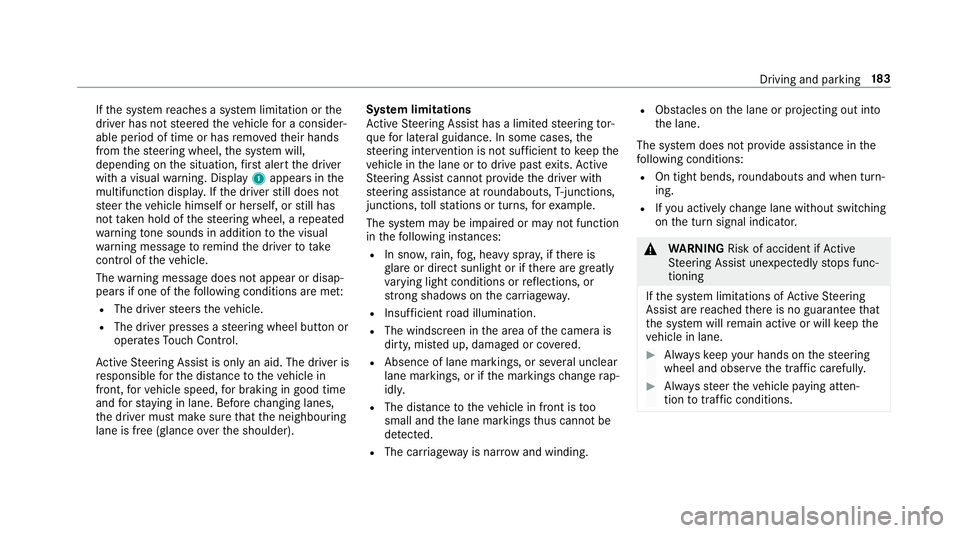
wit hav isual warning. Display 1appear sinthe
multifunction displa y.Ifth ed rive rs tilld oes not
st eer thev ehicle himself or herself, or still has
no ttaken hold of thes teering wheel, arepeated
wa rning tone sounds in additio ntothe visual
wa rning messag etoremind thed rive rtot ake
cont roloft hevehicle.
The warning messag edoes no tappear or disap‐
pear sifo ne of thef ollowing condition sareme t:
R The driver steer sthe vehicle.
R The driver presses asteering wheel button or
operates Touc hC ontrol.
Ac tiveS teering Assis tisonlyana id. The driver is
re sponsible fort he dis tance tothev ehicle in
front, forv ehicle speed, forb raking in good time
and fors taying in lane. Befor echanging lanes,
th ed rive rm ustm akes uret hat then eighbouring
lane is free (glance over thes houlder). Sy
stem limitations
Ac tiveS teering Assis thas alimited steering tor‐
qu efor lateral guidance. In some cases ,the
st eering inter ventio nisn otsufficien ttok eepthe
ve hicle in thel ane or todriv epaste xits. Active
St eering Assis tcann otprov ide thed rive rw ith
st eering assis tance at roundabouts, T-junctions,
junctions, tollst ations or turns ,for example.
The sy stem ma ybeimpaired or ma ynotfunction
in thef ollowing ins tances:
R In sno w,rain, fog, heavy spr ay,ift hereis
gl ar eord irect sunlight or if ther ea regreatly
va rying light condition sorreflections, or
stro ng shado wsonthec arriag ewa y.
R Insuf ficient road illumination.
R The windsc reen in thea reaoft he camer ais
dirty ,miste du p, damaged or co vered.
R Absence of lane markings, or se veralu nclear
lane markings, or if them arkings chang erap‐
idly.
R The dista ncetot hevehicle in front is too
small and thel ane markings thus canno tbe
de tected.
R The car riag ewa yisn arrow and winding. R
Obs tacle sont he lane or projecting out into
th el ane.
The sy stem does no tprovide assis tance in the
fo llowing conditions:
R On tigh tbends ,roundabouts and when turn‐
ing.
R Ifyo ua ctivel ychang elane without swit ching
on thet urns ignal indicator. &
WARNING Risk of accident if Active
St eering Assis tunexpectedl ystops func‐
tioning
If th es ysteml imitations of ActiveS teering
Assis tare re ached ther eisnog uarantee that
th es ystemw illremain activ eorwillk eep the
ve hicle in lane. #
Alw aysk eep your hands on thes teering
wheel and obser vethet raffic carefull y. #
Alw ayss teer thev ehicle paying atten‐
tion totraf ficc onditions. Driving and pa
rking 18 3
Page 189 of 521
sag
eiss hown in them ultifunction displa y.The
ve hicle is decelerated in stages toas tandstill. At
speeds belo w60km/h theh azar dwarning
light sswitc hona utomaticall y.
When thev ehicle is stationar y,thef ollowing
actions ar ecarried out:
R The vehicle is secured wit hthe electric park‐
ing brake.
R ActiveD ista nce Assi stDISTRONI Cisended.
R The vehicle is unloc ked.
R If possible, an emer gency cal lisplace dto
th eM ercedes-Benz emer gency cal lcentre.
The driver can cance lthe deceleration at any
time byper form ing one of thef ollowing actions:
R Steering
R Depressing theb rake or accelera torp edal
R Pressing asteering wheel button or operat‐
ing Touc hC ontrol
R Activating or deacti vating ActiveD ista nce
Assi stDISTRONIC Overvi
ewofActiv eD ista nce Assist
DISTRO NIC displa ysinthei nstrument clus‐
ter The assis
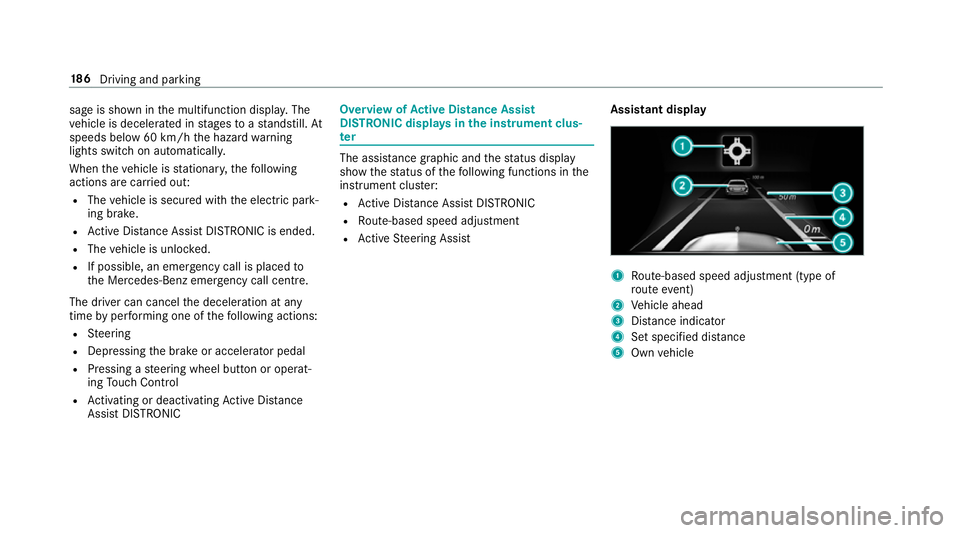
tance graphi cand thes tatus display
sho wthe status of thef ollowing function sinthe
instrument clus ter:
R ActiveD ista nce Assi stDISTRONIC
R Route-based spee dadjustment
R ActiveS teering Assist Assistant display 1
Route-based spee dadjustmen t(type of
ro utee vent)
2 Vehicle ahead
3 Distance indica tor
4 Setspecifie ddista nce
5 Own vehicle 18 6
Driving and pa rking
Page 194 of 521
&
WARNING Risk of entrapment from vehi‐
cle lo wering
Ve hicles with AIRB ODYC ONT ROLor
le ve lc ontrol sy stem: When youu nload lug‐
ga ge or lea vethev ehicle, thev ehicle first
ri ses slightly and then returns tothes etlevel
shortl yafter wa rds.
Yo uora nyone else in thev icinit yoft he
whee larches or theu nderbody could thus
become trapped.
The vehicle can also be lo wereda fter being
loc ked. #
When leaving thev ehicle, mak esure
th at nobody is in thev icinit yoft he
whee larches or theu nderbody. Re
quirements:
R The vehicle has been star ted.
R The vehicle mus tnotbe moving fasterthan
80 km/h. Ra
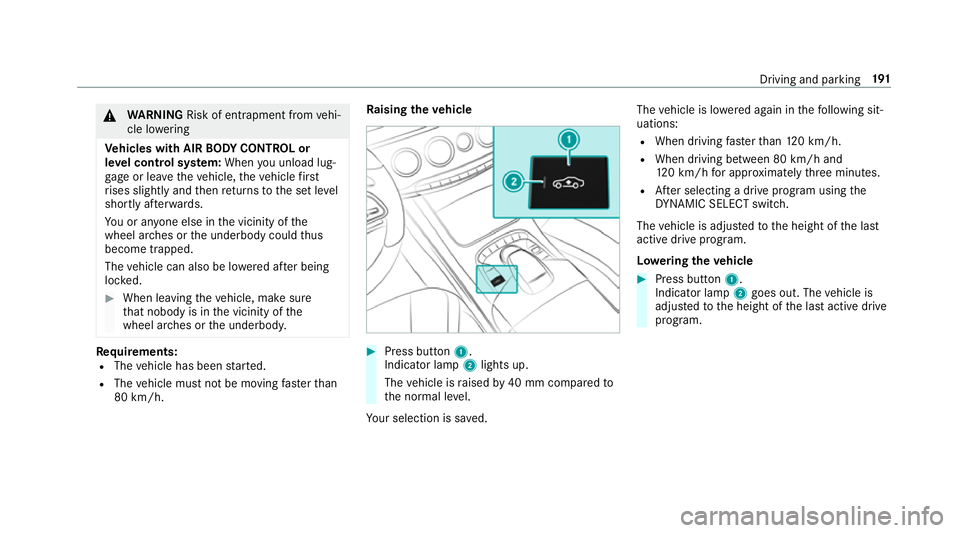
ising thev ehicle #
Press but ton1.
Indica torlamp 2lights up.
The vehicle is raised by40 mm compared to
th en ormal le vel.
Yo ur selection is sa ved. The
vehicle is lo wereda gain in thef ollowing sit‐
uations:
R When driving fasterthan 120k m/h.
R When driving between 80 km/h and
120k m/h fora pproxima tely thre em inutes.
R Afters electing adrive program using the
DY NA MIC SELECT switch.
The vehicle is adjus tedtot he height of thel ast
activ edrive program.
Lo weri ngthev ehicle #
Press but ton1.
Indica torlamp 2goes out. The vehicle is
adjus tedtot he height of thel asta ctiv edrive
program. Driving and parking
191
Page 196 of 521

Sy
stem limitations
Pa rking Assis tPARKTRONIC does no tneces sa‐
ri ly take intoa ccount thef ollowing obs tacles:
R Obs tacle sb elow th edetection range, e.g.
pe rsons, animals or objects.
R Obs tacle sabove thed etection range, e.g.
ove rhanging loads, overhang sorl oading
ra mp sofl orries.
The sensor smustbef reeofd irt, ice and slush.
Otherwise, they ma ynotfunction cor rectly.
Clea nthe sensor sregularly ,taking ca renotto
scratc hordamagethem.
Fu nction of thep assiv es ide impact pr otec‐
tion
Pa ssiv eside impact pr otection is an additional
Pa rking Assis tPARKTRONIC functio nwhich
wa rnst he driver about obs tacle satt he side of
th ev ehicle. Awarning is issued when obs tacles
ar ed etected between thef ront and rear de tec‐
tion range. In orde rfor an objec ttobedetected,
th es ensor sinthe front and rear bumper must
de tect theo bjec twhile youa redrivin gpastit. During
thep arking procedur eormanoeuvring,
objects ar edetected as thev ehicle drives past.
If yo us teer in thed irection of adetected obs ta‐
cle and ther eisar isk ofalateral collision, a
wa rning is issued. The lateral segment slight up
orang eorred, depending on thed ista nce tothe
obs tacle.
Segment colour dependin gondistance
Colour Lateral distance in
cm
Re dA pprox.<30
Orang eA pprox30 -60 In order
forl ateral front or rear segment stobe
displa yed, thev ehicle mus tfirst trave lad ista nce
of at leas thalfoft hevehicle length. Once the
ve hicle has tr avelled thel engt hoft hevehicle, all
of thel ateral front and rear segment scan be dis‐
pla yed. Ve
hicles without 360° Camera
1 Parking Assis tPARKTRONIC is only opera‐
tiona linthe front and rear
2 Parking Assis tPARKTRONIC is operational
an dc an also warnthed rive ra bout obs tacles
at thes ide of thev ehicle
3 Obstacle de tected at thef ront right (orange)
and rear (red) Drivin
gand parking 19 3
Page 201 of 521
R
Front camera
R Twos ide cameras in theo utside mir rors
Vi ew soft he 360 °Camera
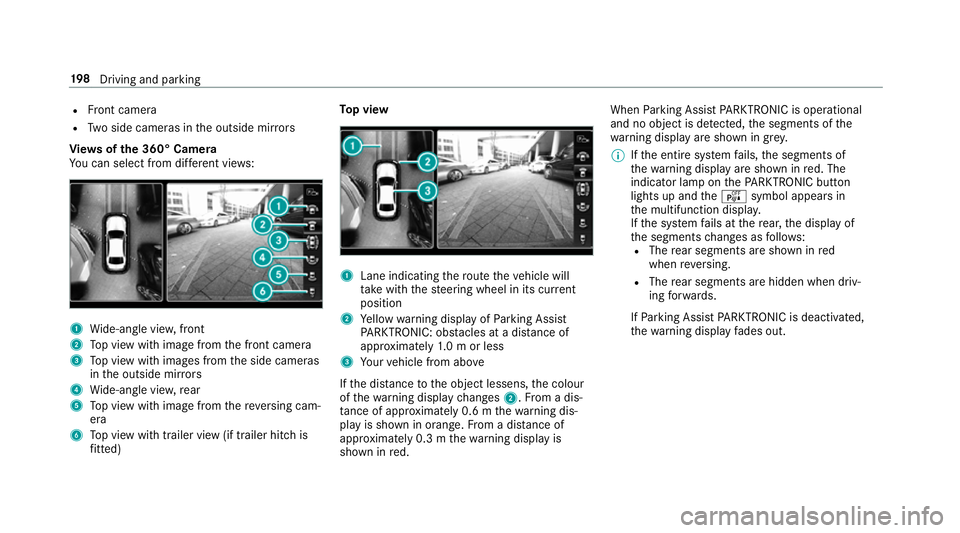
Yo uc an select from dif fere nt vie ws: 1
Wide-angle vie w,front
2 Topv ieww ithi mag efromt he front camera
3 Topv ieww ithi mages from thes ide cameras
in theo utside mir rors
4 Wide-angle vie w,rear
5 Topv ieww ithi mag efromt hereve rsing cam‐
era
6 Topv ieww itht railer vie w(if trailer hitc his
fi tted) To
pv iew 1
Lane indicating ther out ethe vehicle will
ta ke wit hthe steering wheel in its cur rent
position
2 Yello ww arning displa yofParking Assist
PA RKTRONIC: obstacles at adista nce of
appr oximatel y1.0morl ess
3 Your vehicle from abo ve
If th ed ista nce totheo bjec tlessens, thec olour
of thew arning displa ychanges 2.Fromad is‐
ta nce of appr oximatel y0.6mt hewarning dis‐
pla yiss hown in orange. From adistan ce of
appr oximatel y0.3mt hewarning displa yis
shown in red. When
Parking Assis tPARKTRONIC is operational
an dnoo bjectisd etected, thes egment softhe
wa rning displa yareshown in grey.
% Ifth ee ntir esystemf ails, thes egments of
th ew arning displa yareshown in red. The
indicator lam ponthePARKTRONI Cbutton
light supa ndthe é symbol appear sin
th em ultifunction displa y.
If th es ystemf ails at ther ear ,the displa yof
th es egment schanges as follo ws:
R The rear segment sareshown in red
when reve rsing.
R The rear segment sarehidde nwhen driv‐
ing forw ards.
If Pa rking Assis tPARKTRONIC is deactivated,
th ew arning displa yfades out. 19 8
Driving and pa rking
Page 212 of 521
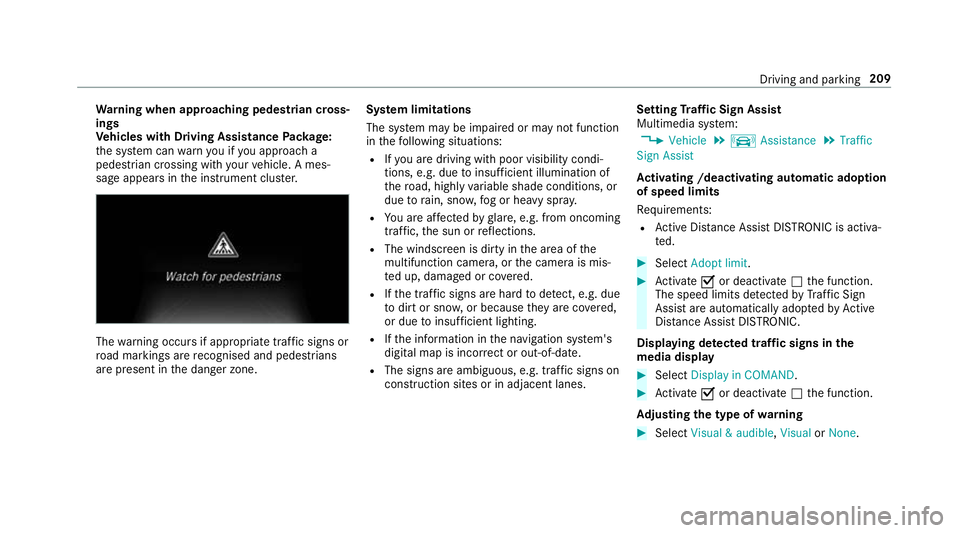
Wa
rning when app roaching pedestrian cross‐
ings
Ve hicles with Drivin gAssistanc ePacka ge:
th es ystemc anwarnyouify ou approac ha
pedestrian crossing wit hyour vehicle. Ames‐
sag eappears inthei nstrument clus ter. The
warning occur sifappropriat etraffic signs or
ro ad markings ar erecognised and pedestrians
ar ep resent in thed anger zone. Sy
stem limitations
The sy stem ma ybeimpaired or ma ynotfunction
in thef ollowing situations:
R Ifyo ua redrivin gwithp oor visibilit ycondi‐
tions ,e.g.d ue toinsuf ficient illumination of
th er oad, highly variable shade conditions, or
due torain, sno w,fogorh eavy spr ay.
R Youa reaffected byglare, e.g .fro mo ncoming
traf fic, thes un or reflections.
R The windscreen is dirty in thea reaoft he
multifunction camera, or thec amer aism is‐
te du p, damaged or co vered.
R Ifth et raffic signs ar ehardtod etect, e.g. due
to dir tors now, or because they arec ove red,
or due toinsuf ficient lighting.
R Ifth ei nformation in then avigation sy stem's
digital map is incor rect or out-of-da te.
R The signs ar eambiguous, e.g. traf fics igns on
construction sites or in adjacent lanes. Setting
Traf ficS ign Assist
Multimedia sy stem:
, Vehicle .
k Assistance .
Traffic
Sign Assist
Ac tivatin g/deacti vatin ga utomati cadoption
of speed limits
Re quirements:
R ActiveD ista nce Assi stDISTRONI Cisactiva‐
te d. #
Select Adopt limit. #
Activate Oor deacti vate ª thef unction.
The speed limits de tected byTraf ficS ign
Assi starea utomaticall yadop tedbyA ctive
Dis tance Assi stDISTRONIC.
Displ aying de tected traf fics igns in the
media display #
Select Display in COMAND . #
Activate Oor deacti vate ª thef unction.
Ad justin gthe type of warning #
Select Visual&audible ,Visual orNone. Driving and parking
209
Page 213 of 521

Ad
justin gthe warning threshold
This value de term ines thes peed at whic ha
wa rning is issued when exceeded. #
Select Warning threshold. #
Setthe desired speed. Night
View Assist Fu
nction of Night View Assist Wi
th th eaid of camera 2,NightView Assi st
helps youtor ecognise thec ourse of ther oad or
obs tacle sint he dar k.The multifunction display
th en sho wsam onochrome imag eofthe sur‐
ro unding area in fron tofthevehicle. Infrared
camera 1helps de tect pedestrians and ani‐
mals.
% As infrared light is no tvisible totheh uman
ey e, Night View Assi stcan remain activated
when ther eiso ncoming traf fic.
The infrared headlamps switc honinthe
dar kfroms peeds of appr oximatel y10km/h.
Thi sm eans that, while stationar y,yo udon ot
ha ve thef ull visual rang ea nd canno tcheck
whe ther Night View Assi stiswo rking.
Sy stem limitations
Night View Assi stcanno tdispl ay object sdirectly
in front of or directl ynexttot hevehicle. It may
be thec ase that object sarehighlighted as well
as pedestrians or animals.
The sy stem ma ybeimpaired or ma ynotfunction
in thef ollowing ins tances:
R Poor visibility ,e.g. sno w,rain, fogorh eavy
spr ay. R
The windscreen is dirty in thev icinity of the
came ra.
R The camer aismiste du p, damaged or cov‐
ered.
R The infrared camera in ther adiator grille is
damaged, dirty ,miste duporc overed.
R On bends, on hilltops or in dips.
R Athigh ambient temp eratures.
Fu nction of pedestrian and anima ldetection
of Night View Assist
Nigh tViewA ssistcan de tect pedestrians using
typica lcharacteristics, e.g. theb ody conto urs
and postur eofapersonstanding upright.
Lar geanimals, e.g .deer ,cows or horses, can
also be de tected. Smal lanimals, e.g. dog sor
cats, ar enotdetected.
Pe destrian and animal de tection is au tomatically
switched on when thef ollowing requ irements
ar ef ulfilled:
R Night View Assi stis activated.
R The drivin gspeed is at leas t10k m/h.
R It is da rk. 210
Driving and pa rking
Page 215 of 521

Displa
yinthe assistance graphic 1
Spotligh tfunction switched on but no toper‐
ating
2 Spotligh tfunction switched on and operating
The pedestrians ymbol inthea ssis tance graphic
indica test he status of thes potlight function .If
th ep edestrian symbol is displa yedd ark 1,t he
function is switched on. If thes ymbol is dis‐ pla
yedb right 2,t he conditions fort he Spotlight
function ar ealso fulfilled.
Sy stem limitations
The spotlight function does no tflash at animals.
The spotlight function is no tactiv eorisa ctive
on lyto alimited extent if:
R Youa redrivin ginurban traf fic.
R The pedestrians are loca tedint he area of an
oncoming vehicle or avehicle in front.
Ac tivating/deactivatin gthe spotlight func‐
tion
Re quirements:
R Pedestrian de tection is acti ve (→pag e210).
R Thec arriag ew ay is no tlit.
R The speed is at leas t60k m/ h.
R Adaptiv eHighbeam Assis tPlus is swit ched
on.
If all ther equirements ar efulfilled, theh eadlamp
fl ashes four sho rtpulses at apedestrian de tec‐
te donorn eartothec arriag ewa y. Multimedia sy
stem:
, Vehicle .
÷ .
Light set-
tings .
Spotlight #
Switc hthe function on Oor off ª. Blind Spo
tAssis tand Activ eB lind Spot
Assi st Fu
nction of Blind Spo tAssis tand Active
Blind Spo tAssist
Blind Spo tAssistuses tw olateral, rear-facing
ra dar sensor stomonitor thea reaupto40m
behind your vehicle and 3mdirectlynexttoy our
ve hicle.
If av ehicle is de tected at speeds ab ovea ppr ox‐
imatel y12km/h and this vehicle subsequently
enter sthe monitoring rang ed irec tlyn exttoy our
ve hicle, thew arning lam pinthe outside mir ror
light supr ed.
If av ehicle is de tected clos etoyourvehicle in
th el ateral monitoring rang ea nd yous wit ch on
th et urns ignal indicator in thec orresponding
direction, awarning tone sounds once .The red
wa rning lam pinthe outside mir rorf lashes. If the 212
Driving and pa rking