2017 MERCEDES-BENZ GLC display
[x] Cancel search: displayPage 53 of 374
Occupant Classification System
(OCS)
Introduction The Occupant Classification System (OCS) cat-
egorizes the person in the front-passenger seat.
Depending on that result, the front-passenger
front air bag is either enabled or deactivated.
The system does not deactivate: R
the side impact air bag R
the window curtain air bag R
the Emergency Tensioning Devices
Requirements To be classified correctly, the front passenger
must sit: R
with the seat belt fastened correctly R
in an almost upright position with their back
against the seat backrest R
with their feet resting on the floor, if possible
If the front passenger does not observe these
conditions, OCS may produce a false classifica-
tion, e.g. because the front passenger: R
transfers their weight by supporting them-
selves on a vehicle armrest R
sits in such a way that their weight is raised
from the seat cushion
If it is absolutely necessary to install a child
restraint system on the front-passenger seat, be
sure to observe the correct positioning of the
child restraint system. Never place objects
under or behind the child restraint system, e.g. a
cushion. Fully retract the seat cushion length.
The entire base of the child restraint system
must always rest on the seat cushion of the
front-passenger seat. The backrest of the
forward-facing child restraint system must lie as
flat as possible against the backrest of the front-
passenger seat.
The child restraint system must not touch the
roof or be subjected to a load by the head
restraint. Adjust the angle of the seat backrest
and the head restraint position accordingly.
Only then can OCS be guaranteed to function
correctly. Always observe the child restraint sys-
tem manufacturer's installation and operating
instructions. Occupant Classification System opera-
tion (OCS)
C
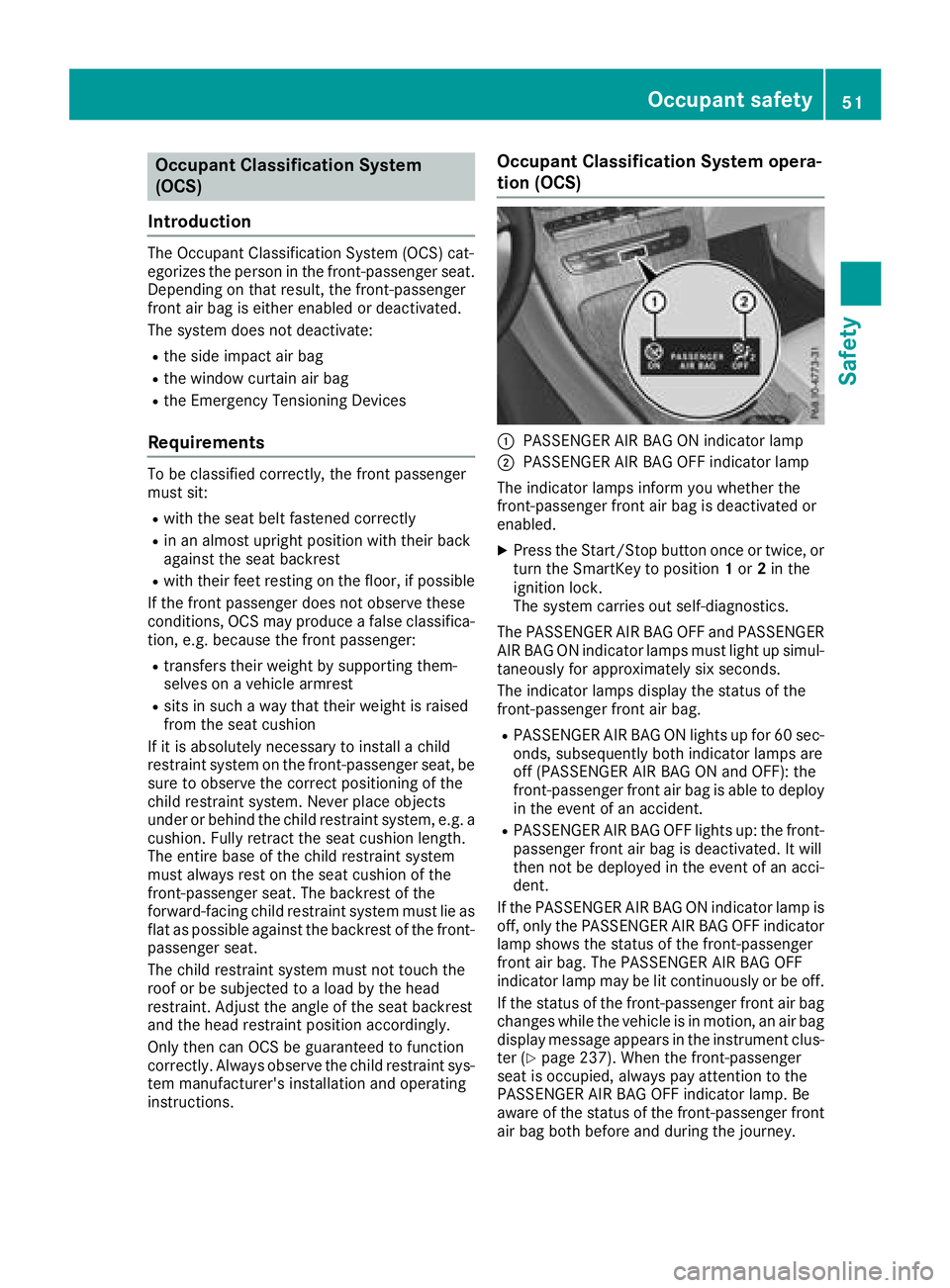
PASSENGER AIR BAG ON indicator lamp D
PASSENGER AIR BAG OFF indicator lamp
The indicator lamps inform you whether the
front-passenger front air bag is deactivated or
enabled. X
Press the Start/Stop button once or twice, or
turn the SmartKey to position 1 or 2 in the
ignition lock.
The system carries out self-diagnostics.
The PASSENGER AIR BAG OFF and PASSENGER
AIR BAG ON indicator lamps must light up simul-
taneously for approximately six seconds.
The indicator lamps display the status of the
front-passenger front air bag. R
PASSENGER AIR BAG ON lights up for 60 sec-
onds, subsequently both indicator lamps are
off (PASSENGER AIR BAG ON and OFF): the
front-passenger front air bag is able to deploy
in the event of an accident. R
PASSENGER AIR BAG OFF lights up: the front-
passenger front air bag is deactivated. It will
then not be deployed in the event of an acci-
dent.
If the PASSENGER AIR BAG ON indicator lamp is
off, only the PASSENGER AIR BAG OFF indicator
lamp shows the status of the front-passenger
front air bag. The PASSENGER AIR BAG OFF
indicator lamp may be lit continuously or be off.
If the status of the front-passenger front air bag
changes while the vehicle is in motion, an air bag
display message appears in the instrument clus-
ter ( Y
page 237). When the front-passenger
seat is occupied, always pay attention to the
PASSENGER AIR BAG OFF indicator lamp. Be
aware of the status of the front-passenger front
air bag both before and during the journey.Occupant safety 51
Safety Z
Page 56 of 374
passenger seat may not be used. Do not
install a child restraint system on the front-
passenger seat. Have the Occupant Classifi-
cation System (OCS) checked and repaired
immediately at a qualified specialist work-
shop.
G WARNING
Objects between the seat surface and the
child restraint system could affect OCS oper-
ation. This could result in the front-passenger
air bag not functioning as intended during an
accident. This poses an increased risk of
injury or even fatal injury.
Do not place any objects between the seat
surface and the child restraint system. The
entire base of the child restraint system must
always rest on the seat cushion of the front-
passenger seat. The backrest of the forward- facing child restraint system must, as far as
possible, be resting on the backrest of the
front-passenger seat. Always comply with the
child restraint system manufacturer's instal-
lation instructions.
After the system self-test, the PASSENGER AIR
BAG OFF or PASSENGER AIR BAG ON indicator
lamp displays the status of the front-passenger
front air bag ( Y
page 51). If the front-passenger
front air bag is enabled, the PASSENGER AIR
BAG ON indicator lamp lights up for 60 seconds
and then goes out.
If the PASSENGER AIR BAG ON indicator lamp is
off, only the PASSENGER AIR BAG OFF indicator
lamp shows the status of the front-passenger
front air bag. The PASSENGER AIR BAG OFF
indicator lamp may be lit continuously or be off.
For more information about the OCS, see "Prob-
lems with the Occupant Classification System"
( Y
page 54).
Problems with the Occupant Classification System (OCS) Be sure to observe the notes on "System self-test" ( Y
page 53).54
Occupant safety
Safety
Page 64 of 374
in the event of an accident. This poses an
increased risk of injury or even fatal injury.
Always lock rear seat backrests after instal-
ling a Top Tether belt. Observe the lock veri-
fication indicator.
If the rear seat backrest is not engaged and
locked, this will be shown in the multifunction
display in the instrument cluster.
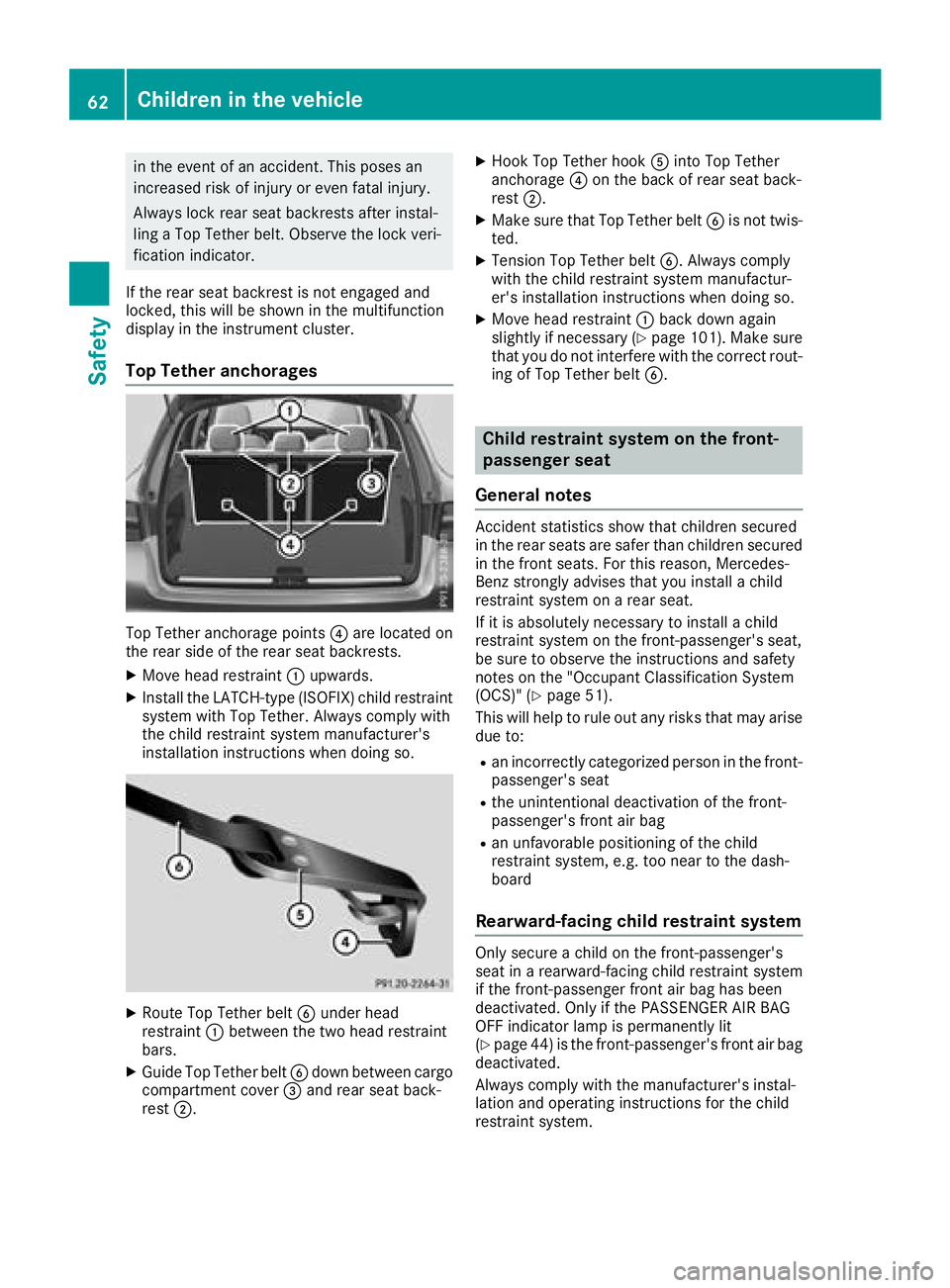
Top Tether anchorages
Top Tether anchorage points
Page 74 of 374
Only deactivate ESP ®
in the situations descri-
bed in the following.
! Avoid spinning the driven wheels for an
extended period with ESP ®
deactivated. You
could otherwise damage the drivetrain.
In the following situations, it may be better to
activate SPORT handling mode or deactivate
ESP ®
:R
when using snow chains R
in deep snow R
on sand or gravel R
on specially designated roads when the vehi-
cle's own oversteering and understeering
characteristics are desired
Spinning the wheels results in a cutting action
which provides better grip.
Driving in SPORT handling mode or without
ESP ®
requires an extremely qualified and expe-
rienced driver.
i Activate ESP ®
as soon as the situations
described above no longer apply. ESP ®
will
otherwise not be able to stabilize the vehicle if
the vehicle starts to skid or a wheel starts to
spin.
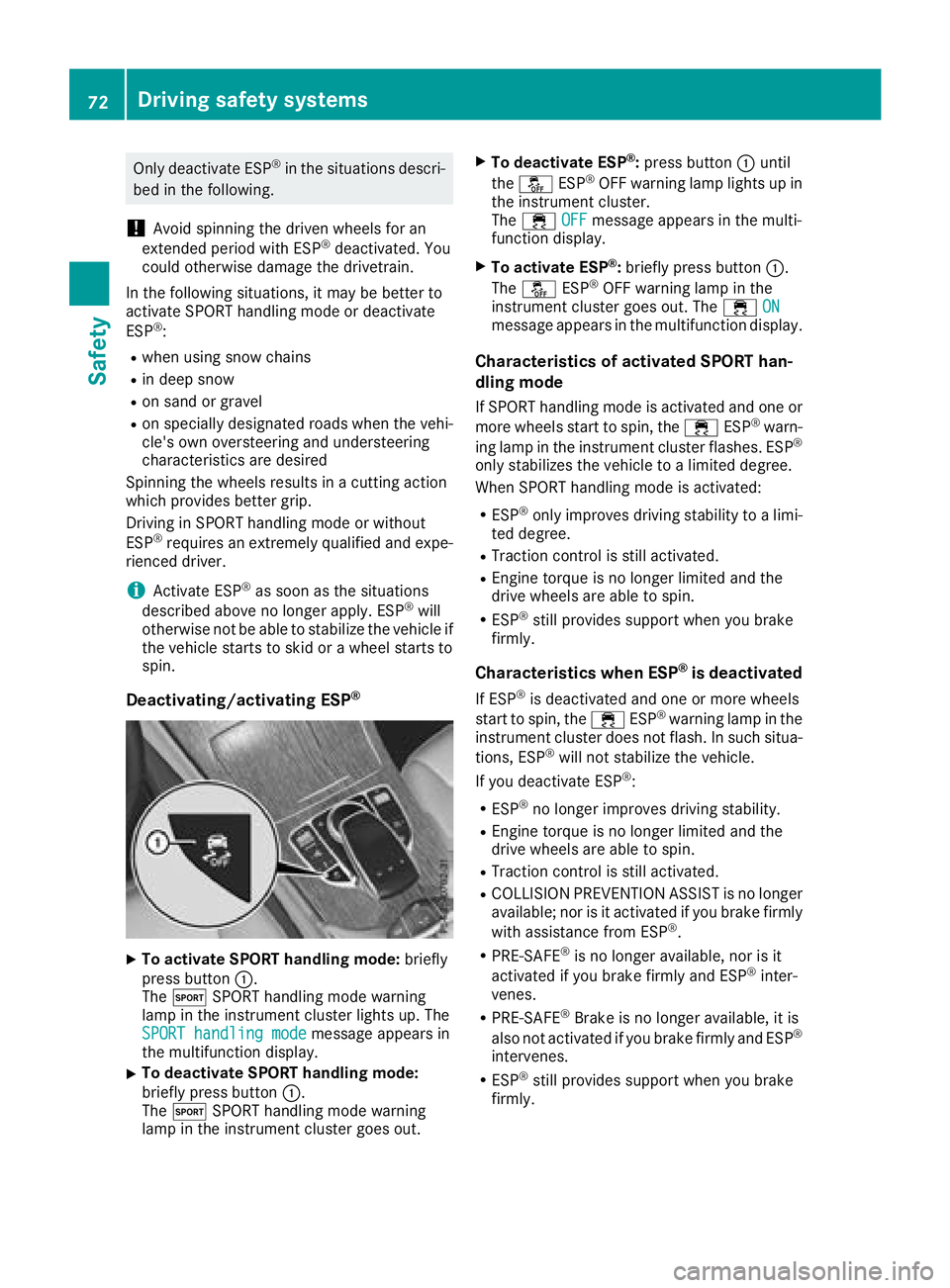
Deactivating/activating ESP ®
X
To activate SPORT handling mode: briefly
press button C .
The t SPORT handling mode warning
lamp in the instrument cluster lights up. The
SPORT handling mode
message appears in
the multifunction display. X
To deactivate SPORT handling mode:
briefly press button C .
The t SPORT handling mode warning
lamp in the instrument cluster goes out. X
To deactivate ESP ®
: press button C until
the
Page 75 of 374
ESP ®
trailer stabilizationGeneral information If your vehicle/trailer combination begins to
swerve, ESP ®
assists you in this situation. ESP ®
slows the vehicle down by braking and limiting
the engine output until the vehicle/trailer com-
bination has stabilized.
Important safety notes
G WARNING
If road and weather conditions are poor,
trailer stabilization will not be able to prevent
the vehicle/trailer combination from swerv-
ing. Trailers with a high center of gravity can
tip over before ESP ®
can detect this. There is
a risk of an accident.
Always adapt your driving style to the prevail-
ing road and weather conditions.
If your vehicle with trailer (vehicle/trailer com-
bination) begins to lurch, you can only stabilize
the vehicle/trailer combination by depressing
the brake firmly.
ESP ®
trailer stabilization is active above speeds
of approximately 40 mph (65 km/h).
ESP ®
trailer stabilization does not work if ESP ®
is deactivated or malfunctioning.
Crosswind Assist
General information Strong crosswind gusts can impair the ability of
your vehicle to drive straight ahead. The cross-
wind driving assistance function integrated in
ESP ®
noticeably reduces these impairments.
ESP ®
intervenes automatically according to the
direction and intensity of the crosswinds affect-
ing your vehicle.
ESP ®
intervenes with stabilizing braking to
assist you in keeping the vehicle in the lane.
Crosswind Assist is active at vehicle speeds
above 50 mph (80 km/h) when driving straight
ahead or cornering gently.
Important safety notes
Crosswind Assist does not work if ESP ®
is
switched off or deactivated because of a mal-
function. EBD (electronic brake force distribu-
tion)
General information EBD monitors and controls the brake pressure
on the rear wheels to improve driving stability
while braking.
Important safety notes
i Observe the "Important safety notes" sec-
tion ( Y
page 65).
G WARNING
If EBD is malfunctioning, the rear wheels can
lock, e.g. under full braking. This increases the
risk of skidding and an accident.
You should therefore adapt your driving style
to the different handling characteristics. Have
the brake system checked at a qualified spe-
cialist workshop.
Observe information regarding indicator and
warning lamps ( Y
page 259) as well as display
messages ( Y
page 230).
ADAPTIVE BRAKE ADAPTIVE BRAKE enhances braking safety and
offers increased braking comfort. In addition to
the braking function, ADAPTIVE BRAKE also has
the HOLD function ( Y
page 171) and hill start
assist ( Y
page 136).
PRE-SAFE ®
Brake
General information PRE-SAFE ®
Brake can help you to minimize the
risk of a collision with a vehicle ahead or a
pedestrian, and reduce the effects of such a
collision. If PRE-SAFE ®
Brake has detected a risk
of collision, you will be warned visually and
acoustically as well as by automatic braking.
i Pay attention to the important safety notes
in the "Driving safety systems" section
( Y
page 65).
PRE ‑ SAFE ®
Brake is only available in vehicles
with the Driving Assistance Plus package.Driving safety systems 73
Safety Z
Page 112 of 374
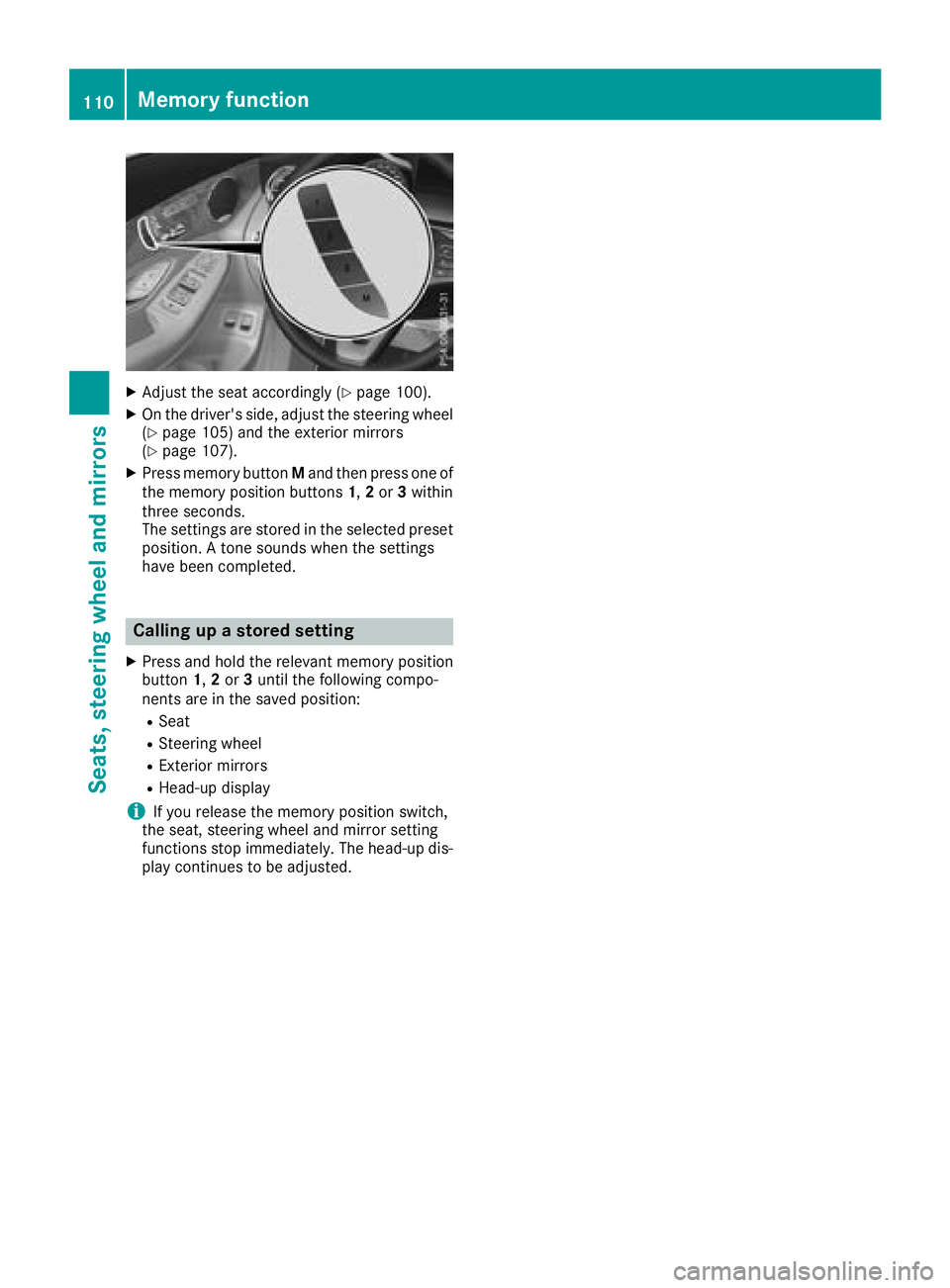
X
Adjust the seat accordingly ( Y
page 100).X
On the driver's side, adjust the steering wheel
( Y
page 105) and the exterior mirrors
( Y
page 107).X
Press memory button M and then press one of
the memory position buttons 1 , 2 or 3 within
three seconds.
The settings are stored in the selected preset
position. A tone sounds when the settings
have been completed.
Calling up a stored setting X
Press and hold the relevant memory position
button 1 , 2 or 3 until the following compo-
nents are in the saved position: R
Seat R
Steering wheel R
Exterior mirrors R
Head-up display
i If you release the memory position switch,
the seat, steering wheel and mirror setting
functions stop immediately. The head-up dis-
play continues to be adjusted.110
Memory function
Seats, steering wheel an d mirrors
Page 136 of 374
G WARNING
Flammable materials introduced through
environmental influence or by animals can
ignite if in contact with the exhaust system or
parts of the engine that heat up. There is a risk
of fire.
Carry out regular checks to make sure that
there are no flammable foreign materials in
the engine compartment or in the exhaust
system.
General notes Vehicles with a gasoline engine: the catalytic
converter is preheated for up to 30 seconds
after a cold start. The sound of the engine may
change during this time.
Automatic transmission X
Shift the transmission to position ]
( Y
page 141).
The transmission position indicator on the
multifunction display shows ]
( Y
page 142).
i You can start the engine in transmission
position ] and \\ .
Starting procedure with the SmartKey To start the engine using the SmartKey instead
of the Start/Stop button, pull the Start/Stop
button out of the ignition lock. X
To start a diesel engine: turn the SmartKey
to position H in the ignition lock
( Y
page 132).
The \( preglow indicator lamp in the instru-
ment cluster lights up. X
Turn the SmartKey to position I in the igni-
tion lock ( Y
page 132) and release it as soon
as the engine is running.
i Vehicles with a diesel engine: you can
start the engine without preglow if the engine
is warm.
If the engine will not start: X
Remove the SmartKey from the ignition lock. X
Reinsert the SmartKey into the ignition lock
after a short waiting period. X
Turn the SmartKey to position H in the igni-
tion lock ( Y
page 132).
The indicator lamps in the instrument cluster
light up ( Y
page 256). X
Turn the SmartKey to position I in the igni-
tion lock ( Y
page 132) and release it as soon
as the engine is running.
Starting procedure with the Start/Stop
button The Start/Stop button is only available on vehi-
cles with KEYLESS-GO or the KEYLESS-GO start
function.
The Start/Stop button can be used to start the
vehicle manually without inserting the SmartKey
into the ignition lock. The Start/Stop button
must be inserted in the ignition lock and the
SmartKey must be in the vehicle. This mode for
starting the engine operates independently of
the ECO start/stop automatic engine start func-
tion.
You can start the engine if a valid SmartKey is in
the vehicle. Switch off the engine and always
take the SmartKey with you when leaving the
vehicle, even if you only leave it for a short time.
Pay attention to the important safety notes. X
Depress the brake pedal and keep it
depressed. X
Press the Start/Stop button once
( Y
page 133).
Vehicles with a gasoline engine: the engine
starts.
Vehicles with a diesel engine: preglow is
activated and the engine starts.
Starting procedure via smartphone Observe the important safety notes on starting
the engine ( Y
page 133).
You can also start your engine via your smart-
phone from outside the vehicle. In this case, the
previously selected climate control setting is
activated. In this way you can cool or heat the
interior of the vehicle before starting the jour-
ney.
Only start the engine via your smartphone if it is
safe to start and run the engine where your vehi-
cle is parked.
Observe the legal stipulations in the area where
your vehicle is parked. Engine start via smart-
phone may be limited to certain countries or
regions.134
Driving
Driving and parking
Page 138 of 374
To ensure that you do not roll backwards when
pulling away on an uphill slope, engage the elec-
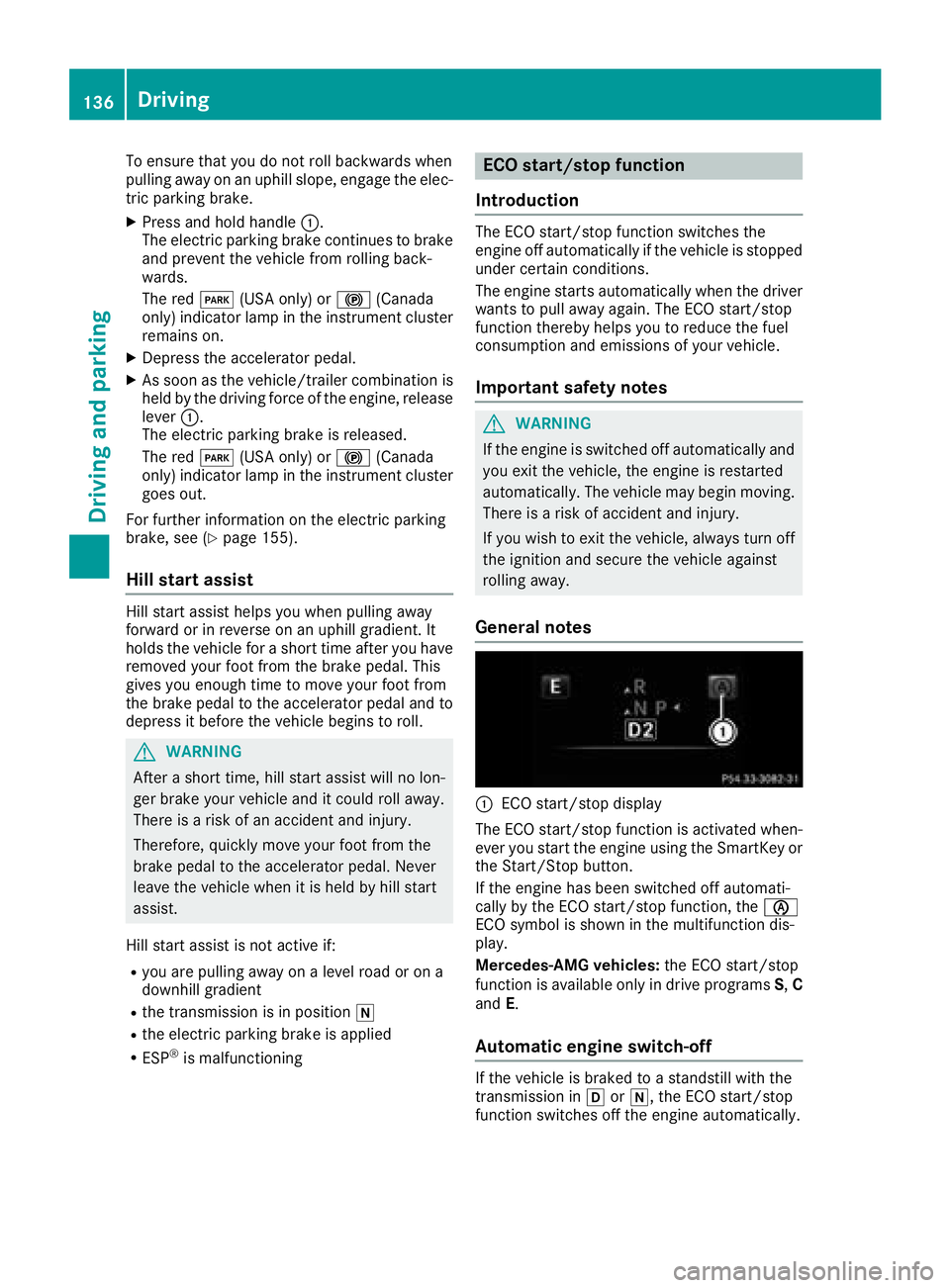
tric parking brake. X
Press and hold handle C .
The electric parking brake continues to brake
and prevent the vehicle from rolling back-
wards.
The red I (USA only) or $ (Canada
only) indicator lamp in the instrument cluster
remains on. X
Depress the accelerator pedal. X
As soon as the vehicle/trailer combination is
held by the driving force of the engine, release
lever C .
The electric parking brake is released.
The red I (USA only) or $ (Canada
only) indicator lamp in the instrument cluster
goes out.
For further information on the electric parking
brake, see ( Y
page 155).
Hill start assist Hill start assist helps you when pulling away
forward or in reverse on an uphill gradient. It
holds the vehicle for a short time after you have
removed your foot from the brake pedal. This
gives you enough time to move your foot from
the brake pedal to the accelerator pedal and to
depress it before the vehicle begins to roll.
G WARNING
After a short time, hill start assist will no lon-
ger brake your vehicle and it could roll away.
There is a risk of an accident and injury.
Therefore, quickly move your foot from the
brake pedal to the accelerator pedal. Never
leave the vehicle when it is held by hill start
assist.
Hill start assist is not active if: R
you are pulling away on a level road or on a
downhill gradient R
the transmission is in position \\R
the electric parking brake is applied R
ESP ®
is malfunctioning ECO start/stop function
Introduction The ECO start/stop function switches the
engine off automatically if the vehicle is stopped
under certain conditions.
The engine starts automatically when the driver
wants to pull away again. The ECO start/stop
function thereby helps you to reduce the fuel
consumption and emissions of your vehicle.
Important safety notes
G WARNING
If the engine is switched off automatically and
you exit the vehicle, the engine is restarted
automatically. The vehicle may begin moving.
There is a risk of accident and injury.
If you wish to exit the vehicle, always turn off
the ignition and secure the vehicle against
rolling away.
General notes
C
ECO start/stop display
The ECO start/stop function is activated when-
ever you start the engine using the SmartKey or
the Start/Stop button.
If the engine has been switched off automati-
cally by the ECO start/stop function, the