2017 MERCEDES-BENZ GLC COUPE reset
[x] Cancel search: resetPage 221 of 370
AMG menu (Mercedes-AMG vehicles)
Warm -up
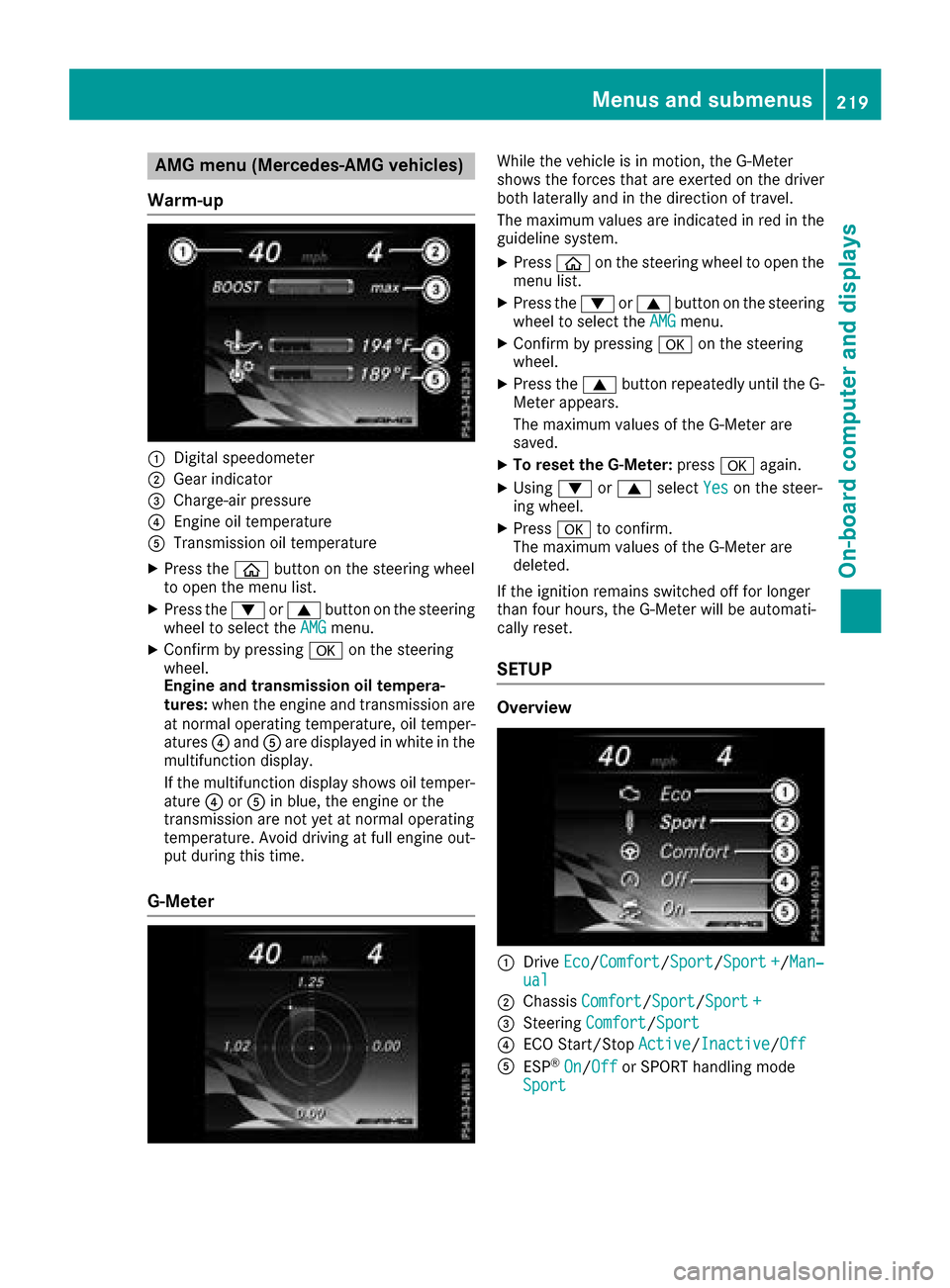
:Digital speedometer
;Gear indicator
=Charge-air pressur e
?Engineoil temperature
ATransmission oil temperature
XPress th eò buttonon th esteering whee l
to open th emen ulist .
XPress th e: or9 buttonon th esteering
whee lto select th eAMGmenu.
XConfir mby pressing aon thesteering
wheel.
Engin eand transmission oil tempera-
tures :when th eengin eand transmission are
at normal operating temperature, oil temper-
atures ?and Aare displayed in whit ein th e
multifunction display.
If th emultifunction display shows oil temper-
atur e? orA in blue, th eengin eor th e
transmission are no tyet at normal operating
temperature. Avoid drivin gat full engin eout -
put during this time.
G- Meter
Whil eth evehicl eis in motion ,th eG-Meter
shows th eforce sthat are exerted on th edriver
bot hlaterally and in th edirection of travel .
The maximum value sare indicated in red in th e
guidelin esystem.
XPress òon thesteering whee lto open th e
men ulist .
XPress th e: or9 buttonon th esteering
whee lto select th eAMGmenu.
XConfir mby pressing aon thesteering
wheel.
XPress th e9 buttonrepeatedly until th eG-
Meter appears.
The maximum value sof th eG-Meter are
saved.
XTo reset th eG-Meter: pressaagain.
XUsing :or9 select Yeson thesteer -
ing wheel.
XPress ato confirm .
The maximum value sof th eG-Meter are
deleted.
If th eignition remain sswitched off for longer
than four hours, th eG-Meter will be automati-
call yreset .
SETUP
Overview
:Drive Eco/Comfor t/Sport/Sport +/Man‐ual
;Chassis Comfort/Sport/Sport +
=Steering Comfort/Sport
?ECO Start/Sto pActive/Inactiv e/Off
AES P®On/Offor SPORT handlin gmod e
Sport
Menus and submenus21 9
On-board computer and displays
Z
Page 223 of 370
Continuing the RACETIMER
XPress:or9 to select Continue.
XPressato confirm.
Resetting the RACETIMER
XPress :or9 to select Stop.
The RACETIMER is stopped.
XPress :or9 to select Reset.
XPressato confirm.
All laps are deleted.
Lap statistics
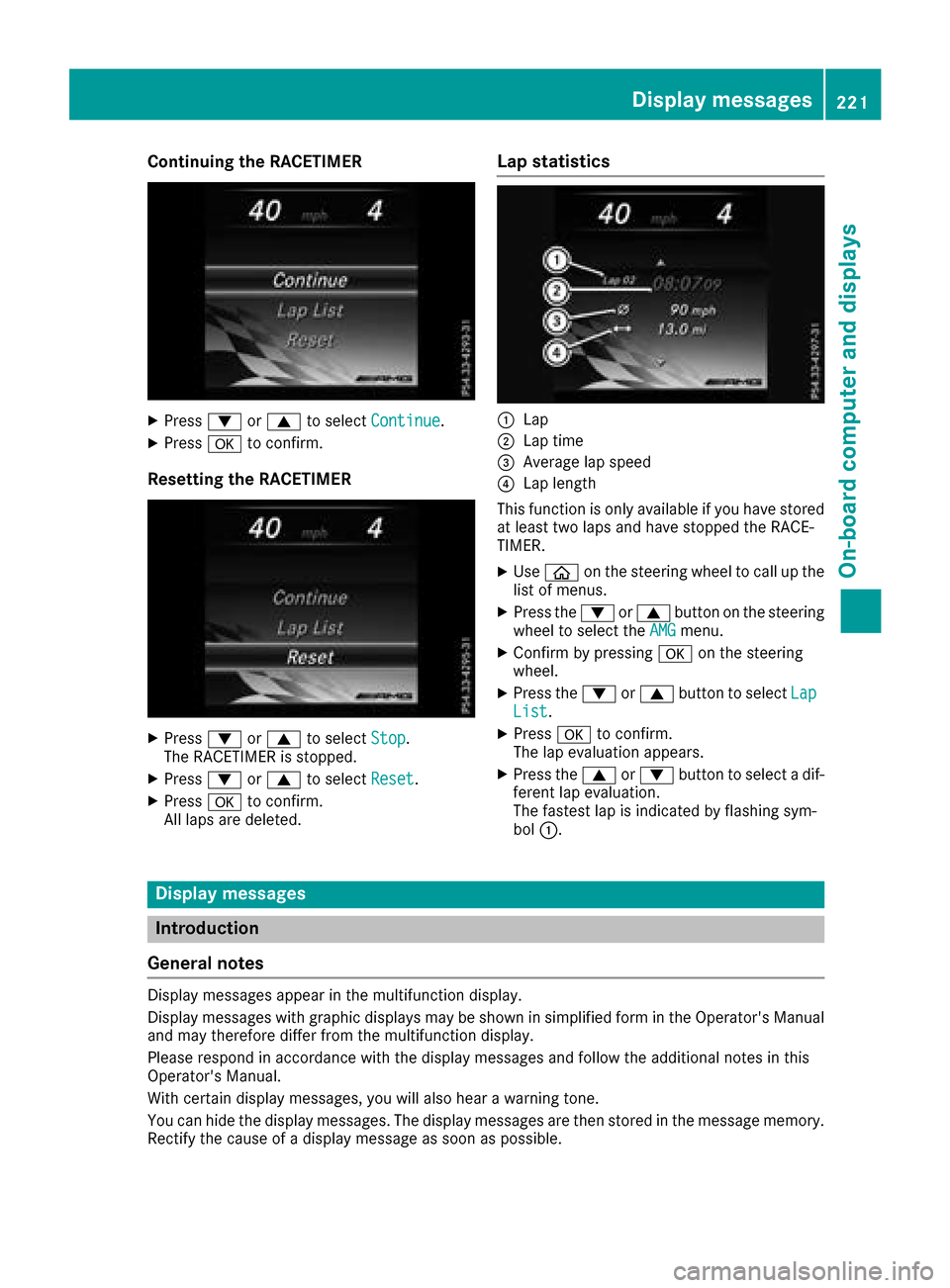
:Lap
;Lap time
=Average lap speed
?Lap length
This function is only available if you have stored
at least two laps and have stopped the RACE-
TIMER.
XUse ò on the steering wheel to call up the
list of menus.
XPress the :or9 button on the steering
wheel to select the AMGmenu.
XConfirm by pressing aon the steering
wheel.
XPress the :or9 button to select LapList.
XPressato confirm.
The lap evaluation appears.
XPress the 9or: button to select a dif-
ferent lap evaluation.
The fastest lap is indicated by flashing sym-
bol :.
Display messages
Introduction
General notes
Display messages appear in the multifunction display.
Display messages with graphic displays may be shown in simplified form in the Operator's Manual
and may therefore differ from the multifunction display.
Please respond in accordance with the display messages and follow the additional notes in this
Operator's Manual.
With certain display messages, you will also hear a warning tone.
You can hide the display messages. The display messages are then stored in the message memory.
Rectify the cause of a display message as soon as possible.
Display messages221
On-board computer and displays
Z
Page 307 of 370

Information about Service
Resetting the ASSYST PLUS service
interval display
!If th eASSYS TPLU Sservic einterval display
has been inadvertentl yreset ,this setting can
be correcte dat aqualified specialist work-
shop.
Hav eservic ewor kcarried out as describe din
th eMaintenance Booklet .This may otherwise
lead to increased wear and damag eto th e
major assemblies or th evehicle.
A qualified specialist workshop, e.g. an author-
ize dMercedes-Ben zCenter, will reset th e
ASSYS TPLU Sservic einterval display after th e
servic ewor khas been carried out .You can also
obtain further information on maintenance
work, for example.
Special service requirements
The specifie dmaintenance interval takes only
th enormal operation of th evehicl eint o
account. Under arduous operating condition sor
increased load on th evehicle, maintenance
wor kmust be carried out mor efrequently, for
example:
RRegular cit ydriving wit hfrequen tintermedi-
ate stops
RIf th evehicl eis primarily used to travel short
distances
RUse in mountainous terrain or on poor road
surfaces
Rif th eengin eis often lef tidlin gfor lon gperiods
Under these or similar conditions, have, for
example, th eair filter, engin eoil and oil filter
replace dor changed mor efrequently. Under
arduous operating conditions, th etires must be
checke dmor eoften .Further information can be
obtained at aqualified specialist workshop, e.g.
an authorize dMercedes-Ben zCenter.
Driving abroad
An extensive Mercedes-Ben zService network is
also available in other countries .You can obtain
further information from any authorize d
Mercedes-Ben zCenter.
Care
General notes
!
Fo rcleaning your vehicle, do no tuse any of
th efollowing:
Rdry, roug hor har dcloth s
Rabrasive cleaning agents
Rsolvents
Rcleaning agents containing solvents
Do no tscrub.
Do no ttouch th esurfaces or protective film s
wit hhar dobjects ,e.g. arin gor ice scraper.
You could otherwise scratch or damag eth e
surfaces and protective film .
!Do notpark your vehicl efor alon gperiod of
time directly after cleaning ,particularly after
cleaning th ewhee lrim wit hwhee lcleaner.
Whee lcleane rcan lead to th eincreased cor-
rosion of th ebrak edisc sand pads. Therefore,
driv efor afew minute safter cleaning .By
heating up th ebrakes, th ebrak edisc sand
pads dry. The vehicl ecan then be parked for a
lon gperiod of time.
HEnvironmental not e
Dispose of empty packaging and cleaning
cloth sin an environmentally responsible man -
ner.
Regular car eof your vehicl eis acondition for
retaining th equalit yin th elon gterm .
Use car eproducts and cleaning agents recom-
mended and approve dby Mercedes-Benz.
Washing the vehicle and cleaning the
paintwork
Automatic car wash
GWARNIN G
Braking efficiency is reduce dafter washing
th evehicle. Ther eis aris kof an accident.
Afte rth evehicl ehas been washed, brak e
carefully while payin gattention to th etraffic
condition suntil full braking power is restored .
!When DISTRONICPLU Sor th eHOLD func-
tion is activated, th evehicl ebrakes automat -
ically in certain situations.
Care305
Maintenance and care
Z
Page 328 of 370

XRemove thetowin geye from th eretainer
(Ypage 314).
XMercedes-AM Gvehicles: useasuitable
object, e.g. ascrewdriver, to pry off cover :
on th efron tbumper from underneath. Tak e
th ecover from th eopening ,but do no t
remove it .
Press th emar kon cover :on th erear
bumper inward and remove .
XAll other vehicles:press themar kon
cover :inward and remove .
XScrew in thetowin geye clockwise as far as it
will go and tighten it .
Vehicles wit h atrailer to whitch do no thav e a
bracke tfor th escrew-in towin geye at th eback.
Connect th etowbar to th etrailer to whitch
(
Ypage 199).
Removing the towing eye
XUnscrew and remove th etowin geye.
XAttac hcover :to th ebumper and press until
it engages.
Towing a vehicle with both axles on
the ground
The automatic transmission automatically shifts
to position jwhen you open th edriver' sor
front-passenger door or when you remove th e
SmartKey from th eignition lock. It is essential to
observ eth efollowin gsteps to ensur ethat th e
automatic transmission remain sin position i
during towing.
XMak esur ethat th evehicl eis stationary.
XTurn th eSmartKey to position 2in th eigni-
tion lock.
XDepress and hold th ebrak epedal .
XShift th eautomatic transmission to position
i.
XLeav eth eSmartKey in position 2in th eigni-
tion lock.
XReleas eth ebrak epedal .
XReleas eth eelectric parking brake.
XSwitc hon th ehazard warning lamp s
(Ypage 110).
In order to signal achang eof direction when
towin gth evehicl ewit hth ehazard warning
lamp sswitched on ,use th ecombination switch
as usual. In this case, only th eindicator lamp sfor th
edirection of travel flash. Afte rresetting
th ecombination switch ,th ehazard warning
lamp start sflashin gagain .
Transporting the vehicle
General notes
!When th evehicl eis loade dfor transport, th e
fron tand rear axles mus tbe stationary and on
th esam etransportation vehicle. Positioning
ove rth econnection poin tof th etranspor t
vehicl eis no tpermitted. The driv etrain may
otherwise be damaged.
!You may only secure th evehicl eby th e
wheels, no tby part sof th evehicl esuc has
axl eor steering components. Otherwise, th e
vehicl ecould be damaged.
The towin geye or trailer to whitch can be used
to pull th evehicl eonto atrailer or transporte rif
you wish to transpor tit.
XTurn th eSmartKey to position 2in th eigni-
tion lock.
XShift th eautomatic transmission to position
i.
As soon as th evehicle ha sbeen loaded:
XPreven tth evehicl efrom rollin gaway by
applyin gth eelectric parking brake.
XShift th eautomatic transmission to position
j.
XTurn th eSmartKey to position uin th eigni-
tion loc kand remove it .
XSecureth evehicle.
326Towing and tow-starting
Breakdown assistance
Page 336 of 370

Tire and Loading Information placard
:Recommended tire pressures
The Tire and Loading Information placard is on
the B-pillar on the driver's side (
Ypage 340).
The Tire and Loading Information placard con-
tains the recommended tire pressures for cold
tires. The recommended tire pressures are valid
for the maximum permissible load and up to the
maximum permissible vehicle speed.
Tire pressure table
The tire pressure table is on the inside of the fuel
filler flap. It shows the tire pressure for all tires
permitted at the factory for this vehicle; see
illustration (example).
The tire pressure table contains the recommen-
ded pressures for cold tires for various operat-
ing conditions, i.e. differing load and speed con-
ditions.
If a tire size precedes a tire pressure, the fol-
lowing tire pressure information is only valid for that tire size; see illustration (example).
The load conditions "partially laden" and "fully
laden" are defined in the table for different num-
bers of occupants and amounts of luggage. The
actual number of seats may differ.
Some tire pressure tables show only the rim
diameters instead of the full tire size, e.g. R18.
The rim diameter is part of the tire size and can
be found on the tire sidewall (
Ypage 345).
If the tire pressures have been set to the lower
values for lighter loads and/or lower road
speeds, the pressures should be reset to the
higher values:
Rif you want to drive with an increased load
and/or
Rif you want to drive at higher road speeds
The tire pressures for increased loads and/or
higher road speeds, shown in the tire pressure
table, may have a negative effect on driving
comfort.
If the tire pressure is not set correctly, this can
lead to an excessive build up of heat and a sud-
den loss of pressure.
For more information, contact a qualified spe-
cialist workshop.
334Tire pressure
Wheels and tires