2017 MERCEDES-BENZ GLA SUV technical data
[x] Cancel search: technical dataPage 6 of 369
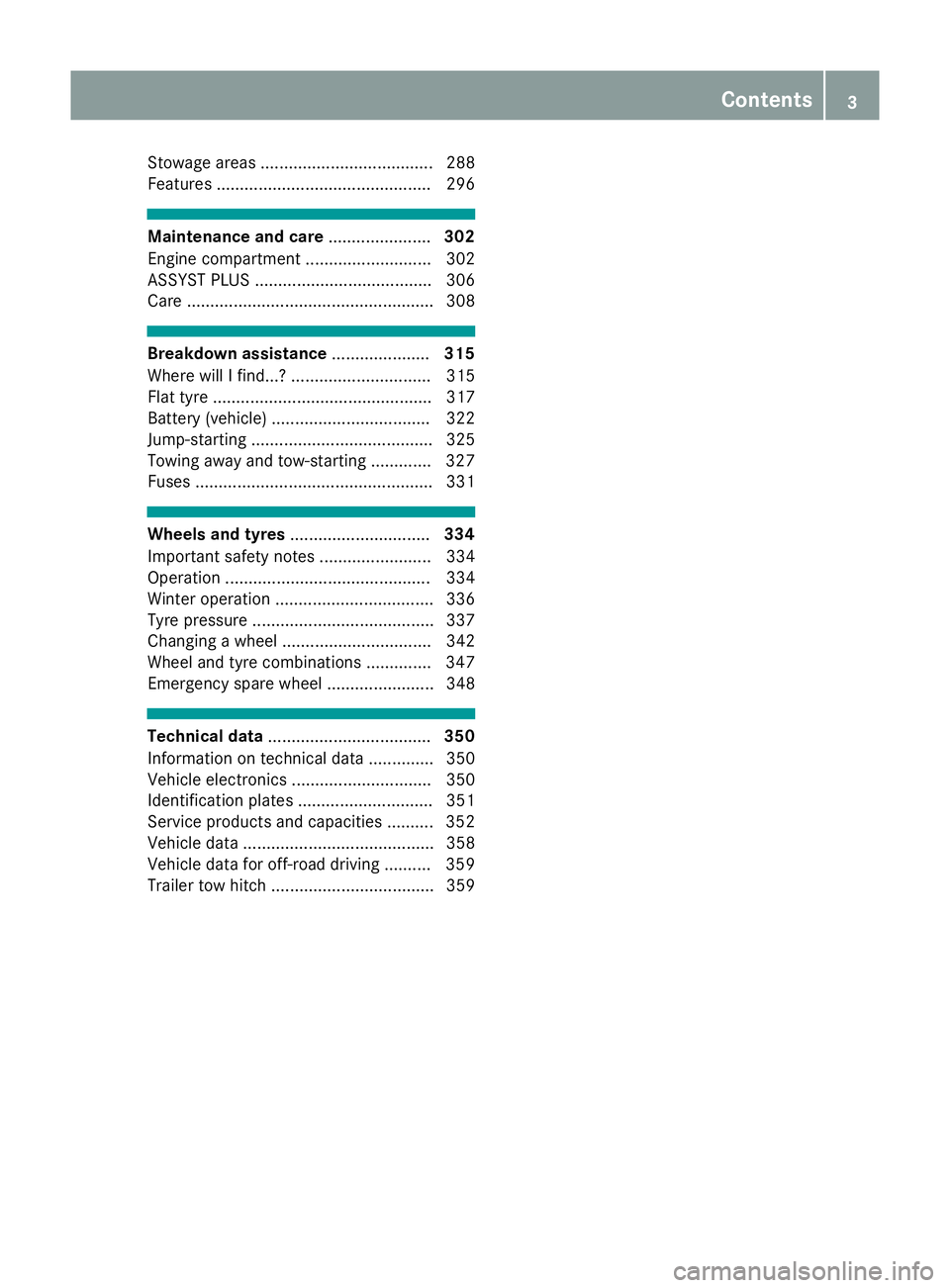
Stowage areas ..................................... 288
Features .............................................. 296 Maintenance and care
......................302
Engine compartment ........................... 302
ASSYST PLUS ...................................... 306
Care ..................................................... 308 Breakdown assistance
.....................315
Where will I find...? .............................. 315
Flat tyre ............................................... 317
Battery (vehicle) .................................. 322
Jump-starting ....................................... 325
Towing away and tow-starting ............. 327
Fuses ................................................... 331 Wheels and tyres
.............................. 334
Important safety notes ........................ 334
Operation ............................................ 334
Winter operation .................................. 336
Tyre pressure ....................................... 337
Changing a wheel ................................ 342
Wheel and tyre combinations .............. 347
Emergency spare wheel ....................... 348 Technical data
................................... 350
Information on technical data .............. 350
Vehicle electronics .............................. 350
Identification plates ............................. 351
Service products and capacities .......... 352
Vehicle data ......................................... 358
Vehicle data for off-road driving .......... 359
Trailer tow hitch ................................... 359 Contents
3
Page 11 of 369
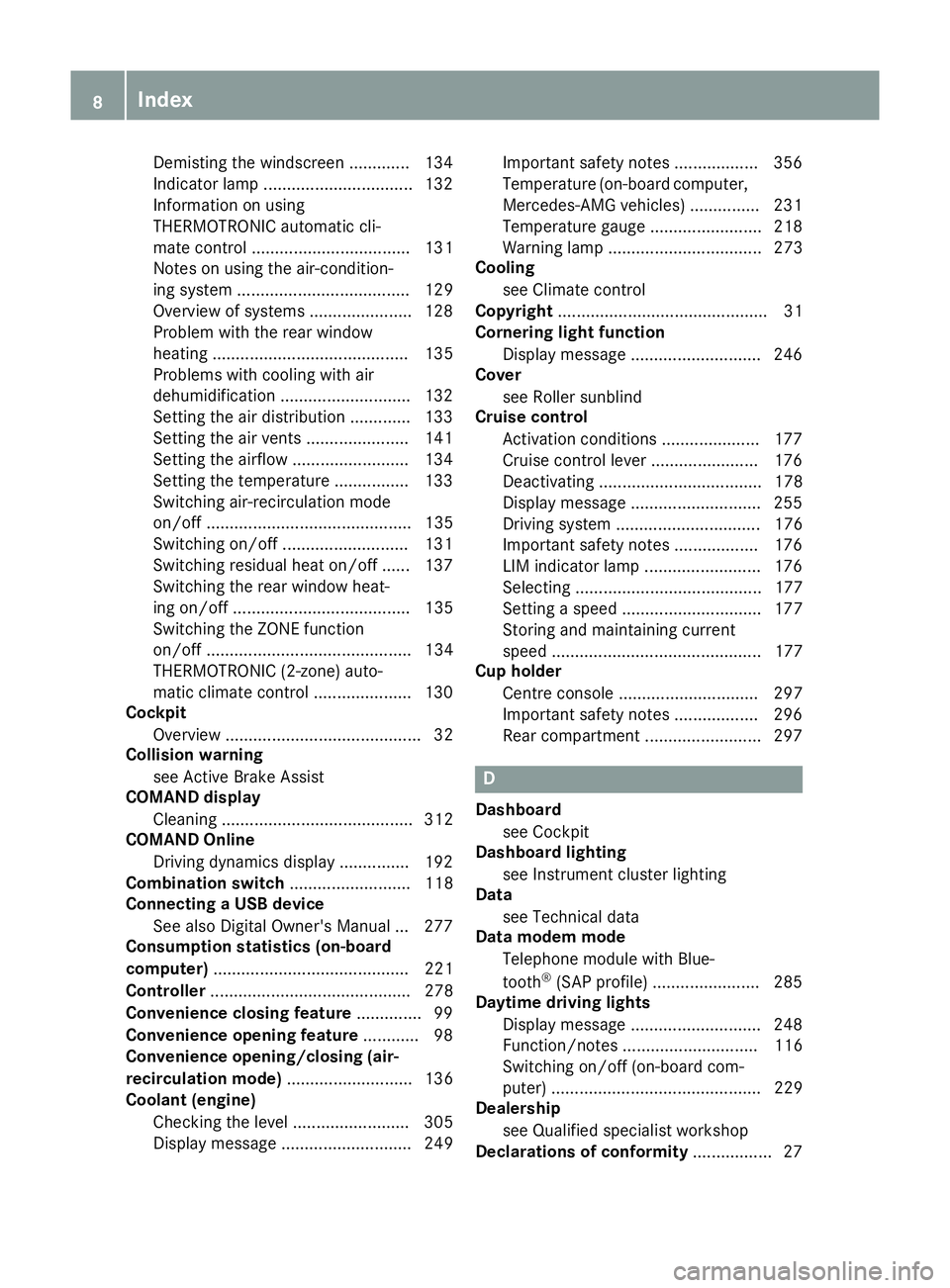
Demisting the windscreen ............
.134
Indicator lamp ................................ 132
Information on using
THERMOTRONIC automatic cli-
mate control .................................. 131
Notes on using the air-condition-
ing system ..................................... 129
Overview of systems ..................... .128
Problem with the rear window
heating .......................................... 135
Problems with cooling with air
dehumidification ............................ 132
Setting the air distribution ............. 133
Setting the air vents ..................... .141
Setting the airflow ......................... 134
Setting the temperature ................ 133
Switching air-recirculation mode
on/off ............................................ 135
Switching on/off ........................... 131
Switching residual heat on/off ...... 137
Switching the rear window heat-
ing on/off ...................................... 135
Switching the ZONE function
on/off ............................................ 134
THERMOTRONIC (2-zone) auto-
matic climate control ..................... 130
Cockpit
Overview .......................................... 32
Collision warning
see Active Brake Assist
COMAND display
Cleaning ......................................... 312
COMAND Online
Driving dynamics displa y............... 192
Combination switch .......................... 118
Connecting a USB device
See also Digital Owner's Manua l... 277
Consumption statistics (on-board
computer) .......................................... 221
Controller ........................................... 278
Convenience closing feature .............. 99
Convenience opening feature ............ 98
Convenience opening/closing (air-
recirculation mode) ........................... 136
Coolant (engine)
Checking the level ......................... 305
Display message ............................ 249 Important safety notes .................. 356
Temperature (on-board computer,
Mercedes-AMG vehicles) ............... 231
Temperature gaug e........................ 218
Warning lamp ................................. 273
Cooling
see Climate control
Copyright ............................................. 31
Cornering light function
Display message ............................ 246
Cover
see Roller sunblind
Cruise control
Activation conditions ..................... 177
Cruise control lever ....................... 176
Deactivating ................................... 178
Display message ............................ 255
Driving system ............................... 176
Important safety notes .................. 176
LIM indicator lamp ......................... 176
Selecting ........................................ 177
Setting a speed .............................. 177
Storing and maintaining current
speed ............................................. 177
Cup holder
Centre console .............................. 297
Important safety notes .................. 296
Rear compartment ......................... 297 D
Dashboard see Cockpit
Dashboard lighting
see Instrument cluster lighting
Data
see Technical data
Data modem mode
Telephone module with Blue-
tooth ®
(SAP profile) ....................... 285
Daytime driving lights
Display message ............................ 248
Function/note s............................. 116
Switching on/off (on-board com-
puter) ............................................. 229
Dealership
see Qualified specialist workshop
Declarations of conformity ................. 278
Index
Page 23 of 369
Spare wheel
see Emergency spare wheel
Specialist workshop ............................30
Spectacles compartment ................. 289
Speed limiter
Display message ............................2 55
Important safety notes .................. 178
Selecting ........................................ 179
Speed, controlling
see Cruise control
Speedometer
Activating/deactivating the addi-
tional speedometer ........................ 228
Digital ............................................ 222
In the Instrument cluster ................. 34
Segments ...................................... 217
Selecting a display unit .................. 228
SPORT handling mode
Deactivating/activating
(Mercedes-AMG vehicles) ................ 73
Warning lamp ................................. 270
Start-off assist
Activating ....................................... 188
Important safety notes .................. 187
Start/Stop button
Removing ....................................... 145
Starting the engine ........................ 146
Start/stop function
see ECO start/stop function
Starting (engine) ................................ 145
Starting the engine
see Starting (engine)
STEER CONTROL .................................. 75
Steering
Display message ............................ 262
Steering assistant STEER CON-
TROL
see STEER CONTROL
Steering wheel
Adjusting (manually) ...................... 111
Button overview ............................... 35
Buttons (on-board computer) ......... 218
Cleaning ......................................... 313
Gearshift paddle s........................... 161
Important safety notes .................. 111
Steering wheel gearshift paddles .... 161
Stopwatch (RACETIMER) ................... 232Stowage compartment
Map pockets .................................. 290
Stowage compartments
Armrest (front) ............................... 289
Armrest (under) ............................. 290
Centre console .............................. 289
Centre console (rear) ..................... 290
Cup holde r..................................... 296
Glove compartment ....................... 289
Important safety information ......... 288
Spectacles compartment ............... 289
Under driver's seat/front-
passenger sea t.............................. 290
Stowage net ....................................... 290
Stowage space
Stowage net ................................... 290
Summer opening
see Convenience opening feature
Summer tyres .................................... 336
Sun visor ............................................ 297
Suspension settings
AMG RIDE CONTROL sports sus-
pension .......................................... 189
Switching on media mode
Via the device list .......................... 286 T
Tail lamps see Lights
Tailgate
Display message ............................ 261
Emergency unlocking ................. 94, 97
Important safety notes .................... 89
Limiting the opening angle ............... 93
Obstruction detectio n...................... 89
Opening dimensions ...................... 358
Opening/closing (from outside) .. 90, 95 Opening/closing automatically
from inside ....................................... 92
Opening/closing automatically
from outside .................................... 90
Tank
see Fuel tank
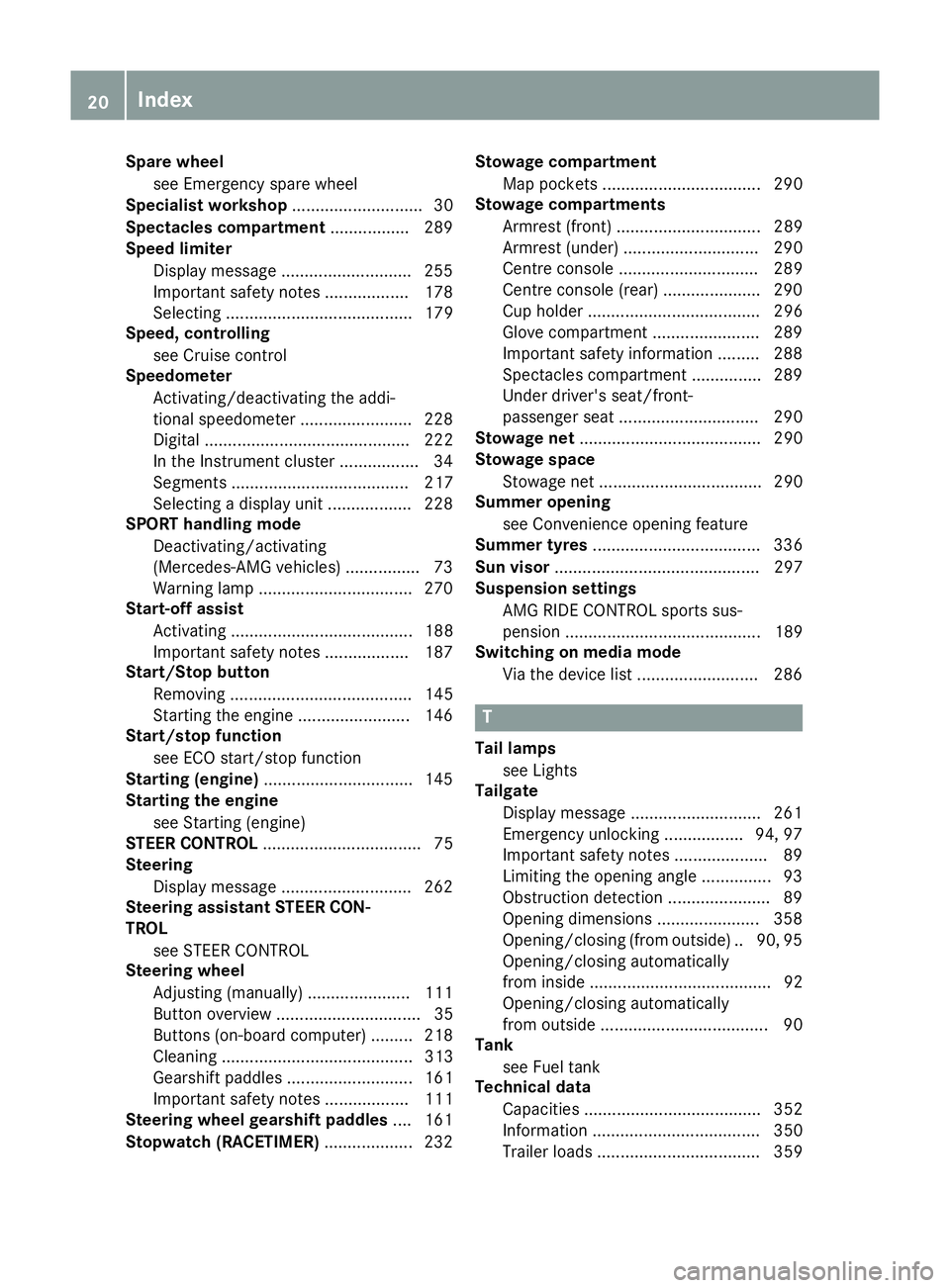
Technical data
Capacities ...................................... 352
Information .................................... 350
Trailer load s................................... 359 20
Index
Page 31 of 369
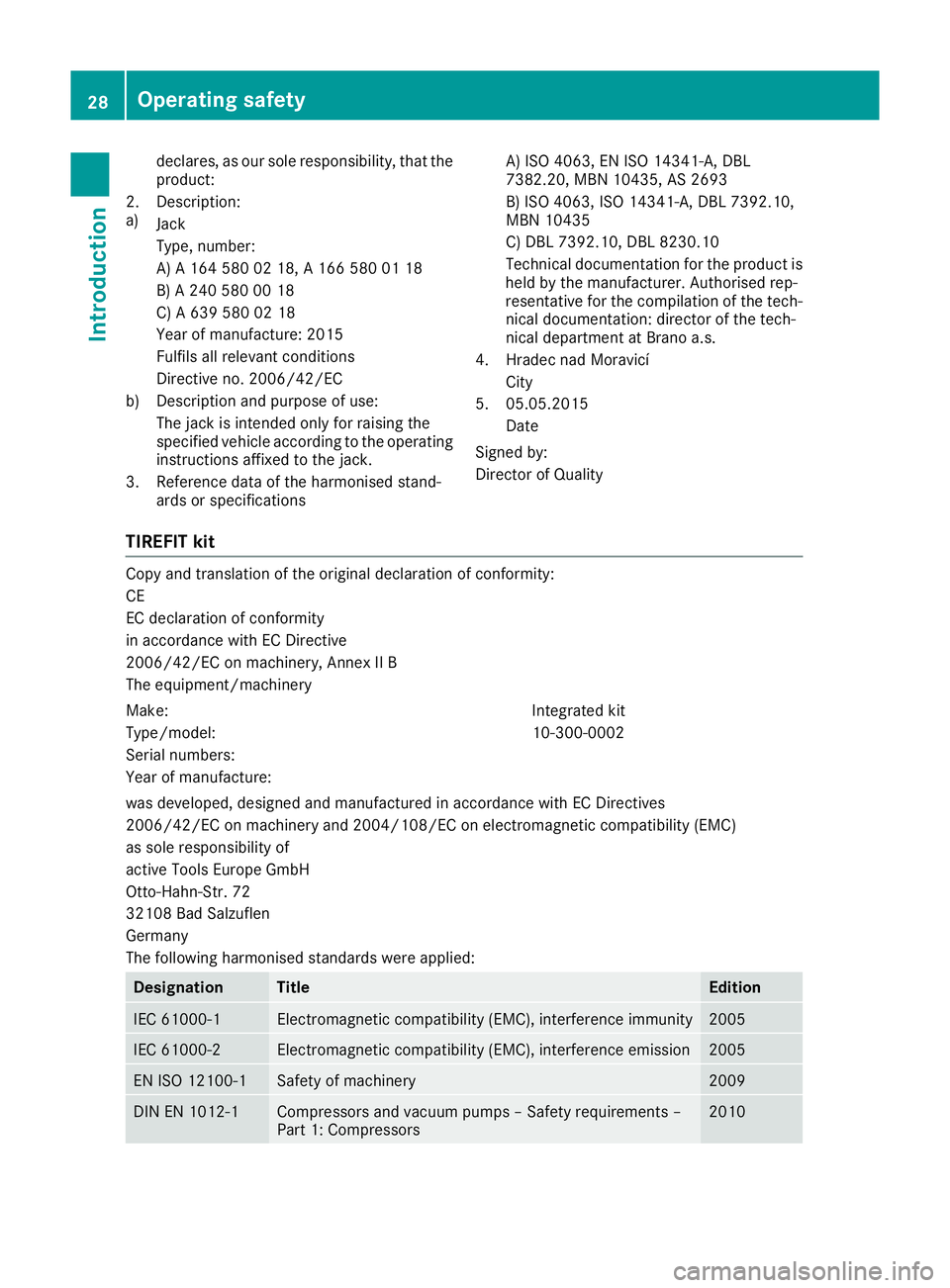
declares, as our sole responsibility, that the
product:
2.
a) Description:
Jack
Type, number:
A) A 164 580 02 18, A 166 580 01 18
B) A 240 580 00 18
C) A 639 580 02 18
Year of manufacture: 2015
Fulfils all relevant conditions
Directive no. 2006/42/EC
b) Description and purpose of use: The jack is intended only for raising the
specified vehicle according to the operatinginstructions affixed to the jack.
3. Reference data of the harmonised stand- ards or specifications A) ISO 4063, EN ISO 14341-A, DBL
7382.20, MBN 10435, AS 2693
B) ISO 4063, ISO 14341-A, DBL 7392.10,
MBN 10435
C) DBL 7392.10, DBL 8230.10
Technical documentation for the product is
held by the manufacturer. Authorised rep-
resentative for the compilation of the tech- nical documentation: director of the tech-
nical department at Brano a.s.
4. Hradec nad Moravicí City
5. 05.05.2015 Date
Signed by:
Director of Quality
TIREFIT kit Copy and translation of the original declaration of conformity:
CE
EC declaration of conformity
in accordance with EC Directive
2006/42/EC on machinery, Annex II B
The equipment/machinery
Make: Integrated kit
Type/model: 10-300-0002
Serial numbers:
Year of manufacture:
was developed, designed and manufactured in accordance with EC Directives
2006/42/EC on machinery and 2004/108/EC on electromagnetic compatibility (EMC)
as sole responsibility of
active Tools Europe GmbH
Otto-Hahn-Str. 72
32108 Bad Salzuflen
Germany
The following harmonised standards were applied: Designation Title Edition
IEC 61000-1 Electromagnetic compatibility (EMC), interference immunity 2005
IEC 61000-2 Electromagnetic compatibility (EMC), interference emission 2005
EN ISO 12100-1 Safety of machinery 2009
DIN EN 1012-1 Compressors and vacuum pumps – Safety requirements –
Part 1: Compressors 201028
Operating safetyIntroduction
Page 33 of 369
Qualified specialist workshop
A qualified specialist workshop has the neces-
sary special skills, tools and qualifications to
correctly carry out any necessary work on your
vehicle. This particularly applies to work rele-
vant to safety.
Observe the notes in the Service Booklet.
Always have the following work carried out at a
qualified specialist workshop:
R work relevant to safety
R service and maintenance work
R repair work
R modifications, installations and conversions
R work on electronic components
Mercedes-Benz recommends that you use a
Mercedes-Benz Service Centre. Vehicle registration
Mercedes-Benz may ask its Service Centres to
carry out technical inspections on certain vehi-
cles. The quality or safety of the vehicle is
improved as a result of the inspection.
Mercedes-Benz can only inform you about vehi-
cle checks if it has your registration data.
It is possible that your vehicle has not yet been
registered in your name in the following cases:
R if your vehicle was not purchased at an
authorised specialist dealer
R if your vehicle has not yet been inspected at a
Mercedes-Benz Service Centre
It is advisable to register your vehicle with a
Mercedes-Benz Service Centre.
Inform Mercedes-Benz as soon as possible
about any change in address or vehicle owner-
ship. You can do this at a Mercedes-Benz Ser-
vice Centre, for example. Correct use
If you remove any warning stickers, you or oth-
ers could fail to recognise certain dangers.
Leave warning stickers in position.
Observe the following information when driving
your vehicle:
R the safety notes in this manual
R technical data for the vehicle R
traffic rules and regulations
R laws and safety standards pertaining to motor
vehicles Implied warranty
! Follow the instructions in this manual about
the proper operation of your vehicle as well as
about possible vehicle damage. Damage to
your vehicle that arises from culpable contra- ventions against these instructions are not
covered either by Mercedes-Benz implied
warranty or by the New or Used-Vehicle War- ranty. QR code for rescue card
The QR code is secured in the fuel filler flap and
on the opposite side on the B-pillar. In the event
of an accident, rescue services can use the QR
code to quickly find the appropriate rescue card for your vehicle. The current rescue card con-
tains, in a compact form, the most important
information about your vehicle, e.g. the routing
of the electric cables.
You can find more information under
www.mercedes-benz.de/qr-code. Data stored in the vehicle
Many of the electronic components in your vehi- cle can store data.
These data memories temporarily or perma-
nently store technical information about:
R the vehicle's operating state
R events
R faults
In general, this technical information docu-
ments the state of a component, a module, a
system or the surroundings.
This includes, for example:
R operating conditions of system components.
For example, fluid levels.
R status messages concerning the vehicle and
its individual components, e.g. number of
wheel revolutions/speed, deceleration in
movement, lateral acceleration, accelerator
pedal position. 30
Data stored in the vehicleIntroduction
Page 34 of 369
R
malfunctions and defects in important system
components, e.g. lights, brakes.
R vehicle reactions and operating conditions in
special driving situations, e.g. airbag deploy-
ment, intervention of stability control sys-
tems
R ambient conditions, e.g. outside tempera-
ture.
These data are of an exclusively technical nature
and can be used to:
R assist in detecting and rectifying faults and
defects
R analyse vehicle functions, e.g. after an acci-
dent
R optimise vehicle functions
The data cannot be used to trace the vehicle's
movements.
When your vehicle is serviced, technical infor-
mation can be read from the event data memory
and fault data memory.
Services include, for example:
R repair services
R service processes
R warranty events
R quality assurance
The vehicle is read out by employees of the ser-
vice network (including the manufacturer) using
special diagnostic testers. You can obtain more information there, if required.
After a fault has been rectified, the information
is deleted from the fault memory or is continu-
ally overwritten.
During vehicle operation, certain situations may
arise in which these technical data – in conjunc-
tion with other information and, if applicable,
after consultation with an approved assessor –
may be linked to an individual person.
Examples include:
R accident reports
R damage to the vehicle
R witness statements
Further additional functions that have been con-
tractually agreed upon with the customer allow
certain vehicle data to be conveyed by the vehi-
cle as well. The additional functions include, for example, vehicle location in the event of an
emergency. Copyright information
General information
Information on licences for free and open-
source software used in your vehicle and its
electronic components is available on the fol-
lowing website:
http://www.mercedes-benz.com/opensource Copyright information
31Introduction Z
Page 215 of 369
The warning vibration occurs earlier in the fol-
lowing situations if:
R you approach the outer lane marking on a
bend
R the road has very wide lanes, e.g. a motorway
R the system detects solid lane markings
The warning vibration occurs later in the follow-
ing situations if:
R the road has narrow lanes
R you cut the corner on a bend Towing a trailer
Important safety notes
G
WARNING
You could lose control of the vehicle/trailer
combination if it begins to swerve. The vehi-
cle/trailer combination could even overturn.
There is a risk of an accident.
On no account should you attempt to
straighten out the vehicle/trailer combina-
tion by increasing speed. Decrease your
speed and do not countersteer. Brake if nec-
essary. G
WARNING
If the maximum permissible load for a carrier system is exceeded, the carrier could come
loose from the vehicle and endanger other
road users. There is a risk of an accident and injury.
Never exceed the maximum permissible load
when using a carrier.
! If you have a trailer tow hitch retrofitted,
changes to the engine cooling system may be necessary, depending on the vehicle type.
If you have a trailer tow hitch retrofitted,
observe the anchorage points on the chassis.
Retrofitting a trailer tow hitch is only permissible
if a trailer load is specified in your vehicle docu-
ments. If this is not the case, then the vehicle is not approved for towing a trailer.
For more information, please contact a qualifiedspecialist workshop. Exceeding the maximum permissible nose-
weight of the trailer drawbar on the ball coupling
may cause damage to the following:
R your vehicle
R trailer
R ball coupling
R trailer tow hitch
The vehicle/trailer combination could become
unstable.
The vehicle/trailer combination could also
become unstable if the noseweight used is lower than the minimum permissible noseweight.
To avoid hazardous situations:
R make sure to check the noseweight before
each journey
R the noseweight should be as close as possible
to the maximum noseweight
R do not exceed the maximum permissible
noseweight
R the noseweight must not be lower than the
minimum permissible noseweight
Make sure that the following values are not
exceeded:
R the permissible noseweight
R the permissible trailer load
R the permissible rear axle load of the towing
vehicle
R the maximum permissible gross vehicle
weight of both the towing vehicle and the
trailer
The applicable permissible values, which must
not be exceeded, can be found:
R in your vehicle documents
R on the identification plates of the trailer tow
hitch and the trailer
R on the vehicle identification plate
If the values differ, the lowest value applies.
You will find the values approved by the manu-
facturer on the identification plates and for the
towing vehicle under "Technical data"
(Y page 359). G
WARNING
If you release the ball coupling or it does not
engage correctly when folding in, it will swing out. Within pivoting range of the ball coupling,
there is an increased risk of an accident and
injury. 212
Towing a trailerDriving and parking
Page 216 of 369
Only release the ball coupling if the pivoting
range is unobstructed. Always make sure that the ball coupling engages when folding in.
When reversing the towing vehicle, make sure
there is nobody between the trailer and the vehi- cle.
Couple and uncouple the trailer carefully. If youdo not couple the trailer to the towing vehicle
correctly, the trailer could become detached.
When towing a trailer, your vehicle's handling
characteristics will be different to when driving
without a trailer.
The vehicle/trailer combination:
R is heavier
R is restricted in its acceleration and gradient-
climbing capability
R has an increased braking distance
R is affected more by strong crosswinds
R demands more sensitive steering
R has a larger turning circle
This can impair the vehicle's handling charac-
teristics. Adapt your driving style accordingly.
Maintain a safe distance. Drive carefully.
When towing a trailer, always adjust your speed to the current road and weather conditions. Do
not exceed the maximum permissible speed for
your vehicle/trailer combination. Notes on towing a trailer
General notes Trailer towing is not possible on the following
models:
R Mercedes‑AMG GLA 45 4MATIC
Items of optional equipment may influence the
effective trailer loads for the vehicle. Please find the applicable trailer loads for your vehicle on
the registration certificate.
When towing a trailer, set the tyre pressure on
the rear axle of the towing vehicle for a maxi-
mum load. Further information on the tyre pres-
sure table in the fuel filler flap (Y page 337).
Please note that when towing a trailer, the fol-
lowing driving systems have limited availability
or are not available at all:
R Parking Assist PARKTRONIC (Y page 193)
R Blind Spot Assist (Y page 209) The height of the ball coupling changes with the
load of the vehicle. If necessary, use a trailer
with a height-adjustable drawbar.
You will find fitting dimensions and loads under"Technical data" (Y page 359).
Driving tips Observe the information on ESP
®
trailer stabili-
sation (Y page 75).
The maximum permissible speed for vehicle/
trailer combinations depends on the type of
trailer. Before beginning the journey, check the
trailer's documents to see what the maximum
permitted speed is. Observe the legally prescri-
bed maximum speed in the relevant country.
For certain Mercedes-Benz vehicles, the maxi-
mum permissible rear axle load is increased
when towing a trailer. See the "Technical data"
section to find out whether this applies to your
vehicle. If when towing, the rear axle load is
increased even partly, the vehicle/trailer com-
bination may not exceed a maximum speed of
100 km/h for reasons concerning the operating
permit. This also applies in countries in which
the permissible maximum speed for vehicle/
trailer combinations is above 100 km/h.
When towing a trailer, your vehicle's handling
characteristics will be different to when driving
without a trailer and the vehicle will consume
more fuel.
Shift to a lower gear in good time on long and
steep downhill gradients. For vehicles with auto-
matic transmission, you need to have selected
manual drive program M(Y page 161).
This also applies if you have activated cruise
control, the speed limiter or Distance Pilot
DISTRONIC.
This will use the braking effect of the engine, so less braking will be required to maintain the
vehicle speed. This relieves the load on the
brake system and prevents the brakes from
overheating and wearing too quickly. If you need
additional braking, depress the brake pedal
repeatedly rather than continuously.
Briefly depressing the accelerator pedal on
downhill gradients while the manual drive pro-
gram Mis temporarily activated (vehicles with
automatic transmission): the automatic trans-
mission may switch back to the last active auto-
matic drive program Eor S. The automatic trans-
mission may shift to a higher gear. This can
reduce the engine's braking effect. Towing a trailer
213Driving and parking Z