2017 MERCEDES-BENZ G-Class seat memory
[x] Cancel search: seat memoryPage 4 of 286

Index....................................................... 4
Digital Operator's Manual..................22
Introductio n........................................... 22
Operation ............................................... 22
Introduction ......................................... 23
Protecting the environment ...................2 3
Genuine Mercedes-Ben zparts............... 23
Operator's Manual ................................. 24
Service and vehicle operation ................2 4
Operating safety .................................... 26
QR codes for rescue cards .................... 28
Data stored in the vehicle ......................2 8
Information on copyright ....................... 29
At ag lance ........................................... 31
Cockpit .................................................. 31
Instrument cluster .................................3 2
Multifunction steering wheel ................. 33
Center console ...................................... 34
Overhead control panel .........................3 6
Doorc ontrolpan el ................................. 37
Safety ................................................... 38
Occupant safety .................................... 38
Childre ninthe vehicl e........................... 49
Pets in the vehicl e................................. 57
Driving safety systems ........................... 57
Protection against theft .........................6 1
Opening and closing...........................63
SmartKey ............................................... 63
Doors ..................................................... 66
Rear door ............................................... 68
Side windows ......................................... 69
Sliding sunroof ....................................... 71
Seats, steering wheel and mirrors ....74
Correct driver's seat position ............... .74
Seats ..................................................... 74
Steering wheel ....................................... 79
Mirrors. .................................................. 81
Memory functions .................................. 83
Lights and windshield wipers ............85
Exterior lighting ..................................... 85
Interior lighting ...................................... 88
Replacing bulb s..................................... 88
Windshield wipers .................................. 92
Climate control .................................... 95
Overview of the climate control sys-
tem ........................................................ 95
Operating the climate control system .... 97
Air vents .............................................. 101
Drivin gand parking .......................... 103
Notesonb reaking-inanew vehicl e..... 103
Driving ................................................. 103
Adjustable damping ............................. 109
Automati ctransmissio n....................... 109
Refueling ............................................. 118
Parking ................................................ 120
Driving tip s.......................................... 122
Driving systems ................................... 131
Off-road driving systems ...................... 145
Towing atraile r.................................... 149
On-board computer and displays ....157
Important safety notes ........................ 157
Displays and operation ........................ 157
Menusa nd submenus ......................... 159
Displa ymessages ............................... 169
Warning and indicator lamps in the
instrument cluster ............................... 187
Multimedi asystem ........................... 198
Generaln otes ...................................... 198
Important safety notes ........................ 198
Function restrictions ............................ 198
Operating system ................................ 199
Stowag eand features ...................... 204
Loading guideline s............................... 204
Stowag eareas ..................................... 205
Feature s.............................................. 210
2Contents
Page 12 of 286
Exhaustsee Exhaust pipe
Exhaust check .................................. .123
Exhaus tpipe
Cleaning ......................................... 235
Exterior lighting
Cleaning ......................................... 234
see Lights
Exterior mirrors
Adjusting ......................................... 81
Dipping (automatic) ......................... 83
Folding in whe nlocking (on-board
computer) ...................................... 167
Folding in/out( automatically). ........ 82
Folding in/out (electrically) ............. 82
Outofp osition (troubleshooting )..... 82
Setting ............................................. 82
Storing settings (memory func-
tion) ................................................. 83
Storing the parking position ............. 83
F
Favorites
Overview ........................................ 200
Filler cap
see Refueling
First-aidk it......................................... 238
Flat tire
Changing awheel /mounting the
spare wheel. .................................. 269
Preparing the vehicl e..................... 240
Folding the seat backres t(rear)
forwards/back .................................. 207
Frequencies
Mobil ephone ................................. 274
Two-way radio ................................ 274
Fuel
Additives ........................................ 278
Consumption statistics .................. 160
Displaying the rang e...................... 160
Driving tip s.................................... 122
Fue lgauge ....................................... 32
Grade (gasoline )............................ 277
Important safety notes .................. 277
Premium-grade unleade dgaso-
line ................................................. 277
Problem (malfunction) ................... 120 Refueling ........................................ 118
Tank content/reserve fue
l............. 277
Fue lfille rflap
Closing ........................................... 119
Emergency release ........................ 119
Opening ......................................... 119
Fue llevel
Calling up the rang e(on-board
computer) ...................................... 160
Fue ltank
Capacity ........................................ 277
Problem (malfunction) ................... 120
Fus eallocatio nchart ........................ 249
Fus ebox
cargo compartment ....................... 250
Dashboard ..................................... 249
Front-passenger footwell ............... 249
Transmission tunne l....................... 250
Fuses
Allocation chart ............................. 249
Before changing ............................. 249
Dashboard fus ebox ....................... 249
Fus ealloc ation chart ..................... 249
Fus ebox in the carg ocompart-
ment .............................................. 250
Fus ebox in the front-passenger
footwell .......................................... 249
Fus ebox in the transmission tun-
nel ................................................. 250
Important safety notes .................. 248
G
Garaged ooro pener
Clearing the memory ..................... 224
Generaln otes ................................ 221
Important safety notes .................. 222
Opening/closing the garag edoor..2 24
Problems whe nprogramming ........2 24
Programming the remote control ... 222
Synchronizing the rolling code ....... 223
Gasoline ............................................. 277
Gear indicator (on-board com-
puter) ..................................................1 67
Genuine parts ...................................... 23
Glove box ...........................................2 05
10Index
Page 15 of 286

Connecting another mobile
phone........................................... .203
Frequencie s................................... 27 4
Instal latio n..................................... 274
Menu (on-board computer) ............ 163
Transmissiono utput (maximum ).... 274
Modifying the programming
(SmartKey) ...........................................6 4
Mountingw heels
Lowering the vehicle. ..................... 272
Mounting anew wheel. .................. 272
Preparing the vehicle. ....................270
Raising the vehicle ......................... 270
Removing awheel .......................... 272
Securing the vehicle against roll-
ing away ........................................ 270
MP3
Operation ....................................... 162
see also Digita lOperator's Man-
ua l..................................................1 98
see separate operating instructions
Multifunctio ndisplay
Function/notes .............................1 59
Permanent display. ........................ 165
Multifunctio nsteering wheel
Operating the on-board computer .. 158
Overview .......................................... 33
Music files
see also Digita lOperator's Man-
ua l..................................................1 98
N
Navigation
Entering adestination .................... 200
Menu (on-board computer) ............ 161
see also Digita lOperator's Man-
ua l..................................................1 98
see separate operating instructions
NECK-PRO head restraints
Operation ......................................... 48
Resetting triggered .......................... 48
NECK-PRO luxury head restraints
Important safety notes .................... 48
Operation ......................................... 48
Resetting whe ntriggered ................. 49
Notes on breaking-inan ew vehi-
cle ....................................................... 103
O
Occupant safety
Air bag s...........................................4 3
Automatic measures after an acci-
dent ................................................. 49
BabySmart™ ai rbag deactivation
system ............................................. 53
Childre ninthe vehicl e..................... 49
Important safety notes. ................... 38
Introduction to the restraint sys-
tem .................................................. 38
PASSENGER AIR BAG indicator
lamps ............................................... 39
Pets in the vehicl e........................... 57
Restraint system warning lamp ........ 38
Seatb elt. ......................................... 39
Odometer ........................................... 160
Off-road
Differential locks ............................ 147
Off-road ABS .................................... 58
Off-road driving
Checklist afte rdriving off-road ...... 129
Checklist before driving off-road .... 128
Driving on sand .............................. 129
Generali nformation ....................... 127
Important safety notes .................. 127
Traveling uphill ............................... 130
Off-road fording ................................. 126
Off-road system
Permanent all-wheeld rive ............. 139
Oil
see Engine oil
On-board computer
AMG menu ..................................... 167
Assistance menu ........................... 164
Audio menu ................................... 162
Convenience submenu .................. 166
Displa ymessages .......................... 169
Factory settings submenu ............. 167
Important safety notes .................. 157
Instrument cluster submenu .......... 165
Lighting submenu .......................... 165
Menu overview .............................. 159
Message memory .......................... 170
Navigation menu ............................ 161
Operation ....................................... 158
RACETIMER ................................... 168
Index13
Page 18 of 286

Removing....................................... 20 3
SD memory card
seea lsoD igita lOperator's Man-
ua l..................................................1 98
Search&S end
see also Digita lOperator's Man-
ua l..................................................1 98
Seat backrest
Folding back .................................. 207
Seat belts
Adjusting the height ......................... 41
center rear-compartment seat. ........ 42
Cleaning ......................................... 237
Correct usag e.................................. 41
Fastening ......................................... 41
Important safety guideline s............. 40
Introduction ..................................... 39
Releasing ......................................... 43
Warning lamp ................................. 188
Warning lamp (function) ................... 43
Seat heating
Indicato rlam p(malfunction) ............ 79
Seat ventilation
Indicato rlam p(malfunction) ............ 79
Seats
Adjusting (electrically) ..................... 76
Adjusting the 4-wa ylum bars up-
por t.................................................. 78
Adjusting the headr estraint ............ 76
Cleaning the cover. ........................ 236
Correct driver'ss eatposition ........... 74
Important safety notes .................... 74
Overview .......................................... 74
Storing settings (memory func-
tion) ................................................. 83
Switching seath eating on/off......... 78
Switching seatv entilation on/off. ... 79
Selecto rlever
Cleaning ......................................... 236
Sensors (cleaning instructions) ....... 234
Servic einterva ldisplay
Displaying aservice message (on-
board computer) ............................ 231
Servic emenu( on-board com-
puter) .................................................. 164
Servic eproducts
Brake fluid ..................................... 279
Coolant (engine) ............................ 279 Engine oil.
...................................... 278
Fue l................................................ 276
Important safety notes .................. 276
Notes. ............................................ 276
Refrigerant (air-conditioni ng sy
s-
tem) ............................................... 280
Washerf luid ................................... 280
Setting the air distribution ................. 98
Setting the date/time format
see also Digital Operator's Man-
ual.................................................. 198
Setting the language
see also Digital Operator's Man-
ual.................................................. 198
Setting the time
see also Digital Operator's Man-
ual.................................................. 198
Settings
Calling up astoreds etting ............... 84
Factory (on-board computer) ......... 167
On-board compute r....................... 164
SETUP (on-board computer,
Mercedes-AMG vehicles) .................. 168
Shift ranges ....................................... 114
Side impac tair bag ............................. 45
Side marker lamp (display mes-
sage) ................................................... 176
Side windows
Convenience closing feature ............ 70
Convenience opening feature .......... 70
Important safety information ........... 69
Opening/closing .............................. 69
Overview .......................................... 69
Problem (malfunction) ..................... 70
SIRIU Sservices
see also Digital Operator's Man-
ua l.................................................. 198
Sliding sunroof
Important safety notes .................... 71
Opening/closing .............................. 72
Operating manually .......................... 72
Problem (malfunction) ..................... 73
SmartKey
Changing the battery ....................... 65
Changing the programming ............. 64
Checking the battery ....................... 65
Convenience closing feature ............ 70
16Index
Page 19 of 286

Convenience opening feature .......... 70
Display message ............................ 187
Door central locking/unlocking ...... .63
Important safety notes .................... 63
Loss .................................................6 6
Mechanical key ................................ 64
Overview .......................................... 63
Positions (ignition lock) ................. 104
Problem (malfunction) ..................... 66
Starting the engine ........................ 105
SMS
see also Digital Operator's Man-
ual .................................................. 198
Snow chains ...................................... 253
Socket (12 V)
Cargo compartment. ...................... 213
Front-passenger footwell ............... 212
General notes ................................ 212
Rear compartment. ........................213
Sound
Switching on/off ........................... 199
Spare fuses ........................................ 249
Spare wheel
Spare wheel bracket at the rear .... 239
Stainless-steel spare hub cap ........2 39
Special seat beltr etractor.................. 50
Specialist workshop ............................ 27
Speedometer
Digita l............................................ 160
In the Instrument cluster ................. 32
Segments ...................................... 157
Selecting the displayu nit ...............165
Standingl amps
Display message ............................ 176
Switching on/off .............................. 86
Starting the engine
Important safety notes .................. 104
Steering (display message) .............. 187
Steering wheel
Adjusting (electrically). .................... 80
Buttons (on-board computer) ......... 158
Cleaning ..................... .................... 236
Important sa
fety notes .................... 79
Paddle shifters ............................... 114
Steering wheel heating .................... 80
Storing settings (memory func-
tion) ................................................. 83 Steering wheel heating
Indicator lamp (malfunction) ............ 80
Steering wheel paddle shifters ........114
Stopwatch (RACETIMER) ................... 168
Stowage areas ................................... 205
Stowage compartment
Door stowage compartment .......... 206
Stowage compartments
Armrest (under) .............................2 06
Cu ph olders ................................... 210
Glove box ....................................... 205
Important safety information ......... 205
Stowag enet ................................... 206
Stowag epockets ........................... 206
Stowage net ....................................... 206
Summer opening
see Convenience opening feature
Summer tires
In winter ........................................ 253
Sun visor ............................................ 210
Surround lighting (on-board com-
puter) ..................................................1 65
SUV
(Sport Utility Vehicle) ....................... 26
Switchin gair-recirculation mode
on/off ................................................. 101
Switchin gonmedia mode
Via the device lis t.......................... 203
T
Tachometer ........................................ 157
Tail lamp
Replacing bulb s............................... 91
Tail lamps
Displa ymessage ............................ 176
Tank content
Fuelgauge ....................................... 32
Technical data
Capacities ...................................... 276
Drawba rloa d( maximum) ............... 284
Information .................................... 274
Trailer load s................................... 284
Vehicl edata. .................................. 281
Telephone
Accepting acall. ............................ 163
Authorizing amobilephone (con-
necting) ......................................... 202
Index17
Page 76 of 286
Correct driver's seat position
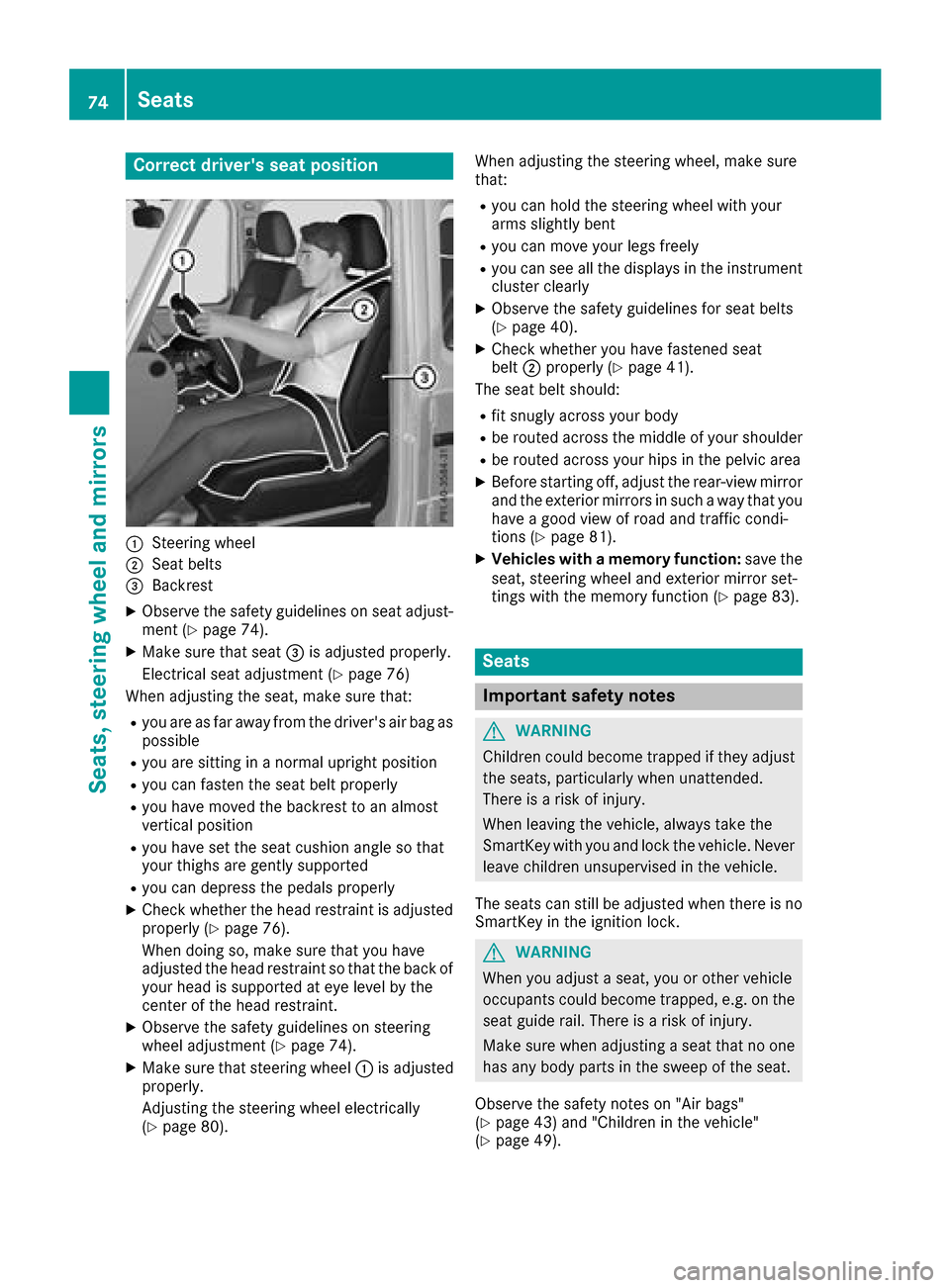
:Steering wheel
;Seat belts
=Backrest
XObservethe safety guideline sonseat adjust-
men t(Ypage 74).
XMakes ure that seat =is adjusted properly.
Electrical seat adjustmen t(
Ypage 76)
When adjusting th eseat,m akes ure that:
Ryou are as far away from th edriver'sa ir bag as
possible
Ryou are sittin ginanormalupright position
Ryou can fasten th eseat belt properly
Ryou have moved th ebackres ttoana lmost
vertical position
Ryou have set th eseat cushion angle so that
your thighs are gently supported
Ryou can depress th epedals properly
XCheckw hether th ehead restraint is adjusted
properl y(Ypage 76).
When doings o, makesure that you have
adjusted th ehead restraint so that th eback of
your head is supported at eye leve lbythe
cente rofthehead restraint.
XObserv ethe safety guideline sonsteering
wheel adjustmen t(Ypage 74).
XMakesure that steering wheel :is adjusted
properly.
Adjusting th esteering wheel electrically
(
Ypage 80). When adjusting th
esteering wheel,m akes ure
that:
Ryou can hold th esteering wheel withy our
arm sslightly bent
Ryou can mov eyour legs freely
Ryou can see all th edisplays in th einstrument
cluste rclearly
XObserv ethe safety guideline sfor seat belts
(Ypage 40).
XCheckw hether you have fastened seat
belt ;properl y(Ypage 41).
The seat belt should:
Rfit snugly across your body
Rbe routed across th emiddle of your shoulder
Rbe routed across your hips in th epelvic area
XBefore starting off ,adjust th erear-view mirror
and th eexteri or mirror sinsuchaw ay that you
have agood view of road and traffic condi-
tions (
Ypage 81).
XVehicles with amemory function: save the
seat,s teering wheel and exterior mirror set-
tings witht hememory function (
Ypage 83).
Seats
Important safety notes
GWARNING
Children coul dbecome trapped if they adjust
th es eats, particularly when unattended.
Thereisar iskofi njury.
When leaving th evehicle ,always tak ethe
SmartKey withy ou and lockthevehicle .Never
leave childre nunsupervised in th evehicle.
The seatsc an still be adjusted when there is no
SmartKey in th eignition lock.
GWARNING
When you adjust aseat,y ou or other vehicle
occupants coul dbecome trapped, e.g .onthe
seat guide rail. Thereisar iskofi njury.
Makes ure when adjusting aseat that no one
has any body part sinthesweep of th eseat.
Observ ethe safety note son"Air bags"
(
Ypage 43 )and "Children in th evehicle"
(Ypage 49).
74Seats
Seats, steerin gwheel and mirrors
Page 78 of 286
Adjusting theseats electri cally
!
Mak esuret hatthe cup holder on th ecenter
console is folded down before you mov ethe
front-passenger seat forwards.
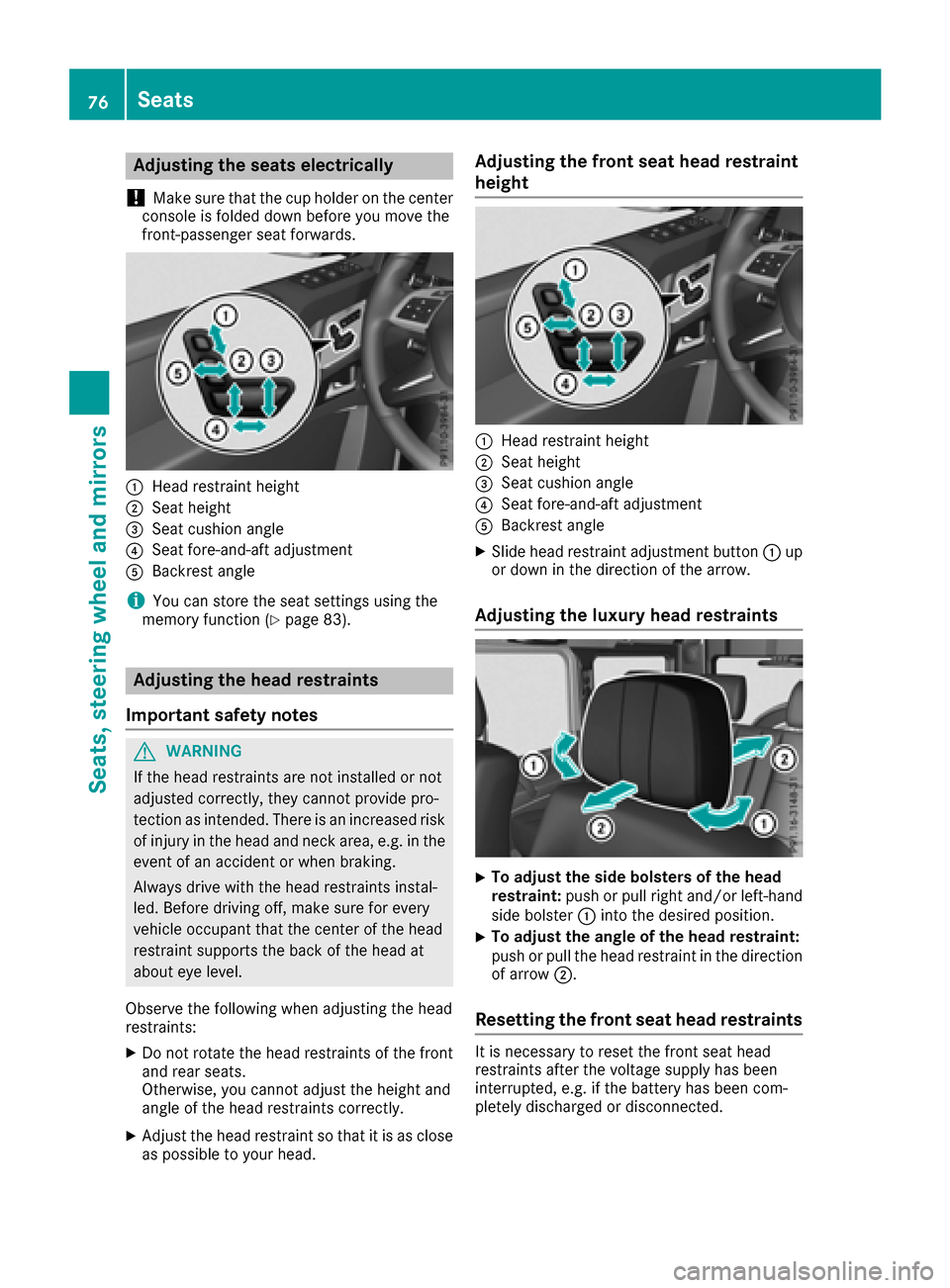
:Hea drestrain theight
;Seat height
=Seat cushion angle
?Seat fore-and-af tadjustmen t
ABackrest angle
iYou can store th eseat setting susingthe
memory function (Ypage 83).
Adjusting th eheadr estraints
Import ant safety notes
GWARNIN G
If th ehead restraints are no tinstalled or no t
adjusted correctly, they canno tprovid epro-
tection as intended. There is an increased ris k
of injury in th ehead and neck area, e.g. in th e
event of an acciden torwhen braking .
Always drive wit hthe head restraints instal -
led. Befor edrivin goff,m akes uref or every
vehicl eoccupant that th ecenter of thehead
restrain tsupport sthe bac koft hehead at
about eye level.
Observ ethe followin gwhen adjusting th ehead
restraints :
XDo notrotate th ehead restraints of th efront
and rear seats.
Otherwise ,you canno tadjust th eheight and
angle of th ehead restraints correctly.
XAdjus tthe head restrain tsothatiti sasc lose
as possibl etoyour head .
Adjusting th efront seath eadr estraint
height
:Hea drestrain theight
;Seat height
=Seat cushion angle
?Seat fore-and-af tadjustmen t
ABackrest angle
XSlide head restrain tadjustmen tbutto n: up
or down in th edirection of th earrow.
Adjusting th eluxur yheadr estraints
XTo adjust th esideb olsters of th ehead
restraint: push or pull right and/o rleft-han d
side bolste r: intot he desired position .
XTo adjust theangle of th eheadr estraint:
push or pull th ehead restrain tinthedirection
of arrow ;.
Resetting th efront seath eadr estraints
It is necessar ytor eset th efront seat head
restraints after th evoltag esupply has been
interrupted, e.g. if th ebattery has been com-
pletely discharged or disconnected.
76Seats
Seats ,steering wheel and mirrors
Page 83 of 286
If somebodybecomes trapped:
Rpress one of the memory function position
buttons, or
Rpress one of the memory function memory
buttons, or
Rmove the switch for steering wheel adjust-
ment in the opposite direction to that in
which the steering wheel is moving
The adjustment process is stopped.
GWARNING
If you drive off whilet he EASY-ENTRY/EXIT
feature is making adjustments, you could lose
control of the vehicle.T here isarisk of an
accident.
Alway swaitu ntil the adjustment process is
complete before driving off.
!Do not activate the EASY-ENTRY/EXIT fea-
ture, if the seat backrest is reclined too far
backwards. This can damage the front or rear
seats. You must first move the backrest to a
vertical position.
The EASY-ENTRY/EXIT feature makes getting in
and out of you rvehicle easier.
You can activate and deactivate the EASY-
ENTRY/EXIT feature in the on-board computer
(
Ypage 166).
Position of the steering whee lwhen the
EASY-ENTRY/EXIT feature is active
The steering wheel moves upwards and towards
the dashboard if:
Ryou remove the SmartKey from the ignition
lock or
Ryou open the driver's door and the SmartKey
is in position 0or 1in the ignition lock
iThe steering wheel only moves upwards and
towards the dashboard if it has not already
reached the uppers teering limiter.
Position of the steering whee lfor driv-
ing
The steering wheel is moved to the last selected positionw hen:
Rthe driver's door is closed
Ryou insert the SmartKey into the ignition lock
The last positionoft he steering column is stored
when you switch off the ignition or when you
store the setting with the memory function
(
Ypage 83).
Mirrors
Rear-view mirror
XAdjust the rear-view mirror in such away that
you have agood view of road and traffic con-
ditions behind you.
Exteriorm irrors
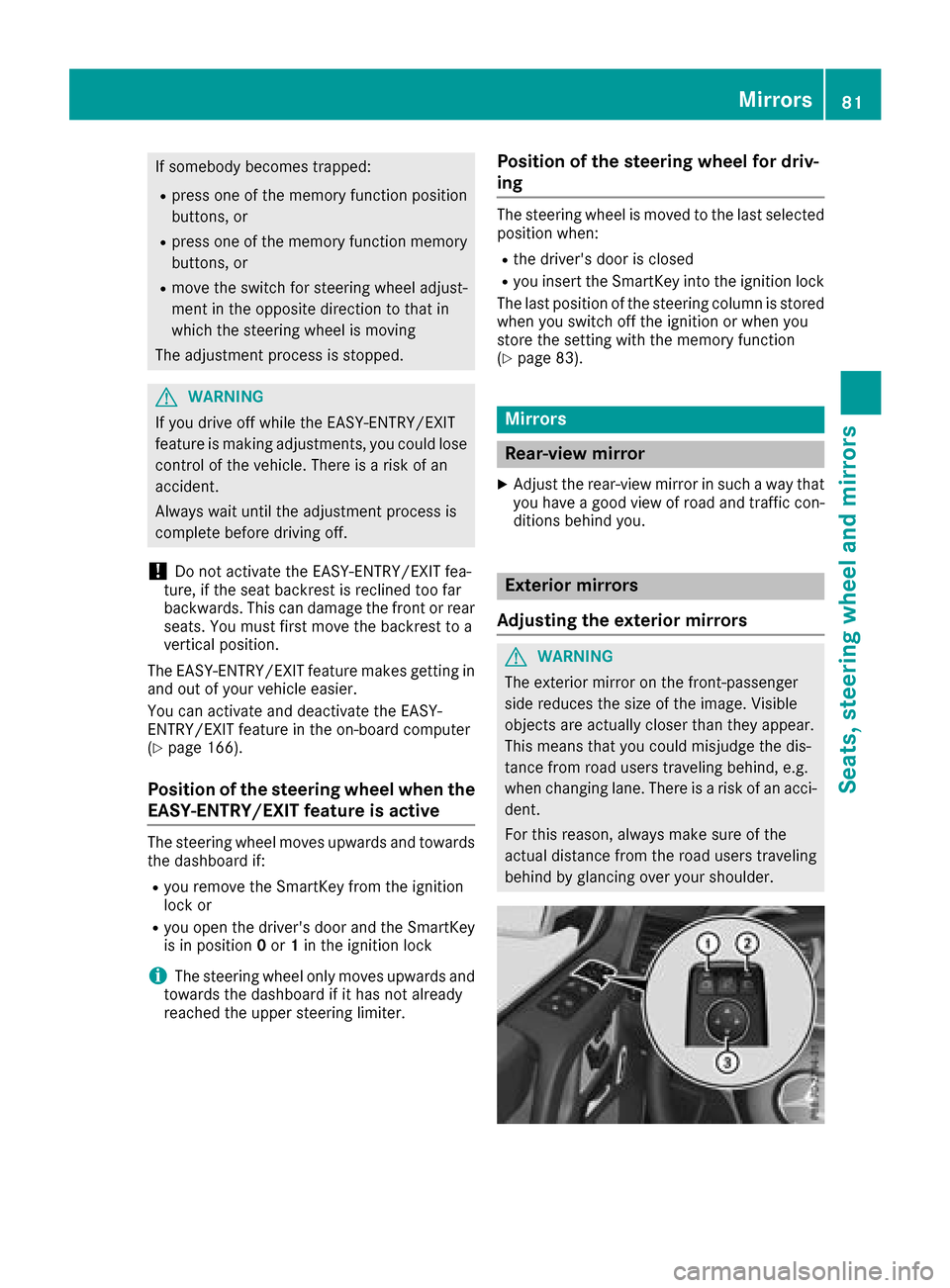
Adjusting the exterio rmirrors
GWARNING
The exterior mirror on the front-passenger
side reduces the size of the image.V isible
objects are actually closer than they appear.
This means that you could misjudge the dis-
tance from road users traveling behind, e.g.
when changing lane. There is arisk of an acci-
dent.
For this reason, always make sure of the
actual distance from the road users traveling
behind by glancing over you rshoulder.
Mirrors81
Seats, steeringw heel and mirrors
Z