2017 MERCEDES-BENZ G-Class bulb
[x] Cancel search: bulbPage 90 of 286
Interior lighting
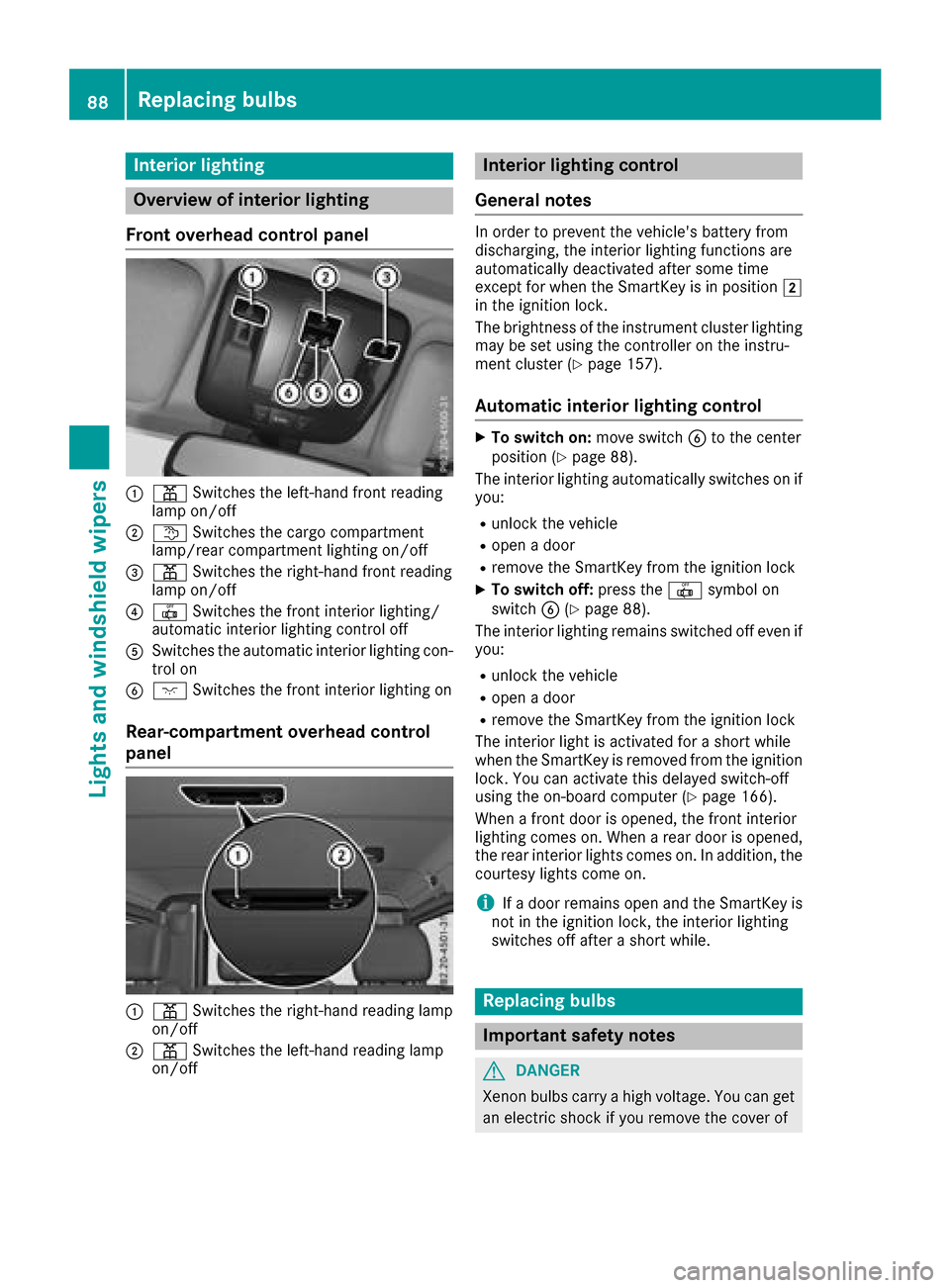
Overview of interior lighting
Fron toverhea dcontrol panel
:p Switches th eleft-han dfront reading
lamp on/off
;t Switches th ecargo compartmen t
lamp/rear compartmen tlighting on/off
=p Switches th eright-hand fron treading
lamp on/off
?| Switches th efront interio rlighting /
automatic interior lighting control off
ASwitches th eautomatic interio rlighting con-
trol on
Bc Switches th efront interio rlighting on
Rear-compartment overhea dcontrol
panel
:p Switches th eright-hand reading lamp
on/off
;p Switches th eleft-han dreading lamp
on/off
Interior lighting control
General notes
In order to preven tthe vehicle's battery from
discharging, th einterior lighting function sare
automatically deactivated after som etime
except for when th eSmartKey is in position 2
in th eignition lock.
The brightness of th einstrumen tcluste rlighting
may be set usin gthe controller on th einstru-
men tcluste r(
Ypage 157).
Automati cinterior lighting control
XTo switch on: moveswitch Bto th ecenter
position (Ypage 88) .
The interior lighting automatically switches on if
you:
Runlock th evehicl e
Ropen adoor
Rremove th eSmartKey from th eignition loc k
XTo switch off :press th e| symbol on
switch B(Ypage 88).
The interior lighting remain sswitched off eve nif
you:
Runlock th evehicl e
Ropen adoor
Rremove th eSmartKey from th eignition loc k
The interior ligh tisactivated for ashort while
when th eSma rtKey is remove dfromt heignition
lock. You can activat ethisd elaye dswitch-off
usin gthe on-board computer (
Ypage 166).
When afront door is opened, th efront interior
lighting comes on .When arear door is opened,
th er ear interior lights comes on .Inaddition ,the
courtesy lights come on .
iIfad oor remain sopen and th eSmartKey is
no tint heignition lock, th einterior lighting
switches off after ashort while .
Replacingbulbs
Important safety notes
GDANGER
Xenon bulbs carry ahigh voltage. You can get
an electric shock if you remove th ecover of
88Replacingb ulbs
Lightsand windshield wipers
Page 91 of 286
the Xenon bulb and touch the electrical con-
tacts.There is ariskoff atal injury.
Never touch the parts or the electrical con-
tacts of the Xenon bulb .Alway shavew orko n
the Xenon bulb scarrie doutataq uali fied spe-
cialist workshop.
GWARNING
Bulbs ,lam ps and connectors can ge tveryh ot
when operating .Ifyouchange abulb, you
could burn yourself on these components.
There is ariskofi njury.
Allow these components to coo ldow nb efore
changing abulb.
Do not us eabulbifith asbeen dropped or if its
glas stub eh asbeen scratched.
The bulb maye xplode if:
Ryout ouch it
Rit is hot
Ryoud ropi t
Ryous cratch it
Use bulb sonlyinc losedl amps thath aveb een
designe dfor thisp urpose.O nlyinstal lspare
bulb soft he same typ eand the specifie dvolt-
age.
Marks on the glas stub er educe the service life
of the bulbs. Do not touch the glas stub ew ith
your bare hands .Ifnecessary,c lean the glass
tub ew henc oldw itha lcohol or spiri tand rubi t
off with alint-freec loth.
Protect bulb sfromm oisture durin goperation.
Do not allo wbulbs to come into contact with
liquids.
Xeno nbulbs and LE Dmodules: in additio nto
the Xenon bulbs, there ar eLED modules which
yo uc annot change yourself.
Hav ethe following bulb sreplaced at aquali fied
specialis tworkshop:
RHigh-mounte dbrake lamp
RAdditiona ltur ns ignals in the exteriorm irrors
RHigh-beam/low-beam headlamps (Xenon
headlamps)
RDaytim erunning lamps
RLicens eplate lamp
RParking lamps/standing lamps
RSid em arker lamps
iIndividua lseg ments of the licens eplate
lamp LEDs mayf ailw ithou tad isplay message
appearing in the multifunctio ndisplay .Regu-
larly check the licens eplate lamp. If neces-
sary,v isitaquali fied specialis tworkshop.
Yo uc an replace the following bulbs:
RTurn signa llam p(front)
RBrake/tail lamp
RTurn signa llam p(rear)
RTail lamps/standing lamps
RBackup lamp
RRear fog lamp
Replace onl ythe bulb slisted(
Ypage 89).
Hav ethe bulb sthaty oucannot change yourself
replaced at aquali fied specialis tworkshop.
If yo urequire assistance replacing bulbs, con-
sult aquali fied specialis tworkshop.
If the new bulb still does not light up ,consul ta
qualified specialis tworkshop.
Headlamps and lights ar eanimportant aspect of
vehicl esafety .You must therefore make sure
thatt hese functio ncorrectl yatalltimes .Have
the headlamp setting checked regularly.
Overvie wofbulbt ypes
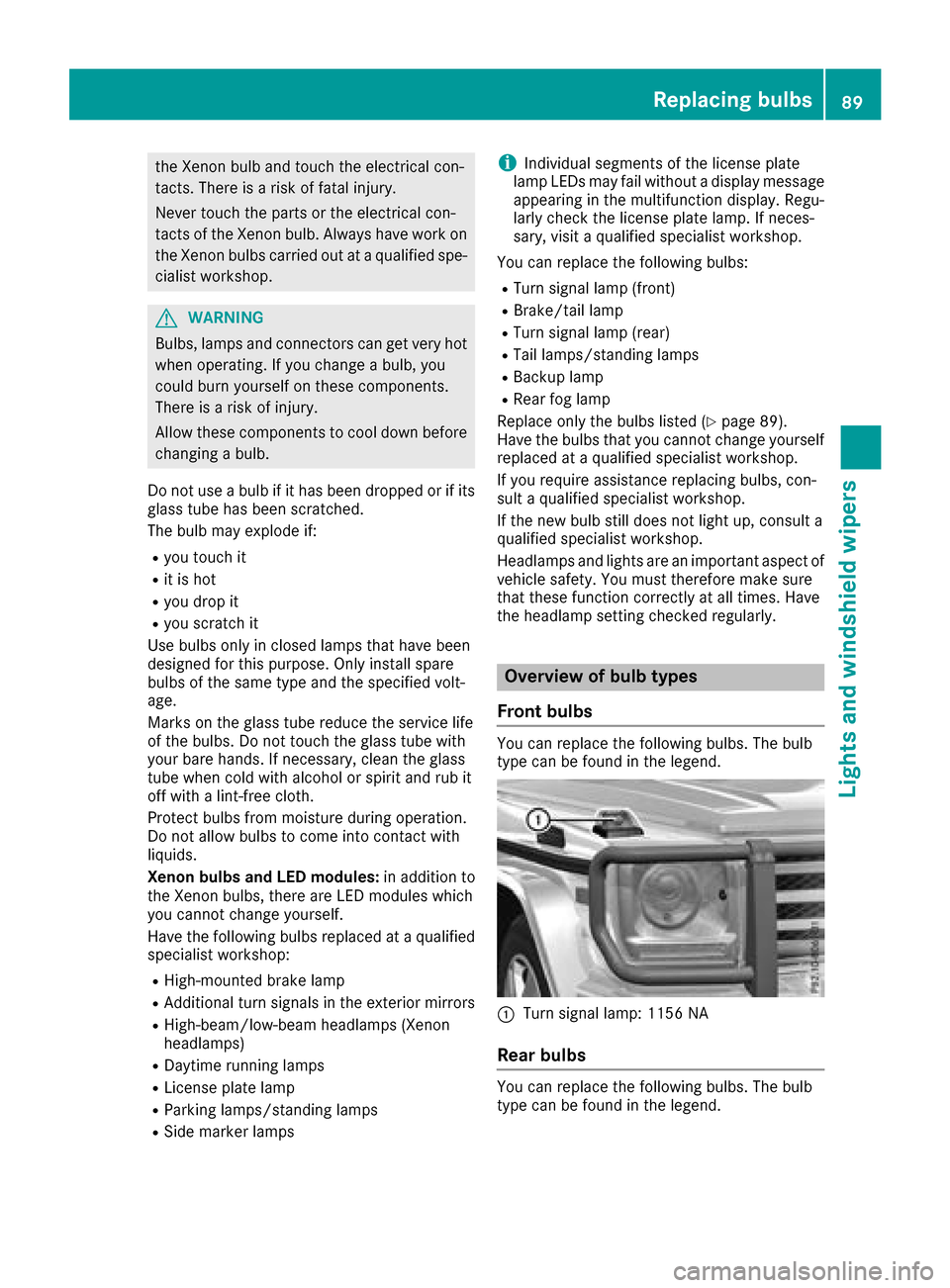
Front bulbs
Yo uc an replace the following bulbs. Th ebulb
typ ecan be found in the legend.
:Turn signa llam p: 1156 NA
Rea rbulbs
Youc an replace the following bulbs. Th ebulb
typ ecan be found in the legend.
Replacin gbulbs89
Lights and windshield wiper s
Z
Page 92 of 286
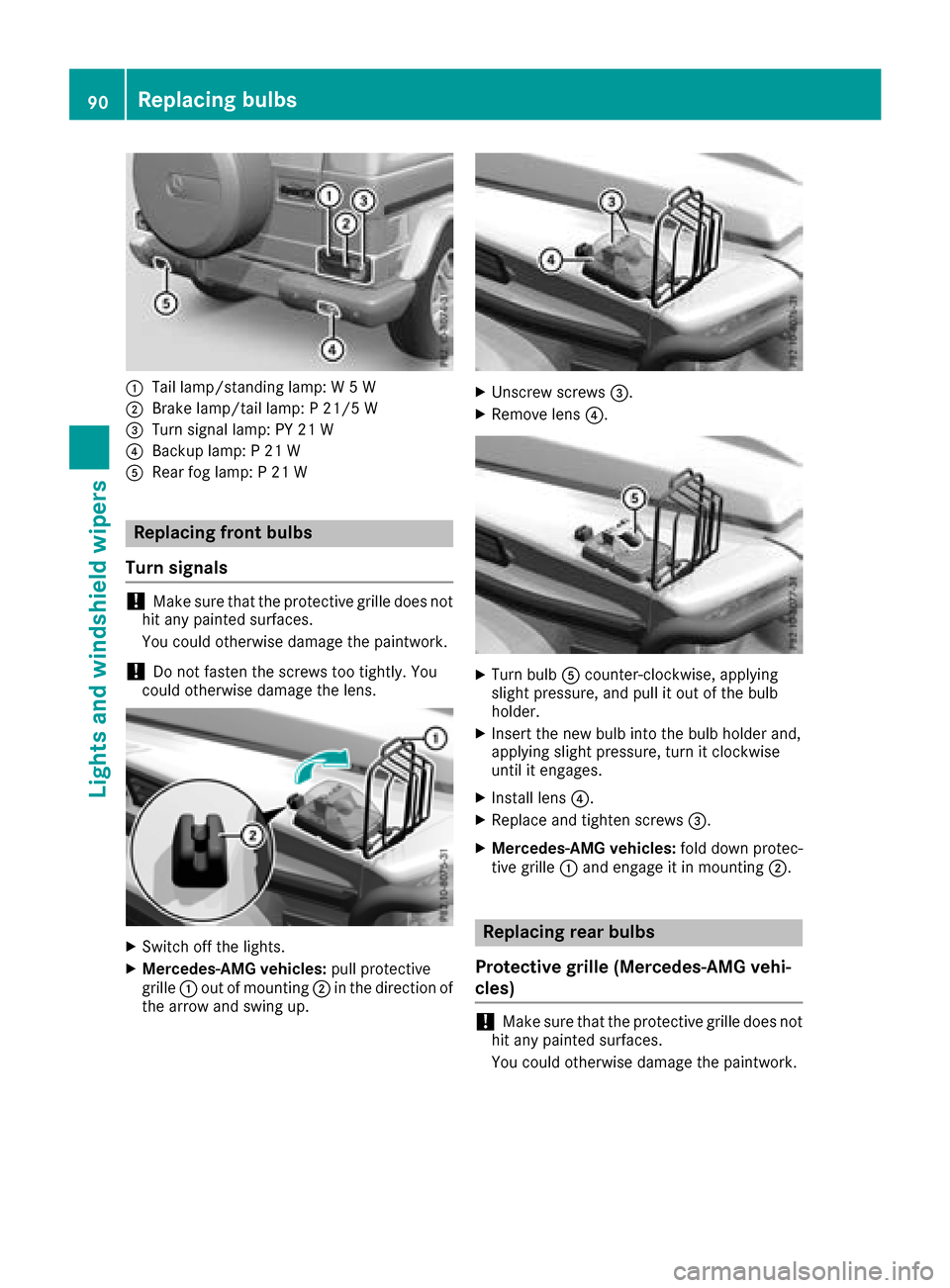
:Tail lamp/standinglamp: W5W
;Brake lamp/tail lamp: P21/5 W
=Turn signal lamp: PY 21 W
?Backup lamp: P21W
ARear fog lamp: P21W
Replacing front bulbs
Turns ignals
!Make sure that the protective grille does not
hit any painted surfaces.
You could otherwise damage the paintwork.
!Do not fasten the screws too tightly. You
could otherwise damage the lens.
XSwitch off the lights.
XMercedes-AMG vehicles: pull protective
grille :out of mounting ;in the direction of
the arrow and swing up.
XUnscrew screws =.
XRemove lens?.
XTurn bulbAcounter-clockwise, applying
slight pressure, and pull it out of the bulb
holder.
XInsert the new bulb into the bulb holder and,
applying slight pressure, turn it clockwise
until it engages.
XInstall lens ?.
XReplace and tighten screws =.
XMercedes-AMG vehicles:fold down protec-
tive grille :and engage it in mounting ;.
Replacing rear bulbs
Protective grille (Mercedes-AMG vehi-
cles)
!Make sure that the protective grille does not
hit any painted surfaces.
You could otherwise damage the paintwork.
90Replacing bulbs
Lights and windshield wipers
Page 93 of 286
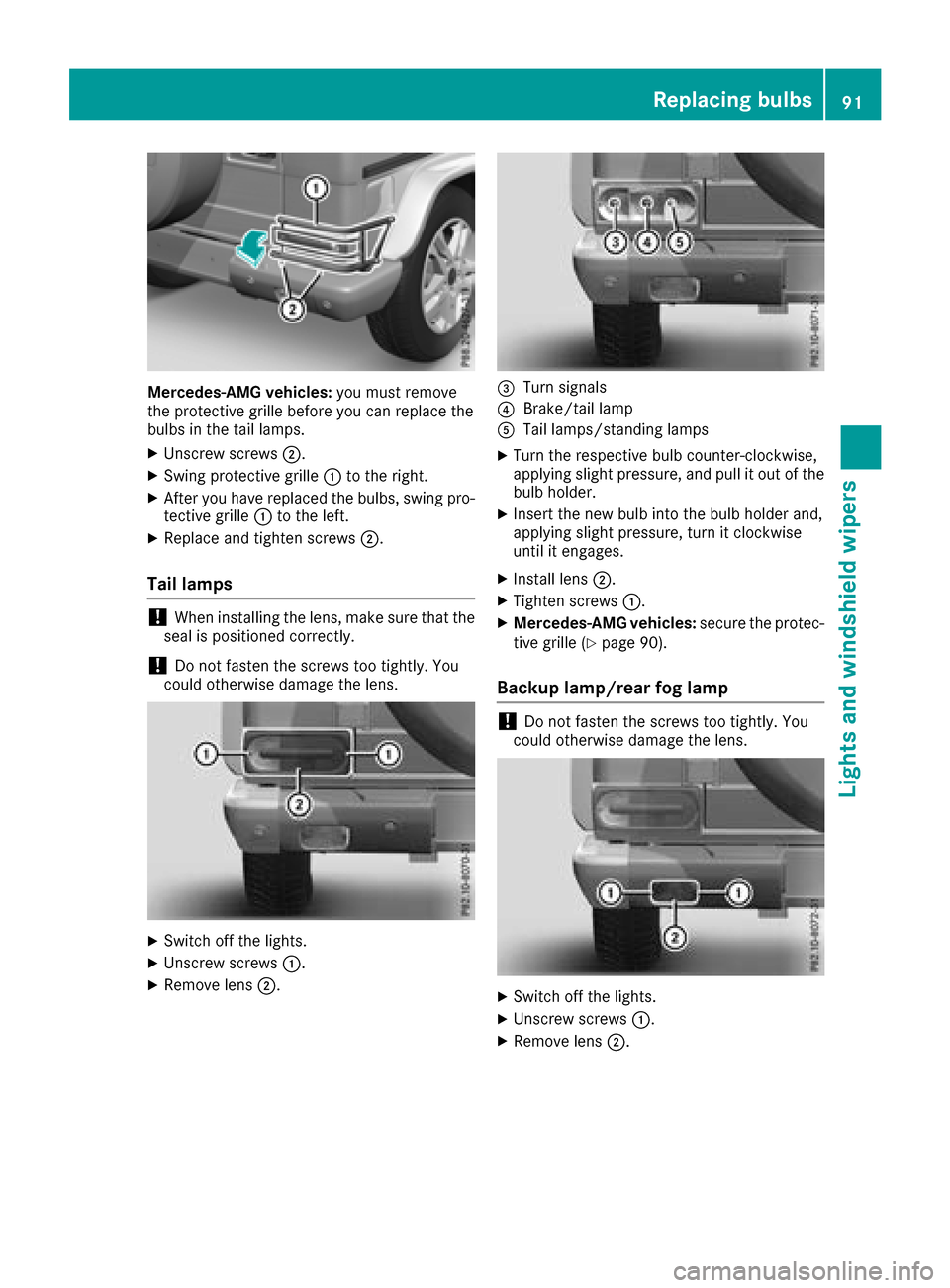
Mercedes-AMG vehicles:you must remove
the protective grille before you can replace the
bulbs in the tail lamps.
XUnscrew screws ;.
XSwing protective grille :to the right.
XAfter you have replaced the bulbs, swing pro-
tective grille :to the left.
XReplace and tighten screws ;.
Tail lamps
!When installing the lens, make sure that the
seal is positioned correctly.
!Do not fasten the screws too tightly.Y ou
could otherwise damage the lens.
XSwitch off the lights.
XUnscrew screws :.
XRemove lens;.
=Turn signals
?Brake/tail lamp
ATaillamps/standing lamps
XTurn the respective bul bcounter-clockwise,
applying slight pressure, and pul litout of the
bul bh older.
XInsert the new bul binto the bul bholder and,
applying slight pressure, turn it clockwise
until it engages.
XInstall lens ;.
XTighten screws :.
XMercedes-AMG vehicles: secure the protec-
tive grille (Ypag e90).
Backup lamp/rear fog lamp
!Do not fasten the screws too tightly.Y ou
coul dotherwise damage the lens.
XSwitch off the lights.
XUnscrew screws :.
XRemove lens;.
Replacing bulbs91
Lights and windshield wipers
Z
Page 94 of 286

XTurn bulb=counter-clockwise, applying
slight pressure, and pull it out of the bulb
holder.
XInsert the new bulb into the bulb holder and,
applying slight pressure, turn it clockwise
until it engages.
XInstall lens ;.
XTighten screws :.
Windshield wipers
Switching the windshield wipers
on/off
!
Do not operate the windshield wipers when
the windshield is dry, as this could damage
the wiper blades. Moreover, dust that has col-
lected on the windshield/rear window can
scratc hthe glass if wiping takes place when
the windshield/rear window is dry.
If it is necessary to switch on the windshield
wipers in dry weather conditions, alwaysu se
washer fluid when operating the windshield
wipers.
!If the windshield wipers leave smears on the
windshield/rear window after the vehicle has
been washed in an automatic car wash, this
may be due to wax or other residue. Clean the
windshield/rear window with washer fluid
after an automatic car wash.
!Intermittent wiping with rain sensor: due to
optical influences and the windshield becom-
ing dirty in dry weather conditions, the wind-
shield wipers may be activated inadvertently.
This could then damage the windshield wiper
blades or scratc hthe windshield.
For this reason, you should alwayss witch off
the windshield wipers in dry weather.
1$ Windshield wipers off
2ÄIntermittent wipe, normal
3ÅIntermittent wipe, frequent
4°Continuous wipe, slow
5¯Continuous wipe, fast
BíSingle wipe
î Wipes with washer fluid
XSwitch on the ignition.
XTurn the combination switch to the corre-
sponding position.
In the ÄorÅ position, the appropriate
wiping frequency is set automatically according
to the intensity of the rain. In the Åposition,
the rain sensor is more sensitiv ethan in the
Ä position, causing the windshield wiper to
wipe more frequently.
Intermittent wiping is interrupted if you stop the vehicle and open afront door. This protects
people getting into and out of the vehicle from
being sprayed with water.
Intermittent wiping continues when all doors are
closed and:
Ryou shift the automatic transmission to drive
position Dor reverse gear R
or
Ryou change the wiper setting on the combi-
nation switch
92Windshield wipers
Lights and windshield wipers
Page 145 of 286
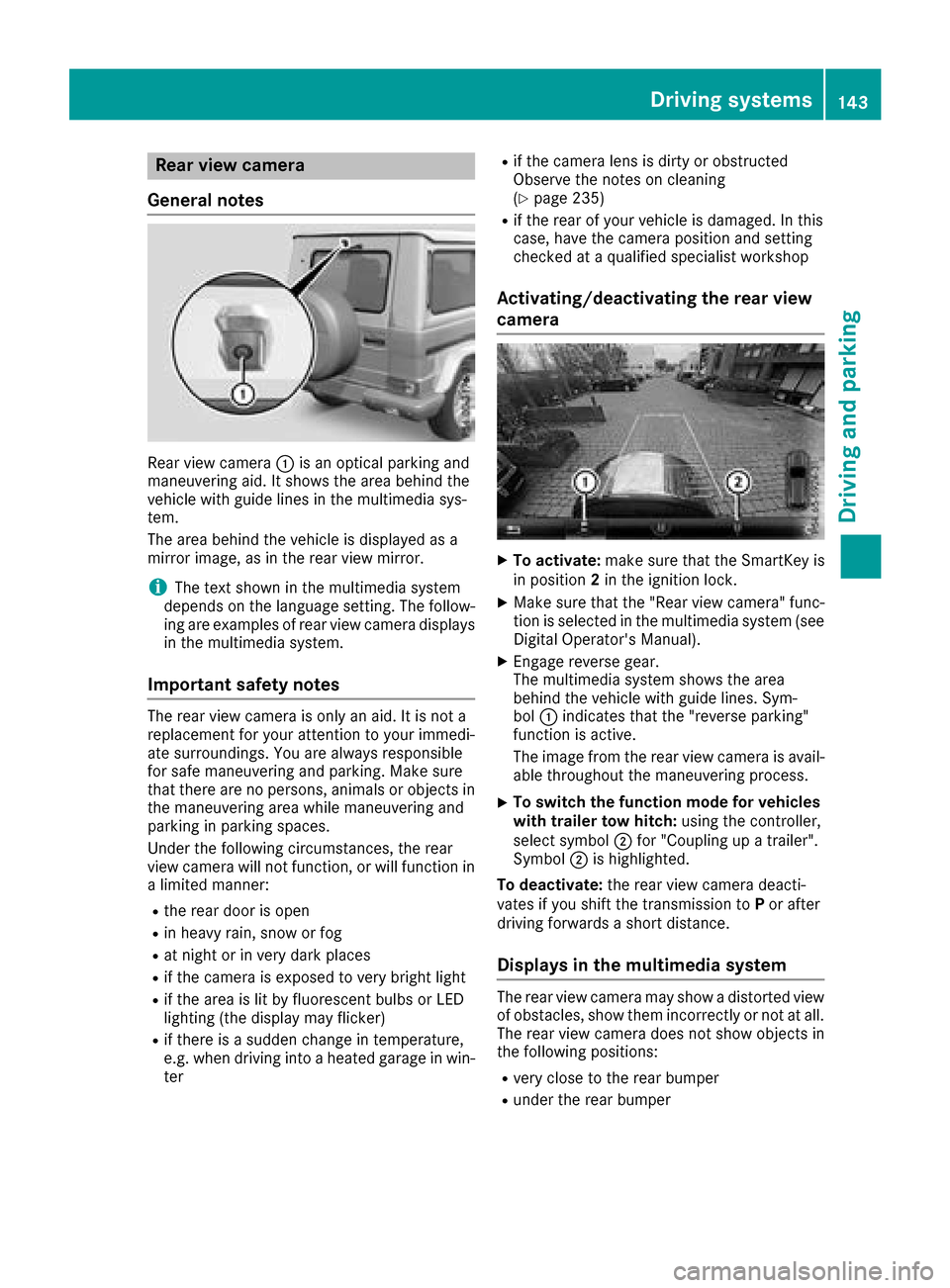
Rear viewcamera
General notes
Rear vie wcamera :is an optical parking and
maneuvering aid. It shows the are abehind the
vehicl ewithg uide lines in the multimedi asys-
tem.
The are abehind the vehicl eisdisplayed as a
mirror image, as in the rearv iewm irror.
iThe text shown in the multimedi asystem
depends on the languag esetting. The follow-
ing are examples of rearv iewc amera displays
in the multimedi asystem.
Important safety notes
The rearv iewc amera is only an aid. It is not a
replacement for your attention to your immedi-
ate surroundings. Yo uare always responsible
for safe maneuvering and parking .Makes ure
that there are no persons,a nimalsoro bjects in
the maneuvering are awhile maneuvering and
parking in parking spaces.
Unde rthe following circumstances, the rear
vie wc amera will not function, or will function in
al im ite dm anner:
Rthe reard ooriso pen
Rin heavy rain, snow or fog
Rat nigh torinv ery dark places
Rif the camera is exposed to very bright light
Rif the are aislitby fluorescent bulb sorLED
lighting (the display may flicker)
Rif there is asudde nchange in temperature,
e.g. when driving into aheated garag einwin-
ter
Rif the camera lens is dirty or obstructed
Observe the notes on cleaning
(
Ypage 235)
Rif the rearofy ourv ehicl eisd amaged. In this
case, have the camera position and setting
checke dataq ualified specialist workshop
Activating/deactivatin gthe rear view
camera
XTo activate: make sure that the SmartKey is
in position 2in the ignition lock.
XMake sure that the "Rearv iewc amera" func-
tion is selected in the multimedi asystem (see
Digital Operator's Manual).
XEngag ereverse gear.
The multimedi asystem shows the area
behind the vehicl ewithg uide lines. Sym-
bol :indicates that the "reversep arking"
function is active.
The image from the rearv iewc amera is avail-
able throughout the maneuvering process.
XTo switc hthe functio nmode for vehicles
with trailer tow hitch: using the controller,
select symbol ;for "Coupling up atrailer".
Symbol ;is highlighted.
To deactivate: the rearviewc amera deacti-
vate sify oushift the transmissio ntoP or after
driving forward sashort distance.
Displays in the multimedias ystem
The rearviewc amera may showad istortedv iew
of obstacles, showt hem incorrectlyornot at all.
The rearv iewc amera doe snot showo bjects in
the following positions:
Rvery close to the rearb umper
Runder the rearb umper
Driving systems143
Driving and parking
Z
Page 178 of 286

Lights
Display messagesPossible causes/consequences andMSolutions
b
Example:CheckL eftLow Beam
The bulb in question is malfunctioning.
XVisitaqualifie dspecialist workshop.
or
XCheckw hether you are permitted to replacet hebulb yourself
(Ypage 88).
iLEDl ight sources :the display message for th ecorresponding
lamp onl yappearsw hen all th eLEDsint helamp have failed.
b
Malfunction SeeOperator'sM anual
The exteriorlighting is malfunctioning.
XVisit aqualifie dspecialist workshop.
b
AutoL ampFunctionInoperative
The light sensor is defective.
XVisitaqualifie dspecialist workshop.
b
Switch Off Lights
The lightsa re still switche donwhen you leave th evehicle .Awarning
tone also sounds.
XTurn th elight switch to position Ã.
Engine
Display messagesPossible causes/consequences and MSolutions
+
CheckCoolantLevelSee Operator'sMan‐ual
The coolant level is to olow.
XAdd coolant ,observingt hewarning notes before doings o
(Ypage 229).
XHav ethe coolant system checked at aqualifie dspecialist workshop
if th ecoolant needs toppingupm oreo ften than usual.
?The fan motor is malfunctioning.
XAt coolant temperatures below drivetot he nearest
qualified specialist workshop.
XAvoid heavy loads on the engine as you do so, e.g. driving in moun-
tainou sterrai nand stop-start traffic.
176Display messages
On-board computer and displays
the marking
H,