Page 378 of 497

&
WARNING Risk of an accident due to
va pour poc kets form ing in the brake sys‐
tem
The brake fluid constantly absorbs moisture
from the air. This lo wersthe boiling point of
th e brake fluid. If the boiling point is too lo w,
va pour poc kets may form inthe brake sys‐
te m when the brakes are applied hard.
This impairs the braking ef fect. #
Have the brake fluid rene we d at the
specified inter vals. Ha
ve the brake fluid regularly changed at a quali‐
fi ed specialist workshop.
Only use brake fluid appr ovedby Mercedes-Benz
according toMB-F reigabe or MB-Appr oval 33 1.0.
Fu rther information on brake fluid:
R inthe Mercedes-Benz Specifications for
Operating Fluids at http://be vo.mercedes-
benz.com
R at a qualified specialist workshop Coolant
Note
s on coolant
Obser vethe no tes on service products
(→ page 368). &
WARNING Risk offire ‑ and inju ryfrom
antifreeze
If antifreeze comes into contact with hot
component parts in the engine compart‐
ment, it may ignite. #
Allow the engine tocool down before
yo uto p up the antif reeze. #
Make sure that no antifreeze spills out
next tothefiller opening. #
Thoroughly clean the antif reeze from
component parts before starting the
ve hicle. *
NO
TEDama gecaused byincor rect cool‐
ant #
Only add coolant that has been pre‐
mixed with therequ ired antifreeze pro‐
te ction.
Fu rther information on coolant:
R Inthe Mercedes-Benz Specifications for
Operating Fluids 310.1, e.g. online at
http://be vo.mercedes-benz.com.
R Ataqu alified specialist workshop. *
NO
TEOverheating at high outside tem‐
peratures If an inapp
ropriate coolant is used, the
engine cooling sy stem is not suf ficiently pro‐
te cted against overheating and cor rosion at
high outside temp eratures. #
Alw ays use coolant appr ovedby
Mercedes-Benz. #
Obser vethe instructions in the
Mercedes-Benz Specifications for Oper‐
ating Fluids 310.1. Te
ch nical da ta375
Page 442 of 497
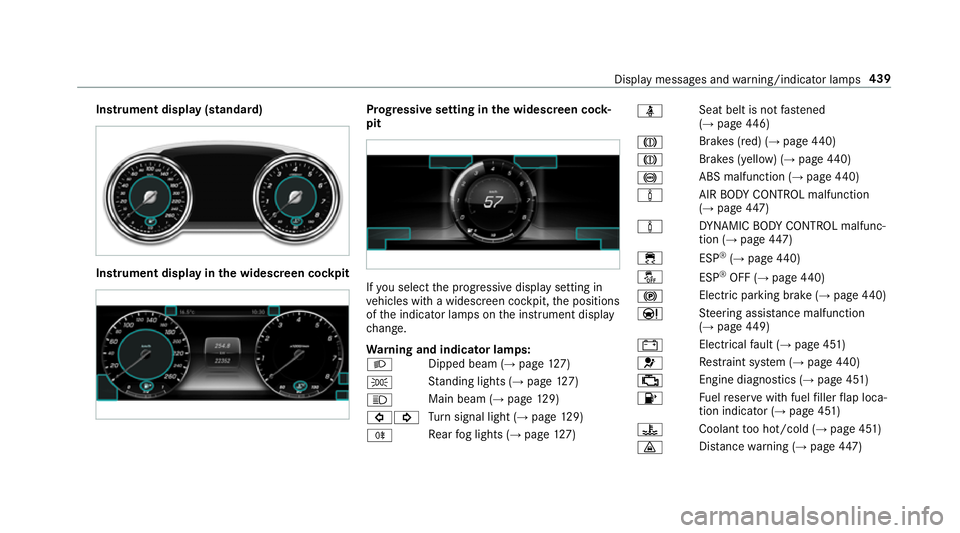
Instrument display (standard)
Instrument display in
the widescreen cockpit Prog
ressive setting in the widescreen cock‐
pit If
yo u select the progressive display setting in
ve hicles with a widescreen cockpit, the positions
of the indicator lamps on the instrument display
ch ange.
Wa rning and indicator lamps:
L Dipped beam (→
page127)
T St
anding lights (→ page127)
K Main beam (→
page129)
#! Tu
rn signal light (→ page129)
R Re
ar fog lights (→ page127) ü
Seat belt is not
fastened
(→ page 446)
J Brakes (red) (→
page 440)
J Brakes (yell
ow) (→ page 440)
! ABS malfunction (→
page 440)
à AIR
BODY CONTROL malfunction
(→ page 447)
à DY
NA MIC BODY CONTROL malfunc‐
tion (→ page447)
÷ ESP®
(→ page 440)
å ESP®
OFF (→ page 440)
! Electric pa
rking brake (→ page440)
Ð St
eering assis tance malfunction
(→ page 449)
# Electrical
fault (→ page 451)
6 Re
stra int sy stem (→ page440)
; Engine diagnostics (→
page 451)
8 Fu
elreser vewith fuel filler flap loca‐
tion indicator (→ page 451)
? Coolant
too hot/cold (→ page 451)
· Dis
tance warning (→ page447) Displ
aymessa ges and warning/indicator lamps 439
Page 463 of 497
Boot box
see EAS Y-PA CK boot box
Boot lid Activating/deactivating the boot lid
opening limiter ....................................... 81
Closing .................................................. 77
HANDS-FREE ACCESS .......................... .79
Locking separa tely ................................. 81
Opening .................................................76
Opening dimensions ............................3 76
Brake Assi stSystem
see BAS (Brake Assi stSystem)
Brake fluid
No tes ................................................... 374
Brake forc e distribution
EBD (Elect ronic Brake forc e Distribu‐
tion) ..................................................... 19 6
Brakes ABS (Anti-lock Braking Sy stem) ........... 191
Ac tive Brake Assi st.............................. 19 6
Ad aptive brake lights .......................... .201
BA S (Brake Assi stSystem) ...................1 91
Driving tips .......................................... 16 4EBD (Electronic Brake
forc e Distribu‐
tion) ..................................................... 19 6
HOLD function .................................... .212
Limited braking ef fect (salt-trea ted
ro ads) .................................................. 16 4
New/replaced brake linings/brake
discs .................................................... 16 4
Ru nning-in no tes ..................................1 64
Braking assistance see BAS (Brake Assi stSystem)
Breakdown Assis tance overview .............................. 18
To w- starting ........................................ 340
To wing away ........................................ 336
Tr ansporting theve hicle ......................3 38
Wheel change ...................................... 357
Breakdown see Flat tyre
Breakdown assistance call see Service call
Breakdown management see Service call
Bu rm ester ®
sur round sound sy stem .....3 05
Ad justing the balance/fader ............... 305 Ad
justing the sound optimisation ........ 305
Ad justing treble, mid and bass ............ 305
Calling up the sound menu .................. 305
Information .......................................... 305
Switching the sur round sound on/off
............................................................ .305
Buttons Steering wheel .................................... 252 C
Call lists Calling up the speed dial list ............... 285
Deleting speed dial presets ................. 285
Displaying de tails from a list ent ry...... 285
Making a call ....................................... 285
Overview ............................................. 285
Setting up a speed dial li st.................. 285
Calling up the sound menu Burmes ter®
sur round sound sy stem ... 305
Calls ..........................................................2 82
Ac cepting ............................................ 282
Ac tivating functions du ring a call ........ 282
Calls wi thseveral participants ............ .282
Declining ............................................. 282 460
Index
Page:
< prev 1-8 9-16 17-24