2017 MERCEDES-BENZ E-CLASS SALOON air condition
[x] Cancel search: air conditionPage 203 of 497
R
Can assist during swerving and stra ightening
of theve hicle.
R Can react from a speed of appr oximately
20 km/h up toa speed of appr oximately
70 km/h.
Yo u can pr eventthe assis tance at any time by
actively steering. &
WARNING Risk of an accident despi te
Evasive Steering Assist
Evasive Steering Assist cann otalw ays clearly
identify objects and complex traf fic situa‐
tions.
In addition, thesteering support of Evasive
St eering Assist is generally not su fficient to
av oid a collision.
In such cases Evasive Steering Assist can:
R give an unnecessary warning or pr ovide
assis tance
R not gi veawa rning or not pr ovide assis‐
ta nce #
Alw ays pay careful attention tothe traf‐
fi c situation; do not rely on Ev asive
St eering Assist alone. #
Beready tobrake and take evasive
action, if necessar y. #
Preve ntthe assis tance byactively steer‐
ing in non-critical driving situations. #
Drive at an appropriate speed if pedes‐
trians are close tothe path of your vehi‐
cle. Also obser
vethe sy stem limitations of Evasive
St eering Assist.
Sy stem limitations
The sy stem may be impaired or may not function
in thefo llowing situations:
R In sno w,rain, fog, heavy spr ay, if there is
gl are, in direct sunlight or in greatlyvarying
light conditions.
R Ifth e sensors are dirty, mis ted up, damaged
or co vered. R
Ifth e sensors malfunction due to otherradar
source inter fere nce, forex ample stro ng radar
re flections in multi-s torey car par ks.
R If a loss of tyre pressure or a defective tyre
has been de tected and displ ayed.
The sy stem may not react cor rectly:
R In compl extraf fic situations whe reobjects
cannot always be clearly identified.
R Topedestrians or vehicles if they mo ve
qu ickly into the sensor de tection range.
R Topedestrians who are hidden by other
objects.
R Ifth e typical outline of a pedestrian cann ot
be distinguished from the bac kground.
R If a pedestrian is not recognised as su ch, e.g.
due tospecial clo thing or other objects.
R On bends with a tight radius. 200
Driving and parking
Page 209 of 497
If
yo u activate the turn signal indicator tochange
lanes, theve hicle will accelerate more briskly to
th e set speed under thefo llowing conditions:
R Active Dis tance Assi stDISTRONIC is acti va‐
te d.
R Ifth e driving speed is higher than 70 km/h.
R Ifth e driven speed drops below thestored
speed.
R The sy stem cann otdetect a vehicle in there l‐
ev ant area of theov ertak ing lane.
Drive prog ram
The DYNA MIC SELECT switch allo wsyouto
ch ange the driving style of Active Dis tance
Assi stDISTRONIC. Depending on which drive
program is selected, the driving characteristics
can be geared towa rds fuel econom y,comfort or
dynamic per form ance (→ page170).
Sy stem limitations
Ac tive Dis tance Assi stDISTRONIC is acti vein
th e 0 km/h to200 km/h speed range.
Ve hicles with the Driving Assistance Pack‐
age: Active Dis tance Assi stDISTRONIC is acti ve
in the 0 km/h to210 km/h speed range. The sy
stem may be impaired or may not function
in thefo llowing ins tances, forex ample:
R In sn ow,ra in, fog, heavy spr ay, if there is
gl are, in direct sunlight or in great lyvarying
light conditions.
R The windsc reen in the area of the camera is
dirty, mis ted up, damaged or co vered.
R Ifth era dar sensors are dirty or co vered.
R On slippery roads, braking or accelerating
can cause the drive wheels tolose traction
and theve hicle could then skid.
R In multi-s torey car par ks,to llst ations or on
ro ads with steep uphill or downhill gradients.
Do not use Active Dis tance Assi stDISTRONIC in
th ese situations.
Tips
Pa y particular attention in thefo llowing traf fic
situations. In such situations, brake if necessar y.
Ac tive Dis tance Assi stDISTRONIC is then deacti‐
va ted:
R When cornering, entering and exiting a bend.
R When not driving in the cent reofthe lane. R
When other vehicles are changing lane.
R Ifth ere are nar row vehicles.
R Ifth ere are obs tacles and stationary vehi‐
cles.
R Ifth ere are crossing vehicles, pedestrians,
mo torcyc lists or cyclists.
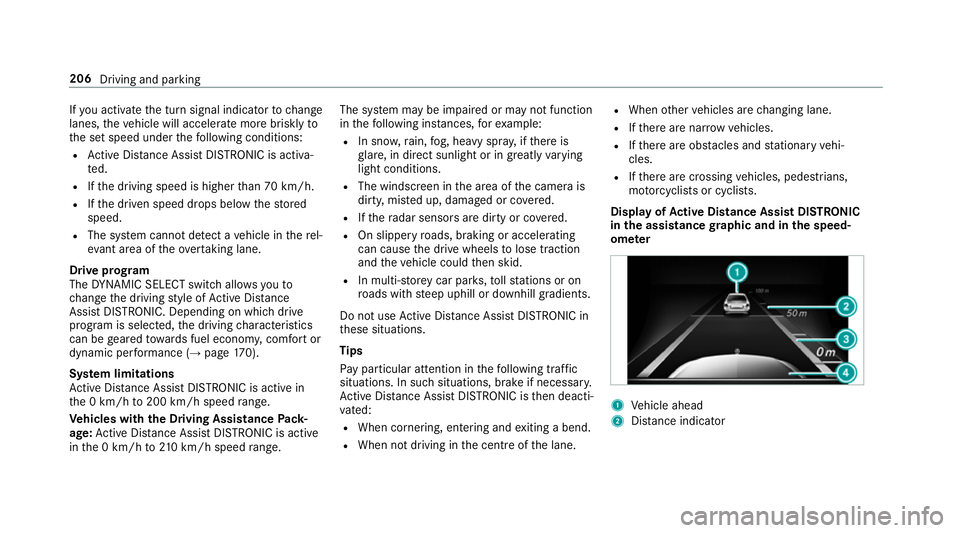
Display of Active Di stance Assist DIST RONIC
in the assistance graphic and in the speed‐
ome ter 1
Vehicle ahead
2 Distance indica tor 206
Driving and parking
Page 210 of 497
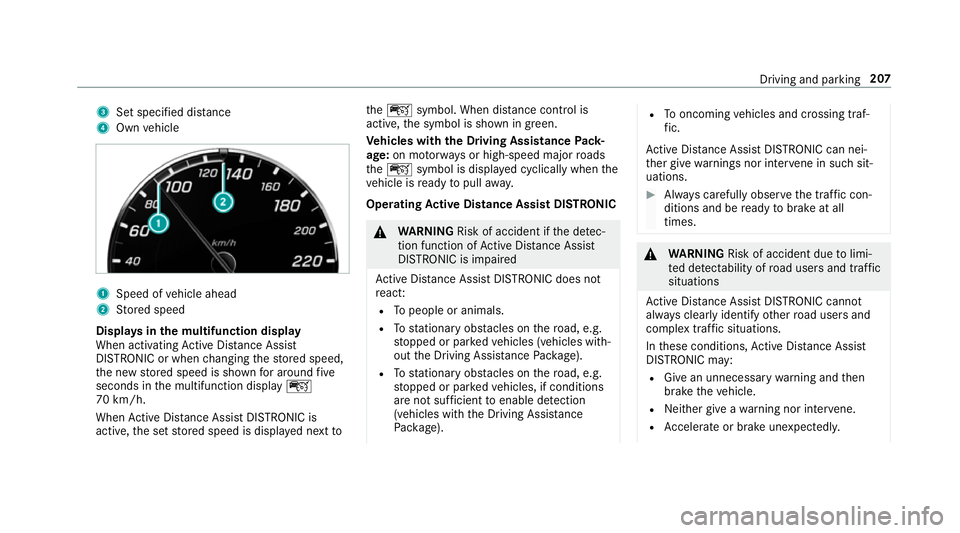
3
Set specified di stance
4 Own vehicle 1
Speed of vehicle ahead
2 Stored speed
Displa ysinthe multifunction display
When activating Active Dis tance Assi st
DISTRONIC or when changing thestored speed,
th e new stored speed is shown for around five
seconds in the multifunction display ç
70 km/h.
When Active Dis tance Assi stDISTRONIC is
acti ve,th e set stored speed is displa yed next toth
eç symbol. When dis tance control is
acti ve,th e symbol is shown in green.
Ve hicles with the Driving Assistance Pack‐
age: on mo torw ays or high-speed major roads
th eç symbol is displa yed cyclically when the
ve hicle is ready topull away.
Operating Active Di stance Assist DIST RONIC &
WARNING Risk of accident if the de tec‐
tion function of Active Dis tance Assi st
DISTRONIC is impaired
Ac tive Dis tance Assi stDISTRONIC does not
re act:
R Topeople or animals.
R Tostationary obstacles on thero ad, e.g.
st opped or par kedve hicles (vehicles with‐
out the Driving Assis tance Package).
R Tostationary obstacles on thero ad, e.g.
st opped or par kedve hicles, if conditions
are not suf ficient toenable de tection
(vehicles wi th the Driving Assis tance
Pa ckage). R
Tooncoming vehicles and crossing traf‐
fi c.
Ac tive Dis tance Assi stDISTRONIC can nei‐
th er give warnings nor inter vene in su chsit‐
uations. #
Alw ays carefully obser vethe traf fic con‐
ditions and be ready tobrake at all
times. &
WARNING Risk of accident due tolimi‐
te d de tectability of road users and traf fic
situations
Ac tive Dis tance Assi stDISTRONIC cannot
al wa ys clear lyidentify other road users and
complex traf fic situations.
In these conditions, Active Dis tance Assi st
DISTRONIC may:
R Give an unnecessary warning and then
brake theve hicle.
R Neither give a warning nor inter vene.
R Accelerate or brake unexpectedly. Driving and pa
rking 207
Page 216 of 497
The HOLD function is deactivated in
thefo llow‐
ing situations:
R When Active Dis tance Assi stDISTRONIC is
acti vated.
R Vehicles with automatic transmission:
when transmission position jis selected.
R When theve hicle is secured with the electric
parking brake.
In thefo llowing situations, theve hicle is held by
th e transmission position jorby the electric
parking brake:
R When the seat belt is unfas tened and the
driver's door is opened.
R When the engine is switched off.
R When there is a malfunction in the sy stem or
if th e po wer supply is insuf ficient.
Ve hicles with manual transmission:
The Brake immediately message may also
appear in the multifunction displa y:#
Immedia tely depress the brake pedal firm ly
until thewa rning message disappears.
The HOLD function is deactivated. A horn sounds at
regular inter vals if you turn off
th e engine, remo veyour seat belt and open the
driver's door while the HOLD function is activa‐
te d. If you attem pttolock theve hicle, the horn
to ne becomes louder. The vehicle cannot be
loc ked until you ha vedeactivated the HOLD
function.
% Once you ha veswitched off the engine, you
cannot restart the engine until you ha ve
deactivated the HOLD function. DY
NA MIC BODY CONT ROL DY
NA MIC BODY CONTROL has thefo llowing
ch aracteristics:
R Variable damping characteristics
R Continual adjustment of the damping forc es
The damping characteristics adapt tothe cur rent
operating and driving situation.
The da mping is tuned individually for each wheel
and is af fected bythefo llowing factors:
R The road sur face conditions
R Vehicle load R
The drive program selected
The drive program can be adjus ted using the
DY NA MIC SELECT switch. AIR
BODY CONT ROL AIR
BODY CONT ROL function
AIR BODY CONTROL is an air suspension sy stem
with variable damping for impr oved driving com‐
fo rt. The all-round le vel control sy stem ensures
th e best possible suspension and const ant
ground clea rance, even wi tha laden vehicle.
When driving at speed, theve hicle is lo wered
automatically toimpr ovedriving saf ety and to
re duce fuel consum ption. The option of manually
adjusting theve hicle le vel is also available.
AIR BODY CONTROL comprises:
R Air suspension with variable spring rate
R Automatic le vel control sy stem
R Speed-dependent lo wering toreduce fuel
consum ption
R Manually selec table high-le vel setting for
grea ter ground clea rance Driving and pa
rking 213
Page 218 of 497
Setting
theve hicle le vel &
WARNING Risk of accident because
ve hicle le vel is too high
If yo u drive at a higher vehicle le vel,th e driv‐
ing characteristics may be impaired due to
th e higher vehicle centre of gravity.
The vehicle can drift outwards, forex ample,
when steering or cornering. #
Alw aysch oose a vehicle le vel which is
suited tothe driving style and thero ad
sur face conditions. &
WARNING Risk of entrapment from vehi‐
cle lo wering
When lo wering theve hicle, other people
could become trapped if their limbs are
between theve hicle body and the tyres or
underneath theve hicle. #
Make sure no one is underneath the
ve hicle or in the immediate vicinity of
th e wheel ar ches when you lo werthe
ve hicle. &
WARNING Risk of entrapment from vehi‐
cle lo wering
Ve hicles with AIR BODY CONT ROL or
le ve l control sy stem: When you unload lug‐
ga ge or lea vetheve hicle, theve hicle first
ri ses slightly and then returns tothe set le vel
shortly af terw ards.
Yo u or an yone else in the vicinity of the
wheel ar ches or the underbody could thus
become trapped.
The vehicle can also be lo wered af ter being
loc ked. #
When leaving theve hicle, make sure
th at nobody is in the vicinity of the
wheel ar ches or the underbody. Re
quirements:
R The vehicle has been star ted.
R The vehicle must not be moving fasterthan
60 km/h. Ra
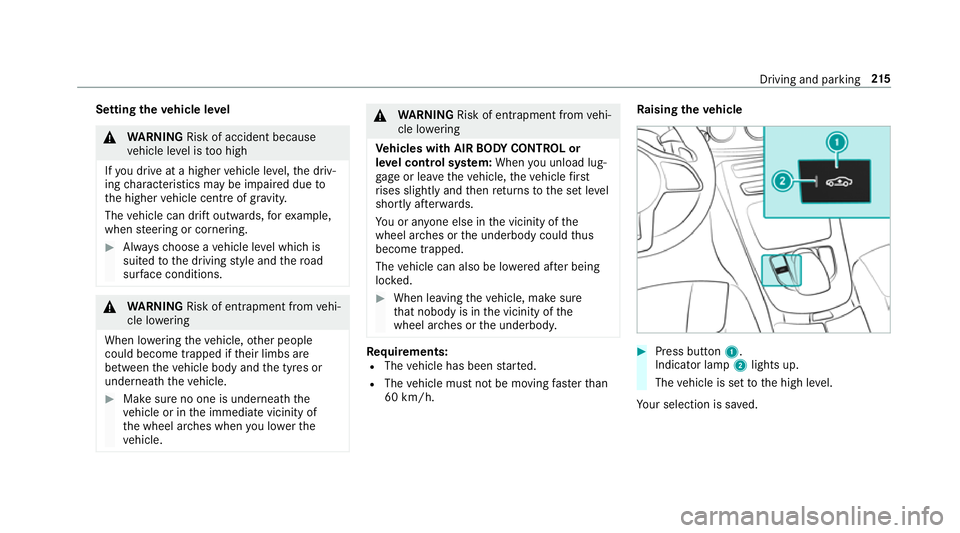
ising theve hicle #
Press button 1.
Indica tor lamp 2lights up.
The vehicle is set tothe high le vel.
Yo ur selection is sa ved. Driving and parking
215
Page 223 of 497
Re
versing camera Fu
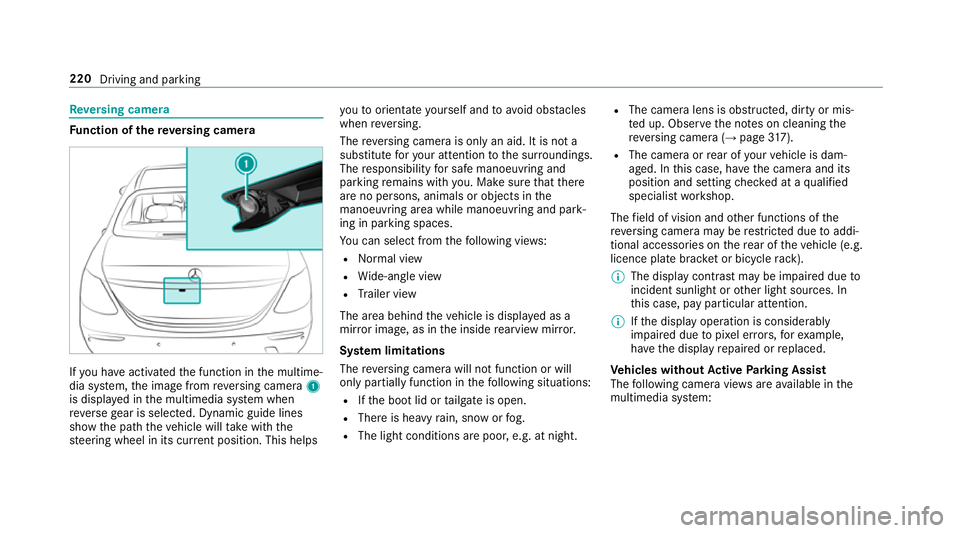
nction of there ve rsing camera If
yo u ha veactivated the function in the multime‐
dia sy stem, the image from reve rsing camera 1
is displa yed in the multimedia sy stem when
re ve rsege ar is selec ted. Dynamic guide lines
show the path theve hicle will take with the
st eering wheel in its cur rent position. This helps yo
uto orientate yourself and toavo id obs tacles
when reve rsing.
The reve rsing camera is only an aid. It is not a
substitute foryo ur attention tothe sur roundings.
The responsibility for safe manoeuvring and
parking remains with you. Make sure that there
are no persons, animals or objects in the
manoeuvring area while manoeuvring and park‐
ing in parking spaces.
Yo u can select from thefo llowing vie ws:
R Normal view
R Wide-angle view
R Trailer view
The area behind theve hicle is displa yed as a
mir ror image, as in the inside rearview mir ror.
Sy stem limitations
The reve rsing camera will not function or will
only partially function in thefo llowing situations:
R Ifth e boot lid or tailgate is open.
R There is heavy rain, snow or fog.
R The light conditions are poor, e.g. at night. R
The camera lens is obstructed, dirty or mis‐
te d up. Obser vethe no tes on cleaning the
re ve rsing camera (→ page317).
R The camera or rear of your vehicle is dam‐
aged. In this case, ha vethe camera and its
position and setting checked at a qualified
specialist workshop.
The field of vision and other functions of the
re ve rsing camera may be restricted due toaddi‐
tional accesso ries on there ar of theve hicle (e.g.
licence plate brac ket or bicycle rack ).
% The display contrast may be impaired due to
incident sunlight or other light sources. In
th is case, pay particular attention.
% Ifth e display operation is considerably
impaired due topixel er rors,fo rex ample,
ha ve the display repaired or replaced.
Ve hicles without Active Parking Assist
The following camera vie wsare available in the
multimedia sy stem: 220
Driving and parking
Page 245 of 497
ve
hicle in front, forve hicle speed, for braking in
good time and forst ay ing in lane.
Ve hicles with Lane Tracking pac kage:if the
lane markings are solid lines and you do not
re act tothewa rning, a lane-cor recting brake
application can bring theve hicle back into the
original lane.
Ve hicles with Driving Assistance pac kageor
Driving Assistance Plus pa ckage: ifyo u do not
re act tothewa rning, a lane-cor recting brake
application can bring theve hicle back into the
original lane. In the case of a broken lane mark‐
ing being de tected, a brake application will only
be made if a vehicle has been de tected in the
adjacent lane. Oncoming vehicles, overtaking
ve hicles and vehicles in adjacent lanes can be
de tected.
The brake application is available in the speed
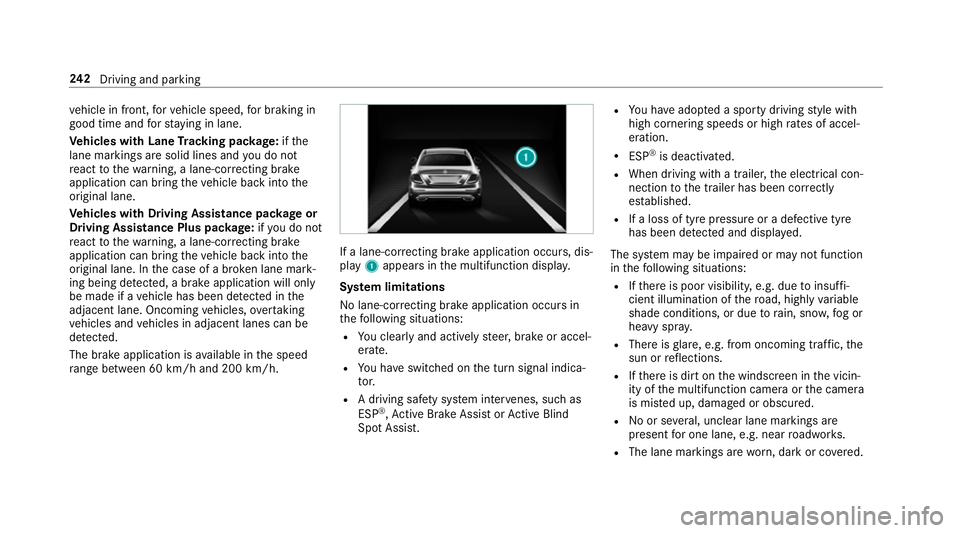
ra nge between 60 km/h and 200 km/h. If a lane-co
rrecting brake application occurs, dis‐
play 1appears in the multifunction displa y.
Sy stem limitations
No lane-cor recting brake application occu rsin
th efo llowing situations:
R You clear lyand actively steer, brake or accel‐
erate.
R You ha veswitched on the turn signal indica‐
to r.
R A driving sa fety sy stem inter venes, su chas
ESP ®
,Ac tive Brake Assi stor Active Blind
Spot Assi st. R
You ha veadop ted a sporty driving style with
high cornering speeds or high rates of accel‐
eration.
R ESP ®
is deactivated.
R When driving with a trailer, the electrical con‐
nection tothe trailer has been cor rectly
es tablished.
R If a loss of tyre pressure or a defective tyre
has been de tected and displ ayed.
The sy stem may be impaired or may not function
in thefo llowing situations:
R Ifth ere is poor visibility, e.g. due toinsuf fi‐
cient illumination of thero ad, high lyvariable
shade conditions, or due torain, sno w,fog or
heavy spr ay.
R There is glare, e.g. from oncoming traf fic, the
sun or reflections.
R Ifth ere is dirt on the windscreen in the vicin‐
ity of the multifunction camera or the camera
is mis ted up, damaged or obscured.
R Noor se veral, unclear lane markings are
present for one lane, e.g. near roadwor ks.
R The lane markings are worn, dark or co vered. 242
Driving and pa rking
Page 246 of 497

R
The dis tance totheve hicle in front is too
small and the lane markings thus cannot be
de tected.
R The lane markings change quickl y,e.g. lanes
branch off, cross one ano ther or mer ge.
R The car riag ew ay isvery nar row and winding.
Ve hicles with Driving Assistance pac kage or
Driving Assistance Plus pa ckage: Active Lane
Ke eping Assist uses radar sensors tomonitor
se veral areas around theve hicle. If thera dar
sensors in there ar bumper are dirty or co vered
with sn ow,th e sy stem may be impaired or may
not function. If an obs tacle in the lane in which
yo u are driving has been de tected, no lane-cor‐
re cting brake application occu rs.
Ac tivating Active Lane Keeping Assist &
WARNING Risk of accident despi te
Ac tive Lane Keeping Assist warning
A lane-cor recting brake application cannot
al wa ys bring theve hicle back into the origi‐
nal lane. #
Alw aysst eer, brake or accelera teyour‐
self, especially if Active Lane Keeping
Assist warnsyo u or makes a lane-cor‐
re cting brake application. &
WARNING Risk of accident despi teinter‐
ve ntion of Active Lane Keeping Assist
Ac tive Lane Keeping Assist does not de tect
traf fic conditions or road users. In very rare
cases, the sy stem may make an inappropri‐
ate brake application, e.g. af ter intentional ly
driving over a solid lane marking.
The brake application can be inter rupte d at
any time if yousteer slightly in the opposite
direction. #
Alw ays make sure that there is suf fi‐
cient di stance tothe side forot her traf‐
fi c or obs tacles. &
WARNING Risk of accident despi teLane
Ke eping Assist
Lane Keeping Assist cann otalw ays clearly
de tect lane markings. In su
chcases, Lane Keeping Assist can:
R give an unnecessary warning
R not give a warning #
Alw ays pay particular attention tothe
traf fic situation and keep within the
lane, especially if Active Lane Keeping
Assist alerts you. Re
quirement:
The driving speed is at least 60 km/h. Driving and parking
243