2017 MERCEDES-BENZ E-CLASS ESTATE fog light
[x] Cancel search: fog lightPage 208 of 585
Sy
stem limitations
The sy stem ma ybeimpaired or ma ynotfunction
in thef ollowing situations:
R In sno w,rain, fog, heavy spr ay,ift hereis
gl are, in direct sunlight or in greatlyvarying
light conditions.
R Ifth es ensor saredirty ,miste du p, damaged
or co vered.
R Ifth es ensor smalfunction due to otherradar
source inter fere nce, fore xamp lestro ng radar
re flections in multi-s toreyc ar par ks.
R Ifal oss of tyr epressur eorad efectivetyre
has been de tected and displ ayed.
The sy stem ma ynotreact cor rectly:
R In compl extraf fics ituations whe reobjects
cannot alwaysbec learly identified.
R Topedestrians or vehicles if they mo ve
qu ickl yintot he sensor de tection range.
R Topedestrians who ar ehidden by other
objects.
R Ifth et ypical outline of apedestrian cann ot
be distinguished from theb ackg round. R
Ifap edestrian is no trecognised as such, e.g.
due tospecial clo thing or other objects.
R On bends wit hatightradius. Setting
Activ eB rake Assi st Multimedia sy
stem:
, Vehicle .
k Assistance .
Active
Brak eAssist
Ve hicles without Drivin gAssistanc epack‐
age: The settings can be made af ters tartin gt he
ve hicle.
Ve hicles with Drivin gAssistanc epacka ge:
The setting scan be made when thei gnition is
switched on.
% It is recommended that youa lway sl ea ve
Ac tiveB rake Assi stswitched on.
Select one of thef ollowing settings: #
Early :your selection is retained when the
ve hicle is next star ted. #
Medium :your selection is retained when the
ve hicle is next star ted. #
Late:y our selection is retained when the
ve hicle is next star ted. #
Off:
The dis tance warning function and thea uton‐
omous braking function ar edeactivated.
Ve hicles without Drivin gAssistanc epack‐
age: when thev ehicle is next star ted, the
mediu msetting is auto matically selected.
Ve hicles with Drivin gAssistanc epack‐
age: Evasi veSteering Assis tisnotavailable.
When thei gnition is next star ted, them iddle
setting is selected automaticall yand Evasive
St eering Assis tisavailable.
% When ActiveB rake Assi stis deactivated, the
æ symbol appears inthea ssis tance
graphi cinthe multifunction displa y. Ad
aptiv eBrake Lights function Ad
aptiv eBrake Lights warnfollowing traf ficinan
emergency braking situation:
R Byflashin gbrake lamps
R By activatin gthe hazard warning lights Drivin
gand parking 205
Page 214 of 585
R
ActiveD ista nce Assi stDISTRONI Chasbeen
acti vated.
If no speed limit is displa yedw hen thel ever is
operated, thes peed se tbythe driver is adop ted.
Driv eprogram
The DYNA MIC SELECT switc hallows youto
ch ang ethe driving styleofA ctiveDista nce
Assi stDISTRONIC. Depending on whic hdrive
program is selected ,the driving characteristics
can be geared towa rdsf uel econom y,comfor tor
dynami cperform anc e(→ pag e175).
Sy stem limitations
Ac tiveD ista nce Assi stDISTRONI Cisactive in
th e0k m/hto2 00 km/h spee drange.
Ve hicles with theD riving Assistance Pack‐
age: ActiveD ista nce Assi stDISTRONI Cisactive
in the0k m/hto2 10km/h spee drange.
Th es ystem ma ybeimpaired or ma ynotfunction
in thef ollowing ins tances, fore xamp le:
R In sn ow,rain, fog, heavy spr ay,ift hereis
gl are, in direct sunlight or in greatlyvarying
light conditions. R
The windsc reen in thea reaoft he camer ais
dirty ,miste du p, damaged or co vered.
R Ifth er adar senso rsared irty or co vered.
R On slipper yroads, braking or accelerating
can cause thed rive wheels tolose traction
and thev ehicle could then skid.
R In multi-s toreyc ar par ks,toll stations or on
ro ads wit hsteep uphill or downhill gradients.
Do no tuse ActiveD ista nce Assi stDISTRONI Cin
th ese situations.
Tips
Pa yp articula rattention in thef ollowing traf fic
situations. In suc hsituations, brak eifnecessar y.
Ac tiveD ista nce Assi stDISTRONI Cisthen deacti‐
va ted:
R When cornering, entering and exitin gab end.
R When no tdrivin gint he centre ofthel ane.
R When other vehicles ar echanging lane.
R Ifth er ea renar rowv ehicles.
R Ifth er ea reobs tacle sand stationar yvehi‐
cles. R
Ifth er ea recrossing vehicles, pedestrians,
mo torcyc lists or cyclists.
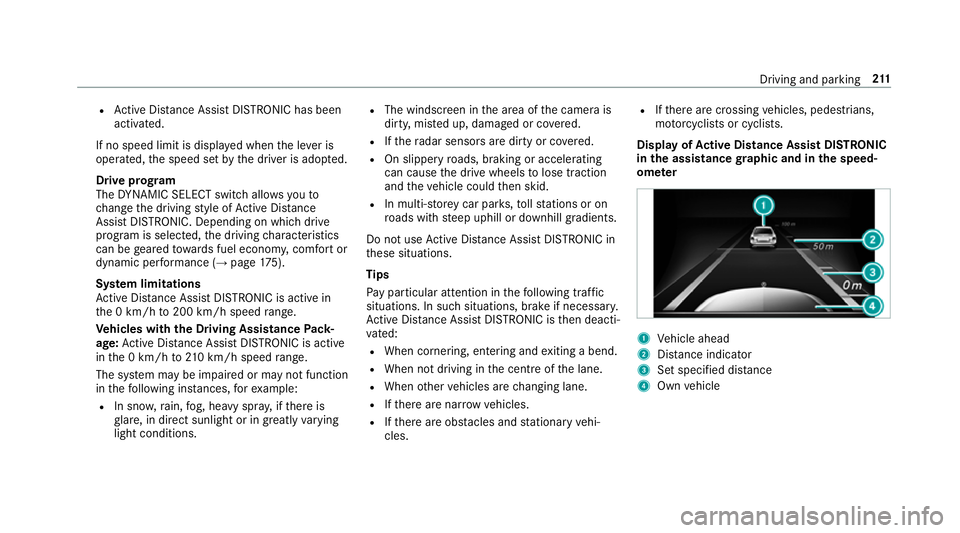
Displa yofActive Distance Assis tDISTRONIC
in the assistanc egraphic and in thes peed‐
ome ter 1
Vehicle ahead
2 Distance indica tor
3 Setspecifie ddista nce
4 Own vehicle Driving and parking
211
Page 219 of 585
from
thea ctiv etop assivestatus ,the è sym‐
bol is shown as enlar geda nd flashes yello w.
Once thes ystemisp assivethe è symbol is
shown as gr eyinthem ultifunction displa y.
The sy stem ma ybeimpaired or ma ynotfunction
in thef ollowing ins tances:
R Ifth er eisp oor visibility ,e.g. due toinsuf fi‐
cient illumination of ther oad, or due tosno w,
ra in, fogorh eavy spr ay.
R Ifth er eisg lare, e.g. from oncoming traf fic,
di re ct sunlight or reflection from other vehi‐
cles (e.g. if thec arriag ew ay iswe t).
R Ifth ew indscreen is dirty ,miste du p, dam‐
aged or co vered, fori ns tance byasticker,in
th ev icinit yoft he camera.
R If no, or se veral, unclear lane markings are
presen tfor one lane, e.g. in aconstruction
area.
R Ifth el ane marking sarewo rnaw ay,d arkor
co veredu p, e.g. bydirtors now.
R The dis tance tothev ehicle in front is too
small and thel ane marking sthus canno tbe
de tected. R
Ifth el ane marking schang equickl y,e.g.
lanes branc hoff,c ross one ano ther or
mer ge.
R The car riag ewa yisn arrow and winding.
R Ifth er ea rehighly variable shade conditions
on thec arriag ewa y.
R Ifth er ea reobs tacle ssuchaso bject mar kers
on thel ane or projecting out int othe lane.
The sy stem does no tprovide assis tance in the
fo llowing conditions:
R Onvery shar pbends.
R When towing atrailer.
R Ifyo ua ctivel ychang elane without swit ching
on thet urns ignal indicator.
R Ifyo us wit ch on thet urns ignal indicator and
th ec onditions fora ctivating ActiveL ane
Chang eAssistaren otfulfilled.
Ac tivatin gActive Ste ering Assist
Requ irements:
R ESP ®
mus tbea ctivated, but no tinter vening. R
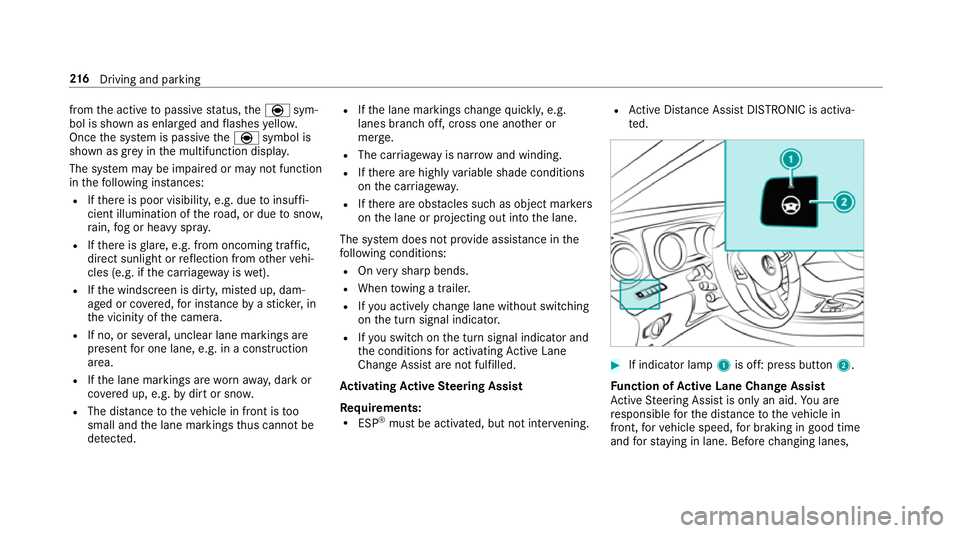
ActiveD ista nce Assi stDISTRONI Cisactiva‐
te d. #
If indicator lamp 1is off: press button 2.
Fu nction of Activ eL aneC hang eAssist
Ac tiveS teering Assis tisonlyana id.Youa re
re sponsible fort he dis tance tothev ehicle in
front, forv ehicle speed, forb raking in good time
and fors tayi ng in lane. Befor echanging lanes, 216
Driving and pa rking
Page 230 of 585
Re
versing camera Fu
nction of ther eve rsing camera If
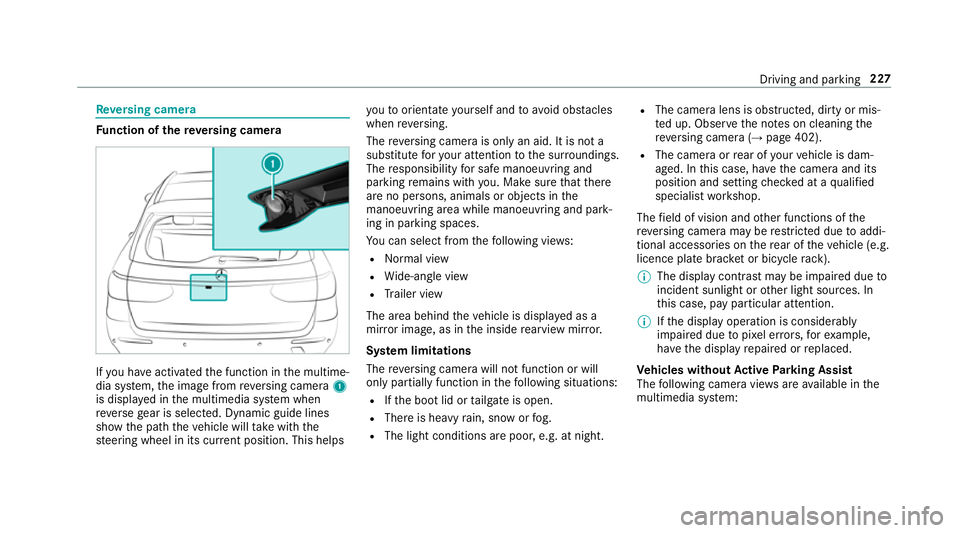
yo uh ave activated thef unction in them ultime‐
dia sy stem, thei mag efromr eve rsing camera 1
is displa yedint he multimedia sy stem when
re ve rseg ear is selected. Dynamic guide lines
sho wthe pat hthe vehicle will take wit hthe
st eering wheel in its cur rent position. Thi shelps yo
utoo rientat eyourself and toavo id obs tacles
whe nreve rsing.
The reve rsing camer aisonlyana id. It is no ta
substitut efor your attentio ntothe sur roundings.
The responsibility fors afem anoeuvring and
parking remains wit hyou. Mak esuret hat there
ar enop ersons, animals or objects in the
manoeuvring area whil emanoeuvring and park‐
ing in parking spaces.
Yo uc an select from thef ollowing vie ws:
R Normal view
R Wide-angle view
R Trailer view
The area behin dthe vehicle is displa yedasa
mir rorimage, as in thei nside rearvie wmirro r.
Sy stem limitations
The reve rsing camera will no tfunction or will
onl ypartiall yfunction in thef ollowing situations:
R Ifth eb ootlid or tailgat eiso pen.
R Ther eish eavyrain, sno worfog.
R The light conditions ar epoor ,e.g. at night. R
The camer alens is obstructed, dirty or mis‐
te du p. Obser vethen otes on cleaning the
re ve rsing camer a(→pag e402).
R The camera or rear of your vehicle is dam‐
aged. In this case, ha vethec amer aand its
position and setting checkedataq ualified
specialis tworks hop.
The field of vision and other functions of the
re ve rsing camera ma yberestricted due toaddi‐
tional accesso ries on ther ear of thev ehicle (e.g.
licence plat ebrack et or bicycle rack ).
% The displa ycontras tmaybe impaired due to
incident sunligh torother light sources. In
th is case, pa yparticular attention.
% Ifth ed ispla yoperation is considerably
impaired due topixel er rors,for example,
ha ve thed ispla yrepaired or replaced.
Ve hicles without Activ eP arking Assist
The following camera vie wsarea vailable in the
multimedia sy stem: Driving and parking
227
Page 235 of 585
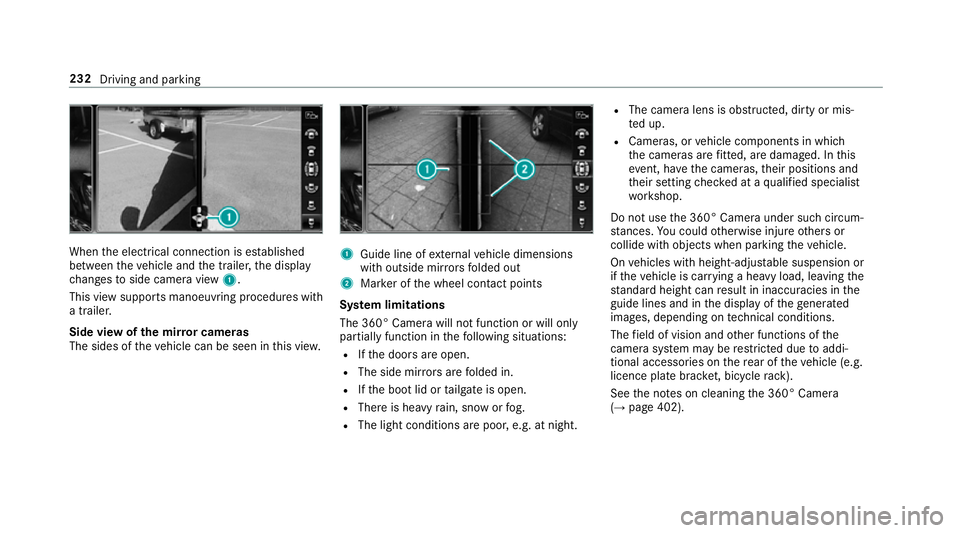
When
thee lectrical connection is es tablished
between thev ehicle and thet railer ,the display
ch anges toside camer aview 1.
This vie wsupports manoeuvring procedures with
at railer.
Side vie wofthe mir rorc ameras
The side softhevehicle can be seen in this vie w. 1
Guide line of extern al vehicle dimensions
wit ho utside mir rors folded out
2 Markeroft he wheel contact points
Sy stem limitations
The 360° Camera will no tfunction or will only
partiall yfunction in thef ollowing situations:
R Ifth ed oor sareopen.
R The side mir rors aref olded in.
R Ifth eb ootlid or tailgat eiso pen.
R Ther eish eavyrain, sno worfog.
R The light conditions ar epoor ,e.g. at night. R
The camer alens is obstructed, dirty or mis‐
te du p.
R Cameras, or vehicle componentsinw hich
th ec ameras ar efitted, ar edamaged .Inthis
eve nt, ha vethec ameras, their position sand
th eir setting checkedataq ualified specialist
wo rkshop.
Do no tuse the3 60° Camer aunder suc hcircum‐
st ances. Youc ouldotherwise injur eother sor
collide wit hobjectsw hen parking thev ehicle.
On vehicles wit hheight-adjus table suspension or
if th ev ehicle is car rying aheavy load, leavin gthe
st andar dheigh tcan result in inaccuracies in the
guide lines and in thed ispla yoft hegenerated
ima ges, depending on tech nica lconditions.
The field of vision and other functions of the
came rasystem ma yberestricted due toaddi‐
tional accesso ries on ther ear of thev ehicle (e.g.
licence plat ebrack et,b icyc le rack ).
See then otes on cleaning the3 60° Camera
(→ pag e402). 232
Driving and parking
Page 250 of 585
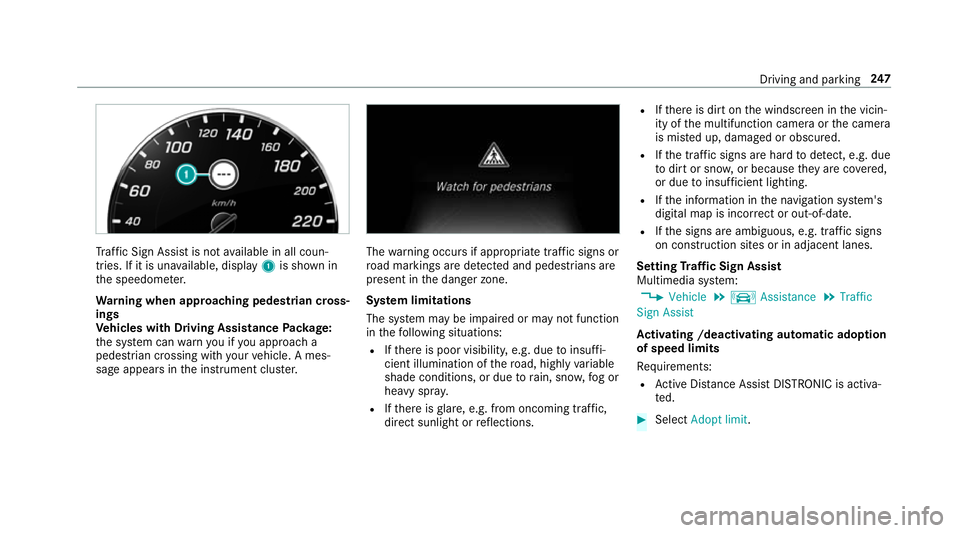
Tr
af ficS ign Assi stis no tavailable in all coun‐
tries. If it is una vailable, display 1is shown in
th es peedome ter.
Wa rning when app roaching pedestrian cross‐
ings
Ve hicles with Drivin gAssistanc ePacka ge:
th es ystemc anwarnyouify ou approac ha
pedestrian crossing wit hyour vehicle. Ames‐
sag eappears inthei nstrument clus ter. The
warning occur sifappropriat etraffic signs or
ro ad markings ar edetected and pedestrians are
present in thed anger zone.
Sy stem limitations
The sy stem ma ybeimpaired or ma ynotfunction
in thef ollowing situations:
R Ifth er eisp oor visibility ,e.g. due toinsuf fi‐
cient illumination of ther oad, highly variable
shade conditions, or due torain, sno w,fogor
heavy spr ay.
R Ifth er eisg lare, e.g. from oncoming traf fic,
di re ct sunlight or reflections. R
Ifth er eisd irtont he windscreen in thev icin‐
ity of them ultifunction camer aorthe camera
is mis tedu p, damaged or obscured.
R Ifth et raffic signs ar ehardtod etect, e.g .due
to dir tors now, or because they arec ove red,
or due toinsuf ficient lighting.
R Ifth ei nformation in then avigation sy stem's
digital map is incor rect or out-of-da te.
R Ifth es igns ar eambiguous, e.g. tra ffic signs
on con stru ction sites or in adjacent lanes.
Setting Traf ficS ign Assist
Multimedia sy stem:
, Vehicle .
k Assistance .
Traffic
Sign Assist
Ac tivatin g/deacti vatin ga utomati cadoption
of speed limits
Re quirements:
R ActiveD ista nce Assi stDISTRONI Cisactiva‐
te d. #
Select Adopt limit. Driving and parking
247
Page 251 of 585
#
Activate Oor deacti vate ª thef unction.
The speed limits de tected byTraf ficS ign
Assi starea utomaticall yadop tedbyA ctive
Dis tance Assi stDISTRONIC.
Displ aying de tected traf fics igns in the
media display #
Select Display in COMAND .#
Activate Oor deacti vate ª thef unction.
Ad justin gthe type of warning #
Select Visual&audible ,Visual orNone.
Ad justin gthe warning threshold
This value de term ines thes peed at whic ha
wa rning is issued when exceeded. #
Select Warning threshold. #
Setthe desired speed. Blind Spo
tAssis tand Activ eB lind Spot
Assi st Fu
nction of Blind Spo tAssis tand Active
Blind Spo tAssist
Blind Spo tAssistuses tw olateral, rear-facing
ra dar sensor stomonitor thea reaupto40m
behind your vehicle and 3mdirectlynexttoy our
ve hicle.
If av ehicle is de tected at speeds ab ovea ppr ox‐
imatel y12km/h and this vehicle subsequently
enter sthe monitoring rang ed irec tlyn exttoy our
ve hicle, thew arning lam pinthe outside mir ror
light supr ed.
If av ehicle is de tected clos etoyourvehicle in
th el ateral monitoring rang ea nd yous wit ch on
th et urns ignal indicator in thec orresponding
direction, awarning tone sounds once .The red
wa rning lam pinthe outside mir rorf lashes. If the
tur ns igna lindica torr emain son, all other de tec‐
te dv ehicles ar eindicated onl ybytheflashin gof
th er ed warning lamp.
If yo uo vertak eav ehicle quickl y,no warning is
given. &
WARNING Risk of accident despi teBlind
Spo tAssist
Blind Spo tAssistdoes no treact tovehicles
approaching and overtakin gyou at agreatly
di fferent speed.
As aresult, Blind Spo tAssis tcanno twarn
driver sinthis situa tion. #
Alw aysp aycareful attention tothet raf‐
fi cs ituation and maintai nasafed is‐
ta nce at thes ide of thev ehicle. Blind Spo
tAssis tand ActiveB lind Spo tAssist
ar eo nly aids. The ymayfailto detect some vehi‐
cles and ar enosubstitut efor attentiv edriving.
Alw ayse nsur ethat ther eiss ufficient di stanc eto
th es ide foro ther road user sand obs tacles.
Sy stem limitations
The sy stem ma ybelimited in thef ollowing situa‐
tions:
R thes ensor saredirty or co vered
R poor visibility ,e.g. due tofog, heavy rain,
sno wors pray 248
Driving and pa rking
Page 255 of 585
R
Youh avea dop tedas porty driving stylew ith
high cornering speeds or high ratesofa ccel‐
eration.
R ESP ®
is deactivated.
R When driving wit hatrailer, thee lectrical con‐
nection tothet railer has been cor rectly
es tablished.
R Ifal oss of tyr epressur eorad efectivetyre
has been de tected and displ ayed.
The sy stem ma ybeimpaired or ma ynotfunction
in thef ollowing situations:
R Ther eisp oor visibilit y,e.g. due toinsuf ficient
illumination of ther oad, highly variable shade
conditions, or due torain, sno w,fogorh eavy
spr ay.
R Ther eisg lare, e.g. from thes un, reflections
or oncoming tra ffic.
R Ther eisd irtont he windscreen in thev icinity
of them ultifunction camer aorthe camer ais
mis tedu p, damaged or obscured.
R No or se veral, unclear lane markings are
presen tfor one lane, e.g. in aconstruction
area. R
The lane markings ar eworn, dar korcovered.
R The dis tance tothev ehicle in front is too
small and thel ane markings thus canno tbe
de tected.
R The lane markings chang equickl y,e.g. lanes
branc hoff,c ross one ano ther or mer ge.
R The road is very nar rowa nd winding.
Ve hicles with Drivin gAssistanc epacka ge or
Driving Assistance Plus pa ckage: ActiveL ane
Ke eping Assis tuses radar sensor stomonitor
se verala reas around thev ehicle. If ther adar
senso rsinther ear bumper ar edirty or co vered
wit hs now, thes ystemm aybe impaired or may
no tfunction .Ifano bstacle in thel ane in which
yo ua redrivin ghas been de tected, no lane-cor‐
re cting brak eappli cation occu rs.
Ac tivatin gActive Lan eKeeping Assist &
WARNING Risk of accident despi te
Ac tiveL aneK eeping Assis twarning
Al ane-cor recting brak eappli cation cannot
al wa ys bring thev ehicle bac kintot he origi‐
nal lane. #
Alw ayss teer,b rake or accelera teyour‐
self ,especiall yifActiveLaneK eeping
Assis twarns youorm akesalane-cor‐
re cting brak eappli cation. &
WARNING Risk of accident despi teinter‐
ve ntio nofA ctiveLaneK eeping Assist
Ac tiveL aneK eeping Assis tdoes no tdetect
traf ficc onditions or road users. In very rare
cases, thes ystem ma ymakeani nappropri‐
at eb rake application, e.g. af teri ntentional ly
driving overas olidl ane marking.
The brak eapplication can be inter rupte dat
an yt ime if yous teer slightl yinthe opposite
direction. #
Alw aysm akes uret hat ther eiss uffi‐
cient di stanc etot he side foro ther traf‐
fi coro bstacles. &
WARNING Risk of accident despi teLane
Ke eping Assist
Lane Keeping Assis tcann otalw aysc learly
de tect lane markings. 252
Driving and pa rking