2017 MERCEDES-BENZ CLA stop start
[x] Cancel search: stop startPage 160 of 318
R
the steering wheel is in the straight-ahead
position. R
the vehicle is stationary and the brake pedal is
depressed (left foot). R
the transmission is in position D .R
one of the drive programs S , S+ or RACE is
selected. ( Y
page 128)
Activating RACE START X
Depress the brake pedal with your left foot
and keep it depressed. X
Pull and hold both steering wheel paddle shift-
ers. X
The RACE START Confirm: Paddle UP
Cancel: Paddle DOWN message appears in
the multifunction display. X
Release both steering wheel paddle shifters.
i If the activation conditions are no longer ful-
filled, RACE START is canceled. The RACE
START Not Possible See Operator's
Manual message appears in the multifunction
display. X
To cancel: pull the left steering wheel paddle
shifter ( Y
page 135).
or X
To confirm: pull the right steering wheel pad-
dle shifter ( Y
page 135).
The RACE START Available Depress gas
pedal message appears in the multifunction
display.
i If you do not depress the accelerator pedal
within a few seconds, RACE START is can-
celed. The multifunction display shows the
RACE START Canceled message.X
Fully depress the accelerator pedal.
The engine speed is increased.
The RACE START Release brake to start
message appears in the multifunction display.
i If you do not release the brake pedal within
a short time, RACE START will be canceled.
The multifunction display shows the RACE
START Canceled message.X
Take your foot off the brake, but keep the
accelerator pedal depressed.
The vehicle pulls away at maximum acceler-
ation.
The RACE START Active message appears in
the multifunction display. RACE START is deactivated when the vehicle
reaches a speed of approximately 50 km/h.
RACE START is deactivated immediately if you
release the accelerator pedal during RACE
START or if any of the activation conditions are
no longer fulfilled. The RACE START Not Pos‐
sible or RACE START Canceled message
appears in the multifunction display.
i If RACE START is used repeatedly within a
short period of time, it is only available again
after the vehicle has been driven a certain
distance.
AMG adaptive sport suspension sys-
tem
General notes The electronically controlled damping system
works continuously. This improves driving
safety and ride comfort.
The damping is tuned individually to each wheel
and depends on: R
your driving style, e.g. sporty R
the road surface condition, e.g. bumps R
your individual selection of "Sport" or "Com-
fort"
The suspension setting is adjusted using the
corresponding button in the center console.
i The mode can also be set using the AMG
DYNAMIC SELECT controller ( Y
page 128).
Each time you start the engine with the Smart-
Key or the Start/Stop button, Comfort mode is
activated. For further information about starting
the engine, see ( Y
page 122).
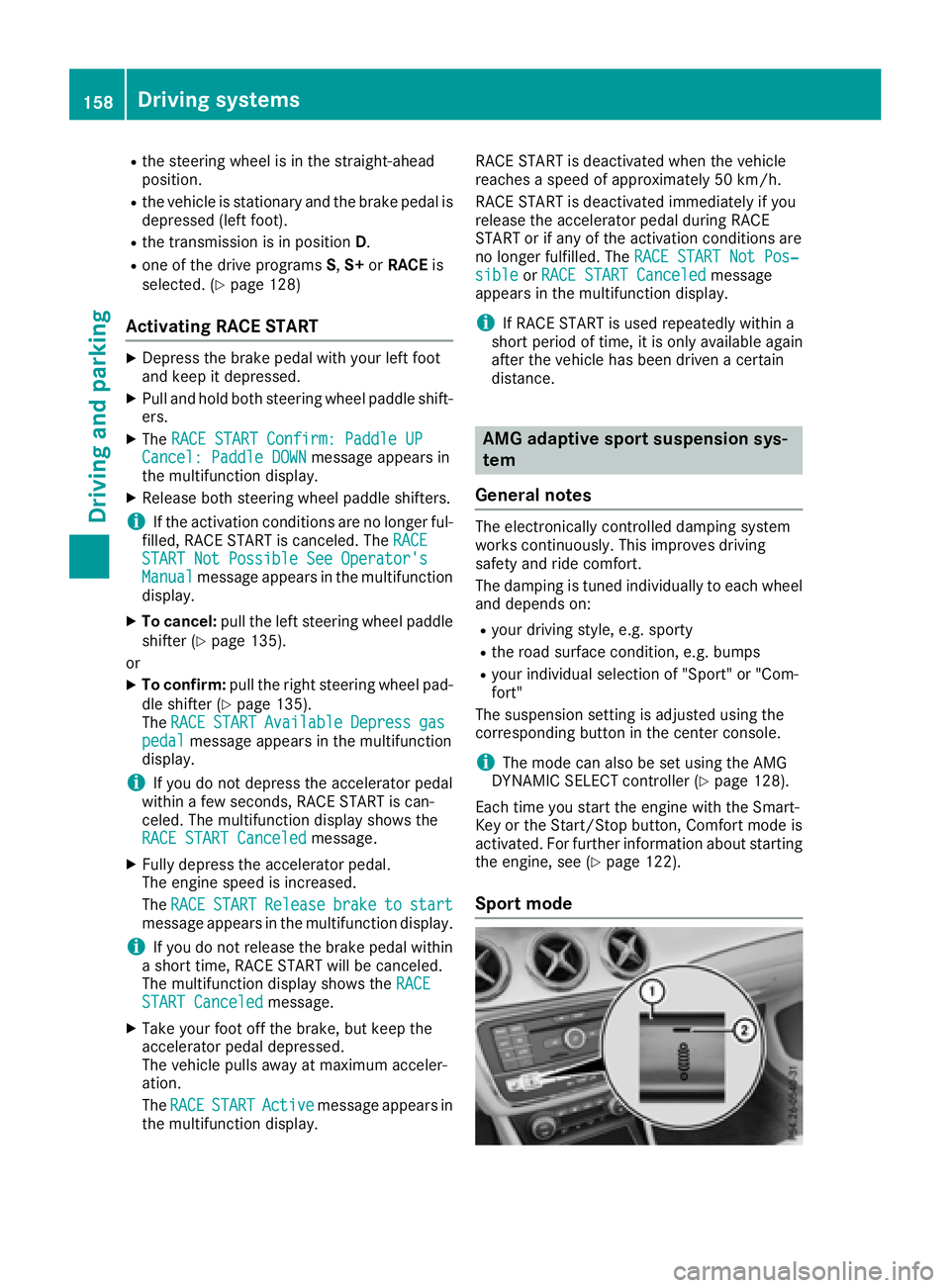
Sport mode158
Driving system s
Dr ivi ng an d parking
Page 166 of 318
R
that are parallel to the direction of travel and
at least 39.5 in (1.0 m) longer than your vehi-
cle R
that are at right angles to the direction of
travel and at least 39.5 in (1.0 m) wider than
your vehicle
i Note that Parking Pilot cannot measure the
length of a parking space if it is at right angles
to the direction of travel. You will need to
judge whether your vehicle will fit into the
parking space.
When driving at speeds below 19 mph
(30 km/h), you will see parking symbol D as a
status indicator in the instrument cluster. When
a parking space has been detected, an arrow
towards the right or the left also appears. Park-
ing Pilot only displays parking spaces on the
front-passenger side as standard. Parking
spaces on the driver's side are displayed as
soon as the turn signal on the driver's side is
activated. When parking on the driver's side,
this must remain activated until you confirm the
use of Parking Pilot by pressing the v button
on the multifunction steering wheel. The system
automatically determines whether the parking
space is parallel or at right-angles to the direc-
tion of travel.
A parking space is displayed while you are driv-
ing past it, and until you are approximately 50 ft
(15 m) away from it.
Parking
G WARNING
If you leave the vehicle when it is only being
braked by Parking Pilot, it could roll away if: R
there is a malfunction in the system or in
the voltage supply. R
the electrical system in the engine com-
partment, the battery or the fuses are tam-
pered with. R
the battery is disconnected. R
the vehicle is accelerated, e.g. by a vehicle
occupant.
There is a risk of an accident.
Before leaving the vehicle, always secure it
against rolling away.
i If Parking Assist PARKTRONIC detects
obstacles, Parking Pilot brakes automatically whilst the vehicle is parking. You are respon-
sible for braking in good time. X
Stop the vehicle when the parking space sym-
bol shows the desired parking space in the
instrument cluster. X
Shift the transmission to position R .
The Start Parking Pilot? Yes: OK No:
8 message appears in the multifunction
display. X
To cancel the procedure: press the 8
button on the multifunction steering wheel or
pull away.
or X
To park using Parking Pilot: press the v
button on the multifunction steering wheel.
The Parking Pilot Active Accelerate
and Brake Observe Surroundings mes-
sage appears in the multifunction display. X
Let go of the multifunction steering wheel. X
Back up the vehicle, being ready to brake at all
times. When backing up, drive at a speed
below approximately 6 mph (10 km/h). Oth-
erwise Parking Pilot is canceled.
Parking Pilot brakes the vehicle to a standstill
when the vehicle approaches the rear border
of the parking space.
Maneuvering may be required in tight parking
spaces.
The Parking Pilot Active Select D
Observe Surroundings message appears in
the multifunction display. X
Shift the transmission to position D while the
vehicle is stationary.
Parking Pilot immediately steers in the other
direction.
The Parking Pilot Active Accelerate
and Brake Observe Surroundings mes-
sage appears in the multifunction display.
i You will achieve the best results by waiting
for the steering procedure to complete before
pulling away. X
Drive forwards and be ready to brake at all
times.
Parking Pilot brakes the vehicle to a standstill
when the vehicle approaches the front border
of the parking space.
Maneuvering may be required in tight parking
spaces.
The Parking Pilot Active Select R
Observe Surroundings message appears in
the multifunction display.164
Driving systems
Driving and parking
Page 183 of 318

cle while driving, you will be distracted from
traffic conditions. You could also lose control
of the vehicle. There is a risk of an accident.
Only operate the equipment when the traffic
situation permits. If you are not sure that this
is possible, park the vehicle paying attention
to traffic conditions and operate the equip-
ment when the vehicle is stationary.
When telephoning, you must observe the legal
requirements for the country in which you are
currently driving. X
Switch on the mobile phone (see the manu-
facturer’s operating instructions). X
Switch on the multimedia system (see sepa-
rate operating instructions). X
Establish a Bluetooth ®
connection to the mul-
timedia system; see the separate operating
instructions. X
Press the Y or e button on the steering
wheel to select the Tel menu.
You will see one of the following display mes-
sages in the multifunction display: R
Telephone READY or the name of the net-
work provider: the mobile phone has found a
network and is ready to receive. R
Telephone No service : there is no network
available or the mobile phone is searching for
a network.
Accepting a call If someone calls you when you are in the Tel
menu, a display message appears in the multi-
function display.
You can accept a call at any time, even if you are
not in the Tel menu.X
Press the a button on the steering wheel
to accept an incoming call.
Rejecting or ending a call
You can end or reject a call anytime, even if you
are not in the Tel menu.X
Press the v button on the steering wheel
to reject or end a call. Selecting an entry in the phone book X
Press the Y or e button on the steering
wheel to select the Tel menu.X
Press the c , d or v button to
switch to the phone book. X
Authorize access to the phone book on the
phone. X
Press the c or d button to select the
desired name.
or X
To begin rapid scrolling: press and hold the
c or d button for longer than one sec-
ond.
Rapid scrolling stops when you release the
button or reach the end of the list. X
If only one telephone number is stored for
a name: press the a or v button to
start dialing.
or X
If there is more than one number for a
particular name: press the a or v
button to display the numbers. X
Press the c or d button to select the
number you want to dial. X
Press the a or v button to start dialing.
or X
If you do not want to make a call: press the
v or 8 button.
Redialing The on-board computer saves the last names or
numbers dialed in the redial memory. X
Press the Y or e button on the steering
wheel to select the Tel menu.X
Press the a button to switch to the redial
memory. X
Press the c or d button to select the
desired name or number. X
Press the a or v button to start dialing.
or X
If you do not want to make the call: press
the v or 8 button.Menus and submenus 181
On-board computer and displays Z
Page 189 of 318
X
Press the 8 button on the steering wheel.X
Confirm Yes with v .
The RACETIMER interrupts timing if you stop the
vehicle and turn the SmartKey to position 1 in
the ignition lock. If you turn the key to position 3
and then press v to confirm Start , timing is
continued.
Resetting the current lap X
Stop the RACETIMER. X
Press the Y or e button to select
Reset Lap .X
Press v to reset the lap time to "0".
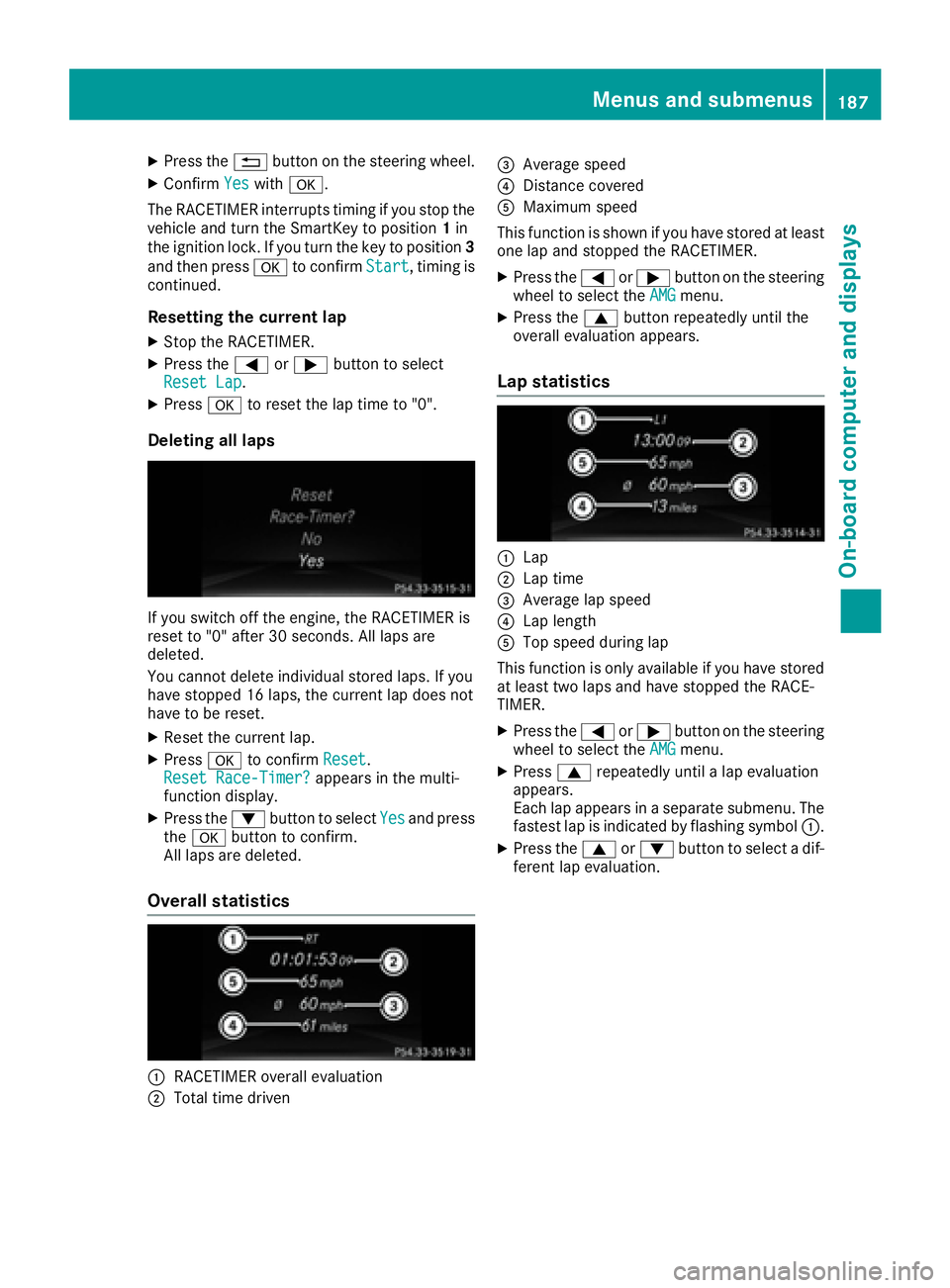
Deleting all laps
If you switch off the engine, the RACETIMER is
reset to "0" after 30 seconds. All laps are
deleted.
You cannot delete individual stored laps. If you
have stopped 16 laps, the current lap does not
have to be reset. X
Reset the current lap. X
Press v to confirm Reset .
Reset Race-Timer? appears in the multi-
function display. X
Press the d button to select Yes and press
the v button to confirm.
All laps are deleted.
Overall statistics
C
RACETIMER overall evaluation
D
Total time driven
Page 196 of 318
Display messages
Possible causes/consequences and P Solutions
The yellow $ warning lamp lights up and th e red I (US A only)
or $ (Canada only) indicator lamp flashes .
It is no t possibl e to apply th e electric parking brak e manually.X
Shift th e transmission to position P .X
Visit a qualified specialist workshop .
' (USA
only)
M ( Canada
only)
Check Brake Fluid
Level There is no t enough brak e fluid in th e brak e fluid reservoir .
A warning tone sounds. The ' (US A only) or M (Canada only)
warning lamp s in th e instrumen t cluste r may also ligh t up.
G WARNIN G
The braking effec t may be impaired.
There is a ris k of an accident.X
Pull ove r and stop th e vehicl e safely as soo n as possible, payin g
attention to roa d and traffic conditions. Do no t continu e drivin g
under any circumstances. X
Secur e th e vehicl e against rollin g away ( Y
page 140).X
Consult a qualified specialist workshop .X
Do no t add brak e fluid . This does no t correc t th e malfunction .
& Check Brake Pad Wea r The brak e pads/linings hav e reached their wear limit.X
Visit a qualified specialist workshop .
S Inoperative On e or mor e main features of th e mbrace system are malfunctioning .X
Visit a qualified specialist workshop .
Active Brake Assist
Functions Currently
Limite d See Opera‐
tor's Manual Active Brake Assis t is temporarily inoperative.
Possibl e causes are: R
th e radar sensor system is temporarily inoperative, e.g. due to elec -
tromagneti c radiation emitted by nearby TV or radi o station s or
other source s of electromagneti c radiationR
th e system is outside th e operating temperature rangeR
th e on-boar d voltag e is to o low
Whe n th e causes state d abov e no longer apply, th e display message
disappears.
Active Brake Assis t is operational again .
If th e display message does no t disappear :X
Pull ove r and stop th e vehicl e safely as soo n as possible, payin g
attention to roa d and traffic conditions.X
Secur e th e vehicl e against rollin g away ( Y
page 140).X
Restart th e engine.
Active Brake
Assist : System Inop‐
erativ e Active Brake Assis t is unavailable due to a malfunction . Situation -
dependen t parking assistanc e may also hav e failed.X
Visit a qualified specialist workshop immediately.194
Display messages
On-board computer and displays
Page 197 of 318
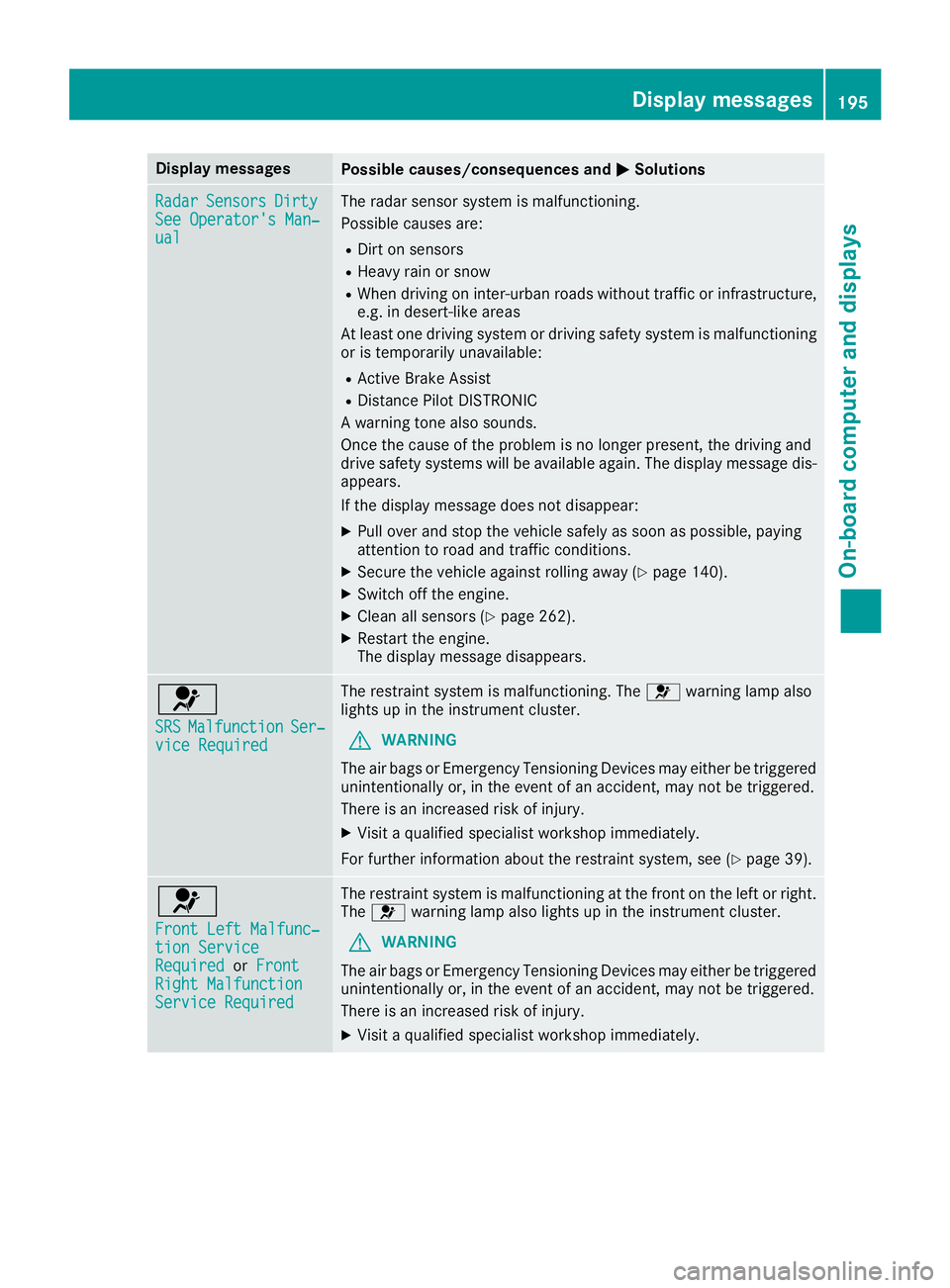
Display messages
Possible causes/consequences and P Solutions
Radar Sensor s Dirty
See Operator' s Man ‐
ual The radar sensor system is malfunctioning .
Possibl e causes are: R
Dirt on sensor sR
Heavy rain or snow R
Whe n drivin g on inter-urban roads without traffic or infrastructure,
e.g. in desert-like area s
At least on e drivin g system or drivin g safet y system is malfunctioning
or is temporarily unavailable :R
Active Brake Assis tR
Distanc e Pilo t DISTRONI C
A warning tone also sounds.
Once th e caus e of th e problem is no longer present, th e drivin g and
drive safet y systems will be available again . The display message dis-
appears.
If th e display message does no t disappear :X
Pull ove r and stop th e vehicl e safely as soo n as possible, payin g
attention to roa d and traffic conditions.X
Secur e th e vehicl e against rollin g away ( Y
page 140).X
Switc h off th e engine.X
Clean all sensor s ( Y
page 262).X
Restart th e engine.
The display message disappears.
u SRS Malfunction Ser ‐
vic e Required The restrain t system is malfunctioning . The u warning lamp also
lights up in th e instrumen t cluster.
G WARNIN G
The air bags or Emergency Tensioning Devices may either be triggered
unintentionally or, in th e event of an accident, may no t be triggered .
There is an increased ris k of injury.X
Visit a qualified specialist workshop immediately.
Fo r further information about th e restrain t system, see ( Y
page 39) .
u Front Lef t Malfunc‐
tio n Servic e
Required or Front
Right Malfunction
Servic e Required The restrain t system is malfunctioning at th e fron t on th e lef t or right .
The u warning lamp also lights up in th e instrumen t cluster.
G WARNIN G
The air bags or Emergency Tensioning Devices may either be triggered
unintentionally or, in th e event of an accident, may no t be triggered .
There is an increased ris k of injury.X
Visit a qualified specialist workshop immediately. Display messages 19 5
On-board computer and displays Z
Page 208 of 318
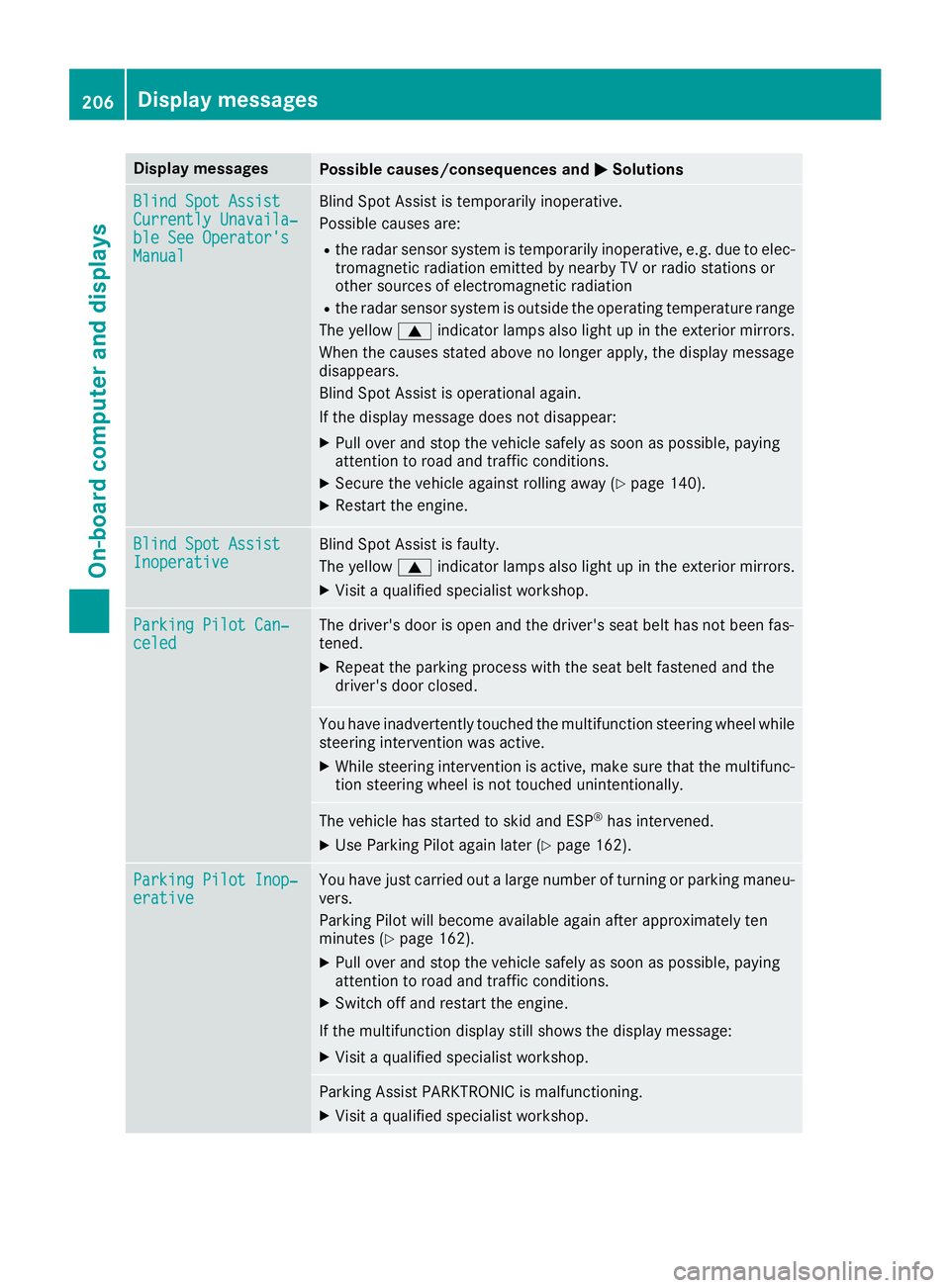
Display messages
Possible causes/consequences and P Solutions
Blind Spo t Assist
Currently Unavaila‐
ble See Operator' s
Manual Blind Spot Assis t is temporarily inoperative.
Possibl e causes are: R
th e radar sensor system is temporarily inoperative, e.g. due to elec -
tromagneti c radiation emitted by nearby TV or radi o station s or
other source s of electromagneti c radiationR
th e radar sensor system is outside th e operating temperature range
The yellow c indicator lamp s also ligh t up in th e exterio r mirrors.
Whe n th e causes state d abov e no longer apply, th e display message
disappears.
Blind Spot Assis t is operational again .
If th e display message does no t disappear :X
Pull ove r and stop th e vehicl e safely as soo n as possible, payin g
attention to roa d and traffic conditions.X
Secur e th e vehicl e against rollin g away ( Y
page 140).X
Restart th e engine.
Blind Spo t Assist
Inoperative Blind Spot Assis t is faulty.
The yellow c indicator lamp s also ligh t up in th e exterio r mirrors.X
Visit a qualified specialist workshop .
Parkin g Pilot Can ‐
celed The driver's door is open and th e driver's seat belt has no t been fas -
tened. X
Repeat th e parking process wit h th e seat belt fastene d and th e
driver's door closed .
You hav e inadvertentl y touched th e multifunction steering whee l while
steering intervention was active .X
Whil e steering intervention is active , mak e sur e that th e multifunc-
tion steering whee l is no t touched unintentionally.
The vehicl e has started to skid and ES P ®
has intervened.X
Use Parking Pilo t again later ( Y
page 162).
Parkin g Pilot Inop‐
erativ e You hav e jus t carrie d out a larg e number of turnin g or parking maneu-
vers.
Parking Pilo t will become available again after approximately te n
minute s ( Y
page 162). X
Pull ove r and stop th e vehicl e safely as soo n as possible, payin g
attention to roa d and traffic conditions.X
Switc h off and restar t th e engine.
If th e multifunction display still shows th e display message :X
Visit a qualified specialist workshop .
Parking Assis t PARKTRONI C is malfunctioning .X
Visit a qualified specialist workshop .206
Display messages
On-board computer and displays
Page 209 of 318
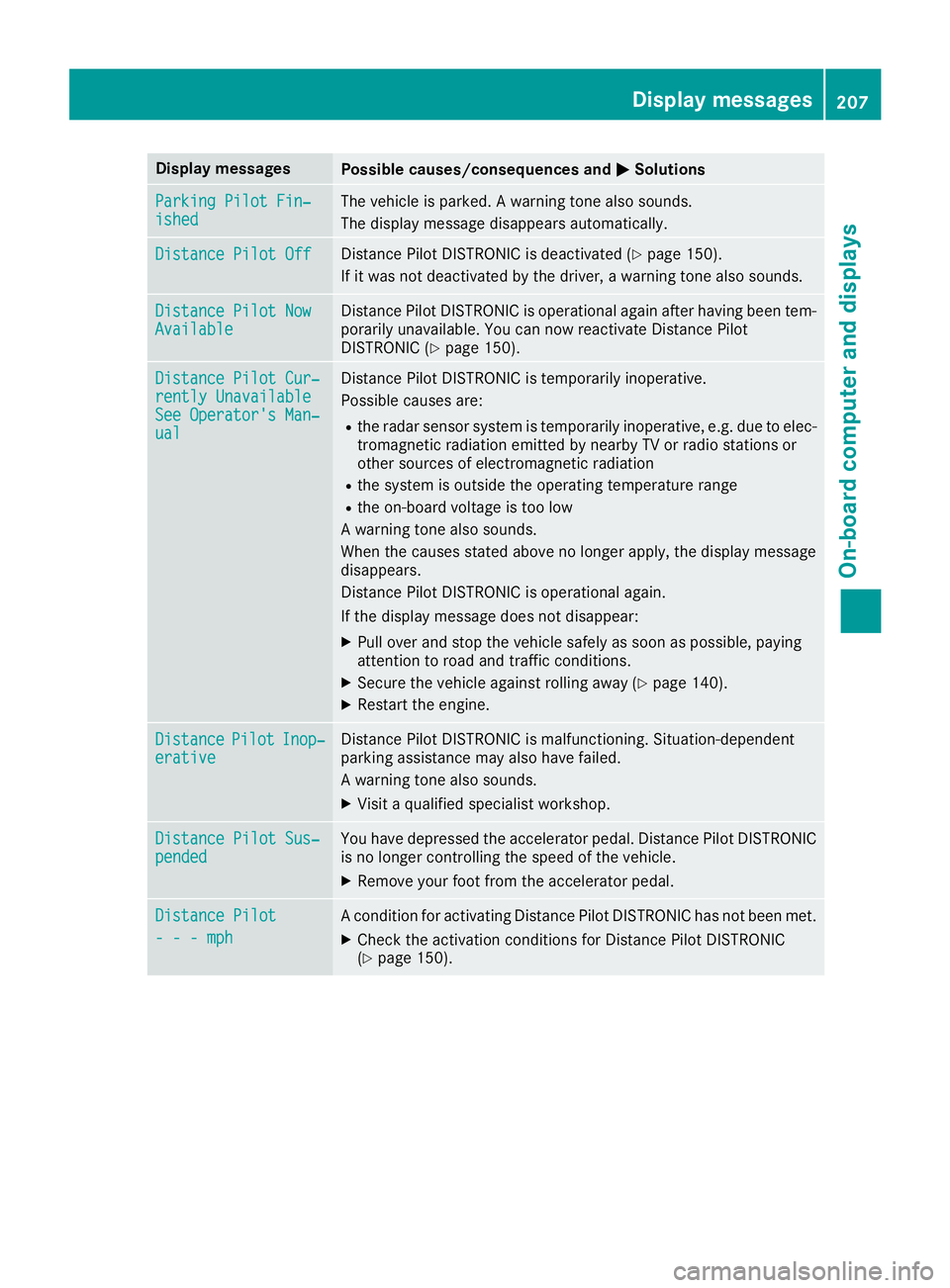
Display messages
Possible causes/consequences and P Solutions
Parkin g Pilot Fin ‐
ished The vehicl e is parked. A warning tone also sounds.
The display message disappear s automatically.
Distance Pilot Off Distanc e Pilo t DISTRONI C is deactivated ( Y
page 150).
If it was no t deactivated by th e driver , a warning tone also sounds.
Distance Pilot Now
Available Distanc e Pilo t DISTRONI C is operational again after having been tem-
porarily unavailable . You can no w reactivat e Distanc e Pilo t
DISTRONI C ( Y
page 150).
Distance Pilot Cur ‐
rently Unavailable
See Operator' s Man ‐
ual Distanc e Pilo t DISTRONI C is temporarily inoperative.
Possibl e causes are: R
th e radar sensor system is temporarily inoperative, e.g. due to elec -
tromagneti c radiation emitted by nearby TV or radi o station s or
other source s of electromagneti c radiationR
th e system is outside th e operating temperature rangeR
th e on-boar d voltag e is to o low
A warning tone also sounds.
Whe n th e causes state d abov e no longer apply, th e display message
disappears.
Distanc e Pilo t DISTRONI C is operational again .
If th e display message does no t disappear :X
Pull ove r and stop th e vehicl e safely as soo n as possible, payin g
attention to roa d and traffic conditions.X
Secur e th e vehicl e against rollin g away ( Y
page 140).X
Restart th e engine.
Distance Pilot Inop‐
erativ e Distanc e Pilo t DISTRONI C is malfunctioning . Situation-dependen t
parking assistanc e may also hav e failed.
A warning tone also sounds. X
Visit a qualified specialist workshop .
Distance Pilot Sus ‐
pended You hav e depressed th e accelerato r pedal . Distanc e Pilo t DISTRONI C
is no longer controllin g th e speed of th e vehicle.X
Remove your foo t from th e accelerato r pedal .
Distance Pilot
- - - mph A condition for activating Distanc e Pilo t DISTRONI C has no t been met .X
Chec k th e activation condition s for Distanc e Pilo t DISTRONI C
( Y
page 150). Display messages 20 7
On-board computer and displays Z