2017 MERCEDES-BENZ CLA lights
[x] Cancel search: lightsPage 67 of 318
R
Traction control is still activated. R
STEER CONTROL is no longer active R
ESP ®
still provides support when you brake
firmly.
Deactivating/activating ESP ®
(Mercedes ‑ AMG vehicles)Important safety notes
i Observe the "Important safety notes" sec-
tion ( Y
page 60).
You can select between the following states of
ESP ®
: R
ESP ®
is activated.R
SPORT handling mode is activated. R
ESP ®
is deactivated.
G WARNING
When SPORT handling mode is activated,
there is a greater risk of skidding and acci-
dents.
Only activate SPORT handling mode in the sit-
uations described in the following.
G WARNING
If you deactivate ESP ®
, ESP ®
no longer sta-
bilizes the vehicle. There is an increased risk
of skidding and an accident.
Only deactivate ESP ®
in the situations descri-
bed in the following.
In the following situations, it may be better to
activate SPORT handling mode or deactivate
ESP ®
: R
when using snow chains R
in deep snow R
on sand or gravel R
on specially designated roads when the vehi-
cle's own oversteering and understeering
characteristics are desired
Driving in SPORT handling mode or without
ESP ®
requires an extremely qualified and expe-
rienced driver.
i Activate ESP ®
as soon as the situations
described above no longer apply. ESP ®
will
otherwise not be able to stabilize the vehicle if the vehicle starts to skid or a wheel starts to
spin.
! Avoid spinning the driven wheels for an
extended period with ESP ®
deactivated. You
could otherwise damage the drivetrain.
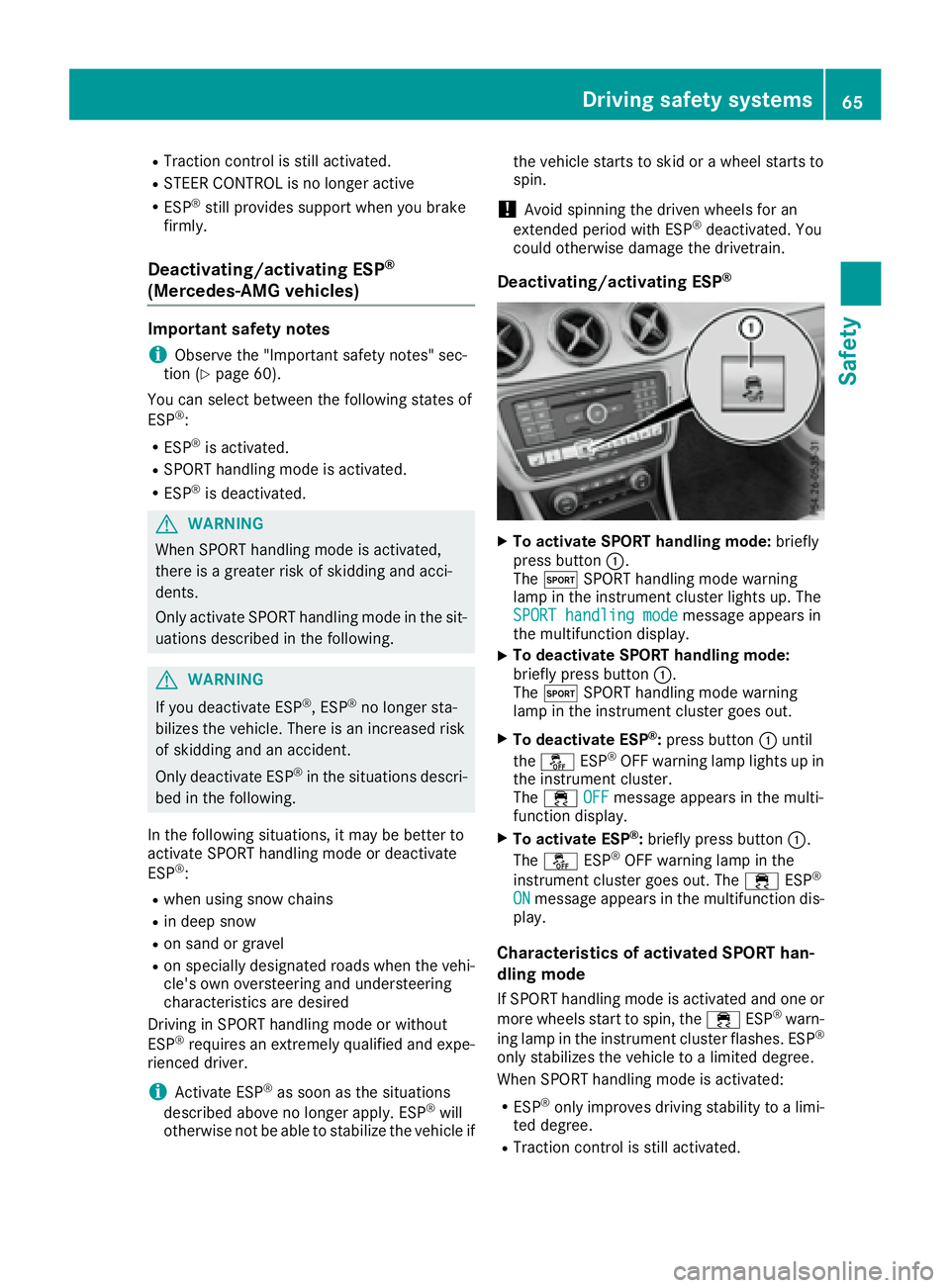
Deactivating/activating ESP ®
X
To activate SPORT handling mode: briefly
press button C .
The t SPORT handling mode warning
lamp in the instrument cluster lights up. The
SPORT handling mode
message appears in
the multifunction display. X
To deactivate SPORT handling mode:
briefly press button C .
The t SPORT handling mode warning
lamp in the instrument cluster goes out. X
To deactivate ESP ®
: press button C until
the
Page 72 of 318
KEYLESS- GO
Gene ra l notesBear in min d that th e engin e can be started by
any of th e vehicl e occupant s if there is a Smart -
Key in th e vehicle.
Locking and unlocking You can start , loc k or unloc k th e vehicl e usin g
KEYLESS-GO . To do this, you only need carry th e
SmartKey wit h you. You can combine th e func-
tion s of KEYLESS-GO wit h those of a conven -
tional SmartKey. Unloc k th e vehicl e by usin g
KEYLESS-GO , for instance , and loc k it usin g th e
7 butto n on th e SmartKey.
The driver's door and th e door at whic h th e han -
dle is used , mus t bot h be closed. The SmartKey
mus t be outside th e vehicle. Whe n locking or
unlocking wit h KEYLESS-GO , th e distanc e
between th e SmartKey and th e corresponding
door handle mus t no t be greate r than 3 ft (1 m).
A chec k whic h periodically establishes a radi o
connection between th e vehicl e and th e Smart -
Key determine s whether a valid SmartKey is in
th e vehicle. This occurs, for example: R
when starting th e engin eR
while drivin gR
when usin g HANDS-FRE E ACCESSR
when th e external door handles are touchedR
during convenience closin g
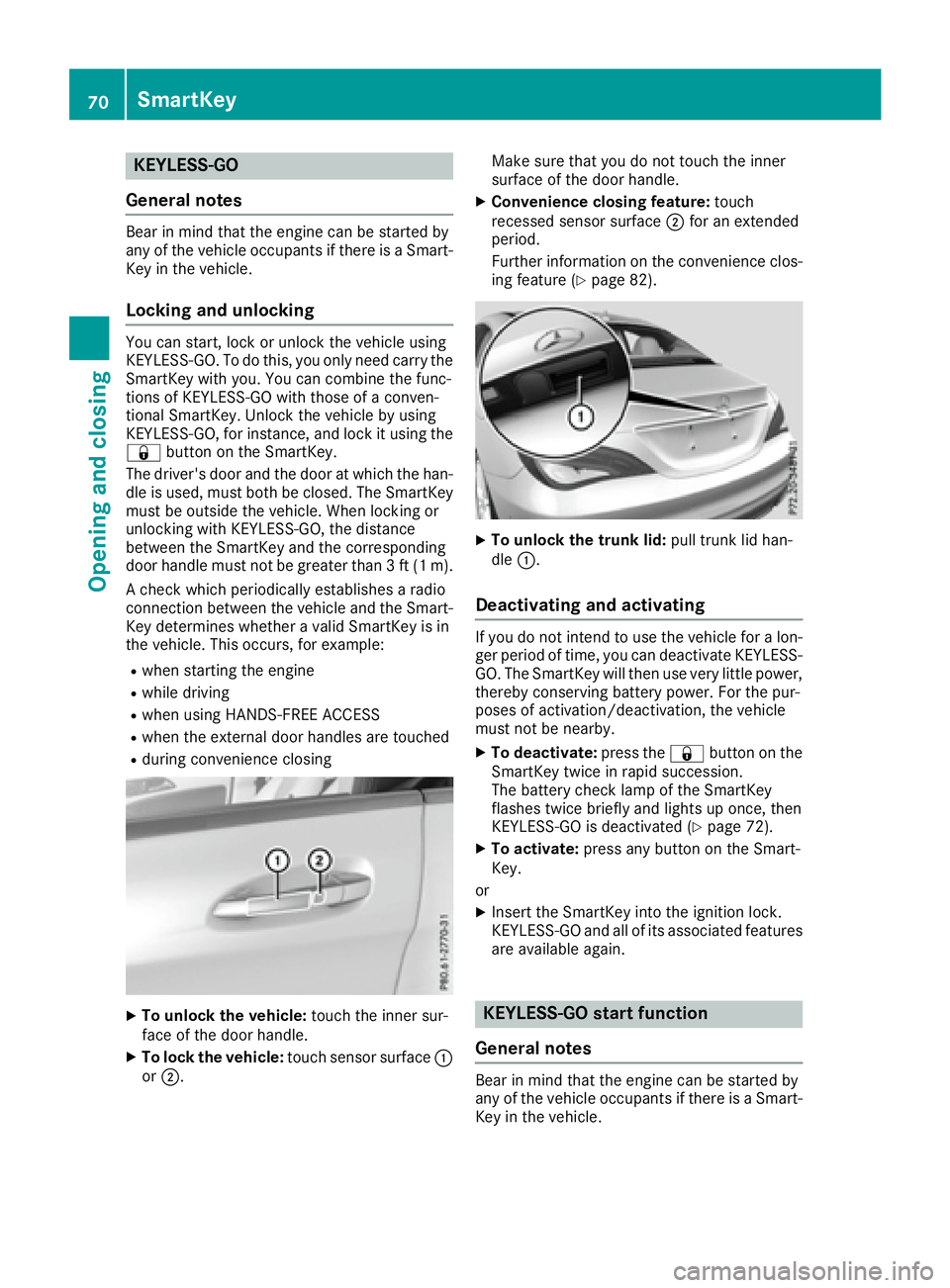
X
To unlock th e vehicle: touch th e inner sur -
fac e of th e door handle.X
To lock th e vehicle: touch sensor surfac e C
or D . Mak e sur e that you do no t touch th e inner
surfac e of th e door handle. X
Convenienc e closin g feature: touch
recessed sensor surfac e D for an extended
period.
Further information on th e convenience clos-
ing feature ( Y
page 82).
X
To unlock th e trunk lid : pull trunk lid han -
dle C .
Deactivating and activating If you do no t inten d to use th e vehicl e for a lon -
ger period of time, you can deactivat e KEYLESS -
GO. The SmartKey will then use ver y littl e power,
thereby conserving battery power. Fo r th e pur-
poses of activation/deactivation , th e vehicl e
mus t no t be nearby. X
To deactivate: press th e 7 butto n on th e
SmartKey twice in rapi d succession .
The battery chec k lamp of th e SmartKey
flashes twice briefl y and lights up once , then
KEYLESS-GO is deactivated ( Y
page 72).X
To activate: press any butto n on th e Smart -
Key.
or X
Inser t th e SmartKey int o th e ignition lock.
KEYLESS-GO and all of it s associated features
are available again .
KEYLESS- GO start function
Gene ra l notes
Bear in min d that th e engin e can be started by
any of th e vehicl e occupant s if there is a Smart -
Key in th e vehicle.70
SmartKey
Opening and closing
Page 74 of 318
SmartKey battery
Important safety notes
G WARNING
Batteries contain toxic and corrosive substan-
ces. If batteries are swallowed, it can result in
severe health problems. There is a risk of fatal
injury.
Keep batteries out of the reach of children. If
a battery is swallowed, seek medical attention
immediately.
The SmartKey batteries contain perchlorate
material, which may require special handling
and regard for the environment. National guide-
lines must be observed during disposal. In Cal-
ifornia, see www.dtsc.ca.gov/
HazardousWaste/Perchlorate/index.cfm .
Mercedes-Benz recommends that you have the
battery replaced at a qualified specialist work-
shop.
Checking the battery
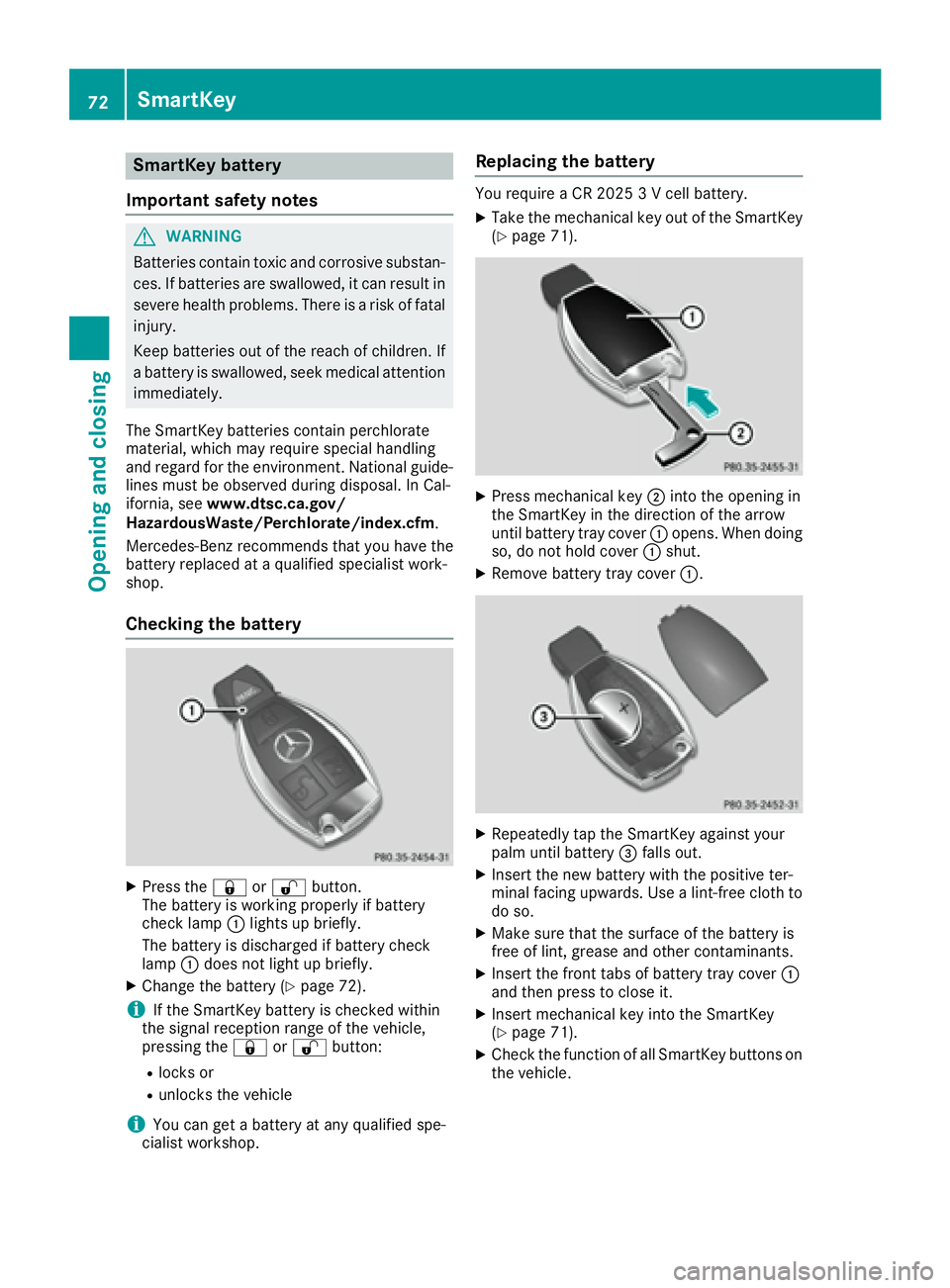
X
Press the 7 or 6 button.
The battery is working properly if battery
check lamp C lights up briefly.
The battery is discharged if battery check
lamp C does not light up briefly.X
Change the battery ( Y
page 72).
i If the SmartKey battery is checked within
the signal reception range of the vehicle,
pressing the 7 or 6 button:R
locks or R
unlocks the vehicle
i You can get a battery at any qualified spe-
cialist workshop. Replacing the battery You require a CR 2025 3 V cell battery. X
Take the mechanical key out of the SmartKey
( Y
page 71).
X
Press mechanical key D into the opening in
the SmartKey in the direction of the arrow
until battery tray cover C opens. When doing
so, do not hold cover C shut.X
Remove battery tray cover C .
X
Repeatedly tap the SmartKey against your
palm until battery
Page 97 of 318
Mirrors
Rear-view mirror X
Anti-glare mode: flick anti-glare lever C for-
wards or back.
Exterior mirrors
Adjusting the exterior mirrors
G WARNING
You could lose control of your vehicle if you do
the following while driving: R
adjust the driver's seat, head restraint,
steering wheel or mirrors R
fasten the seat belt
There is a risk of an accident.
Adjust the driver's seat, head restraint, steer-
ing wheel and mirror and fasten your seat belt
before starting the engine.
G WARNING
The exterior mirror on the front-passenger
side reduces the size of the image. Visible
objects are actually closer than they appear.
This means that you could misjudge the dis-
tance from road users traveling behind, e.g.
when changing lane. There is a risk of an acci-
dent.
For this reason, always make sure of the
actual distance from the road users traveling
behind by glancing over your shoulder. X
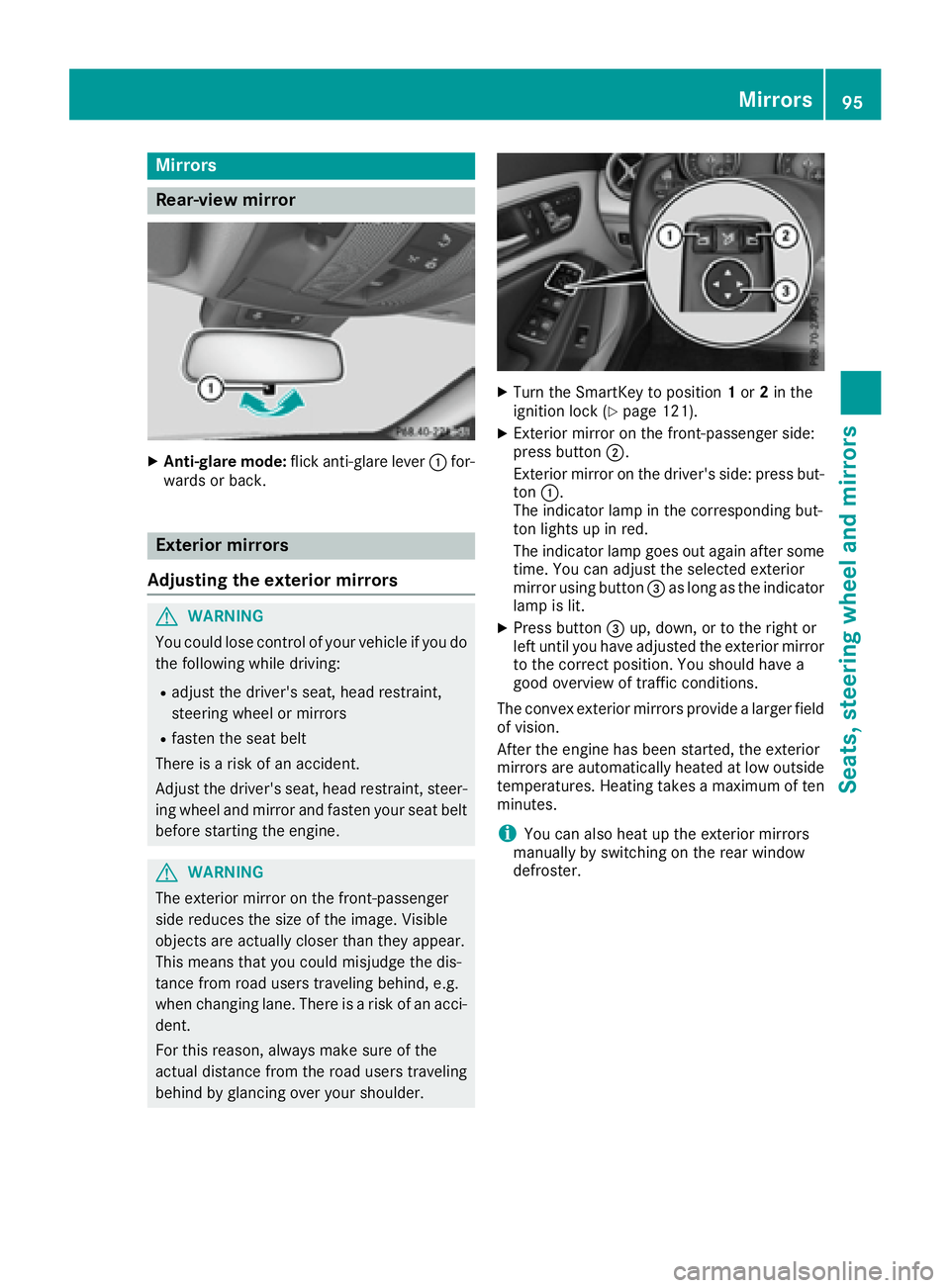
Turn the SmartKey to position 1 or 2 in the
ignition lock ( Y
page 121). X
Exterior mirror on the front-passenger side:
press button D .
Exterior mirror on the driver's side: press but-
ton C .
The indicator lamp in the corresponding but-
ton lights up in red.
The indicator lamp goes out again after some
time. You can adjust the selected exterior
mirror using button
Page 101 of 318

Exterior lighting
General notes For reasons of safety, Mercedes-Benz recom-
mends that you drive with the lights switched on
even during the daytime. In some countries,
operation of the headlamps varies due to legal
requirements and self-imposed obligations.
Setting the exterior lighting
Setting options Exterior lighting can be set using the: R
light switch R
combination switch ( Y
page 100)R
on-board computer ( Y
page 184)
Light switch
Operation
G c
Left-hand standing lampsH d
Right-hand standing lampsI `
Parking lamps, license plate and
instrument cluster lightingJ X
Automatic headlamp mode, controlled
by the light sensor
K X
Low-beam/high-beam headlamps
Page 102 of 318

take precedence over the daytime running
lamps.
USA only:
The daytime running lamps improve the visibility
of your vehicle during the day. To do this, the
daytime running lamps function must be
switched on using the on-board computer
( Y
page 184).
If the engine is running and you turn the light
switch to the ` or X position, the manual
settings take precedence over the daytime run-
ning lamps.
Low-beam headlamps Even if the light sensor does not detect that it is
dark, the parking lamps and low-beam head-
lamps come on when the ignition is switched on
and the light switch is set to the X position.
This is a particularly useful function in the event
of rain and fog. X
To switch on the low-beam headlamps:
turn the SmartKey in the ignition lock to posi-
tion 2 or start the engine.X
Turn the light switch to X .
The green X indicator lamp in the instru-
ment cluster lights up.
Rear fog lamp The rear fog lamp improves visibility of your
vehicle for the traffic behind in the event of thick
fog. Please take note of the country-specific
regulations for the use of rear fog lamps. X
To switch on the rear fog lamp: turn the
SmartKey in the ignition lock to position 2 o r
s
tart the engine. X
Turn the light switch to X or X .X
Press the ^ button.
The yellow ^ indicator lamp in the instru-
ment cluster lights up. X
To switch off the rear fog lamp: press the
^ button.
The yellow ^ indicator lamp in the instru-
ment cluster goes out.
i When the rear fog lamp is switched on, the
center brake lamp in the tail lamp switches off
due to a legal requirement.
Parking lamps
! If the battery charge is very low, the parking
lamps or standing lamps are automatically
switched off to enable the next engine start. Always park your vehicle safely and in a well lit
area, in accordance with the relevant legal
stipulations. Avoid using the ` parking
lamps over a period of several hours. If pos-
sible, switch on the right-hand d or left-
hand c standing lamps. X
To switch on: turn the light switch to ` .
The green ` indicator lamp in the instru-
ment cluster lights up.
Standing lamps Switching on the standing lamps ensures the
corresponding side of the vehicle is illuminated. X
To switch on the standing lamps: the
SmartKey should not be in the ignition lock or
it should be in position 0 .X
Turn the light switch to c (l eft-hand side of
the vehicle) or d (right-hand side of the
vehicle).
Combination switch
X
To indicate briefly: press the combination
switch briefly to the pressure point in the
direction of arrow D or
Page 103 of 318
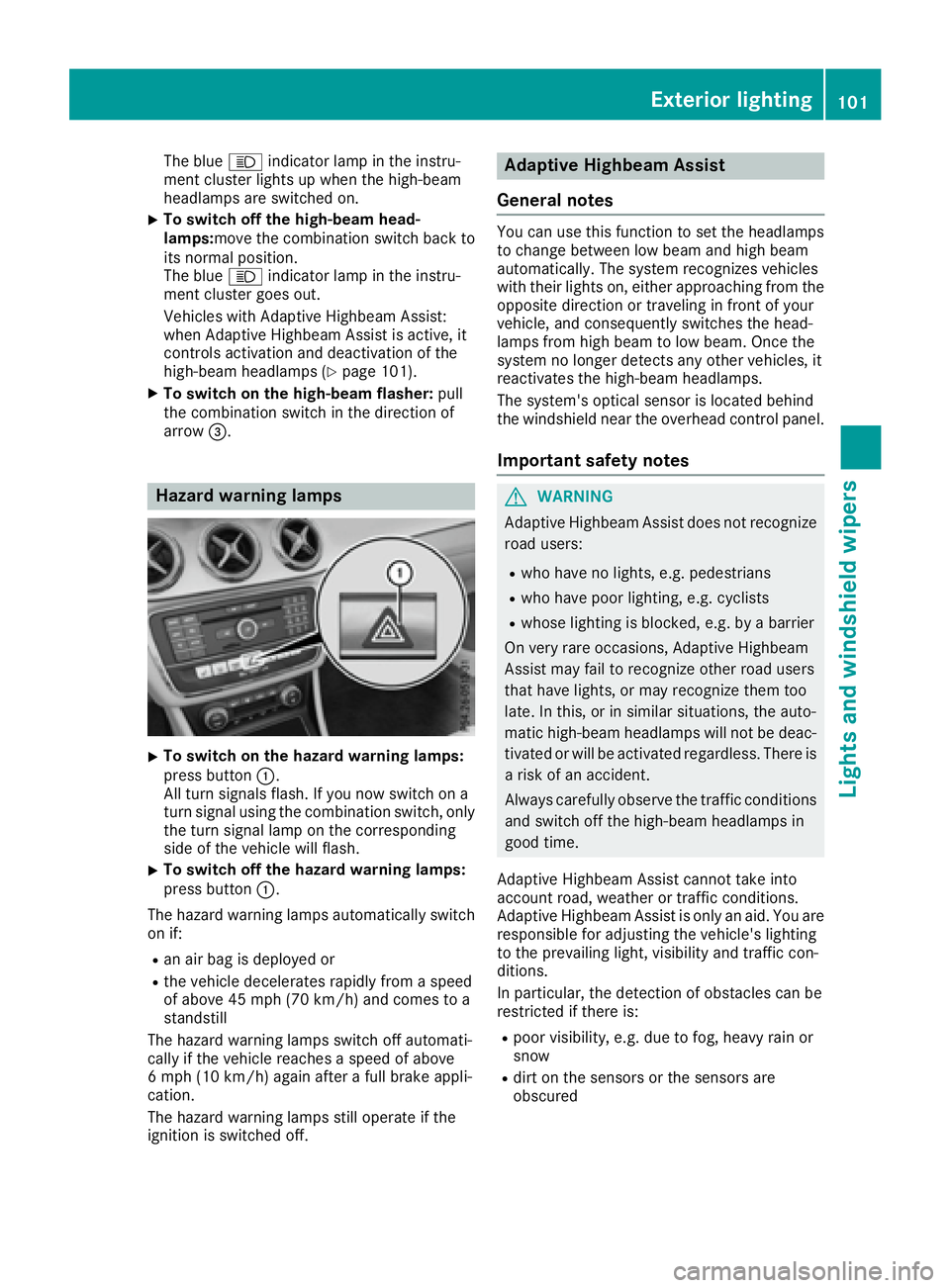
The blue W indicator lamp in the instru-
ment cluster lights up when the high-beam
headlamps are switched on. X
To switch off the high-beam head-
lamps: move the combination switch back to
its normal position.
The blue W indicator lamp in the instru-
ment cluster goes out.
Vehicles with Adaptive Highbeam Assist:
when Adaptive Highbeam Assist is active, it
controls activation and deactivation of the
high-beam headlamps ( Y
page 101).X
To switch on the high-beam flasher: pull
the combination switch in the direction of
arrow
Page 107 of 318
X
Insert the new bulb into bulb holder D .X
Insert bulb holder D and turn it clockwise.X
Press on housing cover C and turn it to the
right. X
Replace the cover in the front wheel housing
( Y
page 104).
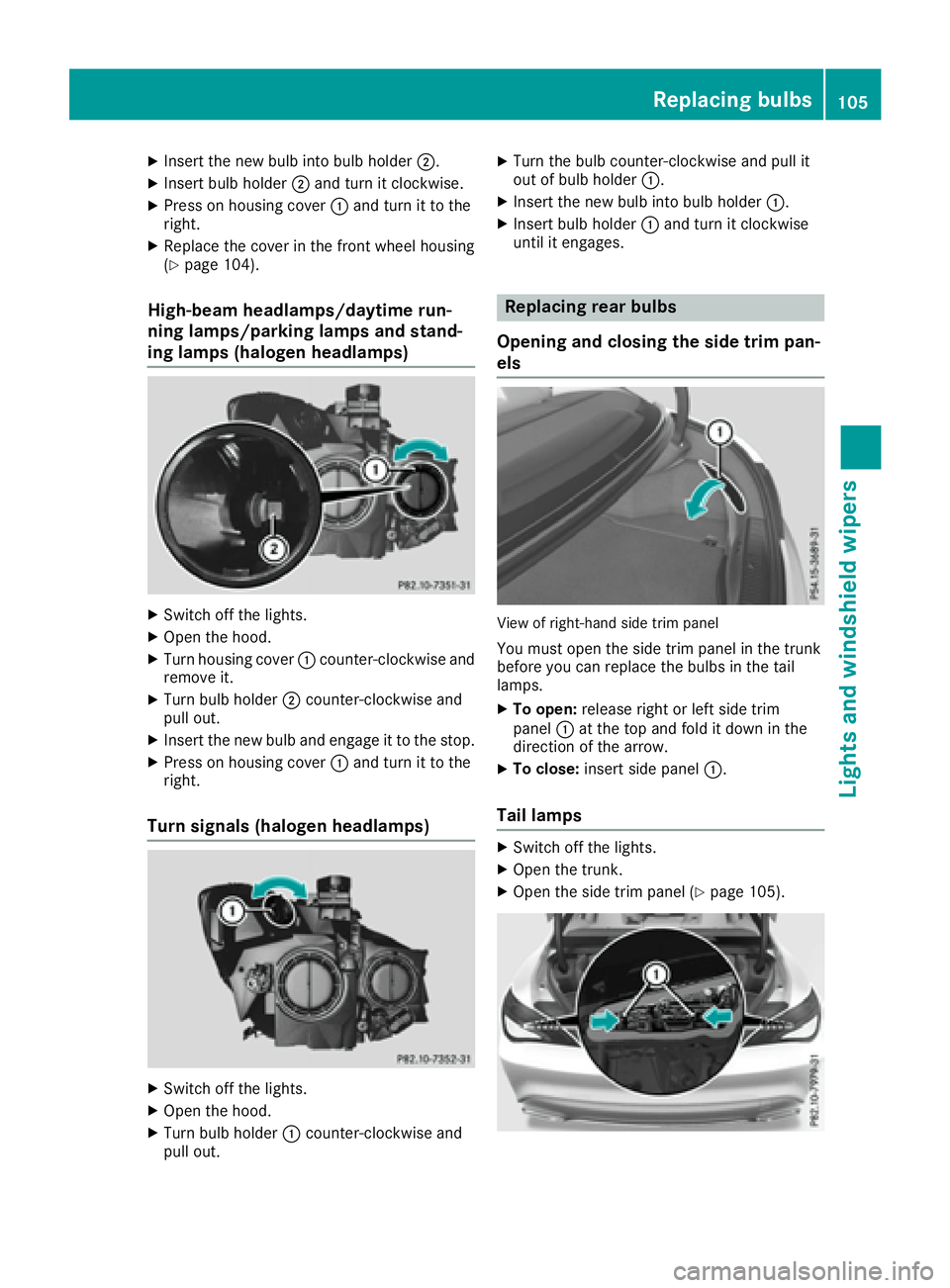
High-beam headlamps/daytime run-
ning lamps/parking lamps and stand-
ing lamps (halogen headlamps) X
Switch off the lights. X
Open the hood. X
Turn housing cover C counter-clockwise and
remove it. X
Turn bulb holder D counter-clockwise and
pull out. X
Insert the new bulb and engage it to the stop. X
Press on housing cover C and turn it to the
right.
Turn signals (halogen headlamps)
X
Switch off the lights. X
Open the hood. X
Turn bulb holder C counter-clockwise and
pull out. X
Turn the bulb counter-clockwise and pull it
out of bulb holder C .X
Insert the new bulb into bulb holder C .X
Insert bulb holder C and turn it clockwise
until it engages.
Replacing rear bulbs
Opening and closing the side trim pan-
els
View of right-hand side trim panel
You must open the side trim panel in the trunk
before you can replace the bulbs in the tail
lamps. X
To open: release right or left side trim
panel C at the top and fold it down in the
direction of the arrow. X
To close: insert side panel C .
Tail lamps X
Switch off the lights. X
Open the trunk. X
Open the side trim panel ( Y
page 105).Replacing bulbs 105
Lights and windshield wipers Z