Page 363 of 564
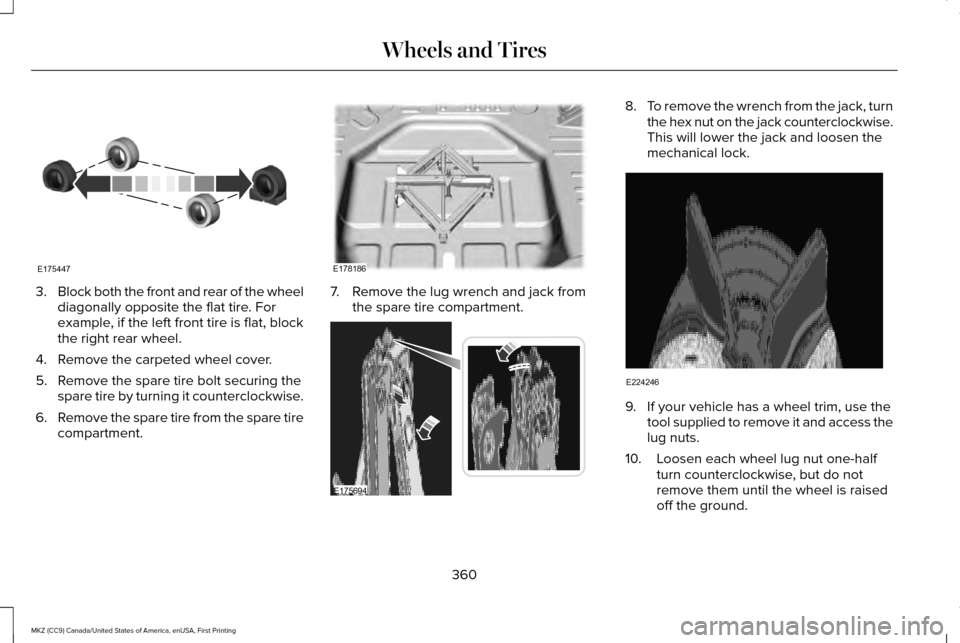
3.
Block both the front and rear of the wheel
diagonally opposite the flat tire. For
example, if the left front tire is flat, block
the right rear wheel.
4. Remove the carpeted wheel cover.
5. Remove the spare tire bolt securing the spare tire by turning it counterclockwise.
6. Remove the spare tire from the spare tire
compartment. 7. Remove the lug wrench and jack from
the spare tire compartment. 8.
To remove the wrench from the jack, turn
the hex nut on the jack counterclockwise.
This will lower the jack and loosen the
mechanical lock. 9. If your vehicle has a wheel trim, use the
tool supplied to remove it and access the
lug nuts.
10. Loosen each wheel lug nut one-half turn counterclockwise, but do not
remove them until the wheel is raised
off the ground.
360
MKZ (CC9) Canada/United States of America, enUSA, First Printing Wheels and TiresE175447 E178186 E175694 E224246
Page 364 of 564

11. The vehicle jacking points are shown
here, and can be identified by the
triangle markings on the molding. The
triangle marking may be located on the
side or the underside of the molding.
The jacking points are identified on
vehicles without moldings by a pair of
arrows on the metal flange pointing to
the jacking point between them. Details
are depicted on the warning label on
the jack. 12.
Place the jack at the jacking point next
to the tire you are changing. Turn the
jack handle clockwise until the wheel
is completely off the ground.
13. Remove the lug nuts with the lug wrench. 14.
Replace the flat tire with the spare tire,
making sure the valve stem is facing
outward. Reinstall the lug nuts until the
wheel is snug against the hub. Do not
fully tighten the lug nuts until the wheel
has been lowered. If you are using the
temporary tire, the lug nut washers will
not appear to be flush with the rim. This
is normal only when using the
temporary spare tire.
15. Lower the wheel by turning the jack handle counterclockwise. 361
MKZ (CC9) Canada/United States of America, enUSA, First Printing Wheels and TiresE145908 E174939 12
3
4
5
E75442
Page 365 of 564
16. Remove the jack and fully tighten the
lug nuts in the order shown. See Technical Specifications (page 365).17.
To store the folded wrench on the jack,
engage the bracket of the jack base on
the wrench feature as shown. Swing
the wrench upward and adjust the
height of the jack until the pin engages
the hole. Tighten the hex nut clockwise
by hand until secure. 18. Put the flat tire, jack and lug wrench
away. Make sure the jack is fastened
securely before you drive.
19. Unblock the wheel.
362
MKZ (CC9) Canada/United States of America, enUSA, First Printing Wheels and TiresE176165
Page 381 of 564

Specification
Name
YN-35 ESB-M1C93-B
Multi-purpose grease:
Motorcraft® Multi-Purpose Grease Spray
XL-5-A
--
Lock cylinders (U.S. and Mexico):
Penetrating and Lock Lubricant
XL-1
--
Lock cylinders (Canada):
Penetrating Fluid
CXC-51-A
If you use oil and fluids that do not meet the
defined specification and viscosity grade,
this may lead to:
• Component damage which is not
covered by the vehicle warranty.
• Longer engine cranking periods.
• Increased emission levels.
• Reduced engine performance.
• Reduced fuel economy.
• Degraded brake performance. We recommend Motorcraft motor oil for your
vehicle. If Motorcraft oil is not available, use
motor oils of the recommended viscosity
grade that meet API SN requirements and
display the API Certification Mark for gasoline
engines. Do not use oil labeled with API SN
service category unless the label also
displays the API certification mark.
378
MKZ (CC9) Canada/United States of America, enUSA, First Printing Capacities and SpecificationsE142732
Page 387 of 564

Specification
Name
ESB-M1C93-B
Multi-purpose grease:
Motorcraft® Multi-Purpose Grease Spray
XL-5-A
--
Lock cylinders (U.S. and Mexico):
Penetrating and Lock Lubricant
XL-1
--
Lock cylinders (Canada):
Penetrating Fluid
CXC-51-A
If you use oil and fluids that do not meet the
defined specification and viscosity grade,
this may lead to:
• Component damage which is not
covered by the vehicle warranty.
• Longer engine cranking periods.
• Increased emission levels.
• Reduced engine performance.
• Reduced fuel economy.
• Degraded brake performance. We recommend Motorcraft motor oil for your
vehicle. If Motorcraft oil is not available, use
motor oils of the recommended viscosity
grade that meet API SN requirements and
display the API Certification Mark for gasoline
engines. Do not use oil labeled with API SN
service category unless the label also
displays the API certification mark.
384
MKZ (CC9) Canada/United States of America, enUSA, First Printing Capacities and SpecificationsE142732
Page 395 of 564

Action and Description
Menu Item
Item
This bar displays icons and messages pertaining to current system activi\
ties including climate
settings, voice commands and phone functions such as text messages.
Status Bar
A
This button is available on the main screens. Pressing it takes you to the home screen view.
Home
B
This shows the current time. You can set the clock manually or have it controlled by the vehicle's
GPS location. See Settings (page 457).
Clock
C
This displays the current outside temperature.
Outside Temperature
D
You can touch any of the buttons on this bar to select a feature.
Feature Bar
E
The touchscreen allows you quick access to
all of your comfort, navigation,
communication and entertainment options.
Using the status and feature bar you can
quickly select the feature you want to use. Note:
Your system is equipped with a feature
that allows you to access and control audio
features for 10 minutes after you switch the
ignition off (and no doors open). The Status Bar
Additional icons also display in the status bar
depending on market, vehicle options and
current operation. If a feature is not active,
the icon does not display. Certain icons may
move to the left or right depending on what
options are active.
392
MKZ (CC9) Canada/United States of America, enUSA, First Printing SYNC™ 3
Page 416 of 564
Once you have provided the digits of the phone number, you can say the following commands:
Description
Voice Command
If the full number was not entered with the first command, you can conti\
nue saying the number.
<0-9>
Tells SYNC 3 to make the phone call.
Dial
Tells SYNC 3 to erase the last block of digits stated.
Delete
Tells SYNC 3 to erase the entire number.
Clear
Text Message Voice Commands
To access text message options, press the voice button and say: Description
Voice command
Listen to Message You can say the number of the message you would like to hear.
Listen to text message ___
Reply to Message
413
MKZ (CC9) Canada/United States of America, enUSA, First Printing SYNC™ 3
Page 428 of 564

Troubleshooting tips
Action
Cause
Message
Contact SIRIUS at 1-888-539-7474 to subscribe to
the channel, or tune to another channel.
Your subscription does not include this channel.
Unsubscribed Channel
The signal is blocked. When you move into an
open area, the signal should return.
The signal is lost from the SIRIUS satellite or SIRIUS
tower to your vehicle antenna.
Satellite acquiring signal\b
No action required. The process may take up to
three minutes.
Update of channel programming in progress.
Updating\b
Contact SIRIUS at 1-888-539-7474 to resolve
subscription issues.
Your satellite service is no longer available.
Questions? Call 1-888-539-7474
Use the channel guide to turn off the Lock or Skip
function on that station.
All the channels in the selected category are either
skipped or locked.
None found. Check channel guide.
No action required.
SIRIUS has updated the channels available for your
vehicle.
SIRIUS Subscription updated
HD Radio ™ Information (If Available)
Note: This feature may not be available in
all markets.
To activate HD radio, please see the Radio
Settings in the Settings Chapter. See
Settings (page 457). Note:
HD Radio broadcasts are not available
in all markets.
425
MKZ (CC9) Canada/United States of America, enUSA, First Printing SYNC™ 3