2017 LINCOLN CONTINENTAL Ignition key
[x] Cancel search: Ignition keyPage 188 of 584

You can correct these temporary
malfunctions by filling the fuel tank with good
quality fuel, properly closing the fuel fill inlet
or letting the electrical system dry out. After
three driving cycles without these or any
other temporary malfunctions present, the
service engine soon indicator should stay off
the next time you start the engine. A driving
cycle consists of a cold engine startup
followed by mixed city and highway driving.
No additional vehicle service is required.
If the service engine soon indicator remains
on, have your vehicle serviced at the first
available opportunity. Although some
malfunctions detected by the OBD-II may not
have symptoms that are apparent, continued
driving with the service engine soon indicator
on can result in increased emissions, lower
fuel economy, reduced engine and
transmission smoothness and lead to more
costly repairs.
Readiness for Inspection and
Maintenance (I/M) Testing
Some state and provincial and local
governments may have
Inspection/Maintenance (I/M) programs to
inspect the emission control equipment on
your vehicle. Failure to pass this inspection
could prevent you from getting a vehicle
registration. If the service engine soon indicator
is on or the bulb does not work,
your vehicle may need service.
See On-Board Diagnostics.
Your vehicle may not pass the I/M test if the
service engine soon indicator is on or not
working properly (bulb is burned out), or if
the OBD-II system has determined that some
of the emission control systems have not
been properly checked. In this case, the
vehicle is not ready for I/M testing. If the vehicle
’s engine or transmission has
just been serviced, or the battery has
recently run down or been replaced, the
OBD-II system may indicate that the vehicle
is not ready for I/M testing. To determine if
the vehicle is ready for I/M testing, turn the
ignition key to the on position for 15 seconds
without cranking the engine. If the service
engine soon indicator blinks eight times, it
means that the vehicle is not ready for I/M
testing; if the service engine soon indicator
stays on solid, it means that your vehicle is
ready for I/M testing.
The OBD-II system checks the emission
control system during normal driving. A
complete check may take several days.
If the vehicle is not ready for I/M testing, you
can perform the following driving cycle
consisting of mixed city and highway driving:
1. 15 minutes of steady driving on an expressway or highway followed by 20
minutes of stop-and-go driving with at
least four 30-second idle periods.
185
Continental (CPL) Canada/United States of America, enUSA, First Printing Fuel and Refueling
Page 190 of 584

AUTOMATIC TRANSMISSION
WARNINGS
Always set the parking brake fully and
make sure you shift the gearshift lever
to park (P). Switch the ignition off and remove
the key whenever you leave your vehicle. Do not apply the brake pedal and
accelerator pedal simultaneously.
Applying both pedals simultaneously for
more than a few seconds will limit engine
rpm, which may result in difficulty maintaining
speed in traffic and could lead to serious
injury. Push Button Shift Transmission
Your vehicle is equipped with an electronic
transmission. The transmission selector is
located on the instrument panel next to the
display screen. The gears are selected by
pressing and releasing the PRNDS buttons.
Every time you select a gear, the button will
light up. The selected gear also appears in
the instrument cluster.Putting your vehicle in gear:
1. Fully press down the brake pedal.
2.
Press and release the button of the gear
you want to select.
3. The button you select will illuminate and
the selected gear appears in the
instrument cluster.
4. Release the brake pedal and your transmission will remain in the selected
gear.
Note: If you attempt to leave your vehicle
while it is in gear, your vehicle will
automatically shift into park (P). Safety belt
and door monitors determine your intent and
make the shift for you. During this time, a
message appears in the instrument cluster
prompting you to make the shift to park (P).
Understanding the Shift Positions of
your Automatic Transmission
Note: Always come to a complete stop
before putting your vehicle into and out of
park (P).
187
Continental (CPL) Canada/United States of America, enUSA, First Printing TransmissionE222846
Page 198 of 584

If Your Vehicle Goes Off the Edge of the
Pavement
•
If your vehicle goes off the edge of the
pavement, slow down, but avoid severe
brake application, ease the vehicle back
onto the pavement only after reducing
your speed. Do not turn the steering
wheel too sharply while returning to the
road surface.
• It may be safer to stay on the apron or
shoulder of the road and slow down
gradually before returning to the
pavement. You may lose control if you
do not slow down or if you turn the
steering wheel too sharply or abruptly.
• It often may be less risky to strike small
objects, such as highway reflectors, with
minor damage to your vehicle rather than
attempt a sudden return to the pavement
which could cause the vehicle to slide
sideways out of control or rollover.
Remember, your safety and the safety of
others should be your primary concern. If Your Vehicle Gets Stuck WARNINGS
Always set the parking brake fully and
make sure you shift the gearshift lever
to park (P). Switch the ignition off and remove
the key whenever you leave your vehicle. If the parking brake is fully released,
but the brake warning lamp remains
illuminated, the brakes may not be working
properly. Have your vehicle checked as soon
as possible. Do not spin the wheels at over 34 mph
(55 km/h). The tires may fail and injure
a passenger or bystander. Note:
Do not rock the vehicle if the engine
is not at normal operating temperature or
damage to the transmission may occur.
Note: Do not rock the vehicle for more than
a few minutes or damage to the transmission
and tires may occur or the engine may
overheat. If your vehicle gets stuck in mud or snow it
may be rocked out by shifting between
forward and reverse gears, stopping
between shifts, in a steady pattern. Press
lightly on the accelerator in each gear.
If your vehicle is equipped with
AdvanceTrac® with Roll Stability Control™, it
may be beneficial to disengage the
AdvanceTrac® with Roll Stability Control™
system while attempting to rock the vehicle.
Emergency Maneuvers
•
In an unavoidable emergency situation
where a sudden sharp turn must be
made, remember to avoid "over-driving"
your vehicle (that is, turn the steering
wheel only as rapidly and as far as
required to avoid the emergency).
Excessive steering will result in less
vehicle control, not more. Additionally,
smooth variations of the accelerator
and/or brake pedal pressure should be
utilized if changes in vehicle speed are
called for. Avoid abrupt steering,
195
Continental (CPL) Canada/United States of America, enUSA, First Printing All-Wheel Drive
(If Equipped)
Page 277 of 584

Should your vehicle shut off after a collision,
you may restart your vehicle. For vehicles
equipped with a key system:
1. Switch off the ignition.
2. Switch on the ignition.
3. Repeat Steps 1 and 2 to re-enable the
fuel pump.
For vehicles equipped with a push button
start system:
1. Press the START/STOP button to switch
off the ignition.
2. Press the brake pedal and press the START/STOP button to switch on the
ignition.
3. Remove your foot from the brake pedal and press the
START/STOP button to
switch off the ignition.
4. You can either attempt to start the engine
by pressing the brake pedal and the
START/STOP
button, or switch on the
ignition only by pressing the
START/STOP
button without pressing
the brake pedal. Both ways re-enable the
fuel system. Note:
When you try to restart your vehicle
after a fuel shutoff, the vehicle makes sure
that various systems are safe to restart.
Once your vehicle determines that the
systems are safe, then the vehicle will allow
you to restart.
Note: In the event that your vehicle does not
restart after your third attempt, contact an
authorized dealer.
JUMP STARTING THE VEHICLE WARNINGS
Batteries normally produce explosive
gases which can cause personal injury.
Therefore, do not allow flames, sparks or
lighted substances to come near the battery.
When working near the battery, always shield
your face and protect your eyes. Always
provide correct ventilation. WARNINGS
Keep batteries out of reach of children.
Batteries contain sulfuric acid. Avoid
contact with skin, eyes or clothing. Shield
your eyes when working near the battery to
protect against possible splashing of acid
solution. In case of acid contact with skin or
eyes, flush immediately with water for a
minimum of 15 minutes and get prompt
medical attention. If acid is swallowed, call a
physician immediately. Use only adequately sized cables with
insulated clamps.
Preparing Your Vehicle
Do not attempt to push-start your automatic
transmission vehicle.
Note:
Attempting to push-start a vehicle with
an automatic transmission may cause
transmission damage.
Note: Use only a 12-volt supply to start your
vehicle.
Note: Do not disconnect the battery of the
disabled vehicle as this could damage the
vehicle electrical system.
274
Continental (CPL) Canada/United States of America, enUSA, First Printing Roadside Emergencies
Page 438 of 584
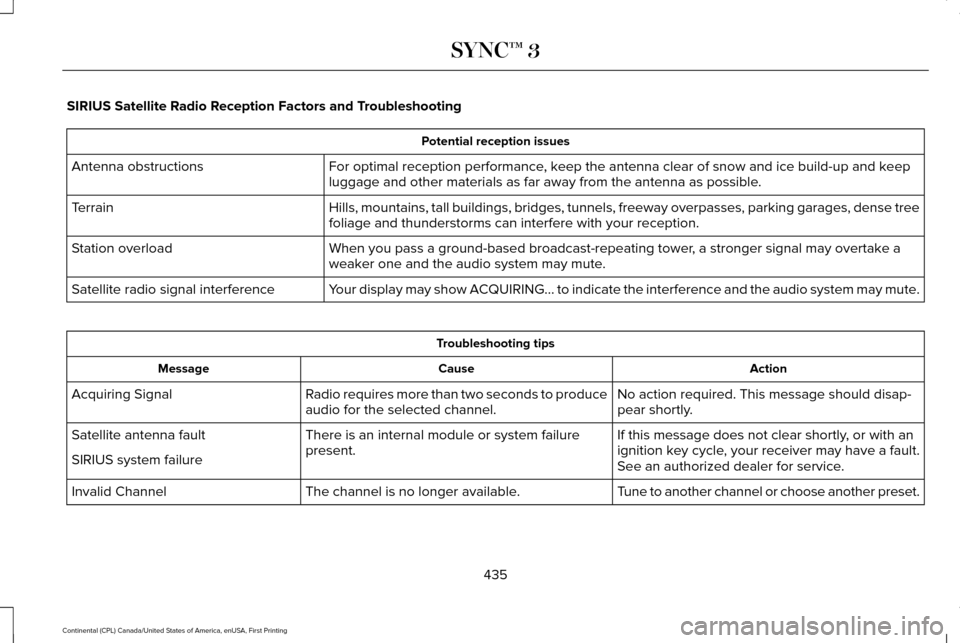
SIRIUS Satellite Radio Reception Factors and Troubleshooting
Potential reception issues
For optimal reception performance, keep the antenna clear of snow and ice build-up and keep
luggage and other materials as far away from the antenna as possible.
Antenna obstructions
Hills, mountains, tall buildings, bridges, tunnels, freeway overpasses, \
parking garages, dense tree
foliage and thunderstorms can interfere with your reception.
Terrain
When you pass a ground-based broadcast-repeating tower, a stronger signal may overtake a
weaker one and the audio system may mute.
Station overload
Your display may show ACQUIRING... to indicate the interference and the a\
udio system may mute.
Satellite radio signal interference Troubleshooting tips
Action
Cause
Message
No action required. This message should disap-
pear shortly.
Radio requires more than two seconds to produce
audio for the selected channel.
Acquiring Signal
If this message does not clear shortly, or with an
ignition key cycle, your receiver may have a fault.
See an authorized dealer for service.
There is an internal module or system failure
present.
Satellite antenna fault
SIRIUS system failure
Tune to another channel or choose another preset.
The channel is no longer available.
Invalid Channel
435
Continental (CPL) Canada/United States of America, enUSA, First Printing SYNC™ 3
Page 574 of 584

3
360 Degree Camera...................................226
Front Camera.......................................................227
Side Camera........................................................228
Using the System...............................................226
A
A/C See: Climate Control............................................141
About This Manual............................................7
ABS See: Brakes...........................................................201
ABS driving hints See: Hints on Driving With Anti-Lock
Brakes................................................................201
Accessories...................................................503 Exterior Style.......................................................503
Interior Style........................................................503
Lifestyle.................................................................503
Peace of Mind.....................................................503
Accessories See: Replacement Parts Recommendation.....13
ACC See: Using Adaptive Cruise Control.............230 Active Park Assist
..........................................215
Deactivating the Active Park Assist
Feature..............................................................221
Parallel Parking, Perpendicular Parking, Parallel Park Out Assist.................................215
Troubleshooting the System............................221
Adaptive Headlamps
.....................................92
Adjusting the Headlamps..........................326
Horizontal Aim Adjustment..............................327
Vertical Aim Adjustment...................................326
Adjusting the Steering Wheel.....................82 Easy Entry and Exit Feature...............................
82
End of Travel Position..........................................82
Memory Feature....................................................82
AFS See: Adaptive Headlamps..................................92
Airbag Disposal
...............................................53
Air Conditioning See: Climate Control............................................141
Air Filter See: Changing the Engine Air Filter - 2.7L
EcoBoost™/3.0L EcoBoost™.........................330
See: Changing the Engine Air Filter - 3.7L....330
Alarm See: Anti-Theft Alarm............................................81
All-Wheel Drive
..............................................192
Ambient Lighting............................................95 Anti-Theft Alarm
...............................................81
Arming the Alarm...................................................81
Disarming the Alarm.............................................81
Appendices.....................................................541
Apps
................................................................466
........................................................................\
........466
SiriusXM Traffic and Travel Link.....................468
Audible Warnings and Indicators
..............109
Headlamps On Warning Chime.......................109
Key in Ignition Warning Chime........................109
Keyless Warning Alert........................................109
Parking Brake On Warning Chime..................
109
Audio Control
...................................................83
Seek, Next or Previous........................................83
Audio System................................................396 General Information...........................................396
Audio Unit - Vehicles With: Premium AM/ FM/CD
...........................................................397
Rear Passenger Audio......................................400
Auto Hold
.......................................................204
Using Auto Hold.................................................205
Autolamps.........................................................89
Automatic Climate Control...........................141 Automatic Fan Settings......................................
143
Automatic High Beam Control.....................91 Activating the System...........................................91
Manually Overriding the System......................92
571
Continental (CPL) Canada/United States of America, enUSA, First Printing Index
Page 579 of 584

AWD........................................................................\
122
Battery and Charging System..........................123
Blind Spot Information and Cross Traffic Alert
System...............................................................124
Doors and Locks..................................................124
Driver Alert............................................................125
Fuel........................................................................\
.126
Hill Start Assist.....................................................126
Keys and Intelligent Access.............................126
Lane Keeping System........................................128
Maintenance.........................................................128
MyKey.....................................................................130
Park Aid...................................................................131
Park Brake..............................................................131
Power Steering....................................................132
Pre-Collision Assist.............................................133
Remote Start.........................................................133
Seats.......................................................................133
Stability Control....................................................134
Starting System ...................................................134
Tire Pressure Monitoring System....................135
Transmission.........................................................135
Installing Child Restraints..............................19
Inflatable Seatbelts...............................................22
Standard Seatbelts...............................................20
Using Lap and Shoulder Belts............................19
Using Lower Anchors and Tethers for
CHildren (LATCH).............................................25 Using Tether Straps..............................................27
Instrument Cluster
.........................................103
Instrument Lighting Dimmer........................90
Interior Lamps
..................................................93
Front Interior Lamp...............................................93
Rear Interior Lamp................................................95
Interior Luggage Compartment Release............................................................77
Interior Mirror
.................................................100
Auto-Dimming Mirror..........................................100
Introduction
.........................................................7
J
Jump Starting the Vehicle..........................274 Connecting the Jumper Cables......................275
Jump Starting......................................................276
Preparing Your Vehicle......................................274
Removing the Jumper Cables.........................276
K
Keyless Entry
....................................................75
SECURICODE™ Keyless Entry Keypad.............75
Keyless Starting..............................................171 Ignition Modes.......................................................171
Keys and Remote Controls
...........................54 L
Lane Keeping System
.................................240
Switching the System On and Off..................240
Lighting Control...............................................88 Headlamp Flasher................................................89
Headlamp High Beam.........................................89
Lighting..............................................................88 General Information.............................................88
Lincoln Automotive Financial Services......12
Lincoln Protect
..............................................505
Lincoln Protect (CANADA ONLY)...................506
Lincoln Protect Extended Service Plans (U.S.
Only)..................................................................505
Load Carrying
................................................258
Load Limit.......................................................258 Special Loading Instructions for Owners of
Pick-up Trucks and Utility-type
Vehicles............................................................262
Vehicle Loading - with and without a Trailer................................................................258
Locking and Unlocking
.................................65
Activating Intelligent Access.............................65
Battery Saver..........................................................70
Door Lock Indicator..............................................65
Door Lock Switch Inhibitor.................................65
Emergency Locking.............................................68
Illuminated Entry...................................................70
576
Continental (CPL) Canada/United States of America, enUSA, First Printing Index