2017 LINCOLN CONTINENTAL clock
[x] Cancel search: clockPage 331 of 584

Front Direction Indicator
1. Switch all of the lamps and the ignition
off.
2. Disconnect the electrical connector. 3. Turn the bulb holder counterclockwise
and remove it.
4. Remove the bulb by pulling it straight out.
LED Lamps
LED lamps are not serviceable items. See an
authorized dealer if they fail.
The following lamps are LED:
• Front parking lamps.
• Front side marker lamps.
• Side direction indicators.
• Rear side marker lamps.
• Brake and rear lamps.
• Central high mounted brake lamp. •
Rear direction indicators.
• Reversing lamps.
• License plate lamps.
BULB SPECIFICATION CHART
The specified replacement bulbs are in the
chart below. Headlamp bulbs must be
marked with an authorized D.O.T.
(Department of Transportation) for North
America to affirm lamp performance, light
brightness and pattern and safe visibility. The
correct bulbs will not damage the lamp
assembly or void the lamp assembly warranty
and will provide quality bulb burn time. Trade number
Function
D3S
* Headlamp (high intensity discharge) Low and High
LED
* Sidemarker - front
LED
* Park lamp - front
7444NA
* Turn lamp - front
LED
Signal indicator mirror lamp
328
Continental (CPL) Canada/United States of America, enUSA, First Printing MaintenanceE163826
Page 366 of 584
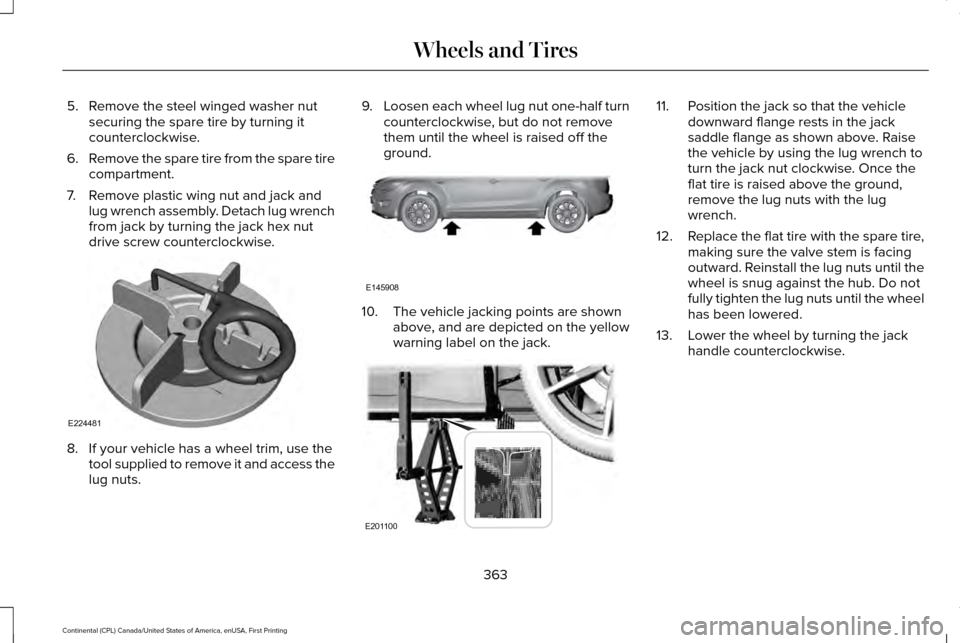
5. Remove the steel winged washer nut
securing the spare tire by turning it
counterclockwise.
6. Remove the spare tire from the spare tire
compartment.
7. Remove plastic wing nut and jack and lug wrench assembly. Detach lug wrench
from jack by turning the jack hex nut
drive screw counterclockwise. 8. If your vehicle has a wheel trim, use the
tool supplied to remove it and access the
lug nuts. 9.
Loosen each wheel lug nut one-half turn
counterclockwise, but do not remove
them until the wheel is raised off the
ground. 10. The vehicle jacking points are shown
above, and are depicted on the yellow
warning label on the jack. 11. Position the jack so that the vehicle
downward flange rests in the jack
saddle flange as shown above. Raise
the vehicle by using the lug wrench to
turn the jack nut clockwise. Once the
flat tire is raised above the ground,
remove the lug nuts with the lug
wrench.
12. Replace the flat tire with the spare tire,
making sure the valve stem is facing
outward. Reinstall the lug nuts until the
wheel is snug against the hub. Do not
fully tighten the lug nuts until the wheel
has been lowered.
13. Lower the wheel by turning the jack handle counterclockwise.
363
Continental (CPL) Canada/United States of America, enUSA, First Printing Wheels and TiresE224481 E145908 E201100
Page 407 of 584

Action and Description
Menu Item
Item
This bar displays icons and messages pertaining to current system activi\
ties including climate
settings, voice commands and phone functions such as text messages.
Status Bar
A
This button is available on the main screens. Pressing it takes you to the home screen view.
Home
B
This shows the current time. You can set the clock manually or have it controlled by the vehicle's
GPS location. See Settings (page 469).
Clock
C
This displays the current outside temperature.
Outside Temperature
D
You can touch any of the buttons on this bar to select a feature.
Feature Bar
E
The touchscreen allows you quick access to
all of your comfort, navigation,
communication and entertainment options.
Using the status and feature bar you can
quickly select the feature you want to use. Note:
Your system is equipped with a feature
that allows you to access and control audio
features for 10 minutes after you switch the
ignition off (and no doors open). The Status Bar
Additional icons also display in the status bar
depending on market, vehicle options and
current operation. If a feature is not active,
the icon does not display. Certain icons may
move to the left or right depending on what
options are active.
404
Continental (CPL) Canada/United States of America, enUSA, First Printing SYNC™ 3
Page 475 of 584

Clock
To adjust the time, select the up and down
arrows on either side of the screen. The
arrows on the left adjust the hour and arrows
on the right adjust the minute. You can then
select AM or PM.
You can adjust the following features: Action and Description
Menu Item
Select how time displays.
Clock Format
When active, the clock adjusts to time zone changes.
Auto Time Zone Update
This feature is only available in vehicles with navigation.
When selected, the vehicle clock resets to GPS satellite time.
Reset Clock to GPS Time
The system automatically saves any updates
you make to the settings. Bluetooth
Pressing this button allows you to access the
following: Action
Menu Item
On
Bluetooth
Off
You must activate Bluetooth to pair a
Bluetooth-enabled device. The processes of pairing a Bluetooth device
is the same as pairing a phone. See Pairing
a Device in Phone settings for how to pair a
device and the available options.
472
Continental (CPL) Canada/United States of America, enUSA, First Printing SYNC™ 3
Page 582 of 584

Safety Precautions........................................176
Scheduled Maintenance Record...............521
Scheduled Maintenance............................508
Seatbelt Extension.........................................42
Seatbelt Height Adjustment.........................39
Seatbelt Reminder..........................................40 Belt-Minder™...........................................................40
Seatbelts...........................................................34 Principle of Operation..........................................34
Seatbelt Warning Lamp and Indicator Chime..............................................................39
Conditions of operation......................................39
Seats.................................................................148
Security..............................................................79
Settings...........................................................469 911 Assist...............................................................476
Ambient Lighting................................................484
Bluetooth..............................................................472
Clock......................................................................472
Display...................................................................485
General.................................................................482
Media Player........................................................470
Mobile Apps.........................................................480
Navigation............................................................478
Phone.....................................................................473
Radio......................................................................477
Sound....................................................................469
Valet Mode...........................................................486 Vehicle...................................................................484
Voice Control.......................................................485
Wi-Fi.......................................................................483
Side Airbags.....................................................49
Side Sensing System....................................214 Obstacle Distance Indicator.............................214
Sitting in the Correct Position
....................148
Snow Chains See: Using Snow Chains..................................355
Soft Closing Door............................................75
Special Notices
.................................................13
New Vehicle Limited Warranty...........................13
On Board Diagnostics Data Link Connector............................................................14
Special Instructions...............................................13
Special Operating Conditions Scheduled Maintenance................................................517
Exceptions ............................................................520
Speed Control See: Cruise Control...........................................229
Stability Control............................................209 Principle of Operation.......................................209
Starting a Gasoline Engine.........................172 Automatic Engine Shutdown............................173
Failure to Start......................................................172
Guarding Against Exhaust Fumes...................174
Important Ventilating Information....................174
Starting Your Vehicle..........................................172 Stopping the Engine When Your Vehicle is
Moving...............................................................174
Stopping the Engine When Your Vehicle is Stationary..........................................................174
Starting and Stopping the Engine..............171 General Information.............................................171
Steering...........................................................251 Adaptive Steering..............................................252
Electric Power Steering.....................................251
Steering Wheel
................................................82
Storage Compartments...............................170
Sunroof See: Moonroof.....................................................102
Sun Shades
......................................................101
Sun Visors........................................................101
Illuminated Vanity Mirror....................................101
Supplementary Restraints System
.............44
Principle of Operation..........................................44
Symbols Glossary
..............................................7
SYNC™ 3..........................................................402
General Information...........................................402
SYNC™ 3 Troubleshooting..........................486
T
Technical Specifications See: Capacities and Specifications...............368
579
Continental (CPL) Canada/United States of America, enUSA, First Printing Index