Page 128 of 640

1282. Instrument cluster
RC300h_EE(OM24740E)
■When disconnecting and reconnecting battery terminals
The drive information data will be reset.
■Liquid crystal display
P. 120
WARNING
■Caution for use while driving
●When operating the multi-information display while driving, pay extra attention to the safety of the area around the vehicle.
●Do not look continuously at the multi-info rmation display while driving as you may fail to see pedestrians, objects on the road, etc. ahead of the vehicle.
■The information display at low temperatures
Allow the interior of the vehicle to warm up before using the liquid crystal information display. At extremely low temperatures, th e information display monitor may respond slowly, and display changes may be delayed.
For example, there is a lag between the dr iver’s shifting and the new gear number appearing on the display. This lag could cau se the driver to downshift again, causing rapid and excessive engine braking and po ssibly an accident resulting in death or
injury.
■Cautions during setting up the display
As the hybrid system needs to be running during setting up the display, ensure that the
vehicle is parked in a place with adequate ventilation. In a closed area such as a garage, exhaust gases including harmful carbon monoxide (CO) may collect and enter thevehicle. This may lead to death or a serious health hazard.
NOTICE
■While setting up the display
To prevent battery discharge, ensure that the engine is running while setting up the dis- play features.
Page 137 of 640
137
3
Operation of
each component
RC300h_EE(OM24740E)
3-1. Key information
Keys .................................................. 138
3-2. Opening, closing and locking
the doors and trunk
Doors ................................................144
Trunk ................................................ 150
Smart entry & start
system ........................................... 155
3-3. Adjusting the seats
Front seats...................................... 178
Rear seats.........................................181
Driving position memory ......... 183
Head restraints ............................ 186
3-4. Adjusting the steering
wheel and mirrors
Steering wheel ............................. 189
Inside rear view mirror ............... 191
Outside rear view
mirrors .......................................... 193
3-5. Opening, closing the
windows and moon roof
Power windows ........................... 196
Moon roof .....................................200
Page 153 of 640
1533-2. Opening, closing and locking the doors and trunk
3
Operation of each component
RC300h_EE(OM24740E)
WARNING
Observe the following precautions. Failure to do so may result in death or serious injury.
■Before driving
●Make sure that the trunk lid is fully closed. If the trunk lid is not fully closed, it may open unexpectedly while driv ing and hit near-by objects or luggage in the trunk may be thrown out, causing an accident.
●Do not allow children to play in the trunk.If a child is accidentally locked in the trunk, they could suffer from heat exhaustion,suffocation or other injuries.
●Do not allow a child to open or close the trunk lid.Doing so may cause the trunk lid to open unexpectedly, or cause the child’s hands,head, or neck to be caught by the closing trunk lid.
■Important points while driving
Never let anyone sit in the trunk. In the event of sudden braking or a collision, they are susceptible to death or serious injury.
Page 179 of 640
1793-3. Adjusting the seats
3
Operation of each component
RC300h_EE(OM24740E)
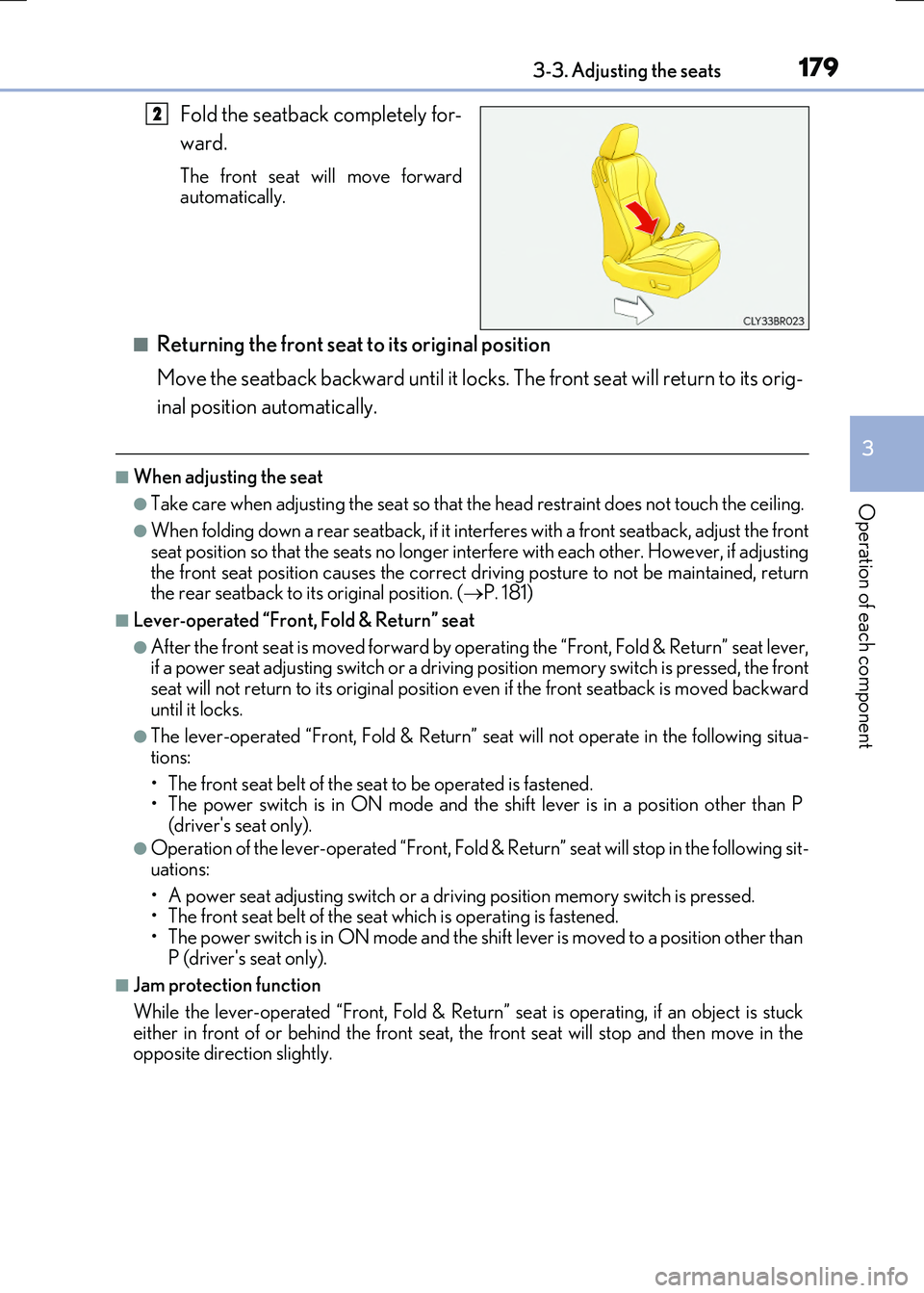
Fold the seatback completely for-
ward.
The front seat will move forward automatically.
■Returning the front seat to its original position
Move the seatback backward until it locks. The front seat will return to its orig-
inal position automatically.
■When adjusting the seat
●Take care when adjusting the seat so that the head restraint does not touch the ceiling.
●When folding down a rear seatback, if it interferes with a front seatback, adjust the front
seat position so that the seats no longer interfere with each other. However, if adjusting the front seat position causes the correct dr iving posture to not be maintained, return the rear seatback to its original position. ( P. 181)
■Lever-operated “Front, Fold & Return” seat
●After the front seat is moved forward by operating the “Front, Fold & Return” seat lever, if a power seat adjustin g switch or a driving position memory switch is pressed, the front
seat will not return to its original position even if the front seatback is moved backward until it locks.
●The lever-operated “Front, Fold & Return” se at will not operate in the following situa-
tions:
• The front seat belt of the seat to be operated is fastened. • The power switch is in ON mode and the sh ift lever is in a position other than P
(driver's seat only).
●Operation of the lever-operated “Front, Fold & Return” seat will stop in the following sit-
uations:
• A power seat adjusting switch or a driv ing position memory switch is pressed. • The front seat belt of the seat which is operating is fastened.
• The power switch is in ON mode and the sh ift lever is moved to a position other than P (driver's seat only).
■Jam protection function
While the lever-operated “Front, Fold & Return” seat is operating, if an object is stuck either in front of or behind the front seat, the front seat will stop and then move in the opposite direction slightly.
2
Page 181 of 640
1813-3. Adjusting the seats
3
Operation of each component
RC300h_EE(OM24740E)
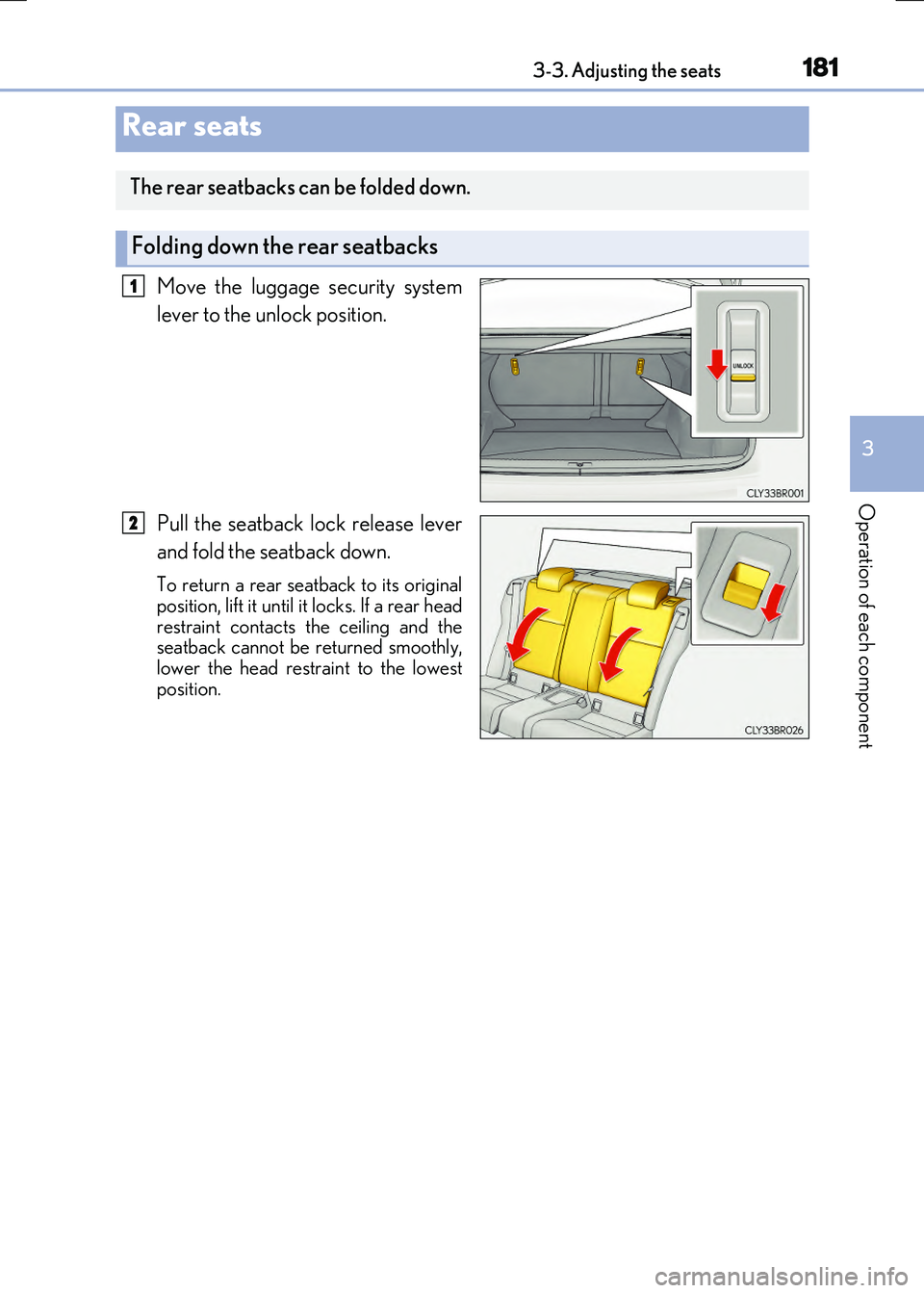
Move the luggage security system
lever to the unlock position.
Pull the seatback lock release lever
and fold the seatback down.
To return a rear seatback to its original
position, lift it until it locks. If a rear head restraint contacts the ceiling and theseatback cannot be returned smoothly,
lower the head restraint to the lowest position.
Rear seats
The rear seatbacks can be folded down.
Folding down the rear seatbacks
1
2
Page 186 of 640
1863-3. Adjusting the seats
RC300h_EE(OM24740E)
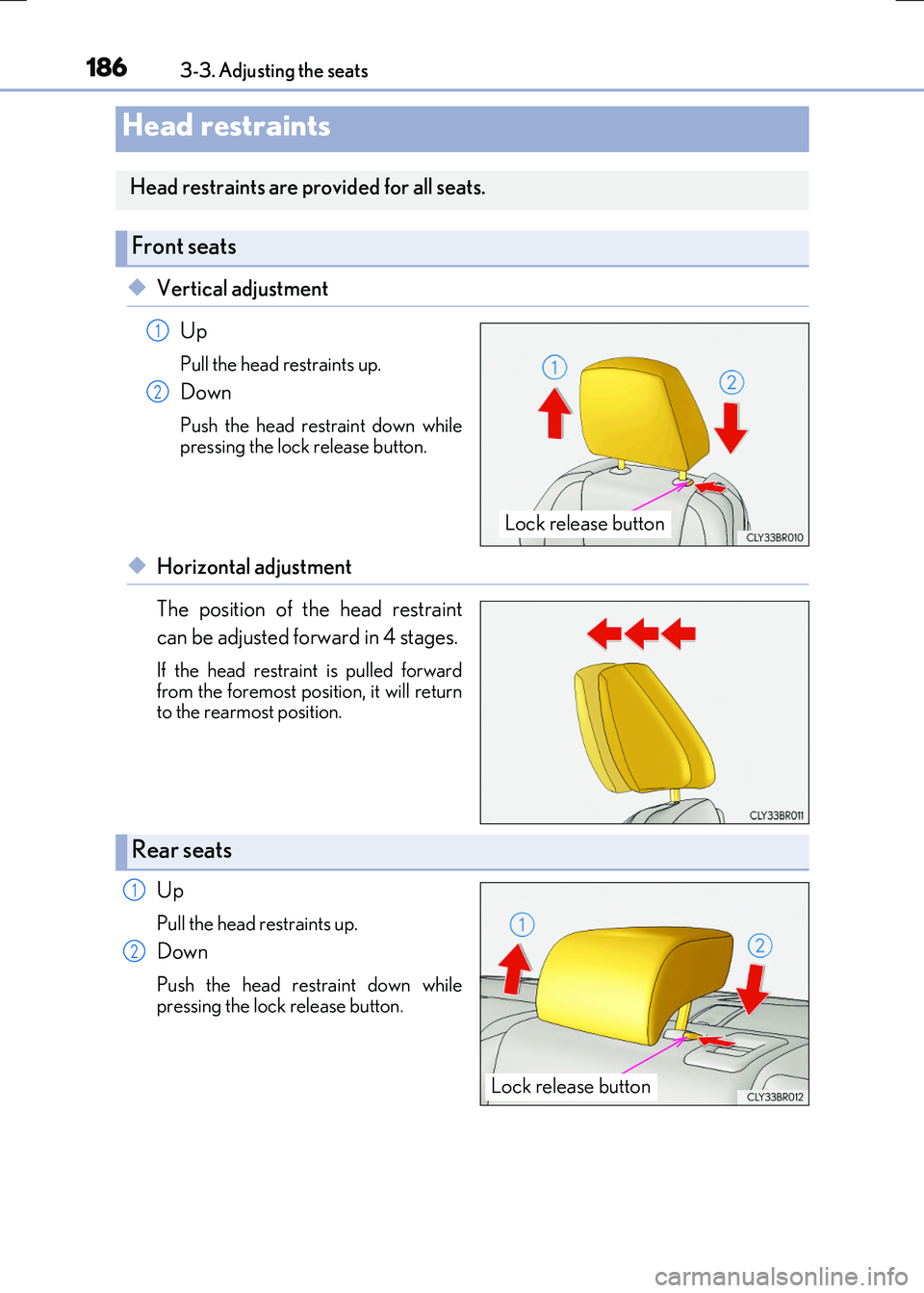
◆Vertical adjustment
Up
Pull the head restraints up.
Down
Push the head restraint down while pressing the lock release button.
◆Horizontal adjustment
The position of the head restraint
can be adjusted forward in 4 stages.
If the head restraint is pulled forward
from the foremost position, it will return to the rearmost position.
Up
Pull the head restraints up.
Down
Push the head restraint down whilepressing the lock release button.
Head restraints
Head restraints are provided for all seats.
Front seats
Lock release button
1
2
Rear seats
Lock release button
1
2
Page 187 of 640
1873-3. Adjusting the seats
3
Operation of each component
RC300h_EE(OM24740E)
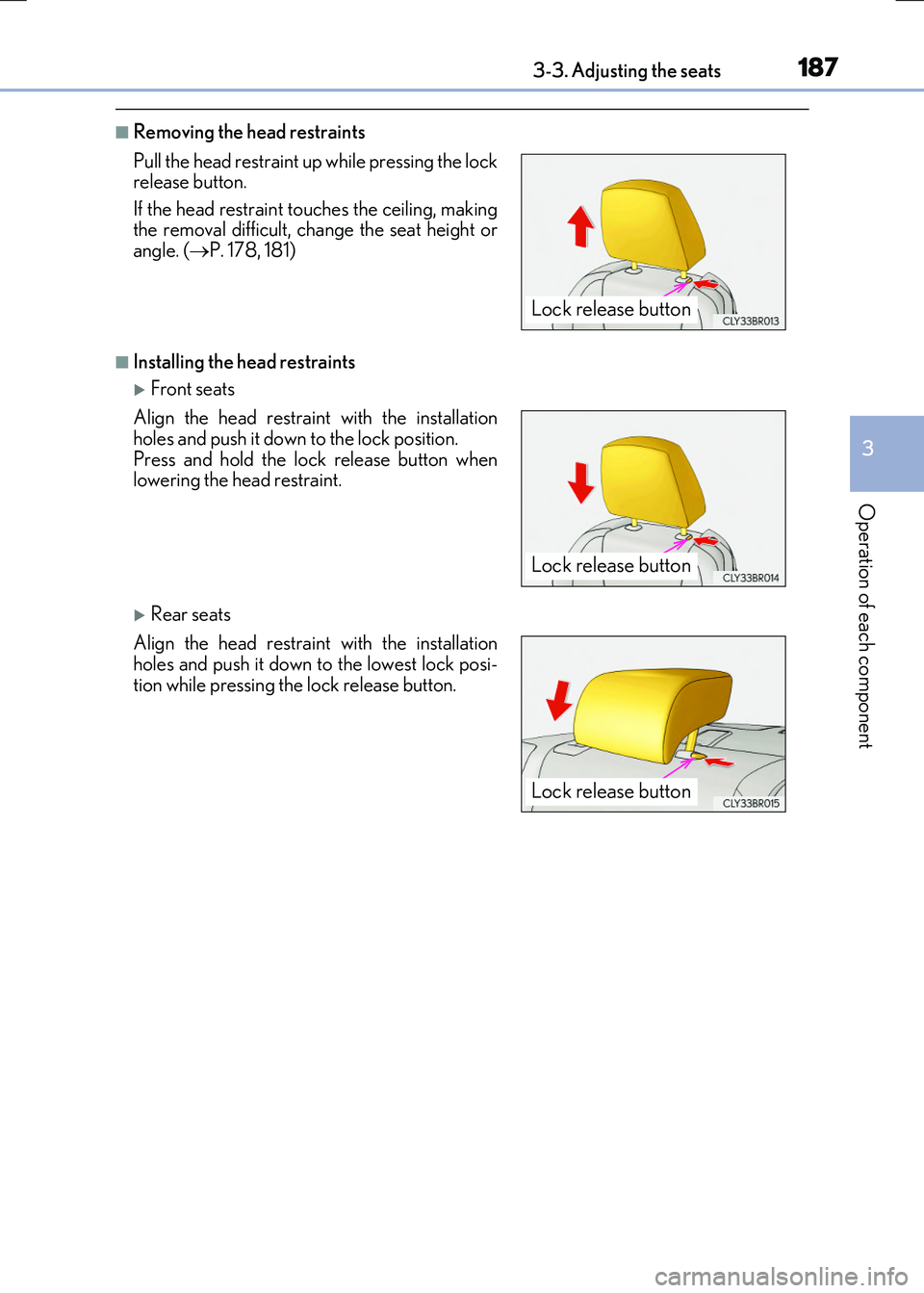
■Removing the head restraints
■Installing the head restraints
Front seats
Rear seats
Pull the head restraint up while pressing the lock release button.
If the head restraint to uches the ceiling, making the removal difficult, change the seat height orangle. ( P. 178, 181)
Align the head restraint with the installation
holes and push it down to the lock position. Press and hold the lock release button whenlowering the head restraint.
Align the head restraint with the installation
holes and push it down to the lowest lock posi- tion while pressing the lock release button.
Lock release button
Lock release button
Lock release button
Page 188 of 640
1883-3. Adjusting the seats
RC300h_EE(OM24740E)
■Adjusting the height of the head restraints
■Adjusting the rear seat head restraint
Always raise the head restraint one leve l from the stowed position when using.
Make sure that the head restraints are adjusted
so that the center of the head restraint is closest to the top of your ears.
WARNING
■Head restraint precautions
Observe the following precautions regarding th e head restraints. Failure to do so may result in death or serious injury.
●Use the head restraints designed for each respective seat.
●Adjust the head restraints to the correct position at all times.
●After adjusting the head restraints, push down on them and make sure they are
locked in position.
●Do not drive with the head restraints removed.