Page 227 of 640
2274-2. Driving procedures
4
Driving
RC300h_EE(OM24740E)
■If the shift lever cannot be shifted from P
First, check whether the brake pedal is being depressed.
If the shift lever cannot be shifted with your foot on the brake pedal, there may be a prob-
lem with the shift lock system. Have the vehicle inspected by any authorized Lexus dealer or repairer, or another duly qualifie d and equipped professional immediately. The following steps may be used as an emerge ncy measure to ensure that the shift lever
can be shifted.
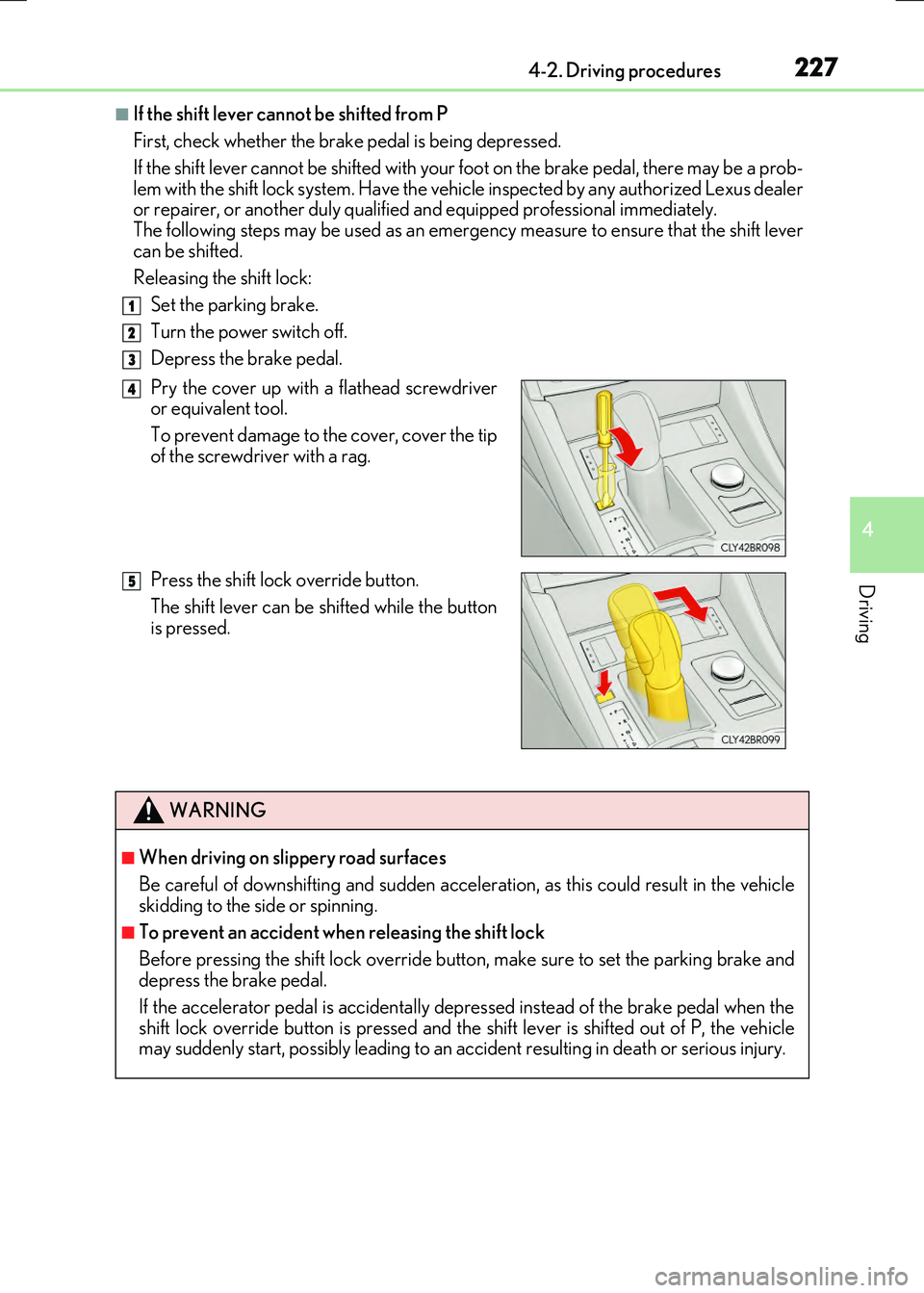
Releasing the shift lock:
Set the parking brake.
Turn the power switch off.
Depress the brake pedal.
Pry the cover up with a flathead screwdriver or equivalent tool.
To prevent damage to the cover, cover the tip
of the screwdriver with a rag.
Press the shift lock override button.
The shift lever can be shifted while the button is pressed.
1
2
3
4
5
WARNING
■When driving on slippery road surfaces
Be careful of downshifting and sudden acceler ation, as this could result in the vehicle skidding to the side or spinning.
■To prevent an accident wh en releasing the shift lock
Before pressing the shift lock override butt on, make sure to set the parking brake and depress the brake pedal.
If the accelerator pedal is accidentally depressed instead of the brake pedal when the shift lock override button is pressed and the shift lever is shifted out of P, the vehicle may suddenly start, possibly leading to an accident resulting in death or serious injury.
Page 229 of 640

2294-2. Driving procedures
4
Driving
RC300h_EE(OM24740E)
The lever will return to its original position immediately after operation.
Right turn
Lane change to the right (move the
lever partway and release it)
The right hand signals will flash 3 times.
Lane change to the left (move the
lever partway and release it)
The left hand signals will flash 3 times.
Left turn
■If the turn signals do not stop flashing after turning left or right, or if you want
to stop them flashing
Operate the lever in the opposite direction to either position or . If you
move the lever to either position or , the selected turn signals will flash.
■Turn signals can be operated when
The power switch is in ON mode.
■If the indicator flashes faster than usual
Check that a light bulb in the front or rear turn signal lights has not burned out.
■If the turn signals stop flashing before a lane change has been performed
Operate the lever again.
■Customization
The number of times the turn signals flash during a lane change can be changed.
(Customizable feature P. 607)
Turn signal lever
Operating instructions
1
2
3
4
23
14
Page 231 of 640

2314-2. Driving procedures
4
Driving
RC300h_EE(OM24740E)
Louder
Lower
The indicator comes on when the ASC system is on.
When the dial is turned to the lowest volume, the ASC system will be turnedoff and the indicator will go off.
■The ASC system can be operated when
The driving mode select switch is in normal mode or sport mode. (P. 301)
■Temporary cancelation of the ASC system functions
The ASC system may be temporarily cancel ed depending on the driving conditions, such as when the tires slip due to sudden acceleration.
ASC (Active Sound Control)
: If equipped
The ASC system is an electronic soun d system that generates engine sound,
conveying the kinetic situations of the vehicle’s acceleration and deceleration
to the driver through the speakers inside the instrument panel.
The vehicle’s response to the driver’s acceleration behavior and shift opera-
tions are also conveyed in sound.
When sport mode is selected, the sound conveyed to the driver will be louder.
Controlling volume
1
2
Page 232 of 640
232
RC300h_EE(OM24740E)
4-3. Operating the lights and wipers
Turning the end of the lever turns on the lights as follows:
The front position, tail, license
plate and instrument panel
lights turn on.
The headlights and all lights
listed above turn on.
The headlights, daytime run-
ning lights ( P. 233) and all
the lights listed above turn on
and off automatically.
(When the power switch is in
ON mode.)
With the headlights on, push the
lever away from you to turn on the
high beams.
Pull the lever toward you to the center position to turn the high beams off.
Pull the lever toward you and release
it to flash the high beams once.
You can flash the high beams with the
headlights on or off.
Headlight switch
The headlights can be operated manually or automatically.
Operating instructions
1
2
3
Turning on the high beam headlights
1
2
Page 233 of 640

2334-3. Operating the lights and wipers
4
Driving
RC300h_EE(OM24740E)
This system allows the headlights and front position lights to be turned on for 30
seconds when the power switch is off.
Pull the lever toward you and release it
with the light switch is in after turn-
ing the power switch off.
Pull the lever toward you and release it again to turn off the lights.
■Daytime running light system
●To make your vehicle more visible to other drivers during daytime driving, the daytime
running lights turn on automatically whenever the hybrid system is started and the park- ing brake is released with the headlight switch in the “AUTO” position. (Illuminatebrighter than the front position lights.) Daytime running lights are not designed for use
at night.
●Vehicles with LED front turn signal lights: If a turn signal light is in use, the daytime run- ning light, on the same side, is turned off. For emergency flashers, both are turned off.
■Headlight control sensor
■Automatic light off system
●When the light switch is in or : The headlights turn off automatically if the
power switch is turned to ACCESSORY mode or turned off.
●When the light switch is in : The headlights and all lights turn off automatically if the
power switch is turned to ACCESSORY mode or turned off.
To turn the lights on again, turn the power switch to ON mode, or turn the light switch off
once and then back to or .
Follow me home system
The sensor may not function properly if an
object is placed on the sensor, or anything that blocks the sensor is affixed to the windshield. Doing so interferes with the sensor detecting
the level of ambient light and may cause the automatic headlight system to malfunction.
Page 234 of 640
2344-3. Operating the lights and wipers
RC300h_EE(OM24740E)
■Light reminder buzzer
A buzzer sounds when the power switch is turned off or turned to ACCESSORY mode and the driver’s door is opened while the lights are turned on.
■Automatic headlight leveling system
The level of the headlights is automatically ad justed according to the number of passen- gers and the loading condition of the vehicle to ensure that the headlights do not inter-
fere with other road users.
■Customization
Settings (e.g. light sensor se nsitivity) can be changed.
(Customizable features: P. 607)
NOTICE
■To prevent 12-volt battery discharge
Do not leave the lights on longer than necessary when the hybrid system is not operat- ing.
Page 235 of 640
2354-3. Operating the lights and wipers
4
Driving
RC300h_EE(OM24740E)
Push the lever away from you with
the headlight switch in the or
position.
Press the Automatic High Beam
switch.
The Automatic High Beam indicator will
come on when the headlights are turned on automatically to indicate that the sys-tem is active.
Automatic High Beam
: If equipped
The Automatic High Beam uses an in-vehicle camera sensor to assess the
brightness of streetlights, the lights of oncoming and preceding vehicles, etc.,
and automatically turns the high beam on or off as necessary.
Activating the Automatic High Beam system
1
2
Page 236 of 640

2364-3. Operating the lights and wipers
RC300h_EE(OM24740E)
When all of the following conditions are met, the high beam will be automatically
turned on (after approximately 1 second):
●Vehicle speed is above approximately 40 km/h (25 mph).
●The area ahead of the vehicle is dark.
●There are no oncoming or preceding vehicles with headlights or tail lights
turned on.
●There are few streetlights on the road ahead.
If any of the following conditions are met, the high beam will be automatically
turned off:
●Vehicle speed drops below approximately 30 km/h (19 mph).
●The area ahead of the vehicle is not dark.
●Oncoming or preceding vehicles have headlights or tail lights turned on.
●There are many streetlights on the road ahead.
■Switching to low beam
Pull the lever to the original position.
The Automatic High Beam indicator will turn off.
Push the lever away from you to acti- vate the Automatic High Beam sys-tem again.
■Switching to high beam
Press the Automatic High Beam
switch.
The Automatic High Beam indicator will turn off and the high beam indi-
cator will turn on.
Press the switch to activate the Auto- matic High Beam system again.
High beam automatic turning on or off conditions
Turning the high beam on/off manually


