Page 249 of 640
249
4
Driving
RC300h_EE(OM24740E)
4-4. Refueling
●Close both side doors and windows, and turn the power switch off.
●Confirm the type of fuel.
■Fuel types
P. 606
■Fuel tank opening for unleaded gasoline
To help prevent incorrect fueling, your vehicle has a fuel tank opening that only accom-
modates the special nozzle on unleaded fuel pumps.
Opening the fuel tank cap
Perform the following steps to open the fuel tank cap:
Before refueling the vehicle
Page 250 of 640

2504-4. Refueling
RC300h_EE(OM24740E)
WARNING
■When refueling the vehicle
Observe the following precautions while refueling the vehicle. Failure to do so may result in death or serious injury.
●After exiting the vehicle and before opening the fuel door, touch an unpainted metalsurface to discharge any static electricity. It is important to discharge static electricity before refueling because sparks resulting fr om static electricity can cause fuel vapors
to ignite while refueling.
●Always hold the grips on the fuel tank cap and turn it slowly to remove it. A whooshing sound may be heard when the fuel tank cap is loosened. Wait until the
sound cannot be heard before fully removing the cap. In hot weather, pressurized fuel may spray out the filler neck and cause injury.
●Do not allow anyone that has not discharged static electricity from their body to come
close to an open fuel tank.
●Do not inhale vaporized fuel. Fuel contains substances that are harmful if inhaled.
●Do not smoke while refueling the vehicle.Doing so may cause the fuel to ignite and cause a fire.
●Do not return to the vehicle or touch any person or object that is statically charged.
This may cause static electricity to build up, resulting in a possible ignition hazard.
■When refueling
Observe the following precautions to prevent fuel overflowing from the fuel tank:
●Securely insert the fuel nozzle into the fuel filler neck.
●Stop filling the tank after the fuel nozzle automatically clicks off.
●Do not top off the fuel tank.
NOTICE
■Refueling
Do not spill fuel during refueling. Doing so may damage the vehicle, such as causing the emission control system tooperate abnormally or damaging fuel system components or the vehicle’s painted sur-
face.
Page 251 of 640
2514-4. Refueling
4
Driving
RC300h_EE(OM24740E)
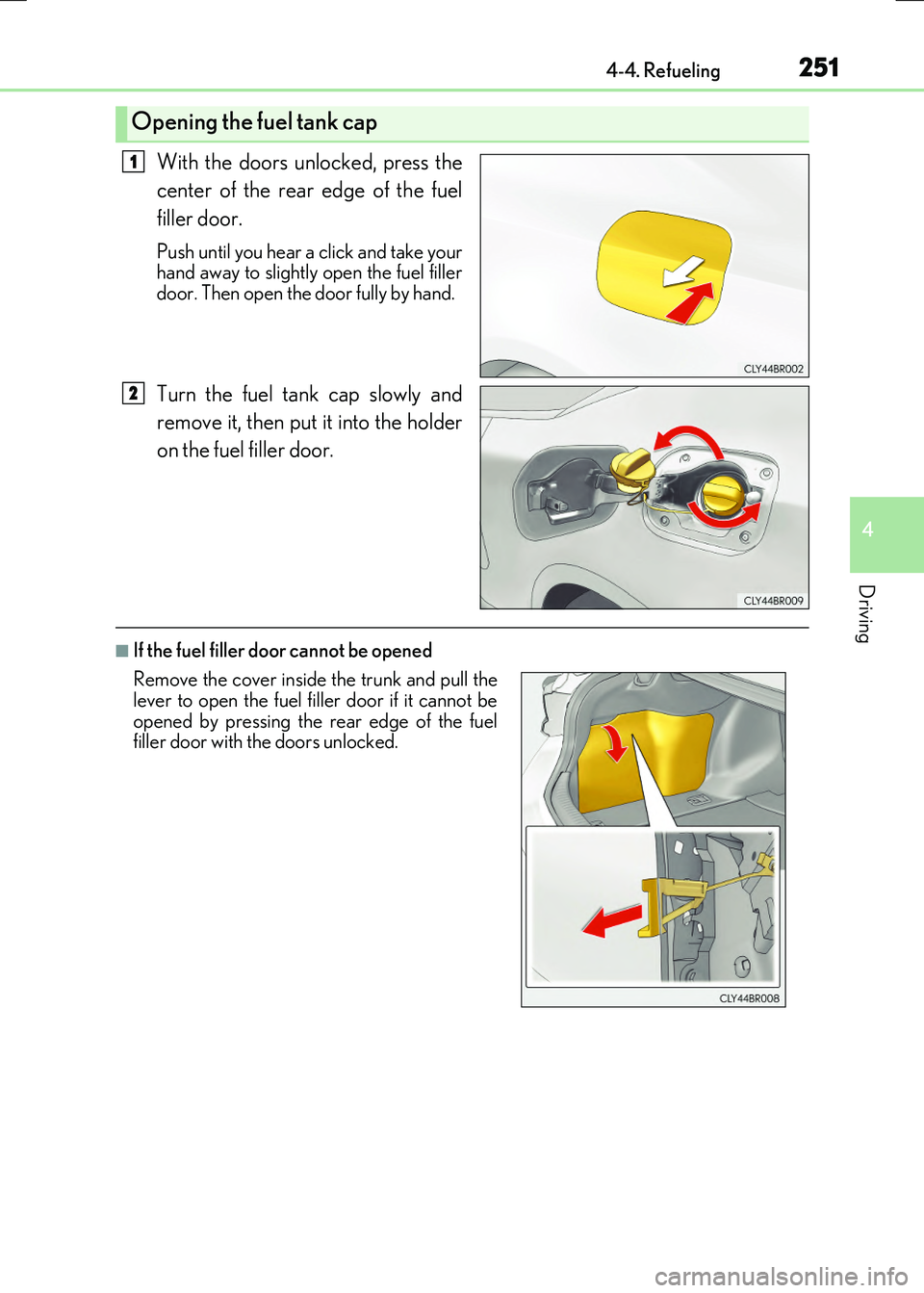
With the doors unlocked, press the
center of the rear edge of the fuel
filler door.
Push until you hear a click and take your hand away to slightly open the fuel filler
door. Then open the door fully by hand.
Turn the fuel tank cap slowly and
remove it, then put it into the holder
on the fuel filler door.
■If the fuel filler door cannot be opened
Opening the fuel tank cap
1
2
Remove the cover inside the trunk and pull the lever to open the fuel filler door if it cannot be
opened by pressing the rear edge of the fuel filler door with the doors unlocked.
Page 252 of 640
2524-4. Refueling
RC300h_EE(OM24740E)
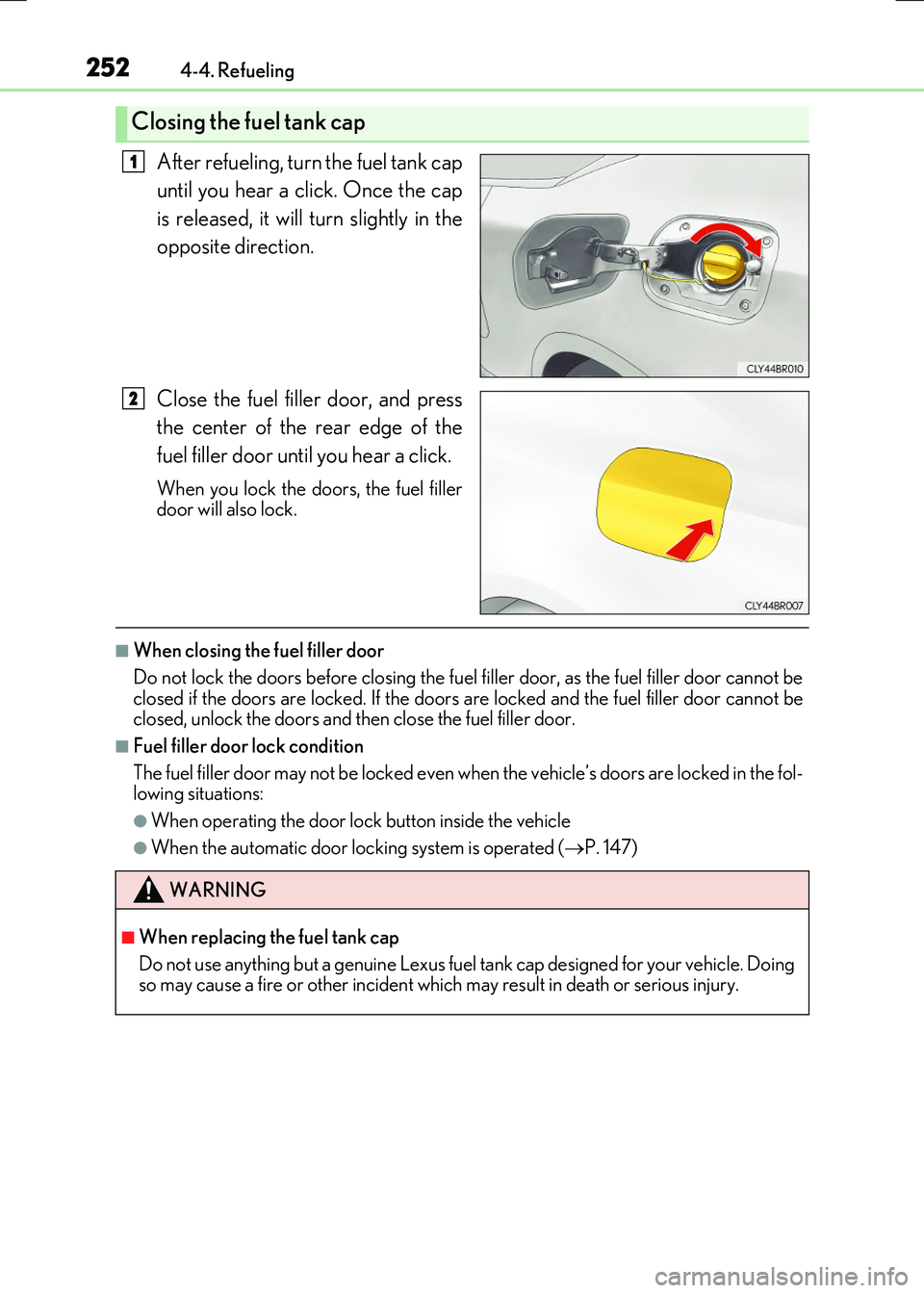
After refueling, turn the fuel tank cap
until you hear a click. Once the cap
is released, it will turn slightly in the
opposite direction.
Close the fuel filler door, and press
the center of the rear edge of the
fuel filler door until you hear a click.
When you lock the doors, the fuel filler door will also lock.
■When closing the fuel filler door
Do not lock the doors before closing the fuel filler door, as the fuel filler door cannot be closed if the doors are locked. If the doors are locked and the fuel filler door cannot be closed, unlock the doors and then close the fuel filler door.
■Fuel filler door lock condition
The fuel filler door may not be locked even wh en the vehicle’s doors are locked in the fol- lowing situations:
●When operating the door lock button inside the vehicle
●When the automatic door locking system is operated (P. 147)
Closing the fuel tank cap
1
2
WARNING
■When replacing the fuel tank cap
Do not use anything but a genuine Lexus fuel tank cap designed for your vehicle. Doing so may cause a fire or other incident which may result in death or serious injury.
Page 255 of 640

2554-5. Using the driving support systems
4
Driving
RC300h_EE(OM24740E)
■Cruise control can be set when
●The shift lever is in D or range 4 or higher of S has been selected.
●Range 4 or higher of D has been selected by using the paddle shift.
●Vehicle speed is above approximately 40 km/h (25 mph).
■Accelerating after setting the vehicle speed
●The vehicle can be accelerated by operating accelerator pedal. After accelerating, the set speed resumes.
●Even without canceling the cruise control, the set speed can be increased by first accel-erating the vehicle to the desired speed and then pushing the lever down to set the newspeed.
■Automatic cruise control cancelation
Cruise control is automatically canceled in any of the following situations.
●Actual vehicle speed falls more than approximately 16 km/h (10 mph) below the set
speed.
●Actual vehicle speed is below approximately 40 km/h (25 mph).
●VSC is activated.
●TRC is activated for a period of time.
●When the VSC or TRC system is turned off by pressing the VSC OFF switch.
■If the warning message for the cruise contro l is shown on the multi-information display
Press the “ON/OFF” button once to deactivate the system, and then press the button again to reactivate the system.If the cruise control speed cannot be set or if the cruise control cancels immediately after
being activated, there may be a malfunction in the cruise control system. Have the vehi- cle inspected by any authorized Lexus dealer or repairer, or another duly qualified andequipped professional.
Page 258 of 640

2584-5. Using the driving support systems
RC300h_EE(OM24740E)
This mode employs a radar sensor to detect the presence of vehicles up to
approximately 120 m (400 ft.) ahead, determines the current vehicle-to-vehicle
following distance, and operates to maintain a suitable following distance from
the vehicle ahead.
Note that vehicle-to-vehicle distance will close in when traveling on long downhill slopes.
Example of constant speed cruising
When there are no vehicles ahead
The vehicle travels at the speed set by the driver. The desired vehicle-to-vehicle dis- tance can also be set by operating the vehicle-to-vehicle distance control.
Example of deceleration cruising
When a preceding vehicle driving slower than the set speed appears
When a vehicle is detected running ahead of you, the system automatically deceler- ates your vehicle. When a greater reductio n in vehicle speed is necessary, the system applies the brakes (the stop lights will come on at this time). A warning tone warns you
when the system cannot decelerate sufficiently to prevent your vehicle from closing in on the vehicle ahead.
Example of follow-up cruising
When following a preceding vehicle driving slower than the set speed
The system continues follow-up cruising wh ile adjusting for changes in the speed of
the vehicle ahead in order to maintain the vehicle-to-vehicle distance set by the driver.
Example of acceleration
When there are no longer any preceding vehicles driving slower than the set
speed
The system accelerates until the set speed is reached. The system then returns to con- stant speed cruising.
Driving in vehicle-to-veh icle distance control mode
1
2
3
4
Page 261 of 640
2614-5. Using the driving support systems
4
Driving
RC300h_EE(OM24740E)
Pressing the button changes the vehi-
cle-to-vehicle distance as follows:
Long
Medium
Short
The vehicle-to-vehicle distance is set automatically to long mode when thepower switch is turned to ON mode.
If a vehicle is running ahead of you, the preceding vehicle mark will also be displayed.
Select a distance from the table below. Note that the distances shown corre-
spond to a vehicle speed of 80 km/h (50 mph). Vehicle-to-vehicle distance
increases/decreases in accordance with vehicle speed.
Changing the vehicle-to-vehicle di stance (vehicle-to-vehicle distance
control mode)
Preceding
vehicle mark
1
2
3
Vehicle-to-vehicle distance setting s (vehicle-to-vehicle distance con-
trol mode)
Distance optionsVehicle-to-vehicle distance
LongApproximately 50 m (160 ft.)
MediumApproximately 40 m (130 ft.)
ShortApproximately 30 m (100 ft.)
Page 262 of 640
2624-5. Using the driving support systems
RC300h_EE(OM24740E)
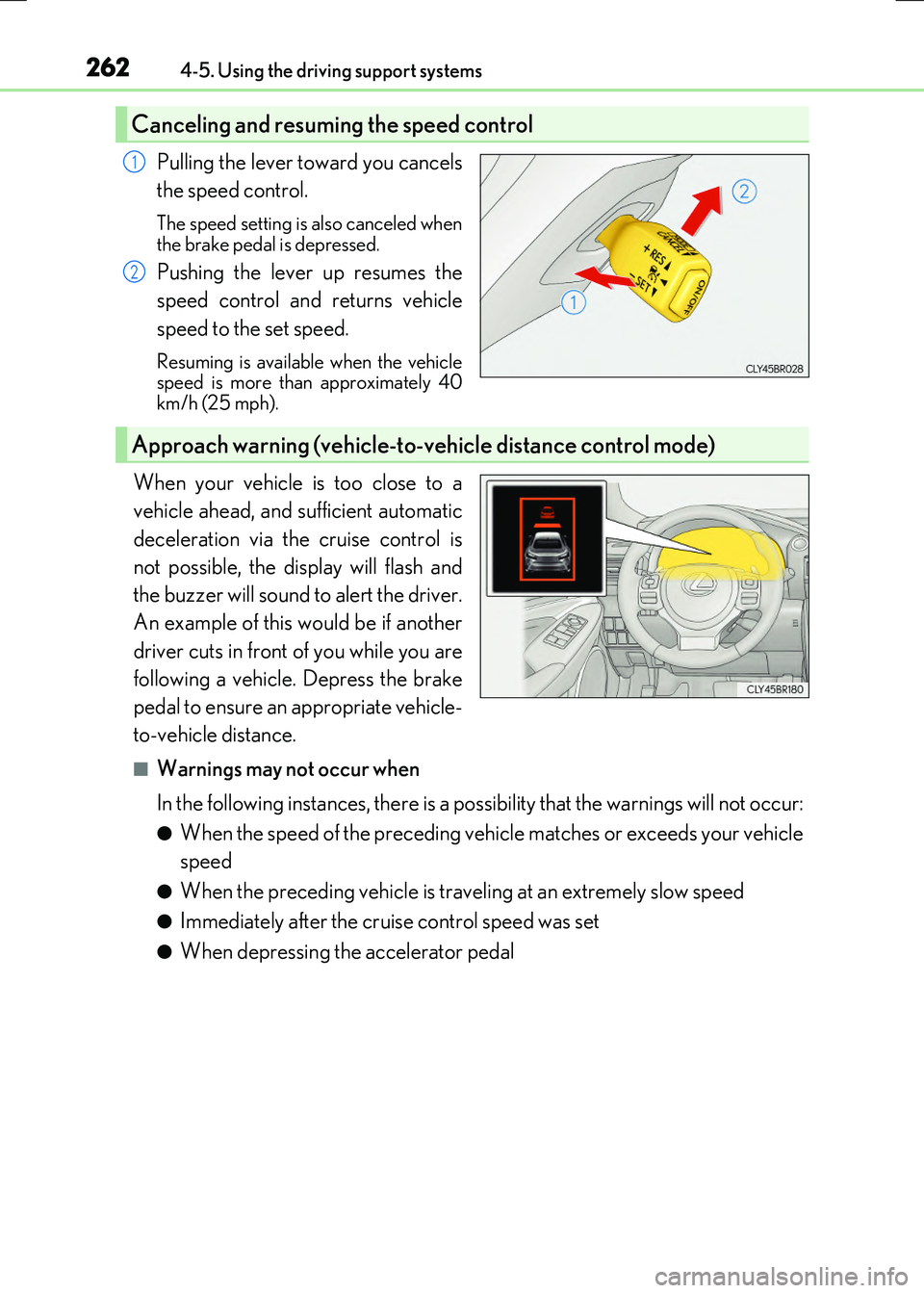
Pulling the lever toward you cancels
the speed control.
The speed setting is also canceled when
the brake pedal is depressed.
Pushing the lever up resumes the
speed control and returns vehicle
speed to the set speed.
Resuming is available when the vehicle speed is more than approximately 40km/h (25 mph).
When your vehicle is too close to a
vehicle ahead, and sufficient automatic
deceleration via the cruise control is
not possible, the display will flash and
the buzzer will sound to alert the driver.
An example of this would be if another
driver cuts in front of you while you are
following a vehicle. Depress the brake
pedal to ensure an appropriate vehicle-
to-vehicle distance.
■Warnings may not occur when
In the following instances, there is a possibility that the warnings will not occur:
●When the speed of the preceding vehicle matches or exceeds your vehicle
speed
●When the preceding vehicle is traveling at an extremely slow speed
●Immediately after the cruise control speed was set
●When depressing the accelerator pedal
Canceling and resuming the speed control
1
2
Approach warning (vehicle-to-vehicle distance control mode)