2017 LEXUS RC300H turn
[x] Cancel search: turnPage 216 of 640

2164-2. Driving procedures
RC300h_EE(OM24740E)
Modes can be changed by pressing the power switch with brake pedal released.
(The mode changes each time the switch is pressed.)
Off*
The emergency flashers can be used.
ACCESSORY mode
Some electrical components such as the
audio system can be used.
“ACCESSORY” will be displayed on the meters.
ON mode
All electrical components can be used.
“IGNITION ON” will be displayed on the meters.
*: If the shift lever is in a position other than
P when turning off the hybrid system,
the power switch will be turned to
ACCESSORY mode, not to off.
If the hybrid system is stopped with the sh ift lever in a position other than P, the
power switch will not be turned off but instead be turned to ACCESSORY
mode. Perform the following procedure to turn the switch off:
Check that the parking brake is set.
Shift the shift lever to P.
Check that “Turn Power OFF” is displayed on the multi-information display
and then press the power switch once.
Check that “Turn Power OFF” on the multi-information display is off.
Changing power switch modes
1
2
3
When stopping the hybrid system with the shift lever in a position other
than P
1
2
3
4
Page 217 of 640

2174-2. Driving procedures
4
Driving
RC300h_EE(OM24740E)
■Auto power off function
If the vehicle is left in ACCESSORY mode for more than 20 minutes or ON mode (the hybrid system is not operating) for more than an hour with the shift lever in P, the power switch will automatically turn off. However, th is function cannot entirely prevent 12-volt
battery discharge. Do not leave the vehicle with the power switch in ACCESSORY or ON mode for long periods of time when the hybrid system is not operating.
■Sounds and vibrations specific to a hybrid vehicle
P. 88
■Electronic key battery depletion
P. 141
■When the ambient temperature is low, such as during winter driving conditions
When starting the hybrid system, the flashing time of the “READY” indicator may be long. Leave the vehicle as it is until the “REA DY” indicator is steady on, as steady means
the vehicle is able to move.
■Conditions affecting operation
P. 157
■Notes for the entry function
P. 158
■If the hybrid system does not start
●Check that the shift lever is securely set in P. The hybrid system may not start if the shift lever is displaced out of P.
●The immobilizer system may not have been deactivated. ( P. 95)
Contact any authorized Lexus dealer or repairer, or another duly qualified and equipped professional.
■Steering lock
After turning the power switch off and openin g and closing the doors, the steering wheel will be locked due to the steering lock func tion. Operating the power switch again auto- matically cancels the steering lock.
■When the steering lock cannot be released
■Steering lock motor overheating prevention
To prevent the steering lock motor from over heating, operation of the motor may be sus- pended if the hybrid system is turned on an d off repeatedly in a short period of time. In
this case, refrain from operating the power switch. After about 10 seconds, the steering lock motor will resume functioning.
“Steering Lock active” will be displayed on the
multi-information display.
Check that the shift lever is in P. Press the power switch while turning the steering wheel left and
right.
Page 218 of 640

2184-2. Driving procedures
RC300h_EE(OM24740E)
■When “Check Entry & Start System” is displayed on the multi-information display
The system may be malfunctioning. Have the vehicle inspected by any authorized Lexus dealer or repairer, or another duly qua lified and equipped professional immediately.
■If the “READY” indicator does not come on
In the event that the “READY” indicator does not come on even after performing the proper procedures for starting the vehicle, contact any authorized Lexus dealer or
repairer, or another duly qualified and equipped professional immediately.
■If the hybrid system is malfunctioning
P. 543
■If the electronic key battery is depleted
P. 511
■Operation of the power switch
●If the switch is not pressed shortly and firmly, the power switch mode may not change or the hybrid system may not start.
●If attempting to restart the hybrid system immediately after turning the power switch off,
the hybrid system may not start in some cases. After turning the power switch off, please wait a few seconds before restarting the hybrid system.
■If the smart entry & start system has been deactivated by a customized setting
P. 578
WARNING
■When starting the hybrid system
Always start the hybrid system while sittin g in the driver’s seat. Do not depress the accelerator pedal while starting the hybrid system under any circumstances.
Doing so may cause an accident resu lting in death or serious injury.
■Caution while driving
If hybrid system failure occurs while the ve hicle is moving, do not lock or open the
doors until the vehicle reaches a safe and c omplete stop. Activation of the steering lock in this circumstance may lead to an accide nt, resulting in death or serious injury.
■Stopping the hybrid system in an emergency
If you want to stop the hybrid system in an emergency while driving the vehicle, press and hold the power switch for more than 2 seconds, or press it briefly 3 times or morein succession. ( P. 529)
However, do not touch the power switch while driving except in an emergency. Turning the hybrid system off while driving will not cause loss of steering or braking control, however, power assist to the steering will be lost. This will make it more difficult to steer
smoothly, so you should pull over and stop the vehicle as soon as it is safe to do so.
Page 219 of 640

2194-2. Driving procedures
4
Driving
RC300h_EE(OM24740E)
NOTICE
■To prevent 12-volt battery discharge
●Do not leave the power switch in ACCESSORY or ON mode for long periods of time without the hybrid system on.
●If “ACCESSORY” or “IGNITION ON” is displayed on the meters while the hybridsystem is not operating, the power switch is not off. Exit the vehicle after turning thepower switch off.
●Do not stop the hybrid system when the shift lever is in a position other than P. If thehybrid system is stopped in another shift lever position, the power switch will not be turned off but instead be turned to ACCESSORY mode. If the vehicle is left in
ACCESSORY mode, 12-volt battery discharge may occur.
■When starting the hybrid system
If the hybrid system becomes difficult to start, have your vehicle checked by any autho-
rized Lexus dealer or repairer, or anothe r duly qualified and equipped professional immediately.
■Symptoms indicating a malfun ction with the power switch
If the power switch seems to be operating s omewhat differently than usual, such as the switch sticking slightly, th ere may be a malfunction. Contact any authorized Lexus dealer or repairer, or another duly qualif ied and equipped professional immediately.
Page 220 of 640

2204-2. Driving procedures
RC300h_EE(OM24740E)
Turns EV drive mode on/off
When EV drive mode is turned on, “EV MODE” will be displayed on the multi-information display. Pressing the switch
when in EV drive mode will return the vehicle to normal driving (using the gas-oline engine and electric motor [traction
motor]).
■Situations in which EV drive mode cannot be turned on
It may not be possible to turn EV drive mode on in the following situations. If it cannot be turned on, a buzzer will sound and a message will be shown on the multi-information dis- play.
●The temperature of the hybrid system is high. The vehicle has been left in the sun, driv en on a hill, driven at high speeds, etc.
●The temperature of the hybrid system is low.
The vehicle has been left in temperatures lower than about 0 C (32F) for a long period of time etc.
●The gasoline engine is warming up.
●The hybrid battery (traction battery) is low.The remaining battery level indicated in the “Energy monitor” display is low. ( P. 129)
●Vehicle speed is high.
●The accelerator pedal is depressed firmly or the vehicle is on a hill, etc.
●The windshield defogger is in use.
EV drive mode
In EV drive mode, electric power is supplied by the hybrid battery (traction
battery), and only the electric motor (tra ction motor) is used to drive the vehi-
cle.
This mode allows you to drive in residential areas early in the morning and late
at night, or in indoor parking lots etc. without concern for noises and gas emis-
sions.
Page 223 of 640
2234-2. Driving procedures
4
Driving
RC300h_EE(OM24740E)
*1: To improve fuel efficiency and reduce noise, shift the shift lever to D for normal driv-
ing.
*2: By selecting shift ranges using S mode, you can control accelerating force and engine
braking force.
■Sport mode/Eco drive mode
P. 301
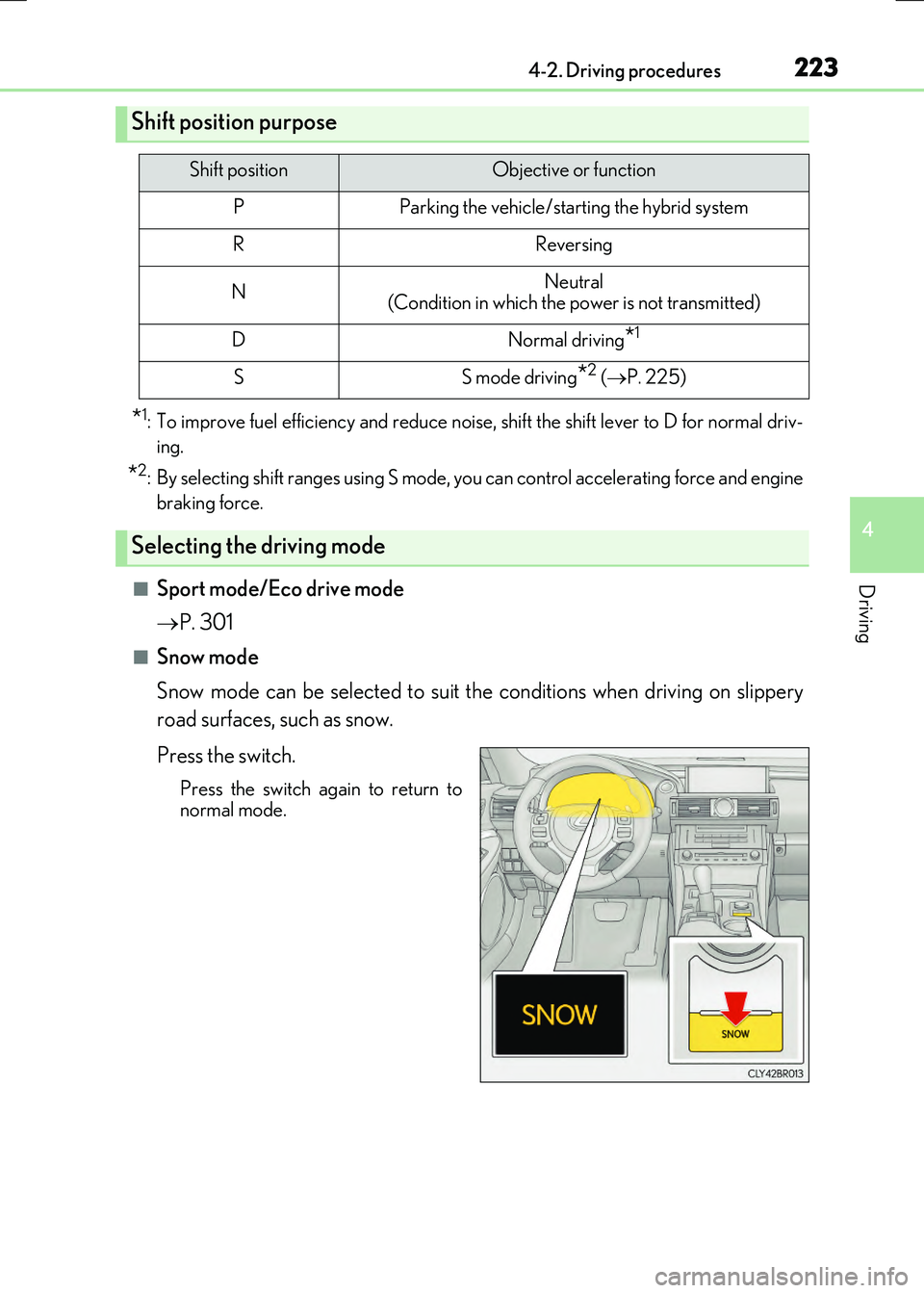
■Snow mode
Snow mode can be selected to suit the conditions when driving on slippery
road surfaces, such as snow.
Press the switch.
Press the switch again to return to
normal mode.
Shift position purpose
Shift positionObjective or function
PParking the vehicle/starting the hybrid system
RReversing
NNeutral (Condition in which the power is not transmitted)
DNormal driving*1
SS mode driving*2 ( P. 225)
Selecting the driving mode
Page 224 of 640

2244-2. Driving procedures
RC300h_EE(OM24740E)
To drive using temporary shift range selection, operate the “-” paddle shift switch.
Changing the shift range enables the level of engine braking force to be
selected. The shift range can then be selected by operating the “-” and “+” paddle
shift switches.
Upshifting
Downshifting
The selected shift range, from D1 to D6, will be displayed in the meter.
The initial shift rang e when the “-” pad- dle shift switch is operated is automati-cally set to D2, D3, D4 or D5 according
to the vehicle speed.
To return to normal D position driving, the “+” paddle shift switch must be held
down for a period of time.
■Shift ranges and their functions
●You can choose from 6 levels of engine braking force.
●A lower shift range will provide greater engine braking force than a higher
shift range, and the engine revolutions will also increase.
Selecting shift ranges in the D position
1
2
Page 226 of 640

2264-2. Driving procedures
RC300h_EE(OM24740E)
■When the “-” paddle shift switch is operated with the shift lever in the D position
The shift range is downshifted to a range that enables engine braking force that is suit- able to driving conditions.
■Automatic deactivation of shift range selection in the D position
Shift range selection in the D position will be deactivated in the following situations:
●When the vehicle comes to a stop
●If the accelerator pedal is depressed for more than a certain period of time
●When the shift lever is shifted to a position other than D
■Downshifting restriction warning buzzer
To help ensure safety and driving performa nce, downshifting operation may sometimes
be restricted. In some circumstances, down shifting may not be possible even when the shift lever or paddle shift switch is operated. (A buzzer will sound twice.)
■Snow mode automatic deactivation
Snow mode is automatically deactivated if the power switch is turned off after driving in snow mode.
■When driving with cruise control or dynamic radar cruise control activated
Even when performing the following actions with the intent of enabling engine braking, engine braking will not activate because crui se control or dynamic radar cruise control will not be canceled.
●While driving in the D or S position, downshifting to 5 or 4. ( P. 253, 257)
●When switching the driving mode to sport mode while driving in D position. (P. 301)
■Shift lock system
The shift lock system is a system to prevent accidental operation of the shift lever in start- ing.
The shift lever can be shifted from P only when the power switch is in IGNITION ON
mode and the brake pedal is being depressed.