2017 LEXUS RC200T USB
[x] Cancel search: USBPage 4 of 724

TABLE OF CONTENTS4
RC200t_RC F_EE(OM24728E)
5-1. Basic Operations
Lexus Display Audio
System ........................................ 390
Steering wheel audio
switches.......................................396
USB/AUX ports ........................ 397
5-2. Setup
Setup menu...................................399
General settings ........................ 400
Voice settings ............................. 403
Display settings ...........................404
5-3. Using the audio system
Selecting the audio
source ..........................................406
Optimal use of the audio
system ..........................................407
Audio settings............................. 408
Audio menu screen
operation ..................................... 412
5-4. Using the radio
Radio operation ........................... 415
5-5. Playing an audio CD and
MP3/WMA/AAC discs
CD player operation ..................417
5-6. Using an external device
Listening to an iPod ................... 423
Using USB memory
device........................................... 427
Using the AUX port ................. 432
5-7. Connecting Bluetooth®
Steps for using Bluetooth®
devices.........................................433
Registering a Bluetooth®
device...........................................435
Selecting a Bluetooth®
device...........................................436
Connecting a Bluetooth®
audio player............................... 437
Connecting a Bluetooth®
phone .......................................... 438
Displaying a Bluetooth®
device details ............................439
Detailed Bluetooth®
settings.........................................440
5-8. Bluetooth® Audio
Listening to Bluetooth®
Audio............................................. 441
5Lexus Display Audio system
Page 5 of 724

5
1
9
8
7
6
4
3
2
RC200t_RC F_EE(OM24728E)
5
5-9. Bluetooth® Phone
Using a Bluetooth®
Phone ...........................................443
Making a call ................................445
Receiving a call ...........................448
Speaking on the phone............449
Using a Bluetooth®
phone messages....................... 451
Using the steering wheel
switches.......................................454
Bluetooth® phone
settings.........................................455
5-10. Phonebook
Contact settings ......................... 457
Messaging setting......................460
5-11. Bluetooth®
What to do if...
(Troubleshooting) .................... 461
Bluetooth®...................................464
5-12. Other function
“Information” screen .................469
MirrorLink ................................470
USB photo .................................... 473
Speech command
system .......................................... 475
6-1. Using the air conditioning
system
Automatic air conditioning
system ..........................................478
Heated steering wheel/
seat heaters/
seat ventilators .........................490
6-2. Using the interior lights
Interior lights list.......................... 492
• Interior lights ..........................493
• Personal lights ....................... 494
6-3. Using the storage features
List of storage features ............495
• Glove box ...............................496
• Console box........................... 496
• Cup holders ........................... 497
Trunk features ............................ 498
6-4. Using the other interior
features
Other interior features ........... 500
• Sun visors ............................... 500
• Vanity mirrors....................... 500
• Clock.......................................... 501
• Power outlet............................ 501
• Armrest ................................... 502
•Trunk storage
extension ................................ 503
• Assist grips............................. 504
• Coat hooks ............................ 504
6Interior features
Page 388 of 724
388
RC200t_RC F_EE(OM24728E)
5-1. Basic Operations
Lexus Display Audio
System .........................................390
Steering wheel audio
switches....................................... 396
USB/AUX ports ........................ 397
5-2. Setup
Setup menu .................................. 399
General settings.........................400
Voice settings..............................403
Display settings ...........................404
5-3. Using the audio system
Selecting the audio
source ..........................................406
Optimal use of the audio
system .......................................... 407
Audio settings .............................408
Audio menu screen
operation ......................................412
5-4. Using the radio
Radio operation........................... 415
5-5. Playing an audio CD and
MP3/WMA/AAC discs
CD player operation ..................417
Some of the functions cannot be operated while driving.
Page 389 of 724

389
5
Lexus Display
Audio system
RC200t_RC F_EE(OM24728E)
5-6. Using an external device
Listening to an iPod................... 423
Using USB memory
device........................................... 427
Using the AUX port ................. 432
5-7. Connecting Bluetooth®
Steps for using Bluetooth®
devices.........................................433
Registering a Bluetooth®
device...........................................435
Selecting a Bluetooth®
device...........................................436
Connecting a Bluetooth®
audio player ............................... 437
Connecting a Bluetooth®
phone .......................................... 438
Displaying a Bluetooth®
device details ............................439
Detailed Bluetooth®
settings.........................................440
5-8. Bluetooth® Audio
Listening to Bluetooth®
Audio............................................. 441
5-9. Bluetooth® Phone
Using a Bluetooth®
Phone........................................... 443
Making a call................................ 445
Receiving a call ...........................448
Speaking on the phone ........... 449
Using a Bluetooth®
phone messages ...................... 451
Using the steering wheel
switches....................................... 454
Bluetooth® phone
settings ........................................ 455
5-10. Phonebook
Contact settings ......................... 457
Messaging setting .....................460
5-11. Bluetooth®
What to do if...
(Troubleshooting).....................461
Bluetooth®................................... 464
5-12. Other function
“Information” screen................. 469
MirrorLink ................................ 470
USB photo .................................... 473
Speech command system ...... 475
Some of the functions cannot be operated while driving.
Page 396 of 724

3965-1. Basic Operations
RC200t_RC F_EE(OM24728E)
Volume switch
• Increases/decreases volume
• Press and hold: Continuously
increases/decreases volume
Radio mode:
• Press (except manual mode):
Select a radio station
• Press (manual mode): Seek up/
down
• Press and hold (manual mode): Continuously seek up/down
CD, MP3/WMA/AAC disc, Bluetooth®, iPod or USB mode:
• Press: Select a track/file/song/video
• Press and hold: Select a folder/album (MP3/WMA/AAC disc or USB)
“MODE” switch
• Turns the power on, selects audio source
• Press and hold this switch to mute or pause the current operation. To can-
cel the mute or pause, press and hold.
Steering wheel audio switches
Some audio features can be controlled using the switches on the steering
wheel.
Operation may differ depending on the type of audio system or navigation
system. For details, refer to the manual provided with the audio system or nav-
igation system.
Operating the audio system us ing the steering wheel switches
1
2
WARNING
■To reduce the risk of an accident
Exercise care when operating the audio switches on the steering wheel.
3
Page 397 of 724

3975-1. Basic Operations
5
Lexus Display Audio system
RC200t_RC F_EE(OM24728E)
■iPod
Open the cover and connect an
iPod using an iPod cable.
Turn on the power of the iPod if it is not turned on.
■USB memory
Open the cover and connect the USB memory device.
Turn on the power of the USB memory device if it is not turned on.
■Portable audio player
Open the cover and connect the portable audio player.
Turn on the power of the portable audio player if it is not turned on.
USB/AUX ports
Connect an iPod, USB memory device or portable audio player to the USB/
AUX port as indicated below. Select “iPod”, “USB”, “AUX” or “A/V” on the
audio source selection screen and the device can be operated via the Lexus
Display Audio system.
Connecting using the USB/AUX port
Page 398 of 724

3985-1. Basic Operations
RC200t_RC F_EE(OM24728E)
To view a video on an iPod video or VTR, it is necessary to use a 4-pole AUX
cable to connect the portable audio device.
When connecting a portable audio device to the AUX port, use a 4-pole AUX
cable with a plug that matches the exact layout shown in the illustration.
Connected device (portable audio
device, etc.)
Left audio
Right audio
Ground
Video
When using an iPod video, a cable
that has a 4-pole AUX plug and a
USB connector is necessary. Con-
nect the plug and connector to the
AUX and USB ports.
■When using a 4-pole AUX cable
If a 4-pole AUX cable with a different layout is used, audio and/or video may not be out- put properly.
Using a 4-pole AUX cable
1
2
3
4
5
WARNING
■While driving
Do not connect a device or operate the device controls.
Failure to do so may lead to an accident.
Page 401 of 724
4015-2. Setup
5
Lexus Display Audio system
RC200t_RC F_EE(OM24728E)
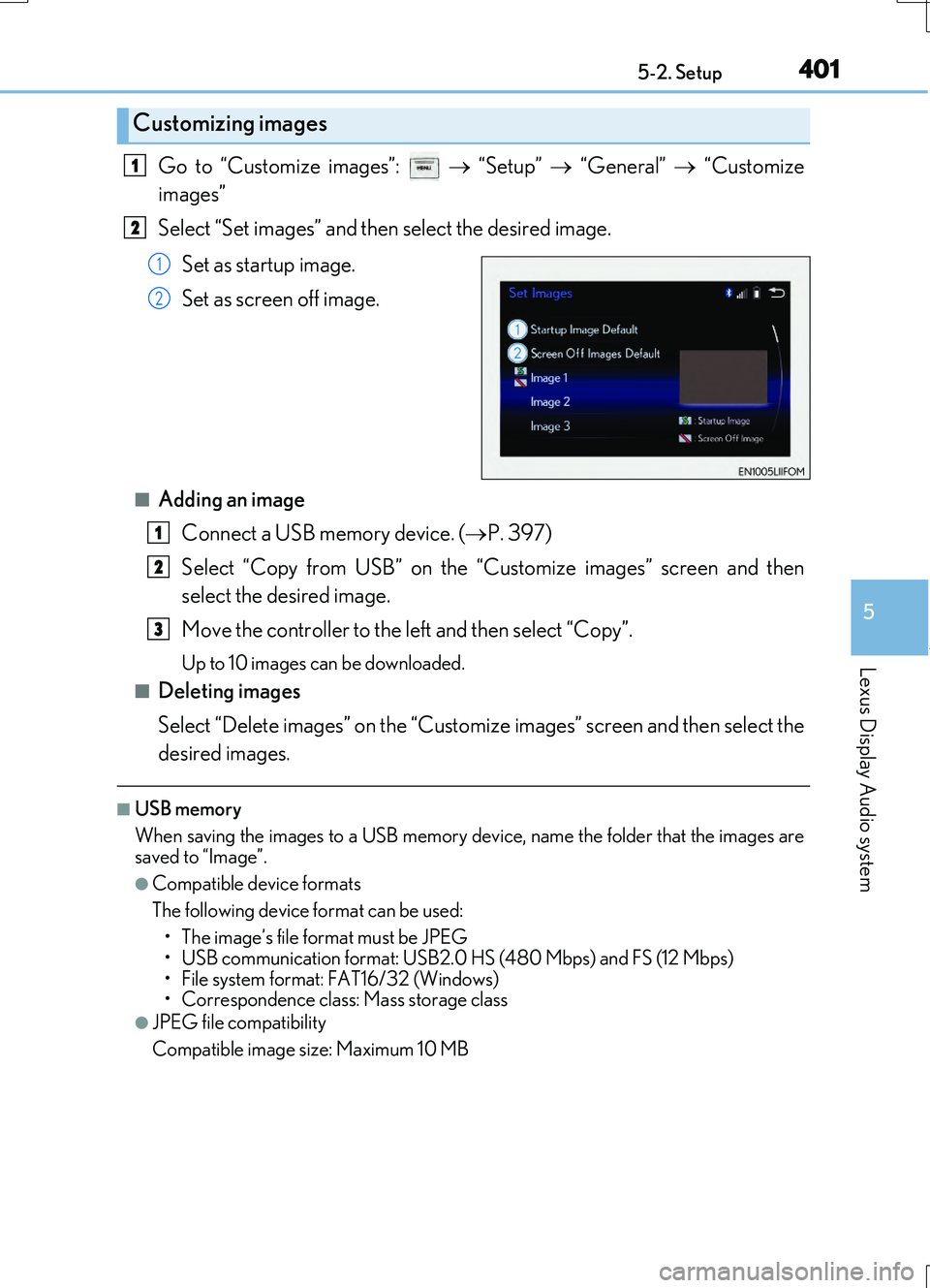
Go to “Customize images”: “Setup” “General” “Customize
images”
Select “Set images” and then select the desired image.
Set as startup image.
Set as screen off image.
■Adding an image Connect a USB memory device. ( P. 397)
Select “Copy from USB” on the “Customize images” screen and then
select the desired image.
Move the controller to the left and then select “Copy”.
Up to 10 images can be downloaded.
■Deleting images
Select “Delete images” on the “Customize images” screen and then select the
desired images.
■USB memory
When saving the images to a USB memory device, name the folder that the images are
saved to “Image”.
●Compatible device formats
The following device format can be used: • The image’s file format must be JPEG
• USB communication format: USB2.0 HS (480 Mbps) and FS (12 Mbps)
• File system format: FAT16/32 (Windows)
• Correspondence class: Mass storage class
●JPEG file compatibility
Compatible image size: Maximum 10 MB
Customizing images
1
2
1
2
1
2
3