Page 336 of 692
3364-5. Using the driving support systems
IS300h_EE(OM53D89E)
■Outside rear view mirror indicator visibility
In strong sunlight, the outside rear view mirror indicator may be difficult to see.
■Hearing the RCTA buzzer
The RCTA buzzer may be difficult to hear over loud noises, such as if the audio system
volume is high.
■When there is a malfunction in the Blind Spot Monitor
If a system malfunction is detected due to any of the following, a warning message will be
displayed: ( P. 581)
●A sensor is malfunctioning
●A sensor is dirty or covered with snow or a sticker
●The outside temperature is extremely high or low
●Sensor voltage is abnormal
●A sensor is misaligned
■Certification for the Blind Spot Monitor
Page 340 of 692

3404-5. Using the driving support systems
IS300h_EE(OM53D89E)
The Blind Spot Monitor function uses radar sensors to detect vehicles that are
traveling in an adjacent lane in the area that is not reflected in the outside rear
view mirror (the blind spot), and advises the driver of the vehicles existence via
the outside rear view mirror indicator.
The areas that vehicles can be detected in are outlined below.
The range of each detection area is:
Approximately 0.5 m (1.6 ft.) to 3.5
m (11.5 ft.) from either side of the
vehicle*
*: The area between the side of the vehicle
and 0.5 m (1.6 ft.) from the side of the
vehicle cannot be detected.
Approximately 3 m (9.8 ft.) from the
rear bumper
Approximately 1 m (3.3 ft.) forward
of the rear bumper
BSM function
BSM function detection areas
1
2
3
WARNING
■Cautions regarding the use of the function
The driver is solely responsible for safe dr iving. Always drive safely, taking care to
observe your surroundings.
The BSM function is a supplementary function which alerts the driver that a vehicle is in
a blind spot of the outside rear view mirrors or is approaching rapidly from behind into
a blind spot. Do not overly rely on the BSM function. As the function cannot judge if it is safe to change lanes, over reliance could lead to an accident resulting in death or seri-
ous injury.
As the system may not function correctly under certain conditions, the driver’s own visual confirmation of safety is necessary.
Page 343 of 692
3434-5. Using the driving support systems
4
Driving
IS300h_EE(OM53D89E)
The RCTA function uses radar sensors to detect vehicles approaching from the
right or left at the rear of the vehicle an d alerts the driver of the presence of such
vehicles by flashing the outside rear view mirror indicators and sounding a
buzzer.
Approaching vehicles
Detection areas of approaching vehicles
RCTA function
1
2
Page 367 of 692

367
5
Lexus Display
Audio system
IS300h_EE(OM53D89E)
5-6. Using an external device
Listening to an iPod ...................402
Using USB memory
device...........................................406
Using the AUX port .................... 411
5-7. Connecting Bluetooth®
Steps for usin g Bluetooth®
devices.......................................... 412
Registering a Bluetooth®
device............................................ 414
Selecting a Bluetooth®
device............................................ 415
Connecting a Bluetooth®
audio player ................................ 416
Connecting a Bluetooth®
phone .............................................417
Displaying a Bluetooth®
device details ............................. 418
Detailed Bluetooth®
settings.......................................... 419
5-8. Bluetooth® Audio
Listening to Bluetooth®
Audio............................................420
5-9. Bluetooth® Phone
Using a Bluetooth®
Phone.............................................421
Making a call................................ 423
Receiving a call ........................... 426
Speaking on the phone ........... 427
Using a Bluetooth® phone
messages.................................... 429
Using the steering wheel
switches....................................... 432
Bluetooth® phone
settings ........................................ 433
5-10. Phonebook
Contact settings ......................... 435
Messaging setting .....................438
5-11. Bluetooth®
What to do if...
(Troubleshooting)................... 439
Bluetooth®................................... 442
5-12. Other function
“Information” screen.................450
MirrorLink™ ................................. 451
USB photo .................................... 455
Speech command system ...... 457
Some of the functions cannot be operated while driving.
Page 407 of 692

4075-6. Using an external device
5
Lexus Display Audio system
IS300h_EE(OM53D89E)
Moving the controller to the right and selecting “Play video” while the USB audio
screen is displayed changes to USB video mode.
This function cannot be used while USB photo or MirrorLink™ is in use.
■Menu screen
P. 391
■Selecting a file
Press the “ ” or “” button, turn the “TUNE•SCROLL” knob to select the
desired file number.
To fast-forward or reverse, press and hold the “ ” or “” button.
■Selecting a folder
Move the controller to the right and select “Browse”.
Select the desired folder , then select a file to begin using the selected
folder.
■Displaying the now playing list
Move the controller to the righ t and select “Now playing list”.
■USB memory functions
●Depending on the USB memory device that is connected to the system, the device
itself may not be operable and certain functions may not be available. If the device is inoperable or a function is unavailable du e to a malfunction (as opposed to a system
specification), disconnecting the device an d reconnecting it may resolve the problem.
●If the USB memory device still does not begin operation after being disconnected and reconnected, format the device.
■Error messages for USB memory
If the following error message s appear on the screen, refer to the table and take the appropriate measures. If the pr oblem is not rectified, take the vehicle to any authorized
Lexus retailer or Lexus authorized re pairer, or any reliable repairer.
USB video
MessageCause/Correction procedures
“Connection error. Consult your
owner’s manual for instructions
on how to reconnect the USB device.”
This indicates a problem with the USB memory
device or its connection.
“There are no files available for
playback. Add compatible files
to your USB device.”
This indicates that no MP3/WMA/AAC files are included on the USB memory device.
“No video files found.”This indicates that no video files are included in theUSB memory.
1
2
Page 450 of 692
450
IS300h_EE(OM53D89E)
5-12. Other function
Go to “Information”: “MENU” button “Info”
Display the “MirrorLink ” screen.
( P. 451)
Display the “USB photo” screen.
( P. 455)
“Information” screen
Display “Information” screen
1
2
Page 451 of 692
4515-12. Other function
5
Lexus Display Audio system
IS300h_EE(OM53D89E)
P. 375
MirrorLink™
The MirrorLink™ function enables operations of some smartphone content
via the Lexus Display Audio system.
Depending on differences between mode ls or software version etc., some
models might be incompatible with this system.
Connect a smartphone to USB port using a USB cable.
For safety reasons, the safe driving sc reen is displayed while driving depend-
ing on the application.
Connecting a smartphone
Page 452 of 692
4525-12. Other function
IS300h_EE(OM53D89E)
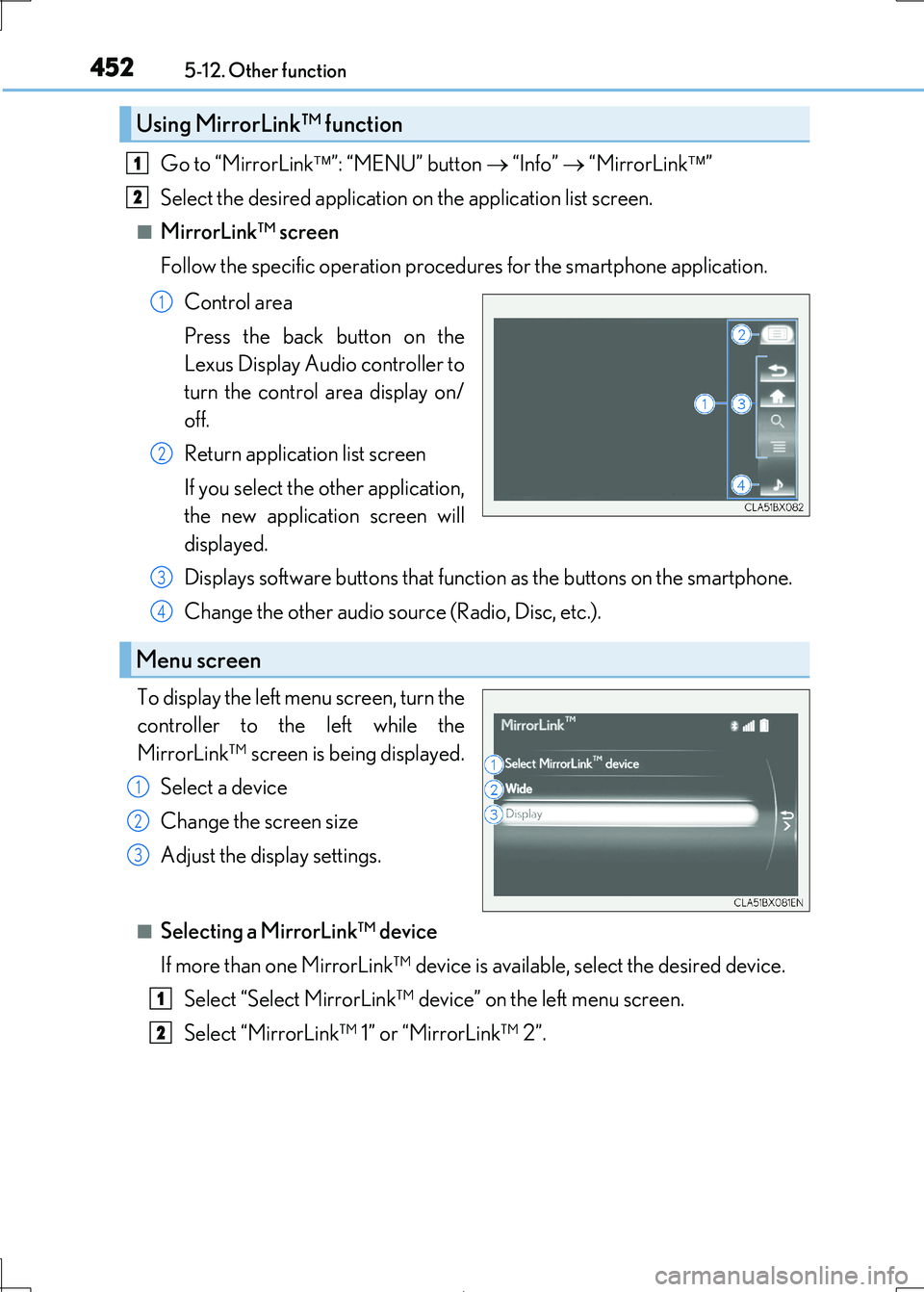
Go to “MirrorLink”: “MENU” button “Info” “MirrorLink”
Select the desired application on the application list screen.
■MirrorLink™ screen
Follow the specific operation procedur es for the smartphone application.
Control area
Press the back button on the
Lexus Display Audio controller to
turn the control area display on/
off.
Return application list screen
If you select the other application,
the new application screen will
displayed.
Displays software buttons that functi on as the buttons on the smartphone.
Change the other audio source (Radio, Disc, etc.).
To display the left menu screen, turn the
controller to the left while the
MirrorLink™ screen is being displayed.
Select a device
Change the screen size
Adjust the display settings.
■Selecting a MirrorLink™ device
If more than one MirrorLink™ device is available, select the desired device.
Select “Select MirrorLink™ device” on the left menu screen.
Select “MirrorLink™ 1” or “MirrorLink™ 2”.
Using MirrorLink™ function
1
2
1
2
Menu screen
3
4
1
2
3
1
2


