Page 3 of 100

2
GS350_200t_QG_OM30G01U_(U)
Garage Door Opener......................................................................................................................78
Hands-free System For Cellular Phone
*
Bluetooth® phone pairing .........................................................................................................56
Contacts transfer .............................................................................................................. ............. 57
Registering the contacts in the favori tes list ...................................................................... 58
Calling by name................................................................................................................ ............. 58
Calling by favorites list ...................................................................................................... ...........59
Calling the message sender ..................................................................................................... .59
Receiving a call ............................................................................................................... ................59
Steering switches .............................................................................................................. .............59
Headlights .............................................................................................................................................. 26
Head-up Display ............................................................................................................................... ... 24
Intuitive Parking Assist ..................................................................................................................... 42
Lexus Enform ............................................................................................................................... .........84
Lexus Enform Safety Connect ......................................................................................................82
LKA (Lane-Keeping Assist) ...........................................................................................................34
Multi-information Display .............................................................................................................. 22
Navigation System Register home .................................................................................................................. ...............52
Destination search - Search by address ..............................................................................53
Destination search - Search points of interest by name ................................................54
Destination search - Search points of interest by category .........................................55
Destination search - Search points of interest by phone number .............................55
Voice Command System ........................................................................................................... 73
Parking Brake .......................................................................................................................................20
Portable Audio Device Ports ........................................................................................................78
Rear Air Conditioning System Control panel .................................................................................................................. ................69
Front controller............................................................................................................... ................69
Remote Touch ............................................................................................................................... .......48
*: These features may be operated by Voice Command (See P.73)
Page 9 of 100
8
GS350_200t_QG_OM30G01U_(U)
: If equipped
*: Refer to “OWNER’S MANUAL”.
Horn*
Talk switch P.59
Telephone switches P.59
LKA (Lane-Keeping Assist) switch P.34
Cruise control switch
P.35, 40
Vehicle-to-vehicle distance button P.37
Meter control switches P.23
Paddle shift switches*
Audio remote control switches P.61
Page 50 of 100
49
GS350_200t_QG_OM30G01U_(U)
■“Menu” screen
Press the “MENU” button on the Remote Touch to display the “Menu” screen.
The display may differ depending on the type of the system.
12.3-inch display: When an interruption screen is being displayed on the side display, the
“Menu” screen will be sh own on the main display.
■Display
Press the “MENU” button on the Remote
Touch and select “Display” on the “Menu”
screen.
Turns the screen off
Turns day mode on/off
Adjust the screen display
Adjust the camera display
Vehicles with 8-inch display
Vehicles with 12.3-inch display
“Destination” ( P.53)
“Radio” ( P.62)
“Media” ( P.62)
“Phone” ( P.56)
“LEXUS App Suite” “Info”
“Climate” (
P.65)
“Setup”
“Display” ( P.49)
“Compass”
1
2
3
4
5
6
7
8
9
10
1
2
3
4
Page 52 of 100
51
GS350_200t_QG_OM30G01U_(U)
12.3-inch Display (if equipped)
■Full screen display
The following functions can be displayed full screen:
■Split-screen display
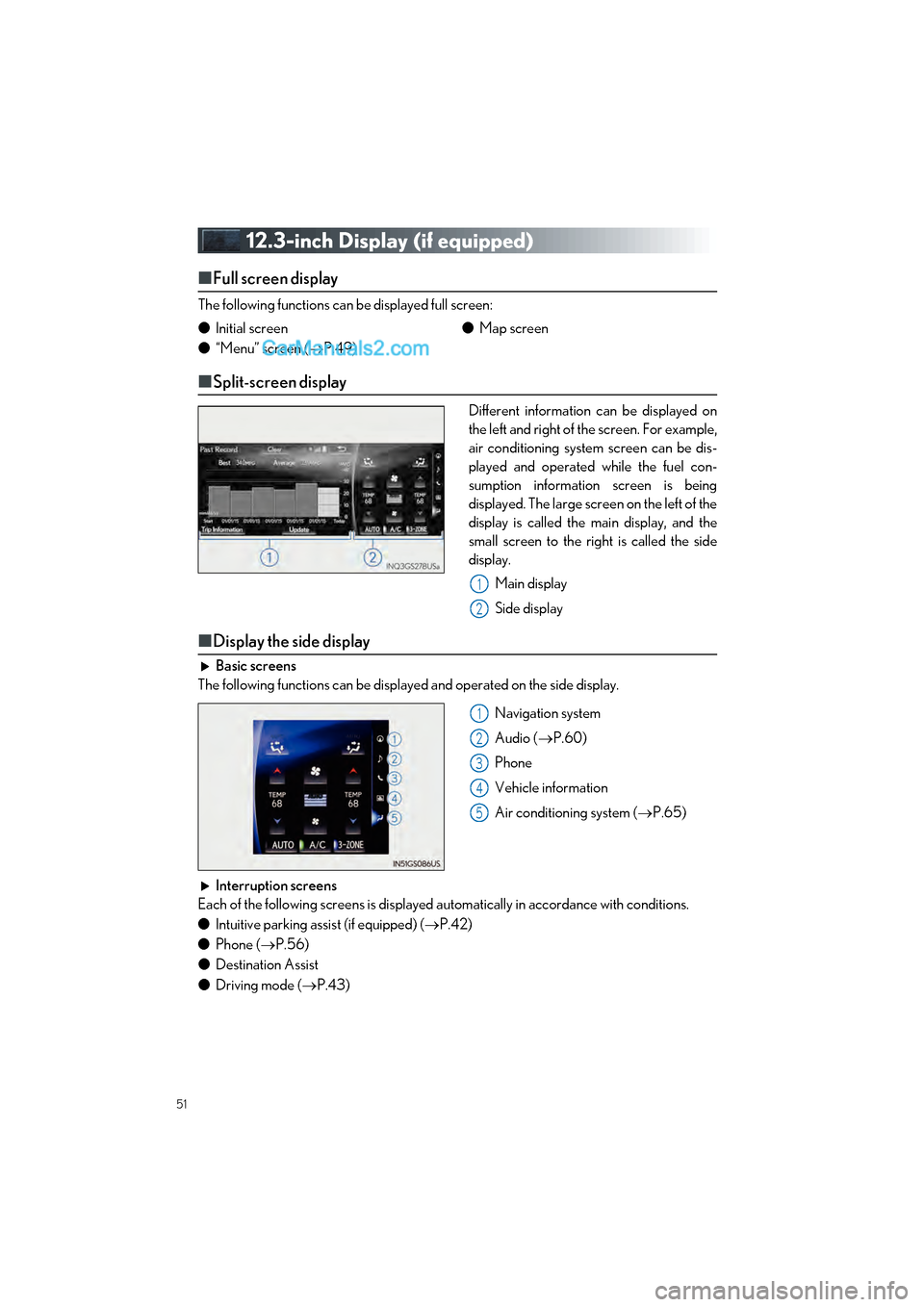
Different information can be displayed on
the left and right of the screen. For example,
air conditioning system screen can be dis-
played and operated while the fuel con-
sumption information screen is being
displayed. The large screen on the left of the
display is called the main display, and the
small screen to the right is called the side
display.
Main display
Side display
■Display the side display
Basic screens
The following functions can be displayed and operated on the side display.
Navigation system
Audio (P.60)
Phone
Vehicle information
Air conditioning system ( P.65)
Interruption screens
Each of the following screens is displayed automatically in accordance with conditions.
● Intuitive parking assist (if equipped) ( P.42)
● Phone ( P.56)
● Destination Assist
● Driving mode ( P.43)
●
Initial screen
● “Menu” screen ( P.49) ●
Map screen
1
2
1
2
3
4
5
Page 56 of 100
55
GS350_200t_QG_OM30G01U_(U)
Search by categorySelect “Category”.
Select the desired search point.
Select the desired POI category.
Select the desired POI.
Select “Go”.
Select “OK”.
Search by phone number Select “Phone #”.
Enter a phone number and select
“OK”.
Select “Go”.
Select “OK”.
44
55
6
7
8
9
44
5
6
7
Page 57 of 100

56
GS350_200t_QG_OM30G01U_(U)
Hands-free System For Cellular Phone
■Bluetooth® phone pairing
To use the hands-free system, it is necessary to register a Bluetooth® phone with the system.
Please refer to the cellular phone manufacturer’s user guide for pairing procedures, or go to
http://www.lexus.com/MobileLink
for more phone information.
Turn the Bluetooth
® connection set-
ting of your cellular phone on.
Press the “MENU” button on the
Remote Touch.
Please refer to P.48 for the Remote
Touch operation.
Select “Phone”.
Select “Yes” to register a phone.
When this screen is displayed, search
for the device name displayed on this
screen on the screen of your
Bluetooth
® device.
Register the Bluetooth
® device using
your Bluetooth
® device.
Check that a confirmation screen is
displayed, indicating pairing was suc-
cessful (a Bluetooth
® link has been
established but registration is not yet
complete).
Check that “Connected” is displayed
and registration is complete.
41
2
3
4
55
6
7
8
Page 58 of 100
57
GS350_200t_QG_OM30G01U_(U)
■Contacts transfer
Press the “MENU” button on the
Remote Touch.
Please refer to P.48 for the Remote
Touch operation.
Select “Setup”.
Select “Phone”.
Select “Contacts/Call History”.
Select “Transfer Contacts from Phone”.
Transfer the contact data to the system
using a Bluetooth
® phone.
Check that a confirmation screen is
displayed when the operation is com-
plete.
31
2
3
4
45
6
7
Contacts transfer may not be possible depending on phone model.
Page 59 of 100
58
GS350_200t_QG_OM30G01U_(U)
■Registering the contacts in the favorites list
Press the “MENU” button on the
Remote Touch.
Please refer to P.48 for the
Remote Touch operation.
Select “Setup”.
Select “Phone”.
Select “Contact/Call History”.
Select “Add Favorite”.
Select the desired contact to add to the
favorites list.
Check that a confirmation screen is
displayed when the operation is com-
plete.
■Calling by name
You can call by giving a name registered in the contacts. For details, refer to the “NAVIGA-
TION SYSTEM OWNER’S MANUAL”.
Press the talk switch.
Say “Call ”.
In the same manner as it is displayed on
the screen, “Call
types>”, after saying “Call a contact”
say the name, or the name and type of
phone, of a contact.
For example: “Call a contact”, “John
Smith” or “Call a contact”, “Mary
Davis”, “Mobile”
31
2
3
4
55
6
7
11
2
Talk switch: Pressing this switch turns the voice command system on. Say a command after the beep.


