2017 Lexus GS350 phone
[x] Cancel search: phonePage 60 of 100

59
GS350_200t_QG_OM30G01U_(U)
■Calling by favorites list
Press the “MENU” button on the Remote Touch.
Please refer to P.48 for the Remote Touch operation.
Select “Phone”.
Select the “Favorites” tab and select the desired contact.
Select the desired number.
Check that the “Call” screen is displayed.
■ Calling the message sender
Press the “MENU” button on the Remote Touch.
Please refer to P.48 for the Remote Touch operation.
Select “Phone”.
Select .
Select the desired message.
Select “Call”.
Check that the “Call” screen is displayed.
■ Receiving a call
When a call is received, this screen is displayed with a sound.
12.3-inch display: Call screen can also be displayed on the side display.
Press the switch on the steering wheel to talk on the phone.
To refuse to receive the call, press the switch on the steering wheel.
■Steering switches
Sending/Receiving/Phone top screen
display
End call/Refuse call
Start the voice command system
Increases/decreases volume
1
2
3
4
5
1
2
3
4
5
6
1
2
3
4
Page 74 of 100

73
GS350_200t_QG_OM30G01U_(U)
Voice Command System
■Basic operation
Press the talk switch on the steering
wheel.
If you know the command:
Press the talk switch again.
If you do not know the command:
Follow the voice guidance to learn the
command and then press the talk
switch again.
Say a command after the beep.
Continue on to pages 74-77 for a detailed lis t of Voice Commands for the following catego-
ries: Basic . . . . . . . . . . . . . . . . . . . . . . . . . . . . . . . . . . . . . . . . . . . . . . . . . . . . P.74
Apps . . . . . . . . . . . . . . . . . . . . . . . . . . . . . . . . . . . . . . . . . . . . . . . . . . . . P.74
Navi . . . . . . . . . . . . . . . . . . . . . . . . . . . . . . . . . . . . . . . . . . . . . . . . . . . . . P.74
Phone . . . . . . . . . . . . . . . . . . . . . . . . . . . . . . . . . . . . . . . . . . . . . . . . . . . P.75
Radio . . . . . . . . . . . . . . . . . . . . . . . . . . . . . . . . . . . . . . . . . . . . . . . . . . . . P.75
Audio . . . . . . . . . . . . . . . . . . . . . . . . . . . . . . . . . . . . . . . . . . . . . . . . . . . P.76
Info. . . . . . . . . . . . . . . . . . . . . . . . . . . . . . . . . . . . . . . . . . . . . . . . . . . . . . P.76
Climate. . . . . . . . . . . . . . . . . . . . . . . . . . . . . . . . . . . . . . . . . . . . . . . . . . P.77
NOTE: When entering voice commands you must wait until after the beep to speak.
1
2
3
■ Important voice commands information and tips
Voice commands can be used while driving.
You must wait until after the beep to say a command.
If you know what command to use, you can press the talk switch at any time to inter-
rupt the voice guidance.
Page 76 of 100

75
GS350_200t_QG_OM30G01U_(U)
Phone
Radio
CommandAction
“Redial”Places a call to the phone number of the latest outgo-
ing call
“Call Back”Places a call to the phone number of latest incoming
call
“Show Recent Calls”Displays the call history screen
“Dial
“Call
the phone book
“Mobile Assistant”Activates Apple’s Siri® Eyes Free mode
CommandAction
“Tune to
“Tune to
“Play
genre
“Tune to FM
HD
“Tune to preset
tion
“Tune to
the specified name
“Tune to channel
channel number
“Play
specified genre
“AM Radio”Selects AM radio mode
“FM Radio”Selects FM radio mode
“Sirius XM”Selects satellite radio mode
Page 83 of 100
82
GS350_200t_QG_OM30G01U_(U)
Lexus Enform Safety Connect (if equipped)
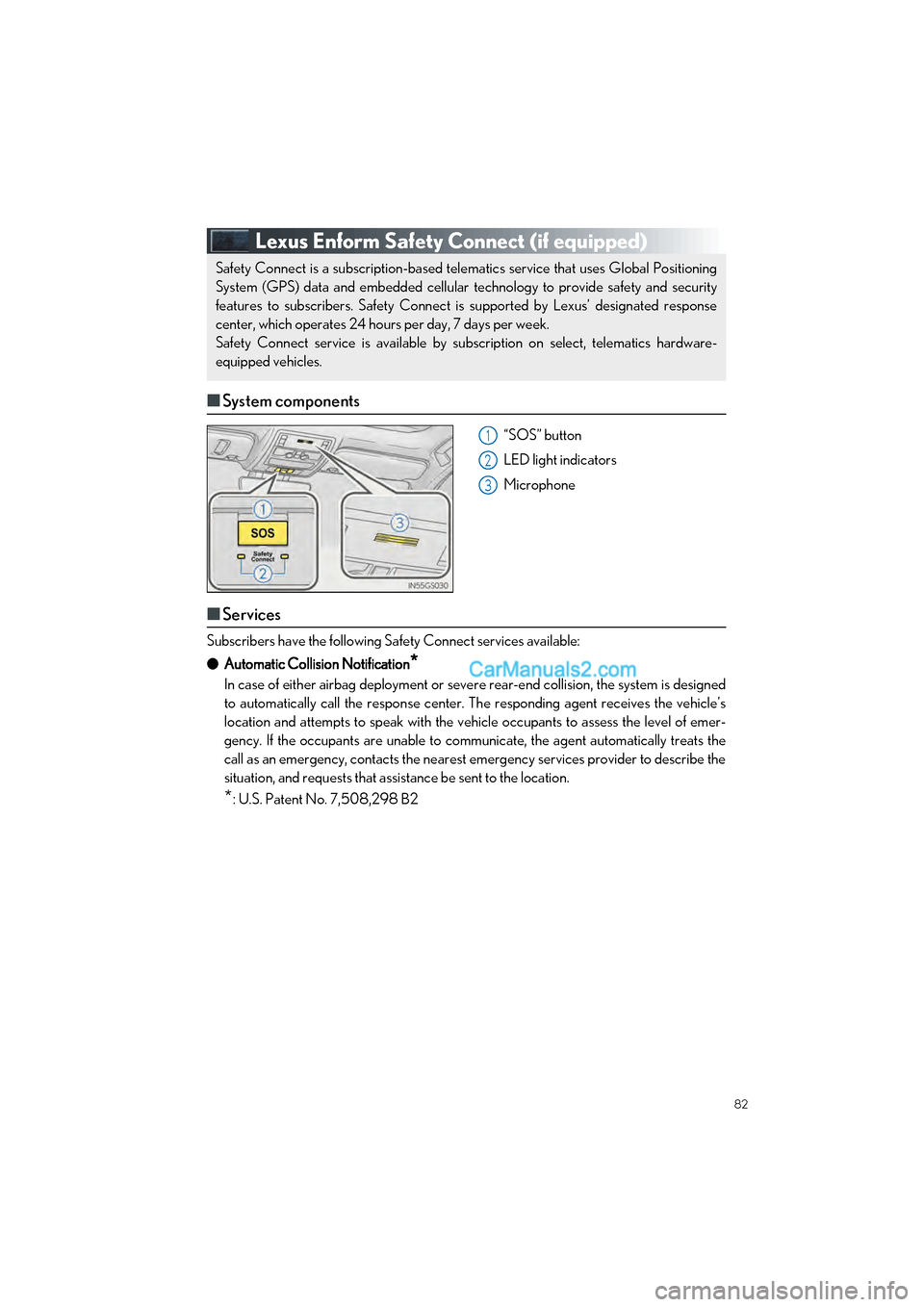
■System components
“SOS” button
LED light indicators
Microphone
■Services
Subscribers have the following Sa fety Connect services available:
● Automatic Collision Notification
*
In case of either airbag deployment or seve re rear-end collision, the system is designed
to automatically call the response center. The responding agent receives the vehicle’s
location and attempts to speak with the vehicle occupants to assess the level of emer-
gency. If the occupants are unable to communicate, the agent automatically treats the
call as an emergency, contacts the nearest emergency services provider to describe the
situation, and requests that assistance be sent to the location.
*: U.S. Patent No. 7,508,298 B2
Safety Connect is a subscription-based telematics service that uses Global Positioning
System (GPS) data and embedded cellular technology to provide safety and security
features to subscribers. Safety Connect is supported by Lexus’ designated response
center, which operates 24 hours per day, 7 days per week.
Safety Connect service is available by subs cription on select, telematics hardware-
equipped vehicles.
1
2
3
Page 85 of 100

84
GS350_200t_QG_OM30G01U_(U)
Lexus Enform (for U.S.A., if equipped)
■Function achieved by using a cellular phone (vehicles with navigation sys-
tem)
■
Services
Of the functions included with Lexus Enform, only LEXUS App Suite can be achieved by
using a cellular phone.
LEXUS App Suite is a service that enables the us able contents of a cellular phone to be dis-
played on and operated from the navigation screen. Before LEXUS App Suite can be used,
a few settings need to be performed.
● LEXUS App Suite
When LEXUS App Suite is activated, an application may need to update. By updating, an
application can be kept the latest version. To updating the application, it is necessary to
download the updated data and install it.
■Subscription
LEXUS App Suite will be availabl e on a trial period included upon purchase of a new vehi-
cle. User registration is required to start using the service.
When a trial period has elapsed after purcha sing a new vehicle, a fee will be charged to
renew the contract. Services requiring a separa te contract can also be used. For details,
refer to http://www.lexus.com/enform/
or call 1-800-255-3987.
■ Function achieved by using DC M and the navigation system
(vehicles with navigation system)
■
Services
Of the functions included with Lexus Enform, LEXUS Enform Destinations (Destination
Assist, eDestination), and Lexus Insider ca n be achieved by making DCM cooperate with
the navigation system.
These are subscription-based telematics services that use Global Positioning System (GPS)
data, embedded cellular technology to provid e safety and security as well as convenience
features to subscribers. The services are supp orted by Lexus’ designated response center,
which operates 24 hours a day, 7 days a week.
The services are available by subscription on select, telematics hardware-equipped vehi-
cles.
Lexus Enform is a service that includes Sa fety Connect, Remote, Destinations, Insider
and App Suite.
For details, refer to the “OWNER’S MANUAL” and “NAVIGATION SYSTEM
OWNER’S MANUAL”.
Page 86 of 100

85
GS350_200t_QG_OM30G01U_(U)
●Destination Assist
Destination Assist provides you with live assi stance for finding destinations via the Lexus
response center. You can request either a sp ecific business, address, or ask for help
locating your desired destinatio n by category, such as restaurants, gas stations, shopping
centers or other points of interest (POI).
After you tell the agent your choice of destination, its coordinates are sent wirelessly to
your vehicle’s navigation system.
● eDestination
With the eDestination feature, you can go online, and via the Lexus.com owner’s Web
site, select and organize destinations of your choice and then wirelessly send them to
your vehicle’s navigation system.
Up to 200 locations can be stored online and accessed or updated at any time.
Locations can be organized into up to 20 personalized folders.
You must first go online at www.lexus.com/drivers/
to view the Owners site where you
will need to register and log in. After this, personalized folders that contain the locations
to be sent to your vehicle can be created. (See Lexus Enform Guide for more informa-
tion.)
● Lexus Insider
Lexus Insider is an optional service that can send audio messages, or articles, to partici-
pating owners’ vehicles via the navigation system. Potential Lexus Insider subjects might
include, for example, Lexus vehicle technology tips, updates on regional Lexus events, or
audio excerpts from Lexus Magazine articles.
■Subscription
After you have signed the Telematics Subscription Service Agreement and are enrolled,
you can begin receiving services. A variety of subscription terms are available.
Contact your Lexus dealer, call 1-800-25-LEXUS (1-800-255-3987), or select the
“Destination Assist” in your vehicl e for further subscription details.
■Function achieved by using DCM
■
Services
Of the functions included with Lexus Enform Safety Connect, Safety Connect can be
achieved by using DCM.
● Lexus Enform Safety Connect ( P.82)
■LEXUS Enform Remote
■
Services
Lexus Enform Remote is a cellular phone application that lets you view and remotely
control certain aspects of your vehicle.
For details about the functions and services of this application, refer to
http://www.lexus.com/enform/
. For further details, contact your Lexus dealer.
Function of the Lexus Enform Remote is achieved by using an embedded cellular device
in the vehicle (DCM: Data Communication Module).
■Subscription
P.85