Page 97 of 600
97
2Instrument cluster
GS450h_300h_OM_OM30F92E_(EE) 2. Instrument cluster
Warning lights and indicators .............................. 98
Gauges and meters ................... 104
Multi-information display ........... 111
Head-up display ............................ 119
Energy monitor/ consumption screen ................126
Page 98 of 600
982. Instrument cluster
GS450h_300h_OM_OM30F92E_(EE)
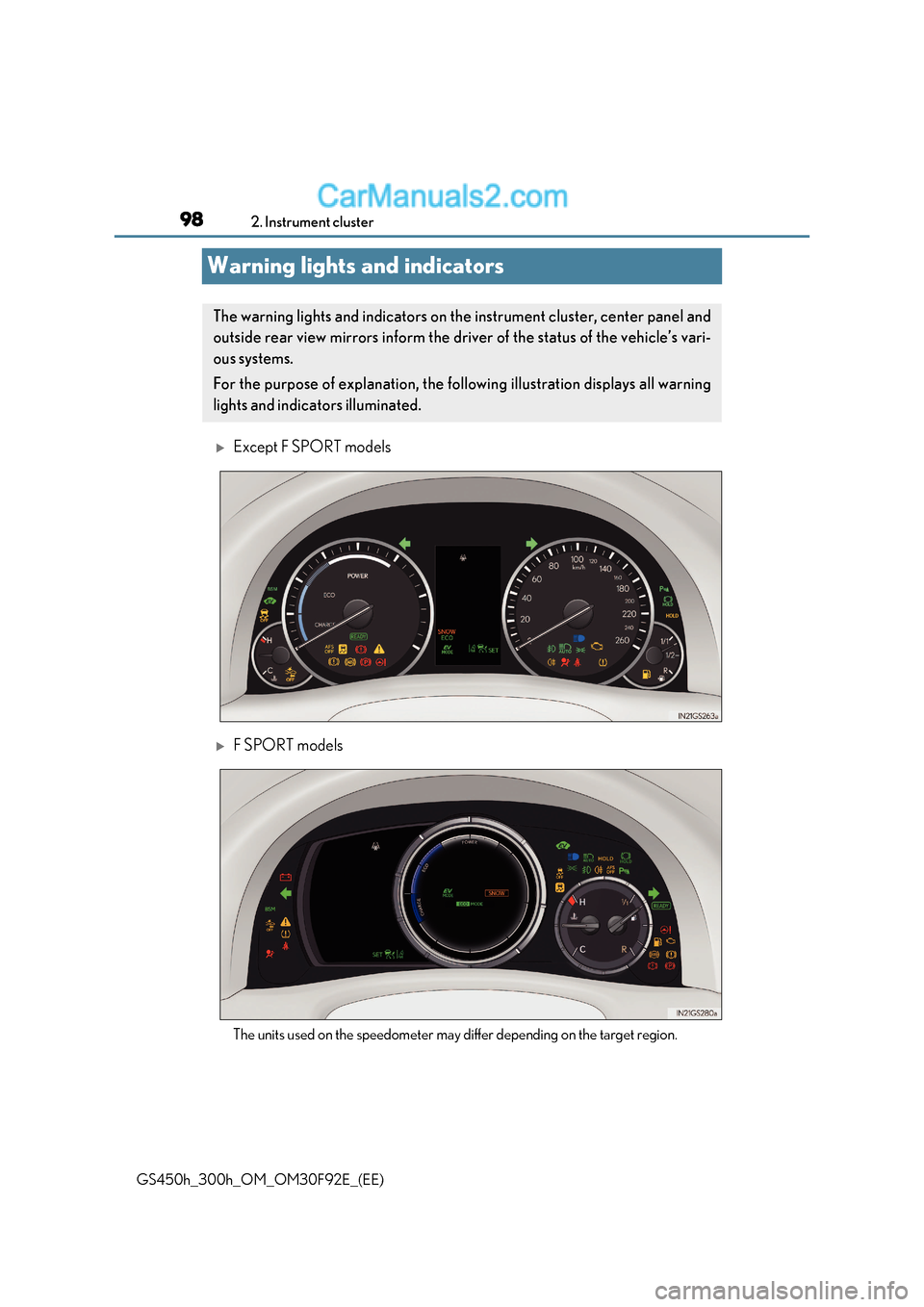
Warning lights and indicators
Except F SPORT models
F SPORT models
The units used on the speedometer may differ depending on the target region.
The warning lights and indicators on th e instrument cluster, center panel and
outside rear view mirrors inform the driv er of the status of the vehicle’s vari-
ous systems.
For the purpose of explanation, the foll owing illustration displays all warning
lights and indicators illuminated.
Page 99 of 600
99
2. Instrument cluster
2
Instrument cluster
GS450h_300h_OM_OM30F92E_(EE) Warning lights inform the driver of malfunctions in the indicated vehicle’s sys-
tems.
Warning lights
*
1
Brake system warning light ( P. 460) *
2, 3
(If equipped)
“AFS OFF” indicator (
P. 462)
* 2, 4
Charging system warning
light (P. 460) *
1, 3
Brake hold operated
indicator (
P. 462)
* 2
Malfunction indicator
lamp ( P. 460) *
3
Parking brake indicator (
P. 462)
* 2
SRS warning light ( P. 460) *
1
Brake system warning light (
P. 462)
* 1
ABS warning light ( P. 461)
Low fuel level warning light ( P. 462)
* 2
Electric power steering
system warning light (
P. 461)Seat belt reminder light ( P. 462)
* 2, 3
(If equipped)
PCS (Pre-Crash Safety
system) warning light (
P. 461) *
2
Master warning light ( P. 462)
* 1
Slip indicator (
P. 461) *
2
(If equipped)
Tire pressure warning light (
P. 463)
(If equipped)
LKA warning light ( P. 463)
Page 233 of 600

233
4-2. Driving procedures
4
Driving
GS450h_300h_OM_OM30F92E_(EE)
■Parking brake operation
●When the power switch is not in ON mode, the parking brake cannot be released using
the parking brake switch.
●When the power switch is not in ON mode, automatic mode (automatic brake setting
and releasing) is not available.
●If the parking brake is operated repeatedly over a short period of time, the system may
restrict operation to prevent overheating. If this happens, refrain from operating the
parking brake. Normal operation wi ll return after about 1 minute.
●Vehicles with towing package: In situations such as when parking while towing a trailer,
the maximum amount of braking force can be used by pressing the parking brake
switch with the parking brake already set.
●Vehicles without towing package: In situations such as when parking on a steep slope *,
the maximum amount of braking force can be used by pressing the parking brake
switch with the parking brake already set.
* : Use wheel chocks when parking on a steep slope.
■Parking brake operation sound
When the parking brake operates, a motor sound (whirring sound) may be heard. This
does not indicate a malfunction.
■Parking brake indicator light
●Depending on the power switch mode, the parking brake indicator light will come on
and stay on as described below:
ON mode: Comes on until the parking brake is released.
Not in ON mode: Stays on for approximately 15 seconds.
●When the power switch is turned off with th e parking brake set, the parking brake indi-
cator light will stay on for about 15 seco nds. This does not indicate a malfunction.
■When there is a malfunction in the system
Warning lights and/or warning message will turn on or flash. ( P. 462, 466)
Depending on the condition, the park ing brake indicator light may flash.
■Parking the vehicle P. 200
■Parking brake engaged warning buzzer P. 472
■Usage in winter time P. 334
Page 241 of 600

241
4
4-3. Operating the lights and wipers
Driving
GS450h_300h_OM_OM30F92E_(EE)
AHS (Adaptive High-beam System)
●
Adjusts the brightness and illuminated area of the high beams according to
the vehicle speed.
● Adjusts the intensity of the high beams, while driving on a curve, so t hat the
area in the direction that the vehicle is turning will be illuminated more brightly
than other areas.
● Operates the variable high beams
so that the area around vehicles
ahead is partially not illuminated
while all other areas continue to be
illuminated with the high beams.
The variable high beams help optimize
forward visibility while reducing the daz-
zling effect on the drivers of vehicles
ahead.
● Adjusts the distance that the low beams are projected according to the dis-
tance to a preceding vehicle.
: If equipped
The Adaptive High-beam System uses a camera sensor located behind the
upper portion of the windshield to assess the brightness of the lights of vehi-
cles ahead, streetlights, etc., and au tomatically controls the headlight light
distribution as necessary.
WARNING
■Limitations of the Adaptive High-beam System
Do not rely on the Adaptive High-beam System. Always drive safely, taking care to
observe your surroundings and turning the high beam on or off manually if necessary.
■To prevent incorrect operation of the Adaptive High-beam system
Do not overload the vehicle.
Page 246 of 600
2464-3. Operating the lights and wipers
GS450h_300h_OM_OM30F92E_(EE)
Automatic High Beam
Push the lever away from you with
the headlight switch in the or
position.
Press the Automatic High Beam
switch.
The Automatic High Beam indicator will
come on when the headlights are turned
on automatically to indicate that the sys-
tem is active.
: If equipped
The Automatic High Beam uses an in-vehicle camera sensor to assess the
brightness of streetlights, the lights of vehicles ahead, etc., and automatically
turns the high beam on or off as necessary.
WARNING
■Limitations of the Automatic High Beam
Do not rely on the Automatic High Beam. Al ways drive safely, taking care to observe
your surroundings and turning the high beam on or off manually if necessary.
■To prevent incorrect operation of the Automatic High Beam system
Do not overload the vehicle.
Activating the Automatic High Beam system
1
2
Page 255 of 600

255
4-3. Operating the lights and wipers
4
Driving
GS450h_300h_OM_OM30F92E_(EE)
■The windshield wiper and washer can be operated when
The power switch is in ON mode.
■Dripping prevention wiper sweep
After washing and wiping operation several times, the wipers operate one more time
after a short delay to prevent dripping.
However, the last sweep will not happen while the vehicle is moving.
■Effects of vehicle speed on wiper operation
●Intermittent windshield wipers interval changes when the vehicle is stopped.
●With low speed operation selected, wiper op eration will be switched from low speed to
intermittent operation only when the vehicle is stationary.
■Raindrop sensor (vehicles with rain-sensing windshield wipers)
●If AUTO mode is selected while the power sw itch is in ON mode, the wipers will oper-
ate once to show that AUTO mode is activated.
●If the temperature of the raindrop sensor is 85°C (185°F) or higher, or -30°C
(-22°F) or lower, automatic operation may not occur. In this case, operate the wip-
ers in any mode other than AUTO mode.
■When the windshield wipers are in temporary operation
AUTO mode cannot be activated even if is pressed.
■If no windshield washer fluid sprays
Check that the washer nozzles are not blocked if there is washer fluid in the windshield
washer fluid reservoir.
●The raindrop sensor judges the amount of raindrops.
An optical sensor is adopted. It may not oper-
ate properly when sunlight from the rising or
setting of the sun intermittently strikes the
windshield, or if bugs etc. are present on the
windshield.
WARNING
■Caution regarding the use of windshield wipers in AUTO mode
The windshield wipers may operate unexpectedly if the sensor is touched or the wind-
shield is subject to vibration in AUTO mode. Take care that your fingers or anything
else do not become caught in the windshield wipers.
■Caution regarding the use of washer fluid
When it is cold, do not use the washer fluid until the windshield becomes warm. The
fluid may freeze on the windshield and cause low visibility. This may lead to an accident,
resulting in death or serious injury.
Page 266 of 600
2664-5. Using the driving support systems
GS450h_300h_OM_OM30F92E_(EE)
WARNING
●Do not subject the camera sensor to a strong impact.
●Do not change the installation position or di rection of the camera sensor or remove it.
●Do not disassemble the camera sensor.
●Do not install an electronic device or device that emits strong electric waves near the
camera sensor.
●Do not modify any components of the vehicle around the camera sensor (inside rear
view mirror, etc.) or ceiling.
●Do not attach any accessories that may obstruct the camera sensor to the hood, front
grille or front bumper. Contact any author ized Lexus retailer or Lexus authorized
repairer, or any reliable repairer for details.
●If a surfboard or other long object is to be mounted on the roof, make sure that it will
not obstruct the camera sensor.
●Do not modify the headlights or other lights.