2017 KIA SOUL remote control
[x] Cancel search: remote controlPage 278 of 589
Audio system
543
Siri
✽
✽NOTICE - Using Siri
• If you want to use Siri, you have to
connect your iOS device to multi-
media system through Bluetooth
®
Wireless Technology. (Please
check whether your iOS device
supports Siri and turning Siri On)
• If the iOS version is changed, the functions and response may be dif-
ferent according to the iOS device
and the latest version.
• Siri automatically stops in the fol- lowing events.
1) Outgoing and incoming phone calls.
2) Media (USB, etc.) is connected. (Siri mode is maintained when
iPod®s are connected)
3) Rear camera is activated (option).
4) Vehicle is started or engine is turned off.
5) Screen transition buttons, such as RADIO or MEDIA, are
selected. (Continued)(Continued)
6) When a pop-up message is dis- played on the screen due to
accidental execution of Siri.
• The microphone is located above the driver’s seat. To ensure proper
Siri, state your voice while main-
taining proper driving posture.
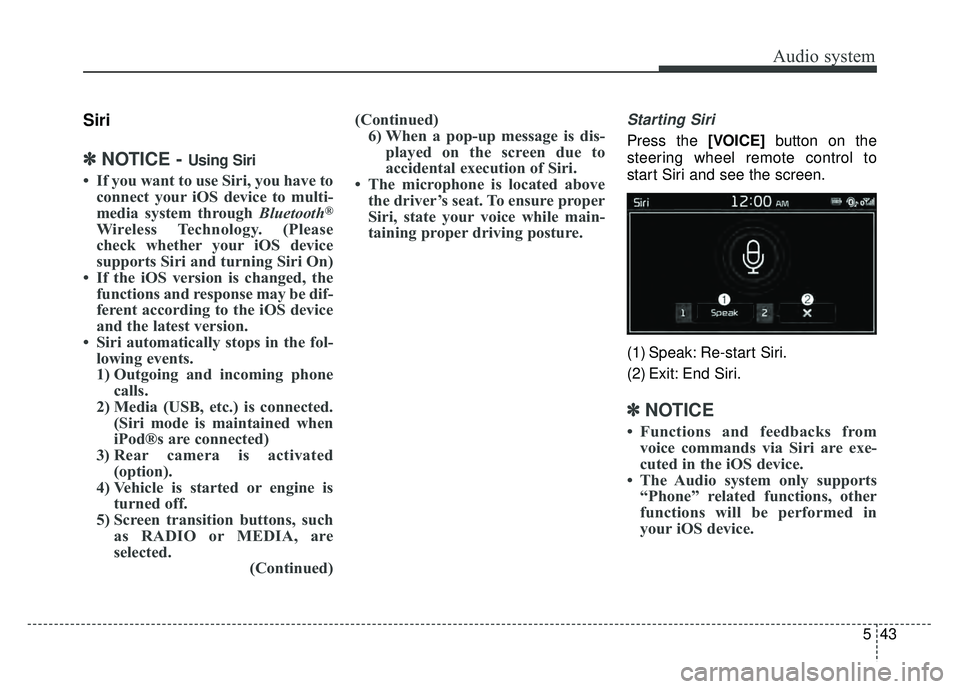
Starting Siri
Press the [VOICE] button on the
steering wheel remote control to
start Siri and see the screen.
(1) Speak: Re-start Siri.
(2) Exit: End Siri.
✽ ✽ NOTICE
• Functions and feedbacks from
voice commands via Siri are exe-
cuted in the iOS device.
• The Audio system only supports “Phone” related functions, other
functions will be performed in
your iOS device.
Page 284 of 589

Audio system
549
Steering wheel remote control
❈The actual features in the vehicle
may differ from the illustration.
(1) MODE
Press the button to change the mode in the following order: Radio
➟ Media.
Press and hold the button to turn off.
(2) VOLUME
Press to adjust the volume.
(3) UP/DOWN
Press the button in radio mode to search Presets. Press and hold the button in radio
mode to search frequencies.
Press the button in media mode to change the current song.
Press and hold the button in media mode to quick search through
songs.
(4) VOICE
Pressing the button - If Siri is not active: Starts Siri.
- If Siri is active: Re-starts Siri.
Pressing and holding the button: Siri is deactivated.
(5) CALL
Pressing the button - If not in
Bluetooth®Wireless
Technology Handsfree mode or
receiving a phone call.
First press: Display Dial Number
screen.
Second press: Automatically dis-
play the most recently Dialed call
number.
Third press: Dial the phone num-
ber entered. - Press in the Incoming Call notifi-
cation screen to accept the
phone call.
- Press in
Bluetooth®Wireless
Technology Handsfree mode to
switch to the waiting call.
Pressing and holding the button - If not in
Bluetooth®Wireless
Technology Handsfree mode or
receiving a phone call, the most
recently Dialed Call number is
dialed.
- Press in
Bluetooth®Wireless
Technology Handsfree mode to
transfer the call to your cell
phone.
- Press in cell phone mode to switch to
Bluetooth®Wireless
Technology Handsfree mode.
(6) END
Press in
Bluetooth®Wireless
Technology Handsfree mode to
end the phone call.
Press in the incoming call screen to reject the call.
Page 310 of 589
Audio system
575
Pairing a Bluetooth®Wireless
Technology device
Information on pairing Bluetooth®
Wireless Technology devices
Pairing refers to the process of pair-
ing
Bluetooth®Wireless Technology
cell phones or devices with the
system prior to connection. This is
a necessary procedure for
Bluetooth®
Wireless Technology connection
and usage.
Up to five devices can be paired.
Pairing the first Bluetooth
®Wireless
Technology device
Select the [PHONE] button on the
audio system or the [CALL] button
on the steering wheel remote control
➟ Search for the vehicle from the
Bluetooth®Wireless Technology
device, and pair ➟ Enter the passkey
on the
Bluetooth®Wireless Technology
device or approve passkey ➟
Bluetooth®Wireless Technology pair-
ing completed. 1. When the [PHONE]
button on the
audio or the [CALL] button on the
steering wheel remote control is
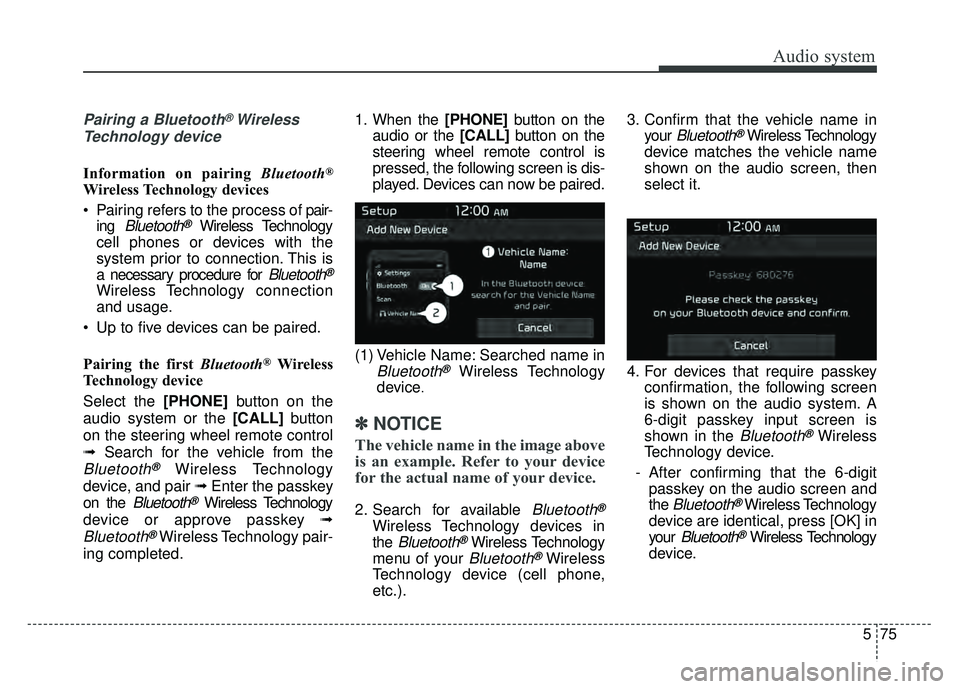
pressed, the following screen is dis-
played. Devices can now be paired.
(1) Vehicle Name: Searched name in
Bluetooth®Wireless Technology
device
.
✽ ✽ NOTICE
The vehicle name in the image above
is an example. Refer to your device
for the actual name of your device.
2. Search for available Bluetooth®
Wireless Technology devices in
the
Bluetooth®Wireless Technology
menu of your
Bluetooth®Wireless
Technology device (cell phone,
etc.). 3. Confirm that the vehicle name in
your
Bluetooth®Wireless Technology
device matches the vehicle name
shown on the audio screen, then
select it.
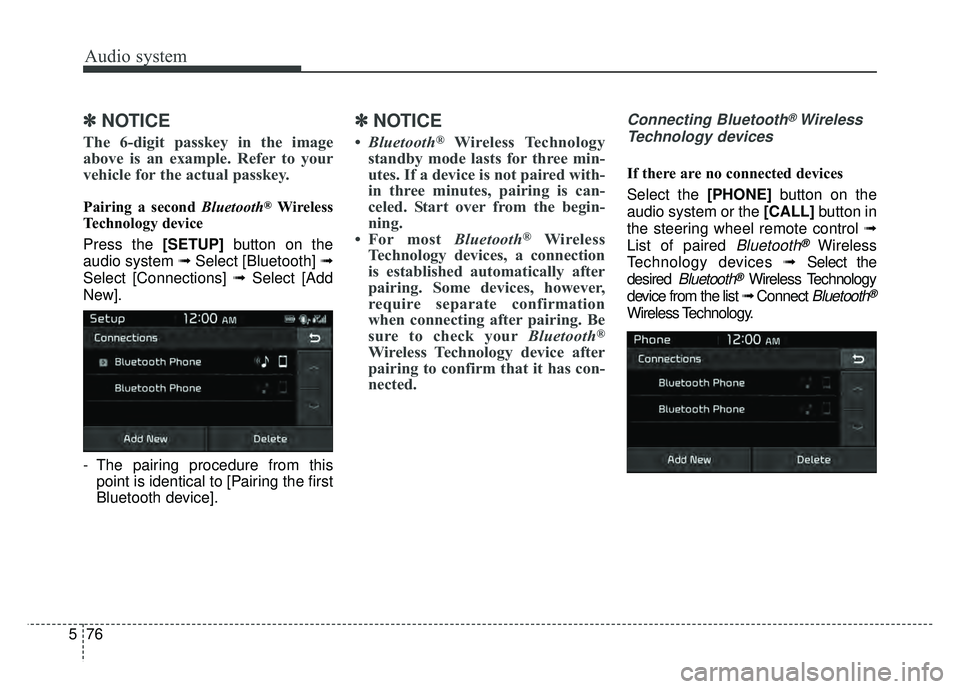
4. For devices that require passkey confirmation, the following screen
is shown on the audio system. A
6-digit passkey input screen is
shown in the
Bluetooth®Wireless
Technology device.
- After confirming that the 6-digit passkey on the audio screen and
the
Bluetooth®Wireless Technology
device are identical, press [OK] in
your
Bluetooth®Wireless Technology
device.
Page 311 of 589
Audio system
76
5
✽
✽
NOTICE
The 6-digit passkey in the image
above is an example. Refer to your
vehicle for the actual passkey.
Pairing a second Bluetooth®Wireless
Technology device
Press the [SETUP] button on the
audio system ➟ Select [Bluetooth] ➟
Select [Connections] ➟ Select [Add
New].
- The pairing procedure from this point is identical to [Pairing the first
Bluetooth device].
✽ ✽ NOTICE
•Bluetooth®Wireless Technology
standby mode lasts for three min-
utes. If a device is not paired with-
in three minutes, pairing is can-
celed. Start over from the begin-
ning.
• For most Bluetooth
®Wireless
Technology devices, a connection
is established automatically after
pairing. Some devices, however,
require separate confirmation
when connecting after pairing. Be
sure to check your Bluetooth
®
Wireless Technology device after
pairing to confirm that it has con-
nected.
Connecting Bluetooth®Wireless
Technology devices
If there are no connected devices
Select the [PHONE] button on the
audio system or the [CALL] button in
the steering wheel remote control ➟
List of paired
Bluetooth®Wireless
Technology devices ➟Select the
desired
Bluetooth®Wireless Technology
device from the list ➟ Connect
Bluetooth®
Wireless Technology.
Page 316 of 589
Audio system
581
Siri
✽
✽NOTICE - Using Siri
• If you want to use Siri, you have to
connect your iOS device to multi-
media system through Bluetooth
®
Wireless Technology. (Please
check whether your iOS device
supports Siri and turning Siri On)
• If the iOS version is changed, the functions and response may be dif-
ferent according to the iOS device
and the latest version.
• Siri automatically stops in the fol- lowing events.
1) Outgoing and incoming phone calls.
2) Media (USB, etc.) is connected. (Siri mode is maintained when
iPod
®s are connected)
3) Rear camera is activated (option).
4) Vehicle is started or engine is turned off.
5) Screen transition buttons, such as RADIO or MEDIA, are
selected. (Continued)(Continued)
6) When a pop-up message is dis- played on the screen due to
accidental execution of Siri.
• The microphone is located above the driver’s seat. To ensure proper
Siri, state your voice while main-
taining proper driving posture.
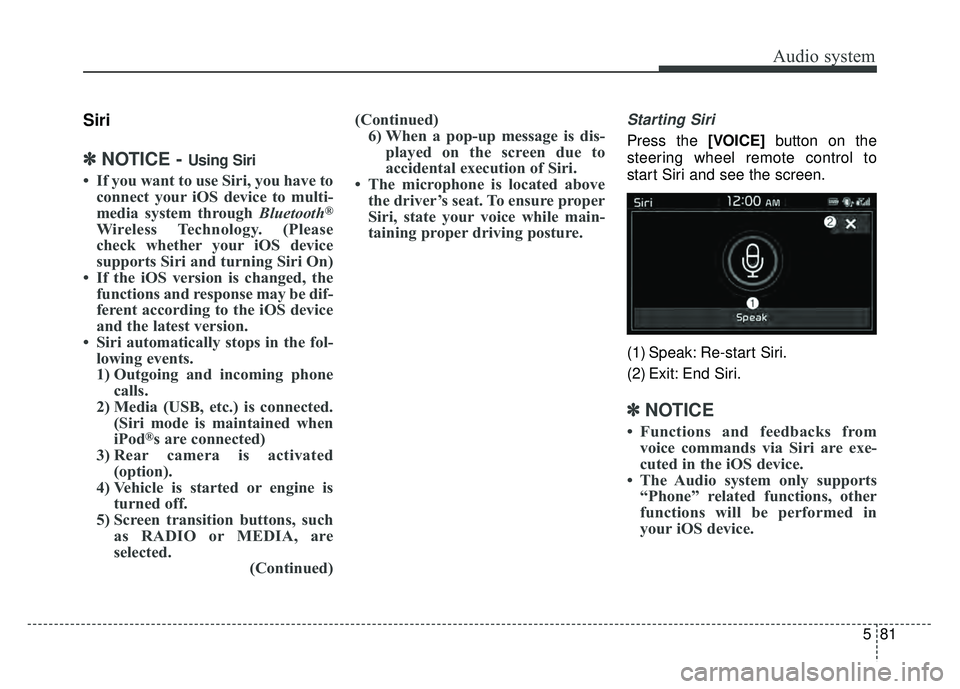
Starting Siri
Press the [VOICE] button on the
steering wheel remote control to
start Siri and see the screen.
(1) Speak: Re-start Siri.
(2) Exit: End Siri.
✽ ✽ NOTICE
• Functions and feedbacks from
voice commands via Siri are exe-
cuted in the iOS device.
• The Audio system only supports “Phone” related functions, other
functions will be performed in
your iOS device.
Page 558 of 589

8117
Maintenance
Your vehicle is equipped with a cat-
alytic converter emission control
device.
Therefore, the following precautions
must be observed:
Use only UNLEADED FUEL forgasoline engines.
Do not operate the vehicle when there are signs of engine malfunc-
tion, such as misfire or a noticeable
loss of performance.
Do not misuse or abuse the engine. Examples of misuse are
coasting with the ignition off and
descending steep grades in gear
with the ignition off.
Do not operate the engine at high idle speed for extended periods (5
minutes or more).
Do not modify or tamper with any part of the engine or emission con-
trol system. All inspections and
adjustments must be made by an
authorized Kia dealer.
Avoid driving with a extremely low fuel level. Running out of fuel could
cause the engine to misfire, dam-
aging the catalytic converter. Failure to observe these precautions
could result in damage to the catalyt-
ic converter and to your vehicle.
Additionally, such actions could void
your warranties.
Perchlorate Material-special handling
may apply, See www.dtsc.ca.gov/haz-
ardouswaste/ perchlorate.
Notice to California Vehicle Dismantlers:
Perchlorate containing materials,
such as air bag inflators, seatbelt
pretensioners and keyless remote
entry batteries, must be disposed of
according to Title 22 California Code
of Regulations Section 67384.10 (a).
CALIFORNIA
PERCHLORATE NOTICE
Page 576 of 589
Index
2I
Air bag warning label . . . . . . . . . . . . . . . . . . . . . . . . . . 3-68
Air bag warning light . . . . . . . . . . . . . . . . . . . . . . . . . . 3-45
Air bags. . . . . . . . . . . . . . . . . . . . . . . . . . . . . . . . . . . . \
. 3-42Operation . . . . . . . . . . . . . . . . . . . . . . . . . . . . . . . . . 3-43
Air bag warning light . . . . . . . . . . . . . . . . . . . . . . . . 3-45
SRS components and functions . . . . . . . . . . . . . . . . 3-46
Occupant Detection System . . . . . . . . . . . . . . . . . . . 3-49
Driver's and passenger's front air bag . . . . . . . . . . . 3-56
Side air bag. . . . . . . . . . . . . . . . . . . . . . . . . . . . . . . . 3-59
Curtain air bag . . . . . . . . . . . . . . . . . . . . . . . . . . . . . 3-61
Inflation conditions . . . . . . . . . . . . . . . . . . . . . . . . . 3-63
Non-inflation conditions . . . . . . . . . . . . . . . . . . . . . 3-65
SRS Care . . . . . . . . . . . . . . . . . . . . . . . . . . . . . . . . . 3-67
Air bag warning label. . . . . . . . . . . . . . . . . . . . . . . . 3-68
Air cleaner . . . . . . . . . . . . . . . . . . . . . . . . . . . . . . . . . . 8-48\
Filter replacement. . . . . . . . . . . . . . . . . . . . . . . . . . . 8-48
Air conditioning system lubricants. . . . . . . . . . . . . . . . . 9-6
Anti-lock brake system (ABS) . . . . . . . . . . . . . . . . . . . 6-36
Appearance care . . . . . . . . . . . . . . . . . . . . . . . . . . . . . 8-106 Exterior care . . . . . . . . . . . . . . . . . . . . . . . . . . . . . . 8-106
Interior care . . . . . . . . . . . . . . . . . . . . . . . . . . . . . . 8-112
AUDIO (With Touch Screen) . . . . . . . . . . . . . . . . . . . 5-46 Feature of Your Audio . . . . . . . . . . . . . . . . . . . . . . . 5-47
Radio Mode . . . . . . . . . . . . . . . . . . . . . . . . . . . . . . . 5-53
SiriusXM Radio Mode . . . . . . . . . . . . . . . . . . . . . . 5-55
Media Mode . . . . . . . . . . . . . . . . . . . . . . . . . . . . . . . 5-57 Phone Mode . . . . . . . . . . . . . . . . . . . . . . . . . . . . . . . 5-73
Siri Mode . . . . . . . . . . . . . . . . . . . . . . . . . . . . . . . . . 5-81
Setup Mode . . . . . . . . . . . . . . . . . . . . . . . . . . . . . . . 5-82
AUDIO (Without Touch Screen) . . . . . . . . . . . . . . . . . 5-10 Feature of Your Audio . . . . . . . . . . . . . . . . . . . . . . . 5-11
Radio Mode . . . . . . . . . . . . . . . . . . . . . . . . . . . . . . . 5-16
SiriusXM Radio Mode . . . . . . . . . . . . . . . . . . . . . . 5-18
Media Mode . . . . . . . . . . . . . . . . . . . . . . . . . . . . . . . 5-20
Phone Mode . . . . . . . . . . . . . . . . . . . . . . . . . . . . . . . 5-35
Siri Mode . . . . . . . . . . . . . . . . . . . . . . . . . . . . . . . . . 5-43
Setup Mode . . . . . . . . . . . . . . . . . . . . . . . . . . . . . . . 5-44
Audio system . . . . . . . . . . . . . . . . . . . . . . . . . . . . . . . . . 5-2 Antenna . . . . . . . . . . . . . . . . . . . . . . . . . . . . . . . . . . . 5-\
2
Audio remote control . . . . . . . . . . . . . . . . . . . . . . . . . 5-3
AUX and USB port . . . . . . . . . . . . . . . . . . . . . . . . . . 5-4
Speaker lights . . . . . . . . . . . . . . . . . . . . . . . . . . . . . . . 5-4
Auto light position . . . . . . . . . . . . . . . . . . . . . . . . . . . . 4-90
Automatic climate control system . . . . . . . . . . . . . . . 4-114 Automatic heating and air conditioning. . . . . . . . . 4-115
Manual heating and air conditioning . . . . . . . . . . . 4-116
System operation . . . . . . . . . . . . . . . . . . . . . . . . . . 4-123
Climate control air filter. . . . . . . . . . . . . . . . . . . . . 4-125
Air Conditioning refrigerant label . . . . . . . . . . . . . 4-126
Automatic transaxle . . . . . . . . . . . . . . . . . . . . . . . . . . . 6-18 Sports mode . . . . . . . . . . . . . . . . . . . . . . . . . . . . . . . 6-20
Shift-lock override . . . . . . . . . . . . . . . . . . . . . . . . . . 6-22
Good driving practices . . . . . . . . . . . . . . . . . . . . . . . 6-23
A
Page 584 of 589

Index
10I
Good driving practices . . . . . . . . . . . . . . . . . . . . . . . 6-17
Map lamp . . . . . . . . . . . . . . . . . . . . . . . . . . . . . . . . . . . 4-\
96
Map lamp bulb replacement . . . . . . . . . . . . . . . . . . . . 8-102
Mirrors . . . . . . . . . . . . . . . . . . . . . . . . . . . . . . . . . . . . \
. 4-43 Inside rearview mirror . . . . . . . . . . . . . . . . . . . . . . . 4-43
Day/night rearview mirror . . . . . . . . . . . . . . . . . . . . 4-43
Electrochromic mirror (ECM) . . . . . . . . . . . . . . . . 4-44
Outside rearview mirror . . . . . . . . . . . . . . . . . . . . . . 4-45
Remote control . . . . . . . . . . . . . . . . . . . . . . . . . . . . . 4-46
Folding the outside rearview mirror. . . . . . . . . . . . . 4-46
Occupant Detection System . . . . . . . . . . . . . . . . . . . . . 3-49
Odometer . . . . . . . . . . . . . . . . . . . . . . . . . . . . . . . . . . . 4-\
52
Oil (Engine) . . . . . . . . . . . . . . . . . . . . . . . . . . . . . . . . . 8-39
ONLINE FACTORY AUTHORIZED MANUALS . . . 9-16
Outside rearview mirror . . . . . . . . . . . . . . . . . . . . . . . . 4-45
Overheats . . . . . . . . . . . . . . . . . . . . . . . . . . . . . . . . . . . . \
7-8
Owner maintenance . . . . . . . . . . . . . . . . . . . . . . . . . . . . 8-8 Owner maintenance schedule. . . . . . . . . . . . . . . . . . . 8-8
Parking brake . . . . . . . . . . . . . . . . . . . . . . . . . . . . . . . . 6-34 Checking the parking brake . . . . . . . . . . . . . . . . . . . 8-48
Parking light position . . . . . . . . . . . . . . . . . . . . . . . . . . 4-89 Portable lamp . . . . . . . . . . . . . . . . . . . . . . . . . . . . . . . . 4-98
Position lamp + DRL (LED type) bulb replacement . . 8-96
Power outlet . . . . . . . . . . . . . . . . . . . . . . . . . . . . . . . . 4-141
Power window lock button . . . . . . . . . . . . . . . . . . . . . . 4-28
Precautions . . . . . . . . . . . . . . . . . . . . . . . . . . . . . . . . . . 3-24\
Pre-tensioner seat belt. . . . . . . . . . . . . . . . . . . . . . . . . . 3-26
Rear camera display . . . . . . . . . . . . . . . . . . . . . . . . . . . 4-87
Rear seat adjustment . . . . . . . . . . . . . . . . . . . . . . . . . . . 3-13
Rear turn signal lamp bulb Replacement . . . . . . . . . . . 8-98
Recommended lubricants and capacities . . . . . . . . . . . . 9-7
Recommended SAE viscosity number. . . . . . . . . . . . 9-9
Record your key number . . . . . . . . . . . . . . . . . . . . . . . . 4-4
Reducing the risk of a rollover . . . . . . . . . . . . . . . . . . . 6-71
Refrigerant label . . . . . . . . . . . . . . . . . . . . . . . . . . . . . . 9-11
Remote control (outside rear view mirror) . . . . . . . . . . 4-46
REPORTING SAFETY DEFECTS . . . . . . . . . . . . . . . 9-16
Resetting the sunroof . . . . . . . . . . . . . . . . . . . . . . . . . . 4-38
Road warning . . . . . . . . . . . . . . . . . . . . . . . . . . . . . . . . . 7-2
Rocking the vehicle . . . . . . . . . . . . . . . . . . . . . . . . . . . 6-72
Room lamp . . . . . . . . . . . . . . . . . . . . . . . . . . . . . . . . . . 4-97\
Room lamp bulb replacement . . . . . . . . . . . . . . . . . . . 8-103
Rotation (Tire) . . . . . . . . . . . . . . . . . . . . . . . . . . . . . . . 8-61
O
P
R