Page 270 of 488
195
Features of your vehicle
4
(Continued)
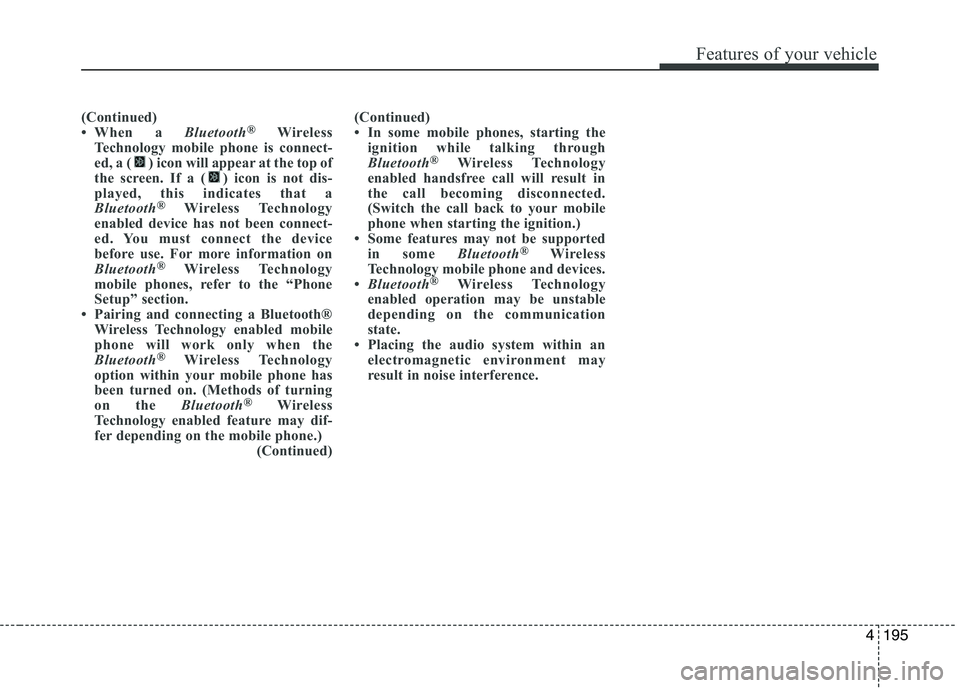
When a Bluetooth®
Wireless
Technology mobile phone is connect-
ed, a ( ) icon will appear at the top of
the screen. If a ( ) icon is not dis-
played, this indicates that a
Bluetooth ®
Wireless Technology
enabled device has not been connect-
ed. You must connect the device
before use. For more information on
Bluetooth ®
Wireless Technology
mobile phones, refer to the “Phone
Setup” section.
Pairing and connecting a Bluetooth® Wireless Technology enabled mobile
phone will work only when the
Bluetooth ®
Wireless Technology
option within your mobile phone has
been turned on. (Methods of turning
on the Bluetooth®
Wireless
Technology enabled feature may dif-
fer depending on the mobile phone.) (Continued)(Continued)
In some mobile phones, starting the
ignition while talking through
Bluetooth ®
Wireless Technology
enabled handsfree call will result in
the call becoming disconnected.
(Switch the call back to your mobile
phone when starting the ignition.)
Some features may not be supported
in some Bluetooth®
Wireless
Technology mobile phone and devices.
Bluetooth ®
Wireless Technology
enabled operation may be unstable
depending on the communication
state.
Placing the audio system within an
electromagnetic environment may
result in noise interference.
Page 271 of 488
Features of your vehicle
1964
✽✽NOTICE - USING VOICE COM-
MAND
The voice recognition feature of this product supports recognition of the
commands listed within this user’s
manual.
While using voice recognition, operat-
ing the steering remote control or the
device will terminate voice recogni-
tion and allow you to manually oper-
ate desired functions.
Position the microphone above the head of the driver’s seat. For superior
performance, maintain good posture
when saying voice commands.
Voice recognition may not function properly due to outside noise. The fol-
lowing conditions can affect the per-
formance of Voice Recognition:
-When the windows and sunroof areopen
-When the heating/cooling system is on
-When passing a tunnel
-When driving on rugged and uneven roads
(Continued)(Continued)
After downloading Bluetooth®
Wireless Technology phone book, the
system requires some times to convert
the phone book into voice informa-
tion. During this time, voice recogni-
tion may not operate properly.
Upon inputting your phone book, spe-
cial symbols and numbers cannot be
recognized by voice. For example, “#
John Doe%&” will be recognized as
“John Doe”.
Page 273 of 488
Features of your vehicle
1984❈
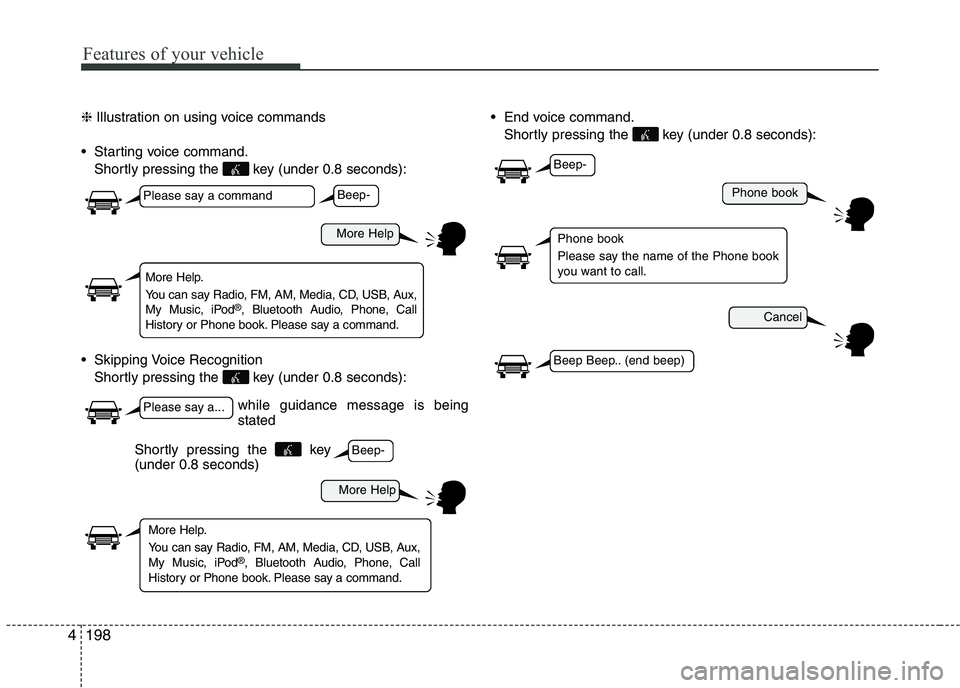
Illustration on using voice commands
Starting voice command. Shortly pressing the key (under 0.8 seconds):
Skipping Voice Recognition Shortly pressing the key (under 0.8 seconds): End voice command.
Shortly pressing the key (under 0.8 seconds):
while guidance message is being stated
More Help
Phone book
Cancel
More Help
Please say a command
Please say a...
More Help.
You can say Radio, FM, AM, Media, CD, USB, Aux,
My Music, iPod ®
, Bluetooth Audio, Phone, Call
History or Phone book. Please say a command.
Phone book
Please say the name of the Phone book
you want to call.
More Help.
You can say Radio, FM, AM, Media, CD, USB, Aux,
My Music, iPod ®
, Bluetooth Audio, Phone, Call
History or Phone book. Please say a command.
Beep-
Beep-
Beep-
Beep Beep.. (end beep)
Shortly pressing the key (under 0.8 seconds)
Page 274 of 488
199
Features of your vehicle
4
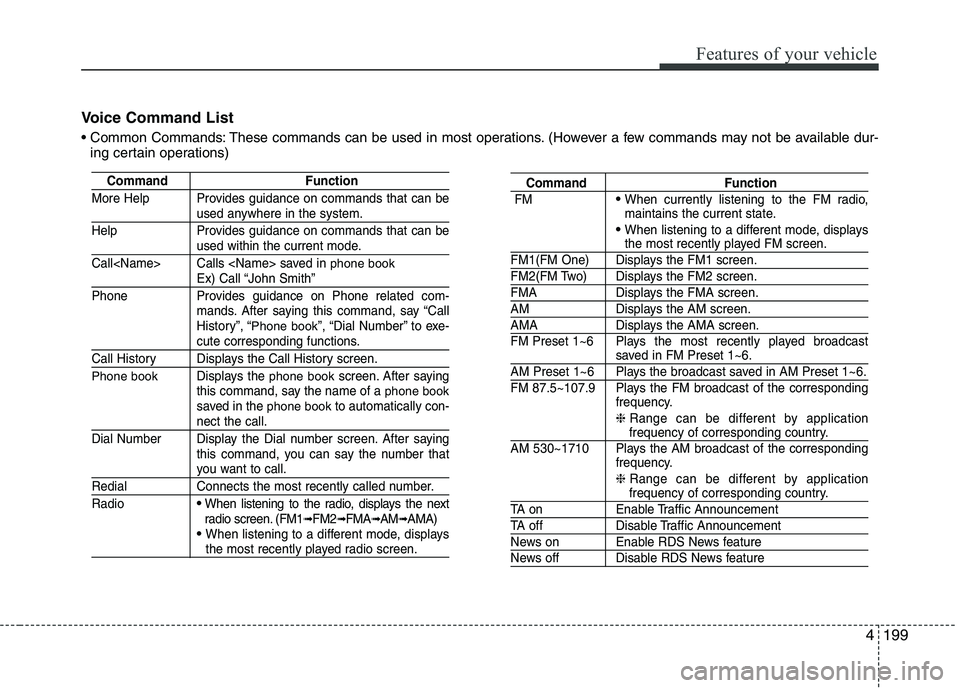
Voice Command List
These commands can be used in most operations. (However a few commands may not be available dur-
ing certain operations)
Command Function
More Help Provides guidance on commands that can be
used anywhere in the system.
Help Provides guidance on commands that can be
used within the current mode.
Call Calls saved in
phone bookEx) Call “John Smith”
Phone Provides guidance on Phone related com- mands. After saying this command, say “Call
History”, “
Phone book”, “Dial Number” to exe-cute corresponding functions.
Call History Displays the Call History screen.
Phone bookDisplays the phone bookscreen. After saying
this command, say the name of a phone booksaved in the phone bookto automatically con-nect the call.
Dial Number Display the Dial number screen. After saying this command, you can say the number that
you want to call.
Redial Connects the most recently called number. Radio
When listening to the radio, displays the next
radio screen. (FM1➟FM2 ➟FMA ➟AM ➟AMA)
When listening to a different mode, displaysthe most recently played radio screen.
Command Function
FM
When currently listening to the FM radio,
maintains the current state.
When listening to a different mode, displaysthe most recently played FM screen.
FM1(FM One) Displays the FM1 screen.
FM2(FM Two) Displays the FM2 screen.
FMA Displays the FMA screen.
AM Displays the AM screen.
AMA Displays the AMA screen.
FM Preset 1~6 Plays the most recently played broadcast
saved in FM Preset 1~6.
AM Preset 1~6 Plays the broadcast saved in AM Preset 1~6.
FM 87.5~107.9 Plays the FM broadcast of the corresponding frequency.
❈ Range can be different by application
frequency of corresponding country.
AM 530~1710 Plays the AM broadcast of the corresponding frequency.
❈ Range can be different by application
frequency of corresponding country.
TA on Enable Traffic Announcement
TA off Disable Traffic Announcement
News on Enable RDS News feature
News off Disable RDS News feature
Page 278 of 488
203
Features of your vehicle
4
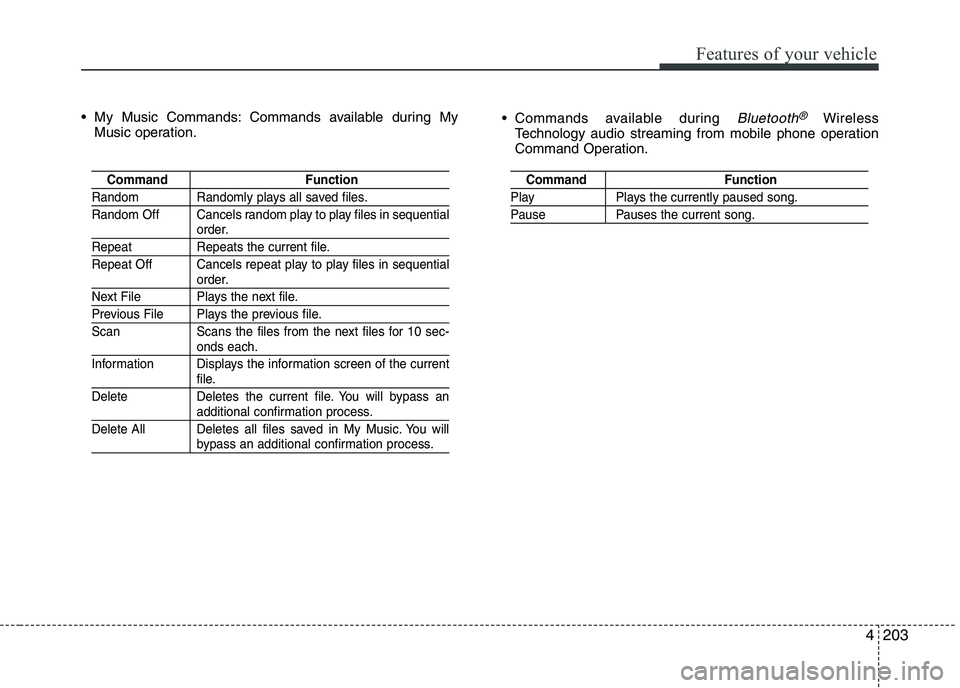
My Music Commands: Commands available during My
Music operation. Commands available during
Bluetooth®Wireless
Technology audio streaming from mobile phone operation
Command Operation.
Command Function
Random Randomly plays all saved files.
Random Off Cancels random play to play files in sequential
order.
Repeat Repeats the current file.
Repeat Off Cancels repeat play to play files in sequential
order.
Next File Plays the next file.
Previous File Plays the previous file.
Scan Scans the files from the next files for 10 sec-
onds each.
Information Displays the information screen of the current
file.
Delete Deletes the current file. You will bypass an
additional confirmation process.
Delete All Deletes all files saved in My Music. You will
bypass an additional confirmation process.
Command Function
Play Plays the currently paused song.
Pause Pauses the current song.