Page 453 of 516

Setting NameSelectable Options
Rear ParkSense Volume — If Equipped Low
Medium High
NOTE: Rear Park Assist chime volume settings can be selected from the instrument cluster display or Uconnect Sys-
tem (if equipped). The chime volume settings include “LOW,” “MEDIUM,” and “HIGH.” The factory default volume
setting is MEDIUM.
Front ParkSense Volume — If Equipped Low
Medium High
NOTE: Front Park Assist chime volume settings can be selected from the instrument cluster display or Uconnect Sys-
tem (if equipped). The chime volume settings include “LOW,” “MEDIUM,” and “HIGH.” The factory default volume
setting is MEDIUM.
Rear ParkSense BrakingAssist — If Equipped On
Off
NOTE: When this feature is selected, the park assist system will detect objects located behind the vehicle and utilize
autonomous braking to stop the vehicle.
LaneSense Warning — If Equipped Early
Medium Late
NOTE: When this feature is selected, it sets the distance at which the steering wheel will provide feedback for poten-
tial lane departures.
10
MULTIMEDIA 451
Page 454 of 516

Setting NameSelectable Options
LaneSense Strength — If Equipped Low
Medium High
NOTE: When this feature is selected, it sets the strength of the steering wheel feedback for potential lane departures.
The amount of directional torque the steering system can apply to the steering wheel to correct for vehicle lane de-
parture can be set at “Low,” “Medium” or “High.”
Blind Spot Alert — If Equipped Off
LightsLights & Chime
NOTE:
•When this feature is selected, the Blind Spot Alert feature can be set to Off, Lights or Lights and Chime. The Blind
Spot Alert feature can be activated in Lights mode. When this mode is selected, the Blind Spot Monitor (BSM) sys-
tem is activated and will only show a visual alert in the outside mirrors. When Lights & Chime mode is activated,
the Blind Spot Monitor (BSM) will show a visual alert in the outside mirrors as well as an audible alert when the
turn signal is on. When Off is selected, the Blind Spot Monitor (BSM) system is deactivated.
•If your vehicle has experienced any damage in the area where the sensor is located, even if the fascia is not dam-
aged, the sensor may have become misaligned. Take your vehicle to an authorized dealer to verify sensor align-
ment. A sensor that is misaligned will result in the BSM not operating to specification.
Electric Park Brake Service Mode — If Equipped On Off
NOTE: This feature provides a means for a technician or vehicle owner to utilize a vehicle integrated, menu driven
system, to command the electric park brake retraction, to service the rear foundation brakes (brake pads, calipers, ro-
tors, etc.).
452 MULTIMEDIA
Page 457 of 516
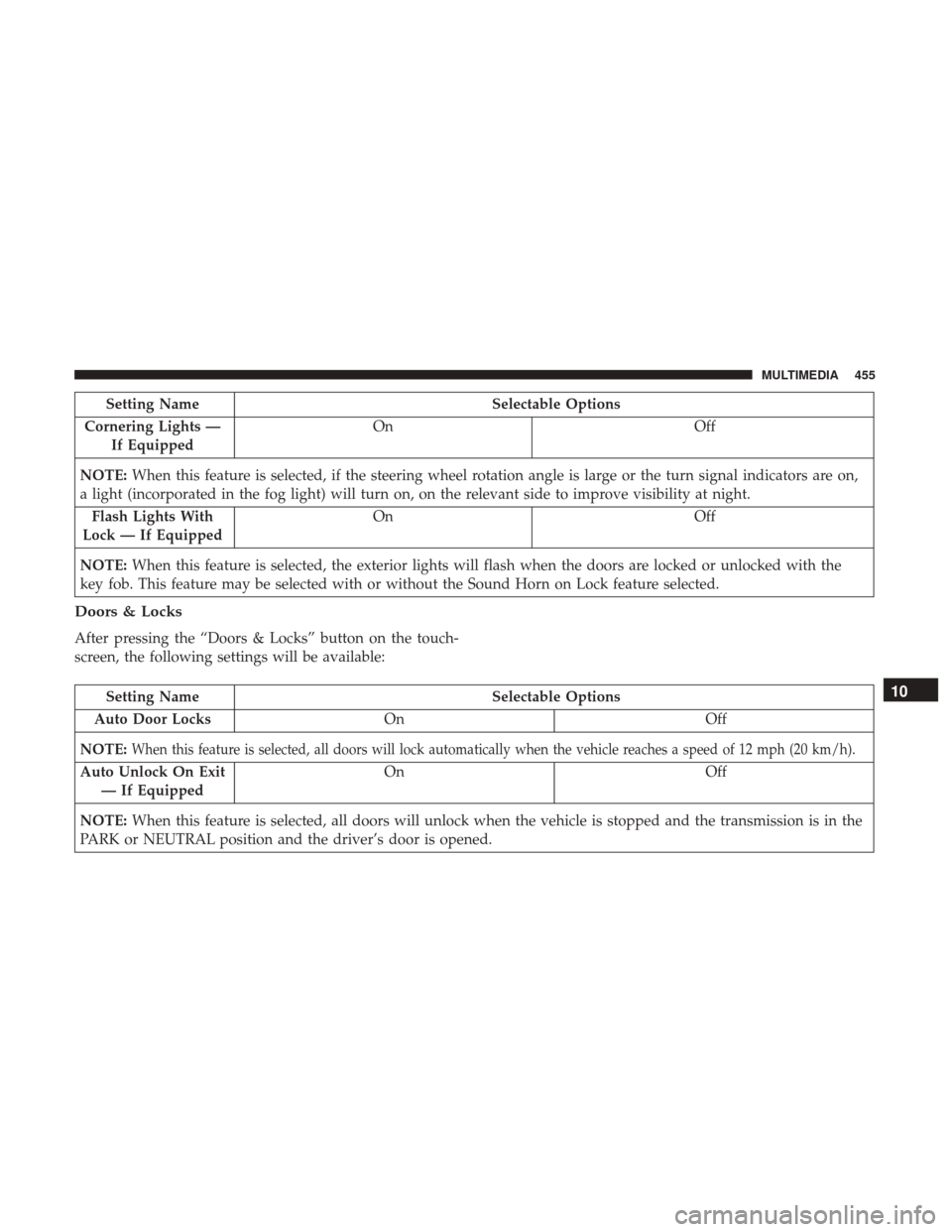
Setting NameSelectable Options
Cornering Lights — If Equipped On
Off
NOTE: When this feature is selected, if the steering wheel rotation angle is large or the turn signal indicators are on,
a light (incorporated in the fog light) will turn on, on the relevant side to improve visibility at night.
Flash Lights With
Lock — If Equipped On
Off
NOTE: When this feature is selected, the exterior lights will flash when the doors are locked or unlocked with the
key fob. This feature may be selected with or without the Sound Horn on Lock feature selected.
Doors & Locks
After pressing the “Doors & Locks” button on the touch-
screen, the following settings will be available:
Setting Name Selectable Options
Auto Door Locks On Off
NOTE:
When this feature is selected, all doors will lock automatically when the vehicle reaches a speed of 12 mph (20 km/h).
Auto Unlock On Exit — If Equipped On Off
NOTE: When this feature is selected, all doors will unlock when the vehicle is stopped and the transmission is in the
PARK or NEUTRAL position and the driver’s door is opened.
10
MULTIMEDIA 455
Page 467 of 516

Setting NameSelectable Options
LaneSense Warning — If Equipped Early
Med Late
NOTE: When this feature is selected, it sets the distance at which the steering wheel will provide feedback for poten-
tial lane departures. The LDW sensitivity can be set to provide either an “early,” “medium,” or “late” warning zone
start point.
LaneSense Strength — If Equipped Low
Med High
NOTE: When this feature is selected, it sets the strength of the steering wheel feedback for potential lane departures.
The amount of directional torque the steering system can apply to the steering wheel to correct for vehicle lane de-
parture can be set at “Low,” “Med” or “High.”
ParkSense — If Equipped Sound OnlySound & Display
NOTE: The ParkSense system will scan for objects behind the vehicle when the transmission gear selector is in RE-
VERSE and the vehicle speed is less than 11 mph (18 km/h). It will provide an alert (audible and/or visual) to indi-
cate the proximity to other objects. The system can be enabled with Sound Only, or Sound and Display.
10
MULTIMEDIA 465
Page 471 of 516
Setting NameSelectable Options
Flash Lights With
Lock — If Equipped On
Off
Setting Name Selectable Options
NOTE: When this feature is selected, the headlights turn relative to a change in direction of the steering wheel.
Doors & Locks
After pressing the “Doors & Locks” button on the touch-
screen, the following settings will be available:
Setting Name Selectable Options
Auto Door Lock Ye sN o
NOTE:
When this feature is selected, all doors will lock automatically when the vehicle reaches a speed of 15 mph (24 km/h).
Auto Unlock On Exit Ye sN o
Flash Lights With Lock — If Equipped Ye s
N o
Sound Horn With Remote Lock — If Equipped On
Off
Remote Door Unlock — If EquippedAllDriver
NOTE: This feature will allow you to program your remote door locks to open “All” or only the “Driver” with the
first push of the key fob or grabbing the Passive Entry door handle.
10
MULTIMEDIA 469
Page 478 of 516

STEERING WHEEL AUDIO CONTROLS
The remote sound system controls are located at the rear of
the steering wheel. Reach behind the wheel to access the
switches.
The right-hand control is a rocker-type switch with a
pushbutton in the center and controls the volume and
mode of the sound system. Pushing the top of the rocker
switch will increase the volume, and pushing the bottom of
the rocker switch will decrease the volume.Pushing the center button will make the radio switch
between the various modes available (AM/FM/SAT/
AUX/Media Player, etc.) and can also be used to select/
enter an item while scrolling through menu.
The left-hand control is a rocker-type switch with a push-
button in the center. The function of the left-hand control is
different depending on which mode you are in.
The following describes the left-hand control operation in
each mode.
Radio Operation
Pushing the top of the switch will “Seek” up for the next
listenable station and pushing the bottom of the switch will
“Seek” down for the next listenable station.
The button located in the center of the left-hand control
will tune to the next preset station that you have pro-
grammed in the radio preset button.
Remote Sound System Controls (Back View Of Steering
Wheel)
476 MULTIMEDIA
Page 481 of 516

Get Started
All you need to control your Uconnect system with your
voice are the buttons on your steering wheel.
1. VisitUconnectPhone.com to check mobile device and
feature compatibility and to find phone pairing in-
structions.
2.
Reduce background noise. Wind and passenger conversa-
tions are examples of noise that may impact recognition.
3. Speak clearly at a normal pace and volume while facing straight ahead. The microphone is positioned on the
rearview mirror and aimed at the driver. 4. Each time you give a Voice Command, you must first
push either the VR or Phone button, wait until afterthe
beep, then say your Voice Command.
5. You can interrupt the help message or system prompts by pushing the VR or Phone button and saying a Voice
Command from current category.
Uconnect 6.5 NAV
Uconnect Voice Command Buttons
1 — Push To Initiate Or To Answer A Phone Call, Send Or Receive
A Text
2 — Push To Begin Radio, Navigation, Or Media Functions
3 — Push To End Call
10
MULTIMEDIA 479
Page 491 of 516
Siri Eyes Free — If Equipped
Siri lets you use your voice to send text messages, select
media, place phone calls and much more. Siri uses your
natural language to understand what you mean and will
respond back to confirm your requests. The system is
designed to keep your eyes on the road and your hands on
the wheel by letting Siri help you perform useful tasks.
To enable Siri push and hold, then release the Uconnect
Voice Recognition (VR) button on the steering wheel. After
you hear a double beep you can ask Siri to play podcasts
and music, get directions, read text messages and many
other useful requests.Getting Started
Ensure Siri is enabled On Your iPhone.
1 — Select Settings On Your
iPhone
2 — Select General3 — Select Siri
4 — Enable Siri10
MULTIMEDIA 489

