Page 517 of 633

MULTIMEDIA
CONTENTS
�UCONNECT RADIOS ....................517
� PERSONALIZED MENU BAR ...............517
� CYBERSECURITY ....................... .517
� UCONNECT SETTINGS ...................519
▫ Buttons On The Faceplate .................519
▫ Buttons On The Touchscreen ...............520
▫ Customer Programmable Features —
Uconnect 5.0 Personal Settings ..............520
▫ Customer Programmable Features —
Uconnect 8.4 Settings ....................543
� OFF ROAD PAGES — IF EQUIPPED ..........564
▫ Off Road Pages Status Bar .................565
▫ Drivetrain ........................... .566
▫ Suspension .......................... .567
▫ Pitch And Roll — If Equipped ..............568▫
Accessory Gauges ..................... .568
▫ Selec-Terrain ......................... .569
� STEERING WHEEL AUDIO CONTROLS — IF
EQUIPPED ........................... .570
▫ Radio Operation ....................... .570
▫ CD Player ........................... .570
� IPOD/USB/MP3 CONTROL — IF EQUIPPED . . .571
� UCONNECT REAR SEAT ENTERTAINMENT
(RSE) SYSTEM — IF EQUIPPED .............571
▫ Getting Started ....................... .571
▫ Dual Video Screen ..................... .573
▫ Blu-ray Disc Player ..................... .573
▫ Play Video Games ..................... .576
▫ Play A DVD/Blu-ray Disc Using The
Touchscreen Radio ..................... .576
10
Page 518 of 633

▫Important Notes For Dual Video Screen
System ............................. .578
▫ Blu-ray Disc Player Remote Control — If
Equipped ........................... .579
▫ Headphones Operation ...................580
▫ Controls ............................ .581
▫ Replacing The Headphone Batteries ..........581
▫ Unwired Stereo Headphone Lifetime Limited
Warranty ............................ .582
� RADIO OPERATION AND MOBILE PHONES . . .587
▫ Regulatory And Safety Information ..........587
� UCONNECT VOICE RECOGNITION QUICK
TIPS ................................ .588
▫ Introducing Uconnect ....................588
▫ Get Started .......................... .589
▫ Basic Voice Commands ...................590
▫ Radio .............................. .592
▫ Media .............................. .592▫
Phone .............................. .593
▫ Voice Text Reply ...................... .594
▫ Climate (8.4/8.4 NAV) ...................596
▫ Navigation (8.4 /8.4 NAV) ................597
▫ Uconnect Access (8.4/8.4 NAV) .............598
▫ Register (8.4/8.4 NAV) ...................599
▫ Vehicle Health Alert ....................599
▫ Mobile App (8.4/8.4 NAV) ................599
▫ Voice Texting (8.4/8.4 NAV) ...............600
▫ Yelp (8.4/8.4 NAV) ..................... .602
▫ SiriusXM Travel Link (8.4/8.4 NAV) ..........603
▫ Siri
Eyes Free — If Equipped ..............603
▫ Do Not Disturb ....................... .606
▫ General Information .....................607
▫ Additional Information ...................607
� CD/DVD DISC MAINTENANCE ............608
516 MULTIMEDIA
Page 519 of 633

UCONNECT RADIOS
For detailed information about your Uconnect radio, refer
to your Uconnect Owner ’s Manual Supplement.
PERSONALIZED MENU BAR
The Uconnect features and services in the main menu bar
are easily changed for your convenience. Simply follow
these steps:1. Press the “Apps
” button to open the App screen.
2. Press and hold, then drag the selected App to replace an
existing shortcut in the main menu bar.
The new shortcut will now be an active App/shortcut on
the main menu bar.
CYBERSECURITY
Your vehicle may be a connected vehicle and may be
equipped with both wired and wireless networks. These
networks allow your vehicle to send and receive informa-
tion. This information allows systems and features in your
vehicle to function properly.
Your vehicle may be equipped with certain security fea-
tures to reduce the risk of unauthorized and unlawful
access to vehicle systems and wireless communications.
Vehicle software technology continues to evolve over time
and FCA US LLC, working with its suppliers, evaluates
and takes appropriate steps as needed. Similar to a com-
puter or other devices, your vehicle may require software
updates to improve the usability and performance of your
systems or to reduce the potential risk of unauthorized and
unlawful access to your vehicle systems.
Uconnect 8.4/8.4 NAV Main Menu
10
MULTIMEDIA 517
Page 520 of 633

The risk of unauthorized and unlawful access to your
vehicle systems may still exist, even if the most recent
version of vehicle software (such as Uconnect software) is
installed.
WARNING!
•It is not possible to know or to predict all of the
possible outcomes if your vehicle’s systems are
breached. It may be possible that vehicle systems,
including safety related systems, could be impaired
or a loss of vehicle control could occur that may
result in an accident involving serious injury or
death.
• ONLY insert media (e.g., USB, SD card, or CD) into
your vehicle if it came from a trusted source. Media
of unknown origin could possibly contain malicious
software, and if installed in your vehicle, it may
increase the possibility for vehicle systems to be
breached.
• As always, if you experience unusual vehicle behav-
ior, take your vehicle to your nearest authorized
dealer immediately. NOTE:
•
FCA US LLC or your dealer may contact you directly
regarding software updates.
• To help further improve vehicle security and minimize
the potential risk of a security breach, vehicle owners
should:
• Routinely check www.driveuconnect.com/software-
update to learn about available Uconnect software
updates.
• Only connect and use trusted media devices (e.g.
personal mobile phones, USBs, CDs).
Privacy of any wireless and wired communications cannot
be assured. Third parties may unlawfully intercept infor-
mation and private communications without your consent.
For further information, refer to “Privacy Practices - If
Equipped with Uconnect 8.4 Radio” in your Uconnect
Owner’s Manual Supplement and “Onboard Diagnostic
System (OBD II) Cybersecurity” in “Getting To Know Your
Instrument Panel”.
518 MULTIMEDIA
Page 533 of 633
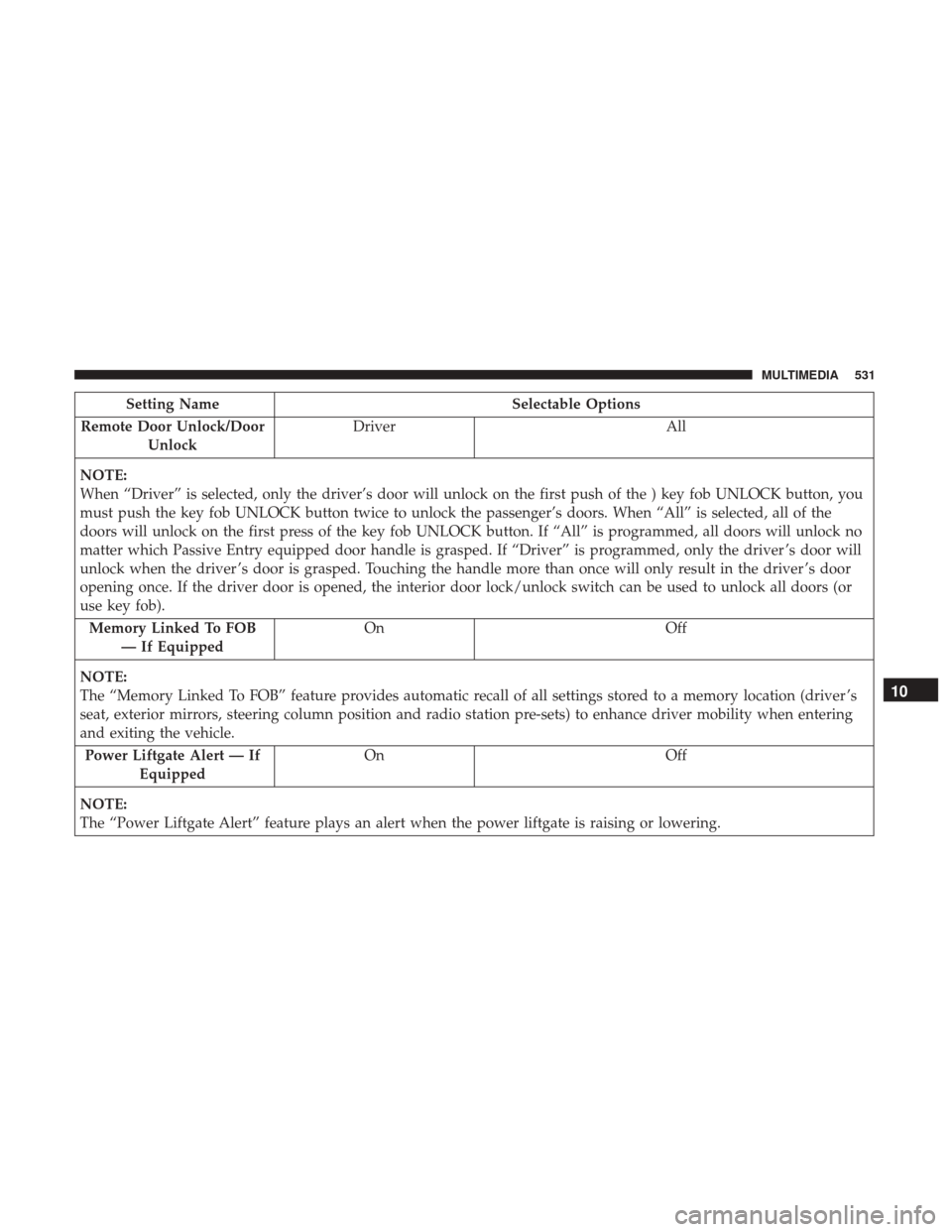
Setting NameSelectable Options
Remote Door Unlock/Door Unlock Driver
All
NOTE:
When “Driver” is selected, only the driver’s door will unlock on the first push of the ) key fob UNLOCK button, you
must push the key fob UNLOCK button twice to unlock the passenger’s doors. When “All” is selected, all of the
doors will unlock on the first press of the key fob UNLOCK button. If “All” is programmed, all doors will unlock no
matter which Passive Entry equipped door handle is grasped. If “Driver” is programmed, only the driver ’s door will
unlock when the driver ’s door is grasped. Touching the handle more than once will only result in the driver ’s door
opening once. If the driver door is opened, the interior door lock/unlock switch can be used to unlock all doors (or
use key fob). Memory Linked To FOB — If Equipped On
Off
NOTE:
The “Memory Linked To FOB” feature provides automatic recall of all settings stored to a memory location (driver ’s
seat, exterior mirrors, steering column position and radio station pre-sets) to enhance driver mobility when entering
and exiting the vehicle. Power Liftgate Alert — If Equipped On
Off
NOTE:
The “Power Liftgate Alert” feature plays an alert when the power liftgate is raising or lowering.
10
MULTIMEDIA 531
Page 535 of 633
Engine Off Options
After pressing the “Engine Off Options” button on the
touchscreen the following settings will be available:
Setting NameSelectable Options
Engine Off Power Delay — IfEquipped 0 sec
45 sec 5 min10 min
NOTE:
When the “Engine Off Power Delay” feature is selected, the power window switches, radio, Uconnect phone system
(if equipped), DVD video system (if equipped), power sunroof (if equipped), and power outlets will remain active for
up to 10 minutes after the ignition is cycled to OFF. Opening either front door will cancel this feature. Headlight Off Delay 0 sec30 sec 60 sec 90 sec
NOTE:
When the “Headlight Off Delay” feature is selected, it allows the adjustment of the amount of time the headlights
remain on after the engine is shut off. Easy Exit Seat — If Equipped
NOTE:
When the “Easy Exit Seat” feature is selected, it provides automatic driver seat positioning to enhance driver mobility
when entering and exiting the vehicle.
10
MULTIMEDIA 533
Page 543 of 633

Setting NameSelectable Options
Subscription Info Sirius ID
NOTE:
New vehicle purchasers or lessees will receive a free limited time subscription to SiriusXM Satellite Radio with your
radio. Following the expiration of the free services, it will be necessary to access the information on the Subscription
Information screen to re-subscribe.
1. Press the “Subscription Info” button on the touchscreen to access the Subscription Information screen.
2. Write down the Sirius ID numbers for your receiver. To reactivate your service, either call the number listed on the screen or visit the provider online.
SiriusXM Travel Link is a separate subscription and is available for U.S. residents only.
Radio Setup — If Equipped
After pressing the “Radio Setup” button on the touch-
screen the following settings will be available:
Setting Name Selectable Options
Regional — If Equipped OnOff
NOTE:
When the “Regional” feature is selected, it forces regional service-following enabling automatic switching to network
stations.
10
MULTIMEDIA 541
Page 557 of 633

Setting NameSelectable Options
1st Press Of Key Fob Unlocks Driver DoorAll Doors
NOTE:
When �Driver Door� is selected with 1st Press Of Key Fob Unlocks, only the driver’s door will unlock with the first
press of the key fob UNLOCK button. You must press the key fob UNLOCK button twice to unlock the passenger’s
doors. When �All Doors�is selected for 1st Press Of Key Fob Unlocks, all doors will unlock on the first press of the
key fob UNLOCK button. If the vehicle is programmed 1st Press Of Key Fob Unlocks “All Doors,” all doors will un-
lock no matter which Passive Entry equipped door handle is grasped. If 1st Press Of Key Fob Unlocks “Driver Door”
is programmed, only the driver ’s door will unlock when the driver ’s door is grasped. With Passive Entry, if 1st Press
Of Key Fob Unlocks “Driver Door” is programmed, touching the handle more than once will result in only the driv-
er ’s door opening. If “Driver Door” is selected, once the driver door is opened, the interior door lock/unlock switch
can be used to unlock all doors (or use key fob).
Passive Entry — If Equipped
NOTE:
This feature allows you to lock and unlock the vehicles door(s) without having to push the key fob LOCK or UN-
LOCK buttons. Personal Settings Linked to Key Fob — If Equipped
NOTE:
This feature provides automatic recall of all settings stored to a memory location (driver ’s seat, exterior mirrors, steer-
ing column position and radio station pre-sets) to enhance driver mobility when entering and exiting the vehicle. Power Lift Gate Alert — If Equipped
10
MULTIMEDIA 555
