2017 HYUNDAI TUCSON LIMITED multimedia
[x] Cancel search: multimediaPage 270 of 642
4-7
Multimedia System
4
Features of Your Vehicle
Satellite radio reception
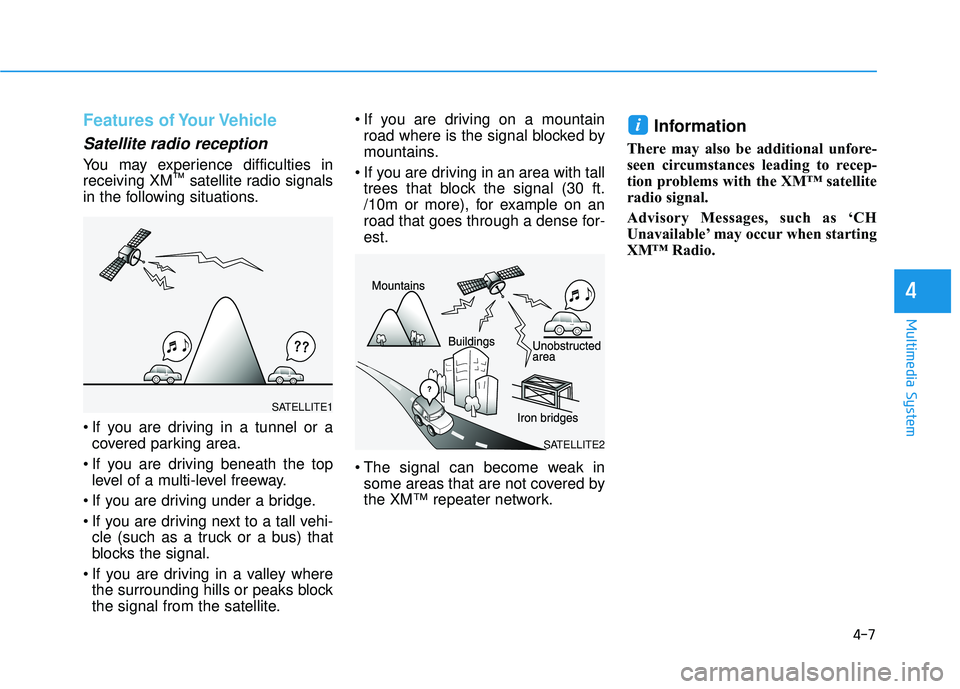
You may experience difficulties in receiving XM™
satellite radio signals
in the following situations.
If you are driving in a tunnel or a covered parking area.
If you are driving beneath the top level of a multi-level freeway.
If you are driving under a bridge.
If you are driving next to a tall vehi- cle (such as a truck or a bus) that
blocks the signal.
If you are driving in a valley where the surrounding hills or peaks block
the signal from the satellite. If you are driving on a mountain
road where is the signal blocked by
mountains.
If you are driving in an area with tall trees that block the signal (30 ft.
/10m or more), for example on an
road that goes through a dense for-est.
The signal can become weak in some areas that are not covered by
the XM™ repeater network.
Information
There may also be additional unfore-
seen circumstances leading to recep-
tion problems with the XM™ satellite
radio signal.
Advisory Messages, such as ‘CH
Unavailable’ may occur when starting
XM™ Radio.
i
SATELLITE2
SATELLITE1
Page 271 of 642
4-8
Multimedia System
Caring for CDs
If the temperature inside the car istoo high, open the car windows to
ventilate before using the system.
It is illegal to copy and use MP3/WMA files without permission.
Use CDs that are created only by
lawful means.
Do not apply volatile agents, such as benzene and thinner, normal
cleaners and magnetic sprays
made for analog disc onto CDs.
To prevent the disc surface from getting damaged, hold CDs by the
edges or the center hole only.
Clean the disc surface with a piece of soft cloth before playback (wipe itfrom the center to the outsideedge).
Do not damage the disc surface or attach pieces of sticky tape or
paper.
Make certain only CDs are inserted into the CD player (Do not insertmore than one CD at a time).
Keep CDs in their cases after use to protect them from scratches or dirt. Depending on the type of CD-
R/CD-RW CDs, certain CDs may
not operate normally according to
the manufacturing companies. In
such circumstances, continued use
may cause malfunctions to youraudio system.
Information - Playing an
Incompatible Copy Protected
Audio CD
Some copy protected CDs, which do
not comply with international audio
CD standards (Red Book), may not
play on your car audio. Please note
that inabilities to properly play a copy
protected CD may indicate that the
CD is defective, not the CD player.
Using a cellular phone or a two- way radio
When a cellular phone is used inside
the vehicle, noise may be produced
from the audio system. This does notmean that something is wrong with
the audio equipment. In such a case,
try to operate mobile devices as far
from the audio equipment as possible.
i
When using a communication
system such as a cellular phone
or a radio set inside the vehicle, a
separate external antenna must
be fitted. When a cellular phoneor a radio set is used with an
internal antenna alone, it may
interfere with the vehicle's electri-
cal system and adversely affect
safe operation of the vehicle.
CAUTION
Do not use a cellular phone
while driving. Stop at a safelocation to use a cellular phoneor set up the hands-free calling
feature.
WARNING
Page 272 of 642
4-9
Multimedia System
4
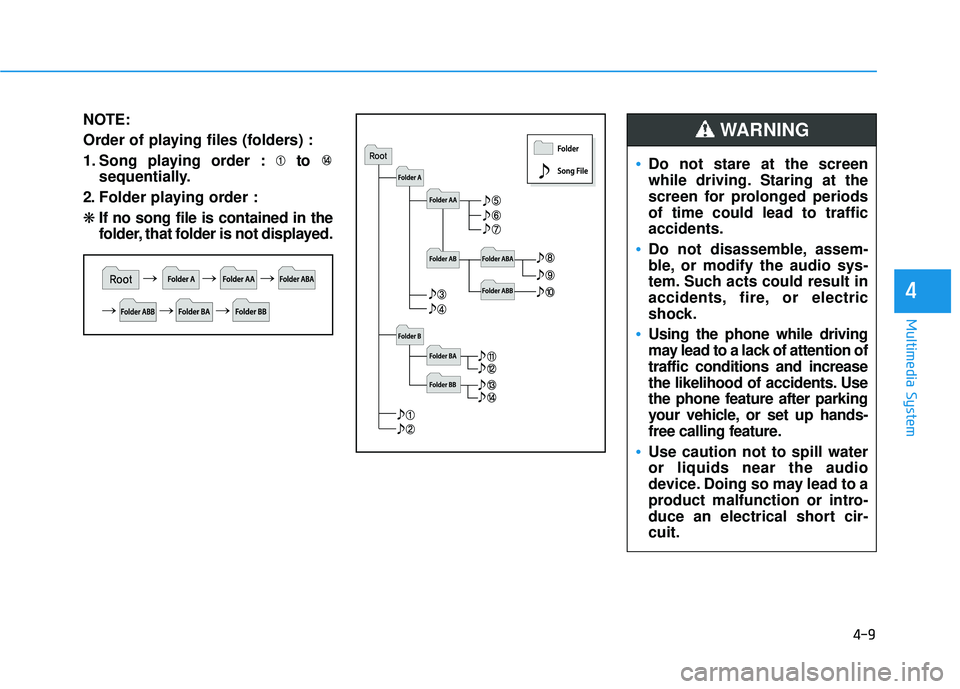
NOTE:
Order of playing files (folders) :
1. Song playing order : to sequentially.
2. Folder playing order : ❋ If no song file is contained in the
folder, that folder is not displayed.
Do not stare at the screen
while driving. Staring at the
screen for prolonged periodsof time could lead to trafficaccidents.
Do not disassemble, assem-
ble, or modify the audio sys-
tem. Such acts could result in
accidents, fire, or electric
shock.
Using the phone while driving
may lead to a lack of attention oftraffic conditions and increase
the likelihood of accidents. Use
the phone feature after parking
your vehicle, or set up hands-
free calling feature.
Use caution not to spill water or liquids near the audio
device. Doing so may lead to a
product malfunction or intro-
duce an electrical short cir-cuit.
WARNING
Page 273 of 642
4-10
Multimedia System
Do not place beverages close tothe audio system. Spilling bever-
ages may lead to system mal-function.
If your audio system is not work- ing properly, have your vehicle
audio system inspected by an
authorized Hyundai dealer.
Placing the audio system within an electromagnetic environment
may result in noise interference.
Use caution to keep chemicals such as perfumes, cosmetics,
sun screen lotions, hand sanitiz-
ers, or air fresheners from con-
tacting any interior components.
Doing so may cause damage ordiscoloration.
Information - Using CDs
This device has been manufactured to be compatible with software
bearing the following logo marks.
Do not clean discs with chemical solutions, such as record sprays,
antistatic sprays, antistatic liquids,
benzene, or thinners.
After using a disc, put the disc back in its original case to prevent disc
scratches.
Hold discs by their edges or within the center hole to prevent damages
to disc surfaces.
Do not introduce foreign substances into the disc insert/eject slot.
Introducing foreign substances
could damage the device interior.
Do not insert two discs simultane- ously.
When using CD-R/CD-RW discs, differences in disc reading and play-
ing times may occur depending on
the disc manufacturer, production
method and the recording method
as used by the user.
(Continued)iNOTICE
Operating the device while driving could lead to acci-
dents due to a lack of atten-
tion to external surroundings.
First park the vehicle before
operating the device.
Adjust the volume to levels
that allow the driver to hear
sounds from outside of the
vehicle. Driving with the audio
volume at a level where exter-
nal sounds cannot be heard
may lead to an accident.
Pay attention to the volume setting when turning the
device on. A sudden output of
extreme volume upon turning
the device on could lead to
hearing impairment. (Adjust
the volume to a suitable level
before turning off the device.)
CAUTION
Page 274 of 642
4-11
Multimedia System
4
(Continued)
Clean fingerprints and dust off thedisc surface (coated side) with a soft
cloth.
The use of CD-R/CD-RW discs attached with labels may result in
disc slot jams or difficulties in disc
removal. Such discs may also result
in noise while playing.
Some CD-R/CD-RW discs may not properly operate depending on the
disc manufacturer, production
method and the record method as
used by the user. If problems persist,
trying using a different CD as con-
tinued use may result in malfunc-
tions.
The performance of this product may differ depending on the CD-
RW Drive Software.
Copy-protected CDs such as S-type CDs may not function in the device.
DATA discs cannot be played.
(However, such discs may still oper-
ate but will do so abnormally.)
(Continued)(Continued)
Do not use abnormally shaped discs
(8cm, heart-shaped, octagon-shaped)
as such discs could lead to malfunc-
tions.
If the disc is straddled on the disc slot without removal for 10 seconds,
the disc will automatically be re-
inserted into the disc player.
Only genuine audio CDs are sup- ported. Other discs may result in
recognition failure (e.g. copy CD-R,
CDs with labels)Information -Using the USB
device
Connect the USB device after turn- ing on the engine. The USB device
may become damaged if it is already
connected when the ignition is
turned on.The USB device may not
operate properly if the car ignition
is turned on or off with the USB
device connected.
Heed caution to static electricity when connecting/disconnecting USB
devices.
Encoded MP3 Players will not be recognized when connected as an
external device.
When connecting an external USB device, the device may not properly
recognize the USB is in some states.
Only products formatted with byte/sectors under 64Kbyte will be
recognized.
This device recognizes USB devices formatted in FAT 12/16/32 file for-
mats. This device does not recognize
files in NTFS file format.
(Continued)i
Page 275 of 642
4-12
Multimedia System
(Continued)
Some USB devices may not be sup- ported due to compatibility issues.
Avoid contact between the USB con- nector with bodily parts or foreign
objects.
Repeated connecting/disconnecting of USB devices within short periods
of time may result in product mal-
function.
A strange noise may occur when dis- connecting the USB.
Make sure to connect/disconnect external USB devices with the audio
power turned off.
The amount of time required to rec- ognize the USB device may differ
depending on the type, size or file
formats stored in the USB. Such dif-
ferences in time are not indications
of malfunctions.
The device only supports USB devices used to play music files.
USB images and videos are not sup- ported.
(Continued)(Continued)
Do not use the USB I/F to charge batteries or USB accessories that
generate heat. Such acts may lead to
worsened performance or damage
to the device.
The device may not recognize the USB device if separately purchased
USB hubs and extension cables are
being used. Connect the USB direct-
ly with the multimedia terminal of
the vehicle.
When using mass storage USB devices with separate logical drives,
only files saved to the root drive can
be played.
Files may not properly operate if application programs are installed
to the USBs.
The device may not operate normal- ly if MP3 Players, cellular phones,
digital cameras, or other electronic
devices (USB devices not recognized
as portable disk drives) are connect-
ed with the device.
(Continued)(Continued)
Charging through the USB may not
work for some mobile devices.
The device may not support normal operation when using a USB memo-
ry type besides (Metal Cover Type)
USB Memory.
The device may not support normal operation when using formats such
as HDD Type, CF, or SD Memory.
The device will not support files locked by DRM (Digital Rights
Management.)
USB memory sticks used by con- necting an Adaptor (SD Type or CF
Type) may not be properly recog-
nized.
The device may not operate proper- ly when using USB HDDs or USBs
subject to connection failures
caused by vehicle vibrations. (e.g. i-
stick type)
(Continued)
Page 276 of 642
4-13
Multimedia System
4
(Continued)
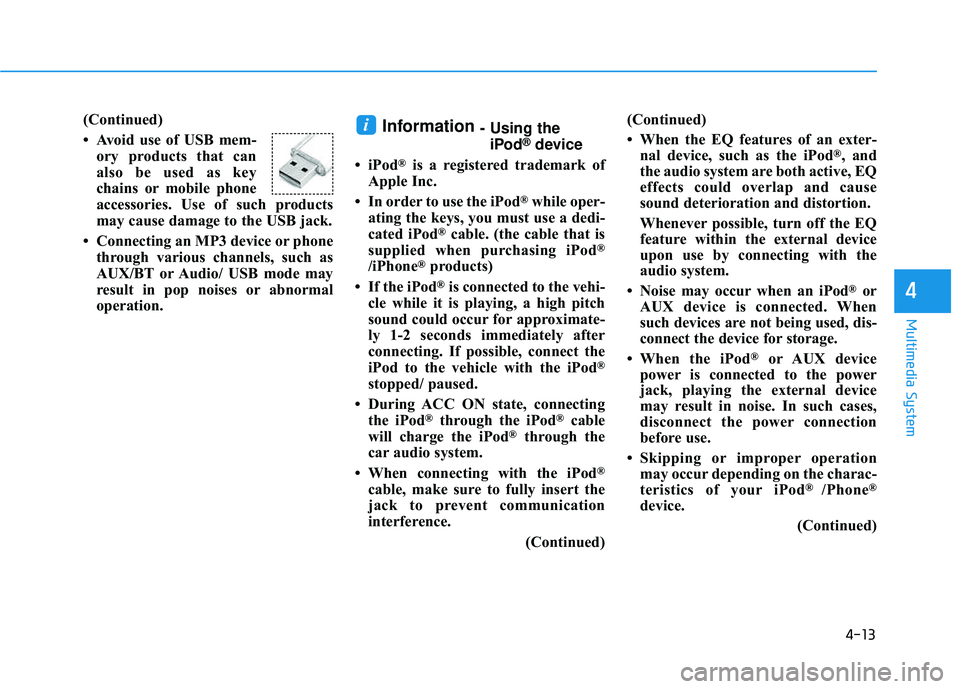
Avoid use of USB mem-ory products that can
also be used as key
chains or mobile phone
accessories. Use of such products
may cause damage to the USB jack.
Connecting an MP3 device or phone through various channels, such as
AUX/BT or Audio/ USB mode may
result in pop noises or abnormal
operation.Information - Using theiPod®device
iPod
®is a registered trademark of
Apple Inc.
In order to use the iPod
®while oper-
ating the keys, you must use a dedi-
cated iPod
®cable. (the cable that is
supplied when purchasing iPod®
/iPhone®products)
If the iPod
®is connected to the vehi-
cle while it is playing, a high pitch
sound could occur for approximate-
ly 1-2 seconds immediately after
connecting. If possible, connect the
iPod to the vehicle with the iPod
®
stopped/ paused.
During ACC ON state, connecting the iPod
®through the iPod®cable
will charge the iPod®through the
car audio system.
When connecting with the iPod
®
cable, make sure to fully insert the
jack to prevent communication
interference.
(Continued)(Continued)
When the EQ features of an exter-
nal device, such as the iPod
®, and
the audio system are both active, EQ
effects could overlap and cause
sound deterioration and distortion.
Whenever possible, turn off the EQ
feature within the external device
upon use by connecting with the
audio system.
Noise may occur when an iPod
®or
AUX device is connected. When
such devices are not being used, dis-
connect the device for storage.
When the iPod
®or AUX device
power is connected to the power
jack, playing the external device
may result in noise. In such cases,
disconnect the power connection
before use.
Skipping or improper operation may occur depending on the charac-
teristics of your iPod
® /Phone®
device.
(Continued)
i
Page 277 of 642
4-14
Multimedia System
(Continued)
If your iPhone
®is connected to both
the Bluetooth®Wireless Technology
and USB, the sound may not be
properly played. In your iPhone
®,
select the Dock c onnector or
Bluetooth
®Wireless Technology to
change the sound output (source).
iPod mode cannot be operated when the iPod
®cannot be recognized due
to versions that do not support com-
munication protocols.
For fifth generation iPod
®Nano
devices, the iPod®may not be recog-
nized when the battery level is low.
Please charge the iPod
®for use.
Search/play orders shown within the iPod
®device may differ with the
orders shown within the audio sys-
tem.
If the iPod
®malfunctions due to an
iPod®device defect, reset the iPod®
and try again. (To learn more, refer to
your iPod®manual)
(Continued) (Continued)
Some iPod
®s may not sync with the
System depending on its version. If
the Media is removed before the
Media is recognized, then the sys-
tem may not properly restore the
previously operated mode. (iPad
®
charging is not supported.)
Information - Using the AUX
device
If an external device connector is connected with the AUX terminal,
then AUX mode will automatically
operate. Once the connector is dis-
connected, the previous mode will
be restored.
AUX mode can be used only when an external audio player (cam-
corder, in-car DVD player, etc.) has
been connected.
The AUX volume can be controlled separately from other audio modes.
Connecting a connector jack to the AUX terminal without an external
device will convert the system to
AUX mode, but only output noise.
When an external device is not
being used, also remove the connec-
tor jack.
When the external device power is connected to the power jack, play-
ing the external device may output
noise. In such cases, disconnect the
power connection before use.
Fully insert the AUX cable to the AUX jack upon use.i