Page 382 of 642
4-119
Multimedia System
4
Clock/Calendar Setting
Clock Settings
Press the key Select [Clock
/Calendar] Select [Clock Settings]
Use the , buttons to set the
Hour, Minutes and AM/PM setting.
Press and hold the key
(over 0.8 seconds) to display the
Clock /Calendar screen.
Calendar Settings
Press the key Select
[Clock/Calendar] Select [CalendarSettings]
Use the , buttons to set the
Day, Month and Year setting.
Time Format
Press the key Select
[Clock/Calendar] Select [Time Format]
This feature is used to change the
clock format between 12hr or 24hr.SETUPSETUP
CLOCK
NOTICE
SETUP
Page 383 of 642
4-120
Multimedia System
Clock Display
Press the key Select [Clock
/Calendar] Select [Clock Display
(Power off)]
This feature is used to display a clock on the screen when the audio sys-
tem is turned off.
System Setting
Memory Information
Press the key Select
[System] Select [Memory Information]
This feature displays information
related to system memory.
1) Using : Displays capacity currentlyin use
2) Capacity : Displays total capacity
Prompt Feedback
Press the key Select
[System] Select [Prompt Feedback]
This feature is used to select the
desired prompt feedback option from
ON and OFF.
1) ON : When using voice recogni- tion, provides detailed guidance prompts
2) OFF : When using voice recogni- tion, omits some guidancepromptsSETUP
SETUP
SETUP
Page 384 of 642
![HYUNDAI TUCSON LIMITED 2017 Owners Manual 4-121
Multimedia System
4
Language
Press the key Select
[System] Select [Language] ❈This feature is used to change the
system and voice recognition lan-
guage.
❈ if the language is changed, th](/manual-img/35/56197/w960_56197-383.png "HYUNDAI TUCSON LIMITED 2017 Owners Manual 4-121
Multimedia System
4
Language
Press the key Select
[System] Select [Language] ❈This feature is used to change the
system and voice recognition lan-
guage.
❈ if the language is changed, th")
4-121
Multimedia System
4
Language
Press the key Select
[System] Select [Language] ❈This feature is used to change the
system and voice recognition lan-
guage.
❈ if the language is changed, the
system will restart and apply the
selected language.
RReeaarr VV iiee ww CC aamm eerraa
The system has been equipped
with a rear view camera for ease
and convenience by allowing the
driver to view the rear of the vehi-
cle through the A/V display.
The rear view camera will automat- ically operate when the ignition key
is turned ON and the shift lever is
set to R (Reverse).
The rear view camera will automat- ically stop operating when the gear
shift lever is shifted out of R
(reverse) into a different gear or
into the P (Park) position.SETUP
The rear view camera has been equipped with an optical lens to
provide a wider field of view
when viewing the rear of the
vehicle. Objects may appear
distorted when viewed through
the A/V display. Use caution
when backing up your vehicle.
For added safety, directly check
the rear view and left and right
sides by turning your head
when backing up your vehicle.
CAUTION
Page 584 of 642
7-71
7
Maintenance
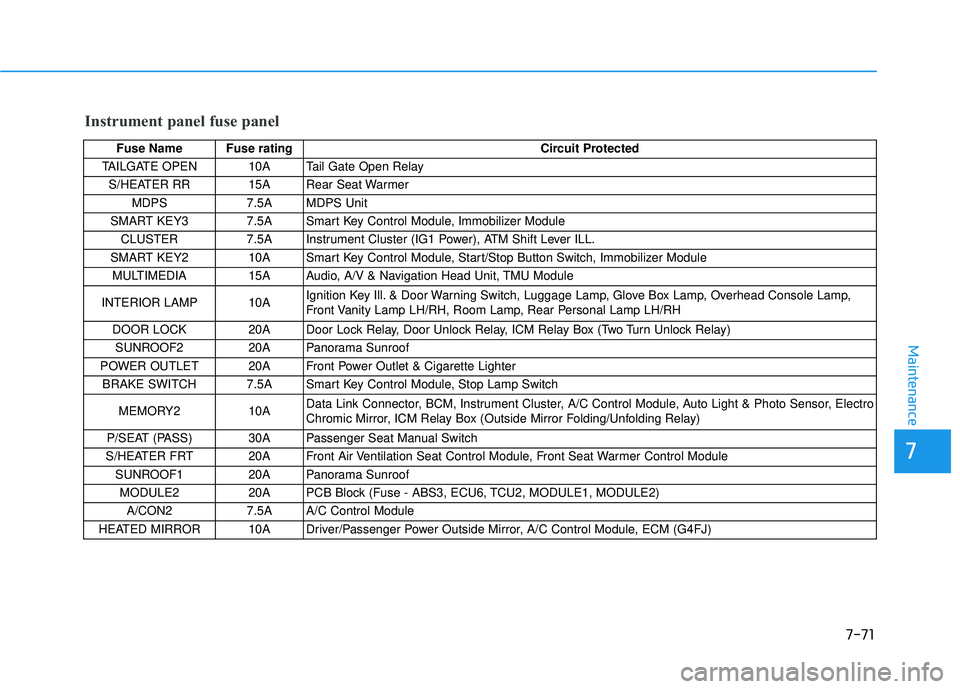
Instrument panel fuse panel
Fuse Name Fuse ratingCircuit Protected
TAILGATE OPEN 10A Tail Gate Open Relay
S/HEATER RR 15A Rear Seat Warmer MDPS 7.5A MDPS Unit
SMART KEY3 7.5A Smart Key Control Module, Immobilizer Module
CLUSTER 7.5A Instrument Cluster (IG1 Power), ATM Shift Lever ILL.
SMART KEY2 10A Smart Key Control Module, Start/Stop Button Switch, Immobilizer Module MULTIMEDIA 15A Audio, A/V & Navigation Head Unit, TMU Module
INTERIOR LAMP 10A Ignition Key Ill. & Door Warning Switch, Luggage Lamp, Glove Box Lamp, Overhead Console Lamp,
Front Vanity Lamp LH/RH, Room Lamp, Rear Personal Lamp LH/RH
DOOR LOCK 20A Door Lock Relay, Door Unlock Relay, ICM Relay Box (Two Turn Unlock Relay) SUNROOF2 20A Panorama Sunroof
POWER OUTLET 20A Front Power Outlet & Cigarette Lighter BRAKE SWITCH 7.5A Smart Key Control Module, Stop Lamp Switch
MEMORY2 10A Data Link Connector, BCM, Instrument Cluster, A/C Control Module, Auto Light & Photo Sensor, Electro
Chromic Mirror, ICM Relay Box (Outside Mirror Folding/Unfolding Relay)
P/SEAT (PASS) 30A Passenger Seat Manual Switch
S/HEATER FRT 20A Front Air Ventilation Seat Control Module, Front Seat Warmer Control Module
SUNROOF1 20A Panorama Sunroof
MODULE2 20A PCB Block (Fuse - ABS3, ECU6, TCU2, MODULE1, MODULE2) A/CON2 7.5A A/C Control Module
HEATED MIRROR 10A Driver/Passenger Power Outside Mirror, A/C Control Module, ECM (G4FJ)
Page 587 of 642
7-74
Maintenance
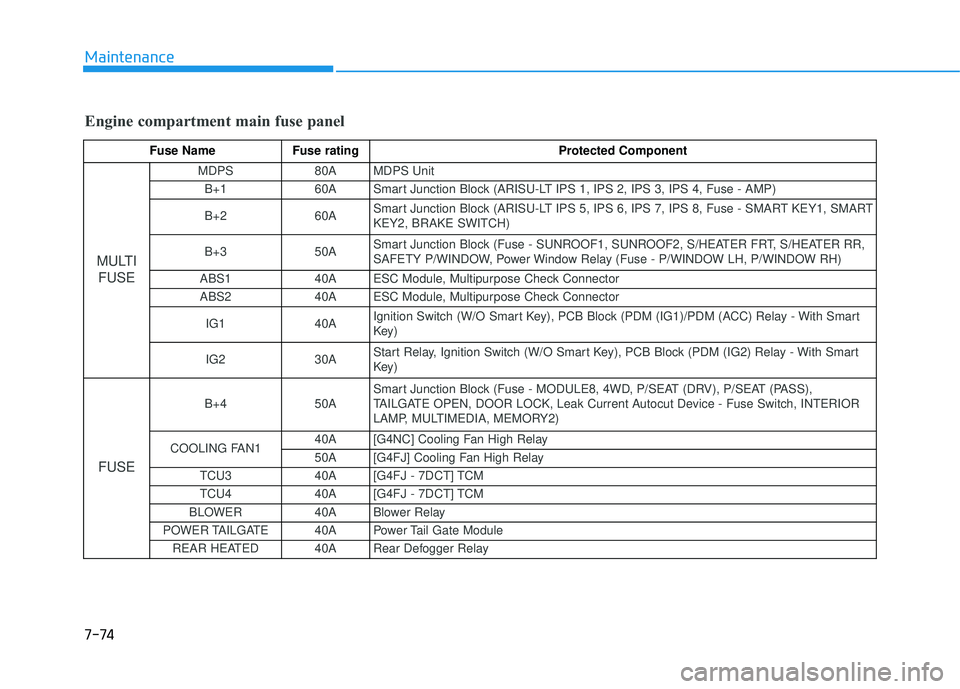
Engine compartment main fuse panel
Fuse Name Fuse rating Protected Component
MULTIFUSE
MDPS 80A MDPS Unit
B+1 60A Smart Junction Block (ARISU-LT IPS 1, IPS 2, IPS 3, IPS 4, Fuse - AMP) B+2 60A Smart Junction Block (ARISU-LT IPS 5, IPS 6, IPS 7, IPS 8, Fuse - SMART KEY1, SMART KEY2, BRAKE SWITCH)
B+3 50A Smart Junction Block (Fuse - SUNROOF1, SUNROOF2, S/HEATER FRT, S/HEATER RR,
SAFETY P/WINDOW, Power Window Relay (Fuse - P/WINDOW LH, P/WINDOW RH)
ABS1 40A ESC Module, Multipurpose Check Connector
ABS2 40A ESC Module, Multipurpose Check Connector
IG1 40A Ignition Switch (W/O Smart Key), PCB Block (PDM (IG1)/PDM (ACC) Relay - With Smart
Key)
IG2 30A Start Relay, Ignition Switch (W/O Smart Key), PCB Block (PDM (IG2) Relay - With Smart
Key)
FUSE
B+4 50A Smart Junction Block (Fuse - MODULE8, 4WD, P/SEAT (DRV), P/SEAT (PASS),
TAILGATE OPEN, DOOR LOCK, Leak Current Autocut Device - Fuse Switch, INTERIOR
LAMP, MULTIMEDIA, MEMORY2)
COOLING FAN1 40A [G4NC] Cooling Fan High Relay
50A [G4FJ] Cooling Fan High Relay
TCU3 40A [G4FJ - 7DCT] TCM
TCU4 40A [G4FJ - 7DCT] TCM
BLOWER 40A Blower Relay
POWER TAILGATE 40A Power Tail Gate Module REAR HEATED 40A Rear Defogger Relay
Page 639 of 642
I-8
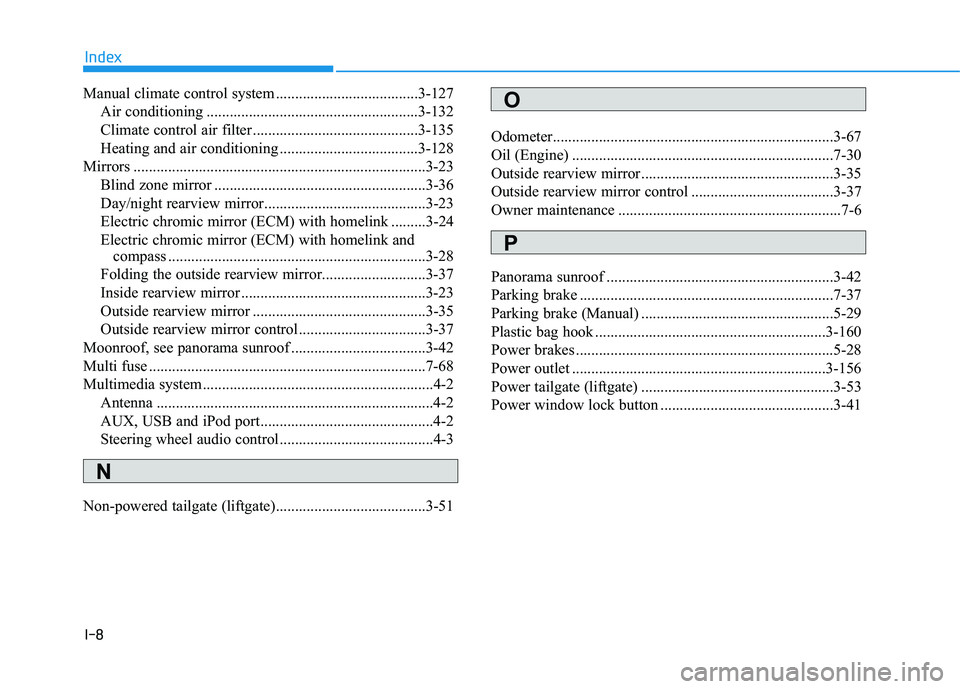
Manual climate control system .....................................3-127Air conditioning .......................................................3-132
Climate control air filter ...........................................3-135
Heating and air conditioning ....................................3-128
Mirrors ............................................................................3-23 Blind zone mirror .......................................................3-36
Day/night rearview mirror..........................................3-23
Electric chromic mirror (ECM) with homelink .........3-24
Electric chromic mirror (ECM) with homelink and compass ...................................................................3-28
Folding the outside rearview mirror...........................3-37
Inside rearview mirror ................................................3-23
Outside rearview mirror .............................................3-35
Outside rearview mirror control .................................3-37
Moonroof, see panorama sunroof ...................................3-42
Multi fuse ........................................................................7-68
Multimedia system............................................................4-2 Antenna ........................................................................4-2
AUX, USB and iPod port.............................................4-2
Steering wheel audio control........................................4-3
Non-powered tailgate (liftgate).......................................3-51 Odometer.........................................................................3-67
Oil (Engine) ....................................................................7-30
Outside rearview mirror..................................................3-35
Outside rearview mirror control .....................................3-37
Owner maintenance ..........................................................7-6
Panorama sunroof ...........................................................3-42
Parking brake ..................................................................7-37
Parking brake (Manual) ..................................................5-29
Plastic bag hook ............................................................3-160
Power brakes ...................................................................5-28
Power outlet ..................................................................3-156
Power tailgate (liftgate) ..................................................3-53
Power window lock button .............................................3-41
Index
O
P
N
![HYUNDAI TUCSON LIMITED 2017 Owners Manual 4-119
Multimedia System
4
Clock/Calendar Setting
Clock Settings
Press the key Select [Clock
/Calendar] Select [Clock Settings]
Use the , buttons to set the
Hour, Minutes and AM/PM setting.
Pres](/manual-img/35/56197/w960_56197-381.png "HYUNDAI TUCSON LIMITED 2017 Owners Manual 4-119
Multimedia System
4
Clock/Calendar Setting
Clock Settings
Press the key Select [Clock
/Calendar] Select [Clock Settings]
Use the , buttons to set the
Hour, Minutes and AM/PM setting.
Pres")
![HYUNDAI TUCSON LIMITED 2017 Owners Manual 4-120
Multimedia System
Clock Display
Press the key Select [Clock
/Calendar] Select [Clock Display
(Power off)]
This feature is used to display a clock on the screen when the audio sys-
tem is turn](/manual-img/35/56197/w960_56197-382.png "HYUNDAI TUCSON LIMITED 2017 Owners Manual 4-120
Multimedia System
Clock Display
Press the key Select [Clock
/Calendar] Select [Clock Display
(Power off)]
This feature is used to display a clock on the screen when the audio sys-
tem is turn")