2017 Hyundai Sonata drive mode
[x] Cancel search: drive modePage 16 of 563

I
IN
N S
ST
T R
R U
U M
M E
EN
N T
T
P
P A
A N
N E
EL
L
O
O V
VE
ER
R V
V I
IE
E W
W
1-5
Your vehicle at a glance
1
The actual shape may differ from the illustration. 1. Light control/Turn signals ..............3-109
2. Steering wheel audio controls*/
Bluetooth®wireless technology
hands-free controls* ..........................4-3
3. Instrument cluster ..........................3-63
4. Horn ................................................3-24
5. Driver’s front air bag........................2-47
6. Wiper/Washer................................3-122
7. Cruise controls* ..............................5-50
8. Engine Start/Stop button/ Key ignition switch ............................5-6
9. Automatic transmission/
Dual clutch
transmission shifter ....................5-14, 5-18
10. Drive mode integrated control system ..........................................5-48
11. Rear parking assist system ........3-124
12. EPB (Electronic Parking Brake)* ..5-31
13. AUTO HOLD ................................5-37
14. Audio system/Navigation system ....4-4
15. Digital Clock ................................3-160
16.Climate control system ....3-129, 3-139
17. Power outlet ................................3-158
18. AUX, USB and iPod
®port ..............4-2
19. Passenger’s front air bag ..............2-47
20. Glove box ....................................3-155
* : if equipped
OLF014004N
Page 44 of 563
2-27
Safety system of your vehicle
2
When the seat belt is fully extended
from the retractor to allow the installa-
tion of a child restraint system, the
seat belt operation changes to allow
the belt to retract, but not to extend
(Automatic Locking Retractor Type).
Refer to the “Using a Child Restraint
System” section in this chapter.
Although the seat belt retractor
provides the same level of protec-
tion for seated passengers in
either emergency or automatic
locking modes, the emergency
locking mode allows seated pas-
sengers to move freely in their
seat while keeping some tension
on the belt. During a collision or
sudden stop, the retractor auto-
matically locks the belt to help
restrain your body.
To deactivate the automatic lock-
ing mode, allow the unbuckled
seat belt to fully retract.
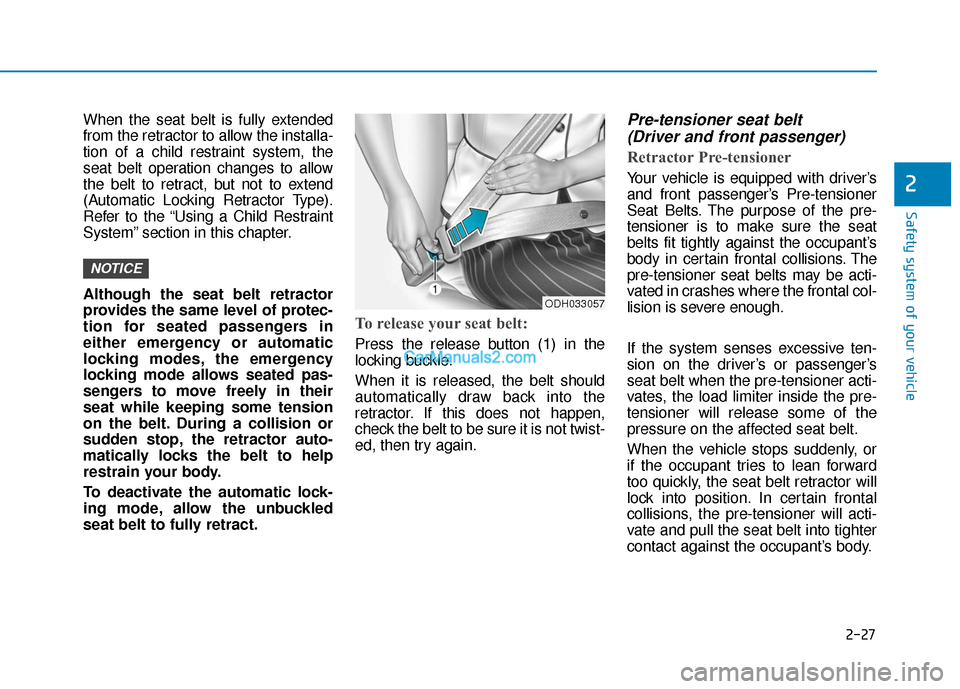
To release your seat belt:
Press the release button (1) in the
locking buckle.
When it is released, the belt should
automatically draw back into the
retractor. If this does not happen,
check the belt to be sure it is not twist-
ed, then try again.
Pre-tensioner seat belt (Driver and front passenger)
Retractor Pre-tensioner
Your vehicle is equipped with driver’s
and front passenger’s Pre-tensioner
Seat Belts. The purpose of the pre-
tensioner is to make sure the seat
belts fit tightly against the occupant’s
body in certain frontal collisions. The
pre-tensioner seat belts may be acti-
vated in crashes where the frontal col-
lision is severe enough.
If the system senses excessive ten-
sion on the driver’s or passenger’s
seat belt when the pre-tensioner acti-
vates, the load limiter inside the pre-
tensioner will release some of the
pressure on the affected seat belt.
When the vehicle stops suddenly, or
if the occupant tries to lean forward
too quickly, the seat belt retractor will
lock into position. In certain frontal
collisions, the pre-tensioner will acti-
vate and pull the seat belt into tighter
contact against the occupant’s body.
NOTICE
ODH033057
Page 64 of 563

2-47
Safety system of your vehicle
2
Where Are the Air Bags?
Driver’s and passenger’s frontair bags
Your vehicle is equipped with a
Advanced Supplemental Restraint
System (SRS) and lap/shoulder belts
at both the driver and passenger
seating positions.
The SRS consists of air bags which
are located in the center of the steer-
ing wheel, in the driver’s side lower
crash pad below the steering wheel
column and the passenger’s side
front panel pad above the glove box.
The air bags are labeled with the let-
ters “AIR BAG” embossed on the pad
covers. The purpose of the SRS is to provide
the vehicle’s driver and front passen-
gers with additional protection than
that offered by the seat belt system
alone. The SRS uses sensors to
gather information about the driver’s
and front passenger’s seat belt
usage and impact severity.
The seat belt buckle sensors deter-
mine if the driver and front passen-
ger’s seat belts are fastened. These
sensors provide the ability to control
the SRS deployment based on
whether or not the seat belts are fas-
tened, and how severe the impact is.
The advanced SRS offers the ability
to control the air bag inflation within
two levels. A first stage level is pro-
vided for moderate-severity impacts.
A second stage level is provided for
more severe impacts.
According to the impact severity, and
seat belt usage, the SRS Control
Module (SRSCM) controls the air
bag inflation. Failure to properly wear
seat belts can increase the risk or
severity of injury in an accident.
OLF034039
OLF034040N
OLF034041
■Driver’s knee air bag
■Driver’s front air bag
■Passenger’s front air bag
Page 87 of 563

LCD Display ...........................................................3-75
LCD Modes ........................................................................\
3-75
Trip Computer Mode.......................................................3-76
Turn By Turn (TBT) Mode ............................................3-77
SCC/LDWS Mode .............................................................3-77
A/V Mode........................................................................\
..3-77
Information Mode ...........................................................3-78
User Settings Mode ........................................................3-80
Warning Messages..........................................................3-85
Trip computer .......................................................3-92
Trip A/B ........................................................................\
.....3-93
Fuel Economy...................................................................3-94
Digital Speedometer .......................................................3-96
Warning and indicator lights ..............................3-97
Warning Lights .................................................................3-97
Indicator Lights ..............................................................3-104
Light .....................................................................3-1\
09
Exterior Lights ...............................................................3-109
Smart High Beam ..........................................................3-111
Welcome System ...........................................................3-117
Interior Lights ................................................................3-118
Wipers and washers ..........................................3-122
Windshield Wipers ........................................................3-122
Windshield Washers .....................................................3-123
Driver assist system ..........................................3-124
Rear View Camera ........................................................3-124
Rear Parking Assist System .......................................3-125
Defroster .............................................................3-128
Rear Window Defroster ..............................................3-128
Manual climate control system........................3-129
Heating and Air Conditioning .....................................3-130
System Operation .........................................................3-135
System Maintenance....................................................3-137
Automatic climate control system ...................3-139
Automatic Heating and Air Conditioning.................3-140
Manual heating and Air Conditioning ......................3-141
System Operation .........................................................3-147
System Maintenance....................................................3-149
Windshield defrosting and defogging...............3-151
Manual Climate Control System ................................3-151
Automatic Climate Control System ...........................3-152
Climate control additional features ...................3-154
Automatic Ventilation ...................................................3-154
Sunroof Inside Air Recirculation ...............................3-154
Storage compartment ........................................3-155
Center Console Storage ..............................................3-155
Glove Box ........................................................................\
3-155
Sunglass Holder.............................................................3-156
Multi box ........................................................................\
.3-156
3
Page 90 of 563

3-5
Convenient features of your vehicle
Unlocking
To unlock:
1.Press the Door Unlock button (2)on the remote key.
2.The driver’s door will unlock. The hazard warning lights will blink two
times.
If you press the Door Unlock button
again within four seconds, then all
the doors will unlock.
Information
After unlocking the doors, the doors
will lock automatically after 30 sec-
onds unless a door is opened.
Trunk unlocking
To unlock:
1. Press the Trunk Unlock button (3) on the remote key for more than
one second.
2. The hazard warning lights will blink two times.
Once the trunk is opened and then
closed, the trunk will lock automati-
cally.
Information
• After unlocking the trunk, the trunk will lock automatically.
• The word "HOLD" is written on the button to inform you that you must
press and hold the button for more
than one second.
Panic button
Press the Panic button (4) for more
than one second. The horn sounds
and hazard warning lights flash for
about 30 seconds.
To cancel the panic mode, press any
button on the remote key.
Start-up
For more information, refer to the
“Key Ignition Switch” section in chap-
ter 5.
To prevent damaging the remote
key:
• Keep the remote key away fromwater or any liquid and fire. If the
inside of the remote key gets
damp (due to drinks or mois-
ture), or is heated, internal cir-
cuit may malfunction, excluding
the car from the warranty.
Avoid dropping or throwing the remote key.
Protect the remote key from extreme temperatures.
NOTICE
ii
3
Page 102 of 563

3-17
Convenient features of your vehicle
3
Auto Door Lock/Unlock Features
Impact sensing door unlocksystem
All doors will be automatically
unlocked when an impact causes the
air bags to deploy.
Speed sensing door lock system
All doors will be automatically locked
when vehicle speed exceeds 9 mph
(15 km/h).
All of the doors will be automatically
unlocked after the engine is turned off.
Shift lever auto door lock
All doors will be automatically locked
when shifting the shift lever out of P
(Park) with the engine running.
You can activate or deactivate the
Auto Door Lock/Unlock features from
the User Settings Mode on the LCD
display.
For more information, refer to the
"LCD Display" section in this
chapter.
Do not pull the inner door han-
dle of driver's (or passenger's)
door while the vehicle is mov-
ing.
WARNING
Always secure your vehicle.
Leaving your vehicle unlocked
increases the potential risk to
you or others from someone
hiding in your vehicle.
To secure your vehicle, while
depressing the brake, move the
shift lever to the P (Park) posi-
tion, engage the parking brake,
and place the ignition switch in
the LOCK/OFF position, close
all windows, lock all doors, and
always take the key with you.
WARNING
If people must spend a longer
time in the vehicle while it is
very hot or cold outside, there
is rick of injuries or danger to
life. Do not lock the vehicle from
the outside when there are peo-
ple in it.
WARNING
Opening a door when some-
thing is approaching may cause
damage or injury. Be careful
when opening doors and watch
for vehicles, motorcycles, bicy-
cles or pedestrians approach-
ing the vehicle in the path of the
door.
CAUTION
Page 106 of 563
3-21
Convenient features of your vehicle
3
Recalling positions from memory
1. Check that the shift lever is in P(Park) while the ignition switch is
in the ON position.
2. Press the desired memory button (1 or 2). The system will beep once,
and then the driver’s seat position,
side view mirror position and instru-
ment panel illumination intensity
will automatically adjust to the
stored positions.
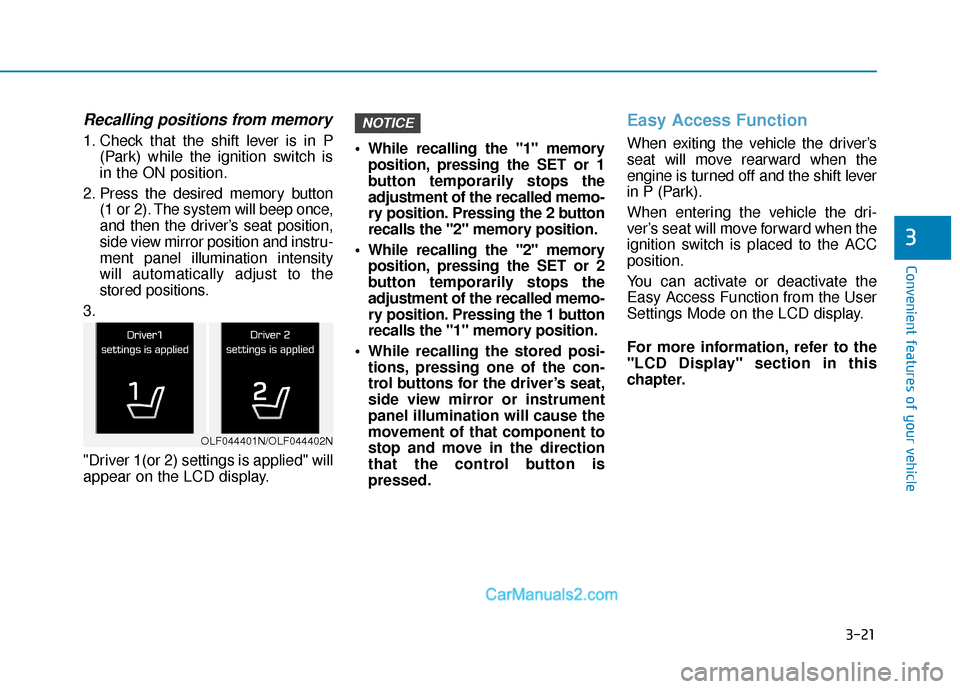
3.
"Driver 1(or 2) settings is applied" will
appear on the LCD display. While recalling the "1" memory
position, pressing the SET or 1
button temporarily stops the
adjustment of the recalled memo-
ry position. Pressing the 2 button
recalls the "2" memory position.
While recalling the "2" memory position, pressing the SET or 2
button temporarily stops the
adjustment of the recalled memo-
ry position. Pressing the 1 button
recalls the "1" memory position.
While recalling the stored posi- tions, pressing one of the con-
trol buttons for the driver’s seat,
side view mirror or instrument
panel illumination will cause the
movement of that component to
stop and move in the direction
that the control button is
pressed.
Easy Access Function
When exiting the vehicle the driver’s
seat will move rearward when the
engine is turned off and the shift lever
in P (Park).
When entering the vehicle the dri-
ver’s seat will move forward when the
ignition switch is placed to the ACC
position.
You can activate or deactivate the
Easy Access Function from the User
Settings Mode on the LCD display.
For more information, refer to the
"LCD Display" section in this
chapter.
NOTICE
OLF044401N/OLF044402N
Page 158 of 563
3-73
Convenient features of your vehicle
3
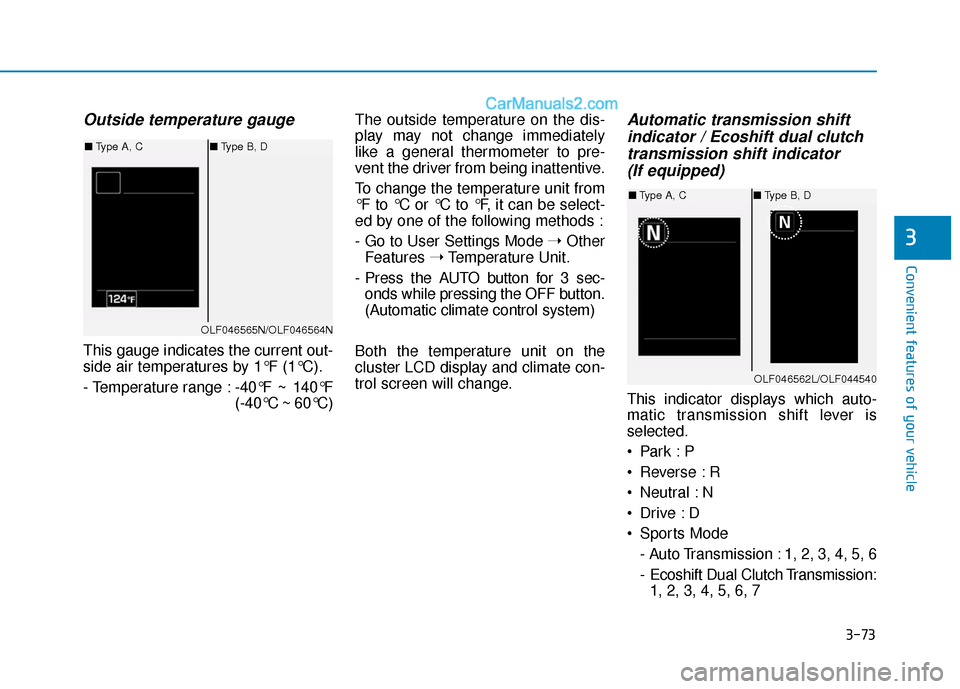
Outside temperature gauge
This gauge indicates the current out-
side air temperatures by 1°F (1°C).
- Temperature range :-40°F ~ 140°F
(-40°C ~ 60°C)The outside temperature on the dis-
play may not change immediately
like a general thermometer to pre-
vent the driver from being inattentive.
To change the temperature unit from
°F to °C or °C to °F, it can be select-
ed by one of the following methods :
- Go to User Settings Mode
➝Other
Features ➝Temperature Unit.
- Press the AUTO button for 3 sec- onds while pressing the OFF button.
(Automatic climate control system)
Both the temperature unit on the
cluster LCD display and climate con-
trol screen will change.
Automatic transmission shift indicator / Ecoshift dual clutchtransmission shift indicator (If equipped)
This indicator displays which auto-
matic transmission shift lever is
selected.
Reverse : R
Neutral : N
Sports Mode
- Auto Transmission : 1, 2, 3, 4, 5, 6
- Ecoshift Dual Clutch Transmission:1, 2, 3, 4, 5, 6, 7
OLF046565N/OLF046564N
■ Type A, C ■Type B, D
OLF046562L/OLF044540
■Type A, C ■Type B, D