2017 Hyundai Santa Fe section 7
[x] Cancel search: section 7Page 240 of 569
4137
Features of your vehicle
✽
✽NOTICE
If you want to defrost and defog the
front windshield, refer to
“Windshield defrosting and defog-
ging” in this section.
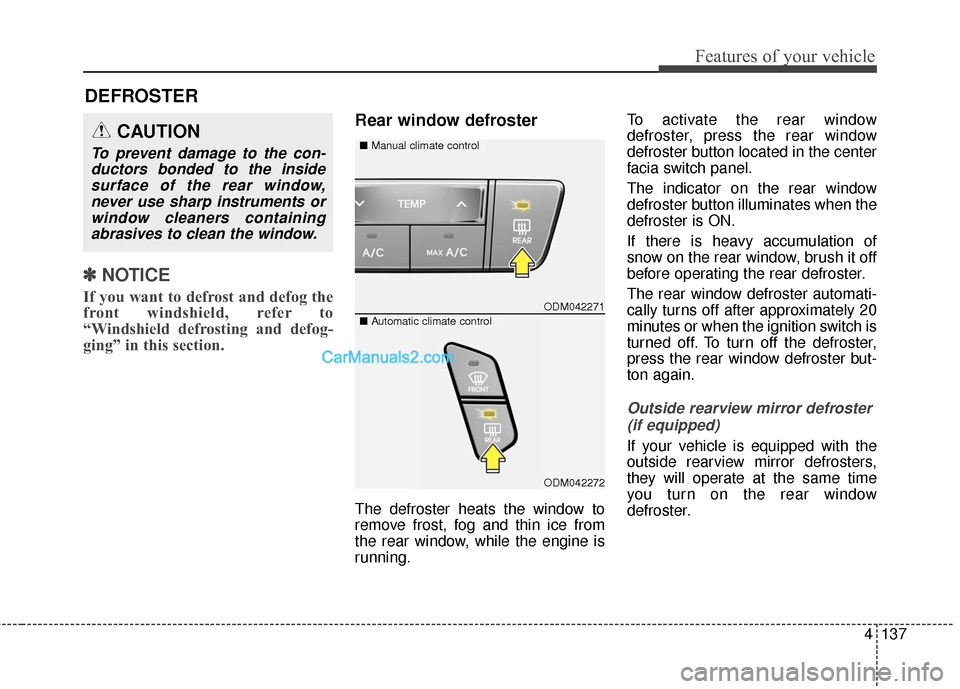
Rear window defroster
The defroster heats the window to
remove frost, fog and thin ice from
the rear window, while the engine is
running. To activate the rear window
defroster, press the rear window
defroster button located in the center
facia switch panel.
The indicator on the rear window
defroster button illuminates when the
defroster is ON.
If there is heavy accumulation of
snow on the rear window, brush it off
before operating the rear defroster.
The rear window defroster automati-
cally turns off after approximately 20
minutes or when the ignition switch is
turned off. To turn off the defroster,
press the rear window defroster but-
ton again.
Outside rearview mirror defroster
(if equipped)
If your vehicle is equipped with the
outside rearview mirror defrosters,
they will operate at the same time
you turn on the rear window
defroster.
DEFROSTER
ODM042271
■ Manual climate controlCAUTION
To prevent damage to the con-
ductors bonded to the insidesurface of the rear window,never use sharp instruments orwindow cleaners containingabrasives to clean the window.
■ Automatic climate control
ODM042272
Page 281 of 569

Features of your vehicle
178
4
MODE (1)
Press the button to change audio
source.
SEEK/PRESET ( / ) (2)
The SEEK/PRESET button has dif-
ferent functions based on the system
mode.
For the following functions the button
should be pressed for 0.8 second or
more.
RADIO mode
It will function as the AUTO SEEK
select button.
CD/USB/iPod
®mode
It will function as the FF/REW button.
If the SEEK/PRESET button is
pressed for less than 0.8 second, it
will work as follows in each mode. RADIO mode
It will function as the PRESET STA-
TION buttons.
CD/USB/iPod
®mode
It will function as TRACK UP/DOWN
button.
VOLUME (VOL+/-) (3)
• Push the lever upward (+) to increase the volume.
Push the lever downward (-) to decrease the volume.
MUTE (4)
Press the button to mute the sound.
Press the button to turn off themicrophone during a telephone call.
Detailed information for audio control
buttons are described in the following
pages in this section.
Audio / Video / Navigation sys-
tem (AVN) (if equipped)
Detailed information for the AVN sys-
tem is described in a separately sup-
plied manual.
Page 296 of 569
Driving your vehicle
45
Before entering vehicle
• Be sure that all windows, outsidemirror(s), and outside lights are
clean.
Check the condition of the tires.
Check under the vehicle for any sign of leaks.
Be sure there are no obstacles behind you if you intend to back up.
Necessary inspections
Fluid levels, such as engine oil,
engine coolant, brake fluid, and
washer fluid should be checked on a
regular basis, with the exact interval
depending on the fluid. Further
details are provided in Section 7,
"Maintenance".
BEFORE DRIVING
CALIFORNIA PROPO-
SITION 65 WARNING
Engine exhaust and a wide vari-
ety of automobile components
and parts, including compo-
nents found in the interior fur-
nishings in a vehicle, contain or
emit chemicals known to the
State of California to cause can-
cer and birth defects and repro-
ductive harm. In addition, cer-
tain fluids contained in vehicles
and certain products of compo-
nent wear contain or emit chem-
icals known to the State of
California to cause cancer and
birth defects or other reproduc-
tive harm.
WARNING
Driving while distracted can
result in a loss of vehicle con-
trol, that may lead to an acci-
dent, severe personal injury,
and death. The driver’s primary
responsibility is in the safe and
legal operation of a vehicle, and
use of any handheld devices,
other equipment, or vehicle sys-
tems which take the driver’s
eyes, attention and focus away
from the safe operation of a
vehicle or which are not permis-
sible by law should never be
used during operation of the
vehicle.
Page 297 of 569
55
Driving your vehicle
Before starting
Close and lock all doors.
Position the seat so that all con-trols are easily reached.
Adjust the inside and side view mir- rors.
Be sure that all lights work.
Check all gauges.
Check the operation of warning lights when the ignition switch is
turned to the ON position.
Release the parking brake and make sure the brake warning light
goes out.
For safe operation, be sure you are
familiar with your vehicle and its
equipment.WARNING- Driving under
the influence of alcohol or
drugs
Drinking and driving is danger-
ous. Drunk driving is the num-
ber one contributor to the high-
way death toll each year. Even a
small amount of alcohol will
affect your reflexes, percep-
tions and judgement. Driving
while under the influence of
drugs is as dangerous or more
dangerous than driving drunk.
You are much more likely to
have a serious accident if you
drink or take drugs and drive.
If you are drinking or taking
drugs, do not drive. Do not ride
with a driver who has been
drinking or taking drugs.
Choose a designated driver or
call a cab.WARNING
All passengers must be proper-
ly belted whenever the vehicle
is moving. Refer to "Seat belts"
in section 3 for more informa-
tion on their proper use.
WARNING
Always check the surrounding
areas near your vehicle for peo-
ple, especially children, before
putting a vehicle into D (Drive)
or R (Reverse).
Page 318 of 569
Driving your vehicle
26
5
✽
✽
NOTICE
• Do not drive through water if the
level is higher than the bottom of
the vehicle.
• Check your brake condition once you are out of mud or water. Press
the brake pedal several times as
you move slowly until you feel nor-
mal braking forces return.
• Shorten your scheduled mainte- nance interval if you drive in off-
road conditions such as sand, mud
or water (see "Maintenance under
severe usage conditions" in section
7). Always wash your vehicle thor-
oughly after off road use, especially
cleaning the bottom of the vehicle.
• Since the driving torque is always applied to the 4 wheels the per-
formance of the AWD vehicle is
greatly affected by the condition of
the tires. Be sure to equip the vehi-
cle with four tires of the same size
and type.
• A full time all wheel drive vehicle cannot be towed by an ordinary
tow truck. Make sure that the
vehicle is placed on a flat bed
truck for towing.CAUTION - Mud or snow
If one of the front or rear wheels
begins to spin in mud, snow,etc. the vehicle can sometimesbe driven out by depressing theaccelerator pedal further; how-ever avoid running the enginecontinuously at high rpmbecause doing so could dam-age the AWD system.
WARNING - AWD driving
Avoid high cornering speed.
Do not make quick steering wheel movements, such as
sharp lane changes or fast,
sharp turns.
The risk of rollover is greatly increased if you lose control
of your vehicle at high speed.
In a collision, an unbelted per- son is significantly more like-
ly to die compared to a person
wearing a seat belt.
Loss of control often occurs if two or more wheels drop off
the roadway and the driver
over steers to re-enter the
roadway. In the event your
vehicle leaves the roadway, do
not steer sharply. Instead,
slow down before pulling
back into the travel lanes.
Page 354 of 569

Driving your vehicle
62
5
System malfunction
When the AEB is not working prop-
erly, the AEB warning light ( )
will illuminate and the warning
message will appear for a few sec-
onds. After the message disap-
pears, the master warning light
( ) will illuminate. In this occurs,
have the vehicle inspected by an
authorized HYUNDAI dealer.
The AEB warning message may appear along with the illumination
of the ESC warning light.
ODM046661L
WARNING
The AEB is only a supplemen-tal system for the driver's con-
venience. The driver still
maintains responsibility to
control the vehicle. Do not
solely depend on the AEB
system. Rather, maintain a
safe braking distance, and, if
necessary, depress the brake
pedal to lower the driving
speed.
The AEB may unnecessarily produce warning messages
and warning alarms. Due to
sensor limitations, the AEB
may not produce warning
messages or the warning
alarm at all.
When there is a malfunction with the AEB, the braking con-
trol does not operate upon
detecting a collision risk even
with other braking systems
normally operating.
(Continued)
(Continued)
The AEB operates only for thevehicle / pedestrian in front,
while driving forward. It does
not operate for any animals or
vehicles in the opposite direc-
tion.
The AEB can not recognize the side-profile of vehicles,
such as in the case of cross-
traffic at an intersection, or a
vehicle pulling out of a drive-
way.
Page 393 of 569
5101
Driving your vehicle
Your vehicle's fuel economy depends
mainly on your style of driving, where
you drive and when you drive.
Each of these factors affects how
many miles (kilometers) you can get
from a gallon (liter) of fuel. To oper-
ate your vehicle as economically as
possible, use the following driving
suggestions to help save money in
both fuel and repairs:
Drive smoothly. Accelerate at amoderate rate. Don't make "jack-
rabbit" starts or full-throttle shifts
and maintain a steady cruising
speed. Don't race between stop-
lights. Try to adjust your speed to
the traffic so you don't have to
change speeds unnecessarily.
Avoid heavy traffic whenever possi-
ble. Always maintain a safe dis-
tance from other vehicles so you
can avoid unnecessary braking.
This also reduces brake wear.
Drive at a moderate speed. The faster you drive, the more fuel your
vehicle uses. Driving at a moderate
speed, especially on the highway,
is one of the most effective ways to
reduce fuel consumption. Don't "ride" the brake pedal. This
can increase fuel consumption and
also increase wear on these com-
ponents. In addition, driving with
your foot resting on the brake pedal
may cause the brakes to overheat,
which reduces their effectiveness
and may lead to more serious con-
sequences.
Take care of your tires. Keep them inflated to the recommended pres-
sure. Incorrect inflation, either too
much or too little, results in unnec-
essary tire wear. Check the tire
pressures at least once a month.
Be sure that the wheels are aligned correctly. Improper align-
ment can result from hitting curbs
or driving too fast over irregular
surfaces. Poor alignment causes
faster tire wear and may also result
in other problems as well as
greater fuel consumption. Keep your vehicle in good condi-
tion. For better fuel economy and
reduced maintenance costs, main-
tain your vehicle in accordance
with the maintenance schedule in
Section 7. If you drive your vehicle
in severe conditions, more frequent
maintenance is required (see
Section 7 for details).
Keep your vehicle clean. For maxi- mum service, your vehicle should
be kept clean and free of corrosive
materials. It is especially important
that mud, dirt, ice, etc. not be
allowed to accumulate on the
underside of the vehicle. This extra
weight can result in increased fuel
consumption and also contribute to
corrosion.
Travel lightly. Don't carry unneces- sary weight in your vehicle. Weight
reduces fuel economy.
Don't let the engine idle longer than necessary. If you are waiting
(and not in traffic), turn off your
engine and restart only when
you're ready to go.
ECONOMICAL OPERATION
Page 400 of 569
Driving your vehicle
108
5
Fuel, engine coolant and engine
oil:
High speed travel consumes more
fuel than urban motoring. Do not for-
get to check both engine coolant and
engine oil.
Drive belt:
A loose or damaged drive belt may
result in overheating of the engine.
WARNING
Underinflated or overinflated tires can cause poor handling,
loss of vehicle control, and
sudden tire failure leading to
accidents, injuries, and even
death. Always check the tires
for proper inflation before
driving. For proper tire pres-
sures, refer to section 8,
“Tires and wheels”.
Driving on tires with no or insufficient tread is danger-
ous. Worn-out tires can result
in loss of vehicle control, col-
lisions, injury, and even death.
Worn-out tires should be
replaced as soon as possible
and should never be used for
driving. Always check the tire
tread before driving your vehi-
cle. For further information
and tread limits, refer to sec-
tion 7, “Tires and wheels”.