2017 Hyundai Ioniq Hybrid turn signal
[x] Cancel search: turn signalPage 13 of 553
1-6
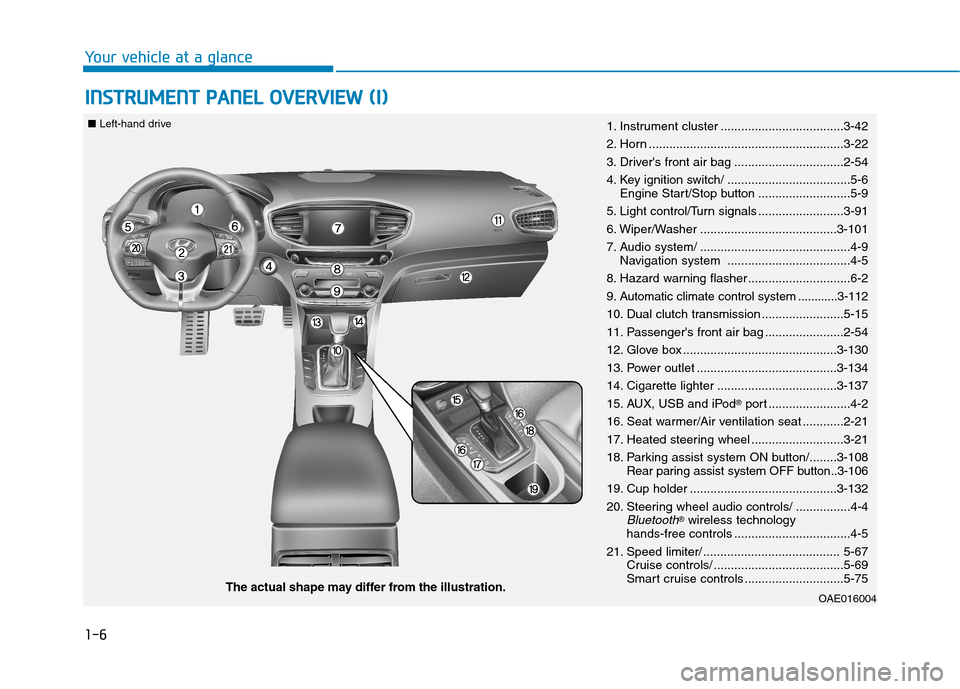
IINN SSTT RR UU MM EENN TT PP AA NN EELL OO VVEERR VV IIEE WW (( II))
Your vehicle at a glance
OAE016004The actual shape may differ from the illustration.
■
Left-hand drive
1. Instrument cluster ....................................3-42
2. Horn .........................................................3-22
3. Driver's front air bag ................................2-54
4. Key ignition switch/ ....................................5-6
Engine Start/Stop button ...........................5-9
5. Light control/Turn signals .........................3-91
6. Wiper/Washer ........................................3-101
7. Audio system/ ............................................4-9 Navigation system ....................................4-5
8. Hazard warning flasher ..............................6-2
9. Automatic climate control system ............3-112
10. Dual clutch transmission ........................5-15
11. Passenger's front air bag .......................2-54
12. Glove box .............................................3-130
13. Power outlet .........................................3-134
14. Cigarette lighter ...................................3-137
15. AUX, USB and iPod ®
port ........................4-2
16. Seat warmer/Air ventilation seat ............2-21
17. Heated steering wheel ...........................3-21
18. Parking assist system ON button/........3-108 Rear paring assist system OFF button..3-106
19. Cup holder ...........................................3-132
20. Steering wheel audio controls/ ................4-4
Bluetooth® wireless technology
hands-free controls ..................................4-5
21. Speed limiter/ ........................................ 5-67 Cruise controls/ ......................................5-69
Smart cruise controls .............................5-75
Page 14 of 553
1-7
Your vehicle at a glance
1
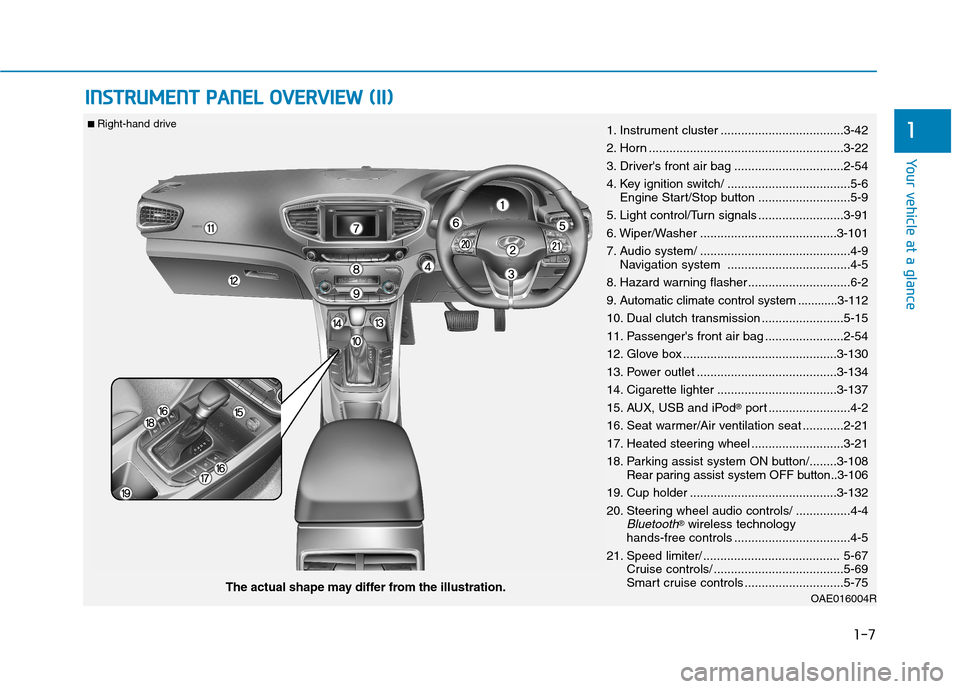
IINN SSTT RR UU MM EENN TT PP AA NN EELL OO VVEERR VV IIEE WW (( IIII))
OAE016004RThe actual shape may differ from the illustration.
■
Right-hand drive
1. Instrument cluster ....................................3-42
2. Horn .........................................................3-22
3. Driver's front air bag ................................2-54
4. Key ignition switch/ ....................................5-6
Engine Start/Stop button ...........................5-9
5. Light control/Turn signals .........................3-91
6. Wiper/Washer ........................................3-101
7. Audio system/ ............................................4-9 Navigation system ....................................4-5
8. Hazard warning flasher ..............................6-2
9. Automatic climate control system ............3-112
10. Dual clutch transmission ........................5-15
11. Passenger's front air bag .......................2-54
12. Glove box .............................................3-130
13. Power outlet .........................................3-134
14. Cigarette lighter ...................................3-137
15. AUX, USB and iPod ®
port ........................4-2
16. Seat warmer/Air ventilation seat ............2-21
17. Heated steering wheel ...........................3-21
18. Parking assist system ON button/........3-108 Rear paring assist system OFF button..3-106
19. Cup holder ...........................................3-132
20. Steering wheel audio controls/ ................4-4
Bluetooth® wireless technology
hands-free controls ..................................4-5
21. Speed limiter/ ........................................ 5-67 Cruise controls/ ......................................5-69
Smart cruise controls .............................5-75
Page 90 of 553

2-60
SRS warning light
The SRS (Supplement Restraint
System) air bag warning light on the
instrument panel displays the air bag
symbol depicted in the illustration. The
system checks the air bag electrical
system for malfunctions. The light indi-
cates that there is a potential problem
with your air bag system.During a moderate to severe frontal
collision, sensors will detect the vehi-
cle’s rapid deceleration. If the rate of
deceleration is high enough, the con-
trol unit will inflate the front air bags,
at the time and with the force needed.
The front air bags help protect the driv-
er and front passenger by respondingto frontal impacts in which seat belts
alone cannot provide adequate
restraint. When needed, the side air
bags help provide protection in the
event of a side impact or rollover by
supporting the side upper body area.
Air bags are activated (able to inflate
if necessary) only when the ignition
switch is in the ON position.
Air bags inflate in the event of certain frontal or side collisions to help pro-
tect the occupants from serious
physical injury.
There is no single speed at which the air bags will inflate. Generally, air bagsare designed to inflate based upon
the severity of a collision and its direc-
tion. These two factors determinewhether the sensors produce an elec-
tronic deployment/inflation signal.
Safety system of your vehicle
If your SRS malfunctions, the
air bag may not inflate properlyduring an accident increasing
the risk of serious injury ordeath.
If any of the following condi-
tions occur, your SRS is mal-functioning:
The light does not turn on for
approximately six seconds
when the ignition switch is inthe ON position.
The light stays on after illumi-
nating for approximately sixseconds.
The light comes on while the
vehicle is in motion.
The light blinks when the engine is running.
We recommend that an author-
ized HYUNDAI dealer inspect the
SRS as soon as possible if any
of these conditions occur.
WARNING
Page 161 of 553
3-59
Convenient features of your vehicle
3
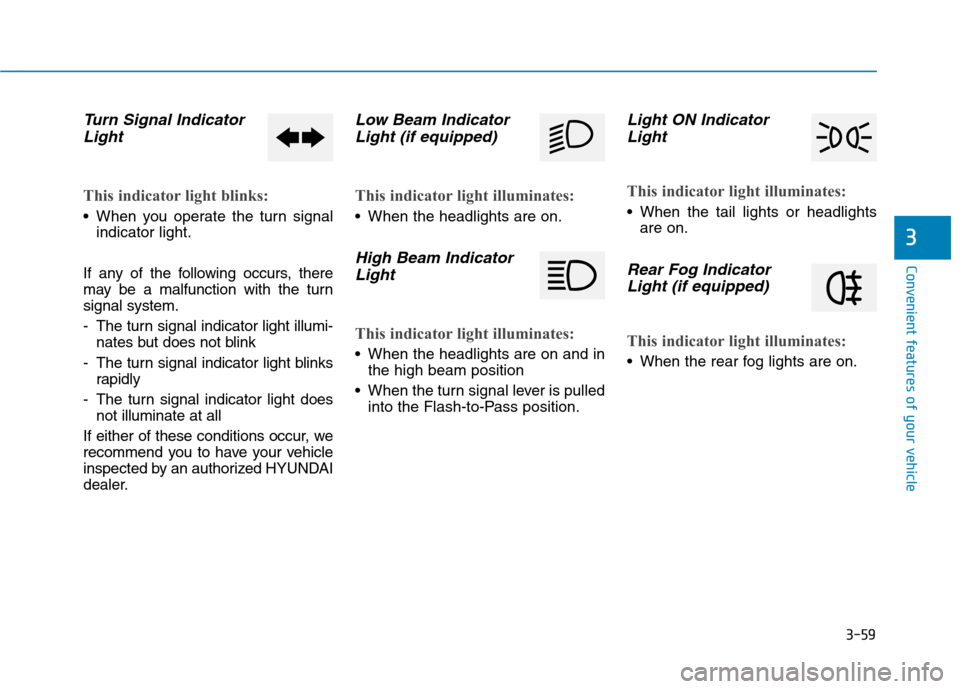
Turn Signal IndicatorLight
This indicator light blinks:
When you operate the turn signal indicator light.
If any of the following occurs, there
may be a malfunction with the turnsignal system.
- The turn signal indicator light illumi- nates but does not blink
- The turn signal indicator light blinks rapidly
- The turn signal indicator light does not illuminate at all
If either of these conditions occur, we
recommend you to have your vehicle
inspected by an authorized HYUNDAI
dealer.
Low Beam Indicator Light (if equipped)
This indicator light illuminates:
When the headlights are on.
High Beam Indicator
Light
This indicator light illuminates:
When the headlights are on and in the high beam position
When the turn signal lever is pulled into the Flash-to-Pass position.
Light ON Indicator
Light
This indicator light illuminates:
When the tail lights or headlights are on.
Rear Fog Indicator
Light (if equipped)
This indicator light illuminates:
When the rear fog lights are on.
Page 179 of 553
3-77
Convenient features of your vehicle
3
- On Shift to P: All doors will be auto-matically unlocked if the automatic
transmission shift lever is shifted to
the P (Park) position.
To activate or deactivate the horn
feedback.
If the horn feedback is activated,
after locking the door by pressing the
lock button on the remote key, and
pressing it again within 4 seconds,
the horn feedback sound will operateonce to indicate that all doors are
locked.
3. Lights
- Off: The one touch turn signal func- tion will be deactivated.
- 3, 5, 7 Flashes: The turn signal indi- cator will blink 3, 5, or 7 times when
the turn signal lever is moved slightly.
For more information, refer to
"Light" in this chapter.
To activate or deactivate the head-
lamp delay function.
For more information, refer to
"Light" in this chapter
4. Sound
- Level 1~3
To adjust the Park Assist System
volume.
5. Convenience
- Off: The seat easy access function is deactivated.
- Normal/Extended: When you turn off the engine, the driver's seat will
automatically move rearward short
(Normal) or long (Extended) for you
to enter or exit the vehicle more
comfortably.
For more information, refer to
"Driver Position Memory System"
in this chapter.
To activate or deactivate the wireless charging system in the front seat.
For more information, refer to
"Wireless Charging System" in
this chapter.
To activate or deactivate the Wiper/
Light mode.
When activated, the LCD display
shows the selected Wiper/Light
mode whenever you change the
mode.
To activate or deactivate the gear
position pop-up.
When activated, the gear position
will be displayed on the LCD display.
6. Service Interval
To activate or deactivate the service
interval function.
Page 186 of 553
3-84
Convenient features of your vehicle
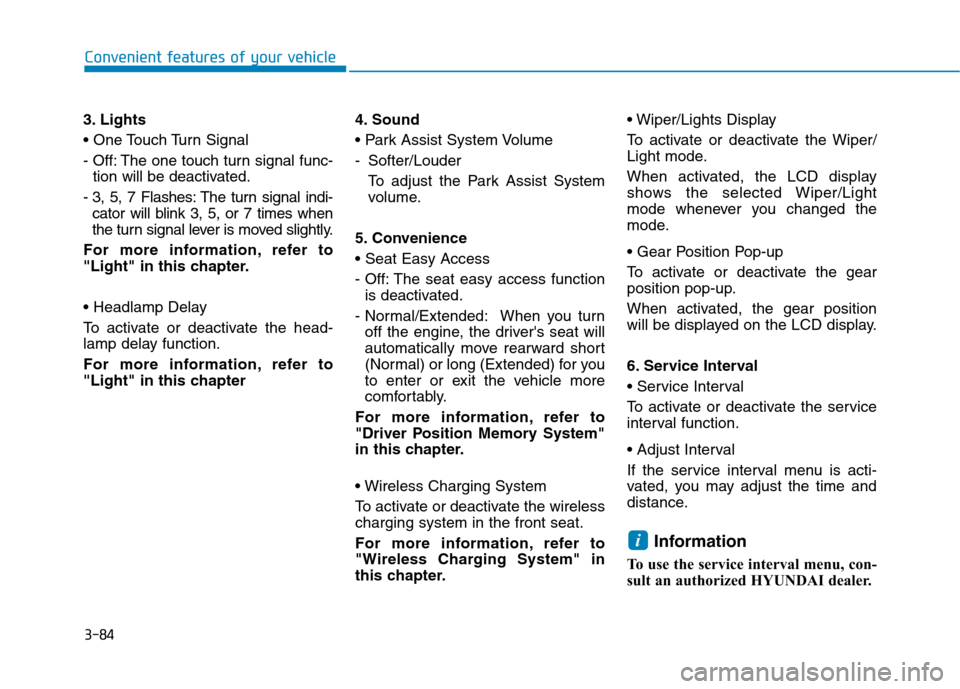
3. Lights
- Off: The one touch turn signal func-tion will be deactivated.
- 3, 5, 7 Flashes: The turn signal indi- cator will blink 3, 5, or 7 times when
the turn signal lever is moved slightly.
For more information, refer to
"Light" in this chapter.
To activate or deactivate the head-
lamp delay function.
For more information, refer to
"Light" in this chapter 4. Sound
- Softer/Louder
To adjust the Park Assist System
volume.
5. Convenience
- Off: The seat easy access function is deactivated.
- Normal/Extended: When you turn off the engine, the driver's seat will
automatically move rearward short
(Normal) or long (Extended) for you
to enter or exit the vehicle more
comfortably.
For more information, refer to
"Driver Position Memory System"
in this chapter.
To activate or deactivate the wireless charging system in the front seat.
For more information, refer to
"Wireless Charging System" in
this chapter.
To activate or deactivate the Wiper/
Light mode.
When activated, the LCD display
shows the selected Wiper/Light
mode whenever you changed the
mode.
To activate or deactivate the gear
position pop-up.
When activated, the gear position
will be displayed on the LCD display.
6. Service Interval
To activate or deactivate the service
interval function.
If the service interval menu is acti-
vated, you may adjust the time and
distance.
Information
To use the service interval menu, con-
sult an authorized HYUNDAI dealer.
i
Page 195 of 553

3-93
Convenient features of your vehicle
3
To turn off the high beam headlamp,
pull the lever towards you. The low
beams will turn on.To flash the high beam headlamp,
pull the lever towards you, then
release the lever. The high beams
will remain ON as long as you hold
the lever towards you.Turn signals and lane changesignals
To signal a turn, push down on the
lever for a left turn or up for a right
turn in position (A). To signal a lane
change, move the turn signal leverslightly and hold it in position (B).
Do not use high beam when there
are other vehicles approaching
you. Using high beam couldobstruct the other driver's vision.
WARNING
OAE046454L
OAE046455L
■
Type A
■Type B
OAE046456L
OAE046457L
■
Type A
■ Type B
Page 196 of 553
3-94
Convenient features of your vehicle
The lever will return to the OFF posi-
tion when released or when the turnis completed.
If an indicator stays on and does not
flash or if it flashes abnormally, one of
the turn signal bulbs may be burnedout and will require replacement.
One-touch turn signal function
To activate an one-touch turn signal
function, move the turn signal lever
slightly and then release it. The lane
change signals will blink 3, 5 or 7
times.
You can activate/deactivate the One
Touch Turn Signal function or choose
the number of blinking (3, 5, or 7)from the User Settings Mode on the
LCD display.For more details, refer
to "LCD Display" in this chapter.
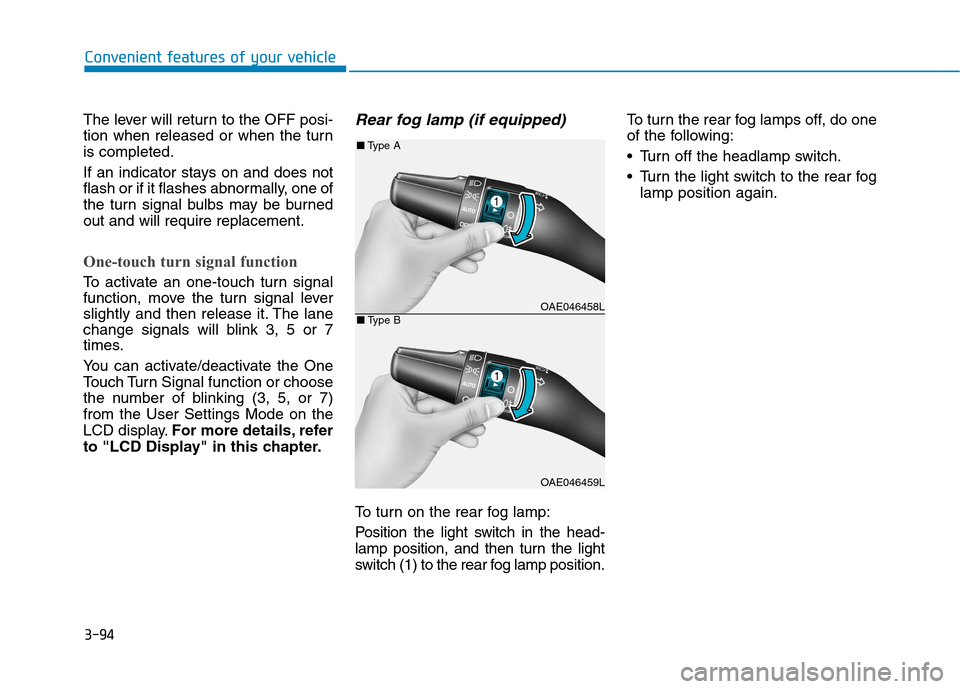
Rear fog lamp (if equipped)
To turn on the rear fog lamp:
Position the light switch in the head-
lamp position, and then turn the light
switch (1) to the rear fog lamp position. To turn the rear fog lamps off, do one
of the following:
• Turn off the headlamp switch.
Turn the light switch to the rear fog
lamp position again.
OAE046458L
OAE046459L
■Type A
■Type B