2017 Hyundai Ioniq Hybrid tow
[x] Cancel search: towPage 246 of 553
(1) Call / Answer button
(2) Call end button
(3) Microphone
Audio : For detailed information,refer to “AUDIO” in this chapter.
AVN : Detailed information for the
Bluetooth® Wireless Technology
hands-free is described in the man-
ual supplied separately.
Audio / Video / Navigation sys-
tem (AVN) (if equipped)
Detailed information for the AVN sys-
tem is described in a separately sup-
plied manual.
How vehicle radio works
FM reception
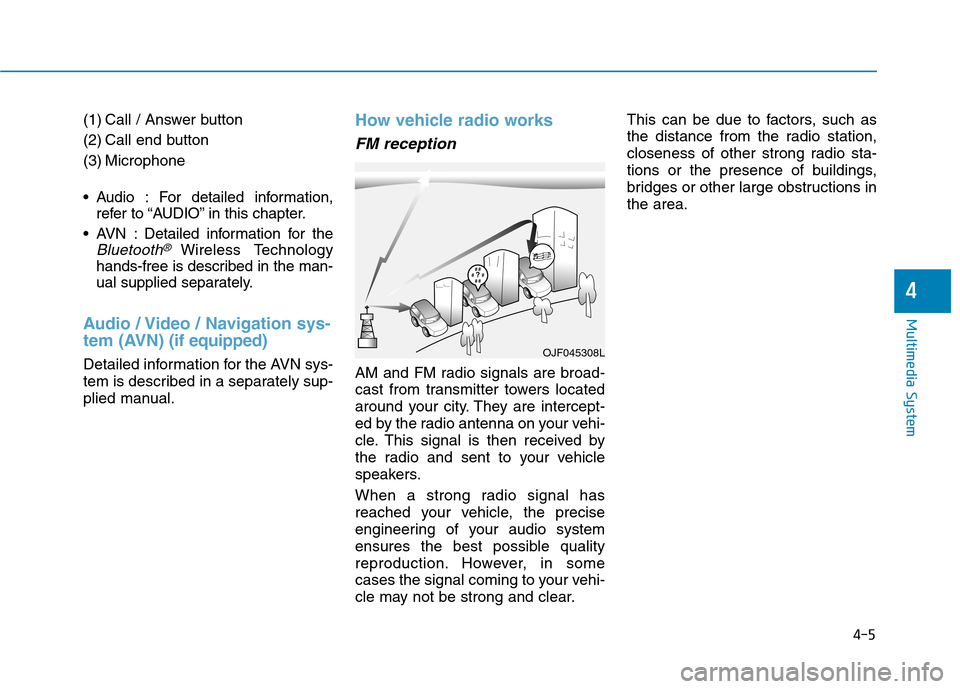
AM and FM radio signals are broad-
cast from transmitter towers located
around your city. They are intercept-
ed by the radio antenna on your vehi-
cle. This signal is then received by
the radio and sent to your vehicle
speakers.
When a strong radio signal has
reached your vehicle, the precise
engineering of your audio system
ensures the best possible quality
reproduction. However, in some
cases the signal coming to your vehi-
cle may not be strong and clear. This can be due to factors, such as
the distance from the radio station,
closeness of other strong radio sta-
tions or the presence of buildings,
bridges or other large obstructions inthe area.
OJF045308L
4-5
Multimedia System
4
Page 286 of 553
5
Special driving conditions ...................................5-92Hazardous driving conditions.......................................5-92
Rocking the vehicle ........................................................5-92
Smooth cornering ...........................................................5-93
Driving at night ................................................................5-93
Driving in the rain ...........................................................5-93
Driving in flooded areas ................................................5-94
Highway driving ...............................................................5-94
Winter driving .......................................................5-95 Snow or icy conditions ..................................................5-95
Winter Precautions .........................................................5-97
Vehicle weight ....................................................5-100 Overloading ....................................................................5-100
Trailer towing .....................................................5-101
Page 291 of 553

5-7
Driving your vehicle
5
Key ignition switch positions
Switch
PositionActionNotes
LOCK
To turn the ignition switch to the LOCK position, put the key in at
the ACC position and turn the key towards the LOCK position.
The ignition key can be removed in the LOCK position.
The steering wheel locks to protect the vehicle from theft. (if equipped)
ACC
Electrical accessories are usable.
The steering wheel unlocks.If difficulty is experienced turning the ignition
switch to the ACC position, turn the key
while turning the steering wheel right andleft to release tension.
ON
This is the normal key position when the vehicle has started.
All features and accessories are usable.
The warning lights can be checked when you turn the ignition
switch from ACC to ON.Do not leave the ignition switch in the ON
position when the vehicle is not running to
prevent the battery from discharging.
STARTTo start the vehicle, turn the ignition switch to the START position.
The switch returns to the ON position when you let go of the key.The engine will crank until you release the
key.
Page 292 of 553
5-8
Driving your vehicle
Starting the vehicle1. Make sure the parking brake isapplied.
2. Make sure the shift lever is in P (Park).
3. Depress the brake pedal.
4. Turn the ignition switch to the START position. Hold the key
(maximum of 10 seconds) until the
" " comes on and release it.
Information
It is best to maintain a moderate engine speed until the vehicle engine
comes up to normal operating tem-
perature. Avoid harsh or abrupt
acceleration or deceleration while
the engine is still cold.
Always start the vehicle with your foot on the brake pedal. Do not
depress the accelerator while start-
ing the vehicle. Do not race the
engine while warming it up.
If ambient temperature is low, the " " indicator may remain illu-
minated longer than the normal
amount of time. To prevent damage to the vehicle:
Do not hold the ignition key in
the START position for more
than 10 seconds. Wait 5 to 10
seconds before trying again.
Do not turn the ignition switch to the START position with the
engine running. It may damage
the starter.
If the " " indicator turns off while you are in motion, do not
attempt to move the shift lever
to the P (Park) position.
If traffic and road conditions
permit, you may put the shift
lever in the N (Neutral) position
while the vehicle is still moving
and turn the ignition switch to
the START position in an
attempt to restart the engine.
Do not push or tow your vehicle to start the vehicle.NOTICE
i
Always wear appropriate
shoes when operating your
vehicle. Unsuitable shoes,
such as high heels, ski boots,
sandals, flip-flops, etc., may
interfere with your ability touse the brake and acceleratorpedals.
Do not start the vehicle with the accelerator pedal depressed.
The vehicle can move and leadto an accident.
Wait until the engine rpm is
normal. The vehicle may sud-
denly move if the brake padelis released when the rpm ishigh.
WARNING
Page 297 of 553
5-13
Driving your vehicle
5
Information
Do not wait for the engine to warm up while the vehicle remains station-
ary.
Start driving at moderate engine
speeds. (Steep accelerating and
decelerating should be avoided.)
Always start the vehicle with your foot on the brake pedal. Do not
depress the accelerator while start-
ing the vehicle. Do not race the
engine while warming it up.
If ambient temperature is low, the " " indicator may remain illumi-
nated longer than the normal amount
of time. To prevent damage to the vehicle:
If the " " indicator turns off
while you are in motion, do not
attempt to move the shift lever
to the P (Park) position.
If traffic and road conditions
permit, you may put the shift
lever in the N (Neutral) position
while the vehicle is still moving
and press the Engine Start/Stop
button in an attempt to restart
the vehicle.
Do not push or tow your vehicle to start the vehicle. To prevent damage to the vehicle:
Do not press the Engine Start/Stop
button for more than 10 seconds
except when the stop lamp fuse is
blown.
When the stop lamp fuse is blown,
you cannot normally start the
hybrid system. Replace the fuse
with a new one. If you are not able
to replace the fuse, you can start
the vehicle by pressing and hold-
ing the Engine Start/Stop button
for 10 seconds with the Engine
Start/Stop button in the ACC posi-tion.
For your safety always depress
the brake pedal before starting the
vehicle.NOTICENOTICEi
Page 338 of 553

5-54
Driving your vehicle
The AEB is only a supplemen-
tal system for the driver's con-
venience. The driver shouldhold the responsibility to con-
trol the vehicle operation. Do
not solely depend on the AEB
system. Rather, maintain a
safe braking distance, and, if
necessary, depress the brakepedal to reduce the drivingspeed.
In certain instances and
under certain driving condi-
tions, the AEB system may
activate prematurely. This ini-
tial warning message appears
on the LCD display with a
warning chime.
Also, in certain instances the
front radar sensor or camera
recognition system may not
detect the vehicle or pedestri-
an ahead. The AEB system
may not activate and the
warning message will not be
displayed. (Continued)
(Continued)
If there is a malfunction with the
AEB system, the autonomous
emergency braking is not
applied even though the brak-ing system is operating normal-
ly.
If the vehicle in front stops
suddenly, you may have less
control of the brake system.
Therefore, always keep a safe
distance between your vehicle
and the vehicle in front of you.
The AEB system may activate during braking and the vehi-
cle may stop suddenly shift-
ing loose objects toward the
passengers. Always keeploose objects secured.
The AEB system may not acti-
vate if the driver applies the
brake pedal to avoid a colli-sion.(Continued)
(Continued)
The AEB system operates
only to detect vehicles or
pedestrians in front of the
vehicle. The AEB system does not
operate when the vehicle is in
reverse. The AEB system is not designed to detect other
objects on the road such asanimals. The AEB system does not
detect cross traffic vehicles
that are approaching. The AEB system cannot
detect the driver approaching
the side view of a parked vehi-
cle (for example on a deadend street.)
In these cases, you must
maintain a safe braking dis-
tance, and if necessary,depress the brake pedal toreduce the driving speed in
order to maintain a safe dis-
tance.
WARNING
Page 342 of 553

5-58
Detecting pedestrians (if equipped)
The sensor may be limited when:
The pedestrian is not fully detected by the camera recognition system,
for example, if the pedestrian is
leaning over or is not fully walking
upright
The pedestrian is moving very quickly or appears abruptly in the
camera detection area
The pedestrian is wearing clothing that easily blends into the back-
ground, making it difficult to be
detected by the camera recogni-tion system
The outside lighting is too bright (e.g. when driving in bright sunlight
or in sun glare) or too dark (e.g.
when driving on a dark rural roadat night)
It is difficult to detect and distin- guish the pedestrian from other
objects in the surroundings, for
example, when there is a group of
pedestrians or a large crowd
There is an item similar to a per- son’s body structure The pedestrian is small
The pedestrian has impaired
mobility
The sensor recognition is limited
Information
In some instances, the AEB system
may be cancelled when subjected to
electromagnetic interference.
i
Driving your vehicle
Do not use the Autonomous
Emergency Braking system
when towing a vehicle.Application of the AEB sys-
tem while towing may
adversely affect the safety of
your vehicle or the towing
vehicle.
Use extreme caution when the
vehicle in front of you has
cargo that extends rearward
from the cab, or when the
vehicle in front of you has
higher ground clearance.(Continued)
(Continued)
The AEB system is designed to detect and monitor the
vehicle ahead or detect a
pedestrian in the roadway
through radar signals and
camera recognition. It is not
designed to detect bicycles,
motorcycles, or smaller
wheeled objects such as lug-
gage bags, shopping carts, or
strollers.
Never try to test the operation
of the AEB system. Doing so
may cause severe injury ordeath.
WARNING
Page 377 of 553
5-93
Driving your vehicle
5
Information
The ESC system (if equipped) must be
turned OFF before rocking the vehi-
cle.
If you are still stuck after rocking
the vehicle a few times, have the
vehicle pulled out by a tow vehicle
to avoid engine overheating, pos-
sible damage to the transmission,
and tire damage. See "Towing" in
chapter 6.Smooth cornering
Avoid braking or gear changing in
corners, especially when roads are
wet. Ideally, corners should always
be taken under gentle acceleration.
Driving at night
Night driving presents more hazards
than driving in the daylight. Here are
some important tips to remember:
Slow down and keep more dis- tance between you and other vehi-
cles, as it may be more difficult tosee at night, especially in areas
where there may not be any street
lights.
Adjust your mirrors to reduce the glare from other driver's head-
lamps.
Keep your headlamps clean and properly aimed. Dirty or improperly
aimed headlamps will make it
much more difficult to see at night.
Avoid staring directly at the head- lamps of oncoming vehicles. You
could be temporarily blinded, and it
will take several seconds for your
eyes to readjust to the darkness.
Driving in the rain
Rain and wet roads can make driving
dangerous. Here are a few things to
consider when driving in the rain or
on slick pavement:
Slow down and allow extra follow-ing distance. A heavy rainfall
makes it harder to see and increas-es the distance needed to stop
your vehicle.
Turn OFF your Cruise Control. (if equipped)
Replace your windshield wiper blades when they show signs ofstreaking or missing areas on thewindshield.
Be sure your tires have enough tread. If your tires do not have
enough tread, making a quick stop
on wet pavement can cause a skid
and possibly lead to an accident.
See "Tire Tread" in chapter 7 .
Turn on your headlamps to make it easier for others to see you.
Driving too fast through large pud- dles can affect your brakes. If you
must go through puddles, try to
drive through them slowly.
NOTICE
i