2017 Hyundai Ioniq Electric power steering
[x] Cancel search: power steeringPage 371 of 582
5-32
Driving your vehicle
ESC checks where you are steering
and where the vehicle is actually
going. ESC applies braking pressure
to any one of the vehicle's brakes
and intervenes in the electric vehicle
control system to assist the driver
with keeping the vehicle on the
intended path. It is not a substitute
for safe driving practices. Always
adjust your speed and driving to the
road conditions.ESC operation
ESC ON condition
When the POWER button is in the ON position, the ESC and the ESC
OFF indicator lights illuminate for
approximately three seconds. After
both lights go off, the ESC is
enabled.
When operating
When the ESC is in opera- tion, the ESC indicator light
blinks:
conditions which may lock the
wheels, you may hear sounds from
the brakes, or feel a corresponding
sensation in the brake pedal. This is
normal and it means your ESC is
active.
cle may not respond to the acceler-ator as it does under routine condi-
tions.
when the ESC activates, the Cruise
Control automatically disengages.
The Cruise Control can be reen-
gaged when the road conditions
allow. See "Cruise Control System"
later in this chapter. (if equipped)
Never drive too fast for the road
conditions or too quickly when
cornering. The ESC system will
not prevent accidents. Excessive speed in turns,
abrupt maneuvers, and
hydroplaning on wet surfaces
can result in severe accidents.
WARNING
Page 374 of 582
5-35
Driving your vehicle
5
Vehicle Stability Management (VSM)
The Vehicle Stability Management (VSM) is a function of the Electronic
Stability Control (ESC) system. It
helps ensure the vehicle stays stable
when accelerating or braking sud-
denly on wet, slippery and rough
roads where traction over the four
tires can suddenly become uneven.
VSM operation
VSM ON condition
The VSM operates when:
The Electronic Stability Control(ESC) is on.
Vehicle speed is approximately above 15 km/h (9 mph) on curve
roads.
Vehicle speed is approximately above 20 km/h (12 mph) when the
vehicle is braking on rough roads.
When operating
When you apply your brakes under
conditions which may activate the
ESC, you may hear sounds from the
brakes, or feel a corresponding sen-
sation in the brake pedal. This is nor-
mal and it means your VSM is active. Information
The VSM does not operate when:
Driving on a banked road such as a gradient or incline.
Driving rearward.
ESC OFF indicator light is on.
EPS (Electric power steering) warning light ( ) is on or blinks.
i
Take the following precautions
when using the Vehicle Stability
Management (VSM):
ALWAYS check the speed and
the distance to the vehicle
ahead. The VSM is not a substi-
tute for safe driving practices.
Never drive too fast for the
road conditions. The VSM sys-
tem will not prevent acci-
dents. Excessive speed in bad
weather, slippery and uneven
roads can result in severeaccidents.
WARNING
Page 389 of 582
5-50
Driving your vehicle
Prerequisite for activation
The AEB gets ready to be activated, when the AEB is selected on the
LCD display, and when the followingprerequisites are satisfied.
- The ESC (Electronic StabilityControl) is activated.
- To enable the system to detect pedestrians ahead, the vehicle
driving speed must be between 8km/h – 70 km/h (5 mph – 45 mph).
- To enable the system to detect a vehicle ahead, the vehicle driving
speed must be between 8 km/h –180 km/h (5 mph – 110 mph).
When traveling above 80 km/h (50mph), the AEB system only initiates
partial braking. This is to prevent
unintended full braking to stop in the
middle of the highway.
AEB warning message and
system control
The AEB produces warning mes-
sages and warning alarms in accor-
dance with the collision risk levels,
such as abrupt stopping of the vehi-
cle in front, insufficient braking dis-
tance, or pedestrian detection. Also,
it controls the brakes in accordance
with the collision risk levels.
The driver can select the initial warn-
ing activation time in the User
Settings in the LCD display. The
options for the initial Forward
Collision Warning include Early,
Normal or Late initial warning time.Completely stop the vehicle
on a safe location before
operating the switch on the
steering wheel to activate
/deactivate the AEB system.
The AEB automatically acti-
vates upon placing the
POWER button to the ON
position. The driver can deac-
tivate the AEB by cancelingthe system setting on the LCD
display.
The AEB automatically deacti-
vates upon canceling the ESC
(Electronic Stability Control).When the ESC is canceled,
the AEB cannot be activated
on the LCD display.
WARNING
Page 391 of 582
5-52
Driving your vehicle
- If your vehicle drives slower than70 km/h (45 mph) with a pedestri-
an in front, the driving speed may
abruptly decrease. When your
vehicle drives faster than 70 km/h
(45 mph) with a pedestrian in
front, the AEB does not operate.Brake operation
In an urgent situation, the braking system enters into the ready status
for prompt reaction against the dri-
ver's depressing the brake pedal.
The AEB provides additional brak- ing power for optimum braking per-
formance, when the driver
depresses the brake pedal.
The braking control is automatical- ly deactivated, when the driver
sharply depresses the accelerator
pedal, or when the driver abruptly
operates the steering wheel.
The AEB brake control is automat- ically canceled, when risk factors
disappear. The driver should always use
extreme caution while operating
the vehicle, whether or not there
is a warning message or alarm
from the AEB system.CAUTION
The braking control cannot
completely stop the vehicle nor
avoid all collisions. The drivershould hold the responsibility
to safely drive and control the
vehicle.
WARNING
Page 400 of 582
5-61
Driving your vehicle
5
LKAS operation
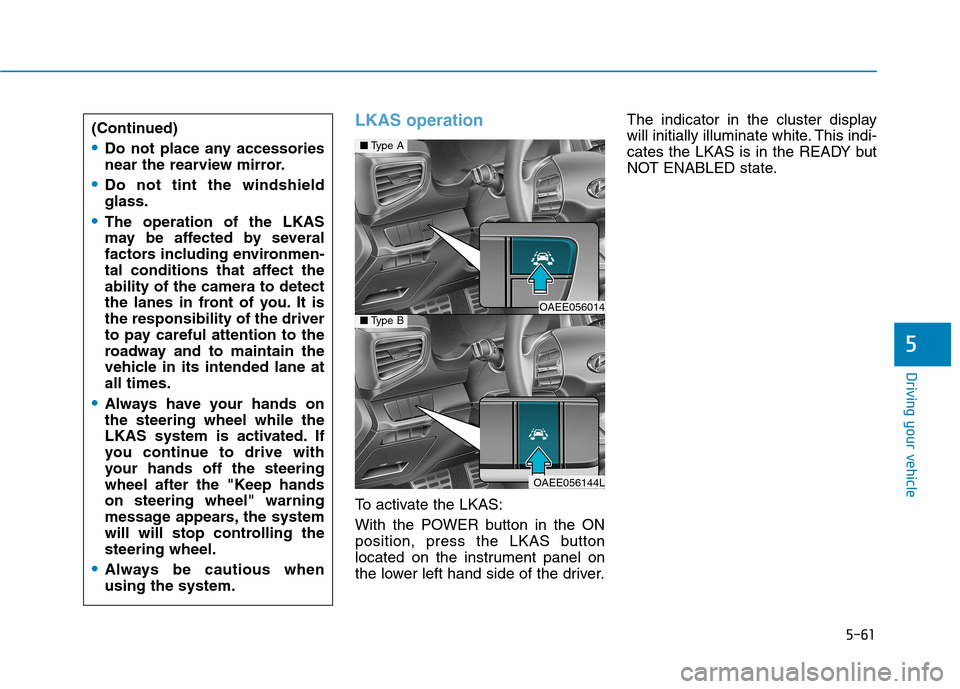
To activate the LKAS:
With the POWER button in the ON
position, press the LKAS button
located on the instrument panel on
the lower left hand side of the driver.The indicator in the cluster display
will initially illuminate white. This indi-
cates the LKAS is in the READY but
NOT ENABLED state.
(Continued)
Do not place any accessories
near the rearview mirror.
Do not tint the windshield glass.
The operation of the LKAS
may be affected by several
factors including environmen-
tal conditions that affect theability of the camera to detect
the lanes in front of you. It isthe responsibility of the driver
to pay careful attention to the
roadway and to maintain the
vehicle in its intended lane atall times.
Always have your hands on the steering wheel while the
LKAS system is activated. If
you continue to drive with
your hands off the steering
wheel after the "Keep handson steering wheel" warning
message appears, the system
will will stop controlling thesteering wheel.
Always be cautious when using the system.
■
Type A
OAEE056014 ■Type B
OAEE056144L
Page 405 of 582
5-66
Driving your vehicle
LKAS failure indicator
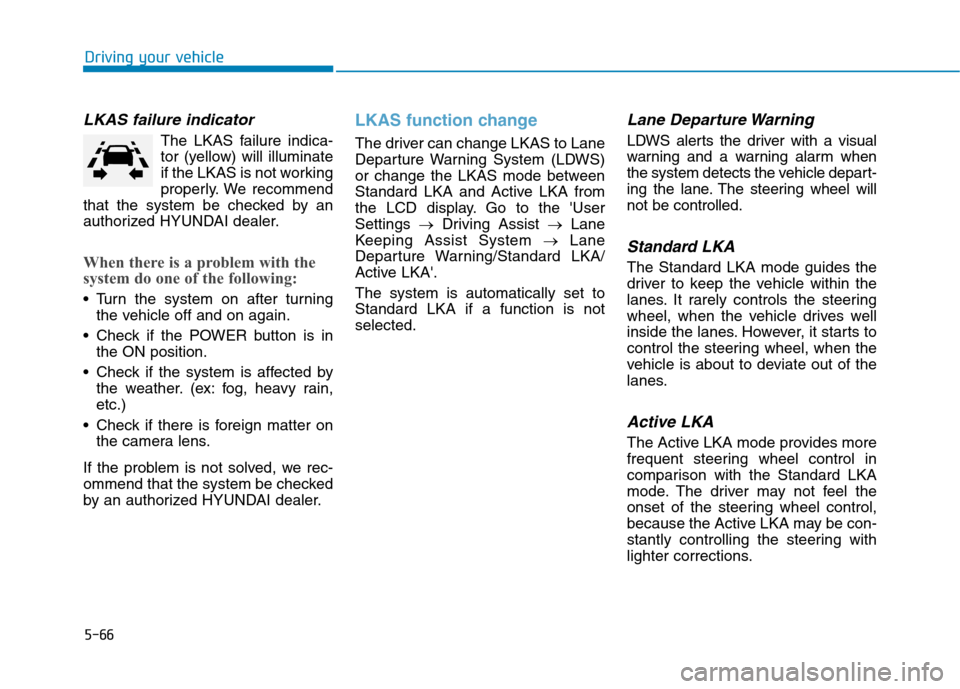
The LKAS failure indica-
tor (yellow) will illuminate
if the LKAS is not working
properly. We recommend
that the system be checked by an
authorized HYUNDAI dealer.
When there is a problem with the
system do one of the following:
Turn the system on after turning the vehicle off and on again.
Check if the POWER button is in the ON position.
Check if the system is affected by the weather. (ex: fog, heavy rain, etc.)
Check if there is foreign matter on the camera lens.
If the problem is not solved, we rec-
ommend that the system be checked
by an authorized HYUNDAI dealer.
LKAS function change
The driver can change LKAS to Lane
Departure Warning System (LDWS)
or change the LKAS mode between
Standard LKA and Active LKA from
the LCD display. Go to the 'UserSettings Driving Assist Lane
Keeping Assist System Lane
Departure Warning/Standard LKA/
Active LKA'. The system is automatically set to Standard LKA if a function is notselected.
Lane Departure Warning
LDWS alerts the driver with a visual
warning and a warning alarm when
the system detects the vehicle depart-
ing the lane. The steering wheel willnot be controlled.
Standard LKA
The Standard LKA mode guides the
driver to keep the vehicle within the
lanes. It rarely controls the steering
wheel, when the vehicle drives well
inside the lanes. However, it starts to
control the steering wheel, when the
vehicle is about to deviate out of the
lanes.
Active LKA
The Active LKA mode provides more
frequent steering wheel control in
comparison with the Standard LKA
mode. The driver may not feel the
onset of the steering wheel control,
because the Active LKA may be con-
stantly controlling the steering with
lighter corrections.
Page 465 of 582
6-24
What to do in an emergency
Emergency towing
If towing is necessary, we recom-
mend you have it done by an author-
ized HYUNDAI dealer or a commer-
cial tow truck service.
If towing service is not available in an
emergency, your vehicle may be
temporarily towed using a cable or
chain secured to the emergency tow-ing hook at the front (or rear) of the
vehicle.
Use extreme caution when towing
the vehicle with a cable or chain. A
driver must be in the vehicle to steer
it and operate the brakes.
Towing in this manner may be done
only on hard-surfaced roads for a
short distance and at low speeds.
Also, the wheels, axles, power train,
steering and brakes must all be ingood condition.Always follow these emergency tow-ing precautions:
While depressing the brake pedal
shift to the N (Neutral) position and
turn the vehicle off. The POWER
button will be in the ACC position.
Release the parking brake.
Depress the brake pedal with more force than normal since you will
have reduced braking perform-
ance.
More steering effort will be required because the power steering system
will be disabled.
Use a vehicle heavier than your own to tow your vehicle.
The drivers of both vehicles should communicate with each other fre-
quently.
Before emergency towing, check that the hook is not broken or dam-aged.
Fasten the towing cable or chain securely to the hook.
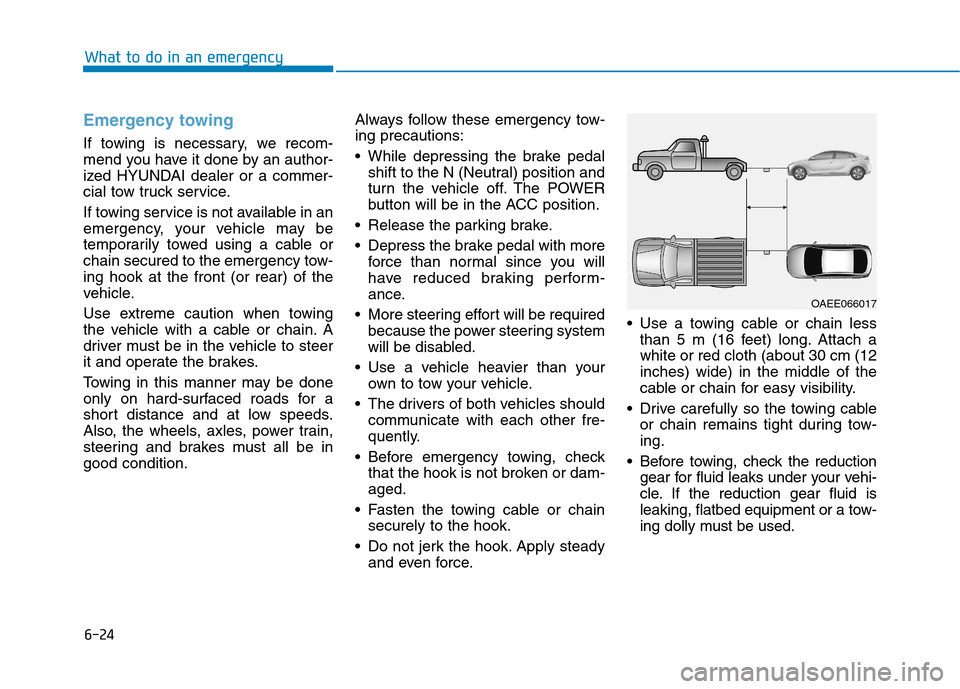
Do not jerk the hook. Apply steady and even force. Use a towing cable or chain less
than 5 m (16 feet) long. Attach awhite or red cloth (about 30 cm (12inches) wide) in the middle of the
cable or chain for easy visibility.
Drive carefully so the towing cable or chain remains tight during tow-ing.
Before towing, check the reduction gear for fluid leaks under your vehi-
cle. If the reduction gear fluid is
leaking, flatbed equipment or a tow-
ing dolly must be used.
OAEE066017
Page 514 of 582
Maintenance
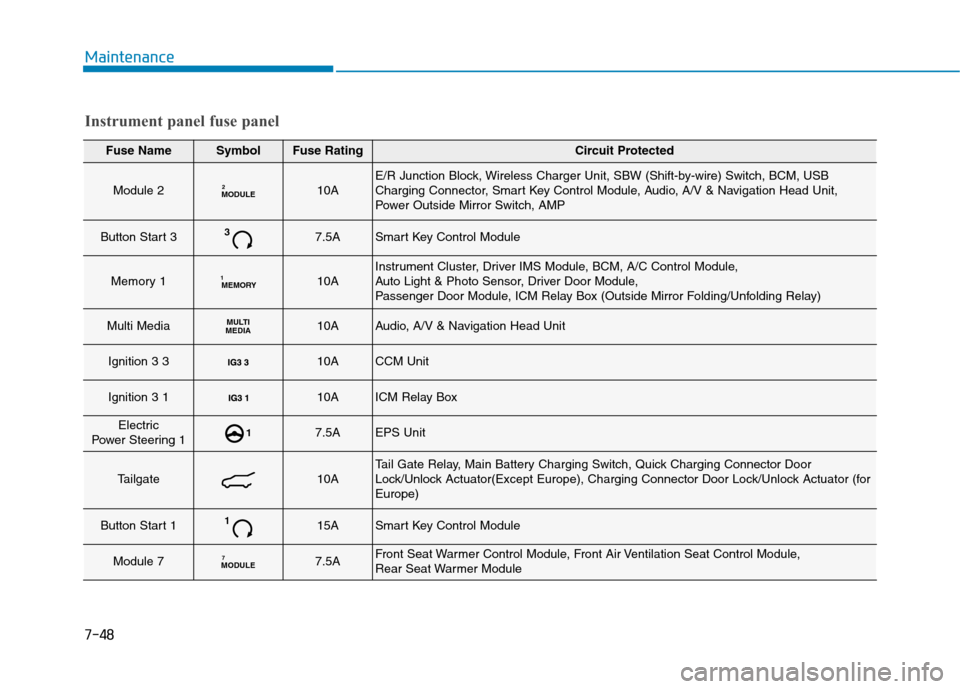
Fuse NameSymbolFuse RatingCircuit Protected
Module 2MODULE210AE/R Junction Block, Wireless Charger Unit, SBW (Shift-by-wire) Switch, BCM, USB
Charging Connector, Smart Key Control Module, Audio, A/V & Navigation Head Unit,
Power Outside Mirror Switch, AMP
Button Start 337.5ASmart Key Control Module
Memory 1MEMORY
110AInstrument Cluster, Driver IMS Module, BCM, A/C Control Module,
Auto Light & Photo Sensor, Driver Door Module,
Passenger Door Module, ICM Relay Box (Outside Mirror Folding/Unfolding Relay)
Multi MediaMULTI
MEDIA10AAudio, A/V & Navigation Head Unit
Ignition 3 3 10ACCM Unit
Ignition 3 1 10AICM Relay Box
Electric
Power Steering 117.5AEPS Unit
Tailgate10ATail Gate Relay, Main Battery Charging Switch, Quick Charging Connector Door
Lock/Unlock Actuator(Except Europe), Charging Connector Door Lock/Unlock Actuator (forEurope)
Button Start 1115ASmart Key Control Module
Module 7MODULE 77.5AFront Seat Warmer Control Module, Front Air Ventilation Seat Control Module,
Rear Seat Warmer Module
Instrument panel fuse panel
7-48