2017 Hyundai Elantra lcd
[x] Cancel search: lcdPage 191 of 637
3-96
Convenient features of your vehicle
Automatic reset
To automatically reset the average fuel
economy after refueling, select the
"Auto Reset" mode in User Settings
menu on the LCD display (Refer to
"LCD Display" in this chapter).
In "Auto Reset" mode, the average fuel
economy will be reset to zero (----),
when driving speed exceeds 1 km/h,
after adding 3~6 liters (1~2 gallon) of
fuels or more.
Information
The vehicle must be driven for a min-
imum of 300 meters (0.19 miles) since
the last ignition key cycle before the
average fuel economy will be recalcu-
lated.
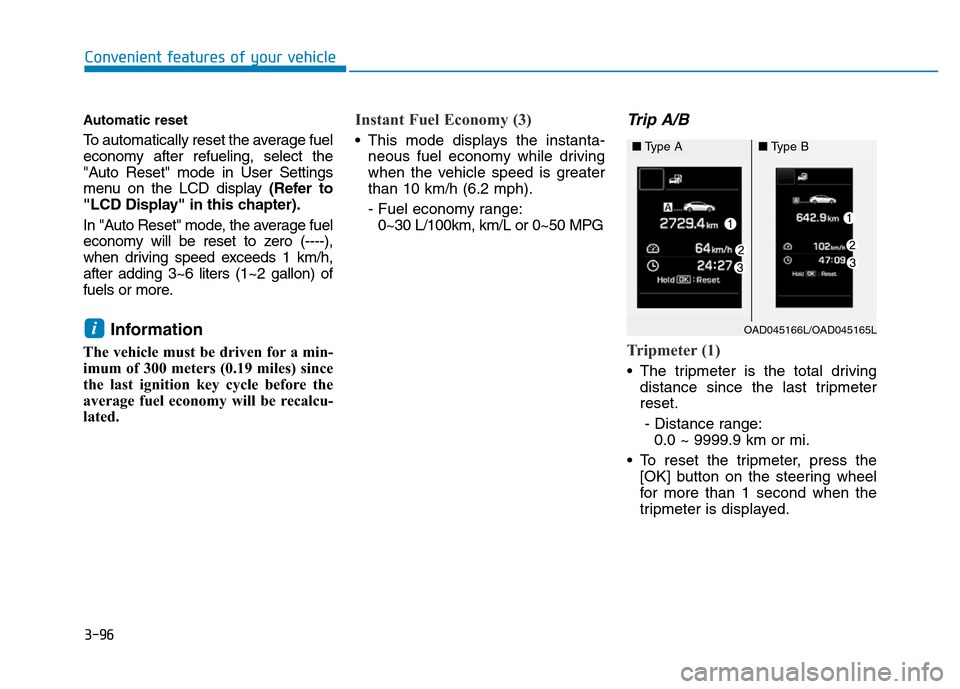
Instant Fuel Economy (3)
• This mode displays the instanta-
neous fuel economy while driving
when the vehicle speed is greater
than 10 km/h (6.2 mph).
- Fuel economy range:
0~30 L/100km, km/L or 0~50 MPG
Trip A/B
Tripmeter (1)
• The tripmeter is the total driving
distance since the last tripmeter
reset.
- Distance range:
0.0 ~ 9999.9 km or mi.
• To reset the tripmeter, press the
[OK] button on the steering wheel
for more than 1 second when the
tripmeter is displayed.
iOAD045166L/OAD045165L
■Type A■Type B
Page 197 of 637

3-102
Convenient features of your vehicle
Turn signals and lane change
signals
To signal a turn, push down on the
lever for a left turn or up for a right
turn in position (A). To signal a lane
change, move the turn signal lever
slightly and hold it in position (B).The lever will return to the OFF posi-
tion when released or when the turn
is completed.
If an indicator stays on and does not
flash or if it flashes abnormally, one of
the turn signal bulbs may be burned
out and will require replacement.
One-touch turn signal function
To activate an one-touch turn signal
function, move the turn signal lever
slightly and then release it. The lane
change signals will blink 3, 5 or 7
times.
You can activate/deactivate the One
Touch Turn Signal function or choose
the number of blinking (3, 5, or 7)
from the User Settings Mode on the
LCD display.For more details, refer
to "LCD Display" in this chapter.
Front fog lamp (if equipped)
Fog lamps are used to provide
improved visibility when visibility is
poor due to fog, rain or snow, etc. Use
the switch next to the headlamp switch
to turn the fog lamps ON and OFF.
OTL045257L
OTL045257R
■Left-hand drive
■Right-hand drive
OTL045258L
OTL045258R
■Left-hand drive
■Right-hand drive
Page 199 of 637

3-104
Convenient features of your vehicle
To turn the rear fog lamps off, do one
of the following:
• Turn off the headlamp switch.
• Turn the light switch to the rear fog
lamp position again.
• When the light switch is in the
parking lamp position, if you turn
off the front fog lamp, the rear fog
lamp will also turn off.
Battery saver function
The purpose of this feature is to pre-
vent the battery from being dis-
charged. The system automatically
turns off the parking lamp when the
driver turns the engine off and opens
the driver-side door.
With this feature, the parking lamps
will turn off automatically if the driver
parks on the side of road at night.
If necessary, to keep the lamps on
when the engine is turned off, perform
the following:
1) Open the driver-side door.
2) Turn the parking lamps OFF and
ON again using the light switch on
the steering column.
Headlamp delay function
(if equipped)
If you place the ignition switch in to
the ACC or OFF position with the
headlamps ON, the headlamps
(and/or parking lamps) remain on for
about 5 minutes. However, with the
engine off if the driver’s door is
opened and closed, the headlamps
(and/or parking lamps) are turned off
after 15 seconds.
The headlamps (and/or parking
lamps) can be turned off by pressing
the lock button on the smart key
twice or turning the light switch to the
OFF or AUTO position. However, if
you turn the light switch to the AUTO
position when it is dark outside, the
headlamps will not be turned off.
You can activate or deactivate the
Headlamp Delay function from the
User Settings Mode on the LCD dis-
play.For more details, refer to
"LCD Display" in this chapter.
Page 201 of 637

3-106
Convenient features of your vehicle
The higher the number of the switch
position, the lower the headlight
beam level. Always keep the head-
light beam at the proper leveling
position, or headlights may dazzle
other road users.
Listed below are the examples of
proper switch settings. For loading
conditions other than those listed
below, adjust the switch position so
that the beam level may be the near-
est as the condition obtained accord-
ing to the list.
Welcome system (if equipped)
Welcome light (if equipped)
Door handle lamp (if equipped)
When all the doors (and trunk) are
closed and locked, the door handle
lamp will come on for about 15 sec-
onds if any of the below is performed.
• When the door unlock button is
pressed on the remote key or
smart key.
• When the button of the outside
door handle is pressed.
• When the vehicle is approached
with the smart key in possession.
Headlamp and Parking lamp
When the headlamp (lamp switch in
the headlamp or AUTO position) is on
and all doors (and trunk) are locked
and closed, the parking lamp and
headlamp will come on for 15 seconds
if/or any of the below is performed.
• When the door unlock button is
pressed on the remote key or
smart key.
At this time, if you press the door lock
or unlock button, the parking lamp and
headlamp will turn off immediately.
You can activate or deactivate the
Welcome Light from the User
Settings Mode on the LCD display.
For more details, refer to "LCD
Display" in this chapter.
Loading conditionSwitch
position
Driver only 0
Driver + Front passenger 0
Full passengers (including driver) 1
Full passengers (including driver)
+ Maximum permissible loading2
Driver + Maximum permissible
loading 3OAD045434L
Page 279 of 637
• Operating the device while driving
could lead to accidents due to a
lack of attention to external sur-
roundings. First park the vehicle
before operating the device.
• Adjust the volume to levels that
allow the driver to hear sounds
from outside of the vehicle.
Driving in a state where external
sounds cannot be heard may lead
to accidents.
• Pay attention to the volume set-
ting when turning the device on. A
sudden output of extreme volume
upon turning the device on could
lead to hearing impairment.
(Adjust the volume to a suitable
levels before turning off the
device.)
• If you want to change the position
of device installation, please
inquire with your place of pur-
chase or service maintenance
center. Technical expertise is
required to install or disassemble
the device.
(Continued)(Continued)
• Turn on the car ignition before
using this device. Do not operate
the audio system for long periods
of time with the ignition turned off
as such operations may lead to
battery discharge.
• Do not subject the device to
severe shock or impact. Direct
pressure onto the front side of the
monitor may cause damage to the
LCD or touch screen.
• When cleaning the device, make
sure to turn off the device and use
a dry and smooth cloth. Never use
tough materials, chemical cloths,
or solvents (alcohol, benzene,
thinners, etc.) as such materials
may damage the device panel or
cause color/quality deterioration
• Do not place beverages close to
the audio system. Spilling bever-
ages may lead to system malfunc-
tion.
• In case of product malfunction,
please contact your place of pur-
chase or After Service center.
• Placing the audio system within
an electromagnetic environment
may result in noise interference.
NOTICE
4-22
Multimedia System
Driving while distracted can
result in a loss of vehicle con-
trol that may lead to an acci-
dent, severe personal injury,
and death. The driver’s primary
responsibility is in the safe and
legal operation of a vehicle, and
use of any handheld devices,
other equipment, or vehicle sys-
tems which take the driver’s
eyes, attention and focus away
from the safe operation of a
vehicle or which are not permis-
sible by law should never be
used during operation of the
vehicle.
WARNING
Page 419 of 637
5-33
Driving your vehicle
• When rapidly accelerating from a
lower vehicle speed, the engine
rpm may increase dramatically as
a result of clutch slip as the dual
clutch transmission selects the cor-
rect gear. This is a normal condi-
tion.
• When accelerating from a stop on
an incline, press the accelerator
smoothly and gradually to avoid
any shudder feeling or jerkiness.
• When traveling at a lower vehicle
speed, if you release the accelera-
tor pedal quickly, you may feel
engine braking before the trans-
mission changes gears. This
engine braking feeling is similar to
operating a manual transmission at
low speed.• When driving downhill, you may
wish to move the gear shift lever to
Manual Shift mode and downshift
to a lower gear in order to control
your speed without using the brake
pedal excessively.
• When you turn the engine on and
off, you may hear clicking sounds
as the system goes through a self
test. This is a normal sound for the
dual clutch transmission.
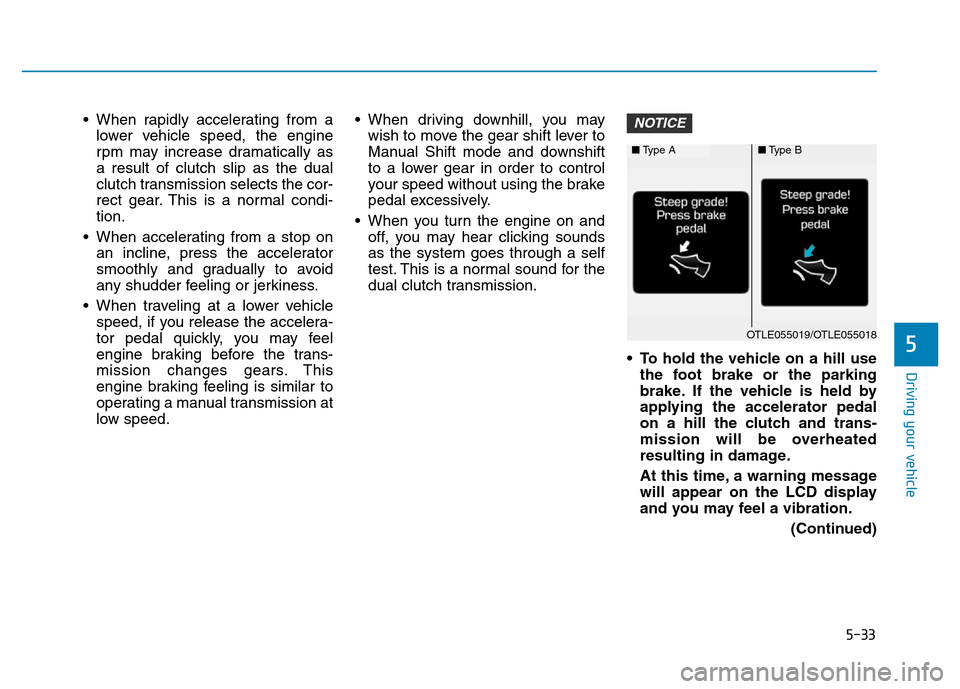
• To hold the vehicle on a hill use
the foot brake or the parking
brake. If the vehicle is held by
applying the accelerator pedal
on a hill the clutch and trans-
mission will be overheated
resulting in damage.
At this time, a warning message
will appear on the LCD display
and you may feel a vibration.
(Continued)NOTICE
5
■Type A■Type B
OTLE055019/OTLE055018
Page 420 of 637

5-34
(Continued)
• If the clutch becomes overheat-
ed by excessive use of the
clutch to hold on a hill, you may
notice a shudder feeling and a
blinking display on the instru-
ment cluster. When this occurs,
the clutch is disabled until the
clutch cools to normal tempera-
tures. If this occurs, pull over to
a safe location, shift into P
(Park) and apply the foot brake
for a few minutes.
• If the LCD warning is active, the
foot brake must be applied.
• Ignoring the warnings can lead
to damage to the transmission.
• If the display continues to blink,
for your safety, we recommend
that you contact an authorized
HYUNDAI dealer and have the
system checked.
(Continued)(Continued)
• Under certain conditions, such
as repeated stop-and-go launch-
es on steep grades, the trans-
mission clutches may overheat.
When the clutches are overheat-
ed, the transmission safe pro-
tection mode logic is enabled.
(Continued)(Continued)
If the safe protection mode logic
is enabled, the gear position
indicator on the cluster blinks
with a chime sound. At this time,
a warning message will appear
on the LCD display and driving
may not be smooth.
If you ignore this warning, the
driving condition may become
worse. To return the normal driv-
ing condition, stop the vehicle
and apply the foot brake for a
few minutes before driving off.
• Gear shifts may be more notice-
able than a conventional auto-
matic transmission. This is a
normal characteristic of this
type of dual clutch transmis-
sion.
(Continued)
Driving your vehicle
■Type A■Type B
■Type A■Type BOTLE055022/OTLE055023
OTLE055026/OTLE055027
Page 441 of 637

5-55
Driving your vehicle
When the driver unfastens the seat-
belt or open the driver's door (or the
hood) in the auto stop mode, you will
experience the followings.
• The ISG system is deactivated.
(The ISG OFF button indicator illu-
minates.)• If equipped with a supervision clus-
ter the message, 'Auto Stop deac-
tivated. Start manually', appears
on the LCD display.
Auto start
To restart the engine in the auto
stop mode
• Release the brake pedal.
• If equipped with a supervision clus-
ter the message, "Press brake
pedal for Auto Start", appears on
the LCD display.
• The auto stop indicator ( ) goes
OFF on the instrument cluster,
when the engine is restarted.
5
OAD055011
■Type A■Type B
OTLE055035/OTLE055036
■Type A■Type B
OAD055086L/OAD055087L