Page 158 of 637

3-63
Convenient features of your vehicle
3
Washer Fluid Warning
Light (if equipped)
This warning light illuminates:
• When the washer fluid level in the
reservoir is nearly empty.
In this case, you should refill the
washer fluid.
Overspeed Warning
Light (if equipped)
This warning light blinks:
• When you drive the vehicle more
than 120 km/h.
- This is to prevent you from driving
your vehicle with overspeed.
- The overspeed warning chime
also sounds for approximately 5
seconds.
Master Warning Light
(for supervision
cluster)
This indicator light illuminates:
• Once you turn the ignition switch or
Engine Start/Stop button to the ON
position.
- It illuminates for approximately 3
seconds and then goes off.
• When there is a malfunction in
operation in any of the following
systems:
- Low washer fluid (if equipped)
- Exterior lamp malfunction
- Blind Spot Detection (BSD) mal-
function (if equipped)
- Tire Pressure Monitoring System
(TPMS, if equipped)
- Service reminder
To identify the details of the warn-
ing, look at the LCD display.
120km/h
Page 159 of 637

3-64
Convenient features of your vehicle
Low Tire Pressure
Warning Light
(if equipped)
This warning light illuminates:
• Once you turn the ignition switch or
Engine Start/Stop button to the ON
position.
- It illuminates for approximately 3
seconds and then goes off.
• When one or more of your tires are
significantly underinflated (The
location of the underinflated tire is
displayed on the supervision clus-
ter LCD display).
For more details, refer to
“Tire Pressure Monitoring System
(TPMS)” in chapter 6.
This warning light remains ON
after blinking for approximately 60
seconds, or repeatedly blinks ON
and OFF in 3 second intervals:
• When there is a malfunction with
the TPMS.
In this case, we recommend that
you have the vehicle inspected by
an authorized HYUNDAI dealer as
soon as possible.
For more details, refer to
“Tire Pressure Monitoring System
(TPMS)” in chapter 6.
Fuel Filter Warning
Light (for diesel engine)
This warning light illuminates:
• When water has accumulated
inside the fuel filter.
In this case, remove the water from
the fuel filter.
For more details, refer to “Fuel
Filter” in chapter 7.
• When the Fuel Filter Warning
Light illuminates, engine power
(vehicle speed & idle speed) may
decrease.
• If you keep driving with the warn-
ing light on, engine parts (injec-
tor, common rail, high pressure
fuel pump) may be damaged. If
this occurs, we recommend that
you have the vehicle inspected
by an authorized HYUNDAI deal-
er as soon as possible.
NOTICE
Safe Stopping
•The TPMS cannot alert you to
severe and sudden tire damage
caused by external factors.
•If you notice any vehicle insta-
bility, immediately take your
foot off the accelerator pedal,
apply the brakes gradually with
light force, and slowly move to
a safe position off the road.
WARNING
Page 160 of 637

3-65
Convenient features of your vehicle
3
Exhaust System (DPF)
Warning Light (for
diesel engine)
This warning light illuminates:
• When there is a malfunction with
Diesel Particulate Filter (DPF) sys-
tem.
• When this warning light illumi-
nates, it may turn off after driving
the vehicle:
- at more than 60 km/h (37 mph), or
- at more than 2nd gear with 1500
~ 2000 engine rpm for a certain
time (for about 25 minutes).
If this warning light blinks in spite of
the procedure (at this time LCD
warning message will be displayed),
we recommend that you have the
DPF system checked by an author-
ized HYUNDAI dealer.
If you continue to drive with the
DPF warning light blinking for a
long time, the DPF system can be
damaged and fuel consumption
can worsen.
Glow Indicator Light
(for diesel engine)
This indicator light illuminates:
• When the engine is being preheat-
ed with the ignition switch or
Engine Start/Stop Button in the ON
position.
- The engine can be started after
the glow indicator light goes off.
- The illumination time varies with
the engine coolant temperature,
air temperature, and battery con-
dition.
If the indicator light remains on or
blinks after the engine has warmed
up or while driving, there may a mal-
function with the engine preheating
system.
In this case, we recommend that you
have the vehicle inspected by an
authorized HYUNDAI dealer.
Information
If the engine does not start within 10
seconds after the preheating is com-
pleted, set the ignition switch or
Engine Start/Stop Button to the
LOCK or OFF position for 10 seconds
and then to the ON position in order
to preheat the engine again.
i
NOTICE
Page 166 of 637

3-71
Convenient features of your vehicle
3
LCD display messages
Shift to "P" position
(for smart key system and auto-
matic transmission/dual clutch
transmission)
This warning message is displayed if
you try to turn off the engine without
the shift lever in P (Park) position.
At this time, the Engine Start/Stop
button turns to the ACC position (If
you press the Engine Start/Stop but-
ton once more, it will turn to the ON
position).
Low Key Battery
(for smart key system)
This warning message is displayed if
the battery of the smart key is dis-
charged while changing the Engine
Start/Stop button while changing to
the OFF position.
Press start button while turning
wheel (for smart key system)
This warning message is displayed if
the steering wheel does not unlock
normally when the Engine Start/Stop
button is pressed.
You should press you should press the
Engine Start/Stop button while turning
the steering wheel right and left.
OTL045141L
OTL045144L
OTL045300L
■Supervision cluster
■Supervision cluster ■Supervision cluster
Page 170 of 637
3-75
Convenient features of your vehicle
3
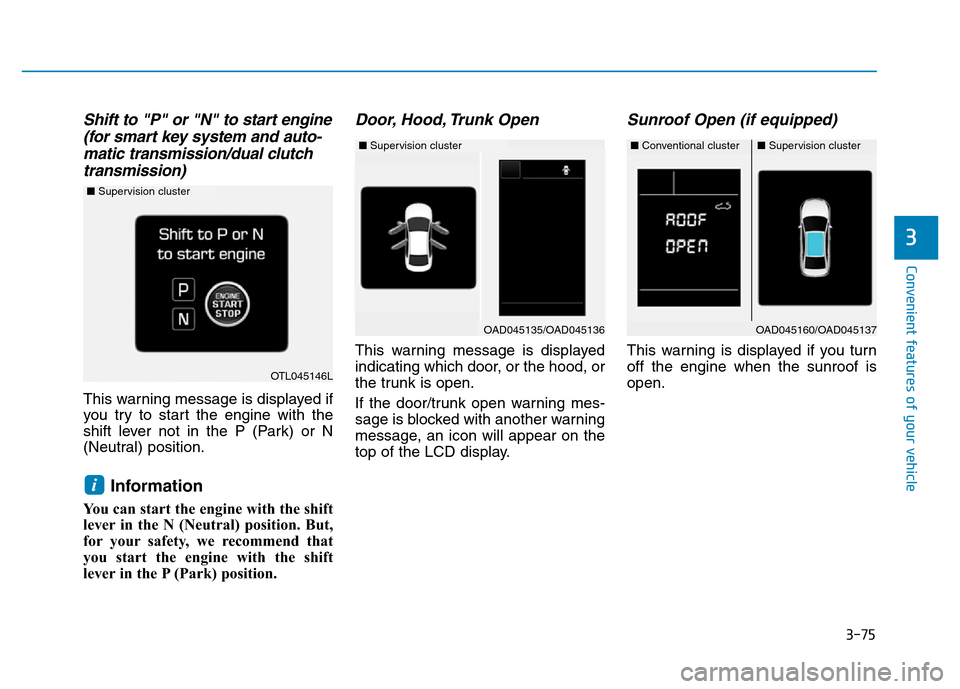
Shift to "P" or "N" to start engine
(for smart key system and auto-
matic transmission/dual clutch
transmission)
This warning message is displayed if
you try to start the engine with the
shift lever not in the P (Park) or N
(Neutral) position.
Information
You can start the engine with the shift
lever in the N (Neutral) position. But,
for your safety, we recommend that
you start the engine with the shift
lever in the P (Park) position.
Door, Hood, Trunk Open
This warning message is displayed
indicating which door, or the hood, or
the trunk is open.
If the door/trunk open warning mes-
sage is blocked with another warning
message, an icon will appear on the
top of the LCD display.
Sunroof Open (if equipped)
This warning is displayed if you turn
off the engine when the sunroof is
open.
i
OAD045160/OAD045137
OTL045146L
■Supervision cluster
■Conventional cluster■Supervision cluster
OAD045135/OAD045136
■Supervision cluster
Page 177 of 637
3-82
Convenient features of your vehicle
LCD display control
The LCD display modes can be
changed by using the control buttons.
(1) : MODE button for changing
modes
(2) ▲, ▼: MOVE switch for chang-
ing items
(3) OK : SELECT/RESET button for
setting or resetting the
selected item
LCD modes
LCD DISPLAY (FOR SUPERVISION CLUSTER)
Modes SymbolExplanation
Trip Computer
This mode displays driving information like
the tripmeter, fuel economy, etc.
For more details, refer to "Trip Computer"
in this chapter.
Tu r n B y Tu r n
(TBT)
(if equipped)This mode displays the state of the navi-
gation.
A/V
(If equipped)This mode displays the state of the A/V
system.
Information
This mode displays the service interval
(mileage or days) and warning messages
related to the Blind Spot Detection system,
etc.
User SettingsIn this mode, you can change settings of
the doors, lamps, etc.
OAD045109L
■Type A
■Type B
or or
Page 180 of 637

3-85
Convenient features of your vehicle
3
Service required
If you exceed the specified service
interval, a message indicating,
"Service required" will be displayed
each time you turn ON the vehicle.
To reset the service interval in
mileages or days that you initially
set:
- Activate the reset mode by press-
ing the OK button for more than 5
second, then press the OK button
again for more than 1 second (for
Europe).
- Press the OK button for more than
1 second (except Europe).
Service in OFF
If the service interval is not set,
"Service in OFF" message is dis-
played on the LCD display.
Information
If any of the following conditions
occur, the mileage and number of days
to service may be incorrect.
- The battery cable is disconnected.
- The fuse switch is turned off.
- The battery is discharged.Warning message
If one of followings occurs, warning
messages will be displayed in the
information mode for several seconds.
- Low washer fluid (if equipped)
- Exterior lamp malfunction
- Blind Spot Detection (BSD) mal-
function (if equipped)
- Tire Pressure Monitoring System
(TPMS, if equipped)
- Service reminder
i
OTL045298L/OTL045299L
■Type A■Type B
OTL045296L/OTL045297L
■Type A■Type B
Page 183 of 637
3-88
Convenient features of your vehicle
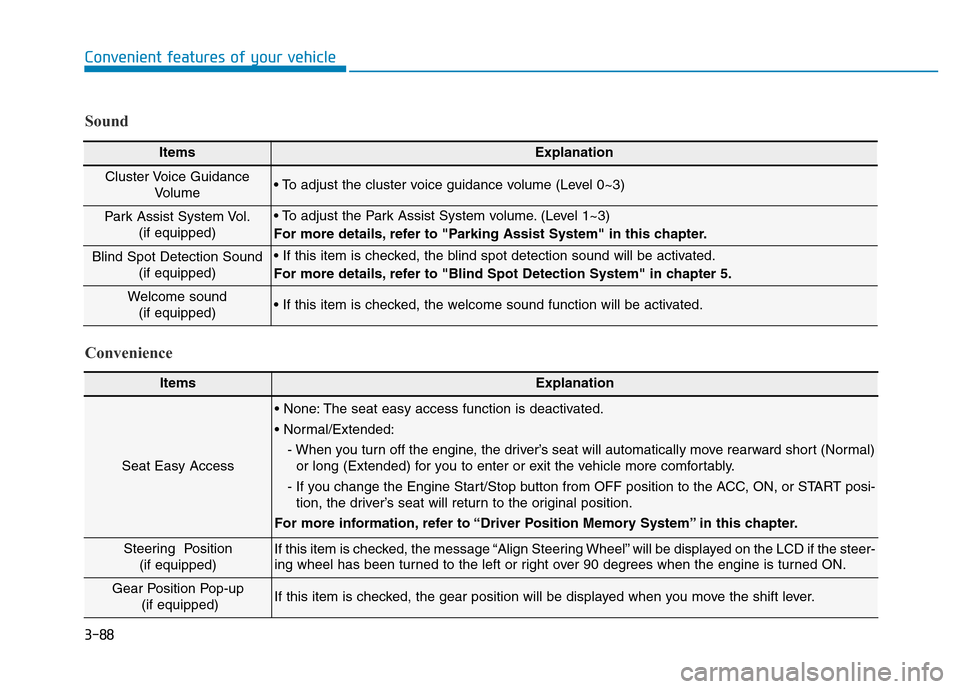
ItemsExplanation
Seat Easy Access
• None: The seat easy access function is deactivated.
• Normal/Extended:
- When you turn off the engine, the driver’s seat will automatically move rearward short (Normal)
or long (Extended) for you to enter or exit the vehicle more comfortably.
- If you change the Engine Start/Stop button from OFF position to the ACC, ON, or START posi-
tion, the driver’s seat will return to the original position.
For more information, refer to “Driver Position Memory System” in this chapter.
Steering Position
(if equipped) If this item is checked, the message “Align Steering Wheel” will be displayed on the LCD if the steer-
ing wheel has been turned to the left or right over 90 degrees when the engine is turned ON.
Gear Position Pop-up
(if equipped)If this item is checked, the gear position will be displayed when you move the shift lever.
Convenience Sound
ItemsExplanation
Cluster Voice Guidance
Volume • To adjust the cluster voice guidance volume (Level 0~3)
Park Assist System Vol.
(if equipped)• To adjust the Park Assist System volume. (Level 1~3)
For more details, refer to "Parking Assist System" in this chapter.
Blind Spot Detection Sound
(if equipped)• If this item is checked, the blind spot detection sound will be activated.
For more details, refer to "Blind Spot Detection System" in chapter 5.
Welcome sound
(if equipped)• If this item is checked, the welcome sound function will be activated.