Page 367 of 637
4-110
Multimedia System
Setup Mode
(Type B-5, Type B-6)
Press the [SETUP]button to display
the Setup screen.
You can select and control options
related to [Display], [Sound],
[Clock/Calendar], [Phone] and
[System].
With the Display Button
Press the [SETUP]button
�Select
[Display]
You can select and control options
related to [Brightness], [Mode Pop
up], [Text Scroll] and [Media Display].
Adjusting the Brightness
Use the [Left/Right] buttons to adjust
the screen brightness or set the
Brightness on Automatic, Day or
Night mode.
Press the [Default] button to reset.
• Automatic : Adjusts the brightness
automatically.
• Day : Always maintains the bright-
ness on high.
• Night : Always maintains the bright-
ness on low.
Page 368 of 637
4-111
Multimedia System
4
Mode Pop up
This feature is used to display the
Mode Pop up screen when entering
radio and media modes.
When this feature is turned on,
pressing the [RADIO]or [MEDIA]
button will display the Mode Pop up
screen.
Information
The media Mode Pop up screen can be
displayed only when two or more
media modes have been connected.
Text Scroll
This feature is used to scroll text dis-
played on the screen when it is too
long to be displayed at once.
When turned on, the text is repeat-
edly scrolled. When turned off, the
text is scrolled just once.
Media Display
This feature is used to change the
information displayed within USB
and MP3 CD modes.
• Folder File : Displays file name and
folder name.
• Album Artist Song : Displays album
name/artist name/song.
i
Page 370 of 637
4-113
Multimedia System
4
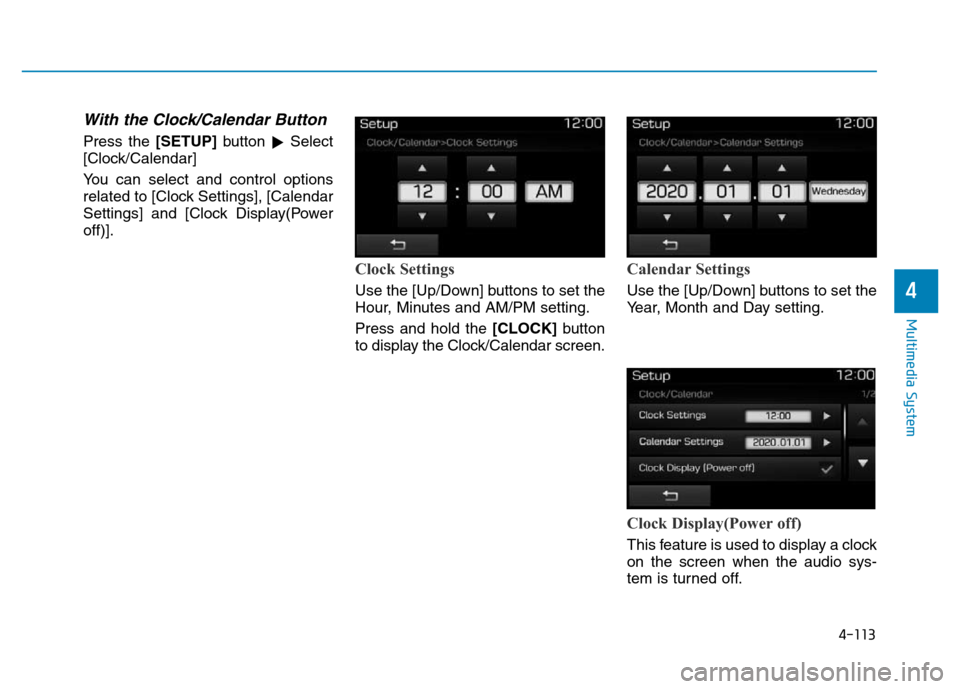
With the Clock/Calendar Button
Press the [SETUP]button
�Select
[Clock/Calendar]
You can select and control options
related to [Clock Settings], [Calendar
Settings] and [Clock Display(Power
off)].
Clock Settings
Use the [Up/Down] buttons to set the
Hour, Minutes and AM/PM setting.
Press and hold the [CLOCK]button
to display the Clock/Calendar screen.
Calendar Settings
Use the [Up/Down] buttons to set the
Year, Month and Day setting.
Clock Display(Power off)
This feature is used to display a clock
on the screen when the audio sys-
tem is turned off.
Page 372 of 637

4-115
Multimedia System
4
Information
- Before Downloading
Contacts
• To learn more about whether your
mobile phone supports contacts
downloads, refer to your mobile
phone user’s manual.
• The contacts for only the connected
phone can be downloaded.
Downloading Contacts
As the contacts are downloaded
from the mobile phone, downloading
contacts number is displayed.
• Up to 1,000 contacts entries can
be copied into car contacts.
• Up to 1,000 contacts entries can
be saved for each paired device.
• Upon downloading contacts data,
previously saved contacts data will
be deleted. However, contacts
entries saved to other paired
phones are not deleted.
Auto Download (Contacts)
This feature is used to automatically
download mobile contacts entries once
a
Bluetooth®Wireless Technology
phone is connected.
• The Auto Download feature will
download mobile contacts entries
every time the phone is connected.
The download time may differ
depending on the number of saved
contacts entries and the communi-
cation state.
• When downloading a contacts, first
check to see that your mobile
phone supports the contacts
download feature.
i
Page 373 of 637
4-116
Multimedia System
Outgoing Volume
Use the [-], [+] buttons to adjust the
outgoing volume level.
Turning Bluetooth System Off
Once Bluetooth®Wireless Technology
is turned off,
Bluetooth®Wireless
Technology related features will not be
supported within the audio system.
To turn Bluetooth®Wireless
Technology back on, go to [SETUP]
�[Phone] and press “Yes”.
With the System Button
Press the [SETUP]button
�Select
[System]
You can select and control options
related to [Memory Information] and
[Language].
Memory Information
This feature displays information
related to system memory.
• Using : Displays capacity currently
in use
• Capacity : Displays total capacity
Language
This feature is used to change the
system language.
If the language is changed, the sys-
tem will restart and apply the select-
ed language.
• Language support by region.
English, Português, Español.
Page 390 of 637

5-4
Driving your vehicle
Before entering the vehicle
• Be sure all windows, outside mir-
ror(s), and outside lights are clean
and unobstructed.
• Remove frost, snow, or ice.
• Visually check the tires for uneven
wear and damage.
• Check under the vehicle for any
sign of leaks.
• Be sure there are no obstacles
behind you if you intend to back up.
Before starting
• Make sure the hood, the trunk, and
the doors are securely closed and
locked.
• Adjust the position of the seat and
steering wheel.
• Adjust the inside and outside
rearview mirrors.
• Verify all the lights work.
• Fasten your seatbelt. Check that all
passengers have fastened their
seatbelts.
• Check the gauges and indicators in
the instrument panel and the mes-
sages on the instrument display
when the ignition switch is in the
ON position.
• Check that any items you are car-
rying are stored properly or fas-
tened down securely.
BEFORE DRIVING
To reduce the risk of SERIOUS
INJURY or DEATH, take the fol-
lowing precautions:
•ALWAYS wear your seat belt.
All passengers must be prop-
erly belted whenever the vehi-
cle is moving. For more infor-
mation, refer to "Seat Belts" in
chapter 2.
•Always drive defensively.
Assume other drivers or pedes-
trians may be careless and
make mistakes.
•Stay focused on the task of
driving. Driver distraction can
cause accidents.
•Leave plenty of space between
you and the vehicle in front of
you.
WARNING
Page 411 of 637

5-25
Driving your vehicle
5
Shift lever position
The indicator in the instrument clus-
ter displays the shift lever position
when the ignition switch is in the ON
position.
P (Park)
Always come to a complete stop
before shifting into P (Park).
To shift from P (Park), you must
depress firmly on the brake pedal
and make sure your foot is off the
accelerator pedal.
If you have done all of the above
and still cannot shift the lever out of
P (Park), see "Shift-Lock Release"
in this chapter.
The shift lever must be in P (Park)
before turning the engine off. To reduce the risk of serious
injury or death:
•ALWAYS check the surround-
ing areas near your vehicle for
people, especially children,
before shifting a vehicle into
D (Drive) or R (Reverse).
•Before leaving the driver's
seat, always make sure the
shift lever is in the P (Park)
position, then set the parking
brake, and place the ignition
switch in the LOCK/OFF posi-
tion. Unexpected and sudden
vehicle movement can occur
if these precautions are not
followed.
•When using Manual Shift
Mode, do not use engine brak-
ing (shifting from a high gear
to lower gear) rapidly on slip-
pery roads. The vehicle may
slip causing an accident.
WARNING
•Shifting into P (Park) while the
vehicle is in motion may
cause you to lose control of
the vehicle.
•After the vehicle has stopped,
always make sure the shift
lever is in P (Park), apply the
parking brake, and turn the
engine off.
•Do not use the P (Park) posi-
tion in place of the parking
brake.
WARNING
Page 419 of 637
5-33
Driving your vehicle
• When rapidly accelerating from a
lower vehicle speed, the engine
rpm may increase dramatically as
a result of clutch slip as the dual
clutch transmission selects the cor-
rect gear. This is a normal condi-
tion.
• When accelerating from a stop on
an incline, press the accelerator
smoothly and gradually to avoid
any shudder feeling or jerkiness.
• When traveling at a lower vehicle
speed, if you release the accelera-
tor pedal quickly, you may feel
engine braking before the trans-
mission changes gears. This
engine braking feeling is similar to
operating a manual transmission at
low speed.• When driving downhill, you may
wish to move the gear shift lever to
Manual Shift mode and downshift
to a lower gear in order to control
your speed without using the brake
pedal excessively.
• When you turn the engine on and
off, you may hear clicking sounds
as the system goes through a self
test. This is a normal sound for the
dual clutch transmission.
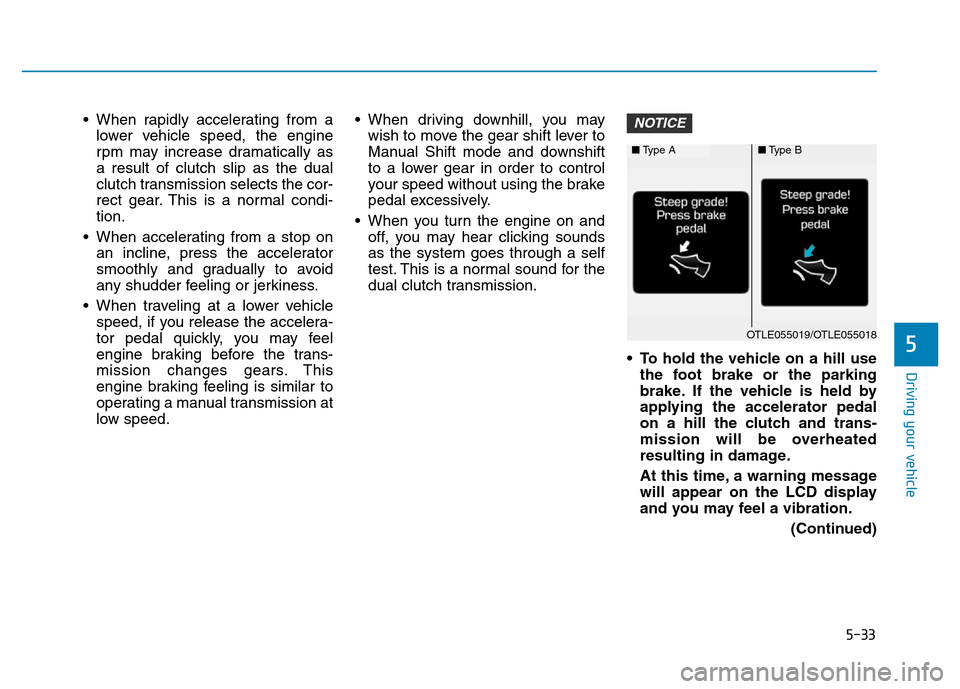
• To hold the vehicle on a hill use
the foot brake or the parking
brake. If the vehicle is held by
applying the accelerator pedal
on a hill the clutch and trans-
mission will be overheated
resulting in damage.
At this time, a warning message
will appear on the LCD display
and you may feel a vibration.
(Continued)NOTICE
5
■Type A■Type B
OTLE055019/OTLE055018
![Hyundai Elantra 2017 Owners Manual 4-110
Multimedia System
Setup Mode
(Type B-5, Type B-6)
Press the [SETUP]button to display
the Setup screen.
You can select and control options
related to [Display], [Sound],
[Clock/Calendar], [Phone]](/manual-img/35/14543/w960_14543-366.png "Hyundai Elantra 2017 Owners Manual 4-110
Multimedia System
Setup Mode
(Type B-5, Type B-6)
Press the [SETUP]button to display
the Setup screen.
You can select and control options
related to [Display], [Sound],
[Clock/Calendar], [Phone]")
![Hyundai Elantra 2017 Owners Manual 4-111
Multimedia System
4
Mode Pop up
This feature is used to display the
Mode Pop up screen when entering
radio and media modes.
When this feature is turned on,
pressing the [RADIO]or [MEDIA]
button](/manual-img/35/14543/w960_14543-367.png "Hyundai Elantra 2017 Owners Manual 4-111
Multimedia System
4
Mode Pop up
This feature is used to display the
Mode Pop up screen when entering
radio and media modes.
When this feature is turned on,
pressing the [RADIO]or [MEDIA]
button")
![Hyundai Elantra 2017 Owners Manual 4-116
Multimedia System
Outgoing Volume
Use the [-], [+] buttons to adjust the
outgoing volume level.
Turning Bluetooth System Off
Once Bluetooth®Wireless Technology
is turned off,
Bluetooth®Wirele](/manual-img/35/14543/w960_14543-372.png "Hyundai Elantra 2017 Owners Manual 4-116
Multimedia System
Outgoing Volume
Use the [-], [+] buttons to adjust the
outgoing volume level.
Turning Bluetooth System Off
Once Bluetooth®Wireless Technology
is turned off,
Bluetooth®Wirele")