Page 168 of 673

167
uuOperating the Switches Around the Steering Wheel uBrightness Control
Controls
Brightness Control
When the power mode is in ON, you can use
the
(+ or (- button to adjust instrument
panel brightness.
To brighten: Press the
(+ button.
To dim: Press the
(- button.
You will hear a beep when the brightness
reaches minimum or maximum. The MID will
return to its original state several seconds after
adjusting the brightness.
■Brightness level indicator
The brightness level is shown on the MID
while you are adjusting it.
1 Brightness Control
Instrument panel brightne ss varies, depending on
whether the exterior lights are on or off. The
instrument panel dims to reduce glare when they are
on.
When it is bright out side and the headlight
integration with the wi per is activated, the
instrument panel bri ghtness does not change.
If you press the
( + button until the brightness display
is up to max, the beeper sounds. This cancels the
reduced instrument panel brightness when the
parking lights are on.
The brightness can be set differently for when the
exterior lights are on, and when they are off.
( + Button
(- Button
17 PILOT-31TG76100.book 167 ページ 2016年9月20日 火曜日 午後4時9分
Page 171 of 673

uuOperating the Switches Around the Steering Wheel uDriving Position Memory System*
170
Controls
1. Set the power mode to ON. Adjust the
driver’s seat and th e door mirrors to the
desired position.
2. Press the SET button.
u You will hear a beep, and the memory
button indicator light will blink.
3. Press memory button
(1 or (2 within five
seconds of pressing the SET button.
u Once the seat and the outside mirror
positions have been memorized, the
indicator light on the button you pressed
stays on.
1. Select
(P.
2. Apply the parking brake.
3. Press a memory button (
(1 or (2).
u You will hear a beep, and the indicator
light will blink.
The seat and the door mirrors will
automatically move to the memorized
positions. When it has finished moving, you
will hear the beep, a nd the indicator light
stays on.
■Storing a Position in Memory1 Storing a Position in Memory
After you press the SET button, the storing operation
will be canceled when:
•You do not press the memory button within five
seconds.
•You readjust the seat or the outside mirror position
before the double-beep.
•You set the power mode to any position except
ON.
Memory Button 1
Memory Button 2SET Button
■Recalling the Stored Position1Recalling the Stored Position
The seat will st op moving if you:
•Press the SET button, or a memory button ((1 or
(2).•Adjust the seat or the door mirror position.
•Select into any position except ( P.
Memory Buttons
17 PILOT-31TG76100.book 170 ページ 2016年9月20日 火曜日 午後4時9分
Page 175 of 673

174
Controls
Adjusting the Seats
Adjusting the Seat Positions
Adjust the driver’s seat as far back as possible
while allowing you to maintain full control of
the vehicle. You should be able to sit upright,
well back in the seat and be able to
adequately press the pedals without leaning
forward, and grip the steering wheel
comfortably. The passenger’s seat should be
adjusted in a similar manner, so that it is as far
back from the front airbag in the dashboard
as possible.
■Adjusting the front power seats*
1Adjusting the Seats
The National Highway Traffic Safety Administration
and Transport Cana da recommend that drivers allow
at least 10 inches (25 cm) between the center of the
steering wheel and the chest.
Always make seat adjustments before driving.
3WARNING
Sitting too close to a front airbag can result
in serious injury or death if the front
airbags inflate.
Always sit as far back from the front
airbags as possible while maintaining
control of the vehicle.
Move back.
Allow sufficient
space.
Horizontal Position
Adjustment
Height Adjustment
*
Seat-back Angle
Adjustment Lumbar Support
Adjustment
*
* Not available on all models
17 PILOT-31TG76100.book 174 ページ 2016年9月20日 火曜日 午後4時9分
Page 180 of 673

Continued179
uuAdjusting the Seats uAdjusting the Seat Positions
Controls
Your vehicle is equipped with head restraints
in all seating positions.
Head restraints are most effective for
protection against whiplash and other rear-
impact crash injuries when the center of the
back of the occupant’s head rests against the
center of the restraint. The tops of the
occupant’s ears should be level with the
center height of the restraint.
■Adjusting the front and second ro w outer head restraint positions*
To raise the head restraint: Pull it upward.
To lower the head restraint: Push it down
while pressing the release button.
■Adjusting the Head Restraints1 Adjusting the Head Restraints
In order for the head restraint system to work
properly:
•Do not hang any items on the head restraints, or
from the restraint legs.
•Do not place any objects between an occupant and
the seat-back.
•Install each restraint in its proper location.
3WARNING
Improperly positioning head restraints
reduces their effectiveness and increases
the likelihood of serious injury in a crash.
Make sure head restraints are in place and
positioned properly before driving.
Position head in the center
of the head restraint.
* Not available on all models
17 PILOT-31TG76100.book 179 ページ 2016年9月20日 火曜日 午後4時9分
Page 181 of 673
uuAdjusting the Seats uAdjusting the Seat Positions
180
Controls
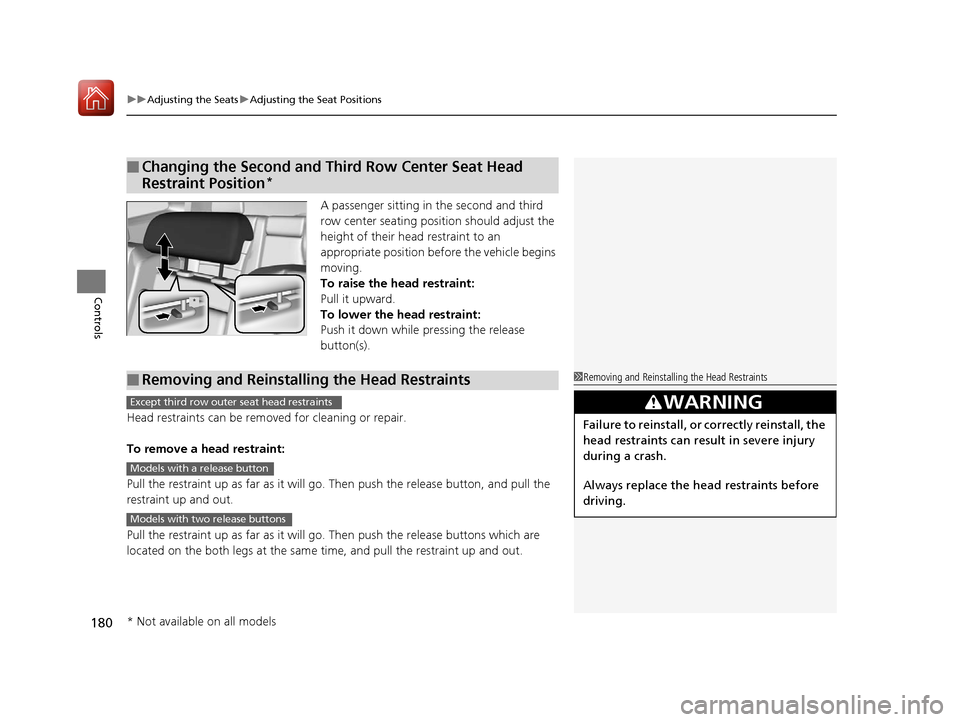
A passenger sitting in the second and third
row center seating position should adjust the
height of their head restraint to an
appropriate position befo re the vehicle begins
moving.
To raise the head restraint:
Pull it upward.
To lower the head restraint:
Push it down while pressing the release
button(s).
Head restraints can be removed for cleaning or repair.
To remove a head restraint:
Pull the restraint up as far as it will go. Then push the release button, and pull the
restraint up and out.
Pull the restraint up as far as it will go. Then push the releas e buttons which are
located on the both legs at the same time, and pull the restraint up and out.
■Changing the Second and Third Row Center Seat Head
Restraint Position
*
*
■Removing and Reinstalling the Head Restraints1 Removing and Reinstalling the Head Restraints
3WARNING
Failure to reinstall, or correctly reinstall, the
head restraints can result in severe injury
during a crash.
Always replace the he ad restraints before
driving.
Except third row outer seat head restraints
Models with a release button
Models with two release buttons
* Not available on all models
17 PILOT-31TG76100.book 180 ページ 2016年9月20日 火曜日 午後4時9分
Page 184 of 673
183
uuAdjusting the Seats uRear Seats
Continued
Controls
Rear Seats
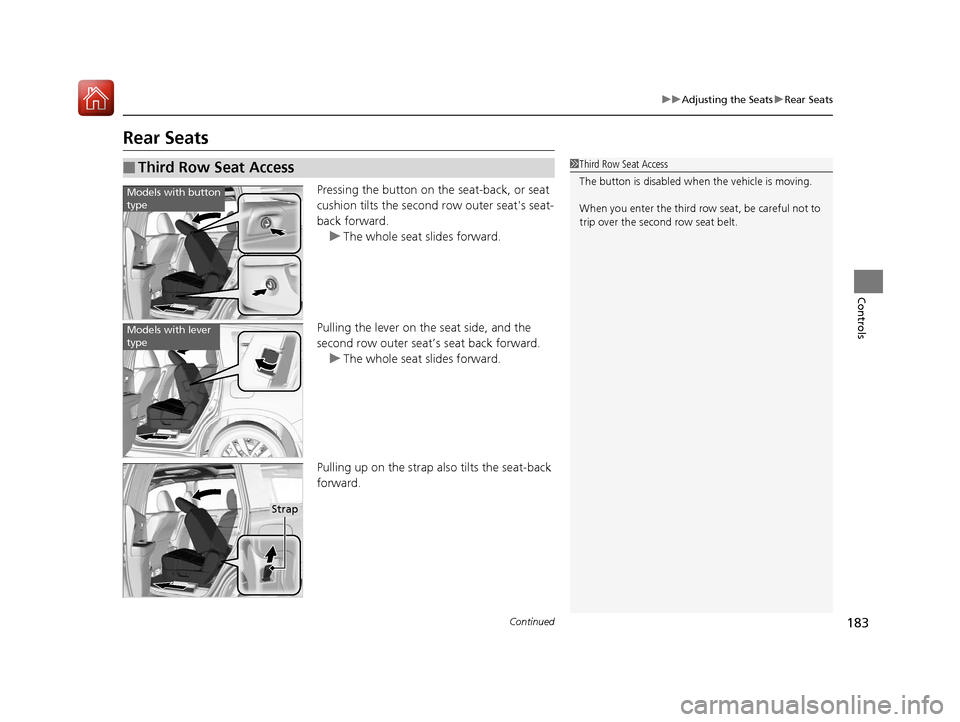
Pressing the button on the seat-back, or seat
cushion tilts the second row outer seat's seat-
back forward.
u The whole seat slides forward.
Pulling the lever on the seat side, and the
second row outer seat’s seat back forward. u The whole seat slides forward.
Pulling up on the strap also tilts the seat-back
forward.
■Third Row Seat Access1 Third Row Seat Access
The button is disabled wh en the vehicle is moving.
When you enter the third row seat, be careful not to
trip over the second row seat belt.
Models with button
type
Models with lever
type
Strap
17 PILOT-31TG76100.book 183 ページ 2016年9月20日 火曜日 午後4時9分
Page 188 of 673
187
uuAdjusting the Seats uArmrest
Controls
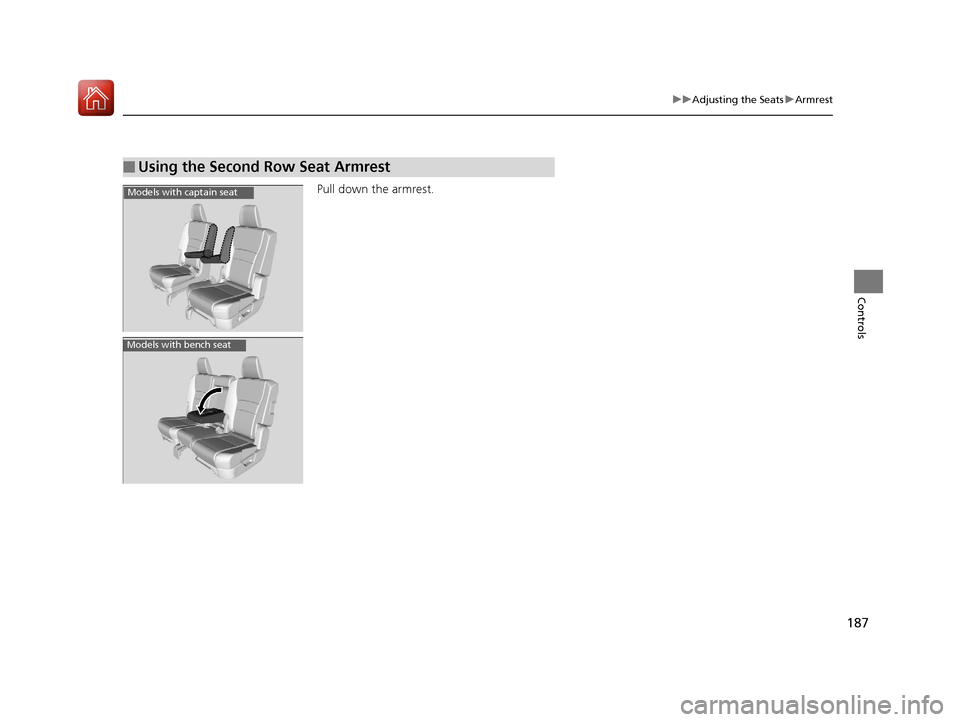
Pull down the armrest.
■Using the Second Row Seat Armrest
Models with captain seat
Models with bench seat
17 PILOT-31TG76100.book 187 ページ 2016年9月20日 火曜日 午後4時9分
Page 189 of 673
188
Controls
Interior Lights/Interior Convenience Items
Interior Lights
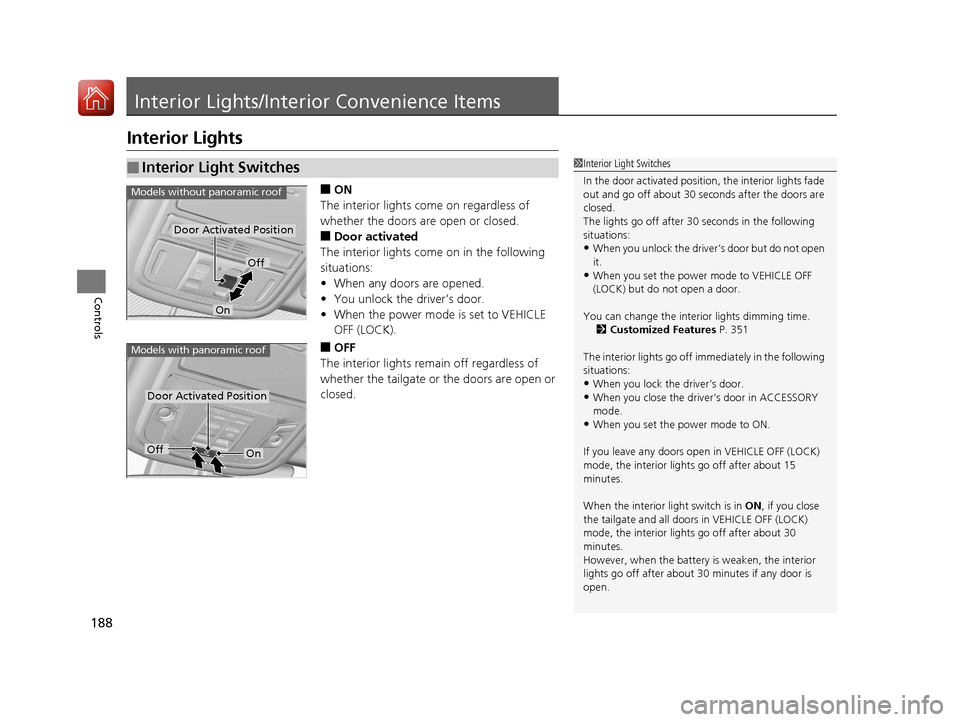
■ON
The interior lights come on regardless of
whether the doors are open or closed.
■Door activated
The interior lights come on in the following
situations:
• When any doors are opened.
• You unlock the driver’s door.
• When the power mode is set to VEHICLE
OFF (LOCK).
■OFF
The interior lights remain off regardless of
whether the tailgate or the doors are open or
closed.
■Interior Light Switches1 Interior Light Switches
In the door activated position, the interior lights fade
out and go off about 30 se conds after the doors are
closed.
The lights go off after 30 seconds in the following
situations:
•When you unlock the driver’s door but do not open
it.
•When you set the power mode to VEHICLE OFF
(LOCK) but do not open a door.
You can change the interi or lights dimming time.
2 Customized Features P. 351
The interior lights go off i mmediately in the following
situations:
•When you lock the driver’s door.
•When you close the driver’s door in ACCESSORY
mode.
•When you set the power mode to ON.
If you leave any doors open in VEHICLE OFF (LOCK)
mode, the interior light s go off after about 15
minutes.
When the interior light switch is in ON, if you close
the tailgate and all doors in VEHICLE OFF (LOCK)
mode, the interior light s go off after about 30
minutes.
However, when the battery is weaken, the interior
lights go off after about 30 minutes if any door is
open.
Door Activated Position
Off
On
Models without panoramic roof
Door Activated Position
Models with panoramic roof
OffOn
17 PILOT-31TG76100.book 188 ページ 2016年9月20日 火曜日 午後4時9分