Page 191 of 673
190
uuInterior Lights/Interior Convenience Items uInterior Lights
Controls
■Second and third row
The map lights can be turned on and off by
pressing the button when the front interior
light switch is in the door activated position.
■ON
The light comes on when you open the
tailgate, and goes off when closed.
■OFF
The light stays off with or without opening the
tailgate.
Models without panoramic roof
Models with panoramic roof
■Cargo Area Lights
Off
On
17 PILOT-31TG76100.book 190 ページ 2016年9月20日 火曜日 午後4時9分
Page 196 of 673
195
uuInterior Lights/Interior Convenience Items uInterior Convenience Items
Continued
Controls
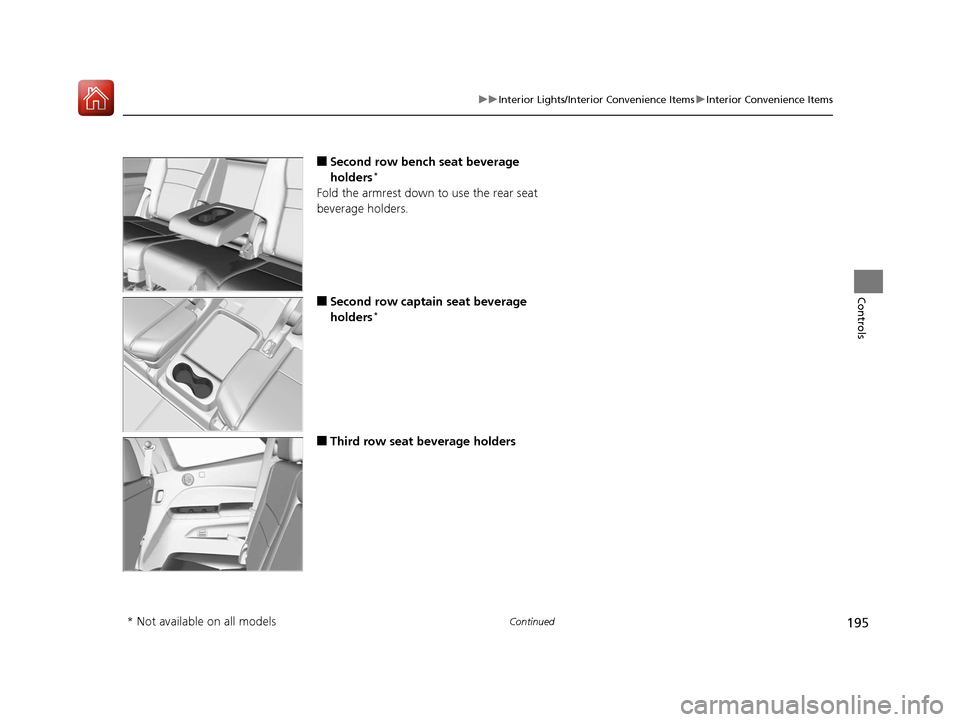
■Second row bench seat beverage
holders*
Fold the armrest down to use the rear seat
beverage holders.
■Second row captain seat beverage
holders*
■Third row seat beverage holders
* Not available on all models
17 PILOT-31TG76100.book 195 ページ 2016年9月20日 火曜日 午後4時9分
Page 204 of 673
Continued203
uuInterior Lights/Interior Convenience Items uInterior Convenience Items
Controls
The power mode must be in ON to use the
seat heaters. The HI setting heats the seats
faster than the LO setting.
Press the seat heater button:
Once - The HI setting (three indicators on)
Twice - The MID setting (two indicators on)
Three times - The LO setting (one indicator on)
Four times - The OFF setting (no indicators on)
■Second Row Outer Seat Heaters*1Second Row Outer Seat Heaters*
Do not use the seat heaters even in LO when the
engine is off. Under such conditions, the battery may
be weakened, making the engine difficult to start.
3WARNING
Heat induced burns are possible when
using seat heaters.
Persons with a diminished ability to sense
temperature (e.g., persons with diabetes,
lower-limb nerve damage, or paralysis) or
with sensitive skin should not use seat
heaters.
* Not available on all models
17 PILOT-31TG76100.book 203 ページ 2016年9月20日 火曜日 午後4時9分
Page 218 of 673

217
Features
This chapter describes how to operate technology features.
Audio SystemAbout Your Audio System ................ 218
USB Port(s) ....................................... 219
Auxiliary Input Jack .......................... 220
Audio System Theft Protection ......... 221
Audio Remote Controls .................... 222
Audio System Basic Operation ........ 224
Audio System Basic Operation ........ 242
Models with color audio system
Models with Display Audio
Audio Error Messages
CD Player*....................................... 310
iPod/USB Flash Drive ........................ 311
Pandora ®
*....................................... 312
Android/Apps*................................ 313
General Information on the Audio
System SiriusXM ® Radio Service
*................. 314
Recommended CD*......................... 315
Compatible iPod, iPhone, and USB Flash Drives............................................. 317
About Open Source Licenses ............ 320 Blu-ray/DVD Rear Entertainment
System
*........................................... 322
Customized Features ........................ 351
HomeLink ® Universal Transceiver
*.. 387
Bluetooth ® HandsFreeLink® ............. 390
Bluetooth ® HandsFreeLink® ............. 415
Compass
*
Compass Calibration........................ 448
Compass Zone Selection .................. 449
Models with color audio system
Models with Display Audio
* Not available on all models
17 PILOT-31TG76100.book 217 ページ 2016年9月20日 火曜日 午後4時9分
Page 220 of 673

219
uuAudio System uUSB Port(s)
Continued
Features
USB Port(s)
Install the iPod USB connector or the USB flash
drive to the USB port.
■On the console panel
u The USB port (1.5A) is for charging
devices, playing audio files and
connecting compatib le phones with
Apple CarPlay
TM or Android AutoTM.
u The USB port (2.5A) is for playing audio
files on the USB flash drive and charging
devices.
■In the consol e compartment
The USB port is for playing audio files on the
USB flash drive and charging devices.
u 1.5A for models with color audio system
u 2.5A for models with Display Audio
1USB Port(s)
•Do not leave the iPod or USB flash drive in the
vehicle. Direct sunlight and high temperatures may
damage it.
•We recommend using an extension cable with the
USB port.
•Do not connect the iPod or USB flash drive using a hub.
•Do not use a device such as a card reader or hard disk
drive, as the device or your files may be damaged.
•We recommend keeping y our data backed up
before using the device in your vehicle.
•Displayed messages may vary depending on the
device model and software version.
If the audio system does not recognize the iPod, try
reconnecting it a few times or reboot the device. To
reboot, follow the manufac turer’s instructions
provided with the iPod or visit www.apple.com/ipod.
The USB port can supply up to 1.5A/2.5A of power. It
does not output 1.5A/2.5A unless the device
requests.
For amperage details, read the operating manual of
the device that ne eds to be charged.
Set the power mode to ACCESSORY or ON first.
USB charge
Models with Display Audio
USB Port (2.5A)
USB Port (1.5A)
In the console compartment
17 PILOT-31TG76100.book 219 ページ 2016年9月20日 火曜日 午後4時9分
Page 222 of 673

221
uuAudio System uAudio System Theft Protection
Features
Audio System Theft Protection
The audio system is disabled when it is disconnected from the power source, such as
when the battery is disconnected or goes dead. In certain conditions, the system
may display a code entry screen. If this occurs, reactivate the audio system.
■Reactivating the audio system
1. Set the power mode to ON.
2. Turn on the audio system.
3. Press and hold the audio system powe r button for more than two seconds.
u The audio system is reac tivated when the audio co ntrol unit establishes a
connection with the vehicl e control unit. If the control unit fails to recognize
the audio unit, you must go to a deal er and have the audio unit checked.
1Audio System Theft Protection
Find the audio system's se curity code and serial
number label in your owner's manual kit.
We recommend that you write down the serial
number in this owner's manual.
Do not store the label in your vehicle. If you lose the
label, you must first retrie ve the serial number, and
then obtain the code.
You can find out about your serial number and
security code from a dealer.
U.S. models
17 PILOT-31TG76100.book 221 ページ 2016年9月20日 火曜日 午後4時9分
Page 225 of 673

224
Features
Audio System Basic Operation
To use the audio system, the power mode must be in ACCESSORY or ON.
Use the selector knob or MENU/CLOCK
button to access some audio functions.
Press to switch between the normal and
extended display fo r some functions.
Selector knob: Rotate left or right to scroll
through the available choices. Press to set
your selection.
MENU/CLOCK button:
Press to select any mode.
The available mode includes the wallpaper,
display, clock, langu age setup, and play
modes. Play modes can be also selected from
scan, random, rep eat, and so on.
(Back) button: Press to go back to the previous display.
(Sound) button: Press to select the sound setting mode.
(Day/Night) button: Press to change the audio/information screen
brightness.
Press the button, then adjust the brightness using . u Each time you press the button, th e mode switches between the daytime
mode, nighttime mode and OFF mode.
Models with color audio system1Audio System Basic Operation
These indications are used to show how to operate
the selector knob.
Rotate to select.
Press to enter.
Menu Items 2 Wallpaper Setup P. 227
2 Display Setup P. 230
2 Scan P. 232, 238
2 Play Mode P. 235, 238
2 RDS Settings P. 232
One of the operating system s used in this unit is
eCos.
For software license terms and condition, visit their
website (eCos license URL:
http://ecos.sourceware.org/license-overview.html )
For source code disclo sure and other details
regarding eCos, visit:
http://www.hondaopensource2.com
Press the SOURCE, , , or button on the
steering wheel to cha nge any audio setting.
2 Audio Remote Controls P. 222
(Back)
Button
Selector
Knob
MENU/
CLOCK
Button
(Day/Night)
Button
(Sound)
Button
Menu Display
17 PILOT-31TG76100.book 224 ページ 2016年9月20日 火曜日 午後4時9分
Page 233 of 673

uuAudio System Basic Operation uPlaying AM/FM Radio
232
Features
Provides text data information related to your selected RDS capable FM station.
■To find an RDS station from Station List
1. Press while listening to an FM station.
2. Rotate to select the station, then press .
■Update List
Updates your available station list at any time.
1. Press while listening to an FM station.
2. Rotate to select Update List, then press .
■Radio text
Displays the radio text informat ion of the selected RDS station.
1. Press the MENU/CLOCK button.
2. Rotate to select Settings, then press .
3. Rotate to select RDS Settings, then press .
4. Rotate to select Radio Text, then press .
■Scan
Samples each of the strongest stations on the selected band for 10 seconds.
1. Press the MENU/CLOCK button.
2. Rotate to select Scan, then press .
To turn off scan, press .
■Radio Data System (RDS)1 Playing AM/FM Radio
The ST indicator appears on the display indicating
stereo FM broadcasts.
Stereo reproduction in AM is not available.
You can store 6 AM stations and 12 FM stations into
reset button memory. FM1 and FM2 let you store 6
stations each.
Switching the Audio Mode
Press the SOURCE button on the steering wheel.
2 Audio Remote Controls P. 222
1Radio Data System (RDS)
When you select an RDS-capable FM station, the RDS
automatically turns on, and the frequency display
changes to the station name. However, when the
signals of that station become weak, the display
changes from the statio n name to the frequency.
17 PILOT-31TG76100.book 232 ページ 2016年9月20日 火曜日 午後4時9分