Page 270 of 565
269
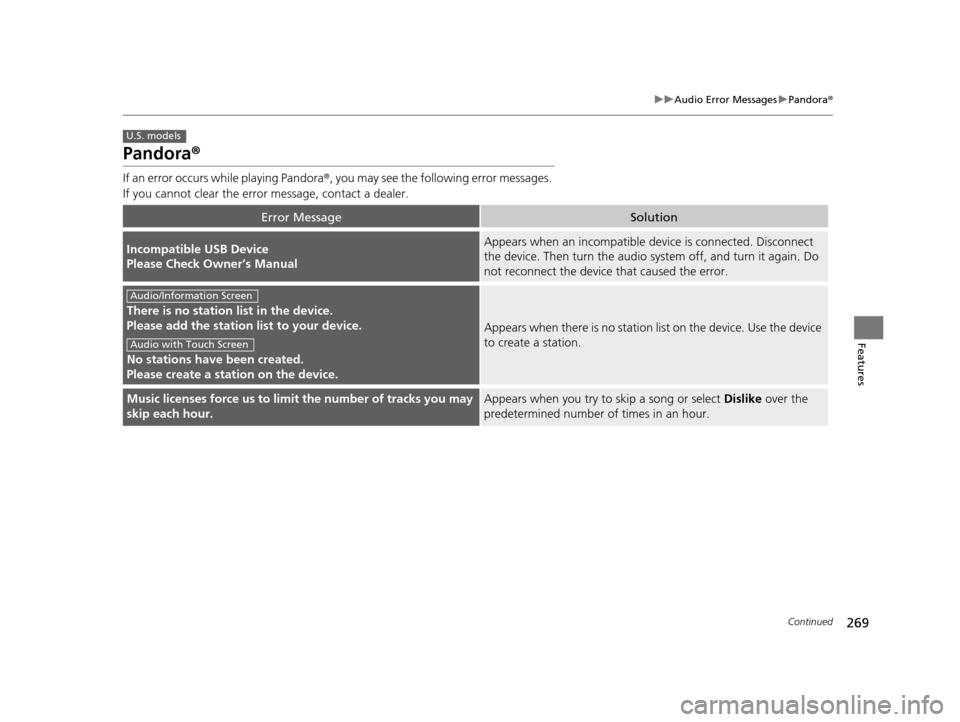
uuAudio Error Messages uPandora ®
Continued
Features
Pandora ®
If an error occurs while playing Pandora ®, you may see the following error messages.
If you cannot clear the error message, contact a dealer.
Error MessageSolution
Incompatible USB Device
Please Check Owner’s ManualAppears when an incompatible de vice is connected. Disconnect
the device. Then turn th e audio system off, and turn it again. Do
not reconnect the device that caused the error.
There is no station list in the device.
Please add the station list to your device.
No stations have been created.
Please create a station on the device.
Appears when there is no station list on the device. Use the device
to create a station.
Music licenses force us to limit the number of tracks you may
skip each hour.Appears when you try to skip a song or select Dislike over the
predetermined number of times in an hour.
U.S. models
Audio/Information Screen
Audio with Touch Screen
17 US ODYSSEY (KA KC)-31TK86600.book 269 ページ 2016年10月24日 月曜日 午後4時2分
Page 271 of 565
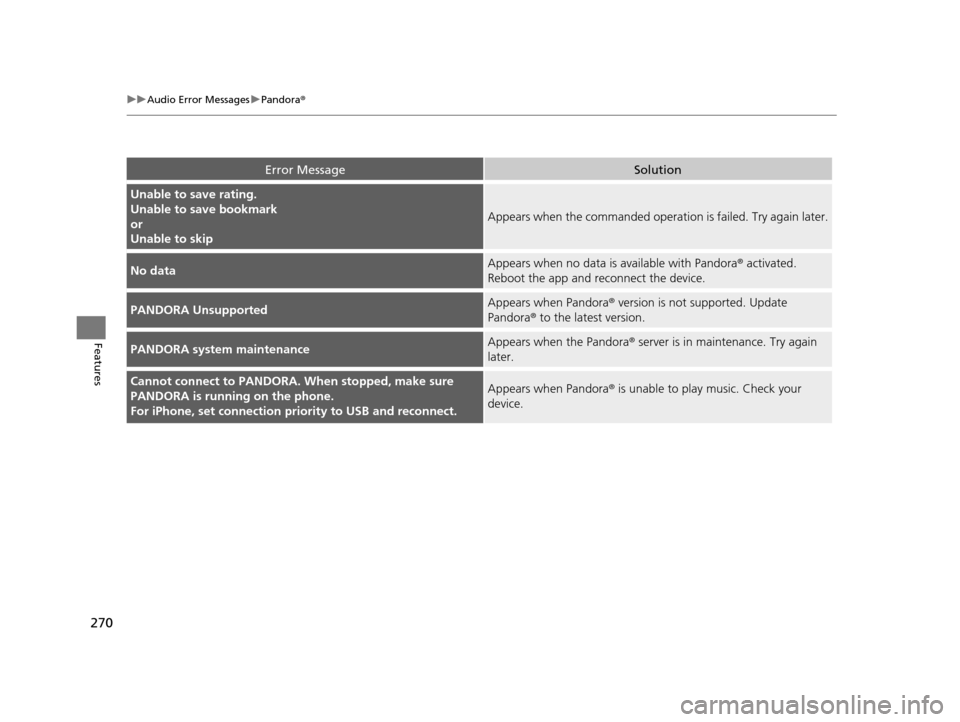
270
uuAudio Error Messages uPandora®
Features
Error MessageSolution
Unable to save rating.
Unable to save bookmark
or
Unable to skip
Appears when the commanded operation is failed. Try again later.
No dataAppears when no data is available with Pandora® activated.
Reboot the app and reconnect the device.
PANDORA UnsupportedAppears when Pandora ® version is not supported. Update
Pandora® to the latest version.
PANDORA system maintenanceAppears when the Pandora ® server is in maintenance. Try again
later.
Cannot connect to PANDORA. When stopped, make sure
PANDORA is running on the phone.
For iPhone, set connection pr iority to USB and reconnect.Appears when Pandora ® is unable to play music. Check your
device.
17 US ODYSSEY (KA KC)-31TK86600.book 270 ページ 2016年10月24日 月曜日 午後4時2分
Page 272 of 565
271
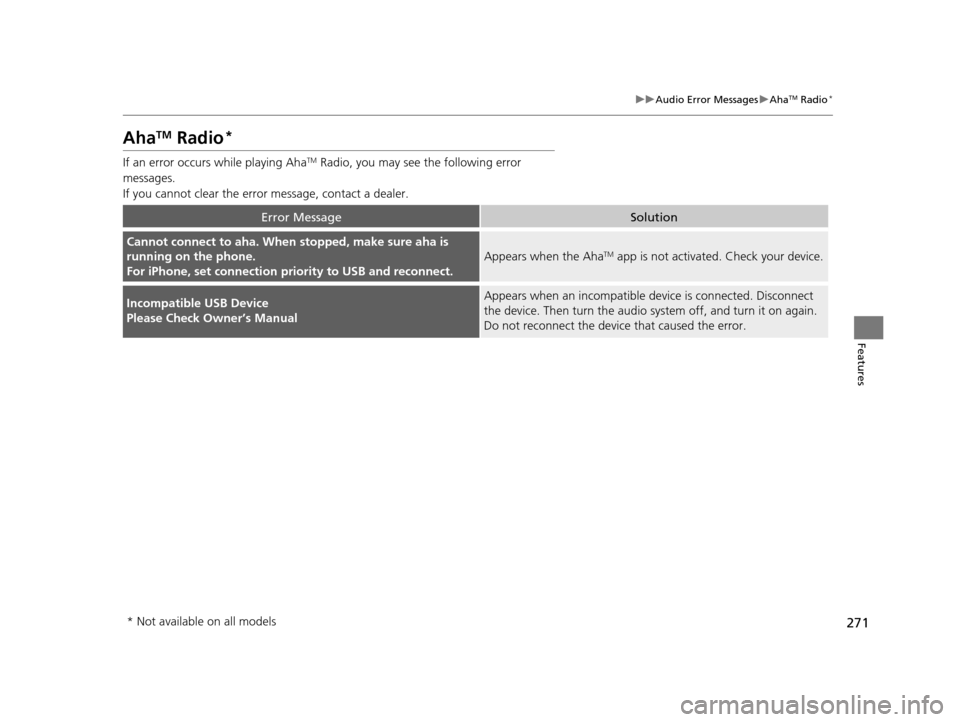
uuAudio Error Messages uAhaTM Radio*
Features
AhaTM Radio*
If an error occurs while playing AhaTM Radio, you may see the following error
messages.
If you cannot clear the error message, contact a dealer.
Error MessageSolution
Cannot connect to aha. When stopped, make sure aha is
running on the phone.
For iPhone, set connection pr iority to USB and reconnect.
Appears when the AhaTM app is not activated. Check your device.
Incompatible USB Device
Please Check Owner’s ManualAppears when an incompatible de vice is connected. Disconnect
the device. Then turn th e audio system off, and turn it on again.
Do not reconnect the device that caused the error.
* Not available on all models
17 US ODYSSEY (KA KC)-31TK86600.book 271 ページ 2016年10月24日 月曜日 午後4時2分
Page 273 of 565
272
Features
General Information on the Audio System
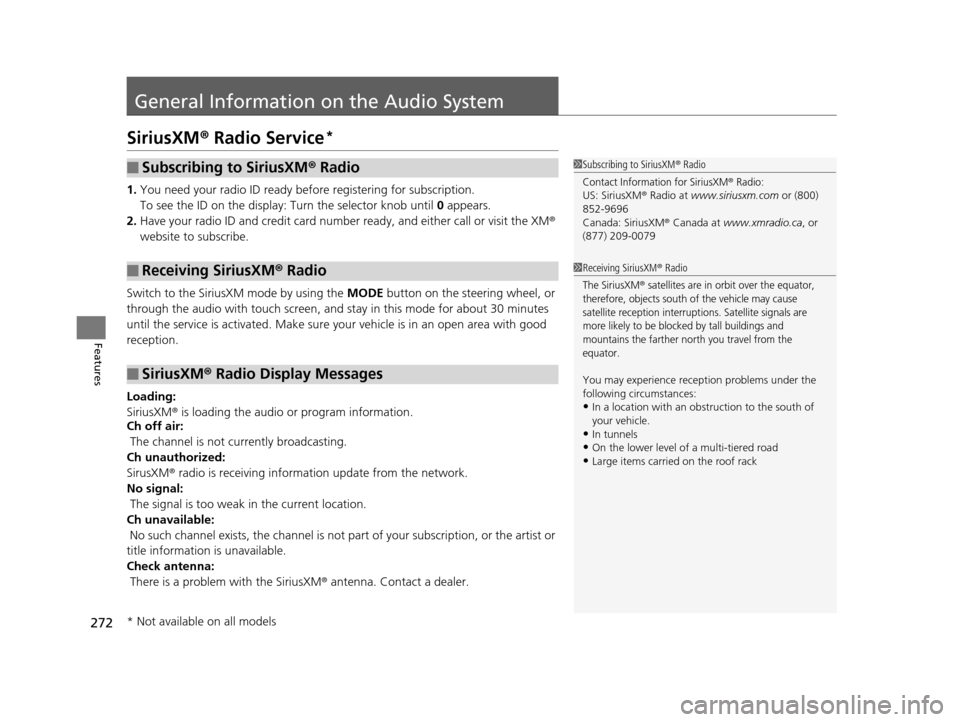
SiriusXM® Radio Service*
1. You need your radio ID ready befo re registering for subscription.
To see the ID on the display: Turn the selector knob until 0 appears.
2. Have your radio ID and credit card number ready, and either call or visit the XM®
website to subscribe.
Switch to the SiriusXM mode by using the MODE button on the steering wheel, or
through the audio with touch screen, and st ay in this mode for about 30 minutes
until the service is activated. Make sure yo ur vehicle is in an open area with good
reception.
Loading:
SiriusXM ® is loading the audio or program information.
Ch off air:
The channel is not currently broadcasting.
Ch unauthorized:
SirusXM ® radio is receiving informat ion update from the network.
No signal:
The signal is too weak in the current location.
Ch unavailable:
No such channel exists, the ch annel is not part of your subscription, or the artist or
title information is unavailable.
Check antenna:
There is a problem with the SiriusXM ® antenna. Contact a dealer.
■Subscribing to SiriusXM® Radio
■Receiving SiriusXM® Radio
■SiriusXM® Radio Display Messages
1 Subscribing to SiriusXM ® Radio
Contact Information for SiriusXM® Radio:US: SiriusXM ® Radio at www.siriusxm.com or (800)
852-9696
Canada: SiriusXM ® Canada at www.xmradio.ca , or
(877) 209-0079
1 Receiving SiriusXM® Radio
The SiriusXM® satellites are in orbit over the equator,
therefore, objects south of the vehicle may cause
satellite reception interrupt ions. Satellite signals are
more likely to be blocked by tall buildings and
mountains the farther north you travel from the
equator.
You may experience rece ption problems under the
following circumstances:
•In a location with an obstruction to the south of
your vehicle.
•In tunnels
•On the lower level of a multi-tiered road•Large items carried on the roof rack
* Not available on all models
17 US ODYSSEY (KA KC)-31TK86600.book 272 ページ 2016年10月24日 月曜日 午後4時2分
Page 295 of 565
294
uuRear Entertainment System*uDVD Player Error Messages
Features
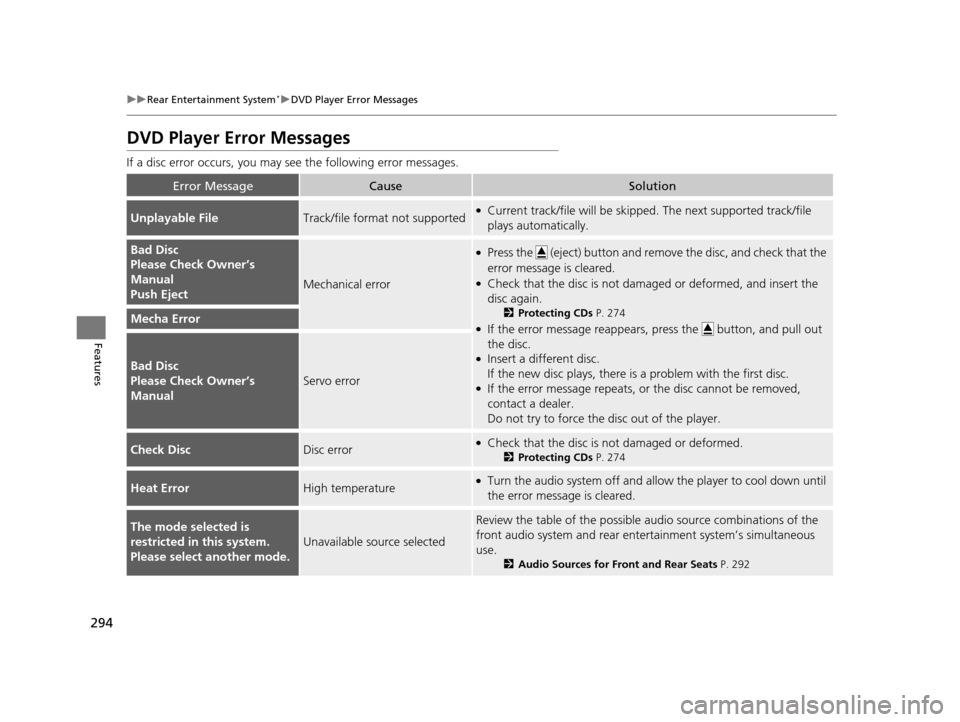
DVD Player Error Messages
If a disc error occurs, you may see the following error messages.
Error MessageCauseSolution
Unplayable FileTrack/file format not supported●Current track/file will be skippe d. The next supported track/file
plays automatically.
Bad Disc
Please Check Owner’s
Manual
Push Eject
Mechanical error
●Press the (eject) button and remove the disc, and check that the
error message is cleared.
●Check that the disc is not damaged or deformed, and insert the
disc again.
2 Protecting CDs P. 274
●If the error message reappears, press the button, and pull out
the disc.
●Insert a different disc.
If the new disc plays, there is a problem with the first disc.
●If the error message repeats, or the disc cannot be removed,
contact a dealer.
Do not try to force the disc out of the player.
Mecha Error
Bad Disc
Please Check Owner’s
Manual
Servo error
Check DiscDisc error●Check that the disc is not damaged or deformed.
2Protecting CDs P. 274
Heat ErrorHigh temperature●Turn the audio system off and allo w the player to cool down until
the error message is cleared.
The mode selected is
restricted in this system.
Please select another mode.
Unavailable source selected
Review the table of the possible audio source combinations of the
front audio system and rear ente rtainment system’s simultaneous
use.
2 Audio Sources for Front and Rear Seats P. 292
17 US ODYSSEY (KA KC)-31TK86600.book 294 ページ 2016年10月24日 月曜日 午後4時2分
Page 404 of 565
403
uuTowing a Trailer uTowing Preparation
Continued
Driving
■Trailer brakes
Recommended for any trailer with a total weight of 1,000 lbs (450 kg) or more:
There are two common types of trailer bra kes: surge and electric. Surge brakes are
common for boat trailers, since the brakes will get wet. If you choose electric brakes,
be sure they are electronically actuated. Do not attempt to attach trailer brakes to
your vehicle's hydraulic system, as it wi ll lower braking effectiveness and create a
potential hazard.
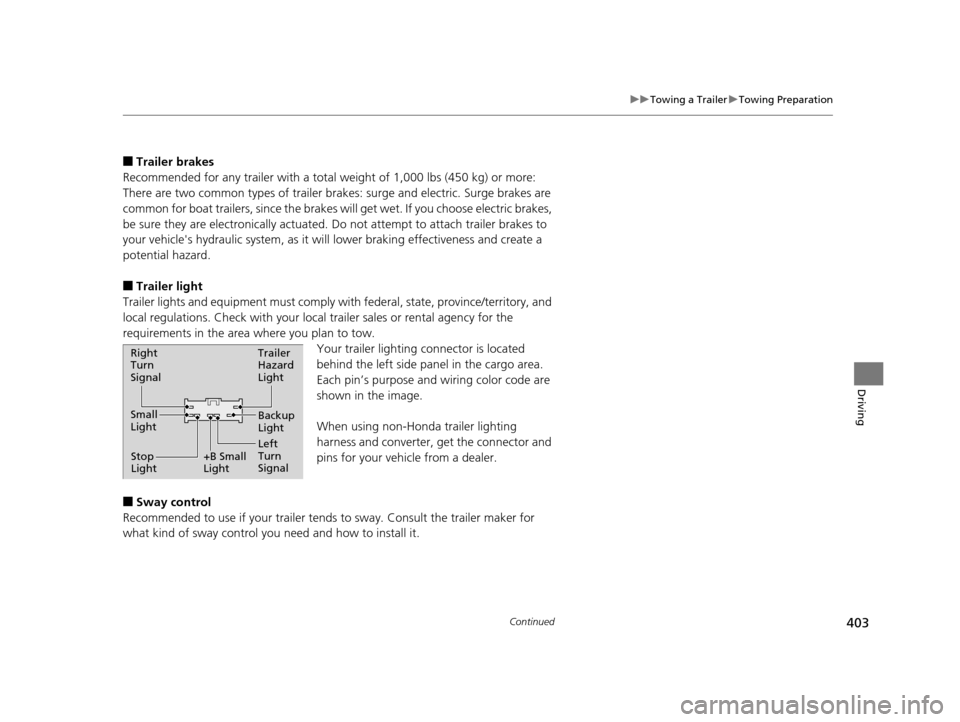
■Trailer light
Trailer lights and equipment must comply with federal, state, province/territory, and
local regulations. Check with your local trailer sales or rental agency for the
requirements in the area where you plan to tow.
Your trailer lighting connector is located
behind the left side panel in the cargo area.
Each pin’s purpose and wiring color code are
shown in the image.
When using non-Honda trailer lighting
harness and converter, get the connector and
pins for your vehicle from a dealer.
■Sway control
Recommended to use if your trailer tends to sway. Consult the trailer maker for
what kind of sway control you need and how to install it.
Right
Turn
Signal
Small
Light
Stop
Light +B Small
LightTrailer
Hazard
Light
Left
Turn
SignalBackup
Light
17 US ODYSSEY (KA KC)-31TK86600.book 403 ページ 2016年10月24日 月曜日
午後4時2分
Page 408 of 565
407Continued
Driving
When Driving
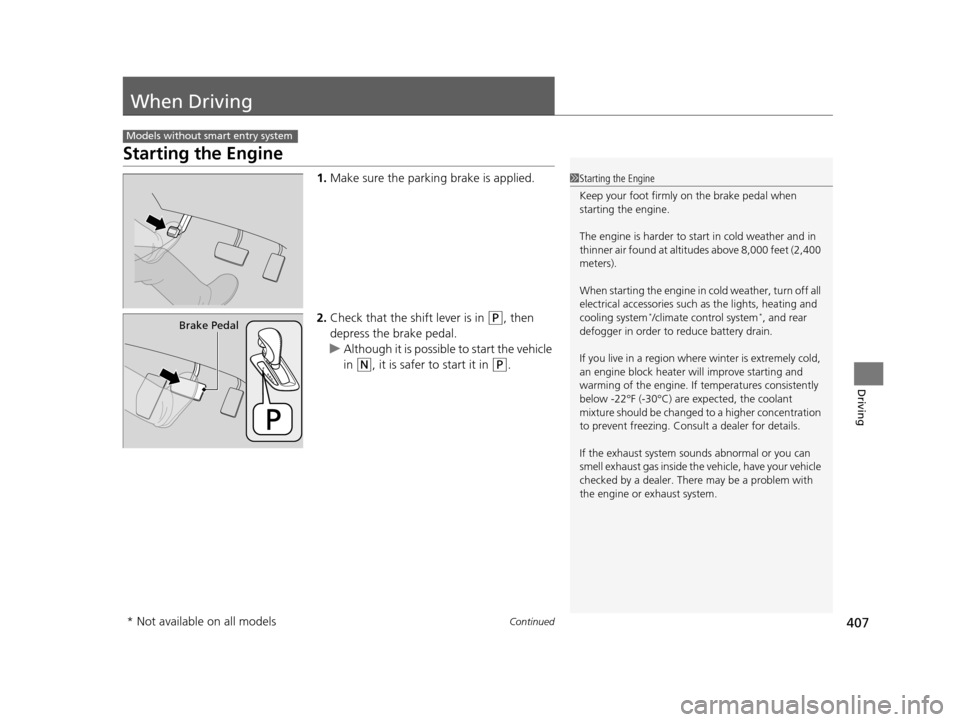
Starting the Engine
1.Make sure the parkin g brake is applied.
2. Check that the shift lever is in
(P, then
depress the brake pedal.
u Although it is possible to start the vehicle
in
(N, it is safer to start it in (P.
Models without smart entry system
1Starting the Engine
Keep your foot firmly on the brake pedal when
starting the engine.
The engine is harder to st art in cold weather and in
thinner air found at altitudes above 8,000 feet (2,400
meters).
When starting the engine in cold weather, turn off all
electrical accessories such as the lights, heating and
cooling system
*/climate control system*, and rear
defogger in order to reduce battery drain.
If you live in a region where winter is extremely cold,
an engine block heater will improve starting and
warming of the engine. If temperatures consistently
below -22°F (-30°C) are expected, the coolant
mixture should be changed to a higher concentration
to prevent freezing. Cons ult a dealer for details.
If the exhaust system sounds abnormal or you can
smell exhaust gas inside the vehicle, have your vehicle
checked by a dealer. There may be a problem with
the engine or exhaust system.Brake Pedal
* Not available on all models
17 US ODYSSEY (KA KC)-31TK86600.book 407 ページ 2016年10月24日 月曜日 午後4時2分
Page 409 of 565

uuWhen Driving uStarting the Engine
408
Driving
3. Turn the ignition switch to START (e
without depressing the accelerator pedal.
1. Keeping your right foot on the brake peda l, release the parking brake. Check that
the parking brake indicator has gone off.
2 Parking Brake P. 436
2.Put the shift lever in (D. Select (R when reversing.
3. Gradually release the brake pedal and gently depress the accelerator pedal to pull
away.
1Starting the Engine
Do not hold the key in START
(e for more than 15
seconds.
•If the engine does not sta rt right away, wait for at
least 10 seconds before trying again.
•If the engine starts, but then immediately stops,
wait at least 10 seconds before repeating step 3
while gently depressing the accelerator pedal.
Release the accelerator pedal once the engine
starts.
The immobilizer system pr otects your vehicle from
theft. If an improperly code d key (or other device) is
used, the engine's fuel system is disabled.
2 Immobilizer System P. 135
■Starting to Drive
17 US ODYSSEY (KA KC)-31TK86600.book 408 ページ 2016年10月24日 月曜日 午後4時2分