Page 319 of 565
318
uuCustomized Features u
Features
*1:Default SettingSetup
Group Customizable Features Descri
ption Selectable Settings
Vehicle
Settings Power
Tailgate
Setup
*
Power Tailgate Keyless
Open Mode
Changes the keyless setting for when the power
tailgate opens. Anytime*1/
When
Unlocked
Power Tailgate Open by
Outer Handle Selects whether to enable the power tailgate
open operation using the tailgate outer handle. Off (Manual Only)
/
On (Power/
Manual)
*1
Mainte-
nance
Info. Maintenance Reset
Resets the engine oil life display when you have
performed the maintenance service. —
Default Cancels/Resets all cust
omized items in the
Vehicle Settings group as default. Default
/OK
* Not available on all models
17 US ODYSSEY (KA KC)-31TK86600.book 318 ページ 2016年10月24日 月曜日 午後4時2分
Page 320 of 565
319
uuCustomized Features u
Continued
Features
*1:Default SettingSetup
Group Customizable Features Description Selectable Settings
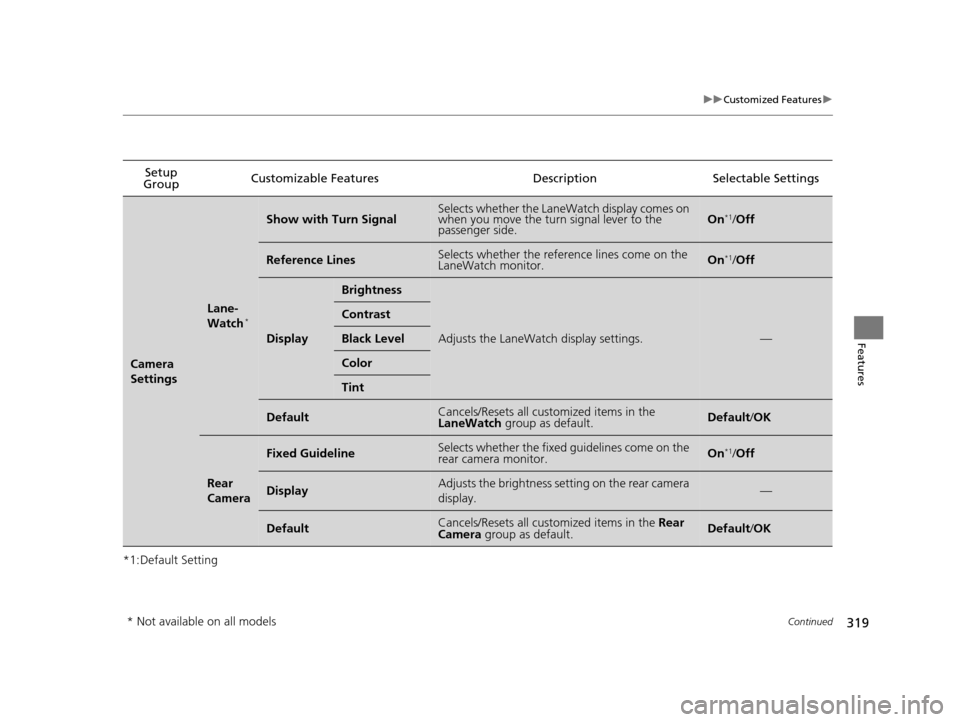
Camera
Settings
Lane-
Watch*
Show with Turn SignalSelects whether the LaneWatch display comes on
when you move the turn signal lever to the
passenger side.On*1/
Off
Reference LinesSelects whether the reference lines come on the
LaneWatch monitor.On*1/Off
Display
Brightness
Adjusts the LaneWatch display settings.—
Contrast
Black Level
Color
Tint
DefaultCancels/Resets all customized items in the
LaneWatch group as default.Default/OK
Rear
Camera
Fixed GuidelineSelects whether the fixed guidelines come on the
rear camera monitor.On*1/ Off
DisplayAdjusts the brightness setting on the rear camera
display.—
DefaultCancels/Resets all customized items in the Rear
Camera group as default.Default/ OK
* Not available on all models
17 US ODYSSEY (KA KC)-31TK86600.book 319 ページ 2016年10月24日 月曜日 午後4時2分
Page 321 of 565
320
uuCustomized Features u
Features
*1:Default SettingSetup
Group Customizable Features Descri
ption Selectable Settings
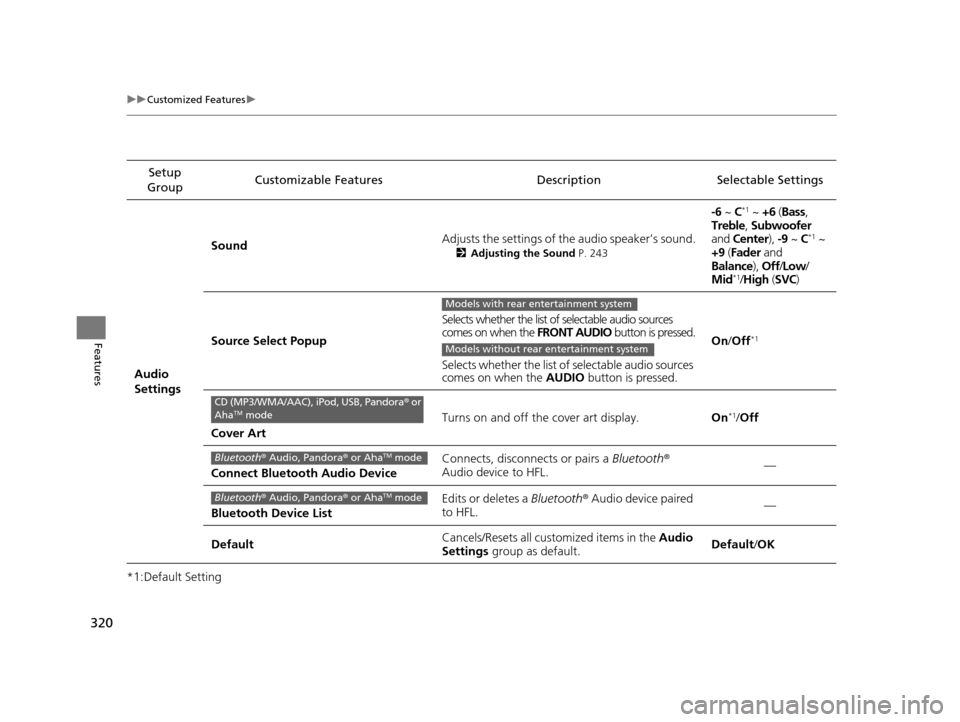
Audio
Settings Sound
Adjusts the settings of th
e audio speaker’s sound.
2Adjusting the Sound P. 243
-6 ~ C*1 ~ +6 (Bass ,
Treble , Subwoofer
and Center ), -9 ~ C
*1 ~
+9 (Fader and
Balance ), Off/Low /
Mid
*1/ High (SVC)
Source Select Popup Selects whether the list of selectable audio sources
comes on when the
FRONT AUDIO button is pressed.
Selects whether the list of selectable audio sources
comes on when the AUDIO button is pressed. On
/Off
*1
Cover Art Turns on and off the cover art display.
On
*1/Off
Connect Bluetooth Audio Device Connects, disconnects or pairs a
Bluetooth®
Audio device to HFL. —
Bluetooth Device List Edits or deletes a
Bluetooth® Audio device paired
to HFL. —
Default Cancels/Resets all cust
omized items in the Audio
Settings group as default. Default
/OK
Models with rear entertainment system
Models without rear entertainment system
CD (MP3/WMA/AAC), iPod, USB, Pandora ® or
AhaTM mode
Bluetooth ® Audio, Pandora ® or AhaTM mode
Bluetooth ® Audio, Pandora ® or AhaTM mode
17 US ODYSSEY (KA KC)-31TK86600.book 320 ページ 2016年10月24日 月曜日 午後4時2分
Page 322 of 565
321
uuCustomized Features u
Continued
Features
*1:Default Setting
*2:Models with rear entertainment systemSetup
Group Customizable Features Description Selectable Settings
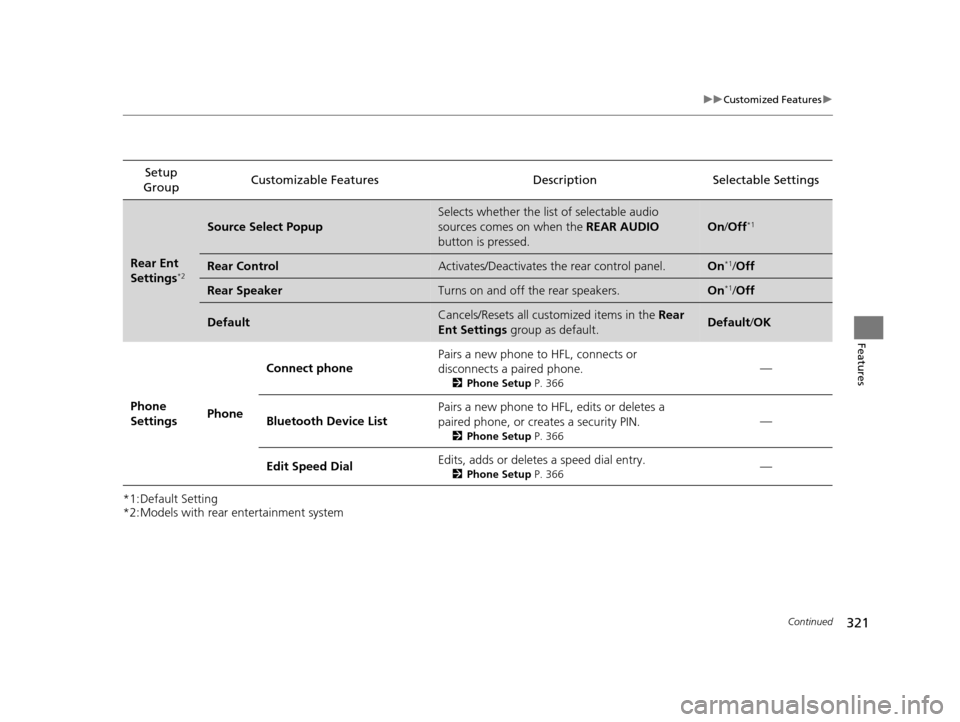
Rear Ent
Settings*2
Source Select Popup
Selects whether the list of selectable audio
sources comes on when the
REAR AUDIO
button is pressed.
On /Off*1
Rear ControlActivates/Deactivates the rear control panel.On*1/Off
Rear SpeakerTurns on and off the rear speakers.On*1/Off
DefaultCancels/Resets all customized items in the Rear
Ent Settings group as default.Default/OK
Phone
Settings PhoneConnect phone
Pairs a new phone to HFL, connects or
disconnects a paired phone.
2
Phone Setup P. 366
—
Bluetooth Device List Pairs a new phone to HFL, edits or deletes a
paired phone, or creates a security PIN.
2
Phone Setup P. 366
—
Edit Speed Dial Edits, adds or deletes a speed dial entry.
2
Phone Setup P. 366—
17 US ODYSSEY (KA KC)-31TK86600.book 321 ページ 2016年10月24日 月曜日 午後4時2分
Page 323 of 565
322
uuCustomized Features u
Features
*1:Default SettingSetup
Group Customizable Features Descri
ption Selectable Settings
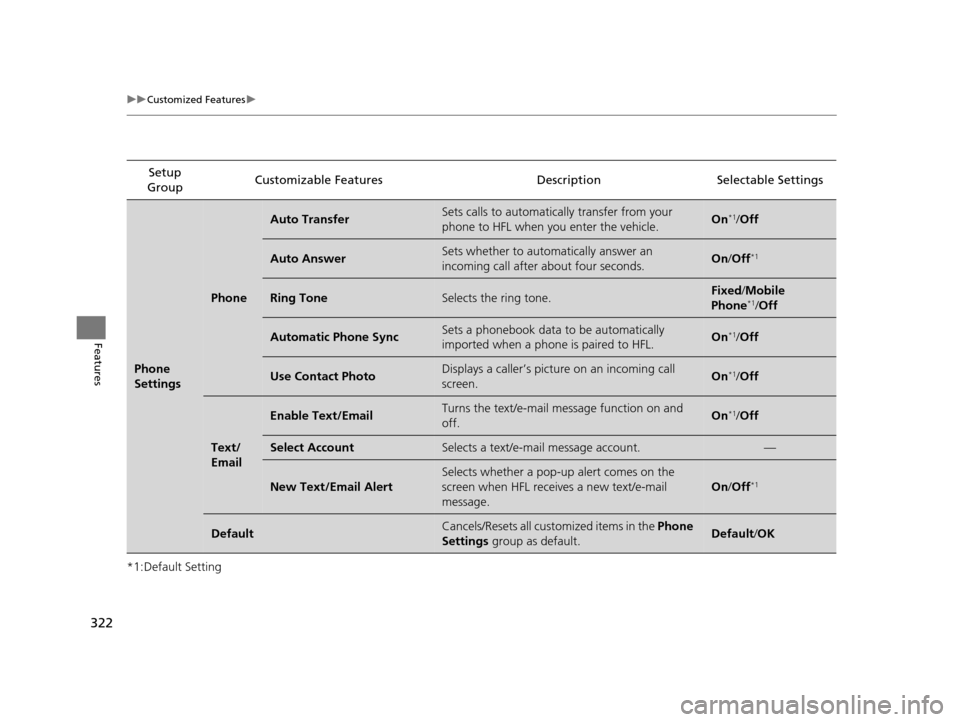
Phone
Settings
Phone
Auto TransferSets calls to automatically transfer from your
phone to HFL when you enter the vehicle.On*1/Off
Auto AnswerSets whether to automatically answer an
incoming call after about four seconds.On /Off*1
Ring ToneSelects the ring tone.Fixed /Mobile
Phone*1/ Off
Automatic Phone SyncSets a phonebook data to be automatically
imported when a phone is paired to HFL.On*1/Off
Use Contact PhotoDisplays a caller’s picture on an incoming call
screen.On*1/Off
Text/
Email
Enable Text/EmailTurns the text/e-mail me ssage function on and
off.On*1/ Off
Select AccountSelects a text/e-mail message account.—
New Text/Email Alert
Selects whether a pop-up alert comes on the
screen when HFL receiv es a new text/e-mail
message.
On /Off*1
DefaultCancels/Resets all customized items in the Phone
Settings group as default.Default/OK
17 US ODYSSEY (KA KC)-31TK86600.book 322 ページ 2016年10月24日 月曜日 午後4時2分
Page 324 of 565
323
uuCustomized Features u
Features
*1:Default SettingSetup
Group Customizable Features Description Selectable Settings
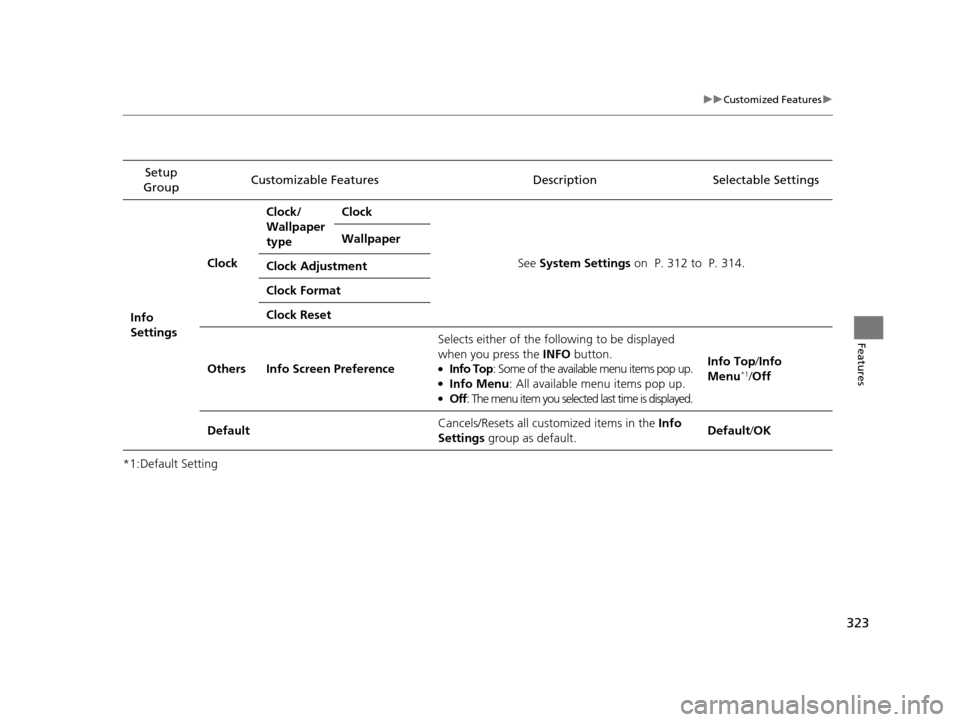
Info
Settings Clock
Clock/
Wallpaper
type
Clock
See System Settings on P. 312 to P. 314.
Wallpaper
Clock Adjustment
Clock Format
Clock Reset
Others Info Screen Preference Selects either of the following to be displayed
when you press the INFO
button.
●Info Top: Some of the available menu items pop up.●Info Menu : All available menu items pop up.●Off: The menu item you selected last time is displayed. Info Top/
Info
Menu
*1/ Off
Default Cancels/Resets all customized items in the
Info
Settings group as default. Default/
OK
17 US ODYSSEY (KA KC)-31TK86600.book 323 ページ 2016年10月24日 月曜日 午後4時2分
Page 325 of 565
324
uuCustomized Features uDefaulting All the Settings
Features
Defaulting All the Settings
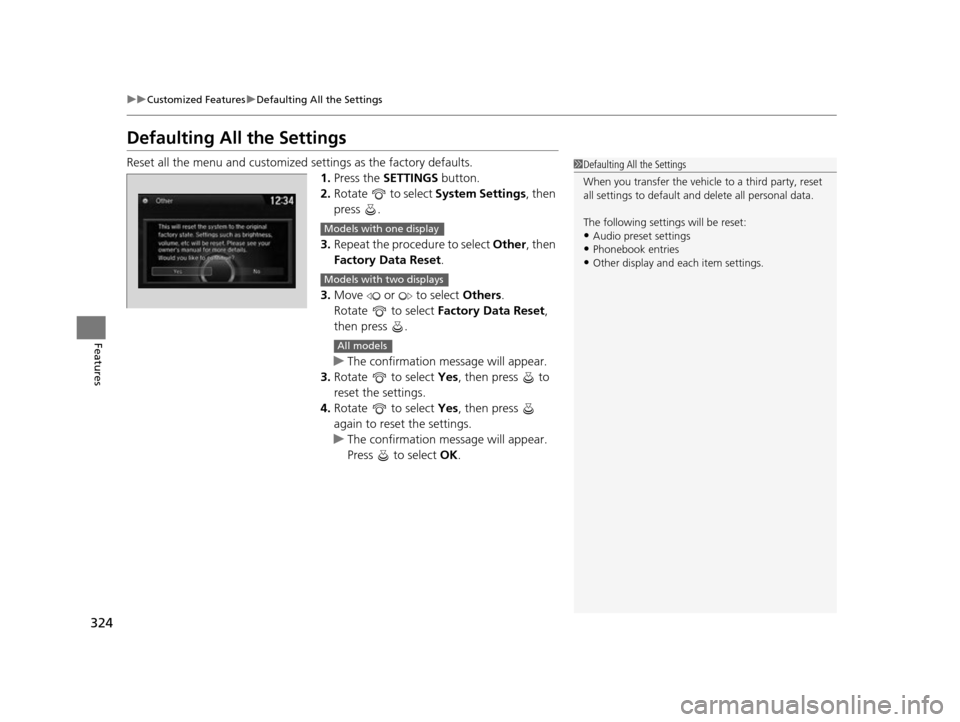
Reset all the menu and customized settings as the factory defaults.
1. Press the SETTINGS button.
2. Rotate to select System Settings, then
press .
3. Repeat the procedure to select Other, then
Factory Data Reset .
3. Move or to select Others.
Rotate to select Factory Data Reset ,
then press .
u The confirmation message will appear.
3. Rotate to select Yes, then press to
reset the settings.
4. Rotate to select Yes, then press
again to reset the settings.
u The confirmation message will appear.
Press to select OK.1Defaulting All the Settings
When you transfer the vehicle to a third party, reset
all settings to default a nd delete all personal data.
The following settin gs will be reset:
•Audio preset settings•Phonebook entries
•Other display and each item settings.
Models with one display
Models with two displays
All models
17 US ODYSSEY (KA KC)-31TK86600.book 324 ページ 2016年10月24日 月曜日 午後4時2分
Page 326 of 565
325Continued
Features
HomeLink® Universal Transceiver*
The HomeLink ® Universal Transceiver can be programmed to operate up to three
remote controlled devices around your home, such as garage doors, lighting, or
home security systems.
Refer to the safety information that came wi th your garage door opener to test that
the safety features are functioning properly. If you do not have the safety
information, contact the manufacturer.
Before programming HomeLink, make sure that people and objects are out of the
way of the garage or gate to prevent potential injury or damage.
When programming a garage door opener, park just outside the garage door’s
path.
Training HomeLink
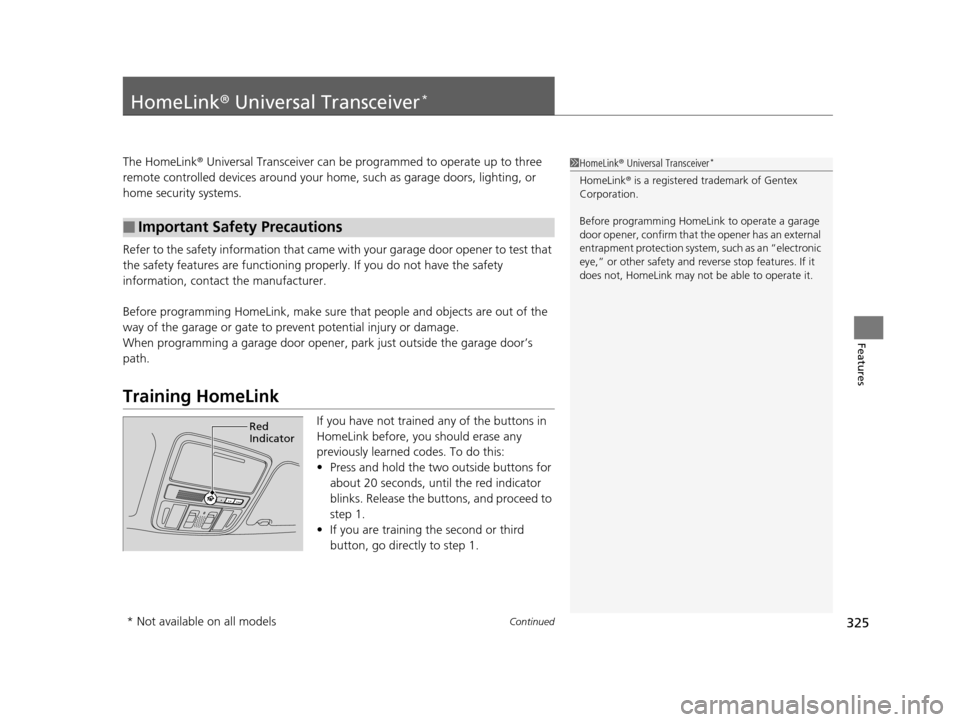
If you have not trained any of the buttons in
HomeLink before, you should erase any
previously learned codes. To do this:
• Press and hold the two outside buttons for
about 20 seconds, until the red indicator
blinks. Release the bu ttons, and proceed to
step 1.
• If you are training the second or third
button, go directly to step 1.
■Important Safety Precautions
1HomeLink ® Universal Transceiver*
HomeLink® is a registered tra demark of Gentex
Corporation.
Before programming HomeLi nk to operate a garage
door opener, confirm that the opener has an external
entrapment protection system, such as an “electronic
eye,” or other safety and re verse stop features. If it
does not, HomeLink may not be able to operate it.
Red
Indicator
* Not available on all models
17 US ODYSSEY (KA KC)-31TK86600.book 325 ページ 2016年10月24日 月曜日 午後4時2分