Page 295 of 565
294
uuRear Entertainment System*uDVD Player Error Messages
Features
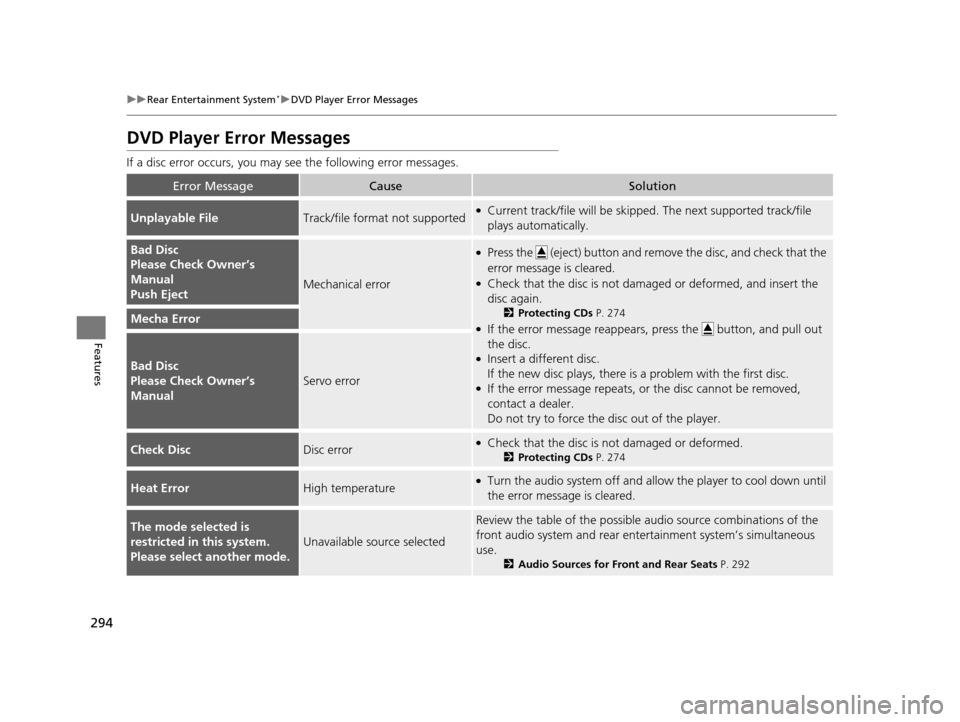
DVD Player Error Messages
If a disc error occurs, you may see the following error messages.
Error MessageCauseSolution
Unplayable FileTrack/file format not supported●Current track/file will be skippe d. The next supported track/file
plays automatically.
Bad Disc
Please Check Owner’s
Manual
Push Eject
Mechanical error
●Press the (eject) button and remove the disc, and check that the
error message is cleared.
●Check that the disc is not damaged or deformed, and insert the
disc again.
2 Protecting CDs P. 274
●If the error message reappears, press the button, and pull out
the disc.
●Insert a different disc.
If the new disc plays, there is a problem with the first disc.
●If the error message repeats, or the disc cannot be removed,
contact a dealer.
Do not try to force the disc out of the player.
Mecha Error
Bad Disc
Please Check Owner’s
Manual
Servo error
Check DiscDisc error●Check that the disc is not damaged or deformed.
2Protecting CDs P. 274
Heat ErrorHigh temperature●Turn the audio system off and allo w the player to cool down until
the error message is cleared.
The mode selected is
restricted in this system.
Please select another mode.
Unavailable source selected
Review the table of the possible audio source combinations of the
front audio system and rear ente rtainment system’s simultaneous
use.
2 Audio Sources for Front and Rear Seats P. 292
17 US ODYSSEY (KA KC)-31TK86600.book 294 ページ 2016年10月24日 月曜日 午後4時2分
Page 296 of 565
295Continued
Features
Customized Features
See the Navigation System Manual for the customized features except for the
Vehicle Settings .
Use the audio/information screen to customize certain features.
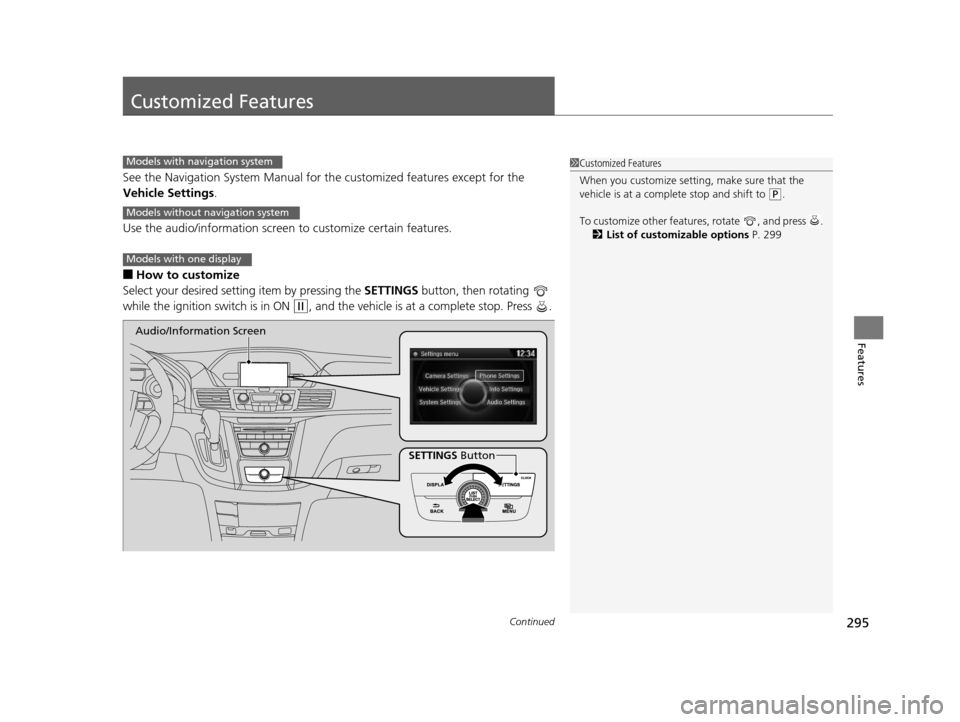
■How to customize
Select your desired setting item by pressing the SETTINGS button, then rotating
while the ignition switch is in ON
(w, and the vehicle is at a complete stop. Press .
1 Customized Features
When you customize setting, make sure that the
vehicle is at a complete stop and shift to
(P.
To customize other featur es, rotate , and press .
2 List of customizable options P. 299
Models with navigation system
Models without navigation system
Models with one display
SETTINGS Button
Audio/Information Screen
17 US ODYSSEY (KA KC)-31TK86600.book 295 ページ 2016年10月24日 月曜日
午後4時2分
Page 297 of 565
296
uuCustomized Features u
Features
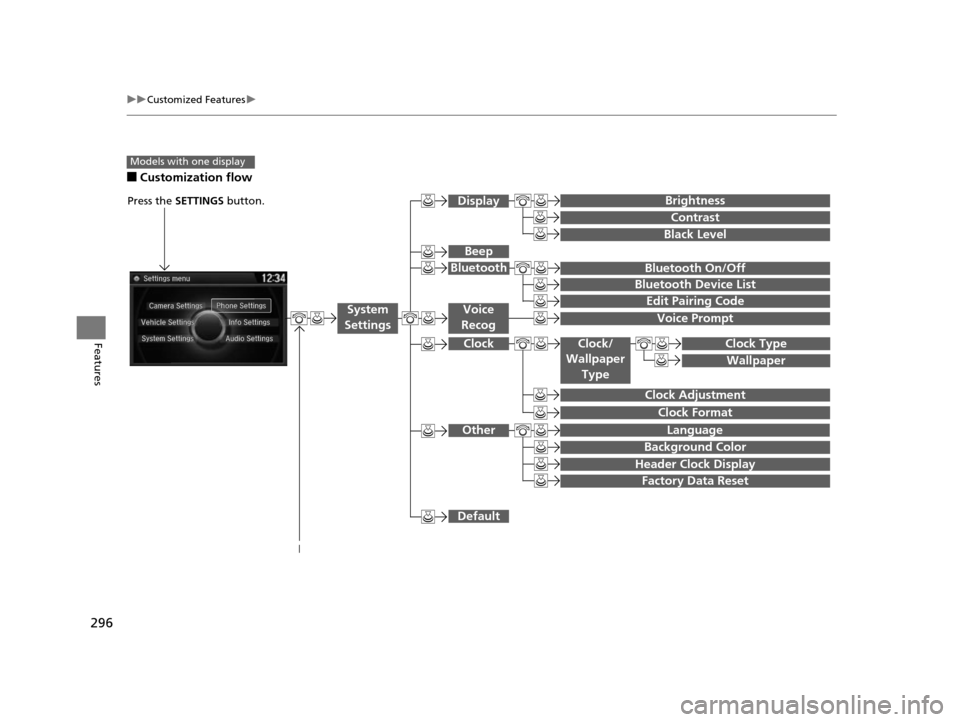
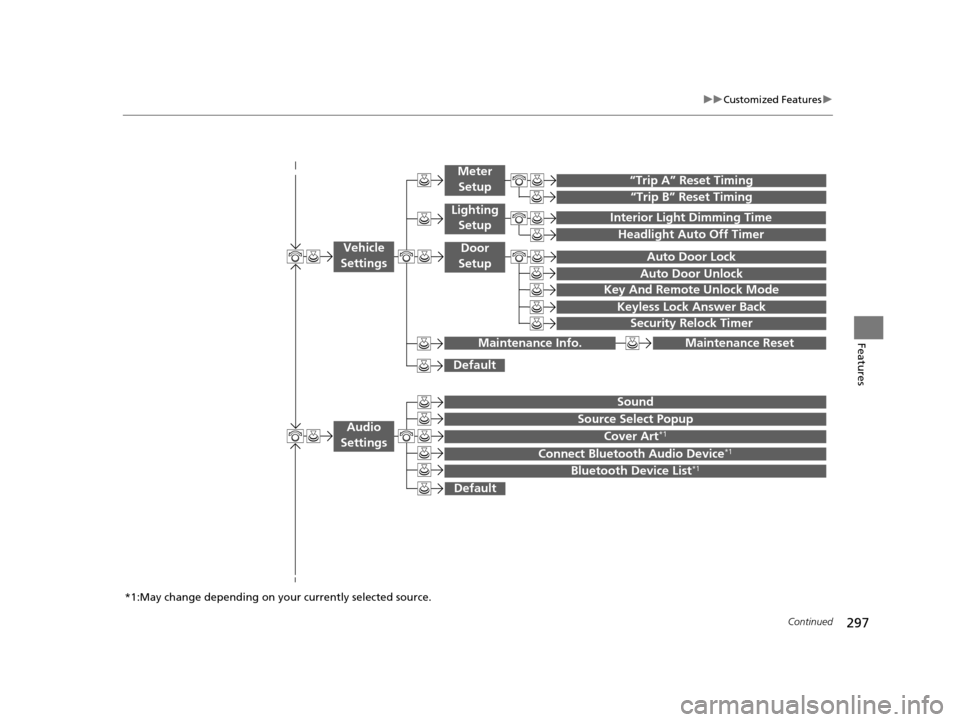
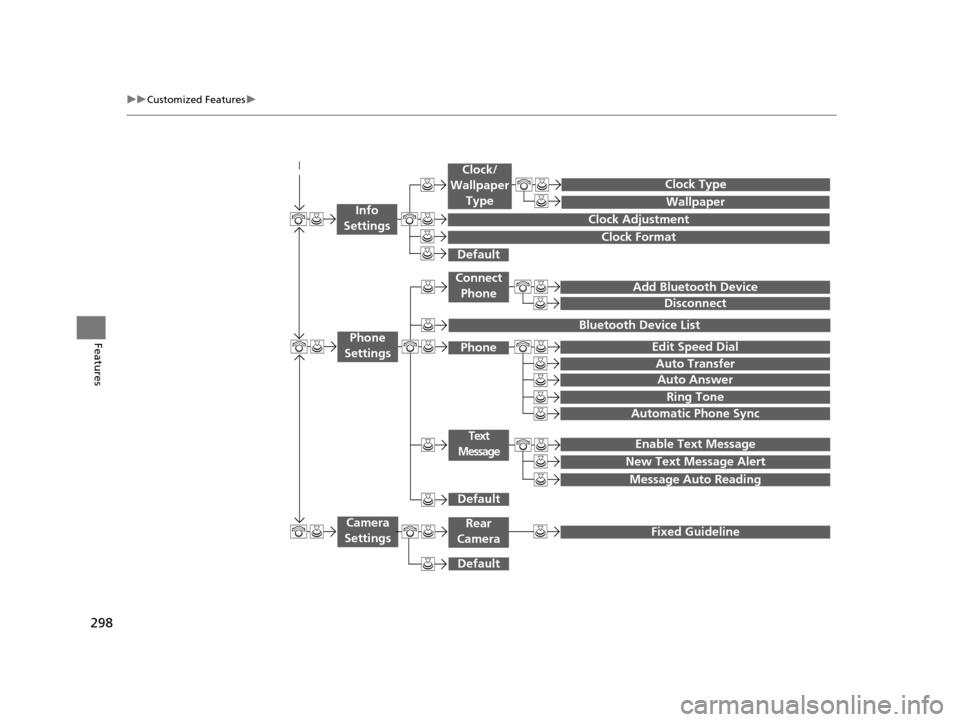
■Customization flow
Models with one display
Clock Format
Background Color
Header Clock Display
Factory Data Reset
Clock Adjustment
Press the SETTINGS button.
Language
Default
Edit Pairing Code
Bluetooth On/Off
Bluetooth Device List
Voice Prompt
Brightness
Contrast
Black Level
Beep
Clock/
Wallpaper
TypeClock Type
Wallpaper
System
SettingsVoice
Recog
Bluetooth
Display
Clock
Other
17 US ODYSSEY (KA KC)-31TK86600.book 296 ページ 2016年10月24日 月曜日 午後4時2分
Page 298 of 565
297
uuCustomized Features u
Continued
Features
“Trip B” Reset Timing
“Trip A” Reset Timing
Auto Door Lock
Auto Door Unlock
Interior Light Dimming Time
Headlight Auto Off Timer
Key And Remote Unlock Mode
Keyless Lock Answer Back
Security Relock Timer
Maintenance Reset
Default
Vehicle
Settings
Meter
Setup
Lighting Setup
Door
Setup
Maintenance Info.
Source Select Popup
Sound
Default
Cover Art*1
Connect Bluetooth Audio Device*1
Bluetooth Device List*1
Audio
Settings
*1:May change depending on your currently selected source.
17 US ODYSSEY (KA KC)-31TK86600.book 297 ページ 2016年10月24日 月曜日 午後4時2分
Page 299 of 565
298
uuCustomized Features u
Features
Add Bluetooth Device
Disconnect
Edit Speed Dial
Auto Transfer
Auto Answer
Ring Tone
Automatic Phone Sync
Default
Enable Text Message
Message Auto Reading
New Text Message Alert
Phone
Settings
Connect
Phone
Text
Message
Bluetooth Device List
Phone
Default
Fixed GuidelineCamera
Settings
Wallpaper
Clock Type
Default
Clock Adjustment
Clock Format
Clock/
Wallpaper Type
Info
Settings
Rear
Camera
17 US ODYSSEY (KA KC)-31TK86600.book 298 ページ 2016年10月24日 月曜日 午後4時2分
Page 300 of 565
299
uuCustomized Features u
Continued
Features
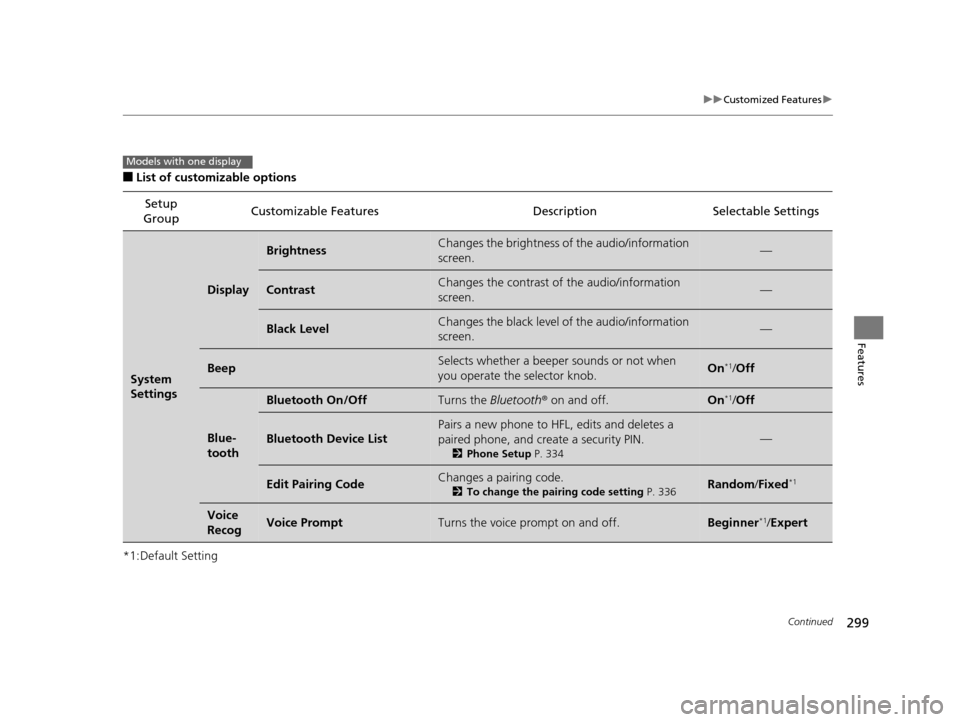
■List of customizable options
*1:Default Setting Setup
Group Customizable Features Description Selectable Settings
System
Settings
Display
BrightnessChanges the brightness of the audio/information
screen.—
ContrastChanges the contrast of the audio/information
screen.—
Black LevelChanges the black level of the audio/information
screen.—
BeepSelects whether a beeper
sounds or not when
you operate the selector knob.On*1/ Off
Blue-
tooth
Bluetooth On/OffTurns the Bluetooth® on and off.On*1/Off
Bluetooth Device List
Pairs a new phone to HFL, edits and deletes a
paired phone, and create a security PIN.
2 Phone Setup P. 334
—
Edit Pairing CodeChanges a pairing code.
2To change the pairing code setting P. 336Random/Fixed*1
Voice
RecogVoice PromptTurns the voice prompt on and off.Beginner*1/ Expert
Models with one display
17 US ODYSSEY (KA KC)-31TK86600.book 299 ページ 2016年10月24日 月曜日 午後4時2分
Page 301 of 565
300
uuCustomized Features u
Features
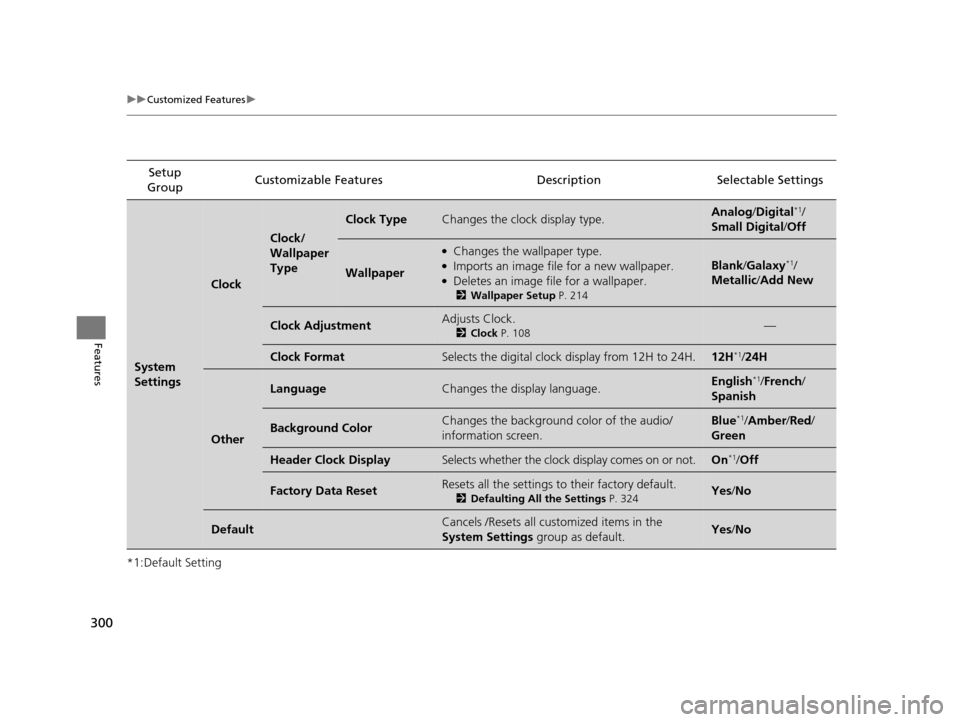
*1:Default SettingSetup
Group Customizable Features Descri
ption Selectable Settings
System
Settings
Clock
Clock/
Wallpaper
Type
Clock TypeChanges the clock display type.Analog/Digital*1/
Small Digital /Off
Wallpaper
●Changes the wallpaper type.●Imports an image file for a new wallpaper.●Deletes an image file for a wallpaper.
2 Wallpaper Setup P. 214
Blank/Galaxy*1/
Metallic /Add New
Clock AdjustmentAdjusts Clock.
2 Clock P. 108—
Clock FormatSelects the digital clock display from 12H to 24H.12H*1/24H
Other
LanguageChanges the display language.English*1/French /
Spanish
Background ColorChanges the background color of the audio/
information screen.Blue*1/ Amber /Red/
Green
Header Clock DisplaySelects whether the clock display comes on or not.On*1/ Off
Factory Data ResetResets all the settings to their factory default.
2 Defaulting All the Settings P. 324Yes/No
DefaultCancels /Resets all customized items in the
System Settings group as default.Yes/No
17 US ODYSSEY (KA KC)-31TK86600.book 300 ページ 2016年10月24日 月曜日 午後4時2分
Page 302 of 565
301
uuCustomized Features u
Continued
Features
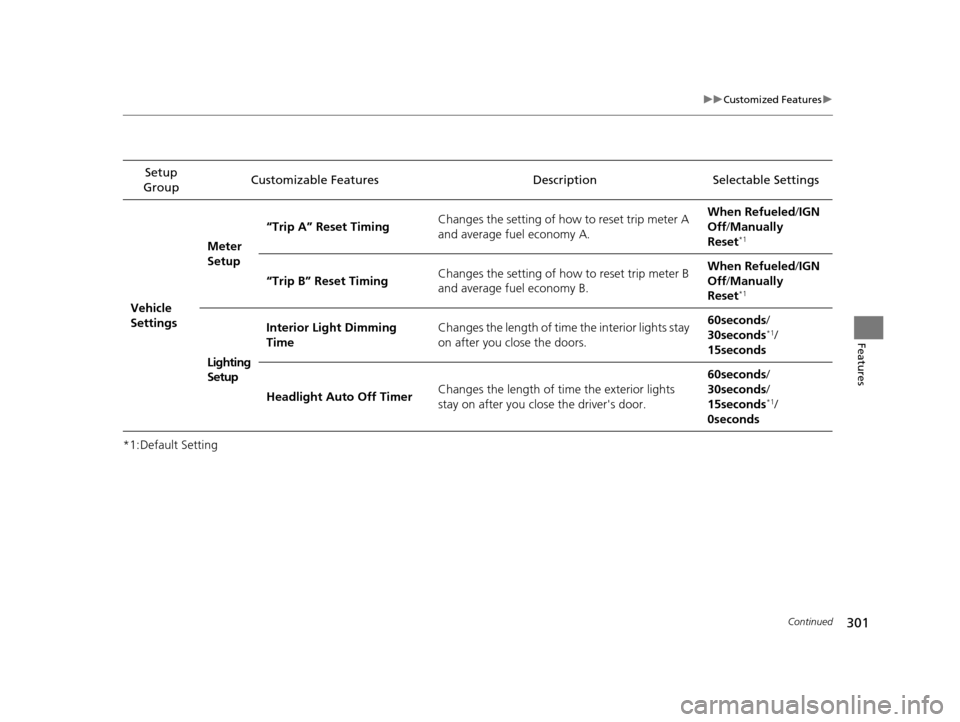
*1:Default SettingSetup
Group Customizable Features Description Selectable Settings
Vehicle
Settings Meter
Setup
“Trip A” Reset Timing
Changes the setting of how to reset trip meter A
and average fuel economy A. When Refueled
/IGN
Off /Manually
Reset
*1
“Trip B” Reset Timing Changes the setting of how to reset trip meter B
and average fuel economy B. When Refueled
/IGN
Off /Manually
Reset*1
Lighting
Setup Interior Light Dimming
Time
Changes the length of time the interior lights stay
on after you close the doors. 60seconds
/
30seconds
*1/
15seconds
Headlight Auto Off Timer Changes the length of time the exterior lights
stay on after you close the driver's door. 60seconds
/
30seconds /
15seconds
*1/
0seconds
17 US ODYSSEY (KA KC)-31TK86600.book 301 ページ 2016年10月24日 月曜日 午後4時2分