Page 169 of 565
uuAdjusting the Seats uAdjusting the Seat Positions
168
Controls
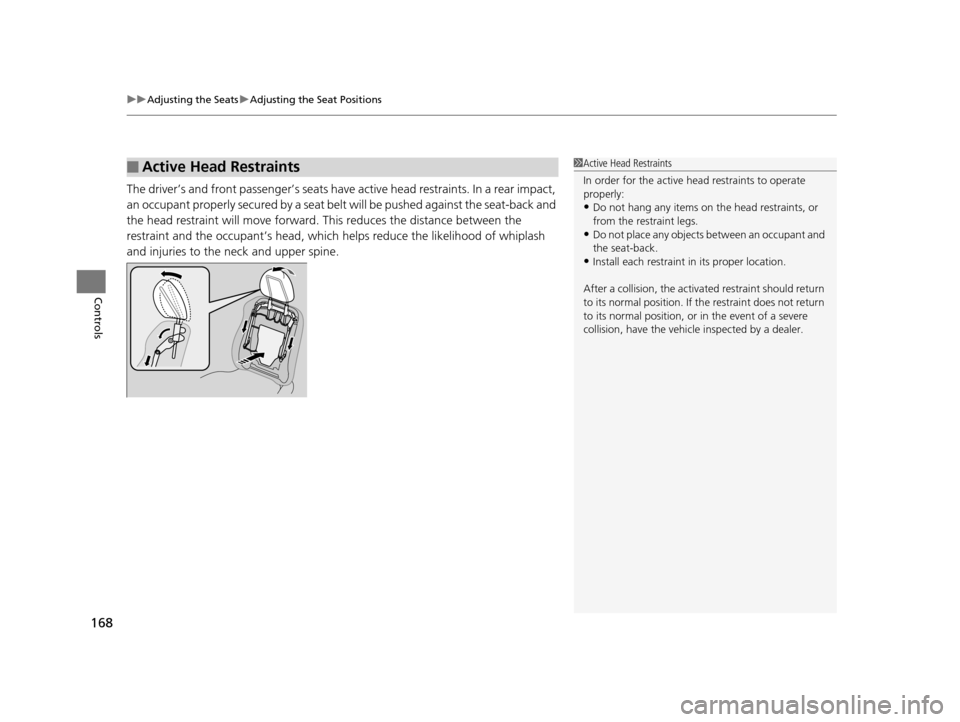
The driver’s and front passenger’s seats have active head restraints. In a rear impact,
an occupant properly secured by a seat belt will be pushed against the seat-back and
the head restraint will move forward. This reduces the distance between the
restraint and the occupant’s head, which helps reduce the likelihood of whiplash
and injuries to the neck and upper spine.
■Active Head Restraints1 Active Head Restraints
In order for the active head restraints to operate
properly:
•Do not hang any items on the head restraints, or
from the restraint legs.
•Do not place any objects between an occupant and
the seat-back.
•Install each restraint in its proper location.
After a collision, th e activated restraint should return
to its normal position. If the restraint does not return
to its normal position, or in the event of a severe
collision, have the vehicl e inspected by a dealer.
17 US ODYSSEY (KA KC)-31TK86600.book 168 ページ 2016年10月24日 月曜日 午後4時2分
Page 310 of 565
309
uuCustomized Features u
Continued
Features
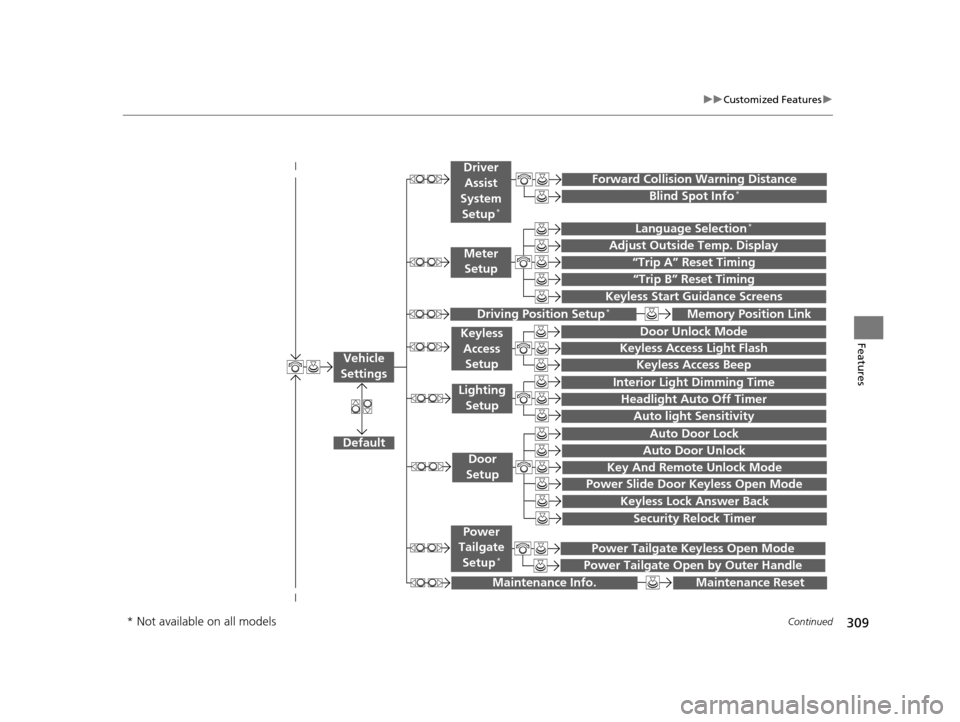
“Trip A” Reset Timing
“Trip B” Reset Timing
Language Selection*
Adjust Outside Temp. Display
Forward Collision Warning Distance
Keyless Start Guidance Screens
Default
Memory Position Link
Door Unlock Mode
Keyless Access Light Flash
Interior Light Dimming Time
Headlight Auto Off Timer
Auto light Sensitivity
Key And Remote Unlock Mode
Keyless Lock Answer Back
Security Relock Timer
Auto Door Lock
Auto Door Unlock
Maintenance Reset
Meter
Setup
Driver
Assist
System
Setup
*
Driving Position Setup*
Keyless Access Setup
Lighting Setup
Door
Setup
Maintenance Info.
Keyless Access Beep
Blind Spot Info*
Power Slide Door Keyless Open Mode
Power Tailgate Keyless Open Mode
Power Tailgate Open by Outer Handle
Power
Tailgate
Setup
*
Vehicle
Settings
* Not available on all models
17 US ODYSSEY (KA KC)-31TK86600.book 309 ページ 2016年10月24日 月曜日 午後4時2分
Page 316 of 565
315
uuCustomized Features u
Continued
Features
*1:Default SettingSetup
Group Customizable Features Description Selectable Settings
Vehicle
Settings Driver
Assist
System
Setup
*
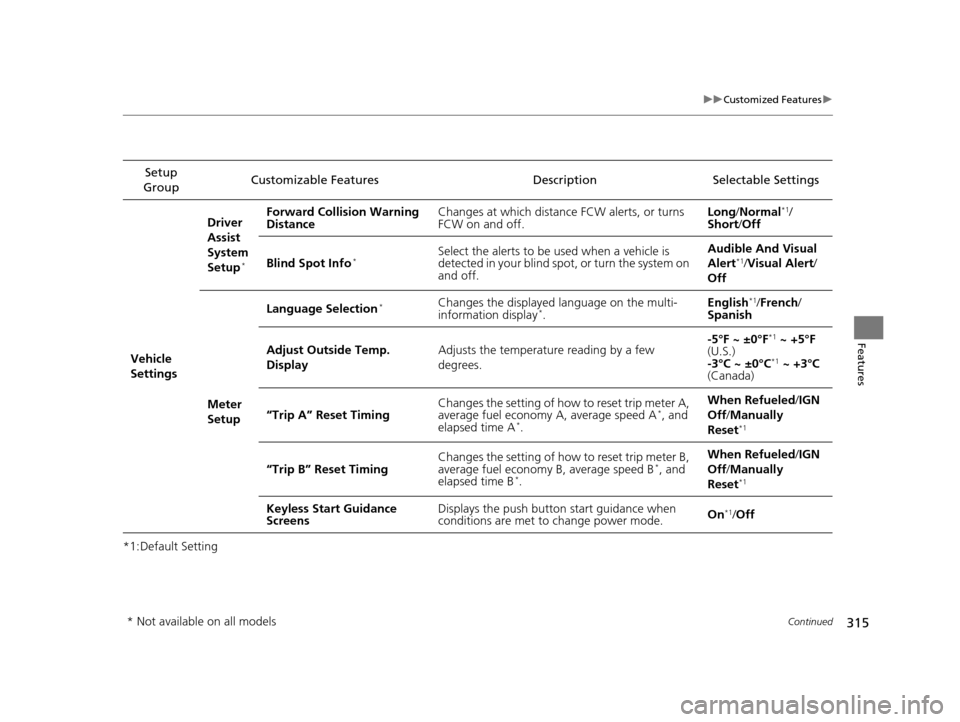
Forward Collision Warning
Distance
Changes at which distance FCW alerts, or turns
FCW on and off. Long
/Normal*1/
Short/ Off
Blind Spot Info
*Select the alerts to be used when a vehicle is
detected in your blind spot, or turn the system on
and off. Audible And Visual
Alert*1/
Visual Alert /
Off
Meter
Setup Language Selection
*Changes the displayed language on the multi-
information display*.
English
*1/
French /
Spanish
Adjust Outside Temp.
Display Adjusts the temperature reading by a few
degrees. -5°F ~ ±0°F
*1
~ +5°F
(U.S.)
-3°C ~ ±0°C
*1 ~ +3°C
(Canada)
“Trip A” Reset Timing Changes the setting of how to reset trip meter A,
average fuel economy A, average speed A
*, and
elapsed time A*. When Refueled
/IGN
Off /Manually
Reset*1
“Trip B” Reset Timing Changes the setting of how to reset trip meter B,
average fuel economy B, average speed B*, and
elapsed time B*. When Refueled
/IGN
Off /Manually
Reset*1
Keyless Start Guidance
Screens Displays the push button
start guidance when
conditions are met to change power mode. On*1/
Off
* Not available on all models
17 US ODYSSEY (KA KC)-31TK86600.book 315 ページ 2016年10月24日 月曜日 午後4時2分
Page 396 of 565

395
Driving
This chapter discusses driving, refueling, and information on items such as accessories.
Before Driving
Driving Preparation .......................... 396
Maximum Load Limit........................ 399
Towing a Trailer Towing Preparation .......................... 401
Driving Safely with a Trailer .............. 405
Towing Your Vehicle ........................ 406
When Driving Starting the Engine .................. 407, 409
Precautions While Driving................. 411
Automatic Transmission ................... 412
Shifting ............................................ 413 Cruise Control ................................. 415
Forward Collision Warning (FCW)*.. 418
Lane Departure Warning (LDW)*..... 422
Vehicle Stability Assist (VSA®), aka Electronic
Stability Control (ESC), System ............... 426
Tire Pressure Monitoring System (TPMS) ... 428
Tire Pressure Monitoring System (TPMS) - Required Federal Explanation ......... 429
Blind Spot Information (BSI) System*.... 432
LaneWatchTM*.................................. 434 Braking
Brake System ................................... 436
Anti-lock Brake System (ABS) ........... 438
Brake Assist System ......................... 439
Parking Your Vehicle When Stopped ................................ 440
Parking Sensor System
*................... 441
Rearview Camera ............................. 445
Refueling Fuel Information .............................. 446
How to Refuel ................................. 447
Fuel Economy and CO
2 Emissions .... 449
Accessories and Modifications ........ 450
* Not available on all models
17 US ODYSSEY (KA KC)-31TK86600.book 395 ページ 2016年10月24日 月曜日 午後4時2分
Page 419 of 565
418
uuWhen Driving uForward Collision Warning (FCW)*
Driving
Forward Collision Warning (FCW)*
Alerts you when it determines that there is a possibility that your vehicle may collide
with a vehicle detected in front of yours.
If the system determines a collision is possible, it gives both visual and audible alerts.
u Take appropriate action to prevent a col lision (apply the brakes, change lanes,
etc.).
■How the system works
The system may give warnings of potential collisions when your vehicle speed is
above 10 mph (15 km/h).
1 Forward Collision Warning (FCW)*
Important Safety Reminder
FCW cannot detect all ob jects ahead and may not
detect a given object; accura cy of the system will vary
based on weather, speed and other factors. FCW
does not include a braking func tion. It is always your
responsibility to sa fely operate the vehicle and avoid
collisions.
You can change the Forward Collision Warning
Distance setting or turn the system on and off. 2 Customized Features P. 99, 295
The camera is shared with Lane Departure Warning
(LDW). 2 LDW Camera P. 424
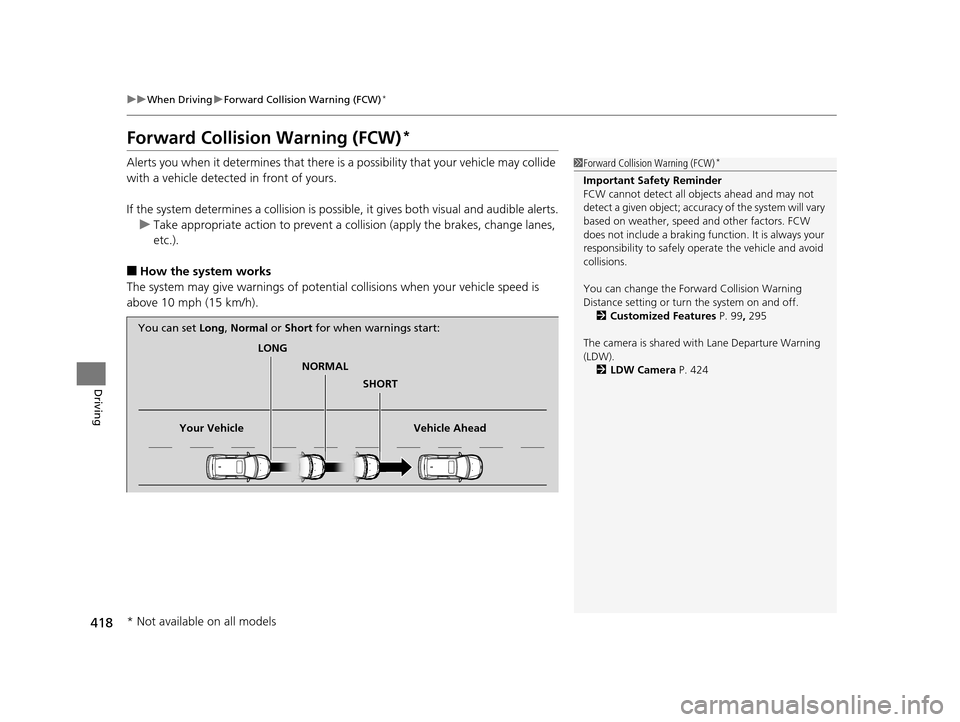
LONG
NORMAL SHORT
Your Vehicle Vehicle Ahead
You can set
Long, Normal or Short for when warnings start:
* Not available on all models
17 US ODYSSEY (KA KC)-31TK86600.book 418 ページ 2016年10月24日 月曜日 午後4時2分
Page 420 of 565

Continued419
uuWhen Driving uForward Collision Warning (FCW)*
Driving
1Forward Collision Warning (FCW)*
Never apply a film or attach any objects to the
windshield that could obs truct the FCW camera's
field of vision.
Scratches, nicks, and othe r damage to the windshield
within the FCW camera's fi eld of vision can cause the
system to operate abnormall y. If this occurs, we
recommend that you replac e the windshield with a
genuine Honda replacem ent windshield. Making
even minor repairs within th e camera's field of vision
or installing an aftermarket replacement windshield
may also cause the system to operate abnormally.
After replacing the winds hield, have a dealer
recalibrate the camera. Prop er calibration of the FCW
camera is necessary for the system to operate
properly.
Beep
Camera-based system
The camera is located
behind the rearview mirror.
The beeper sounds
and the FCW
indicator blinks until
a possible collision is
avoided.
The beeper sounds and the
BRAKE
message appears until a possible
collision is avoided.
Models with multi-information
displayModels with
information display
* Not available on all models
17 US ODYSSEY (KA KC)-31TK86600.book 419 ページ 2016年10月24日 月曜日 午後4時2分
Page 421 of 565
uuWhen Driving uForward Collision Warning (FCW)*
420
Driving
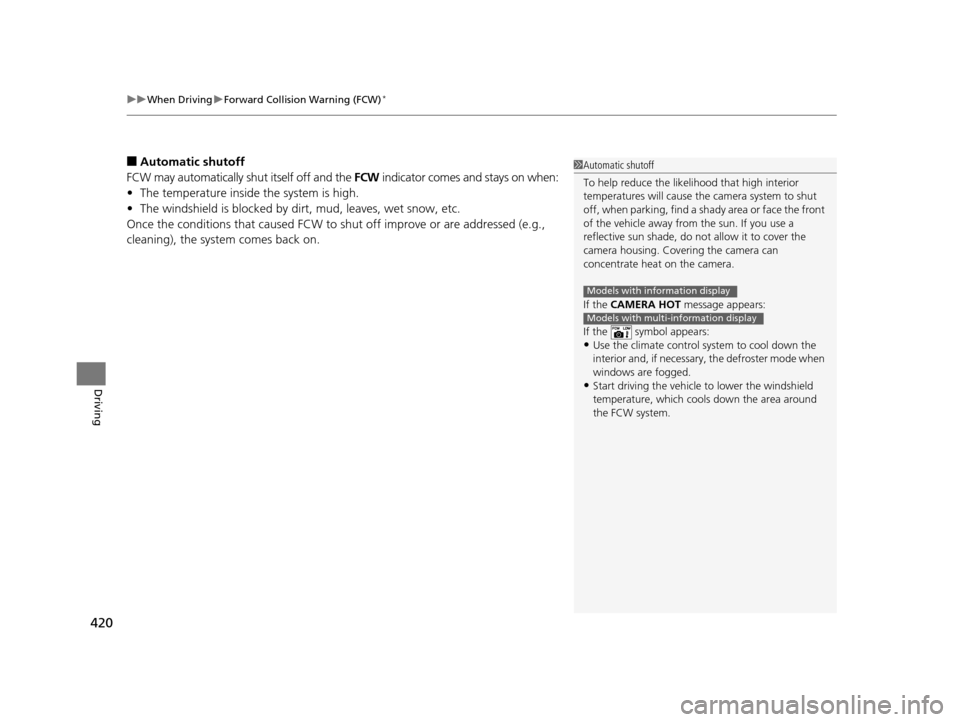
■Automatic shutoff
FCW may automatically shut itself off and the FCW indicator comes and stays on when:
• The temperature inside the system is high.
• The windshield is blocked by di rt, mud, leaves, wet snow, etc.
Once the conditions that caused FCW to shut off improve or are addressed (e.g.,
cleaning), the system comes back on.1 Automatic shutoff
To help reduce the likel ihood that high interior
temperatures will cause the camera system to shut
off, when parking, find a sh ady area or face the front
of the vehicle away from the sun. If you use a
reflective sun shade, do not allow it to cover the
camera housing. Covering the camera can
concentrate heat on the camera.
If the CAMERA HOT message appears:
If the symbol appears:
•Use the climate control system to cool down the
interior and, if necessary , the defroster mode when
windows are fogged.
•Start driving the vehicle to lower the windshield
temperature, which cool s down the area around
the FCW system.
Models with information display
Models with multi-information display
17 US ODYSSEY (KA KC)-31TK86600.book 420 ページ 2016年10月24日 月曜日 午後4時2分
Page 422 of 565
421
uuWhen Driving uForward Collision Warning (FCW)*
Driving
FCW may not activate or may not detect a ve hicle in front of your vehicle, and may
activate even when you are aware of a ve hicle ahead of you, or when there is no
vehicle ahead under the following conditions.
■FCW Limitations
Condition
●The distance between your vehicle and the vehicle ahead of you is too short.●A vehicle cuts in front of you at a slow speed, and it brakes suddenly.●A vehicle suddenly crosses in front of you.●When either your vehicle or the vehicle ahead of you a ccelerates rapidly.●The vehicle ahead of you is a motorcycle, a small vehicle, or a unique vehicle such as a
tractor.
●When you drive off-road or on a mountain road, or curved and winding road for an
extended period that makes it difficult for the camera to properly dete ct a vehicle in front
of you.
●When there are pedestrians or an imals in front of your vehicle.●When you drive in bad weather (rain, fog, etc.).●A heavy load in the rear or modificati ons to the suspension tilts your vehicle.●An abnormal tire condition is detected (wrong tire size, flat tire, etc.).●When the windshield is blocked by dirt, mud, leaves, wet snow, etc.●When the temperature inside the system is high.●A sudden change between light and dark such as an entrance or exit of a tunnel.●You drive into the sunlight (e.g. at dawn or dusk).●When the windshield is dirty or cloudy.●When streetlights are perceived as the ta illight of a vehicle in front of yours.●When driving at night, the vehi cle ahead of you is running with either taillight bulb burned
out.
●When you drive in the shadows of trees, buildings, etc.●When your vehicle is towing a trailer.
17 US ODYSSEY (KA KC)-31TK86600.book 421 ページ 2016年10月24日 月曜日 午後4時2分