2017 HONDA ODYSSEY collision
[x] Cancel search: collisionPage 45 of 565

44
uuAirbags uFront Airbags (SRS)
Safe Driving
■When front airbags should not deploy
Minor frontal crashes: Front airbags were designed to supplement seat belts and
help save lives, not to prevent minor scrapes, or even broken bones that might occur
during a less than moderate-to-severe frontal crash.
Side impacts: Front airbags can provide protection when a sudden deceleration
causes a driver or front passenger to move towards the front of the vehicle. Side
airbags and side curtain airbag s have been specifically designed to help reduce the
severity of injuries that can occur durin g a moderate-to-severe side impact which
can cause the driver or passenger to move towards the side of the vehicle.
Rear impacts: Head restraints and seat belts are your best protection during a rear
impact. Front airbags cannot provide any si gnificant protection and are not designed
to deploy in such collisions.
Rollovers: In a rollover, your best form of protection is a seat belt or, if your vehicle
is equipped with a rollover sensor, both a se at belt and a side curtain airbag. Front
airbags, however, are not designed to deploy in a rollover as they would provide
little if any protection.
■When front airbags deploy with little or no visible damage
Because the airbag system senses sudden deceleration, a strong impact to the
vehicle framework or suspension might caus e one or more of the airbags to deploy.
Examples include running into a curb, the edge of a hole, or other low fixed object
that causes a sudden deceleration in th e vehicle chassis. Since the impact is
underneath the vehicle, damage may not be readily apparent.
■When front airbags may not deploy, even though exterior damage
appears severe
Since crushable body parts absorb crash energy during an impact, the amount of
visible damage does not always indicate proper airbag operation. In fact, some
collisions can result in severe damage but no airbag deployment because the airbags
would not have been needed or would not have provided protection even if they
had deployed.
17 US ODYSSEY (KA KC)-31TK86600.book 44 ページ 2016年10月24日 月曜日 午後4時2分
Page 50 of 565
Continued49
uuAirbags uAirbag System Indicators
Safe Driving
■When side curtain airbags deploy in a frontal collision
One or both side curtain airb ags may inflate in a moderate-to-severe angled frontal
collision.
Airbag System Indicators
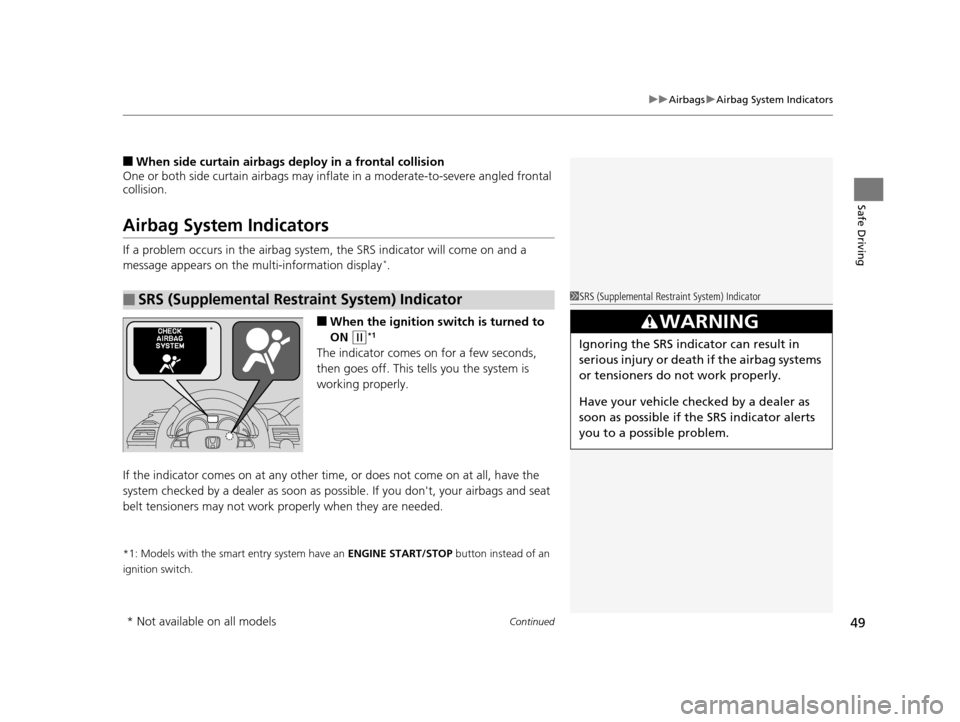
If a problem occurs in the airbag system , the SRS indicator will come on and a
message appears on the multi-information display*.
■When the ignition switch is turned to
ON
(w*1
The indicator comes on for a few seconds,
then goes off. This te lls you the system is
working properly.
If the indicator comes on at any other time, or does not come on at all, have the
system checked by a dealer as soon as po ssible. If you don't, your airbags and seat
belt tensioners may not work properly when they are needed.
*1: Models with the smart entry system have an ENGINE START/STOP button instead of an
ignition switch.
■SRS (Supplemental Restraint System) Indicator1 SRS (Supplemental Restraint System) Indicator
3WARNING
Ignoring the SRS indicator can result in
serious injury or death if the airbag systems
or tensioners do not work properly.
Have your vehi cle checked by a dealer as
soon as possible if th e SRS indicator alerts
you to a possible problem.
*
* Not available on all models
17 US ODYSSEY (KA KC)-31TK86600.book 49 ページ 2016年10月24日 月曜日 午後4時2分
Page 52 of 565

51
uuAirbags uAirbag Care
Safe Driving
Airbag Care
You do not need to, and should not, perform any maintenance on or replace any
airbag system components yourself. However, you should have your vehicle
inspected by a dealer in the following situations:
■When the airbags have deployed
If an airbag has inflated, th e control unit and other related parts must be replaced.
Similarly, once an automatic seat belt te nsioner has been activated, it must be
replaced.
■When the vehicle has been in a moderate-to-severe collision
Even if the airbags did not infl ate, have your dealer inspect the following: the driver’s
seat position sensor, weight sensors in the passenger’s seat, front seat belt
tensioners, and each seat belt that was worn during the crash.
■Do not remove or modify a fron t seat without consulting a dealer
This would likely disable the driver's seat po sition sensor or the weight sensors in the
passenger’s seat. If it is necessary to remove or modify a front seat to accommodate
a person with disabilities, co ntact a Honda dealer, or for U.S. vehicles, American
Honda Automobile Customer Service at 1-800-999-1009 and for Canadian vehicles,
Honda Canada Customer Relations at 1-888-9-HONDA-9.
1 Airbag Care
We recommend against the use of salvaged airbag
system components, including the airbag, tensioners,
sensors, and control unit.
17 US ODYSSEY (KA KC)-31TK86600.book 51 ページ 2016年10月24日 月曜日 午後4時2分
Page 54 of 565
53
uuChild Safety uProtecting Child Passengers
Safe Driving
• Any child who is too small to wear a seat belt correctly must be restrained in an
approved child seat that is properly secured to the vehicle using either the lap belt
portion of the lap/shoulder belt or the lower anchors of the LATCH system.
• Never hold a child on your lap because it is impossible to protect them in the
event of a collision.
• Never put a seat belt over yourself and a child. During a crash, the belt would
likely press deep into the child and cause serious or fatal injuries.
• Never let two children use the same seat belt. Both children could be very
seriously injured in a crash.
• Do not allow children to operate the doors, windows or seat adjustments.
• Do not leave children in the vehicle unatte nded, especially in hot weather when
the inside of the vehicle can get hot enough to kill them. They could also activate
vehicle controls causing it to move unexpectedly.1 Protecting Child Passengers
To deactivate a lockable retractor, release the buckle
and allow the seat belt to wind up all the way.
To remind you of the pa ssenger's front airbag
hazards and child safety, your vehicle has warning
labels on the dashboard (U.S. models) and on the
front visors. Please read and follow the instructions
on these labels. 2 Safety Labels P. 67
3WARNING
Allowing a child to play with a seat belt or
wrap one around their neck can result in
serious injury or death.
Instruct children not to play with any seat
belt and make sure any unused seat belt a
child can reach is buckled, fully retracted,
and locked.
17 US ODYSSEY (KA KC)-31TK86600.book 53 ページ 2016年10月24日 月曜日 午後4時2分
Page 81 of 565
80
uuIndicators u
Instrument Panel
*1:Models with the smart entry system have an ENGINE START/STOP button instead of an ignition switch.
*2:On the left: Models with information display On the right: Models with multi-information display
IndicatorNameOn/BlinkingExplanationMessage*2
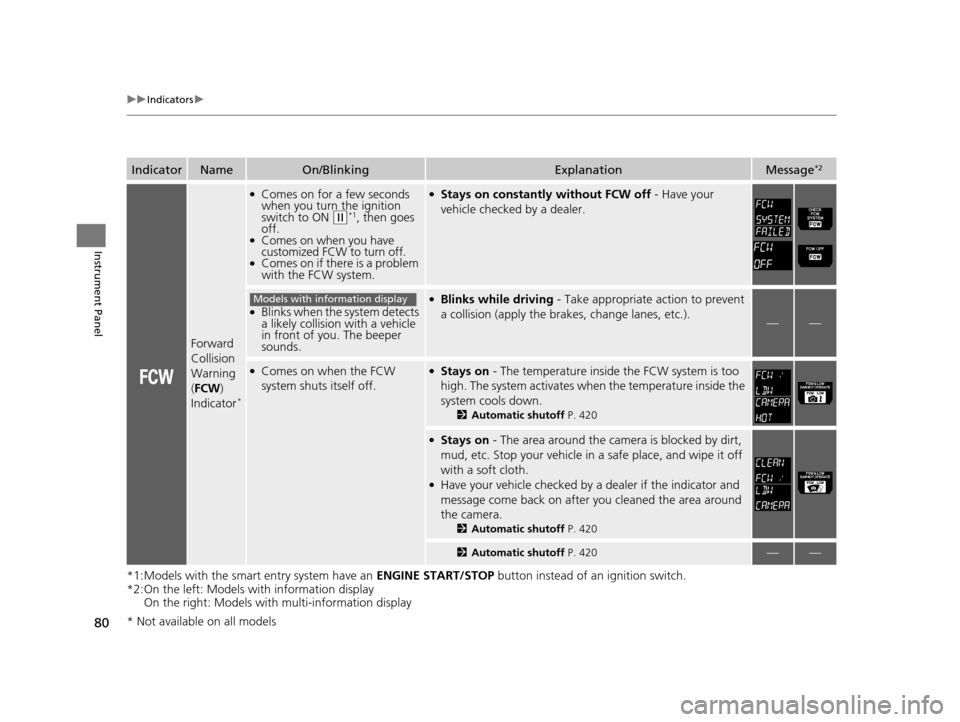
Forward
Collision
Warning
(FCW )
Indicator
*
●Comes on for a few seconds
when you turn the ignition
switch to ON
(w*1, then goes
off.
●Comes on when you have
customized FCW to turn off.
●Comes on if there is a problem
with the FCW system.
●Stays on constantly without FCW off - Have your
vehicle checked by a dealer.
●Blinks when the system detects
a likely collision with a vehicle
in front of you. The beeper
sounds.
●Blinks while driving - Take appropriate action to prevent
a collision (apply the br akes, change lanes, etc.).
——
●Comes on when the FCW
system shuts itself off.●Stays on - The temperature inside the FCW system is too
high. The system activates when the temperature inside the
system cools down.
2 Automatic shutoff P. 420
●Stays on - The area around the camera is blocked by dirt,
mud, etc. Stop your vehicle in a safe place, and wipe it off
with a soft cloth.
●Have your vehicle checked by a dealer if the indicator and
message come back on after you cleaned the area around
the camera.
2 Automatic shutoff P. 420
2Automatic shutoff P. 420——
Models with information display
* Not available on all models
17 US ODYSSEY (KA KC)-31TK86600.book 80 ページ 2016年10月24日 月曜日 午後4時2分
Page 90 of 565

89
uuIndicators uMulti-Information Display Warn ing and Information Messages*
Continued
Instrument Panel
MessageConditionExplanation
●Flashes when the system senses a likely collision with
a vehicle in front of you.●Take appropriate action to prev ent a collision (apply the
brakes, change lanes, etc.).
2 Forward Collision Warning (FCW)* P. 418
●Appears when your vehicle is too close to the traffic
lane lines. The beeper sounds.●Take appropriate action to keep your vehicle within the
lane lines.
2 Lane Departure Warning (LDW)* P. 422
●Appears while you are customizing the settings and
the shift lever is moved out of
(P.2Customized Features P. 99
●Appears if you try to go to CUSTOMIZE SETTINGS
from the multi-information display while the audio/
information screen shows the Vehicle Settings
menu.●Select either display to customize a setting. You cannot
have CUSTOMIZE SETTINGS displayed on the multi-
information display and Vehicle Settings on the audio/
information screen simultaneously.
2 Customized Features P. 99, 295
●Appears when you set the power mode to
ACCESSORY or ON.
2Starting the Engine P. 407
●Appears when the steering wheel is locked.●Move the steering wheel left and right while pressing
the ENGINE START/STOP button.
* Not available on all models
17 US ODYSSEY (KA KC)-31TK86600.book 89 ページ 2016年10月24日 月曜日 午後4時2分
Page 101 of 565
100
uuGauges and Displays uMulti-Information Display*
Instrument Panel
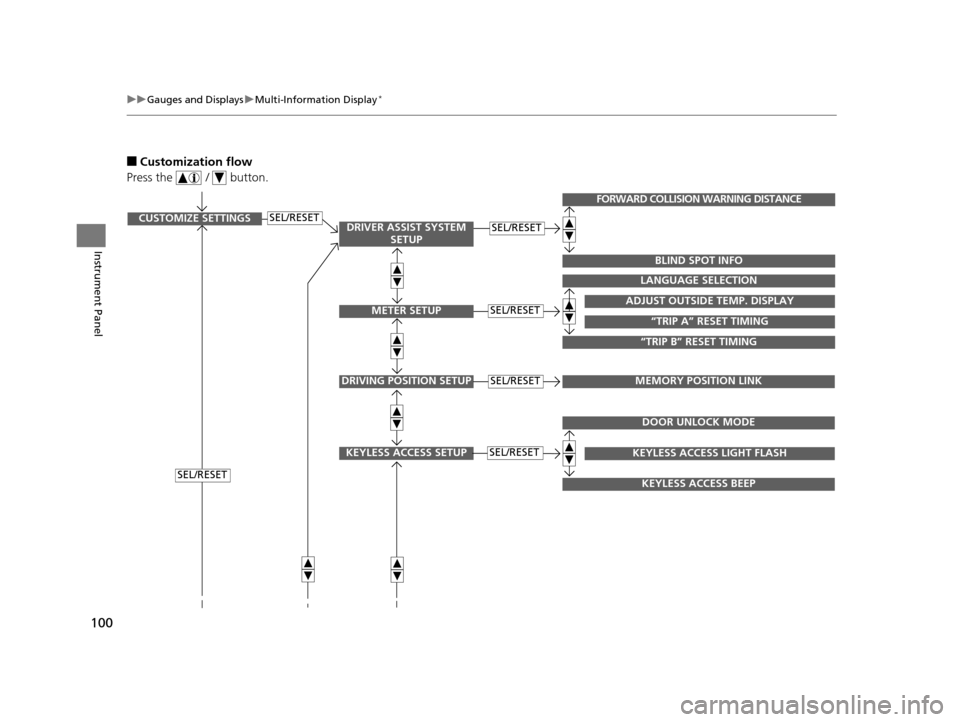
■Customization flow
Press the / button.
SEL/RESETCUSTOMIZE SETTINGSSEL/RESET
SEL/RESET
SEL/RESETADJUST OUTSIDE TEMP. DISPLAY
LANGUAGE SELECTION
“TRIP B” RESET TIMING
“TRIP A” RESET TIMING
FORWARD COLLISION WARNING DISTANCE
BLIND SPOT INFO
DRIVING POSITION SETUPMEMORY POSITION LINKSEL/RESET
KEYLESS ACCESS SETUPSEL/RESET
DOOR UNLOCK MODE
KEYLESS ACCESS BEEP
KEYLESS ACCESS LIGHT FLASH
DRIVER ASSIST SYSTEM SETUP
METER SETUP
17 US ODYSSEY (KA KC)-31TK86600.book 100 ページ 2016年10月24日 月曜日 午後4時2分
Page 103 of 565
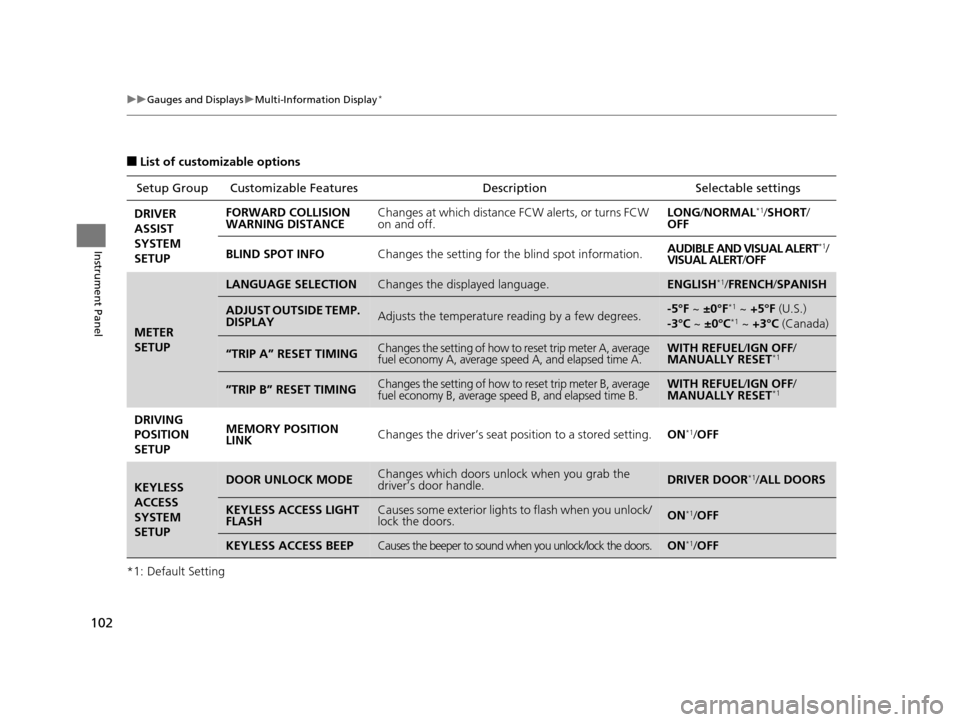
102
uuGauges and Displays uMulti-Information Display*
Instrument Panel
■List of customizable options
*1: Default Setting Setup Group Customizabl
e Features Description Selectable settings
DRIVER
ASSIST
SYSTEM
SETUP FORWARD COLLISION
WARNING DISTANCE
Changes at which distance FCW alerts, or turns FCW
on and off. LONG
/NORMAL
*1/SHORT /
OFF
BLIND SPOT INFO Changes the setting for the blind spot information. AUDIBLE AND VISUAL ALERT
*1/
VISUAL ALERT /OFF
METER
SETUP
LANGUAGE SELECTIONChanges the displayed language.ENGLISH*1/ FRENCH /SPANISH
ADJUST OUTSIDE TEMP.
DISPLAYAdjusts the temperature reading by a few degrees.-5°F ~ ±0°F*1 ~ +5°F (U.S.)
-3°C ~ ±0°C*1 ~ +3°C (Canada)
“TRIP A” RESET TIMINGChanges the setting of how to reset trip meter A, average
fuel economy A, average speed A, and elapsed time A.WITH REFUEL /IGN OFF /
MANUALLY RESET*1
”TRIP B” RESET TIMINGChanges the setting of how to reset trip meter B, average
fuel economy B, average speed B, and elapsed time B.WITH REFUEL /IGN OFF /
MANUALLY RESET*1
DRIVING
POSITION
SETUP MEMORY POSITION
LINK
Changes the driver’s seat po
sition to a stored setting.ON*1/OFF
KEYLESS
ACCESS
SYSTEM
SETUPDOOR UNLOCK MODEChanges which doors unlock when you grab the
driver’s door handle.DRIVER DOOR*1/ALL DOORS
KEYLESS ACCESS LIGHT
FLASHCauses some exterior lights to flash when you unlock/
lock the doors.ON*1/OFF
KEYLESS ACCESS BEEPCauses the beeper to sound when you unlock/lock the doors.ON*1/OFF
17 US ODYSSEY (KA KC)-31TK86600.book 102 ページ 2016年10月24日 月曜日 午後4時2分